Introduction Ubuntu Edge 
Operating System [Ubuntu Touch] 
Tushar B Kute 
tushar@tusharkute.com 
http://snashlug.org 
contact@snashlug.org
Ubuntu Edge 
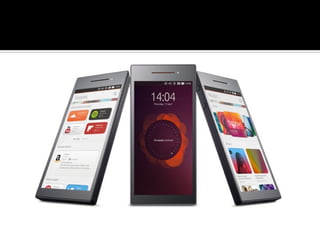
The Ubuntu Edge was a proposed "high 
concept" smartphone announced by Canonical 
Ltd. on 22 July 2013. 
The Edge was designed as a hybrid device, 
which would function as a high-end 
smartphone (with both Ubuntu Touch and 
Android), or—when used with a monitor, 
keyboard and mouse—be able to operate as a 
conventional desktop PC running Ubuntu. 
The Ubuntu Edge was also designed to support 
dual boot, and was to run along with Android.
Ubuntu Touch 
Ubuntu Touch (also known as Ubuntu 
Phone) is a mobile version of the 
Ubuntu operating system developed 
by Canonical UK Ltd and Ubuntu 
Community. 
It is designed primarily for 
touchscreen mobile devices such as 
smartphones and tablet computers.
History 
Mark Shuttleworth announced, 31 
October 2011, that by Ubuntu 14.04, 
Ubuntu will support smartphones, 
tablets, TVs and smart screens. 
The Ubuntu platform for phones was 
unveiled on 2 January 2013. 
The Ubuntu Touch Developer Preview 
was released on 21 February 2013.
Release 
Canonical released Ubuntu Touch 1.0, the 
first developer/partner version on 17 
October 2013, along with Ubuntu 13.10 
that "primarily supports the Galaxy Nexus 
and Nexus 4 phones, though there are 
images available for other phones and 
tablets". 
Developers have access to all of the source 
code under a license allowing modification 
and redistribution of the software.
Features 
Ubuntu Touch uses the Qt 5-based touch 
user interface and various software 
frameworks originally developed for 
Maemo and MeeGo such as oFono as 
telephony stack, accounts-sso for single 
sign-on, and Maliit for input. 
Utilizing libhybris the system can often 
be used with Linux kernels used in 
Android, which makes it easily ported to 
most recent Android smartphones.
Features 
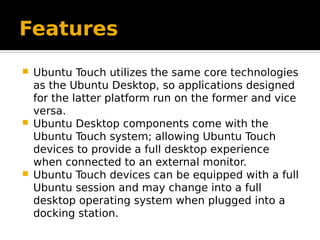
 Ubuntu Touch utilizes the same core technologies 
as the Ubuntu Desktop, so applications designed 
for the latter platform run on the former and vice 
versa. 
 Ubuntu Desktop components come with the 
Ubuntu Touch system; allowing Ubuntu Touch 
devices to provide a full desktop experience 
when connected to an external monitor. 
 Ubuntu Touch devices can be equipped with a full 
Ubuntu session and may change into a full 
desktop operating system when plugged into a 
docking station.
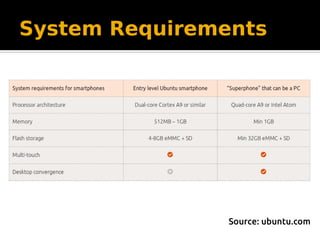
System Requirements 
Source: ubuntu.com
Ubuntu Touch: Challenges 
 Desktop Unity using Compiz + Nux 
– Complex design 
– Lacking proper support for OpenGL ES 2.0 
 Quite a few components were not optimized 
for mobile (battery, background processes, 
usability, etc) 
 Hardware accelerated stack without 
depending on the hw vendor 
 Decision to develop a new stack, and make it 
generic enough so it could later be also 
shared with Desktop (convergence)
New Unity: one that would rule them all 
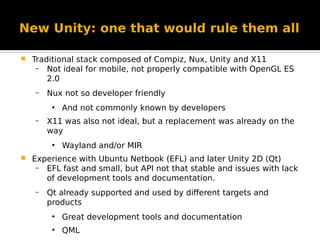
 Traditional stack composed of Compiz, Nux, Unity and X11 
– Not ideal for mobile, not properly compatible with OpenGL ES 
2.0 
– Nux not so developer friendly 
● And not commonly known by developers 
– X11 was also not ideal, but a replacement was already on the 
way 
● Wayland and/or MIR 
 Experience with Ubuntu Netbook (EFL) and later Unity 2D (Qt) 
– EFL fast and small, but API not that stable and issues with lack 
of development tools and documentation. 
– Qt already supported and used by different targets and 
products 
● Great development tools and documentation 
● QML
Unity8: Built with Qt and QML 
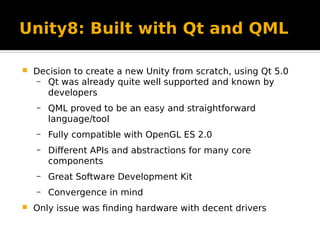
 Decision to create a new Unity from scratch, using Qt 5.0 
– Qt was already quite well supported and known by 
developers 
– QML proved to be an easy and straightforward 
language/tool 
– Fully compatible with OpenGL ES 2.0 
– Different APIs and abstractions for many core 
components 
– Great Software Development Kit 
– Convergence in mind 
 Only issue was finding hardware with decent drivers
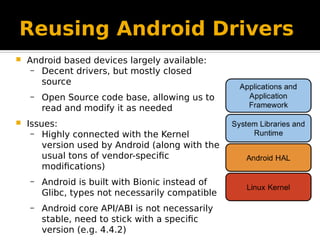
Reusing Android Drivers 
 Android based devices largely available: 
– Decent drivers, but mostly closed 
source 
– Open Source code base, allowing us to 
read and modify it as needed 
 Issues: 
– Highly connected with the Kernel 
version used by Android (along with the 
usual tons of vendor-specific 
modifications) 
– Android is built with Bionic instead of 
Glibc, types not necessarily compatible 
– Android core API/ABI is not necessarily 
stable, need to stick with a specific 
version (e.g. 4.4.2)
Reusing Android Drivers: LibHybris 
 Compatibility layer for systems based on Glibc that allows 
Bionic based binaries to be used. 
 Created by Carsten Munk on August 2012 
 Conceptually libhybris is a custom version of the Bionic 
linker, with hooks replacing Bionic symbols with Glibc 
compatible ones 
 Main differences and issues with libhybris: 
– Android uses fixed TLS slots that can override glibc's 
TLS 
– Bionic pthreads implementation differs from glibc
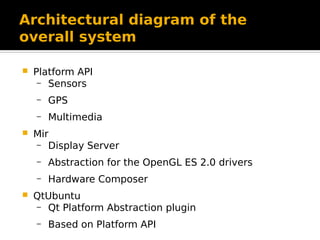
Architectural diagram of the 
overall system 
 Platform API 
– Sensors 
– GPS 
– Multimedia 
 Mir 
– Display Server 
– Abstraction for the OpenGL ES 2.0 drivers 
– Hardware Composer 
 QtUbuntu 
– Qt Platform Abstraction plugin 
– Based on Platform API
Architectural diagram of the 
overall system
Telephony 
 Hard to convince vendors to publish 
enough documentation to build an 
Open Source driver 
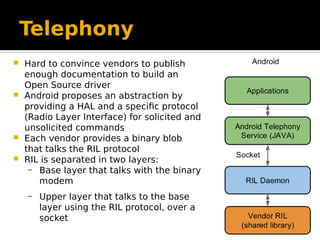
 Android proposes an abstraction by 
providing a HAL and a specific protocol 
(Radio Layer Interface) for solicited and 
unsolicited commands 
 Each vendor provides a binary blob 
that talks the RIL protocol 
 RIL is separated in two layers: 
– Base layer that talks with the binary 
modem 
– Upper layer that talks to the base 
layer using the RIL protocol, over a 
socket
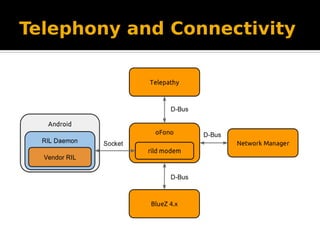
Telephony and Connectivity 
oFono as the main telephony service 
– In order to reuse the Android modem drivers, a new 
oFono specific modem was created that talks with the 
RIL daemon 
– Communication via Socket, LibHybris not involved 
Network Manager as the default connectivity manager 
– No support to talk with oFono (oFono was only 
compatible with ConnMan) 
– New plugin created that talks to oFono and helps setting 
the data connection 
BlueZ 4.x (no issues here) 
Telepathy (and telepathy-ofono) used as the main 
communication framework
Telephony and Connectivity
Multimedia 
 GStreamer commonly used as the default 
multimedia framework on the Desktop 
– Used by QtWebkit, QtMultimedia and others 
– Supports a wide range of plugins 
– Abstraction for the Android multimedia stack, 
but only covering the JNI layer 
(android.media.MediaCodec) 
 Android JNI (and Java) not used by Ubuntu Touch 
– New abstraction on top of stagefright and 
libmedia was created 
– Using LibHybris 
– Texture streaming
Multimedia
Camera: Android 
Multiple HAL versions (1.0, 2.0, 3.0, 3.1) 
– ABI breakage 
– API differences 
– Hard to abstract 
Android Camera Service 
– Part of media service 
– Abstracts the Camera HAL in a simple API 
– Texture used for both output and preview 
– Not deeply connected to any other Android 
subsystem
Camera: Ubuntu Touch 
 Camera Service running inside the container 
– API abstracted by a compat library living on Android 
– LibHybris used to interact with the compat library 
– QtMultimedia plugin that talks with the compat 
library
Future Development 
 Telephony and Connectivity 
– MMS 
– Bluez 5 
 Multimedia 
– Encode support 
– Upstreaming 
 Camera 
– Video Recording 
 And many more!
References 
http://canonical.com 
http://ubuntu.com 
http://linuxfoundation.org
This presentation is created using LibreOffice Writer 4.1.0.4 available 
freely under GNU public license. 
Thank you

Introduction to Ubuntu Edge Operating System (Ubuntu Touch)

  • 1.
    Introduction Ubuntu Edge Operating System [Ubuntu Touch] Tushar B Kute tushar@tusharkute.com http://snashlug.org contact@snashlug.org
  • 2.
    Ubuntu Edge TheUbuntu Edge was a proposed "high concept" smartphone announced by Canonical Ltd. on 22 July 2013. The Edge was designed as a hybrid device, which would function as a high-end smartphone (with both Ubuntu Touch and Android), or—when used with a monitor, keyboard and mouse—be able to operate as a conventional desktop PC running Ubuntu. The Ubuntu Edge was also designed to support dual boot, and was to run along with Android.
  • 4.
    Ubuntu Touch UbuntuTouch (also known as Ubuntu Phone) is a mobile version of the Ubuntu operating system developed by Canonical UK Ltd and Ubuntu Community. It is designed primarily for touchscreen mobile devices such as smartphones and tablet computers.
  • 5.
    History Mark Shuttleworthannounced, 31 October 2011, that by Ubuntu 14.04, Ubuntu will support smartphones, tablets, TVs and smart screens. The Ubuntu platform for phones was unveiled on 2 January 2013. The Ubuntu Touch Developer Preview was released on 21 February 2013.
  • 6.
    Release Canonical releasedUbuntu Touch 1.0, the first developer/partner version on 17 October 2013, along with Ubuntu 13.10 that "primarily supports the Galaxy Nexus and Nexus 4 phones, though there are images available for other phones and tablets". Developers have access to all of the source code under a license allowing modification and redistribution of the software.
  • 7.
    Features Ubuntu Touchuses the Qt 5-based touch user interface and various software frameworks originally developed for Maemo and MeeGo such as oFono as telephony stack, accounts-sso for single sign-on, and Maliit for input. Utilizing libhybris the system can often be used with Linux kernels used in Android, which makes it easily ported to most recent Android smartphones.
  • 8.
    Features  UbuntuTouch utilizes the same core technologies as the Ubuntu Desktop, so applications designed for the latter platform run on the former and vice versa.  Ubuntu Desktop components come with the Ubuntu Touch system; allowing Ubuntu Touch devices to provide a full desktop experience when connected to an external monitor.  Ubuntu Touch devices can be equipped with a full Ubuntu session and may change into a full desktop operating system when plugged into a docking station.
  • 9.
  • 10.
    Ubuntu Touch: Challenges  Desktop Unity using Compiz + Nux – Complex design – Lacking proper support for OpenGL ES 2.0  Quite a few components were not optimized for mobile (battery, background processes, usability, etc)  Hardware accelerated stack without depending on the hw vendor  Decision to develop a new stack, and make it generic enough so it could later be also shared with Desktop (convergence)
  • 11.
    New Unity: onethat would rule them all  Traditional stack composed of Compiz, Nux, Unity and X11 – Not ideal for mobile, not properly compatible with OpenGL ES 2.0 – Nux not so developer friendly ● And not commonly known by developers – X11 was also not ideal, but a replacement was already on the way ● Wayland and/or MIR  Experience with Ubuntu Netbook (EFL) and later Unity 2D (Qt) – EFL fast and small, but API not that stable and issues with lack of development tools and documentation. – Qt already supported and used by different targets and products ● Great development tools and documentation ● QML
  • 12.
    Unity8: Built withQt and QML  Decision to create a new Unity from scratch, using Qt 5.0 – Qt was already quite well supported and known by developers – QML proved to be an easy and straightforward language/tool – Fully compatible with OpenGL ES 2.0 – Different APIs and abstractions for many core components – Great Software Development Kit – Convergence in mind  Only issue was finding hardware with decent drivers
  • 13.
    Reusing Android Drivers  Android based devices largely available: – Decent drivers, but mostly closed source – Open Source code base, allowing us to read and modify it as needed  Issues: – Highly connected with the Kernel version used by Android (along with the usual tons of vendor-specific modifications) – Android is built with Bionic instead of Glibc, types not necessarily compatible – Android core API/ABI is not necessarily stable, need to stick with a specific version (e.g. 4.4.2)
  • 14.
    Reusing Android Drivers:LibHybris  Compatibility layer for systems based on Glibc that allows Bionic based binaries to be used.  Created by Carsten Munk on August 2012  Conceptually libhybris is a custom version of the Bionic linker, with hooks replacing Bionic symbols with Glibc compatible ones  Main differences and issues with libhybris: – Android uses fixed TLS slots that can override glibc's TLS – Bionic pthreads implementation differs from glibc
  • 15.
    Architectural diagram ofthe overall system  Platform API – Sensors – GPS – Multimedia  Mir – Display Server – Abstraction for the OpenGL ES 2.0 drivers – Hardware Composer  QtUbuntu – Qt Platform Abstraction plugin – Based on Platform API
  • 16.
    Architectural diagram ofthe overall system
  • 17.
    Telephony  Hardto convince vendors to publish enough documentation to build an Open Source driver  Android proposes an abstraction by providing a HAL and a specific protocol (Radio Layer Interface) for solicited and unsolicited commands  Each vendor provides a binary blob that talks the RIL protocol  RIL is separated in two layers: – Base layer that talks with the binary modem – Upper layer that talks to the base layer using the RIL protocol, over a socket
  • 18.
    Telephony and Connectivity oFono as the main telephony service – In order to reuse the Android modem drivers, a new oFono specific modem was created that talks with the RIL daemon – Communication via Socket, LibHybris not involved Network Manager as the default connectivity manager – No support to talk with oFono (oFono was only compatible with ConnMan) – New plugin created that talks to oFono and helps setting the data connection BlueZ 4.x (no issues here) Telepathy (and telepathy-ofono) used as the main communication framework
  • 19.
  • 20.
    Multimedia  GStreamercommonly used as the default multimedia framework on the Desktop – Used by QtWebkit, QtMultimedia and others – Supports a wide range of plugins – Abstraction for the Android multimedia stack, but only covering the JNI layer (android.media.MediaCodec)  Android JNI (and Java) not used by Ubuntu Touch – New abstraction on top of stagefright and libmedia was created – Using LibHybris – Texture streaming
  • 21.
  • 22.
    Camera: Android MultipleHAL versions (1.0, 2.0, 3.0, 3.1) – ABI breakage – API differences – Hard to abstract Android Camera Service – Part of media service – Abstracts the Camera HAL in a simple API – Texture used for both output and preview – Not deeply connected to any other Android subsystem
  • 23.
    Camera: Ubuntu Touch  Camera Service running inside the container – API abstracted by a compat library living on Android – LibHybris used to interact with the compat library – QtMultimedia plugin that talks with the compat library
  • 24.
    Future Development Telephony and Connectivity – MMS – Bluez 5  Multimedia – Encode support – Upstreaming  Camera – Video Recording  And many more!
  • 25.
  • 26.
    This presentation iscreated using LibreOffice Writer 4.1.0.4 available freely under GNU public license. Thank you