What & How to Customize Android?
Noritsuna Imamura
noritsuna@siprop.org

©SIProp Project, 2006-2008

1
Agenda
What’s Android System?
Kinds of Android Devices
Kinds of Android Type
Android Source Code

Inside Android
Boot Sequence
About init File

Hands On
Nexus7
Pandaboard
How to Debug
©SIProp Project, 2006-2008

2
Kinds of Android Device
Smart Phone
Tablet
Mini PC
Note PC
Car Navigation
Set Top Box
Smart Watch
Smart Glass

Camera
Game Console
Audio System
Micro Wave
Refrigerator
Cut Board
EVB

If you get today’s knowledge,
You can customize these devices yourself!!!
©SIProp Project, 2006-2008

3
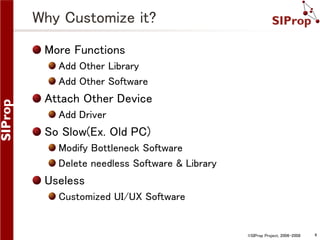
Why Customize it?
More Functions
Add Other Library
Add Other Software

Attach Other Device
Add Driver

So Slow(Ex. Old PC)
Modify Bottleneck Software
Delete needless Software & Library

Useless
Customized UI/UX Software

©SIProp Project, 2006-2008

4
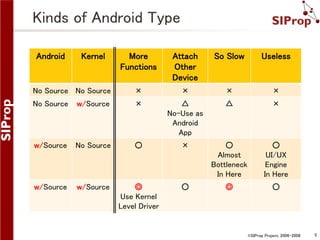
Kinds of Android Type
Android

Kernel

More
Functions

Attach
Other
Device

So Slow

Useless

No Source No Source

×

×

×

×

No Source

w/Source

×

△
No-Use as
Android
App

△

×

w/Source

No Source

○

×

○
Almost
Bottleneck
In Here

○
UI/UX
Engine
In Here

w/Source

w/Source

◎
Use Kernel
Level Driver

○

◎

○

©SIProp Project, 2006-2008

5
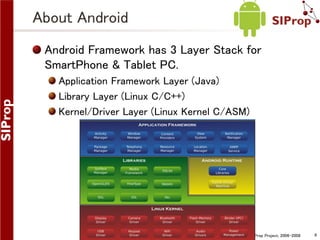
About Android
Android Framework has 3 Layer Stack for
SmartPhone & Tablet PC.
Application Framework Layer (Java)
Library Layer (Linux C/C++)
Kernel/Driver Layer (Linux Kernel C/ASM)

©SIProp Project, 2006-2008

6
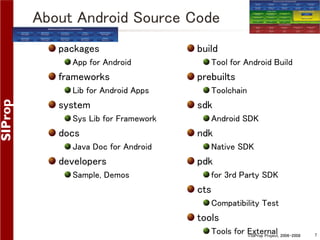
About Android Source Code
packages
App for Android

frameworks
Lib for Android Apps

system
Sys Lib for Framework

docs
Java Doc for Android

developers
Sample, Demos

build
Tool for Android Build

prebuilts
Toolchain

sdk
Android SDK

ndk
Native SDK

pdk
for 3rd Party SDK

cts
Compatibility Test

tools
Tools for External 2006-2008
©SIProp Project,

7
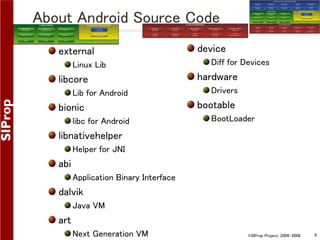
About Android Source Code
external
Linux Lib

libcore
Lib for Android

bionic
libc for Android

device
Diff for Devices

hardware
Drivers

bootable
BootLoader

libnativehelper
Helper for JNI

abi
Application Binary Interface

dalvik
Java VM

art
Next Generation VM

©SIProp Project, 2006-2008

8
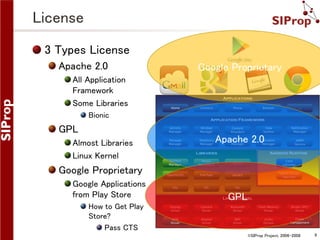
License
3 Types License
Apache 2.0

Google Proprietary

All Application
Framework
Some Libraries
Bionic

GPL
Almost Libraries
Linux Kernel

Apache 2.0

Google Proprietary
Google Applications
from Play Store

GPL

How to Get Play
Store?
Pass CTS
©SIProp Project, 2006-2008

9
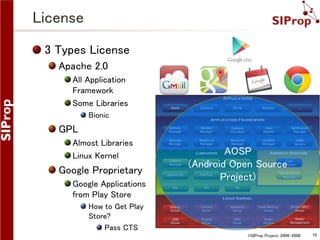
License
3 Types License
Apache 2.0
All Application
Framework
Some Libraries
Bionic

GPL
Almost Libraries
Linux Kernel

Google Proprietary
Google Applications
from Play Store

AOSP
(Android Open Source
Project)

How to Get Play
Store?
Pass CTS
©SIProp Project, 2006-2008

10
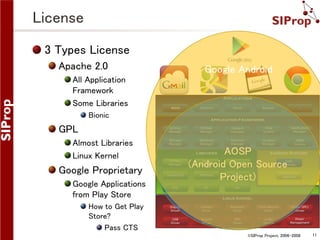
License
3 Types License
Apache 2.0

Google Android

All Application
Framework
Some Libraries
Bionic

GPL
Almost Libraries
Linux Kernel

Google Proprietary
Google Applications
from Play Store

AOSP
(Android Open Source
Project)

How to Get Play
Store?
Pass CTS
©SIProp Project, 2006-2008

11
GApp
Goo.im – Premium Android Developer File Hosting
This Site hosts Google Proprietary Apps!!!
http://goo.im/home

You can use Google Proprietary Apps on your Device.
However it’s illegal…

©SIProp Project, 2006-2008

12
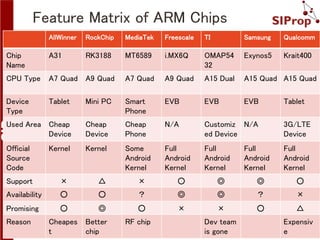
Feature Matrix of ARM Chips
AllWinner

RockChip

MediaTek

Freescale

TI

Samsung

Qualcomm

Chip
Name

A31

RK3188

MT6589

i.MX6Q

OMAP54
32

Exynos5

Krait400

CPU Type

A7 Quad A9 Quad

A7 Quad

A9 Quad

A15 Dual

A15 Quad A15 Quad

Device
Type

Tablet

Mini PC

Smart
Phone

EVB

EVB

EVB

Used Area Cheap
Device

Cheap
Device

Cheap
Phone

N/A

Customiz N/A
ed Device

3G/LTE
Device

Official
Source
Code

Kernel

Kernel

Some
Android
Kernel

Full
Android
Kernel

Full
Android
Kernel

Full
Android
Kernel

Support

×

△

×

○

◎

◎

○

Availability

○

○

?

◎

◎

?

×

Promising

○

◎

○

×

×

○

△

Reason

Cheapes
t

Better
chip

RF chip

Dev team
is gone

Full
Android
Kernel

Tablet

Expensiv
e
13
©SIProp Project, 2006-2008
Inside Android

©SIProp Project, 2006-2008

14
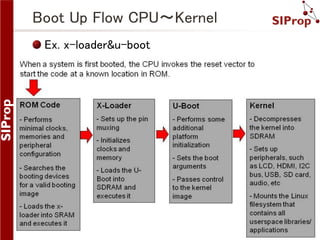
Boot Up Flow CPU~Kernel
Ex. x-loader&u-boot

©SIProp Project, 2006-2008

15
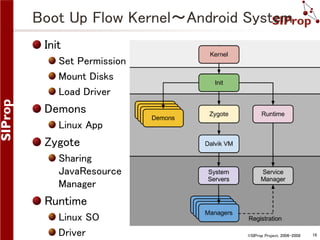
Boot Up Flow Kernel~Android System
Init
Set Permission
Mount Disks
Load Driver

Demons
Linux App

Zygote
Sharing
JavaResource
Manager

Runtime
Linux SO
Driver

©SIProp Project, 2006-2008

16
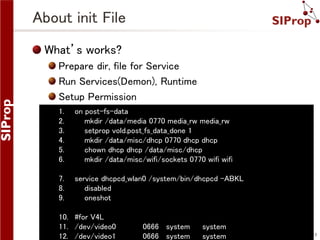
About init File
What’s works?
Prepare dir, file for Service
Run Services(Demon), Runtime
Setup Permission
1.
2.
3.
4.
5.
6.

on post-fs-data
mkdir /data/media 0770 media_rw media_rw
setprop vold.post_fs_data_done 1
mkdir /data/misc/dhcp 0770 dhcp dhcp
chown dhcp dhcp /data/misc/dhcp
mkdir /data/misc/wifi/sockets 0770 wifi wifi

7.
8.
9.

service dhcpcd_wlan0 /system/bin/dhcpcd -ABKL
disabled
oneshot

10. #for V4L
11. /dev/video0
12. /dev/video1

0666 system
0666 system

system
system

©SIProp Project, 2006-2008

17
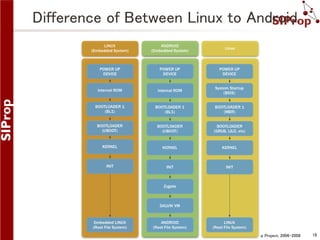
Difference of Between Linux to Android

©SIProp Project, 2006-2008

18
Sorry!!!
About SMP(Multi Core) Compile
Next Week!

©SIProp Project, 2006-2008

19
Hands On

©SIProp Project, 2006-2008

20
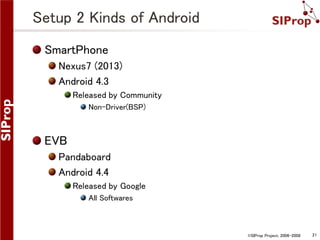
Setup 2 Kinds of Android
SmartPhone
Nexus7 (2013)
Android 4.3
Released by Community
Non-Driver(BSP)

EVB
Pandaboard
Android 4.4
Released by Google
All Softwares

©SIProp Project, 2006-2008

21
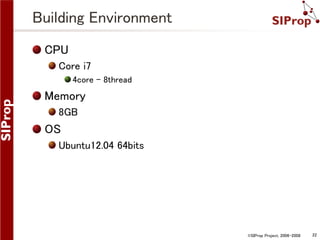
Building Environment
CPU
Core i7
4core – 8thread

Memory
8GB

OS
Ubuntu12.04 64bits

©SIProp Project, 2006-2008

22
Common Setup

©SIProp Project, 2006-2008

23
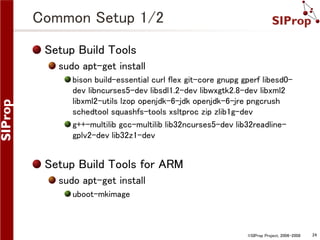
Common Setup 1/2
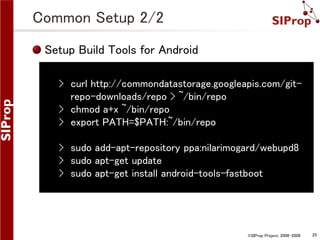
Setup Build Tools
sudo apt-get install
bison build-essential curl flex git-core gnupg gperf libesd0dev libncurses5-dev libsdl1.2-dev libwxgtk2.8-dev libxml2
libxml2-utils lzop openjdk-6-jdk openjdk-6-jre pngcrush
schedtool squashfs-tools xsltproc zip zlib1g-dev
g++-multilib gcc-multilib lib32ncurses5-dev lib32readlinegplv2-dev lib32z1-dev

Setup Build Tools for ARM
sudo apt-get install
uboot-mkimage

©SIProp Project, 2006-2008

24
Common Setup 2/2
Setup Build Tools for Android
› curl http://commondatastorage.googleapis.com/gitrepo-downloads/repo > ~/bin/repo
› chmod a+x ~/bin/repo
› export PATH=$PATH:~/bin/repo

› sudo add-apt-repository ppa:nilarimogard/webupd8
› sudo apt-get update
› sudo apt-get install android-tools-fastboot

©SIProp Project, 2006-2008

25
Nexus7

©SIProp Project, 2006-2008

26
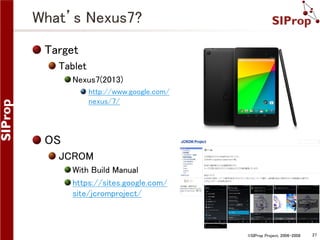
What’s Nexus7?
Target
Tablet
Nexus7(2013)
http://www.google.com/
nexus/7/

OS
JCROM
With Build Manual
https://sites.google.com/
site/jcromproject/

©SIProp Project, 2006-2008

27
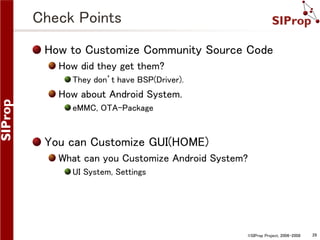
Check Points
How to Customize Community Source Code
How did they get them?
They don’t have BSP(Driver).

How about Android System.
eMMC, OTA-Package

You can Customize GUI(HOME)
What can you Customize Android System?
UI System, Settings

©SIProp Project, 2006-2008

28
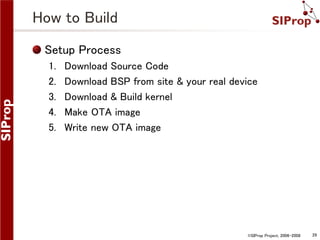
How to Build
Setup Process
1.
2.
3.
4.
5.

Download Source Code
Download BSP from site & your real device
Download & Build kernel
Make OTA image
Write new OTA image

©SIProp Project, 2006-2008

29
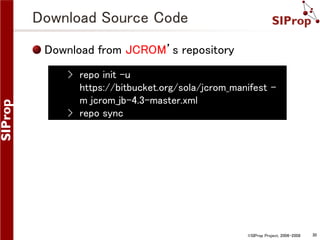
Download Source Code
Download from JCROM’s repository
› repo init -u
https://bitbucket.org/sola/jcrom_manifest m jcrom_jb-4.3-master.xml
› repo sync

©SIProp Project, 2006-2008

30
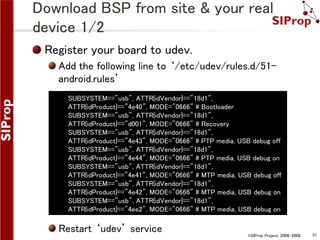
Download BSP from site & your real
device 1/2
Register your board to udev.
Add the following line to ‘/etc/udev/rules.d/51android.rules’
SUBSYSTEM=="usb", ATTR{idVendor}=="18d1",
ATTR{idProduct}=="4e40", MODE="0666" # Bootloader
SUBSYSTEM=="usb", ATTR{idVendor}=="18d1",
ATTR{idProduct}=="d001", MODE="0666" # Recovery
SUBSYSTEM=="usb", ATTR{idVendor}=="18d1",
ATTR{idProduct}=="4e43", MODE="0666" # PTP media, USB debug off
SUBSYSTEM=="usb", ATTR{idVendor}=="18d1",
ATTR{idProduct}=="4e44", MODE="0666" # PTP media, USB debug on
SUBSYSTEM=="usb", ATTR{idVendor}=="18d1",
ATTR{idProduct}=="4e41", MODE="0666" # MTP media, USB debug off
SUBSYSTEM=="usb", ATTR{idVendor}=="18d1",
ATTR{idProduct}=="4e42", MODE="0666" # MTP media, USB debug on
SUBSYSTEM=="usb", ATTR{idVendor}=="18d1",
ATTR{idProduct}=="4ee2", MODE="0666" # MTP media, USB debug on

Restart ‘udev’ service

©SIProp Project, 2006-2008

31
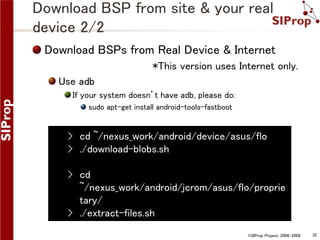
Download BSP from site & your real
device 2/2
Download BSPs from Real Device & Internet
*This version uses Internet only.

Use adb
If your system doesn’t have adb, please do:
sudo apt-get install android-tools-fastboot

› cd ~/nexus_work/android/device/asus/flo
› ./download-blobs.sh
› cd
~/nexus_work/android/jcrom/asus/flo/proprie
tary/
› ./extract-files.sh
©SIProp Project, 2006-2008

32
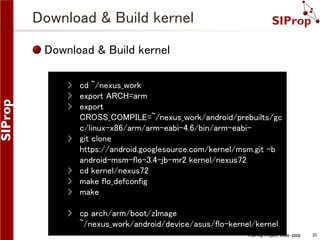
Download & Build kernel
› cd ~/nexus_work
› export ARCH=arm
› export
CROSS_COMPILE=~/nexus_work/android/prebuilts/gc
c/linux-x86/arm/arm-eabi-4.6/bin/arm-eabi› git clone
https://android.googlesource.com/kernel/msm.git -b
android-msm-flo-3.4-jb-mr2 kernel/nexus72
› cd kernel/nexus72
› make flo_defconfig
› make
› cp arch/arm/boot/zImage
~/nexus_work/android/device/asus/flo-kernel/kernel
©SIProp Project, 2006-2008

33
Make OTA image
Make OTA image
This OTA image is update image for Android.

›
›
›
›

cd ~/nexus_work/android/
source build/envsetup.sh
lunch aosp_flo-user
make otapackage

This file name is
aosp_flo-ota-eng.[your Linux’s User name].zip

©SIProp Project, 2006-2008

34
build/envsetup.sh
Helper Command Lib for Android Build
m

jgrep
Build from Top Dir

mm
Build from Current Dir

mmm [Target Dir]
Build from Target Dir

croot
Change Top Dir

Grep for Java Source
Code

resgrep
Grep for XML Source
Code

lunch
Choose Target Build

cgrep
Grep for C/C++ Source Code

©SIProp Project, 2006-2008

35
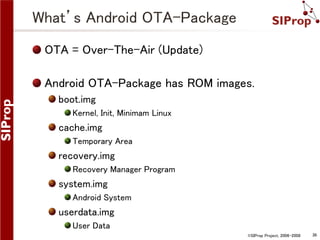
What’s Android OTA-Package
OTA = Over-The-Air (Update)
Android OTA-Package has ROM images.
boot.img
Kernel, Init, Minimam Linux

cache.img
Temporary Area

recovery.img
Recovery Manager Program

system.img
Android System

userdata.img
User Data
©SIProp Project, 2006-2008

36
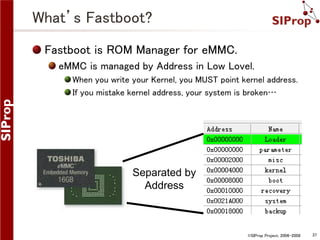
What’s Fastboot?
Fastboot is ROM Manager for eMMC.
eMMC is managed by Address in Low Lovel.
When you write your Kernel, you MUST point kernel address.
If you mistake kernel address, your system is broken…

Separated by
Address

©SIProp Project, 2006-2008

37
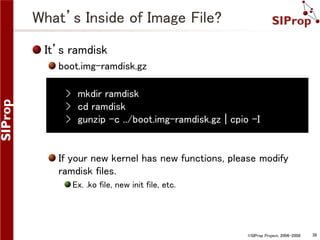
What’s Inside of Image File?
It’s ramdisk
boot.img-ramdisk.gz
› mkdir ramdisk
› cd ramdisk
› gunzip -c ../boot.img-ramdisk.gz | cpio –I

If your new kernel has new functions, please modify
ramdisk files.
Ex. .ko file, new init file, etc.

©SIProp Project, 2006-2008

38
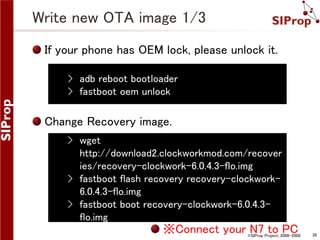
Write new OTA image 1/3
If your phone has OEM lock, please unlock it.
› adb reboot bootloader
› fastboot oem unlock

Change Recovery image.
› wget
http://download2.clockworkmod.com/recover
ies/recovery-clockwork-6.0.4.3-flo.img
› fastboot flash recovery recovery-clockwork6.0.4.3-flo.img
› fastboot boot recovery-clockwork-6.0.4.3flo.img

※Connect your N7 to PC

©SIProp Project, 2006-2008

39
Write new OTA image 2/3
Push your new OTA image to your N7
› adb push
~/nexus_work/android/out/target/product/fl
o/aosp_flo-ota-eng.[your Linux's User
name].zip /sdcard/

If you want to use Google Apps
› wget http://goo.im/gapps/gapps-jb20130813-signed.zip
› adb push gapps-jb-20130813-signed.zip
/sdcard/

©SIProp Project, 2006-2008

40
Write new OTA image 3/3
1. Turn off your phone
2. Volume Up & Power
3. Wipe data/factory reset
4. Install zip from sdcard
5. Choose zip from sdcard
6. aosp_flo-ota-eng.[your Linux's User name].zip
7. Choose zip from sdcard
8. gapps-jb-20130813-signed.zip
9. +++++Go Back+++++
10. Reboot system now
©SIProp Project, 2006-2008

41
Boot up Your Nexus7!

©SIProp Project, 2006-2008

42
Pandaboard

©SIProp Project, 2006-2008

43
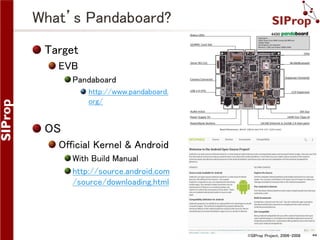
What’s Pandaboard?
Target
EVB
Pandaboard
http://www.pandaboard.
org/

OS
Official Kernel & Android
With Build Manual
http://source.android.com
/source/downloading.html

©SIProp Project, 2006-2008

44
How to Use Peripherals?
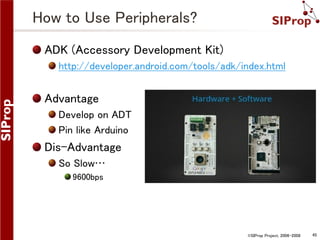
ADK (Accessory Development Kit)
http://developer.android.com/tools/adk/index.html

Advantage
Develop on ADT
Pin like Arduino

Dis-Advantage
So Slow…
9600bps

©SIProp Project, 2006-2008

45
How to Use Peripherals?
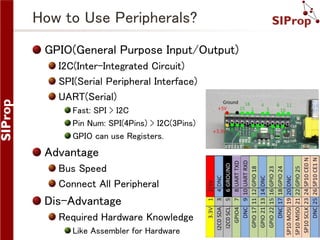
GPIO(General Purpose Input/Output)
I2C(Inter-Integrated Circuit)
SPI(Serial Peripheral Interface)
UART(Serial)
Fast: SPI > I2C
Pin Num: SPI(4Pins) > I2C(3Pins)
GPIO can use Registers.

Advantage
Bus Speed
Connect All Peripheral

Dis-Advantage
Required Hardware Knowledge
Like Assembler for Hardware

©SIProp Project, 2006-2008

46
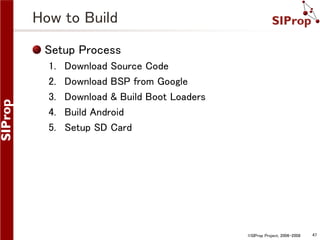
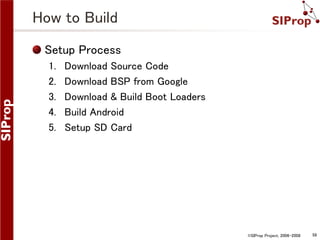
How to Build
Setup Process
1.
2.
3.
4.
5.

Download Source Code
Download BSP from Google
Download & Build Boot Loaders
Build Android
Setup SD Card

©SIProp Project, 2006-2008

47
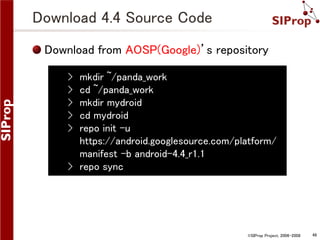
Download 4.4 Source Code
Download from AOSP(Google)’s repository
›
›
›
›
›

mkdir ~/panda_work
cd ~/panda_work
mkdir mydroid
cd mydroid
repo init -u
https://android.googlesource.com/platform/
manifest -b android-4.4_r1.1
› repo sync

©SIProp Project, 2006-2008

48
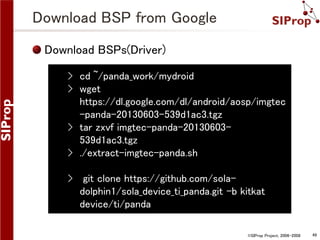
Download BSP from Google
Download BSPs(Driver)
› cd ~/panda_work/mydroid
› wget
https://dl.google.com/dl/android/aosp/imgtec
-panda-20130603-539d1ac3.tgz
› tar zxvf imgtec-panda-20130603539d1ac3.tgz
› ./extract-imgtec-panda.sh
› git clone https://github.com/soladolphin1/sola_device_ti_panda.git -b kitkat
device/ti/panda
©SIProp Project, 2006-2008

49
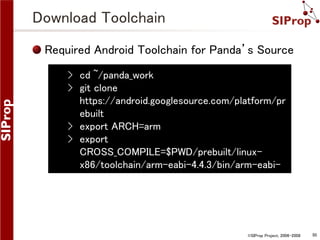
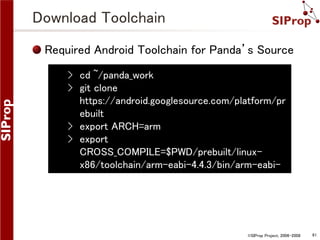
Download Toolchain
Required Android Toolchain for Panda’s Source
› cd ~/panda_work
› git clone
https://android.googlesource.com/platform/pr
ebuilt
› export ARCH=arm
› export
CROSS_COMPILE=$PWD/prebuilt/linuxx86/toolchain/arm-eabi-4.4.3/bin/arm-eabi-

©SIProp Project, 2006-2008

50
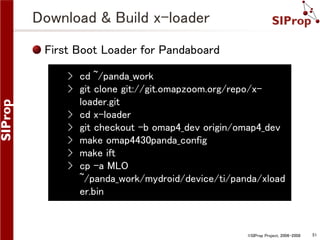
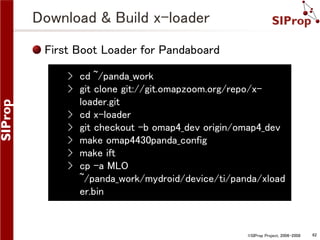
Download & Build x-loader
First Boot Loader for Pandaboard
› cd ~/panda_work
› git clone git://git.omapzoom.org/repo/xloader.git
› cd x-loader
› git checkout -b omap4_dev origin/omap4_dev
› make omap4430panda_config
› make ift
› cp -a MLO
~/panda_work/mydroid/device/ti/panda/xload
er.bin

©SIProp Project, 2006-2008

51
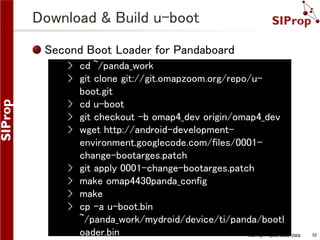
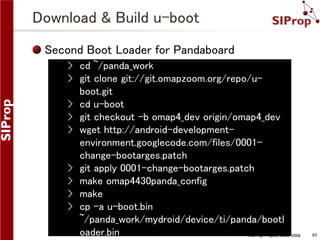
Download & Build u-boot
Second Boot Loader for Pandaboard
› cd ~/panda_work
› git clone git://git.omapzoom.org/repo/uboot.git
› cd u-boot
› git checkout -b omap4_dev origin/omap4_dev
› wget http://android-developmentenvironment.googlecode.com/files/0001change-bootarges.patch
› git apply 0001-change-bootarges.patch
› make omap4430panda_config
› make
› cp -a u-boot.bin
~/panda_work/mydroid/device/ti/panda/bootl
oader.bin
©SIProp Project, 2006-2008

52
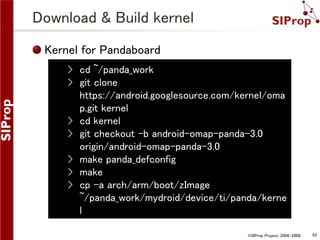
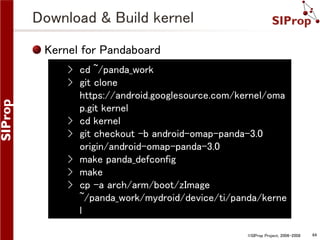
Download & Build kernel
Kernel for Pandaboard
› cd ~/panda_work
› git clone
https://android.googlesource.com/kernel/oma
p.git kernel
› cd kernel
› git checkout -b android-omap-panda-3.0
origin/android-omap-panda-3.0
› make panda_defconfig
› make
› cp -a arch/arm/boot/zImage
~/panda_work/mydroid/device/ti/panda/kerne
l
©SIProp Project, 2006-2008

53
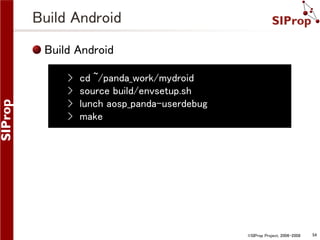
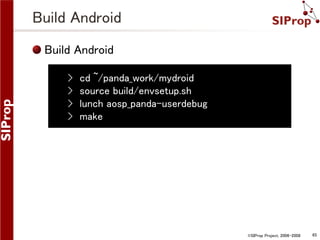
Build Android
Build Android
›
›
›
›

cd ~/panda_work/mydroid
source build/envsetup.sh
lunch aosp_panda-userdebug
make

©SIProp Project, 2006-2008

54
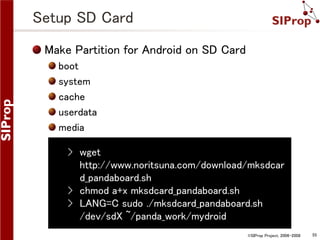
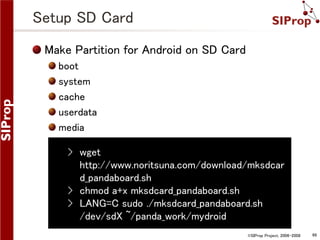
Setup SD Card
Make Partition for Android on SD Card
boot
system
cache
userdata
media

› wget
http://www.noritsuna.com/download/mksdcar
d_pandaboard.sh
› chmod a+x mksdcard_pandaboard.sh
› LANG=C sudo ./mksdcard_pandaboard.sh
/dev/sdX ~/panda_work/mydroid
©SIProp Project, 2006-2008

55
Boot up Your Pandaboard!

©SIProp Project, 2006-2008

56
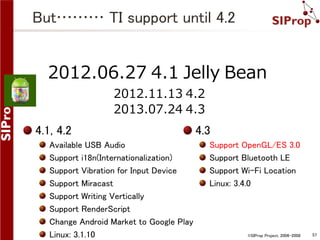
But……… TI support until 4.2

2012.06.27 4.1 Jelly Bean
2012.11.13 4.2
2013.07.24 4.3

4.1, 4.2
Available USB Audio
Support i18n(Internationalization)
Support Vibration for Input Device
Support Miracast
Support Writing Vertically
Support RenderScript
Change Android Market to Google Play
Linux: 3.1.10

4.3
Support OpenGL/ES 3.0
Support Bluetooth LE
Support Wi-Fi Location
Linux: 3.4.0

©SIProp Project, 2006-2008

57
How to Build
Setup Process
1.
2.
3.
4.
5.

Download Source Code
Download BSP from Google
Download & Build Boot Loaders
Build Android
Setup SD Card

©SIProp Project, 2006-2008

58
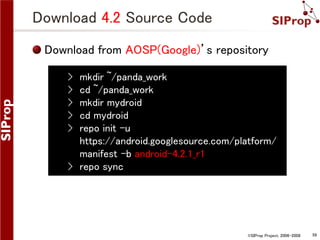
Download 4.2 Source Code
Download from AOSP(Google)’s repository
›
›
›
›
›

mkdir ~/panda_work
cd ~/panda_work
mkdir mydroid
cd mydroid
repo init -u
https://android.googlesource.com/platform/
manifest -b android-4.2.1_r1
› repo sync

©SIProp Project, 2006-2008

59
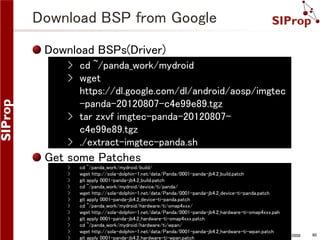
Download BSP from Google
Download BSPs(Driver)
› cd ~/panda_work/mydroid
› wget
https://dl.google.com/dl/android/aosp/imgtec
-panda-20120807-c4e99e89.tgz
› tar zxvf imgtec-panda-20120807c4e99e89.tgz
› ./extract-imgtec-panda.sh

Get some Patches
›
›
›
›
›
›
›
›
›
›
›
›

cd ~/panda_work/mydroid/build/
wget http://sola-dolphin-1.net/data/Panda/0001-panda-jb4.2_build.patch
git apply 0001-panda-jb4.2_build.patch
cd ~/panda_work/mydroid/device/ti/panda/
wget http://sola-dolphin-1.net/data/Panda/0001-panda-jb4.2_device-ti-panda.patch
git apply 0001-panda-jb4.2_device-ti-panda.patch
cd ~/panda_work/mydroid/hardware/ti/omap4xxx/
wget http://sola-dolphin-1.net/data/Panda/0001-panda-jb4.2_hardware-ti-omap4xxx.pah
git apply 0001-panda-jb4.2_hardware-ti-omap4xxx.patch
cd ~/panda_work/mydroid/hardware/ti/wpan/
wget http://sola-dolphin-1.net/data/Panda/0001-panda-jb4.2_hardware-ti-wpan.patch
©SIProp Project, 2006-2008
git apply 0001-panda-jb4.2_hardware-ti-wpan.patch

60
Download Toolchain
Required Android Toolchain for Panda’s Source
› cd ~/panda_work
› git clone
https://android.googlesource.com/platform/pr
ebuilt
› export ARCH=arm
› export
CROSS_COMPILE=$PWD/prebuilt/linuxx86/toolchain/arm-eabi-4.4.3/bin/arm-eabi-

©SIProp Project, 2006-2008

61
Download & Build x-loader
First Boot Loader for Pandaboard
› cd ~/panda_work
› git clone git://git.omapzoom.org/repo/xloader.git
› cd x-loader
› git checkout -b omap4_dev origin/omap4_dev
› make omap4430panda_config
› make ift
› cp -a MLO
~/panda_work/mydroid/device/ti/panda/xload
er.bin

©SIProp Project, 2006-2008

62
Download & Build u-boot
Second Boot Loader for Pandaboard
› cd ~/panda_work
› git clone git://git.omapzoom.org/repo/uboot.git
› cd u-boot
› git checkout -b omap4_dev origin/omap4_dev
› wget http://android-developmentenvironment.googlecode.com/files/0001change-bootarges.patch
› git apply 0001-change-bootarges.patch
› make omap4430panda_config
› make
› cp -a u-boot.bin
~/panda_work/mydroid/device/ti/panda/bootl
oader.bin
©SIProp Project, 2006-2008

63
Download & Build kernel
Kernel for Pandaboard
› cd ~/panda_work
› git clone
https://android.googlesource.com/kernel/oma
p.git kernel
› cd kernel
› git checkout -b android-omap-panda-3.0
origin/android-omap-panda-3.0
› make panda_defconfig
› make
› cp -a arch/arm/boot/zImage
~/panda_work/mydroid/device/ti/panda/kerne
l
©SIProp Project, 2006-2008

64
Build Android
Build Android
›
›
›
›

cd ~/panda_work/mydroid
source build/envsetup.sh
lunch aosp_panda-userdebug
make

©SIProp Project, 2006-2008

65
Setup SD Card
Make Partition for Android on SD Card
boot
system
cache
userdata
media

› wget
http://www.noritsuna.com/download/mksdcar
d_pandaboard.sh
› chmod a+x mksdcard_pandaboard.sh
› LANG=C sudo ./mksdcard_pandaboard.sh
/dev/sdX ~/panda_work/mydroid
©SIProp Project, 2006-2008

66
Boot File of Pandaboard

©SIProp Project, 2006-2008

67
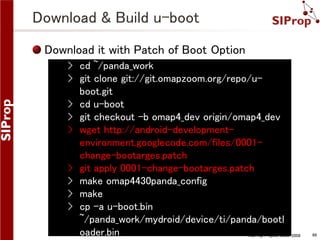
Download & Build u-boot
Download it with Patch of Boot Option
› cd ~/panda_work
› git clone git://git.omapzoom.org/repo/uboot.git
› cd u-boot
› git checkout -b omap4_dev origin/omap4_dev
› wget http://android-developmentenvironment.googlecode.com/files/0001change-bootarges.patch
› git apply 0001-change-bootarges.patch
› make omap4430panda_config
› make
› cp -a u-boot.bin
~/panda_work/mydroid/device/ti/panda/bootl
oader.bin
©SIProp Project, 2006-2008

68
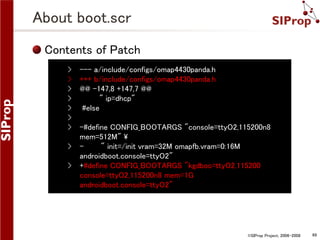
About boot.scr
Contents of Patch
›
›
›
›
›
›
›
›
›

--- a/include/configs/omap4430panda.h
+++ b/include/configs/omap4430panda.h
@@ -147,8 +147,7 @@
" ip=dhcp"
#else
-#define CONFIG_BOOTARGS "console=ttyO2,115200n8
mem=512M" 
" init=/init vram=32M omapfb.vram=0:16M
androidboot.console=ttyO2"
+#define CONFIG_BOOTARGS "kgdboc=ttyO2,115200
console=ttyO2,115200n8 mem=1G
androidboot.console=ttyO2"

©SIProp Project, 2006-2008

69
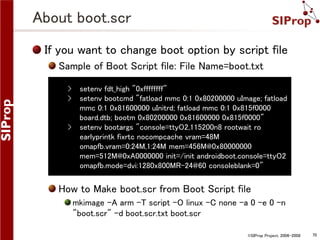
About boot.scr
If you want to change boot option by script file
Sample of Boot Script file: File Name=boot.txt
›
›

›

setenv fdt_high "0xffffffff"
setenv bootcmd "fatload mmc 0:1 0x80200000 uImage; fatload
mmc 0:1 0x81600000 uInitrd; fatload mmc 0:1 0x815f0000
board.dtb; bootm 0x80200000 0x81600000 0x815f0000"
setenv bootargs "console=ttyO2,115200n8 rootwait ro
earlyprintk fixrtc nocompcache vram=48M
omapfb.vram=0:24M,1:24M mem=456M@0x80000000
mem=512M@0xA0000000 init=/init androidboot.console=ttyO2
omapfb.mode=dvi:1280x800MR-24@60 consoleblank=0"

How to Make boot.scr from Boot Script file
mkimage -A arm -T script -O linux -C none -a 0 -e 0 -n
"boot.scr" -d boot.scr.txt boot.scr
©SIProp Project, 2006-2008

70
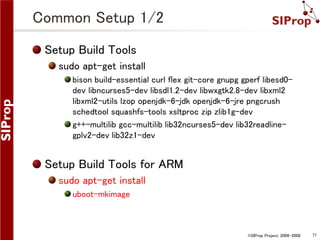
Common Setup 1/2
Setup Build Tools
sudo apt-get install
bison build-essential curl flex git-core gnupg gperf libesd0dev libncurses5-dev libsdl1.2-dev libwxgtk2.8-dev libxml2
libxml2-utils lzop openjdk-6-jdk openjdk-6-jre pngcrush
schedtool squashfs-tools xsltproc zip zlib1g-dev
g++-multilib gcc-multilib lib32ncurses5-dev lib32readlinegplv2-dev lib32z1-dev

Setup Build Tools for ARM
sudo apt-get install
uboot-mkimage

©SIProp Project, 2006-2008

71
Extra Stage

©SIProp Project, 2006-2008

72
How to Use JTAG-ICE

©SIProp Project, 2006-2008

73
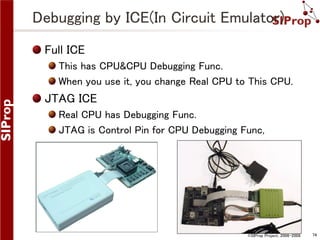
Debugging by ICE(In Circuit Emulator)
Full ICE
This has CPU&CPU Debugging Func.
When you use it, you change Real CPU to This CPU.

JTAG ICE
Real CPU has Debugging Func.
JTAG is Control Pin for CPU Debugging Func,

©SIProp Project, 2006-2008

74
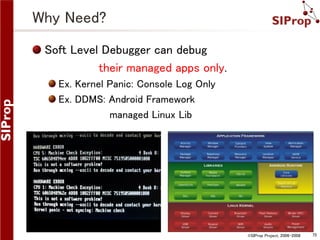
Why Need?
Soft Level Debugger can debug
their managed apps only.
Ex. Kernel Panic: Console Log Only
Ex. DDMS: Android Framework
managed Linux Lib

©SIProp Project, 2006-2008

75
How to Setup JTAG-ICE

©SIProp Project, 2006-2008

76
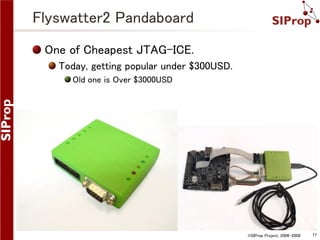
Flyswatter2 Pandaboard
One of Cheapest JTAG-ICE.
Today, getting popular under $300USD.
Old one is Over $3000USD

©SIProp Project, 2006-2008

77
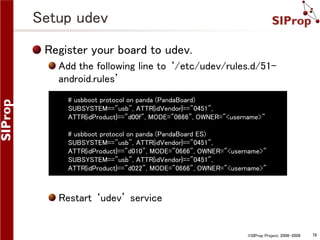
Setup udev
Register your board to udev.
Add the following line to ‘/etc/udev/rules.d/51android.rules’
# usbboot protocol on panda (PandaBoard)
SUBSYSTEM=="usb", ATTR{idVendor}=="0451",
ATTR{idProduct}=="d00f", MODE="0666", OWNER="<username>"
# usbboot protocol on panda (PandaBoard ES)
SUBSYSTEM=="usb", ATTR{idVendor}=="0451",
ATTR{idProduct}=="d010", MODE="0666", OWNER="<username>"
SUBSYSTEM=="usb", ATTR{idVendor}=="0451",
ATTR{idProduct}=="d022", MODE="0666", OWNER="<username>"

Restart ‘udev’ service

©SIProp Project, 2006-2008

78
Add Debug Information to Source Code
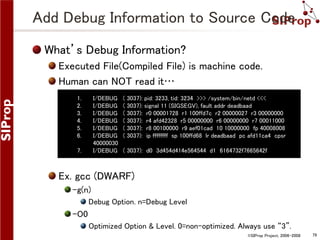
What’s Debug Information?
Executed File(Compiled File) is machine code.
Human can NOT read it…
1.
2.
3.
4.
5.
6.

I/DEBUG
I/DEBUG
I/DEBUG
I/DEBUG
I/DEBUG
I/DEBUG
40000030
I/DEBUG

7.

( 3037): pid: 3233, tid: 3234 >>> /system/bin/netd <<<
( 3037): signal 11 (SIGSEGV), fault addr deadbaad
( 3037): r0 00001728 r1 100ffd7c r2 00000027 r3 00000000
( 3037): r4 afd42328 r5 00000000 r6 00000000 r7 00011000
( 3037): r8 00100000 r9 aef01cad 10 10000000 fp 40008008
( 3037): ip ffffffff sp 100ffd68 lr deadbaad pc afd11ca4 cpsr
( 3037): d0 3d454d414e564544 d1 6164732f7665642f

Ex. gcc (DWARF)
-g(n)
Debug Option. n=Debug Level

–O0
Optimized Option & Level. 0=non-optimized. Always use “3”.
©SIProp Project, 2006-2008

79
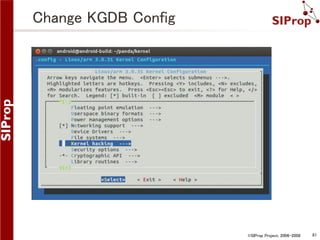
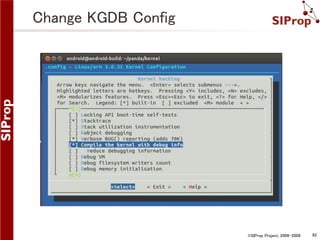
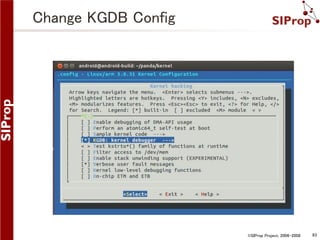
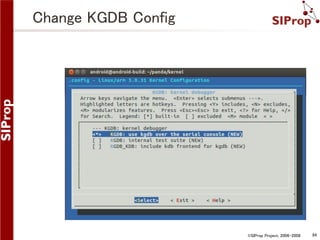
Change KGDB Config
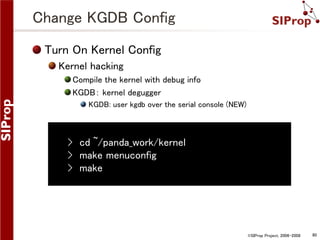
Turn On Kernel Config
Kernel hacking
Compile the kernel with debug info
KGDB: kernel degugger
KGDB: user kgdb over the serial console (NEW)

› cd ~/panda_work/kernel
› make menuconfig
› make

©SIProp Project, 2006-2008

80
Change KGDB Config

©SIProp Project, 2006-2008

81
Change KGDB Config

©SIProp Project, 2006-2008

82
Change KGDB Config

©SIProp Project, 2006-2008

83
Change KGDB Config

©SIProp Project, 2006-2008

84
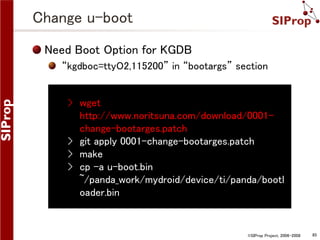
Change u-boot
Need Boot Option for KGDB
“kgdboc=ttyO2,115200” in “bootargs” section
› wget
http://www.noritsuna.com/download/0001change-bootarges.patch
› git apply 0001-change-bootarges.patch
› make
› cp -a u-boot.bin
~/panda_work/mydroid/device/ti/panda/bootl
oader.bin

©SIProp Project, 2006-2008

85
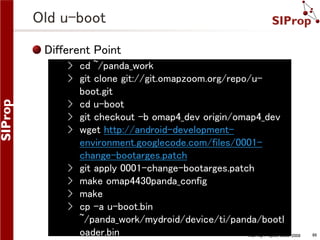
Old u-boot
Different Point
› cd ~/panda_work
› git clone git://git.omapzoom.org/repo/uboot.git
› cd u-boot
› git checkout -b omap4_dev origin/omap4_dev
› wget http://android-developmentenvironment.googlecode.com/files/0001change-bootarges.patch
› git apply 0001-change-bootarges.patch
› make omap4430panda_config
› make
› cp -a u-boot.bin
~/panda_work/mydroid/device/ti/panda/bootl
oader.bin
©SIProp Project, 2006-2008

86
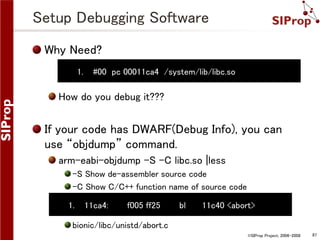
Setup Debugging Software
Why Need?
1.

#00 pc 00011ca4 /system/lib/libc.so

How do you debug it???

If your code has DWARF(Debug Info), you can
use “objdump” command.
arm-eabi-objdump -S -C libc.so |less
-S Show de-assembler source code
-C Show C/C++ function name of source code
1.

11ca4:

f005 ff25

bl

11c40 <abort>

bionic/libc/unistd/abort.c
©SIProp Project, 2006-2008

87
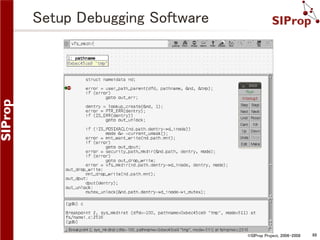
Setup Debugging Software

©SIProp Project, 2006-2008

88
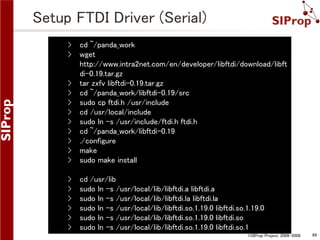
Setup FTDI Driver (Serial)
›
›

cd ~/panda_work
wget
http://www.intra2net.com/en/developer/libftdi/download/libft
di-0.19.tar.gz
› tar zxfv libftdi-0.19.tar.gz
› cd ~/panda_work/libftdi-0.19/src
› sudo cp ftdi.h /usr/include
› cd /usr/local/include
› sudo ln -s /usr/include/ftdi.h ftdi.h
› cd ~/panda_work/libftdi-0.19
› ./configure
› make
› sudo make install

›
›
›
›
›
›

cd /usr/lib
sudo ln -s /usr/local/lib/libftdi.a libftdi.a
sudo ln -s /usr/local/lib/libftdi.la libftdi.la
sudo ln -s /usr/local/lib/libftdi.so.1.19.0 libftdi.so.1.19.0
sudo ln -s /usr/local/lib/libftdi.so.1.19.0 libftdi.so
sudo ln -s /usr/local/lib/libftdi.so.1.19.0 libftdi.so.1
©SIProp Project, 2006-2008

89
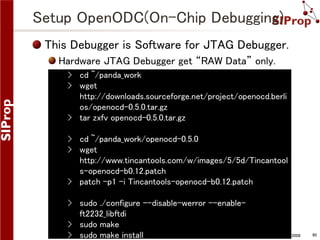
Setup OpenODC(On-Chip Debugging)
This Debugger is Software for JTAG Debugger.
Hardware JTAG Debugger get “RAW Data” only.
› cd ~/panda_work
› wget
http://downloads.sourceforge.net/project/openocd.berli
os/openocd-0.5.0.tar.gz
› tar zxfv openocd-0.5.0.tar.gz

› cd ~/panda_work/openocd-0.5.0
› wget
http://www.tincantools.com/w/images/5/5d/Tincantool
s-openocd-b0.12.patch
› patch -p1 -i Tincantools-openocd-b0.12.patch
› sudo ./configure --disable-werror --enableft2232_libftdi
› sudo make
©SIProp Project, 2006-2008
› sudo make install

90
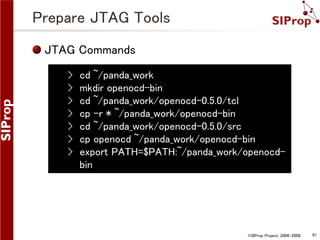
Prepare JTAG Tools
JTAG Commands
›
›
›
›
›
›
›

cd ~/panda_work
mkdir openocd-bin
cd ~/panda_work/openocd-0.5.0/tcl
cp -r * ~/panda_work/openocd-bin
cd ~/panda_work/openocd-0.5.0/src
cp openocd ~/panda_work/openocd-bin
export PATH=$PATH:~/panda_work/openocdbin

©SIProp Project, 2006-2008

91
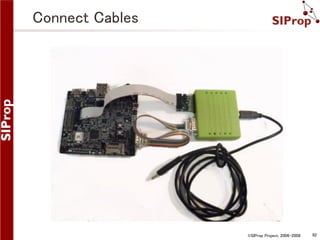
Connect Cables

©SIProp Project, 2006-2008

92
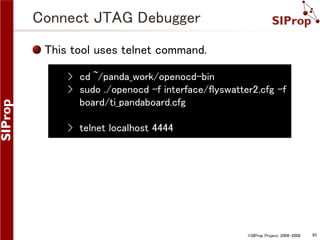
Connect JTAG Debugger
This tool uses telnet command.
› cd ~/panda_work/openocd-bin
› sudo ./openocd -f interface/flyswatter2.cfg -f
board/ti_pandaboard.cfg
› telnet localhost 4444

©SIProp Project, 2006-2008

93
JTAG Commands
reset, halt, resume
Use for Break Point

reg
reg
Show register

reg [entry]
Show entry register

reg [entry] [value]
Set value to entry register

©SIProp Project, 2006-2008

94
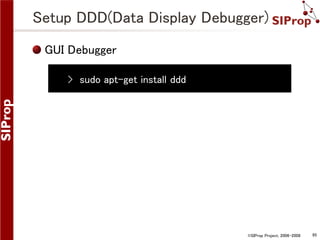
Setup DDD(Data Display Debugger)
GUI Debugger
› sudo apt-get install ddd

©SIProp Project, 2006-2008

95
How to Use Debugger
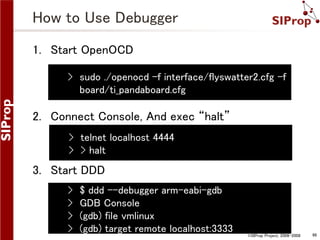
1. Start OpenOCD
› sudo ./openocd -f interface/flyswatter2.cfg -f
board/ti_pandaboard.cfg

2. Connect Console, And exec “halt”
› telnet localhost 4444
› > halt

3. Start DDD
›
›
›
›

$ ddd --debugger arm-eabi-gdb
GDB Console
(gdb) file vmlinux
(gdb) target remote localhost:3333

©SIProp Project, 2006-2008

96
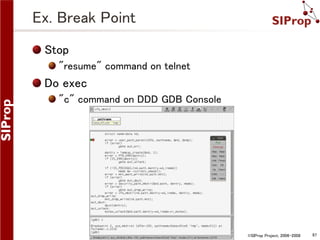
Ex. Break Point
Stop
"resume" command on telnet

Do exec
"c" command on DDD GDB Console

©SIProp Project, 2006-2008

97

What & How to Customize Android?

  • 1.
    What & Howto Customize Android? Noritsuna Imamura noritsuna@siprop.org ©SIProp Project, 2006-2008 1
  • 2.
    Agenda What’s Android System? Kindsof Android Devices Kinds of Android Type Android Source Code Inside Android Boot Sequence About init File Hands On Nexus7 Pandaboard How to Debug ©SIProp Project, 2006-2008 2
  • 3.
    Kinds of AndroidDevice Smart Phone Tablet Mini PC Note PC Car Navigation Set Top Box Smart Watch Smart Glass Camera Game Console Audio System Micro Wave Refrigerator Cut Board EVB If you get today’s knowledge, You can customize these devices yourself!!! ©SIProp Project, 2006-2008 3
  • 4.
    Why Customize it? MoreFunctions Add Other Library Add Other Software Attach Other Device Add Driver So Slow(Ex. Old PC) Modify Bottleneck Software Delete needless Software & Library Useless Customized UI/UX Software ©SIProp Project, 2006-2008 4
  • 5.
    Kinds of AndroidType Android Kernel More Functions Attach Other Device So Slow Useless No Source No Source × × × × No Source w/Source × △ No-Use as Android App △ × w/Source No Source ○ × ○ Almost Bottleneck In Here ○ UI/UX Engine In Here w/Source w/Source ◎ Use Kernel Level Driver ○ ◎ ○ ©SIProp Project, 2006-2008 5
  • 6.
    About Android Android Frameworkhas 3 Layer Stack for SmartPhone & Tablet PC. Application Framework Layer (Java) Library Layer (Linux C/C++) Kernel/Driver Layer (Linux Kernel C/ASM) ©SIProp Project, 2006-2008 6
  • 7.
    About Android SourceCode packages App for Android frameworks Lib for Android Apps system Sys Lib for Framework docs Java Doc for Android developers Sample, Demos build Tool for Android Build prebuilts Toolchain sdk Android SDK ndk Native SDK pdk for 3rd Party SDK cts Compatibility Test tools Tools for External 2006-2008 ©SIProp Project, 7
  • 8.
    About Android SourceCode external Linux Lib libcore Lib for Android bionic libc for Android device Diff for Devices hardware Drivers bootable BootLoader libnativehelper Helper for JNI abi Application Binary Interface dalvik Java VM art Next Generation VM ©SIProp Project, 2006-2008 8
  • 9.
    License 3 Types License Apache2.0 Google Proprietary All Application Framework Some Libraries Bionic GPL Almost Libraries Linux Kernel Apache 2.0 Google Proprietary Google Applications from Play Store GPL How to Get Play Store? Pass CTS ©SIProp Project, 2006-2008 9
  • 10.
    License 3 Types License Apache2.0 All Application Framework Some Libraries Bionic GPL Almost Libraries Linux Kernel Google Proprietary Google Applications from Play Store AOSP (Android Open Source Project) How to Get Play Store? Pass CTS ©SIProp Project, 2006-2008 10
  • 11.
    License 3 Types License Apache2.0 Google Android All Application Framework Some Libraries Bionic GPL Almost Libraries Linux Kernel Google Proprietary Google Applications from Play Store AOSP (Android Open Source Project) How to Get Play Store? Pass CTS ©SIProp Project, 2006-2008 11
  • 12.
    GApp Goo.im – PremiumAndroid Developer File Hosting This Site hosts Google Proprietary Apps!!! http://goo.im/home You can use Google Proprietary Apps on your Device. However it’s illegal… ©SIProp Project, 2006-2008 12
  • 13.
    Feature Matrix ofARM Chips AllWinner RockChip MediaTek Freescale TI Samsung Qualcomm Chip Name A31 RK3188 MT6589 i.MX6Q OMAP54 32 Exynos5 Krait400 CPU Type A7 Quad A9 Quad A7 Quad A9 Quad A15 Dual A15 Quad A15 Quad Device Type Tablet Mini PC Smart Phone EVB EVB EVB Used Area Cheap Device Cheap Device Cheap Phone N/A Customiz N/A ed Device 3G/LTE Device Official Source Code Kernel Kernel Some Android Kernel Full Android Kernel Full Android Kernel Full Android Kernel Support × △ × ○ ◎ ◎ ○ Availability ○ ○ ? ◎ ◎ ? × Promising ○ ◎ ○ × × ○ △ Reason Cheapes t Better chip RF chip Dev team is gone Full Android Kernel Tablet Expensiv e 13 ©SIProp Project, 2006-2008
  • 14.
  • 15.
    Boot Up FlowCPU~Kernel Ex. x-loader&u-boot ©SIProp Project, 2006-2008 15
  • 16.
    Boot Up FlowKernel~Android System Init Set Permission Mount Disks Load Driver Demons Linux App Zygote Sharing JavaResource Manager Runtime Linux SO Driver ©SIProp Project, 2006-2008 16
  • 17.
    About init File What’sworks? Prepare dir, file for Service Run Services(Demon), Runtime Setup Permission 1. 2. 3. 4. 5. 6. on post-fs-data mkdir /data/media 0770 media_rw media_rw setprop vold.post_fs_data_done 1 mkdir /data/misc/dhcp 0770 dhcp dhcp chown dhcp dhcp /data/misc/dhcp mkdir /data/misc/wifi/sockets 0770 wifi wifi 7. 8. 9. service dhcpcd_wlan0 /system/bin/dhcpcd -ABKL disabled oneshot 10. #for V4L 11. /dev/video0 12. /dev/video1 0666 system 0666 system system system ©SIProp Project, 2006-2008 17
  • 18.
    Difference of BetweenLinux to Android ©SIProp Project, 2006-2008 18
  • 19.
    Sorry!!! About SMP(Multi Core)Compile Next Week! ©SIProp Project, 2006-2008 19
  • 20.
  • 21.
    Setup 2 Kindsof Android SmartPhone Nexus7 (2013) Android 4.3 Released by Community Non-Driver(BSP) EVB Pandaboard Android 4.4 Released by Google All Softwares ©SIProp Project, 2006-2008 21
  • 22.
    Building Environment CPU Core i7 4core– 8thread Memory 8GB OS Ubuntu12.04 64bits ©SIProp Project, 2006-2008 22
  • 23.
  • 24.
    Common Setup 1/2 SetupBuild Tools sudo apt-get install bison build-essential curl flex git-core gnupg gperf libesd0dev libncurses5-dev libsdl1.2-dev libwxgtk2.8-dev libxml2 libxml2-utils lzop openjdk-6-jdk openjdk-6-jre pngcrush schedtool squashfs-tools xsltproc zip zlib1g-dev g++-multilib gcc-multilib lib32ncurses5-dev lib32readlinegplv2-dev lib32z1-dev Setup Build Tools for ARM sudo apt-get install uboot-mkimage ©SIProp Project, 2006-2008 24
  • 25.
    Common Setup 2/2 SetupBuild Tools for Android › curl http://commondatastorage.googleapis.com/gitrepo-downloads/repo > ~/bin/repo › chmod a+x ~/bin/repo › export PATH=$PATH:~/bin/repo › sudo add-apt-repository ppa:nilarimogard/webupd8 › sudo apt-get update › sudo apt-get install android-tools-fastboot ©SIProp Project, 2006-2008 25
  • 26.
  • 27.
    What’s Nexus7? Target Tablet Nexus7(2013) http://www.google.com/ nexus/7/ OS JCROM With BuildManual https://sites.google.com/ site/jcromproject/ ©SIProp Project, 2006-2008 27
  • 28.
    Check Points How toCustomize Community Source Code How did they get them? They don’t have BSP(Driver). How about Android System. eMMC, OTA-Package You can Customize GUI(HOME) What can you Customize Android System? UI System, Settings ©SIProp Project, 2006-2008 28
  • 29.
    How to Build SetupProcess 1. 2. 3. 4. 5. Download Source Code Download BSP from site & your real device Download & Build kernel Make OTA image Write new OTA image ©SIProp Project, 2006-2008 29
  • 30.
    Download Source Code Downloadfrom JCROM’s repository › repo init -u https://bitbucket.org/sola/jcrom_manifest m jcrom_jb-4.3-master.xml › repo sync ©SIProp Project, 2006-2008 30
  • 31.
    Download BSP fromsite & your real device 1/2 Register your board to udev. Add the following line to ‘/etc/udev/rules.d/51android.rules’ SUBSYSTEM=="usb", ATTR{idVendor}=="18d1", ATTR{idProduct}=="4e40", MODE="0666" # Bootloader SUBSYSTEM=="usb", ATTR{idVendor}=="18d1", ATTR{idProduct}=="d001", MODE="0666" # Recovery SUBSYSTEM=="usb", ATTR{idVendor}=="18d1", ATTR{idProduct}=="4e43", MODE="0666" # PTP media, USB debug off SUBSYSTEM=="usb", ATTR{idVendor}=="18d1", ATTR{idProduct}=="4e44", MODE="0666" # PTP media, USB debug on SUBSYSTEM=="usb", ATTR{idVendor}=="18d1", ATTR{idProduct}=="4e41", MODE="0666" # MTP media, USB debug off SUBSYSTEM=="usb", ATTR{idVendor}=="18d1", ATTR{idProduct}=="4e42", MODE="0666" # MTP media, USB debug on SUBSYSTEM=="usb", ATTR{idVendor}=="18d1", ATTR{idProduct}=="4ee2", MODE="0666" # MTP media, USB debug on Restart ‘udev’ service ©SIProp Project, 2006-2008 31
  • 32.
    Download BSP fromsite & your real device 2/2 Download BSPs from Real Device & Internet *This version uses Internet only. Use adb If your system doesn’t have adb, please do: sudo apt-get install android-tools-fastboot › cd ~/nexus_work/android/device/asus/flo › ./download-blobs.sh › cd ~/nexus_work/android/jcrom/asus/flo/proprie tary/ › ./extract-files.sh ©SIProp Project, 2006-2008 32
  • 33.
    Download & Buildkernel Download & Build kernel › cd ~/nexus_work › export ARCH=arm › export CROSS_COMPILE=~/nexus_work/android/prebuilts/gc c/linux-x86/arm/arm-eabi-4.6/bin/arm-eabi› git clone https://android.googlesource.com/kernel/msm.git -b android-msm-flo-3.4-jb-mr2 kernel/nexus72 › cd kernel/nexus72 › make flo_defconfig › make › cp arch/arm/boot/zImage ~/nexus_work/android/device/asus/flo-kernel/kernel ©SIProp Project, 2006-2008 33
  • 34.
    Make OTA image MakeOTA image This OTA image is update image for Android. › › › › cd ~/nexus_work/android/ source build/envsetup.sh lunch aosp_flo-user make otapackage This file name is aosp_flo-ota-eng.[your Linux’s User name].zip ©SIProp Project, 2006-2008 34
  • 35.
    build/envsetup.sh Helper Command Libfor Android Build m jgrep Build from Top Dir mm Build from Current Dir mmm [Target Dir] Build from Target Dir croot Change Top Dir Grep for Java Source Code resgrep Grep for XML Source Code lunch Choose Target Build cgrep Grep for C/C++ Source Code ©SIProp Project, 2006-2008 35
  • 36.
    What’s Android OTA-Package OTA= Over-The-Air (Update) Android OTA-Package has ROM images. boot.img Kernel, Init, Minimam Linux cache.img Temporary Area recovery.img Recovery Manager Program system.img Android System userdata.img User Data ©SIProp Project, 2006-2008 36
  • 37.
    What’s Fastboot? Fastboot isROM Manager for eMMC. eMMC is managed by Address in Low Lovel. When you write your Kernel, you MUST point kernel address. If you mistake kernel address, your system is broken… Separated by Address ©SIProp Project, 2006-2008 37
  • 38.
    What’s Inside ofImage File? It’s ramdisk boot.img-ramdisk.gz › mkdir ramdisk › cd ramdisk › gunzip -c ../boot.img-ramdisk.gz | cpio –I If your new kernel has new functions, please modify ramdisk files. Ex. .ko file, new init file, etc. ©SIProp Project, 2006-2008 38
  • 39.
    Write new OTAimage 1/3 If your phone has OEM lock, please unlock it. › adb reboot bootloader › fastboot oem unlock Change Recovery image. › wget http://download2.clockworkmod.com/recover ies/recovery-clockwork-6.0.4.3-flo.img › fastboot flash recovery recovery-clockwork6.0.4.3-flo.img › fastboot boot recovery-clockwork-6.0.4.3flo.img ※Connect your N7 to PC ©SIProp Project, 2006-2008 39
  • 40.
    Write new OTAimage 2/3 Push your new OTA image to your N7 › adb push ~/nexus_work/android/out/target/product/fl o/aosp_flo-ota-eng.[your Linux's User name].zip /sdcard/ If you want to use Google Apps › wget http://goo.im/gapps/gapps-jb20130813-signed.zip › adb push gapps-jb-20130813-signed.zip /sdcard/ ©SIProp Project, 2006-2008 40
  • 41.
    Write new OTAimage 3/3 1. Turn off your phone 2. Volume Up & Power 3. Wipe data/factory reset 4. Install zip from sdcard 5. Choose zip from sdcard 6. aosp_flo-ota-eng.[your Linux's User name].zip 7. Choose zip from sdcard 8. gapps-jb-20130813-signed.zip 9. +++++Go Back+++++ 10. Reboot system now ©SIProp Project, 2006-2008 41
  • 42.
    Boot up YourNexus7! ©SIProp Project, 2006-2008 42
  • 43.
  • 44.
    What’s Pandaboard? Target EVB Pandaboard http://www.pandaboard. org/ OS Official Kernel& Android With Build Manual http://source.android.com /source/downloading.html ©SIProp Project, 2006-2008 44
  • 45.
    How to UsePeripherals? ADK (Accessory Development Kit) http://developer.android.com/tools/adk/index.html Advantage Develop on ADT Pin like Arduino Dis-Advantage So Slow… 9600bps ©SIProp Project, 2006-2008 45
  • 46.
    How to UsePeripherals? GPIO(General Purpose Input/Output) I2C(Inter-Integrated Circuit) SPI(Serial Peripheral Interface) UART(Serial) Fast: SPI > I2C Pin Num: SPI(4Pins) > I2C(3Pins) GPIO can use Registers. Advantage Bus Speed Connect All Peripheral Dis-Advantage Required Hardware Knowledge Like Assembler for Hardware ©SIProp Project, 2006-2008 46
  • 47.
    How to Build SetupProcess 1. 2. 3. 4. 5. Download Source Code Download BSP from Google Download & Build Boot Loaders Build Android Setup SD Card ©SIProp Project, 2006-2008 47
  • 48.
    Download 4.4 SourceCode Download from AOSP(Google)’s repository › › › › › mkdir ~/panda_work cd ~/panda_work mkdir mydroid cd mydroid repo init -u https://android.googlesource.com/platform/ manifest -b android-4.4_r1.1 › repo sync ©SIProp Project, 2006-2008 48
  • 49.
    Download BSP fromGoogle Download BSPs(Driver) › cd ~/panda_work/mydroid › wget https://dl.google.com/dl/android/aosp/imgtec -panda-20130603-539d1ac3.tgz › tar zxvf imgtec-panda-20130603539d1ac3.tgz › ./extract-imgtec-panda.sh › git clone https://github.com/soladolphin1/sola_device_ti_panda.git -b kitkat device/ti/panda ©SIProp Project, 2006-2008 49
  • 50.
    Download Toolchain Required AndroidToolchain for Panda’s Source › cd ~/panda_work › git clone https://android.googlesource.com/platform/pr ebuilt › export ARCH=arm › export CROSS_COMPILE=$PWD/prebuilt/linuxx86/toolchain/arm-eabi-4.4.3/bin/arm-eabi- ©SIProp Project, 2006-2008 50
  • 51.
    Download & Buildx-loader First Boot Loader for Pandaboard › cd ~/panda_work › git clone git://git.omapzoom.org/repo/xloader.git › cd x-loader › git checkout -b omap4_dev origin/omap4_dev › make omap4430panda_config › make ift › cp -a MLO ~/panda_work/mydroid/device/ti/panda/xload er.bin ©SIProp Project, 2006-2008 51
  • 52.
    Download & Buildu-boot Second Boot Loader for Pandaboard › cd ~/panda_work › git clone git://git.omapzoom.org/repo/uboot.git › cd u-boot › git checkout -b omap4_dev origin/omap4_dev › wget http://android-developmentenvironment.googlecode.com/files/0001change-bootarges.patch › git apply 0001-change-bootarges.patch › make omap4430panda_config › make › cp -a u-boot.bin ~/panda_work/mydroid/device/ti/panda/bootl oader.bin ©SIProp Project, 2006-2008 52
  • 53.
    Download & Buildkernel Kernel for Pandaboard › cd ~/panda_work › git clone https://android.googlesource.com/kernel/oma p.git kernel › cd kernel › git checkout -b android-omap-panda-3.0 origin/android-omap-panda-3.0 › make panda_defconfig › make › cp -a arch/arm/boot/zImage ~/panda_work/mydroid/device/ti/panda/kerne l ©SIProp Project, 2006-2008 53
  • 54.
    Build Android Build Android › › › › cd~/panda_work/mydroid source build/envsetup.sh lunch aosp_panda-userdebug make ©SIProp Project, 2006-2008 54
  • 55.
    Setup SD Card MakePartition for Android on SD Card boot system cache userdata media › wget http://www.noritsuna.com/download/mksdcar d_pandaboard.sh › chmod a+x mksdcard_pandaboard.sh › LANG=C sudo ./mksdcard_pandaboard.sh /dev/sdX ~/panda_work/mydroid ©SIProp Project, 2006-2008 55
  • 56.
    Boot up YourPandaboard! ©SIProp Project, 2006-2008 56
  • 57.
    But……… TI supportuntil 4.2 2012.06.27 4.1 Jelly Bean 2012.11.13 4.2 2013.07.24 4.3 4.1, 4.2 Available USB Audio Support i18n(Internationalization) Support Vibration for Input Device Support Miracast Support Writing Vertically Support RenderScript Change Android Market to Google Play Linux: 3.1.10 4.3 Support OpenGL/ES 3.0 Support Bluetooth LE Support Wi-Fi Location Linux: 3.4.0 ©SIProp Project, 2006-2008 57
  • 58.
    How to Build SetupProcess 1. 2. 3. 4. 5. Download Source Code Download BSP from Google Download & Build Boot Loaders Build Android Setup SD Card ©SIProp Project, 2006-2008 58
  • 59.
    Download 4.2 SourceCode Download from AOSP(Google)’s repository › › › › › mkdir ~/panda_work cd ~/panda_work mkdir mydroid cd mydroid repo init -u https://android.googlesource.com/platform/ manifest -b android-4.2.1_r1 › repo sync ©SIProp Project, 2006-2008 59
  • 60.
    Download BSP fromGoogle Download BSPs(Driver) › cd ~/panda_work/mydroid › wget https://dl.google.com/dl/android/aosp/imgtec -panda-20120807-c4e99e89.tgz › tar zxvf imgtec-panda-20120807c4e99e89.tgz › ./extract-imgtec-panda.sh Get some Patches › › › › › › › › › › › › cd ~/panda_work/mydroid/build/ wget http://sola-dolphin-1.net/data/Panda/0001-panda-jb4.2_build.patch git apply 0001-panda-jb4.2_build.patch cd ~/panda_work/mydroid/device/ti/panda/ wget http://sola-dolphin-1.net/data/Panda/0001-panda-jb4.2_device-ti-panda.patch git apply 0001-panda-jb4.2_device-ti-panda.patch cd ~/panda_work/mydroid/hardware/ti/omap4xxx/ wget http://sola-dolphin-1.net/data/Panda/0001-panda-jb4.2_hardware-ti-omap4xxx.pah git apply 0001-panda-jb4.2_hardware-ti-omap4xxx.patch cd ~/panda_work/mydroid/hardware/ti/wpan/ wget http://sola-dolphin-1.net/data/Panda/0001-panda-jb4.2_hardware-ti-wpan.patch ©SIProp Project, 2006-2008 git apply 0001-panda-jb4.2_hardware-ti-wpan.patch 60
  • 61.
    Download Toolchain Required AndroidToolchain for Panda’s Source › cd ~/panda_work › git clone https://android.googlesource.com/platform/pr ebuilt › export ARCH=arm › export CROSS_COMPILE=$PWD/prebuilt/linuxx86/toolchain/arm-eabi-4.4.3/bin/arm-eabi- ©SIProp Project, 2006-2008 61
  • 62.
    Download & Buildx-loader First Boot Loader for Pandaboard › cd ~/panda_work › git clone git://git.omapzoom.org/repo/xloader.git › cd x-loader › git checkout -b omap4_dev origin/omap4_dev › make omap4430panda_config › make ift › cp -a MLO ~/panda_work/mydroid/device/ti/panda/xload er.bin ©SIProp Project, 2006-2008 62
  • 63.
    Download & Buildu-boot Second Boot Loader for Pandaboard › cd ~/panda_work › git clone git://git.omapzoom.org/repo/uboot.git › cd u-boot › git checkout -b omap4_dev origin/omap4_dev › wget http://android-developmentenvironment.googlecode.com/files/0001change-bootarges.patch › git apply 0001-change-bootarges.patch › make omap4430panda_config › make › cp -a u-boot.bin ~/panda_work/mydroid/device/ti/panda/bootl oader.bin ©SIProp Project, 2006-2008 63
  • 64.
    Download & Buildkernel Kernel for Pandaboard › cd ~/panda_work › git clone https://android.googlesource.com/kernel/oma p.git kernel › cd kernel › git checkout -b android-omap-panda-3.0 origin/android-omap-panda-3.0 › make panda_defconfig › make › cp -a arch/arm/boot/zImage ~/panda_work/mydroid/device/ti/panda/kerne l ©SIProp Project, 2006-2008 64
  • 65.
    Build Android Build Android › › › › cd~/panda_work/mydroid source build/envsetup.sh lunch aosp_panda-userdebug make ©SIProp Project, 2006-2008 65
  • 66.
    Setup SD Card MakePartition for Android on SD Card boot system cache userdata media › wget http://www.noritsuna.com/download/mksdcar d_pandaboard.sh › chmod a+x mksdcard_pandaboard.sh › LANG=C sudo ./mksdcard_pandaboard.sh /dev/sdX ~/panda_work/mydroid ©SIProp Project, 2006-2008 66
  • 67.
    Boot File ofPandaboard ©SIProp Project, 2006-2008 67
  • 68.
    Download & Buildu-boot Download it with Patch of Boot Option › cd ~/panda_work › git clone git://git.omapzoom.org/repo/uboot.git › cd u-boot › git checkout -b omap4_dev origin/omap4_dev › wget http://android-developmentenvironment.googlecode.com/files/0001change-bootarges.patch › git apply 0001-change-bootarges.patch › make omap4430panda_config › make › cp -a u-boot.bin ~/panda_work/mydroid/device/ti/panda/bootl oader.bin ©SIProp Project, 2006-2008 68
  • 69.
    About boot.scr Contents ofPatch › › › › › › › › › --- a/include/configs/omap4430panda.h +++ b/include/configs/omap4430panda.h @@ -147,8 +147,7 @@ " ip=dhcp" #else -#define CONFIG_BOOTARGS "console=ttyO2,115200n8 mem=512M" " init=/init vram=32M omapfb.vram=0:16M androidboot.console=ttyO2" +#define CONFIG_BOOTARGS "kgdboc=ttyO2,115200 console=ttyO2,115200n8 mem=1G androidboot.console=ttyO2" ©SIProp Project, 2006-2008 69
  • 70.
    About boot.scr If youwant to change boot option by script file Sample of Boot Script file: File Name=boot.txt › › › setenv fdt_high "0xffffffff" setenv bootcmd "fatload mmc 0:1 0x80200000 uImage; fatload mmc 0:1 0x81600000 uInitrd; fatload mmc 0:1 0x815f0000 board.dtb; bootm 0x80200000 0x81600000 0x815f0000" setenv bootargs "console=ttyO2,115200n8 rootwait ro earlyprintk fixrtc nocompcache vram=48M omapfb.vram=0:24M,1:24M mem=456M@0x80000000 mem=512M@0xA0000000 init=/init androidboot.console=ttyO2 omapfb.mode=dvi:1280x800MR-24@60 consoleblank=0" How to Make boot.scr from Boot Script file mkimage -A arm -T script -O linux -C none -a 0 -e 0 -n "boot.scr" -d boot.scr.txt boot.scr ©SIProp Project, 2006-2008 70
  • 71.
    Common Setup 1/2 SetupBuild Tools sudo apt-get install bison build-essential curl flex git-core gnupg gperf libesd0dev libncurses5-dev libsdl1.2-dev libwxgtk2.8-dev libxml2 libxml2-utils lzop openjdk-6-jdk openjdk-6-jre pngcrush schedtool squashfs-tools xsltproc zip zlib1g-dev g++-multilib gcc-multilib lib32ncurses5-dev lib32readlinegplv2-dev lib32z1-dev Setup Build Tools for ARM sudo apt-get install uboot-mkimage ©SIProp Project, 2006-2008 71
  • 72.
  • 73.
    How to UseJTAG-ICE ©SIProp Project, 2006-2008 73
  • 74.
    Debugging by ICE(InCircuit Emulator) Full ICE This has CPU&CPU Debugging Func. When you use it, you change Real CPU to This CPU. JTAG ICE Real CPU has Debugging Func. JTAG is Control Pin for CPU Debugging Func, ©SIProp Project, 2006-2008 74
  • 75.
    Why Need? Soft LevelDebugger can debug their managed apps only. Ex. Kernel Panic: Console Log Only Ex. DDMS: Android Framework managed Linux Lib ©SIProp Project, 2006-2008 75
  • 76.
    How to SetupJTAG-ICE ©SIProp Project, 2006-2008 76
  • 77.
    Flyswatter2 Pandaboard One ofCheapest JTAG-ICE. Today, getting popular under $300USD. Old one is Over $3000USD ©SIProp Project, 2006-2008 77
  • 78.
    Setup udev Register yourboard to udev. Add the following line to ‘/etc/udev/rules.d/51android.rules’ # usbboot protocol on panda (PandaBoard) SUBSYSTEM=="usb", ATTR{idVendor}=="0451", ATTR{idProduct}=="d00f", MODE="0666", OWNER="<username>" # usbboot protocol on panda (PandaBoard ES) SUBSYSTEM=="usb", ATTR{idVendor}=="0451", ATTR{idProduct}=="d010", MODE="0666", OWNER="<username>" SUBSYSTEM=="usb", ATTR{idVendor}=="0451", ATTR{idProduct}=="d022", MODE="0666", OWNER="<username>" Restart ‘udev’ service ©SIProp Project, 2006-2008 78
  • 79.
    Add Debug Informationto Source Code What’s Debug Information? Executed File(Compiled File) is machine code. Human can NOT read it… 1. 2. 3. 4. 5. 6. I/DEBUG I/DEBUG I/DEBUG I/DEBUG I/DEBUG I/DEBUG 40000030 I/DEBUG 7. ( 3037): pid: 3233, tid: 3234 >>> /system/bin/netd <<< ( 3037): signal 11 (SIGSEGV), fault addr deadbaad ( 3037): r0 00001728 r1 100ffd7c r2 00000027 r3 00000000 ( 3037): r4 afd42328 r5 00000000 r6 00000000 r7 00011000 ( 3037): r8 00100000 r9 aef01cad 10 10000000 fp 40008008 ( 3037): ip ffffffff sp 100ffd68 lr deadbaad pc afd11ca4 cpsr ( 3037): d0 3d454d414e564544 d1 6164732f7665642f Ex. gcc (DWARF) -g(n) Debug Option. n=Debug Level –O0 Optimized Option & Level. 0=non-optimized. Always use “3”. ©SIProp Project, 2006-2008 79
  • 80.
    Change KGDB Config TurnOn Kernel Config Kernel hacking Compile the kernel with debug info KGDB: kernel degugger KGDB: user kgdb over the serial console (NEW) › cd ~/panda_work/kernel › make menuconfig › make ©SIProp Project, 2006-2008 80
  • 81.
    Change KGDB Config ©SIPropProject, 2006-2008 81
  • 82.
    Change KGDB Config ©SIPropProject, 2006-2008 82
  • 83.
    Change KGDB Config ©SIPropProject, 2006-2008 83
  • 84.
    Change KGDB Config ©SIPropProject, 2006-2008 84
  • 85.
    Change u-boot Need BootOption for KGDB “kgdboc=ttyO2,115200” in “bootargs” section › wget http://www.noritsuna.com/download/0001change-bootarges.patch › git apply 0001-change-bootarges.patch › make › cp -a u-boot.bin ~/panda_work/mydroid/device/ti/panda/bootl oader.bin ©SIProp Project, 2006-2008 85
  • 86.
    Old u-boot Different Point ›cd ~/panda_work › git clone git://git.omapzoom.org/repo/uboot.git › cd u-boot › git checkout -b omap4_dev origin/omap4_dev › wget http://android-developmentenvironment.googlecode.com/files/0001change-bootarges.patch › git apply 0001-change-bootarges.patch › make omap4430panda_config › make › cp -a u-boot.bin ~/panda_work/mydroid/device/ti/panda/bootl oader.bin ©SIProp Project, 2006-2008 86
  • 87.
    Setup Debugging Software WhyNeed? 1. #00 pc 00011ca4 /system/lib/libc.so How do you debug it??? If your code has DWARF(Debug Info), you can use “objdump” command. arm-eabi-objdump -S -C libc.so |less -S Show de-assembler source code -C Show C/C++ function name of source code 1. 11ca4: f005 ff25 bl 11c40 <abort> bionic/libc/unistd/abort.c ©SIProp Project, 2006-2008 87
  • 88.
    Setup Debugging Software ©SIPropProject, 2006-2008 88
  • 89.
    Setup FTDI Driver(Serial) › › cd ~/panda_work wget http://www.intra2net.com/en/developer/libftdi/download/libft di-0.19.tar.gz › tar zxfv libftdi-0.19.tar.gz › cd ~/panda_work/libftdi-0.19/src › sudo cp ftdi.h /usr/include › cd /usr/local/include › sudo ln -s /usr/include/ftdi.h ftdi.h › cd ~/panda_work/libftdi-0.19 › ./configure › make › sudo make install › › › › › › cd /usr/lib sudo ln -s /usr/local/lib/libftdi.a libftdi.a sudo ln -s /usr/local/lib/libftdi.la libftdi.la sudo ln -s /usr/local/lib/libftdi.so.1.19.0 libftdi.so.1.19.0 sudo ln -s /usr/local/lib/libftdi.so.1.19.0 libftdi.so sudo ln -s /usr/local/lib/libftdi.so.1.19.0 libftdi.so.1 ©SIProp Project, 2006-2008 89
  • 90.
    Setup OpenODC(On-Chip Debugging) ThisDebugger is Software for JTAG Debugger. Hardware JTAG Debugger get “RAW Data” only. › cd ~/panda_work › wget http://downloads.sourceforge.net/project/openocd.berli os/openocd-0.5.0.tar.gz › tar zxfv openocd-0.5.0.tar.gz › cd ~/panda_work/openocd-0.5.0 › wget http://www.tincantools.com/w/images/5/5d/Tincantool s-openocd-b0.12.patch › patch -p1 -i Tincantools-openocd-b0.12.patch › sudo ./configure --disable-werror --enableft2232_libftdi › sudo make ©SIProp Project, 2006-2008 › sudo make install 90
  • 91.
    Prepare JTAG Tools JTAGCommands › › › › › › › cd ~/panda_work mkdir openocd-bin cd ~/panda_work/openocd-0.5.0/tcl cp -r * ~/panda_work/openocd-bin cd ~/panda_work/openocd-0.5.0/src cp openocd ~/panda_work/openocd-bin export PATH=$PATH:~/panda_work/openocdbin ©SIProp Project, 2006-2008 91
  • 92.
  • 93.
    Connect JTAG Debugger Thistool uses telnet command. › cd ~/panda_work/openocd-bin › sudo ./openocd -f interface/flyswatter2.cfg -f board/ti_pandaboard.cfg › telnet localhost 4444 ©SIProp Project, 2006-2008 93
  • 94.
    JTAG Commands reset, halt,resume Use for Break Point reg reg Show register reg [entry] Show entry register reg [entry] [value] Set value to entry register ©SIProp Project, 2006-2008 94
  • 95.
    Setup DDD(Data DisplayDebugger) GUI Debugger › sudo apt-get install ddd ©SIProp Project, 2006-2008 95
  • 96.
    How to UseDebugger 1. Start OpenOCD › sudo ./openocd -f interface/flyswatter2.cfg -f board/ti_pandaboard.cfg 2. Connect Console, And exec “halt” › telnet localhost 4444 › > halt 3. Start DDD › › › › $ ddd --debugger arm-eabi-gdb GDB Console (gdb) file vmlinux (gdb) target remote localhost:3333 ©SIProp Project, 2006-2008 96
  • 97.
    Ex. Break Point Stop "resume"command on telnet Do exec "c" command on DDD GDB Console ©SIProp Project, 2006-2008 97