THE UNCONVENTIONAL DEVICES
FOR THE VIDEO STREAMING
IN ANDROID
a.martellucci[at]reply.it
@martellux
+AlessandroMartellucci
m.bonifazi[at]reply.it
@mbonifazi
+MatteoBonifazi
Who We Are
•  Reply is today a leading IT Services Company, which operates in Italy,
Germany, UK, Benelux, USA and Brazil.
•  Open Reply is the company of Reply Group focused on open source
software, multichannel web solutions and mobile applications.
•  Based in Rome, our team is based a young team of over 40 engineers
100% focused on mobile development (iOS, Android & Windows Phone).
•  We are specialised in broadcasting, banking and Android OS
Customisation.
Open Reply
Engage users through streaming app
*http://www.nielsen.com/us/en/insights/reports/2014/shifts-in-viewing-the-cross-platform-report-q2-2014.html
+53
%
+80
%
+60
%
-1% -1% -2%
18/34 35/49 50/64 Ages
Engage users through streaming app
q  In US more than 2 milion people watched last World Cup by a mobile App.1
q  270% increase in online video watched by smartphone and tablet.2
q  More than one bilion tap on Google Chromecast cast button.3
q  YouTube viewer habits prove “the bigger the screen, the longer people
watch.”4
1)WatchESPN app access 2)Nielsen Q3 ‘14 Total Audience report 3) Google’s Omid Kordestani interview 2015 4) Youtube usage internal analysis.
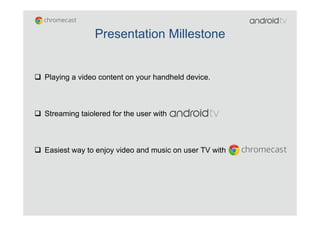
q  Playing a video content on your handheld device.
q  Streaming taiolered for the user with
q  Easiest way to enjoy video and music on user TV with
Presentation Millestone
Android multimedia framework
Android support for playing several media types from media file stored inside
the application (raw resources, standalone files) or for OTT streaming.
*Camera, foto rendering and other media type are managed by it but they are out of scope for this talk.
Network Protocols
RTSP (RTP, SDP)
HTTP/HTTPS progressive streaming
HTTP/HTTPS live streaming
Dynamic adaptive streaming over HTTP (DASH)
Smooth Streaming
Core Media Formats
H.263 ->3GPP(.3gp),MPEG-4(.mp4)
H.264 AVC -> 3GPP(.3gp),MPEG-4(.mp4),MPEG-
TS(.ts)
MPEG-4 SP -> 3GPP(.3gp)
VP8 -> WebM(.webm),Matroska(.mkv)
Note. Any given mobile device may provide support for additional formats or file types not listed in the table.
Android multimedia framework documentation
50% Android multimedia framework questions are unaswered on
Stackoverflow
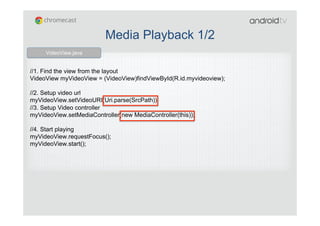
//1. Find the view from the layout
VideoView myVideoView = (VideoView)findViewById(R.id.myvideoview);
//2. Setup video url
myVideoView.setVideoURI(Uri.parse(SrcPath));
//3. Setup Video controller
myVideoView.setMediaController(new MediaController(this));
//4. Start playing
myVideoView.requestFocus();
myVideoView.start();
VideoView.java
Media Playback 1/2
//0. Get SurfaceView and its holder
mPreview = (SurfaceView)findViewById(R.id.surfaceView);
holder = mPreview.getHolder();
mp = new MediaPlayer(); //1. Create MediaPlayer object:
//2. Add SurfaceHolder callback - Aware when SurfaceView is created
holder.addCallback(new SurfaceHolder.Callback(){ ....
@Override
public void surfaceCreated(SurfaceHolder holder) {
mp.setDisplay(holder); //3. Attach the surface to the player
try {
mp.setDataSource(filepath);
//4. Prepare the Mediaplayer in sync or async mode ( prepareAsync() )
mp.prepare();
} catch (Exception e) {// Catch the exception}
mp.start(); //5. Start the player }...
});
MediaPlayer.java
Media Playback 2/2
ExoPlayer
ExoPlayer is a media player built on top of the MediaExtractor and MediaCodec
APIs released in Android 4.1 (API level 16).
ExoPlayer provides default TrackRenderer implementations for audio and
video, which make use of the MediaCodec and AudioTrack classes in the
Android framework.
During playback, your app can listen for events generated by the ExoPlayer
that indicates the overall state of the player (ExoPlayer.Listener).
player = ExoPlayer.Factory.newInstance(RENDERER_COUNT, minBuffer, maxBuffer);
// 2. Construct renderers.
DataSource dataSource = new UriDataSource(userAgent, bandwidthMeter);
HlsChunkSource chunkSource = new HlsChunkSource(dataSource, url, manifest, bandwidthMeter,
null,
HlsChunkSource.ADAPTIVE_MODE_SPLICE);
HlsSampleSource sampleSource = new HlsSampleSource(chunkSource, true, 3);
MediaCodecVideoTrackRenderer videoRenderer = new
MediaCodecVideoTrackRenderer(sampleSource,
MediaCodec.VIDEO_SCALING_MODE_SCALE_TO_FIT, 5000, player.getMainHandler(),
player, 50);
MediaCodecAudioTrackRenderer audioRenderer = new
MediaCodecAudioTrackRenderer(sampleSource);
player.prepare(videoRenderer, audioRenderer); // 3. Inject the renderers through prepare.
player.setSurface(surfaceView.getHolder().getSurface()); // 4. Pass the surface to the video renderer.
player.setPlayWhenReady(true); // 5. Start playback
…
…
player.release(); // Release when everything is done!
ExoPlayer.java
ExoPlayer – HLS implementation
What next?
q  Built-in players
ü  AwesomePlayer (default player selected)
ü  NuPlayer (Apple HLS)
q  Extra player factories can be registered
q  DIY mediaplayer
ü  Demuxing: android.media.mediaExtractor
ü  Decoding: android.media.MediaCodec
ü  Video rendering: android.media.MediaCodec
ü  Audio rendering: android.media.AudioTrack
ü  Implement the interface
frameworks/av/include/media/MediaPlayerInterface.h
Android TV
Android TV is Android!!!
Smartphone 5”
320 dp
TV Full HD 30”
320 dp
10 feet
16 inches
10 foot experience
Keep calm and lean back!!
Provides built-in tailored for 10 feet experience
<uses-feature android:name="android.software.leanback"
android:required="true" />
<application
android:allowBackup="false”
android:label="@string/app_name”
android:theme="@style/Theme.Leanback" >
<activity
android:name="MainActivity”
android:screenOrientation="landscape" >
<intent-filter>
<action android:name="android.intent.action.MAIN" />
<category
android:name="android.intent.category.LEANBACK_LAUNCHER" />
</intent-filter>
</activity>
AndroidManifest.xml
Android Manifest features1/2
Android Manifest features 2/2
Supporting landscape orientation is mandatory
No touch screen is required
<uses-feature android:name="android.hardware.sensor.accelerometer”
android:required="false" />
<uses-feature android:name="android.hardware.touchscreen”
android:required="false"/>
<activity android:name=”AndroidTvActivity”
android:screenOrientation="landscape" >
Limit your sensor! Your app doesn’t need to accelerate!!!
Leanback UI component – BroswerFragment
Leanback UI component – DetailFragment
Building Live TV Apps
TV Input Framework provides a unified method for receiving
audio and video channel content from hardware sources and
software sources.
Android 5.0 (API level 21) or higher
TV Provider manages all EPG info, meanwhile TV Input
Manager handles streaming contents.
TV Input Manager
<service android:name=”droidcon.it.DroidconTvInputService"
android:label="@string/sample_tv_input_label"
android:permission="android.permission.BIND_TV_INPUT">
<intent-filter>
<action android:name="android.media.tv.TvInputService" />
</intent-filter>
<meta-data android:name="android.media.tv.input"
android:resource="@xml/sample_tv_input" />
</service>
onTune() event is fired when user selects a channel, and
notifies the system TV app for changes in the content and
meta data.
TvInputService creates a TvInputService.Session that
implements Handler.Callback to handle player state
changes.
TV provider
<uses-permission android:name="com.android.providers.tv.permission.READ_EPG_DATA" />
<uses-permission android:name="com.android.providers.tv.permission.WRITE_EPG_DATA" />
Tv Channel
COLUMN_DESCRIPTION
COLUMN_DISPLAY_NAME
COLUMN_DISPLAY_NUMBER
COLUMN_INPUT_ID
COLUMN_SERVICE_TYPE
COLUMN_TRANSPORT_STREAM_ID
COLUMN_TYPE
COLUMN_INTERNAL_PROVIDER_DATA
COLUMN_NETWORK_AFFILIATION
COLUMN_ORIGINAL_NETWORK_ID
COLUMN_SEARCHABLE
COLUMN_SERVICE_ID
COLUMN_VERSION_NUMBER
COLUMN_VIDEO_FORMAT
Tv Program
COLUMN_LONG_DESCRIPTION
COLUMN_POSTER_ART_URI
COLUMN_SEASON_NUMBER
COLUMN_SHORT_DESCRIPTION
COLUMN_START_TIME_UTC_MILLIS
COLUMN_THUMBNAIL_URI
COLUMN_TITLE
COLUMN_VERSION_NUMBER
COLUMN_VIDEO_HEIGHT
COLUMN_VIDEO_WIDTH
COLUMN_AUDIO_LANGUAGE
COLUMN_BROADCAST_GENRE
COLUMN_CANONICAL_GENRE
COLUMN_CHANNEL_ID
COLUMN_CONTENT_RATING
COLUMN_END_TIME_UTC_MILLIS
COLUMN_EPISODE_NUMBER
COLUMN_EPISODE_TITLE
COLUMN_INTERNAL_PROVIDER_DATA
A basic database of TV content metadata such as channel and program
information.
Manifest permission:
Chromecast
a cast-ready device for multi-screen experience
source: www.google.it
Chromecast
some numbers
•  10 million units sold
•  1 billion times for Cast button
•  300+ apps on Play Store
•  6000 developers on 10000 apps
Chromecast
components
•  Google Cast technology
•  Multi-Screen experiece
•  Google Cast SDK
•  Sender Application
•  Android app
•  iOS app
•  Chrome app
•  Receiver Application
•  Default Media Receiver
•  Styled Media Receiver
•  Custom Media Receiver
Android Client Application
library dependencies
•  Minimum SDK version supported by Google Cast is 9 (Gingerbread)
•  MediaRouter API of android-support-v7
•  Google Play Services
•  AppCompat API of android-support-v7
Android Client Application
typical sender application flow
•  Sender app starts MediaRouter device discovery: MediaRouter.addCallback
•  MediaRouter informs sender app of the route the user selected:
MediaRouter.Callback.onRouteSelected
•  Sender app retrieves CastDevice instance: CastDevice.getFromBundle
•  Sender app creates and uses GoogleApiClient: GoogleApiClient.Builder
•  Sender app launches the receiver app: Cast.CastApi.launchApplication
•  Sender app creates a communication channel: Cast.CastApi.setMessageReceivedCallbacks
•  Sender sends a message to the receiver over the communication channel:
Cast.CastApi.sendMessage
source: developers.google.com
Cast-Ready Device Discovery
capabilities
Remote	
  Playback	
  
Live	
  Audio	
   Live	
  Video	
  
MediaRouteSelector.Builder builder = new MediaRouteSelector.Builder();
builder.addControlCategory(MediaControlIntent.CATEGORY_REMOTE_PLAYBACK);
builder.addControlCategory(MediaControlIntent.CATEGORY_LIVE_AUDIO);
builder.addControlCategory(MediaControlIntent.CATEGORY_LIVE_VIDEO);
MediaRouterSelector selector = builder.build();
MainAc'vity.java	
  
Media Cast Button
easy approach for discovering
source: developers.google.com source: developers.google.com
public boolean onCreateOptionsMenu(Menu menu) {
MenuItem mediaRouteMenuItem = menu.findItem(R.id.media_route_menu_item);
MediaRouteActionProvider mediaRouteActionProvider = (MediaRouteActionProvider)
MenuItemCompat.getActionProvider(mediaRouteMenuItem);
mediaRouteActionProvider.setRouteSelector(mMediaRouteSelector);
}
MainAc'vity.java	
  
RemoteMediaPlayer
…finally
MediaInfo mediaInfo = new MediaInfo.Builder("http://your.server.com/video.mp4")
.setContentType("video/mp4")
.setStreamType(MediaInfo.STREAM_TYPE_BUFFERED)
.setMetadata(mediaMetadata)
.build();
…
mRemoteMediaPlayer = new RemoteMediaPlayer();
mRemoteMediaPlayer.load(mApiClient, mediaInfo, true);
…
MainAc'vity.java	
  
Receiver Application
powered by Chrome
What is?
HTML5 and Javascript application
What does?
Display the media content on TV
Message handling
Which type?
Default	
  Media	
  Receiver	
  
Styled	
  Media	
  Receiver	
   Custom	
  Media	
  Receiver	
  
source: unknow
Default Media Receiver
simplest
•  Off-the-shelf
•  No UI customization
•  No registration
Source: developers.google.com
Styled Media Receiver
simple and customizable
•  Similar to Default Media Player
•  CSS UI customization
•  Registration
Source:
developers.google.com
Custom Media Receiver
whatever you want
•  Fully Web Applicaiton
•  Debug(able) at 9222
•  Registration
Source: developers.google.com
Custom Media Receiver
basic example
<html>
<head>
<title>Example minimum receiver</title>
<script src="//www.gstatic.com/cast/sdk/libs/receiver/2.0.0/cast_receiver.js"></
script>
</head>
<body>
<video id='media'/>
<script>
window.mediaElement = document.getElementById('media');
window.mediaManager = new cast.receiver.MediaManager(window.mediaElement);
window.castReceiverManager = cast.receiver.CastReceiverManager.getInstance();
window.castReceiverManager.start();
</script>
</body>
</html>
Index.htm	
  
Custom Media Receiver
advanced features
•  Video Codification/Decodification
•  H.264 High Profile Level 4.1, 4.2 and 5
•  VP8
•  Adaptive Bitrate Streaming
•  HTTP Live Streaming (HLS)
•  Dynamic Adaptive Streaming over HTTP (MPEG-DASH)
•  Smooth Streaming
•  Digital Rights Management
•  Play Ready DRM
•  Widevine DRM
•  Media Player Library
Custom Media Receiver
advanced example
Index.htm	
  
<html>
<head>
<script
src="//www.gstatic.com/cast/sdk/libs/mediaplayer/1.0.0/media_player.js" />
</head>
<body>
<script type="text/javascript">
window.defaultOnLoad = mediaManager.onLoad;
mediaManager.onLoad = function (event) {
if (window.player !== null) {
player.unload();
window.player = null;
}
Custom Media Receiver
advanced example
if (event.data['media'] && event.data['media']['contentId']) {
var url = event.data['media']['contentId'];
window.host = new cast.player.api.Host({'mediaElement':mediaElement, 'url':url});
var ext = url.substring(url.lastIndexOf('.'), url.length);
var startAt = event.data['media']['currentTime'] || 0;
var autoplay = event.data['autoplay'] || true;
var protocol = null;
mediaElement.autoplay = autoplay;
if (url.lastIndexOf('.m3u8') >= 0) {
protocol = cast.player.api.CreateHlsStreamingProtocol(host);
} else if (url.lastIndexOf('.mpd') >= 0) {
protocol = cast.player.api.CreateDashStreamingProtocol(host);
} else if (url.indexOf('.ism/') >= 0) {
protocol = cast.player.api.CreateSmoothStreamingProtocol(host);
}
Index.htm	
  
Custom Media Receiver
advanced example
host.onError = function(errorCode) {
if (window.player) {
window.player.unload();
window.player = null;
}
};
if (protocol !== null) {
window.player = new cast.player.api.Player(host);
window.player.load(protocol, startAt);
} else {
window.defaultOnLoad(event);
}
}
}
window.player = null;
window.castReceiverManager = cast.receiver.CastReceiverManager.getInstance();
castReceiverManager.start();
Index.html	
  
Resources
•  Google Cast: https://developers.google.com/cast
•  Chromecast App:
http://www.google.it/chrome/devices/chromecast/apps.html
•  Google Cast Downloads:
https://developers.google.com/cast/docs/downloads
•  Github: https://github.com/googlecast
•  Android TV: https://developer.android.com/tv
•  Android TV Apps:
http://www.google.it/chrome/devices/chromecast/apps.html
•  Android TV codelab: g.co/dev/codelab-androidtv
•  Github Leanback:
https://github.com/googlesamples/androidtv-Leanback.git
Enjoy the video
thank you to all of you
Source: www.huffingtonpost.ca
+MatteoBonifazi +AlessandroMartellucci
@mbonifazi @martellux

The unconventional devices for the video streaming in Android

  • 1.
    THE UNCONVENTIONAL DEVICES FORTHE VIDEO STREAMING IN ANDROID
  • 2.
  • 3.
    •  Reply istoday a leading IT Services Company, which operates in Italy, Germany, UK, Benelux, USA and Brazil. •  Open Reply is the company of Reply Group focused on open source software, multichannel web solutions and mobile applications. •  Based in Rome, our team is based a young team of over 40 engineers 100% focused on mobile development (iOS, Android & Windows Phone). •  We are specialised in broadcasting, banking and Android OS Customisation. Open Reply
  • 4.
    Engage users throughstreaming app *http://www.nielsen.com/us/en/insights/reports/2014/shifts-in-viewing-the-cross-platform-report-q2-2014.html +53 % +80 % +60 % -1% -1% -2% 18/34 35/49 50/64 Ages
  • 5.
    Engage users throughstreaming app q  In US more than 2 milion people watched last World Cup by a mobile App.1 q  270% increase in online video watched by smartphone and tablet.2 q  More than one bilion tap on Google Chromecast cast button.3 q  YouTube viewer habits prove “the bigger the screen, the longer people watch.”4 1)WatchESPN app access 2)Nielsen Q3 ‘14 Total Audience report 3) Google’s Omid Kordestani interview 2015 4) Youtube usage internal analysis.
  • 6.
    q  Playing avideo content on your handheld device. q  Streaming taiolered for the user with q  Easiest way to enjoy video and music on user TV with Presentation Millestone
  • 7.
    Android multimedia framework Androidsupport for playing several media types from media file stored inside the application (raw resources, standalone files) or for OTT streaming. *Camera, foto rendering and other media type are managed by it but they are out of scope for this talk. Network Protocols RTSP (RTP, SDP) HTTP/HTTPS progressive streaming HTTP/HTTPS live streaming Dynamic adaptive streaming over HTTP (DASH) Smooth Streaming Core Media Formats H.263 ->3GPP(.3gp),MPEG-4(.mp4) H.264 AVC -> 3GPP(.3gp),MPEG-4(.mp4),MPEG- TS(.ts) MPEG-4 SP -> 3GPP(.3gp) VP8 -> WebM(.webm),Matroska(.mkv) Note. Any given mobile device may provide support for additional formats or file types not listed in the table.
  • 8.
    Android multimedia frameworkdocumentation 50% Android multimedia framework questions are unaswered on Stackoverflow
  • 9.
    //1. Find theview from the layout VideoView myVideoView = (VideoView)findViewById(R.id.myvideoview); //2. Setup video url myVideoView.setVideoURI(Uri.parse(SrcPath)); //3. Setup Video controller myVideoView.setMediaController(new MediaController(this)); //4. Start playing myVideoView.requestFocus(); myVideoView.start(); VideoView.java Media Playback 1/2
  • 10.
    //0. Get SurfaceViewand its holder mPreview = (SurfaceView)findViewById(R.id.surfaceView); holder = mPreview.getHolder(); mp = new MediaPlayer(); //1. Create MediaPlayer object: //2. Add SurfaceHolder callback - Aware when SurfaceView is created holder.addCallback(new SurfaceHolder.Callback(){ .... @Override public void surfaceCreated(SurfaceHolder holder) { mp.setDisplay(holder); //3. Attach the surface to the player try { mp.setDataSource(filepath); //4. Prepare the Mediaplayer in sync or async mode ( prepareAsync() ) mp.prepare(); } catch (Exception e) {// Catch the exception} mp.start(); //5. Start the player }... }); MediaPlayer.java Media Playback 2/2
  • 11.
    ExoPlayer ExoPlayer is amedia player built on top of the MediaExtractor and MediaCodec APIs released in Android 4.1 (API level 16). ExoPlayer provides default TrackRenderer implementations for audio and video, which make use of the MediaCodec and AudioTrack classes in the Android framework. During playback, your app can listen for events generated by the ExoPlayer that indicates the overall state of the player (ExoPlayer.Listener).
  • 12.
    player = ExoPlayer.Factory.newInstance(RENDERER_COUNT,minBuffer, maxBuffer); // 2. Construct renderers. DataSource dataSource = new UriDataSource(userAgent, bandwidthMeter); HlsChunkSource chunkSource = new HlsChunkSource(dataSource, url, manifest, bandwidthMeter, null, HlsChunkSource.ADAPTIVE_MODE_SPLICE); HlsSampleSource sampleSource = new HlsSampleSource(chunkSource, true, 3); MediaCodecVideoTrackRenderer videoRenderer = new MediaCodecVideoTrackRenderer(sampleSource, MediaCodec.VIDEO_SCALING_MODE_SCALE_TO_FIT, 5000, player.getMainHandler(), player, 50); MediaCodecAudioTrackRenderer audioRenderer = new MediaCodecAudioTrackRenderer(sampleSource); player.prepare(videoRenderer, audioRenderer); // 3. Inject the renderers through prepare. player.setSurface(surfaceView.getHolder().getSurface()); // 4. Pass the surface to the video renderer. player.setPlayWhenReady(true); // 5. Start playback … … player.release(); // Release when everything is done! ExoPlayer.java ExoPlayer – HLS implementation
  • 13.
    What next? q  Built-inplayers ü  AwesomePlayer (default player selected) ü  NuPlayer (Apple HLS) q  Extra player factories can be registered q  DIY mediaplayer ü  Demuxing: android.media.mediaExtractor ü  Decoding: android.media.MediaCodec ü  Video rendering: android.media.MediaCodec ü  Audio rendering: android.media.AudioTrack ü  Implement the interface frameworks/av/include/media/MediaPlayerInterface.h
  • 14.
  • 15.
    Android TV isAndroid!!!
  • 16.
    Smartphone 5” 320 dp TVFull HD 30” 320 dp 10 feet 16 inches 10 foot experience
  • 17.
    Keep calm andlean back!! Provides built-in tailored for 10 feet experience
  • 18.
    <uses-feature android:name="android.software.leanback" android:required="true" /> <application android:allowBackup="false” android:label="@string/app_name” android:theme="@style/Theme.Leanback"> <activity android:name="MainActivity” android:screenOrientation="landscape" > <intent-filter> <action android:name="android.intent.action.MAIN" /> <category android:name="android.intent.category.LEANBACK_LAUNCHER" /> </intent-filter> </activity> AndroidManifest.xml Android Manifest features1/2
  • 19.
    Android Manifest features2/2 Supporting landscape orientation is mandatory No touch screen is required <uses-feature android:name="android.hardware.sensor.accelerometer” android:required="false" /> <uses-feature android:name="android.hardware.touchscreen” android:required="false"/> <activity android:name=”AndroidTvActivity” android:screenOrientation="landscape" > Limit your sensor! Your app doesn’t need to accelerate!!!
  • 20.
    Leanback UI component– BroswerFragment
  • 21.
    Leanback UI component– DetailFragment
  • 22.
    Building Live TVApps TV Input Framework provides a unified method for receiving audio and video channel content from hardware sources and software sources. Android 5.0 (API level 21) or higher TV Provider manages all EPG info, meanwhile TV Input Manager handles streaming contents.
  • 23.
    TV Input Manager <serviceandroid:name=”droidcon.it.DroidconTvInputService" android:label="@string/sample_tv_input_label" android:permission="android.permission.BIND_TV_INPUT"> <intent-filter> <action android:name="android.media.tv.TvInputService" /> </intent-filter> <meta-data android:name="android.media.tv.input" android:resource="@xml/sample_tv_input" /> </service> onTune() event is fired when user selects a channel, and notifies the system TV app for changes in the content and meta data. TvInputService creates a TvInputService.Session that implements Handler.Callback to handle player state changes.
  • 24.
    TV provider <uses-permission android:name="com.android.providers.tv.permission.READ_EPG_DATA"/> <uses-permission android:name="com.android.providers.tv.permission.WRITE_EPG_DATA" /> Tv Channel COLUMN_DESCRIPTION COLUMN_DISPLAY_NAME COLUMN_DISPLAY_NUMBER COLUMN_INPUT_ID COLUMN_SERVICE_TYPE COLUMN_TRANSPORT_STREAM_ID COLUMN_TYPE COLUMN_INTERNAL_PROVIDER_DATA COLUMN_NETWORK_AFFILIATION COLUMN_ORIGINAL_NETWORK_ID COLUMN_SEARCHABLE COLUMN_SERVICE_ID COLUMN_VERSION_NUMBER COLUMN_VIDEO_FORMAT Tv Program COLUMN_LONG_DESCRIPTION COLUMN_POSTER_ART_URI COLUMN_SEASON_NUMBER COLUMN_SHORT_DESCRIPTION COLUMN_START_TIME_UTC_MILLIS COLUMN_THUMBNAIL_URI COLUMN_TITLE COLUMN_VERSION_NUMBER COLUMN_VIDEO_HEIGHT COLUMN_VIDEO_WIDTH COLUMN_AUDIO_LANGUAGE COLUMN_BROADCAST_GENRE COLUMN_CANONICAL_GENRE COLUMN_CHANNEL_ID COLUMN_CONTENT_RATING COLUMN_END_TIME_UTC_MILLIS COLUMN_EPISODE_NUMBER COLUMN_EPISODE_TITLE COLUMN_INTERNAL_PROVIDER_DATA A basic database of TV content metadata such as channel and program information. Manifest permission:
  • 25.
    Chromecast a cast-ready devicefor multi-screen experience source: www.google.it
  • 26.
    Chromecast some numbers •  10million units sold •  1 billion times for Cast button •  300+ apps on Play Store •  6000 developers on 10000 apps
  • 27.
    Chromecast components •  Google Casttechnology •  Multi-Screen experiece •  Google Cast SDK •  Sender Application •  Android app •  iOS app •  Chrome app •  Receiver Application •  Default Media Receiver •  Styled Media Receiver •  Custom Media Receiver
  • 28.
    Android Client Application librarydependencies •  Minimum SDK version supported by Google Cast is 9 (Gingerbread) •  MediaRouter API of android-support-v7 •  Google Play Services •  AppCompat API of android-support-v7
  • 29.
    Android Client Application typicalsender application flow •  Sender app starts MediaRouter device discovery: MediaRouter.addCallback •  MediaRouter informs sender app of the route the user selected: MediaRouter.Callback.onRouteSelected •  Sender app retrieves CastDevice instance: CastDevice.getFromBundle •  Sender app creates and uses GoogleApiClient: GoogleApiClient.Builder •  Sender app launches the receiver app: Cast.CastApi.launchApplication •  Sender app creates a communication channel: Cast.CastApi.setMessageReceivedCallbacks •  Sender sends a message to the receiver over the communication channel: Cast.CastApi.sendMessage source: developers.google.com
  • 30.
    Cast-Ready Device Discovery capabilities Remote  Playback   Live  Audio   Live  Video   MediaRouteSelector.Builder builder = new MediaRouteSelector.Builder(); builder.addControlCategory(MediaControlIntent.CATEGORY_REMOTE_PLAYBACK); builder.addControlCategory(MediaControlIntent.CATEGORY_LIVE_AUDIO); builder.addControlCategory(MediaControlIntent.CATEGORY_LIVE_VIDEO); MediaRouterSelector selector = builder.build(); MainAc'vity.java  
  • 31.
    Media Cast Button easyapproach for discovering source: developers.google.com source: developers.google.com public boolean onCreateOptionsMenu(Menu menu) { MenuItem mediaRouteMenuItem = menu.findItem(R.id.media_route_menu_item); MediaRouteActionProvider mediaRouteActionProvider = (MediaRouteActionProvider) MenuItemCompat.getActionProvider(mediaRouteMenuItem); mediaRouteActionProvider.setRouteSelector(mMediaRouteSelector); } MainAc'vity.java  
  • 32.
    RemoteMediaPlayer …finally MediaInfo mediaInfo =new MediaInfo.Builder("http://your.server.com/video.mp4") .setContentType("video/mp4") .setStreamType(MediaInfo.STREAM_TYPE_BUFFERED) .setMetadata(mediaMetadata) .build(); … mRemoteMediaPlayer = new RemoteMediaPlayer(); mRemoteMediaPlayer.load(mApiClient, mediaInfo, true); … MainAc'vity.java  
  • 33.
    Receiver Application powered byChrome What is? HTML5 and Javascript application What does? Display the media content on TV Message handling Which type? Default  Media  Receiver   Styled  Media  Receiver   Custom  Media  Receiver   source: unknow
  • 34.
    Default Media Receiver simplest • Off-the-shelf •  No UI customization •  No registration Source: developers.google.com
  • 35.
    Styled Media Receiver simpleand customizable •  Similar to Default Media Player •  CSS UI customization •  Registration Source: developers.google.com
  • 36.
    Custom Media Receiver whateveryou want •  Fully Web Applicaiton •  Debug(able) at 9222 •  Registration Source: developers.google.com
  • 37.
    Custom Media Receiver basicexample <html> <head> <title>Example minimum receiver</title> <script src="//www.gstatic.com/cast/sdk/libs/receiver/2.0.0/cast_receiver.js"></ script> </head> <body> <video id='media'/> <script> window.mediaElement = document.getElementById('media'); window.mediaManager = new cast.receiver.MediaManager(window.mediaElement); window.castReceiverManager = cast.receiver.CastReceiverManager.getInstance(); window.castReceiverManager.start(); </script> </body> </html> Index.htm  
  • 38.
    Custom Media Receiver advancedfeatures •  Video Codification/Decodification •  H.264 High Profile Level 4.1, 4.2 and 5 •  VP8 •  Adaptive Bitrate Streaming •  HTTP Live Streaming (HLS) •  Dynamic Adaptive Streaming over HTTP (MPEG-DASH) •  Smooth Streaming •  Digital Rights Management •  Play Ready DRM •  Widevine DRM •  Media Player Library
  • 39.
    Custom Media Receiver advancedexample Index.htm   <html> <head> <script src="//www.gstatic.com/cast/sdk/libs/mediaplayer/1.0.0/media_player.js" /> </head> <body> <script type="text/javascript"> window.defaultOnLoad = mediaManager.onLoad; mediaManager.onLoad = function (event) { if (window.player !== null) { player.unload(); window.player = null; }
  • 40.
    Custom Media Receiver advancedexample if (event.data['media'] && event.data['media']['contentId']) { var url = event.data['media']['contentId']; window.host = new cast.player.api.Host({'mediaElement':mediaElement, 'url':url}); var ext = url.substring(url.lastIndexOf('.'), url.length); var startAt = event.data['media']['currentTime'] || 0; var autoplay = event.data['autoplay'] || true; var protocol = null; mediaElement.autoplay = autoplay; if (url.lastIndexOf('.m3u8') >= 0) { protocol = cast.player.api.CreateHlsStreamingProtocol(host); } else if (url.lastIndexOf('.mpd') >= 0) { protocol = cast.player.api.CreateDashStreamingProtocol(host); } else if (url.indexOf('.ism/') >= 0) { protocol = cast.player.api.CreateSmoothStreamingProtocol(host); } Index.htm  
  • 41.
    Custom Media Receiver advancedexample host.onError = function(errorCode) { if (window.player) { window.player.unload(); window.player = null; } }; if (protocol !== null) { window.player = new cast.player.api.Player(host); window.player.load(protocol, startAt); } else { window.defaultOnLoad(event); } } } window.player = null; window.castReceiverManager = cast.receiver.CastReceiverManager.getInstance(); castReceiverManager.start(); Index.html  
  • 42.
    Resources •  Google Cast:https://developers.google.com/cast •  Chromecast App: http://www.google.it/chrome/devices/chromecast/apps.html •  Google Cast Downloads: https://developers.google.com/cast/docs/downloads •  Github: https://github.com/googlecast •  Android TV: https://developer.android.com/tv •  Android TV Apps: http://www.google.it/chrome/devices/chromecast/apps.html •  Android TV codelab: g.co/dev/codelab-androidtv •  Github Leanback: https://github.com/googlesamples/androidtv-Leanback.git
  • 43.
    Enjoy the video thankyou to all of you Source: www.huffingtonpost.ca +MatteoBonifazi +AlessandroMartellucci @mbonifazi @martellux