UCD and Technical
Communications: the
inevitable marriage
Christopher S. LaRoche, Northeastern University
College of Professional Studies (CPS)
Senior Lecturer & Technical Communications
Consultant
Brian Traynor, Associate Professor
Faculty of Communication Studies
Mount Royal University
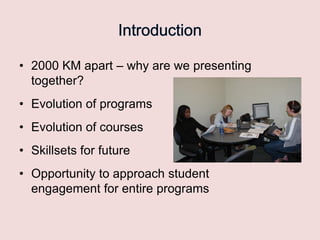
• 2000 KM apart – why are we presenting
together?
• Evolution of programs
• Evolution of courses
• Skillsets for future
• Opportunity to approach student
engagement for entire programs
• The merging of technical communication with
the Usability/User Experience (UX) field is
inevitable and increasing quickly.

• Failure to recognize and embrace these
changes will hasten the field‟s demise.
• As a result, our teaching and technical
communication programs must reflect this
change to remain relevant and functioning.

• Much of this workshop will include discussing
this theme by providing examples and exercises
to show how this change can be central to a
technical communication program.
• “User-Centered Design (UCD) is a methodology
that requires that the user of products be thought
of and understood during the entire process of
product conception, development, and
implementation.”
• Many technical communicators attempt UCD
methods & practices, but that is now required
• Methods and mode of content delivery always
change (this is a constant) – but the types of
content required and expected are rapidly and
dramatically changing.
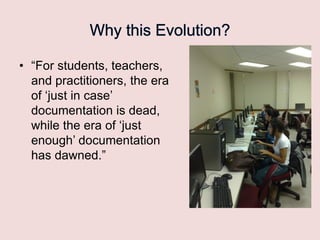
• “For students, teachers,
and practitioners, the era
of „just in case‟
documentation is dead,
while the era of „just
enough‟ documentation
has dawned.”
• “Failure to adapt these methods quickly in both
the classroom and the profession will invariably
lead to the field‟s further decline and likely
extinction as we currently understand it”
• Evolution of the Bachelor‟s Degree in Information
Design at Mt. Royal College/University
• Evolution of the MS in Technical Communications
program at Northeastern University
Workshop format
• Overview of some courses and how
UCD is integrated
• Warming up the sketching muscle…
• Navigation labeling…
• Moving from self-centric to usercentric
– Student Experiences & Self-service

• Debrief and feedback
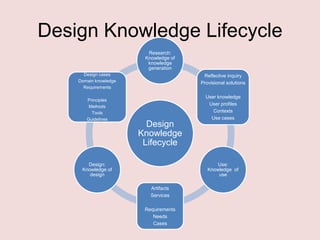
Design Knowledge Lifecycle
Research:
Knowledge of
knowledge
generation
Design cases
Domain knowledge
Requirements
Principles
Methods
Tools
Guidelines

Reflective inquiry
Provisional solutions

Design
Knowledge
Lifecycle

Design:
Knowledge of
design

User knowledge
User profiles
Contexts
Use cases

Use:
Knowledge of
use
Artifacts
Services
Requirements
Needs
Cases
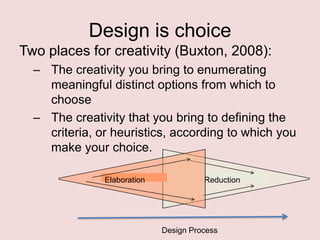
Design is choice
Two places for creativity (Buxton, 2008):
– The creativity you bring to enumerating
meaningful distinct options from which to
choose
– The creativity that you bring to defining the
criteria, or heuristics, according to which you
make your choice.
Elaboration

Reduction

Design Process
What do you currently do

?
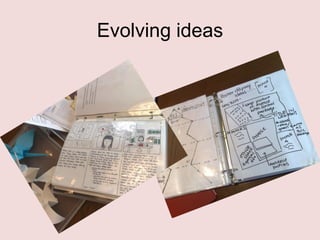
Evolving ideas
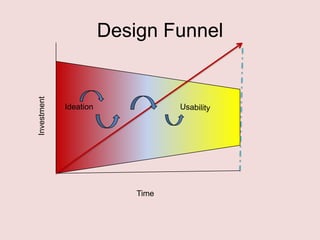
Investment

Design Funnel

Ideation

Time
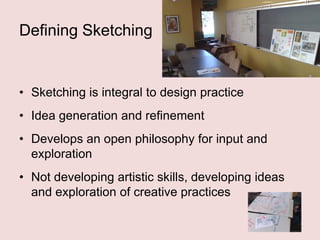
Defining Sketching

• Sketching is integral to design practice
• Idea generation and refinement

• Develops an open philosophy for input and
exploration
• Not developing artistic skills, developing ideas
and exploration of creative practices
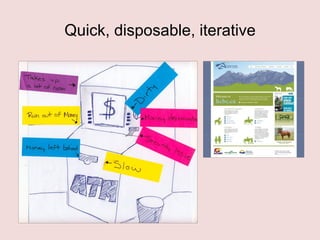
Quick, disposable, iterative
And learn
• When uncertainty is high – keep stakes
low
• Manage front-end process differently
• User-centric orientation embedded
• Participatory design for optimal input
• Iterative user involvement, testing and
validation
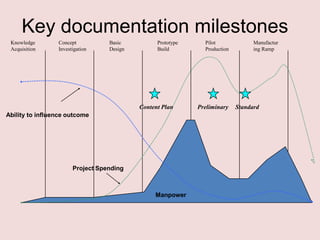
Key documentation milestones
Knowledge
Acquisition

Concept
Investigation

Basic
Design

Prototype
Build

Content Plan
Ability to influence outcome

Project Spending

Manpower

Pilot
Production

Preliminary

Manufactur
ing Ramp

Standard
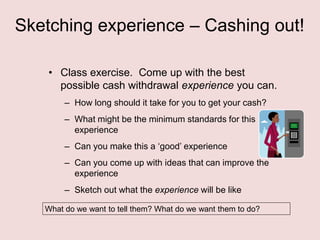
Sketching experience – Cashing out!
• Class exercise. Come up with the best
possible cash withdrawal experience you can.
– How long should it take for you to get your cash?
– What might be the minimum standards for this
experience
– Can you make this a „good‟ experience
– Can you come up with ideas that can improve the
experience

– Sketch out what the experience will be like
What do we want to tell them? What do we want them to do?
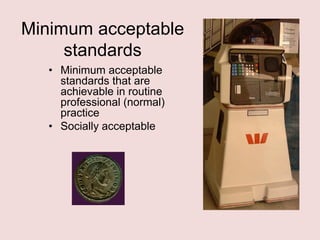
Minimum acceptable
standards
• Minimum acceptable
standards that are
achievable in routine
professional (normal)
practice
• Socially acceptable
Design is Critique
• People on design team
must be as happy to be
wrong as right
• Strong, but fair, criticism
• Reject with good
rationale
• Learn something new
than to be right
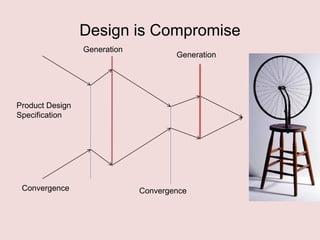
Design is Compromise
Generation

Generation

Product Design
Specification

Convergence

Convergence
Sketches
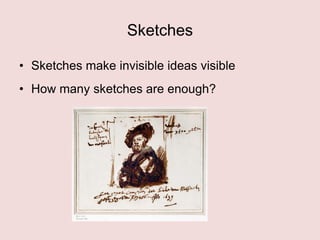
• Sketches make invisible ideas visible
• How many sketches are enough?
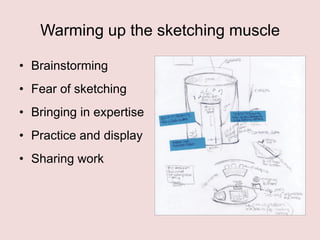
Warming up the sketching muscle
• Brainstorming
• Fear of sketching
• Bringing in expertise

• Practice and display
• Sharing work
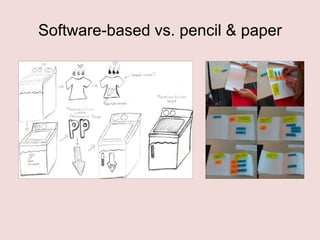
Software-based vs. pencil & paper
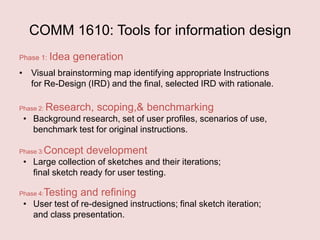
COMM 1610: Tools for information design
Phase 1: Idea

generation

• Visual brainstorming map identifying appropriate Instructions
for Re-Design (IRD) and the final, selected IRD with rationale.
Phase 2:

Research, scoping,& benchmarking

• Background research, set of user profiles, scenarios of use,
benchmark test for original instructions.
Phase 3:

Concept development

• Large collection of sketches and their iterations;
final sketch ready for user testing.
Phase 4:

Testing and refining

• User test of re-designed instructions; final sketch iteration;
and class presentation.
User Involvement
• You don‟t know what you don‟t know!
• Who to test? Ethnographic considerations
• Separation of user and designer
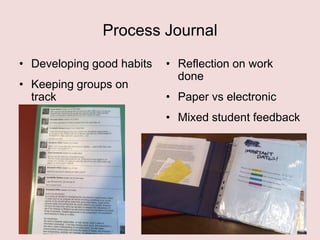
Process Journal
• Developing good habits

• Keeping groups on
track

• Reflection on work
done
• Paper vs electronic
• Mixed student feedback
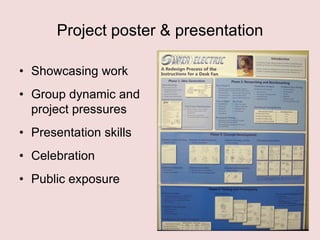
Project poster & presentation
• Showcasing work
• Group dynamic and
project pressures

• Presentation skills
• Celebration
• Public exposure
Conclusion
• Investment – not looking for perfection
• Professional orientation – portfolio of work
• Group think and compromises

• Project management
• Self-centric  User-centric
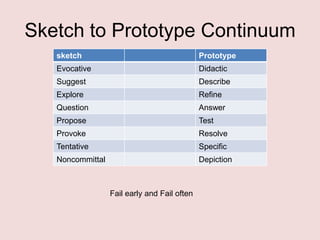
Sketch to Prototype Continuum
sketch

Prototype

Evocative

Didactic

Suggest

Describe

Explore

Refine

Question

Answer

Propose

Test

Provoke

Resolve

Tentative

Specific

Noncommittal

Depiction

Fail early and Fail often
Navigation & Labeling
• TCC 6110 – Information Architecture:
evolved from a theoretical to practitioner
class - redesign an existing Web site.
• Focus is on the review of the navigation
and labeling within a Web site.
Navigation & Labeling
• Class includes a final project that updates
the navigation and labeling of a Web site
of their choice.
• This activity is the next logical step after
the sketching ideas discussed - moving
on to update and make a product more
user centric.
Navigation & Labeling
• Card sorting – critical to revamping a Web
site‟s navigation and labels.
• Suggest as part of a way to better
understand UCD and user centric model –
attempt this method to see if clear trends
and themes emerge.
Navigation & Labeling
• After card sort, have students see if other
methods needed (such as competitive
analysis of other sites) and then start
prototyping for the updates.
• Following is an example of label and
navigation updates:
Navigation & Labeling
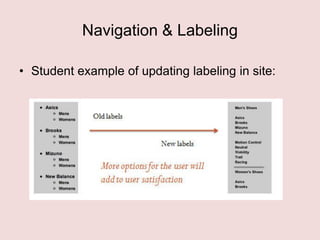
• Student example of updating labeling in site:
Navigation & Labeling
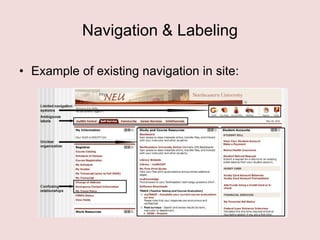
• Example of existing navigation in site:
Navigation & Labeling
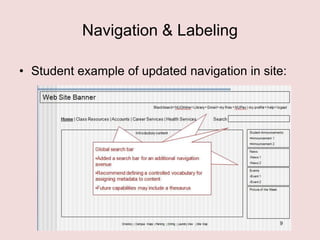
• Student example of updated navigation in site:
Navigation & Labeling
• Understanding of basic concepts of
information architecture and investigating
UCD methods to review and validate
labeling and navigation of Web site is goal.
• Promote more visual approach to move
from text-based approach too.
Navigation & Labeling
• Another key concept is students now
demand key practical skills „take aways‟
from this class and program – this is one.
• Failure to provide these practical skills to
students will hasten the program‟s demise.
• Must constantly reinvent/update program.
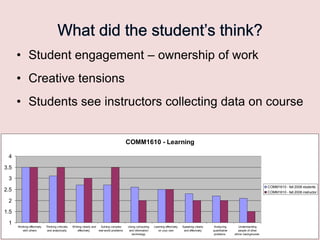
• Student engagement – ownership of work

• Creative tensions
• Students see instructors collecting data on course

COMM1610 - Learning
4
3.5
3
COMM1610 - fall 2008 students

2.5

COMM1610 - fall 2008 instructor

2
1.5
1

Working effectively
with others

Thinking critically
and analytically

Writing clearly and
Solving complex
effectively
real-world problems

Using computing
and information
technology

Learning effectively
on your own

Speaking clearly
and effectively

Analyzing
quantitative
problems

Understanding
people of other
ethnic backgrounds
Future steps
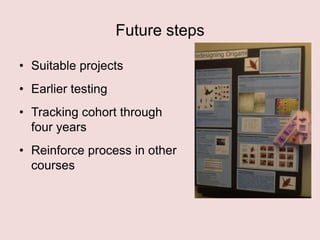
• Suitable projects
• Earlier testing
• Tracking cohort through
four years
• Reinforce process in other
courses
Future steps – required skill sets
• Traditional technical communication skills are
still required: solid writing skills, technological
inquisitiveness, etc
• Understanding of UCD and usability is now also
required – and a true understanding of your user
base.
• Documentation continues to exist – but must be
focused on new ideas such as using tool tips,
graphics, videos, etc. More words not an option!
Using UCD on ourselves
• Please comment on the survey we passed out.
• Let‟s discuss how our presentation mapped to
your understanding and needs!
• What successes have you had with your
students so we can learn from you.
Thank you
• Now we want to hear from you! What do you
think about the approaches presented? Can
they work for you?
• What have you been doing that we can learn
from? How are you creating an engaging, safe
learning environment for your students.
• Let‟s continue the discussion:
– c.laroche@neu.edu
– btraynor@mtroyal.ca

UCD and Technical Communication: The Inevitable Marriage

  • 1.
    UCD and Technical Communications:the inevitable marriage Christopher S. LaRoche, Northeastern University College of Professional Studies (CPS) Senior Lecturer & Technical Communications Consultant Brian Traynor, Associate Professor Faculty of Communication Studies Mount Royal University
  • 2.
    • 2000 KMapart – why are we presenting together? • Evolution of programs • Evolution of courses • Skillsets for future • Opportunity to approach student engagement for entire programs
  • 3.
    • The mergingof technical communication with the Usability/User Experience (UX) field is inevitable and increasing quickly. • Failure to recognize and embrace these changes will hasten the field‟s demise.
  • 4.
    • As aresult, our teaching and technical communication programs must reflect this change to remain relevant and functioning. • Much of this workshop will include discussing this theme by providing examples and exercises to show how this change can be central to a technical communication program.
  • 5.
    • “User-Centered Design(UCD) is a methodology that requires that the user of products be thought of and understood during the entire process of product conception, development, and implementation.” • Many technical communicators attempt UCD methods & practices, but that is now required
  • 6.
    • Methods andmode of content delivery always change (this is a constant) – but the types of content required and expected are rapidly and dramatically changing.
  • 7.
    • “For students,teachers, and practitioners, the era of „just in case‟ documentation is dead, while the era of „just enough‟ documentation has dawned.”
  • 8.
    • “Failure toadapt these methods quickly in both the classroom and the profession will invariably lead to the field‟s further decline and likely extinction as we currently understand it”
  • 9.
    • Evolution ofthe Bachelor‟s Degree in Information Design at Mt. Royal College/University • Evolution of the MS in Technical Communications program at Northeastern University
  • 10.
    Workshop format • Overviewof some courses and how UCD is integrated • Warming up the sketching muscle… • Navigation labeling… • Moving from self-centric to usercentric – Student Experiences & Self-service • Debrief and feedback
  • 11.
    Design Knowledge Lifecycle Research: Knowledgeof knowledge generation Design cases Domain knowledge Requirements Principles Methods Tools Guidelines Reflective inquiry Provisional solutions Design Knowledge Lifecycle Design: Knowledge of design User knowledge User profiles Contexts Use cases Use: Knowledge of use Artifacts Services Requirements Needs Cases
  • 12.
    Design is choice Twoplaces for creativity (Buxton, 2008): – The creativity you bring to enumerating meaningful distinct options from which to choose – The creativity that you bring to defining the criteria, or heuristics, according to which you make your choice. Elaboration Reduction Design Process
  • 13.
    What do youcurrently do ?
  • 14.
  • 15.
  • 16.
    Defining Sketching • Sketchingis integral to design practice • Idea generation and refinement • Develops an open philosophy for input and exploration • Not developing artistic skills, developing ideas and exploration of creative practices
  • 17.
  • 18.
    And learn • Whenuncertainty is high – keep stakes low • Manage front-end process differently • User-centric orientation embedded • Participatory design for optimal input • Iterative user involvement, testing and validation
  • 19.
    Key documentation milestones Knowledge Acquisition Concept Investigation Basic Design Prototype Build ContentPlan Ability to influence outcome Project Spending Manpower Pilot Production Preliminary Manufactur ing Ramp Standard
  • 20.
    Sketching experience –Cashing out! • Class exercise. Come up with the best possible cash withdrawal experience you can. – How long should it take for you to get your cash? – What might be the minimum standards for this experience – Can you make this a „good‟ experience – Can you come up with ideas that can improve the experience – Sketch out what the experience will be like What do we want to tell them? What do we want them to do?
  • 21.
    Minimum acceptable standards • Minimumacceptable standards that are achievable in routine professional (normal) practice • Socially acceptable
  • 22.
    Design is Critique •People on design team must be as happy to be wrong as right • Strong, but fair, criticism • Reject with good rationale • Learn something new than to be right
  • 23.
    Design is Compromise Generation Generation ProductDesign Specification Convergence Convergence
  • 24.
    Sketches • Sketches makeinvisible ideas visible • How many sketches are enough?
  • 25.
    Warming up thesketching muscle • Brainstorming • Fear of sketching • Bringing in expertise • Practice and display • Sharing work
  • 26.
  • 27.
    COMM 1610: Toolsfor information design Phase 1: Idea generation • Visual brainstorming map identifying appropriate Instructions for Re-Design (IRD) and the final, selected IRD with rationale. Phase 2: Research, scoping,& benchmarking • Background research, set of user profiles, scenarios of use, benchmark test for original instructions. Phase 3: Concept development • Large collection of sketches and their iterations; final sketch ready for user testing. Phase 4: Testing and refining • User test of re-designed instructions; final sketch iteration; and class presentation.
  • 28.
    User Involvement • Youdon‟t know what you don‟t know! • Who to test? Ethnographic considerations • Separation of user and designer
  • 29.
    Process Journal • Developinggood habits • Keeping groups on track • Reflection on work done • Paper vs electronic • Mixed student feedback
  • 30.
    Project poster &presentation • Showcasing work • Group dynamic and project pressures • Presentation skills • Celebration • Public exposure
  • 31.
    Conclusion • Investment –not looking for perfection • Professional orientation – portfolio of work • Group think and compromises • Project management • Self-centric  User-centric
  • 32.
    Sketch to PrototypeContinuum sketch Prototype Evocative Didactic Suggest Describe Explore Refine Question Answer Propose Test Provoke Resolve Tentative Specific Noncommittal Depiction Fail early and Fail often
  • 33.
    Navigation & Labeling •TCC 6110 – Information Architecture: evolved from a theoretical to practitioner class - redesign an existing Web site. • Focus is on the review of the navigation and labeling within a Web site.
  • 34.
    Navigation & Labeling •Class includes a final project that updates the navigation and labeling of a Web site of their choice. • This activity is the next logical step after the sketching ideas discussed - moving on to update and make a product more user centric.
  • 35.
    Navigation & Labeling •Card sorting – critical to revamping a Web site‟s navigation and labels. • Suggest as part of a way to better understand UCD and user centric model – attempt this method to see if clear trends and themes emerge.
  • 36.
    Navigation & Labeling •After card sort, have students see if other methods needed (such as competitive analysis of other sites) and then start prototyping for the updates. • Following is an example of label and navigation updates:
  • 37.
    Navigation & Labeling •Student example of updating labeling in site:
  • 38.
    Navigation & Labeling •Example of existing navigation in site:
  • 39.
    Navigation & Labeling •Student example of updated navigation in site:
  • 40.
    Navigation & Labeling •Understanding of basic concepts of information architecture and investigating UCD methods to review and validate labeling and navigation of Web site is goal. • Promote more visual approach to move from text-based approach too.
  • 41.
    Navigation & Labeling •Another key concept is students now demand key practical skills „take aways‟ from this class and program – this is one. • Failure to provide these practical skills to students will hasten the program‟s demise. • Must constantly reinvent/update program.
  • 42.
    • Student engagement– ownership of work • Creative tensions • Students see instructors collecting data on course COMM1610 - Learning 4 3.5 3 COMM1610 - fall 2008 students 2.5 COMM1610 - fall 2008 instructor 2 1.5 1 Working effectively with others Thinking critically and analytically Writing clearly and Solving complex effectively real-world problems Using computing and information technology Learning effectively on your own Speaking clearly and effectively Analyzing quantitative problems Understanding people of other ethnic backgrounds
  • 43.
    Future steps • Suitableprojects • Earlier testing • Tracking cohort through four years • Reinforce process in other courses
  • 44.
    Future steps –required skill sets • Traditional technical communication skills are still required: solid writing skills, technological inquisitiveness, etc • Understanding of UCD and usability is now also required – and a true understanding of your user base. • Documentation continues to exist – but must be focused on new ideas such as using tool tips, graphics, videos, etc. More words not an option!
  • 45.
    Using UCD onourselves • Please comment on the survey we passed out. • Let‟s discuss how our presentation mapped to your understanding and needs! • What successes have you had with your students so we can learn from you.
  • 46.
    Thank you • Nowwe want to hear from you! What do you think about the approaches presented? Can they work for you? • What have you been doing that we can learn from? How are you creating an engaging, safe learning environment for your students. • Let‟s continue the discussion: – c.laroche@neu.edu – btraynor@mtroyal.ca