The User Edit Method

    What is it and how can I use it?


Christopher S. LaRoche, Senior Lecturer
 College of Professional Studies (CPS)
       Northeastern University


        Copyright © 2010 - Christopher S. LaRoche
User Edit


                 User Edit – Introduction

• The User (of Usability) Edit is a specific (if somewhat
  unknown) method for performing usability evaluations on
  documentation. (Atlas, p. 28)

• This method was ‘created’ by Marshall Atlas in 1981. He
  documented the process in a journal, though variants of
  this method existed previously – particularly in military
  uses and potentially within companies (but secret).

• The author did a retrospective in 1998 wondering why the
  method was not well known or used within the usability
  field.
User Edit


                   User Edit – Overview

• “The user edit is perhaps the most powerful tool for finding
  usability problems in documentation.” (Wilson, p. TBD)

• The User Edit is “fast, cheap, easy, and powerful, yielding a
  lot of information for very little effort.” (Atlas, p. 28)

• According to Wishbow: “…In two easily digested pages,
  Atlas accomplishes for words what Tufte’s ‘friendly’ and
  ‘unfriendly’ principles (Tufte, p. 183) accomplish for
  graphics.” (Wishbow, p. 15)
User Edit


                   User Edit – Overview

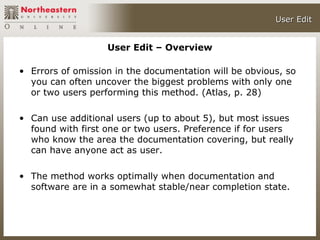
• Errors of omission in the documentation will be obvious, so
  you can often uncover the biggest problems with only one
  or two users performing this method. (Atlas, p. 28)

• Can use additional users (up to about 5), but most issues
  found with first one or two users. Preference if for users
  who know the area the documentation covering, but really
  can have anyone act as user.

• The method works optimally when documentation and
  software are in a somewhat stable/near completion state.
User Edit


       User Edit – Documentation Types


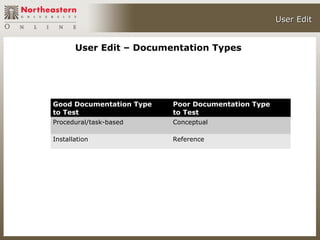
Good Documentation Type   Poor Documentation Type
to Test                   to Test
Procedural/task-based     Conceptual

Installation              Reference
User Edit
User Edit
User Edit


              User Edit – Think Aloud Method

• Think Aloud
   — Similar to the traditional usability test where you ask
     participant to think aloud as they work and record their
     thoughts, ideas, and information during the evaluation.

   — With this method, it does require similar interaction between
     the facilitator and participants – so an initial protocol,
     facilitation, and debriefing is required.

   — You have the participant sit with the product and
     documentation and read and perform the particular task(s)
     while talking out loud.
User Edit


           User Edit – Marked Up Pages Method

• Marked Up Pages
   — This method entails giving the participant a hard copy of the
     documentation (either a book or printed out version of an
     online version of the documentation).

   — The participant than marks up the documentation when they
     think it is incorrect, unclear, or ambiguous.

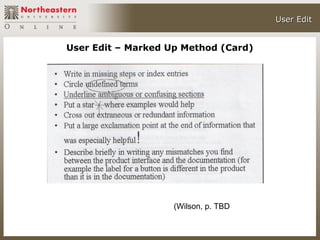
   — Often you create a set of specific codes and symbols to mark
     up the documentation

   — Could write up these markings (or whatever ones you choose)
     on an index card or piece of paper to give to the participant.
User Edit


            User Edit – Marked Up Pages Method

• Marked Up Pages – Examples of how to do mark up:

   —   Write in missing steps
   —   Circle undefined terms
   —   Make a notation where examples would help
   —   Cross out extra or redundant information
   —   Use an exclamation point for particularly helpful content
   —   Write up where you would find mismatches between the
       product software and the documentation.
                                               (Wilson, p. TBD)
User Edit


User Edit – Marked Up Method (Card)


                    (Wilson, p. TBD)
User Edit


           User Edit – Advantages

• Use with online and/or hardcopy documentation
• Often finds issues technical reviewers miss
• Based on usability methods known to practitioners
• Cost and learning time is minimal
• Use existing software/documentation available
• Find major problems with few participants
• You do not need a dedicated lab (general office ok)
• Needed tools (recorder, video camera) often
  available
• Get feedback on the visual elements of the
  documentation (Wilson, p. TBD)
User Edit


          User Edit – Disadvantages

• Requires all focus on the documentation – which is
  often an unrealistic expectation
• Provides a list of very detailed feedback on a
  particular step, but the scope is very narrow as well
• This method can be time consuming if you have
  many sets of tasks and sub tasks to complete
• Potentially huge data analysis – if participants
  mentioned different missing pieces
• Not a method known to the wider usability
  practitioner profession (Wilson, p. TBD)
User Edit


                   User Edit - Conclusion

• This is a particularly good method for testing procedural
  and installation documentation. The participant will quickly
  find missing or ambiguous information.

• This is a solid method to test your documentation that does
  not require many of the more expensive aspects of
  traditional usability testing.

• You do not need many users and often inexperienced or
  novice users are fine participants.

• You can perform the test informally in an office setting.
Contacting Me


                      Contacting Me

• Please contact me if you have any questions about this
  chat, the user/usability edit, etc.

• Please either email me (c.laroche@neu.edu) if you have
  any questions or comments.

• Thank you.
Bibliography/References


                  Bibliography/References

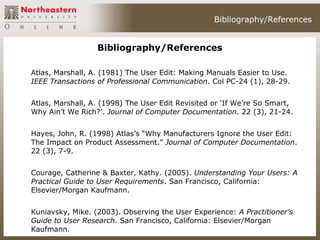
Atlas, Marshall, A. (1981) The User Edit: Making Manuals Easier to Use.
IEEE Transactions of Professional Communication. Col PC-24 (1), 28-29.


Atlas, Marshall, A. (1998) The User Edit Revisited or ‘If We’re So Smart,
Why Ain’t We Rich?’. Journal of Computer Documentation. 22 (3), 21-24.


Hayes, John, R. (1998) Atlas’s “Why Manufacturers Ignore the User Edit:
The Impact on Product Assessment.” Journal of Computer Documentation.
22 (3), 7-9.


Courage, Catherine & Baxter, Kathy. (2005). Understanding Your Users: A
Practical Guide to User Requirements. San Francisco, California:
Elsevier/Morgan Kaufmann.


Kuniavsky, Mike. (2003). Observing the User Experience: A Practitioner’s
Guide to User Research. San Francisco, California: Elsevier/Morgan
Kaufmann.
Bibliography/References


                  Bibliography/References

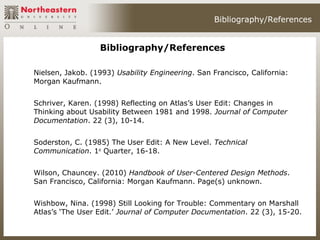
Nielsen, Jakob. (1993) Usability Engineering. San Francisco, California:
Morgan Kaufmann.


Schriver, Karen. (1998) Reflecting on Atlas’s User Edit: Changes in
Thinking about Usability Between 1981 and 1998. Journal of Computer
Documentation. 22 (3), 10-14.


Soderston, C. (1985) The User Edit: A New Level. Technical
Communication. 1st Quarter, 16-18.


Wilson, Chauncey. (2010) Handbook of User-Centered Design Methods.
San Francisco, California: Morgan Kaufmann. Page(s) unknown.


Wishbow, Nina. (1998) Still Looking for Trouble: Commentary on Marshall
Atlas’s ‘The User Edit.’ Journal of Computer Documentation. 22 (3), 15-20.

The User Edit Method - What is it and how can I use it?

  • 1.
    The User EditMethod What is it and how can I use it? Christopher S. LaRoche, Senior Lecturer College of Professional Studies (CPS) Northeastern University Copyright © 2010 - Christopher S. LaRoche
  • 2.
    User Edit User Edit – Introduction • The User (of Usability) Edit is a specific (if somewhat unknown) method for performing usability evaluations on documentation. (Atlas, p. 28) • This method was ‘created’ by Marshall Atlas in 1981. He documented the process in a journal, though variants of this method existed previously – particularly in military uses and potentially within companies (but secret). • The author did a retrospective in 1998 wondering why the method was not well known or used within the usability field.
  • 3.
    User Edit User Edit – Overview • “The user edit is perhaps the most powerful tool for finding usability problems in documentation.” (Wilson, p. TBD) • The User Edit is “fast, cheap, easy, and powerful, yielding a lot of information for very little effort.” (Atlas, p. 28) • According to Wishbow: “…In two easily digested pages, Atlas accomplishes for words what Tufte’s ‘friendly’ and ‘unfriendly’ principles (Tufte, p. 183) accomplish for graphics.” (Wishbow, p. 15)
  • 4.
    User Edit User Edit – Overview • Errors of omission in the documentation will be obvious, so you can often uncover the biggest problems with only one or two users performing this method. (Atlas, p. 28) • Can use additional users (up to about 5), but most issues found with first one or two users. Preference if for users who know the area the documentation covering, but really can have anyone act as user. • The method works optimally when documentation and software are in a somewhat stable/near completion state.
  • 5.
    User Edit User Edit – Documentation Types Good Documentation Type Poor Documentation Type to Test to Test Procedural/task-based Conceptual Installation Reference
  • 6.
  • 7.
  • 8.
    User Edit User Edit – Think Aloud Method • Think Aloud — Similar to the traditional usability test where you ask participant to think aloud as they work and record their thoughts, ideas, and information during the evaluation. — With this method, it does require similar interaction between the facilitator and participants – so an initial protocol, facilitation, and debriefing is required. — You have the participant sit with the product and documentation and read and perform the particular task(s) while talking out loud.
  • 9.
    User Edit User Edit – Marked Up Pages Method • Marked Up Pages — This method entails giving the participant a hard copy of the documentation (either a book or printed out version of an online version of the documentation). — The participant than marks up the documentation when they think it is incorrect, unclear, or ambiguous. — Often you create a set of specific codes and symbols to mark up the documentation — Could write up these markings (or whatever ones you choose) on an index card or piece of paper to give to the participant.
  • 10.
    User Edit User Edit – Marked Up Pages Method • Marked Up Pages – Examples of how to do mark up: — Write in missing steps — Circle undefined terms — Make a notation where examples would help — Cross out extra or redundant information — Use an exclamation point for particularly helpful content — Write up where you would find mismatches between the product software and the documentation. (Wilson, p. TBD)
  • 11.
    User Edit User Edit– Marked Up Method (Card) (Wilson, p. TBD)
  • 12.
    User Edit User Edit – Advantages • Use with online and/or hardcopy documentation • Often finds issues technical reviewers miss • Based on usability methods known to practitioners • Cost and learning time is minimal • Use existing software/documentation available • Find major problems with few participants • You do not need a dedicated lab (general office ok) • Needed tools (recorder, video camera) often available • Get feedback on the visual elements of the documentation (Wilson, p. TBD)
  • 13.
    User Edit User Edit – Disadvantages • Requires all focus on the documentation – which is often an unrealistic expectation • Provides a list of very detailed feedback on a particular step, but the scope is very narrow as well • This method can be time consuming if you have many sets of tasks and sub tasks to complete • Potentially huge data analysis – if participants mentioned different missing pieces • Not a method known to the wider usability practitioner profession (Wilson, p. TBD)
  • 14.
    User Edit User Edit - Conclusion • This is a particularly good method for testing procedural and installation documentation. The participant will quickly find missing or ambiguous information. • This is a solid method to test your documentation that does not require many of the more expensive aspects of traditional usability testing. • You do not need many users and often inexperienced or novice users are fine participants. • You can perform the test informally in an office setting.
  • 15.
    Contacting Me Contacting Me • Please contact me if you have any questions about this chat, the user/usability edit, etc. • Please either email me (c.laroche@neu.edu) if you have any questions or comments. • Thank you.
  • 16.
    Bibliography/References Bibliography/References Atlas, Marshall, A. (1981) The User Edit: Making Manuals Easier to Use. IEEE Transactions of Professional Communication. Col PC-24 (1), 28-29. Atlas, Marshall, A. (1998) The User Edit Revisited or ‘If We’re So Smart, Why Ain’t We Rich?’. Journal of Computer Documentation. 22 (3), 21-24. Hayes, John, R. (1998) Atlas’s “Why Manufacturers Ignore the User Edit: The Impact on Product Assessment.” Journal of Computer Documentation. 22 (3), 7-9. Courage, Catherine & Baxter, Kathy. (2005). Understanding Your Users: A Practical Guide to User Requirements. San Francisco, California: Elsevier/Morgan Kaufmann. Kuniavsky, Mike. (2003). Observing the User Experience: A Practitioner’s Guide to User Research. San Francisco, California: Elsevier/Morgan Kaufmann.
  • 17.
    Bibliography/References Bibliography/References Nielsen, Jakob. (1993) Usability Engineering. San Francisco, California: Morgan Kaufmann. Schriver, Karen. (1998) Reflecting on Atlas’s User Edit: Changes in Thinking about Usability Between 1981 and 1998. Journal of Computer Documentation. 22 (3), 10-14. Soderston, C. (1985) The User Edit: A New Level. Technical Communication. 1st Quarter, 16-18. Wilson, Chauncey. (2010) Handbook of User-Centered Design Methods. San Francisco, California: Morgan Kaufmann. Page(s) unknown. Wishbow, Nina. (1998) Still Looking for Trouble: Commentary on Marshall Atlas’s ‘The User Edit.’ Journal of Computer Documentation. 22 (3), 15-20.

Editor's Notes

  • #3 RETROSPECTIVE -- Prompted a flurry of academic debate about the method and usability and documentation
  • #5 Prior to using the user edit method– always fix the most obvious production issues – typos, improper spelling, layout issues so that user do not focus on this and concentrates on the particular procedure itself.
  • #8 Ask about if folks know the Think Aloud Protocol? Discuss this method a bit.