COMPUTER MEMORY 
• In computing memory refers to the physical device used to 
store program (sequences of instruction) or data on a 
temporary or permanent basis for use in a computer or other 
digital electronic device.
TYPES OF COMPUTER MEMORY 
THERE ARE TWO TYPES OF COMPUTER MEMORY. 
1, VOLATILE MEMORY. 
2, NON VOLATILE MEMORY.
VOLATILE MEMORY 
• Volatile memory is a type of storage whose contents are erased when the system's 
power is turned off or interrupted. For example, RAM is volatile; meaning users will lose 
a document if they do not save their work to a non-volatile classification of memory, such 
as a hard drive, before shutting down the computer. 
• There are several types of volatile memory 
• Ram, cache, register and virtual memory.
RAM (RANDOM ACCESS MEMORY) 
• Ram is stands for "random access memory". It stores 
temporarily information and it is also known short term memory 
RAM simply holds data for the processor..
TYPES OF RAM 
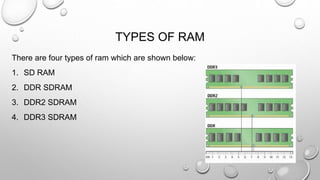
There are four types of ram which are shown below: 
1. SD RAM 
2. DDR SDRAM 
3. DDR2 SDRAM 
4. DDR3 SDRAM
SDRAM, DDR SDRAM 
SDRAM: SDRAM stands for synchronous dynamic random access memory. SDRAM is 
single data rate meaning that SDRAM can accept one command and transfer one word of 
data per clock cycle typical speeds of SDRAM are 100 and 133 mhz. 
DDR RAM: DDR SDRAM stands for double data rate synchronous dynamic random 
access memory. DDR RAM transfers data twice per clock cycle, hence the name double 
data rate. DDR clock speeds range between 200 MHz (DDR-200) and 400 MHz (DDR- 
400). DDR-200 transfers 1600 MB/s, while DDR-400 transfers 3200 MB/s.
DDR2 SDRAM AND DDR3 SDRAM 
DDR2 SDRAM: DDR2 SDRAM stands for double data rate 2 synchronous dynamic random 
access memory.DDR2 is twice as fast as DDR which means twice as much data is carried to 
the module for each clock cycle. DDR2 speeds range between 400 MHz (DDR2-400) and 800 
MHz (DDR2-800). DDR2-400 transfers 3200 MB/s. DDR2-800 transfers 6400 MB/s. 
DDR3 SDRAM: So by now after reading the above it is quite obvious what DDR3 
SDRAM stands for, double data rate 3 synchronous dynamic random access memory. In 
theory DDR3 is supposed to act twice as fast as DDR2 memories. Thus DDR3 speeds 
range between 800 MHz (DDR3-800) and 1600 MHz (DDR3-1600). DDR3-800 transfers 
6400 MB/s; DDR3-1600 transfers 12800 MB/s.
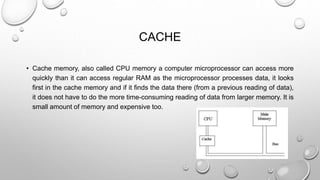
CACHE 
• Cache memory, also called CPU memory a computer microprocessor can access more 
quickly than it can access regular RAM as the microprocessor processes data, it looks 
first in the cache memory and if it finds the data there (from a previous reading of data), 
it does not have to do the more time-consuming reading of data from larger memory. It is 
small amount of memory and expensive too.
REGISTERS 
• In computer architecture, a processor register is a small amount of storage available as 
part of a digital processor, such as a CPU. Such registers are (typically) addressed by 
mechanisms other than main memory and can be accessed faster. It is more expensive 
and fastest than cache.
TYPES OF REGISTER 
THERE ARE TWO TYPES OF REGISTER. 
1. MEMORY BUFFER REGISTER 
2. MEMORY ADDRESS REGISTER
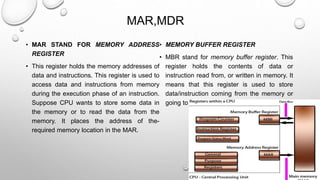
MAR,MDR 
• MAR STAND FOR MEMORY ADDRESS 
REGISTER 
• This register holds the memory addresses of 
data and instructions. This register is used to 
access data and instructions from memory 
during the execution phase of an instruction. 
Suppose CPU wants to store some data in 
the memory or to read the data from the 
memory. It places the address of the-required 
memory location in the MAR. 
• MEMORY BUFFER REGISTER 
• MBR stand for memory buffer register. This 
register holds the contents of data or 
instruction read from, or written in memory. It 
means that this register is used to store 
data/instruction coming from the memory or 
going to the memory.
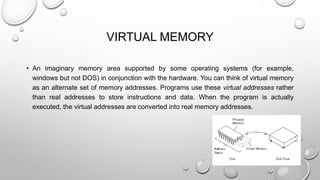
VIRTUAL MEMORY 
• An imaginary memory area supported by some operating systems (for example, 
windows but not DOS) in conjunction with the hardware. You can think of virtual memory 
as an alternate set of memory addresses. Programs use these virtual addresses rather 
than real addresses to store instructions and data. When the program is actually 
executed, the virtual addresses are converted into real memory addresses.
NON VOLATILE MEMORY 
• Non-volatile memory is computer memory that can get back stored information even 
when not powered. 
• There are several type of non-volatile memory. 
• Rom , flash memory
ROM( READ ONLY MEMORY) 
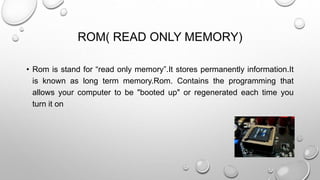
• Rom is stand for “read only memory”.It stores permanently information.It 
is known as long term memory.Rom. Contains the programming that 
allows your computer to be "booted up" or regenerated each time you 
turn it on
FLASH MEMORY 
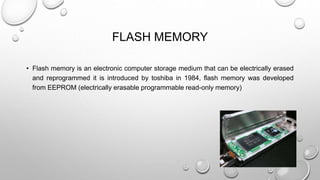
• Flash memory is an electronic computer storage medium that can be electrically erased 
and reprogrammed it is introduced by toshiba in 1984, flash memory was developed 
from EEPROM (electrically erasable programmable read-only memory)
TYPES OF ROM(READ ONLINE MEMORY) 
THERE ARE THREE TYPES OF ROM… 
1. PROM 
2. EPROM 
3. EEPROM
PROM,EPROM AND EEPROM 
• PROM: This type of ROM can be re-programmed by using a special device called a PROM 
programmer. Generally, a PROM can only be changed/updated once. 
• EPROM: This type of ROM can have its contents erased by ultraviolet light and then 
reprogrammed by an RPROM programmer. This procedure can be carried out many times; 
however, the constant erasing and rewriting will eventually render the chip useless. 
• EEPROM: This type of ROM works in a similar way to flash memory in that it can its 
contents can be 'flashed' for erasure ad then written to without having to remove the chip 
from its environment. EEPROM are used to store a computer system's BIOS, and can 
be updated without returning the unit to the factory. In many cases, BIOS updates can 
be carried out by computer users wishing a BIOS update.
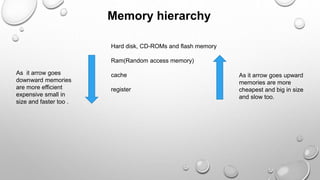
Hard disk, CD-ROMs and flash memory 
Ram(Random access memory) 
cache 
register 
As it arrow goes 
downward memories 
are more efficient 
expensive small in 
size and faster too . 
As it arrow goes upward 
memories are more 
cheapest and big in size 
and slow too. 
Memory hierarchy
GROUP MEMBERS: 
 SHAHBAZ AZEEM (GROUP LEADER) 
 SAAD AMIN 
 ANAS

TYPES OF COMPUTER MEMORIES

  • 2.
    COMPUTER MEMORY •In computing memory refers to the physical device used to store program (sequences of instruction) or data on a temporary or permanent basis for use in a computer or other digital electronic device.
  • 3.
    TYPES OF COMPUTERMEMORY THERE ARE TWO TYPES OF COMPUTER MEMORY. 1, VOLATILE MEMORY. 2, NON VOLATILE MEMORY.
  • 4.
    VOLATILE MEMORY •Volatile memory is a type of storage whose contents are erased when the system's power is turned off or interrupted. For example, RAM is volatile; meaning users will lose a document if they do not save their work to a non-volatile classification of memory, such as a hard drive, before shutting down the computer. • There are several types of volatile memory • Ram, cache, register and virtual memory.
  • 5.
    RAM (RANDOM ACCESSMEMORY) • Ram is stands for "random access memory". It stores temporarily information and it is also known short term memory RAM simply holds data for the processor..
  • 6.
    TYPES OF RAM There are four types of ram which are shown below: 1. SD RAM 2. DDR SDRAM 3. DDR2 SDRAM 4. DDR3 SDRAM
  • 7.
    SDRAM, DDR SDRAM SDRAM: SDRAM stands for synchronous dynamic random access memory. SDRAM is single data rate meaning that SDRAM can accept one command and transfer one word of data per clock cycle typical speeds of SDRAM are 100 and 133 mhz. DDR RAM: DDR SDRAM stands for double data rate synchronous dynamic random access memory. DDR RAM transfers data twice per clock cycle, hence the name double data rate. DDR clock speeds range between 200 MHz (DDR-200) and 400 MHz (DDR- 400). DDR-200 transfers 1600 MB/s, while DDR-400 transfers 3200 MB/s.
  • 8.
    DDR2 SDRAM ANDDDR3 SDRAM DDR2 SDRAM: DDR2 SDRAM stands for double data rate 2 synchronous dynamic random access memory.DDR2 is twice as fast as DDR which means twice as much data is carried to the module for each clock cycle. DDR2 speeds range between 400 MHz (DDR2-400) and 800 MHz (DDR2-800). DDR2-400 transfers 3200 MB/s. DDR2-800 transfers 6400 MB/s. DDR3 SDRAM: So by now after reading the above it is quite obvious what DDR3 SDRAM stands for, double data rate 3 synchronous dynamic random access memory. In theory DDR3 is supposed to act twice as fast as DDR2 memories. Thus DDR3 speeds range between 800 MHz (DDR3-800) and 1600 MHz (DDR3-1600). DDR3-800 transfers 6400 MB/s; DDR3-1600 transfers 12800 MB/s.
  • 9.
    CACHE • Cachememory, also called CPU memory a computer microprocessor can access more quickly than it can access regular RAM as the microprocessor processes data, it looks first in the cache memory and if it finds the data there (from a previous reading of data), it does not have to do the more time-consuming reading of data from larger memory. It is small amount of memory and expensive too.
  • 10.
    REGISTERS • Incomputer architecture, a processor register is a small amount of storage available as part of a digital processor, such as a CPU. Such registers are (typically) addressed by mechanisms other than main memory and can be accessed faster. It is more expensive and fastest than cache.
  • 11.
    TYPES OF REGISTER THERE ARE TWO TYPES OF REGISTER. 1. MEMORY BUFFER REGISTER 2. MEMORY ADDRESS REGISTER
  • 12.
    MAR,MDR • MARSTAND FOR MEMORY ADDRESS REGISTER • This register holds the memory addresses of data and instructions. This register is used to access data and instructions from memory during the execution phase of an instruction. Suppose CPU wants to store some data in the memory or to read the data from the memory. It places the address of the-required memory location in the MAR. • MEMORY BUFFER REGISTER • MBR stand for memory buffer register. This register holds the contents of data or instruction read from, or written in memory. It means that this register is used to store data/instruction coming from the memory or going to the memory.
  • 13.
    VIRTUAL MEMORY •An imaginary memory area supported by some operating systems (for example, windows but not DOS) in conjunction with the hardware. You can think of virtual memory as an alternate set of memory addresses. Programs use these virtual addresses rather than real addresses to store instructions and data. When the program is actually executed, the virtual addresses are converted into real memory addresses.
  • 14.
    NON VOLATILE MEMORY • Non-volatile memory is computer memory that can get back stored information even when not powered. • There are several type of non-volatile memory. • Rom , flash memory
  • 15.
    ROM( READ ONLYMEMORY) • Rom is stand for “read only memory”.It stores permanently information.It is known as long term memory.Rom. Contains the programming that allows your computer to be "booted up" or regenerated each time you turn it on
  • 16.
    FLASH MEMORY •Flash memory is an electronic computer storage medium that can be electrically erased and reprogrammed it is introduced by toshiba in 1984, flash memory was developed from EEPROM (electrically erasable programmable read-only memory)
  • 17.
    TYPES OF ROM(READONLINE MEMORY) THERE ARE THREE TYPES OF ROM… 1. PROM 2. EPROM 3. EEPROM
  • 18.
    PROM,EPROM AND EEPROM • PROM: This type of ROM can be re-programmed by using a special device called a PROM programmer. Generally, a PROM can only be changed/updated once. • EPROM: This type of ROM can have its contents erased by ultraviolet light and then reprogrammed by an RPROM programmer. This procedure can be carried out many times; however, the constant erasing and rewriting will eventually render the chip useless. • EEPROM: This type of ROM works in a similar way to flash memory in that it can its contents can be 'flashed' for erasure ad then written to without having to remove the chip from its environment. EEPROM are used to store a computer system's BIOS, and can be updated without returning the unit to the factory. In many cases, BIOS updates can be carried out by computer users wishing a BIOS update.
  • 19.
    Hard disk, CD-ROMsand flash memory Ram(Random access memory) cache register As it arrow goes downward memories are more efficient expensive small in size and faster too . As it arrow goes upward memories are more cheapest and big in size and slow too. Memory hierarchy
  • 20.
    GROUP MEMBERS: SHAHBAZ AZEEM (GROUP LEADER)  SAAD AMIN  ANAS