elements of Transport Protocol
Transport protocols are implemented to establish a reliable service between two
machines on a network, which resembles the data link protocols implemented
at layer 2. The major difference is that the data link layer uses a physical channel
between two routers while the transport layer uses a subnet.
The following are the issues for implementing transport protocols−
Types of Service
The transport layer also determines the type of service provided to the users
from the session layer. An error-free point-to-point communication to deliver
messages in the order in which they were transmitted is one of the key
functions of the transport layer.
Error Control
• Error detection and error recovery are an integral part of reliable service, and therefore they are necessary to
perform error control mechanisms on an end-to-end basis. To control errors from lost or duplicate segments,
the transport layer enables unique segment sequence numbers to the different packets of the message, creating
virtual circuits, and allowing only one virtual circuit per session.
Flow Control
• The underlying rule of flow control is to maintain a synergy between a fast process and a slow process. The transport layer
enables a fast process to keep pace with a slow one. Acknowledgments are sent back to manage end-to-end flow control.
Go-back N algorithms are used to request the retransmission of packets starting with packet number N. Selective Repeat is
used to request specific packets to be retransmitted.
Connection Establishment/Release
• The transport layer creates and releases the connection across the network. This includes a naming mechanism
so that a process on one machine can indicate with whom it wishes to communicate. The transport layer
enables us to establish and delete connections across the network to multiplex several message streams onto
one communication channel.
Multiplexing/Demultiplexing
• The transport layer establishes a separate network connection for each transport connection required by the
session layer. To improve throughput, the transport layer establishes multiple network connections. When the
issue of throughput is not important, it multiplexes several transport connections onto the same network
connection, thus reducing the cost of establishing and maintaining the network connections.When several
connections are multiplexed, they call for demultiplexing at the receiving end. In the case of the transport layer,
the communication takes place only between two processes and not between two machines. Hence,
communication at the transport layer is also known as peer-to-peer or process-to-process communication.
Fragmentation and re-assembly
• When the transport layer receives a large message from the session layer, it breaks the
message into smaller units depending on the requirement. This process is called
fragmentation. Thereafter, it is passed to the network layer. Conversely, when the transport
layer acts as the receiving process, it reorders the pieces of a message before reassembling
them into a message.
Addressing
• The Transport Layer deals with addressing or labeling a frame. It also differentiates between
a connection and a transaction. Connection identifiers are ports or sockets that label each
frame, so the receiving device knows which process it has been sent from. This helps in
keeping track of multiple-message conversations. Ports or sockets address multiple
conservations in the same location.
Functions of Transport Layer
• The process to process delivery
• End-to-end connection between devices
• Multiplexing and Demultiplexing
• Data integrity and error Correction
• Congestion Control
• Flow Control
Characteristics of Transport Layer Protocol
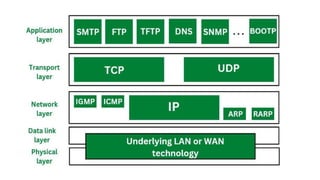
• The two protocols that make up the transport layer are TCP and UDP.
• A datagram is sent by the IP protocol at the network layer from a source host to a destination host.
• These days, an operating system can support environments with multiple users and processes; a
program under execution is referred to as a process.
• A source process is transmitting a process to a destination process when a host sends a message to
another host. Certain connections to certain ports, referred to as protocol ports, are defined by the
transport layer protocols.
• A positive integer address, consisting of 16 bits, defines each port.
Transport Layer Protocols
The transport layer is represented majorly by TCP and UDP protocols. Today almost all operating systems
support multiprocessing multi-user environments. This transport layer protocol provides connections to the
individual ports. These ports are known as protocol ports. Transport layer protocols work above the IP
protocols and deliver the data packets from IP serves to the destination port and from the originating port to
destination IP services. Below are the protocols used at the transport layer.
1. UDP
UDP stands for User Datagram Protocol. User Datagram Protocol provides a nonsequential
transmission of data. It is a connectionless transport protocol. UDP protocol is used in applications
where the speed and size of data transmitted is considered as more important than the security and
reliability. User Datagram is defined as a packet produced by User Datagram Protocol. UDP protocol
adds checksum error control, transport level addresses, and information of length to the data
received from the layer above it. Services provided by User Datagram Protocol(UDP) are
connectionless service, faster delivery of messages, checksum, and process-to-process
communication.
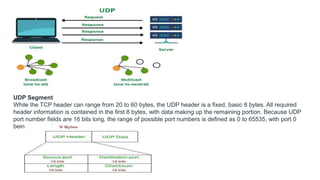
UDP Segment
While the TCP header can range from 20 to 60 bytes, the UDP header is a fixed, basic 8 bytes. All required
header information is contained in the first 8 bytes, with data making up the remaining portion. Because UDP
port number fields are 16 bits long, the range of possible port numbers is defined as 0 to 65535, with port 0
being reserved.
• Source Port: Source Port is a 2 Byte long field used to identify the port number of the source.
• Destination Port: This 2-byte element is used to specify the packet’s destination port.
• Length: The whole length of a UDP packet, including the data and header. The field has sixteen bits.
• Cheksum: The checksum field is two bytes long. The data is padded with zero octets at the end (if
needed) to create a multiple of two octets. It is the 16-bit one’s complement of the one’s complement
sum of the UDP header, the pseudo-header containing information from the IP header, and the data.
Advantages of UDP
• UDP also provides multicast and broadcast transmission of data.
• UDP protocol is preferred more for small transactions such as DNS lookup.
• It is a connectionless protocol, therefore there is no compulsion to have a connection-
oriented network.
• UDP provides fast delivery of messages.
Disadvantages of UDP
• In UDP protocol there is no guarantee that the packet is delivered.
• UDP protocol suffers from worse packet loss.
• UDP protocol has no congestion control mechanism.
• UDP protocol does not provide the sequential transmission of data.
2. TCP
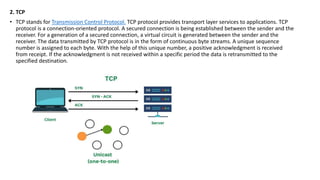
• TCP stands for Transmission Control Protocol. TCP protocol provides transport layer services to applications. TCP
protocol is a connection-oriented protocol. A secured connection is being established between the sender and the
receiver. For a generation of a secured connection, a virtual circuit is generated between the sender and the
receiver. The data transmitted by TCP protocol is in the form of continuous byte streams. A unique sequence
number is assigned to each byte. With the help of this unique number, a positive acknowledgment is received
from receipt. If the acknowledgment is not received within a specific period the data is retransmitted to the
specified destination.
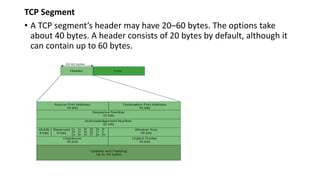
TCP Segment
• A TCP segment’s header may have 20–60 bytes. The options take
about 40 bytes. A header consists of 20 bytes by default, although it
can contain up to 60 bytes.
• Source Port Address: The port address of the program sending the data segment is stored in the
16-bit field known as the source port address.
• Destination Port Address: The port address of the application running on the host receiving the
data segment is stored in the destination port address, a 16-bit field.
• Sequence Number: The sequence number, or the byte number of the first byte sent in that
specific segment, is stored in a 32-bit field. At the receiving end, it is used to put the message
back together once it has been received out of sequence.
• Acknowledgement Number: The acknowledgement number, or the byte number that the
recipient anticipates receiving next, is stored in a 32-bit field called the acknowledgement
number. It serves as a confirmation that the earlier bytes were successfully received.
• Header Length (HLEN): This 4-bit field stores the number of 4-byte words in the TCP header,
indicating how long the header is. For example, if the header is 20 bytes (the minimum length of
the TCP header), this field will store 5 because 5 x 4 = 20, and if the header is 60 bytes (the
maximum length), it will store 15 because 15 x 4 = 60. As a result, this field’s value is always
between 5 and 15.
• Control flags: These are six 1-bit control bits that regulate flow control, method of transfer,
connection abortion, termination, and establishment. They serve the following purposes:
• Urgent: This pointer is legitimate
• ACK: The acknowledgement number (used in cumulative acknowledgement cases) is valid.
• PSH: Push request
• RST: Restart the link.
• SYN: Sequence number synchronisation
• FIN: Cut off the communication
• Window size: This parameter provides the sender TCP’s window size in bytes.
• Control flags: These are six 1-bit control bits that regulate flow control, method of transfer,
connection abortion, termination, and establishment. They serve the following purposes:
• Urgent: This pointer is legitimate
• ACK: The acknowledgement number (used in cumulative acknowledgement cases) is valid.
• PSH: Push request
• RST: Restart the link.
• SYN: Sequence number synchronisation
• FIN: Cut off the communication
• Window size: This parameter provides the sender TCP’s window size in bytes.
• Checksum: The checksum for error control is stored in this field. Unlike UDP, it is required for TCP.
• Urgent pointer: This field is used to point to data that must urgently reach the receiving process
as soon as possible. It is only valid if the URG control flag is set. To obtain the byte number of the
final urgent byte, the value of this field is appended to the sequence number.
• Advantages of TCP
• TCP supports multiple routing protocols.
• TCP protocol operates independently of that of the operating system.
• TCP protocol provides the features of error control and flow control.
• TCP provides a connection-oriented protocol and provides the delivery of
data.
• Disadvantages of TCP
• TCP protocol cannot be used for broadcast or multicast transmission.
• TCP protocol has no block boundaries.
• No clear separation is being offered by TCP protocol between its interface,
services, and protocols.
• In TCP/IP replacement of protocol is difficult.
Domain Name System (DNS) in Application Layer
• Domain Name System (DNS) is a hostname for IP address translation service. DNS is a distributed
database implemented in a hierarchy of name servers. It is an application layer protocol for
message exchange between clients and servers. It is required for the functioning of the Internet.
What is the Need of DNS?
• Every host is identified by the IP address but remembering numbers is very difficult for people also the IP
addresses are not static therefore a mapping is required to change the domain name to the IP address. So
DNS is used to convert the domain name of the websites to their numerical IP address.
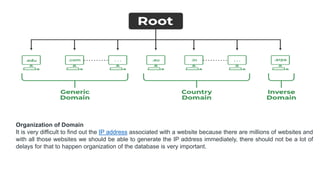
Types of Domain
There are various kinds of domain:
• Generic domains: .com(commercial), .edu(educational), .mil(military), .org(nonprofit organization),
.net(similar to commercial) all these are generic domains.
• Country domain: .in (India) .us .uk
• Inverse domain: if we want to know what is the domain name of the website. Ip to domain name
mapping. So DNS can provide both the mapping .
Organization of Domain
It is very difficult to find out the IP address associated with a website because there are millions of websites and
with all those websites we should be able to generate the IP address immediately, there should not be a lot of
delays for that to happen organization of the database is very important.
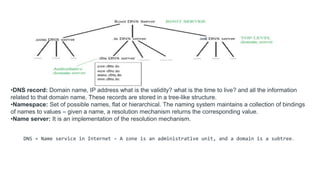
•DNS record: Domain name, IP address what is the validity? what is the time to live? and all the information
related to that domain name. These records are stored in a tree-like structure.
•Namespace: Set of possible names, flat or hierarchical. The naming system maintains a collection of bindings
of names to values – given a name, a resolution mechanism returns the corresponding value.
•Name server: It is an implementation of the resolution mechanism.
DNS = Name service in Internet – A zone is an administrative unit, and a domain is a subtree.
Name-to-Address Resolution
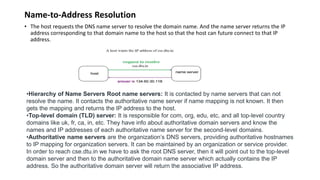
• The host requests the DNS name server to resolve the domain name. And the name server returns the IP
address corresponding to that domain name to the host so that the host can future connect to that IP
address.
•Hierarchy of Name Servers Root name servers: It is contacted by name servers that can not
resolve the name. It contacts the authoritative name server if name mapping is not known. It then
gets the mapping and returns the IP address to the host.
•Top-level domain (TLD) server: It is responsible for com, org, edu, etc, and all top-level country
domains like uk, fr, ca, in, etc. They have info about authoritative domain servers and know the
names and IP addresses of each authoritative name server for the second-level domains.
•Authoritative name servers are the organization’s DNS servers, providing authoritative hostnames
to IP mapping for organization servers. It can be maintained by an organization or service provider.
In order to reach cse.dtu.in we have to ask the root DNS server, then it will point out to the top-level
domain server and then to the authoritative domain name server which actually contains the IP
address. So the authoritative domain server will return the associative IP address.
Domain Name Server
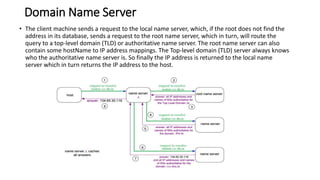
• The client machine sends a request to the local name server, which, if the root does not find the
address in its database, sends a request to the root name server, which in turn, will route the
query to a top-level domain (TLD) or authoritative name server. The root name server can also
contain some hostName to IP address mappings. The Top-level domain (TLD) server always knows
who the authoritative name server is. So finally the IP address is returned to the local name
server which in turn returns the IP address to the host.
How Does DNS Work?
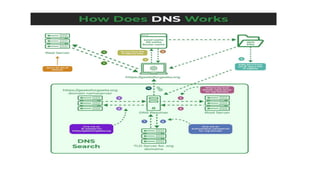
• The working of DNS starts with converting a hostname into an IP Address. A domain name serves
as a distinctive identification for a website. It is used in place of an IP address to make it simpler
for consumers to visit websites. Domain Name System works by executing the database whose
work is to store the names of hosts that are available on the Internet. The top-level domain server
stores address information for top-level domains such as .com and .net, .org, and so on. If the
Client sends the request, then the DNS resolver sends a request to DNS Server to fetch the IP
Address. In case, when it does not contain that particular IP Address with a hostname, it forwards
the request to another DNS Server. When the IP Address has arrived at the resolver, it completes
the request over Internet Protocol.
Transport layer.pptx

Transport layer.pptx

  • 1.
    elements of TransportProtocol Transport protocols are implemented to establish a reliable service between two machines on a network, which resembles the data link protocols implemented at layer 2. The major difference is that the data link layer uses a physical channel between two routers while the transport layer uses a subnet. The following are the issues for implementing transport protocols− Types of Service The transport layer also determines the type of service provided to the users from the session layer. An error-free point-to-point communication to deliver messages in the order in which they were transmitted is one of the key functions of the transport layer.
  • 2.
    Error Control • Errordetection and error recovery are an integral part of reliable service, and therefore they are necessary to perform error control mechanisms on an end-to-end basis. To control errors from lost or duplicate segments, the transport layer enables unique segment sequence numbers to the different packets of the message, creating virtual circuits, and allowing only one virtual circuit per session. Flow Control • The underlying rule of flow control is to maintain a synergy between a fast process and a slow process. The transport layer enables a fast process to keep pace with a slow one. Acknowledgments are sent back to manage end-to-end flow control. Go-back N algorithms are used to request the retransmission of packets starting with packet number N. Selective Repeat is used to request specific packets to be retransmitted. Connection Establishment/Release • The transport layer creates and releases the connection across the network. This includes a naming mechanism so that a process on one machine can indicate with whom it wishes to communicate. The transport layer enables us to establish and delete connections across the network to multiplex several message streams onto one communication channel. Multiplexing/Demultiplexing • The transport layer establishes a separate network connection for each transport connection required by the session layer. To improve throughput, the transport layer establishes multiple network connections. When the issue of throughput is not important, it multiplexes several transport connections onto the same network connection, thus reducing the cost of establishing and maintaining the network connections.When several connections are multiplexed, they call for demultiplexing at the receiving end. In the case of the transport layer, the communication takes place only between two processes and not between two machines. Hence, communication at the transport layer is also known as peer-to-peer or process-to-process communication.
  • 3.
    Fragmentation and re-assembly •When the transport layer receives a large message from the session layer, it breaks the message into smaller units depending on the requirement. This process is called fragmentation. Thereafter, it is passed to the network layer. Conversely, when the transport layer acts as the receiving process, it reorders the pieces of a message before reassembling them into a message. Addressing • The Transport Layer deals with addressing or labeling a frame. It also differentiates between a connection and a transaction. Connection identifiers are ports or sockets that label each frame, so the receiving device knows which process it has been sent from. This helps in keeping track of multiple-message conversations. Ports or sockets address multiple conservations in the same location.
  • 5.
    Functions of TransportLayer • The process to process delivery • End-to-end connection between devices • Multiplexing and Demultiplexing • Data integrity and error Correction • Congestion Control • Flow Control Characteristics of Transport Layer Protocol • The two protocols that make up the transport layer are TCP and UDP. • A datagram is sent by the IP protocol at the network layer from a source host to a destination host. • These days, an operating system can support environments with multiple users and processes; a program under execution is referred to as a process. • A source process is transmitting a process to a destination process when a host sends a message to another host. Certain connections to certain ports, referred to as protocol ports, are defined by the transport layer protocols. • A positive integer address, consisting of 16 bits, defines each port.
  • 6.
    Transport Layer Protocols Thetransport layer is represented majorly by TCP and UDP protocols. Today almost all operating systems support multiprocessing multi-user environments. This transport layer protocol provides connections to the individual ports. These ports are known as protocol ports. Transport layer protocols work above the IP protocols and deliver the data packets from IP serves to the destination port and from the originating port to destination IP services. Below are the protocols used at the transport layer. 1. UDP UDP stands for User Datagram Protocol. User Datagram Protocol provides a nonsequential transmission of data. It is a connectionless transport protocol. UDP protocol is used in applications where the speed and size of data transmitted is considered as more important than the security and reliability. User Datagram is defined as a packet produced by User Datagram Protocol. UDP protocol adds checksum error control, transport level addresses, and information of length to the data received from the layer above it. Services provided by User Datagram Protocol(UDP) are connectionless service, faster delivery of messages, checksum, and process-to-process communication.
  • 7.
    UDP Segment While theTCP header can range from 20 to 60 bytes, the UDP header is a fixed, basic 8 bytes. All required header information is contained in the first 8 bytes, with data making up the remaining portion. Because UDP port number fields are 16 bits long, the range of possible port numbers is defined as 0 to 65535, with port 0 being reserved.
  • 8.
    • Source Port:Source Port is a 2 Byte long field used to identify the port number of the source. • Destination Port: This 2-byte element is used to specify the packet’s destination port. • Length: The whole length of a UDP packet, including the data and header. The field has sixteen bits. • Cheksum: The checksum field is two bytes long. The data is padded with zero octets at the end (if needed) to create a multiple of two octets. It is the 16-bit one’s complement of the one’s complement sum of the UDP header, the pseudo-header containing information from the IP header, and the data. Advantages of UDP • UDP also provides multicast and broadcast transmission of data. • UDP protocol is preferred more for small transactions such as DNS lookup. • It is a connectionless protocol, therefore there is no compulsion to have a connection- oriented network. • UDP provides fast delivery of messages. Disadvantages of UDP • In UDP protocol there is no guarantee that the packet is delivered. • UDP protocol suffers from worse packet loss. • UDP protocol has no congestion control mechanism. • UDP protocol does not provide the sequential transmission of data.
  • 9.
    2. TCP • TCPstands for Transmission Control Protocol. TCP protocol provides transport layer services to applications. TCP protocol is a connection-oriented protocol. A secured connection is being established between the sender and the receiver. For a generation of a secured connection, a virtual circuit is generated between the sender and the receiver. The data transmitted by TCP protocol is in the form of continuous byte streams. A unique sequence number is assigned to each byte. With the help of this unique number, a positive acknowledgment is received from receipt. If the acknowledgment is not received within a specific period the data is retransmitted to the specified destination.
  • 10.
    TCP Segment • ATCP segment’s header may have 20–60 bytes. The options take about 40 bytes. A header consists of 20 bytes by default, although it can contain up to 60 bytes.
  • 11.
    • Source PortAddress: The port address of the program sending the data segment is stored in the 16-bit field known as the source port address. • Destination Port Address: The port address of the application running on the host receiving the data segment is stored in the destination port address, a 16-bit field. • Sequence Number: The sequence number, or the byte number of the first byte sent in that specific segment, is stored in a 32-bit field. At the receiving end, it is used to put the message back together once it has been received out of sequence. • Acknowledgement Number: The acknowledgement number, or the byte number that the recipient anticipates receiving next, is stored in a 32-bit field called the acknowledgement number. It serves as a confirmation that the earlier bytes were successfully received. • Header Length (HLEN): This 4-bit field stores the number of 4-byte words in the TCP header, indicating how long the header is. For example, if the header is 20 bytes (the minimum length of the TCP header), this field will store 5 because 5 x 4 = 20, and if the header is 60 bytes (the maximum length), it will store 15 because 15 x 4 = 60. As a result, this field’s value is always between 5 and 15. • Control flags: These are six 1-bit control bits that regulate flow control, method of transfer, connection abortion, termination, and establishment. They serve the following purposes: • Urgent: This pointer is legitimate • ACK: The acknowledgement number (used in cumulative acknowledgement cases) is valid. • PSH: Push request • RST: Restart the link. • SYN: Sequence number synchronisation • FIN: Cut off the communication • Window size: This parameter provides the sender TCP’s window size in bytes.
  • 12.
    • Control flags:These are six 1-bit control bits that regulate flow control, method of transfer, connection abortion, termination, and establishment. They serve the following purposes: • Urgent: This pointer is legitimate • ACK: The acknowledgement number (used in cumulative acknowledgement cases) is valid. • PSH: Push request • RST: Restart the link. • SYN: Sequence number synchronisation • FIN: Cut off the communication • Window size: This parameter provides the sender TCP’s window size in bytes. • Checksum: The checksum for error control is stored in this field. Unlike UDP, it is required for TCP. • Urgent pointer: This field is used to point to data that must urgently reach the receiving process as soon as possible. It is only valid if the URG control flag is set. To obtain the byte number of the final urgent byte, the value of this field is appended to the sequence number.
  • 13.
    • Advantages ofTCP • TCP supports multiple routing protocols. • TCP protocol operates independently of that of the operating system. • TCP protocol provides the features of error control and flow control. • TCP provides a connection-oriented protocol and provides the delivery of data. • Disadvantages of TCP • TCP protocol cannot be used for broadcast or multicast transmission. • TCP protocol has no block boundaries. • No clear separation is being offered by TCP protocol between its interface, services, and protocols. • In TCP/IP replacement of protocol is difficult.
  • 14.
    Domain Name System(DNS) in Application Layer • Domain Name System (DNS) is a hostname for IP address translation service. DNS is a distributed database implemented in a hierarchy of name servers. It is an application layer protocol for message exchange between clients and servers. It is required for the functioning of the Internet. What is the Need of DNS? • Every host is identified by the IP address but remembering numbers is very difficult for people also the IP addresses are not static therefore a mapping is required to change the domain name to the IP address. So DNS is used to convert the domain name of the websites to their numerical IP address. Types of Domain There are various kinds of domain: • Generic domains: .com(commercial), .edu(educational), .mil(military), .org(nonprofit organization), .net(similar to commercial) all these are generic domains. • Country domain: .in (India) .us .uk • Inverse domain: if we want to know what is the domain name of the website. Ip to domain name mapping. So DNS can provide both the mapping .
  • 15.
    Organization of Domain Itis very difficult to find out the IP address associated with a website because there are millions of websites and with all those websites we should be able to generate the IP address immediately, there should not be a lot of delays for that to happen organization of the database is very important.
  • 16.
    •DNS record: Domainname, IP address what is the validity? what is the time to live? and all the information related to that domain name. These records are stored in a tree-like structure. •Namespace: Set of possible names, flat or hierarchical. The naming system maintains a collection of bindings of names to values – given a name, a resolution mechanism returns the corresponding value. •Name server: It is an implementation of the resolution mechanism. DNS = Name service in Internet – A zone is an administrative unit, and a domain is a subtree.
  • 17.
    Name-to-Address Resolution • Thehost requests the DNS name server to resolve the domain name. And the name server returns the IP address corresponding to that domain name to the host so that the host can future connect to that IP address. •Hierarchy of Name Servers Root name servers: It is contacted by name servers that can not resolve the name. It contacts the authoritative name server if name mapping is not known. It then gets the mapping and returns the IP address to the host. •Top-level domain (TLD) server: It is responsible for com, org, edu, etc, and all top-level country domains like uk, fr, ca, in, etc. They have info about authoritative domain servers and know the names and IP addresses of each authoritative name server for the second-level domains. •Authoritative name servers are the organization’s DNS servers, providing authoritative hostnames to IP mapping for organization servers. It can be maintained by an organization or service provider. In order to reach cse.dtu.in we have to ask the root DNS server, then it will point out to the top-level domain server and then to the authoritative domain name server which actually contains the IP address. So the authoritative domain server will return the associative IP address.
  • 18.
    Domain Name Server •The client machine sends a request to the local name server, which, if the root does not find the address in its database, sends a request to the root name server, which in turn, will route the query to a top-level domain (TLD) or authoritative name server. The root name server can also contain some hostName to IP address mappings. The Top-level domain (TLD) server always knows who the authoritative name server is. So finally the IP address is returned to the local name server which in turn returns the IP address to the host.
  • 19.
    How Does DNSWork? • The working of DNS starts with converting a hostname into an IP Address. A domain name serves as a distinctive identification for a website. It is used in place of an IP address to make it simpler for consumers to visit websites. Domain Name System works by executing the database whose work is to store the names of hosts that are available on the Internet. The top-level domain server stores address information for top-level domains such as .com and .net, .org, and so on. If the Client sends the request, then the DNS resolver sends a request to DNS Server to fetch the IP Address. In case, when it does not contain that particular IP Address with a hostname, it forwards the request to another DNS Server. When the IP Address has arrived at the resolver, it completes the request over Internet Protocol.