


















































































































































DATCOMM
Introduction to Data
and Computer Networks
Engr. Melvin K. Cabatuan, MsE
De La Salle University
January 2013
Objectives
- Identify the scope and significance of Data
Computer Networking in today’s world
Notes
Notes
Objectives
- Identify the scope and significance of Data
Computer Networking in today’s world
- Define and illustrate Data Communications
and Data Network.
Objectives
- Identify the scope and significance of Data
Computer Networking in today’s world
- Define and illustrate Data Communications
and Data Network.
- Describe the Network Components and its
Architecture.
Notes
Notes
Objectives
- Identify the scope and significance of Data
Computer Networking in today’s world
- Define and illustrate Data Communications
and Data Network.
- Describe the Network Components and its
Architecture.
- Illustrate and explain the Internet.
Objectives
- Identify the scope and significance of Data
Computer Networking in today’s world
- Define and illustrate Data Communications
and Data Network.
- Describe the Network Components and its
Architecture.
- Illustrate and explain the Internet.
- Explain the various Network Communication
Models
Notes
Notes
Why Study Networks?
- Networks support and improve our lives by
providing instantaneous local or global
communications.
Why Study Networks?
- Networks improve teaching and learning
through sharing and collaboration.
Notes
Notes
Why Study Networks?
- Networks change the way we work.
Why Study Networks?
- Networks supports the way we play.
Notes
Notes
Data Communications
Data Communications
- are the transfer of data from one device to
another via some form of transmission medium.
Notes
Notes
Data Communications
- The five components that make up a data
communications system are the message,
sender, receiver, medium, and protocol.
Possible Quiz Question
A set of rules that govern data communications. It
represents an agreement between the
communicating devices. Without it, two devices
may be connected but not communicating.
A. Message
B. Sender
C. Receiver
D. Medium
E. Protocol
Notes
Notes
Possible Quiz Question
A set of rules that govern data communications. It
represents an agreement between the
communicating devices. Without it, two devices
may be connected but not communicating.
A. Message
B. Sender
C. Receiver
D. Medium
E. Protocol
Possible Quiz Question
It is a fundamental characteristics of a data
communication system which refers to the
variation in the packet arrival time.
A. Jitter
B. Accuracy
C. Timeliness
D. Delivery
E. All of the above
Notes
Notes
Possible Quiz Question
It is a fundamental characteristics of a data
communication system which refers to the
variation in the packet arrival time.
A. Jitter
B. Accuracy
C. Timeliness
D. Delivery
E. All of the above
Remember
- Delivery.
The system must deliver data to the correct
destination.
Notes
Notes
Remember
- Delivery.
The system must deliver data to the correct
destination.
- Accuracy.
The system must deliver the data accurately.
Remember
- Delivery.
The system must deliver data to the correct
destination.
- Accuracy.
The system must deliver the data accurately.
- Timeliness.
The system must deliver data in a timely
manner.
Notes
Notes
Remember
- Delivery.
The system must deliver data to the correct
destination.
- Accuracy.
The system must deliver the data accurately.
- Timeliness.
The system must deliver data in a timely
manner.
- Jitter.
Jitter refers to the variation in the packet
arrival time.
What is a Network?
Notes
Notes
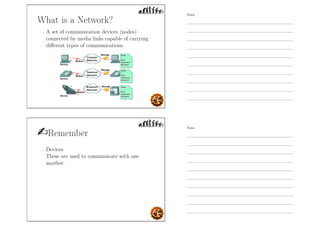
What is a Network?
- A set of communication devices (nodes)
connected by media links capable of carrying
different types of communications.
Remember
- Devices
These are used to communicate with one
another.
Notes
Notes
Remember
- Devices
These are used to communicate with one
another.
- Medium
This is how the devices are connected together.
Remember
- Devices
These are used to communicate with one
another.
- Medium
This is how the devices are connected together.
- Messages
Information that travels over the medium.
Notes
Notes
Remember
- Devices
These are used to communicate with one
another.
- Medium
This is how the devices are connected together.
- Messages
Information that travels over the medium.
- Rules / Protocol
Governs how messages flow across network.
Computer Network
Notes
Notes
Computer Network
- A network of computers.
Why Network Computers?
Notes
Notes
Why Network Computers?
- To increase productivity by linking computers
and computer networks allowing users to share
resources and data. Ex.
Why Network Computers?
- To increase productivity by linking computers
and computer networks allowing users to share
resources and data. Ex.
- Data and applications
Notes
Notes
Why Network Computers?
- To increase productivity by linking computers
and computer networks allowing users to share
resources and data. Ex.
- Data and applications
- Resources, i.e. I/O devices like cameras 
printers
Why Network Computers?
- To increase productivity by linking computers
and computer networks allowing users to share
resources and data. Ex.
- Data and applications
- Resources, i.e. I/O devices like cameras 
printers
- Network Storage
Notes
Notes
Why Network Computers?
- To increase productivity by linking computers
and computer networks allowing users to share
resources and data. Ex.
- Data and applications
- Resources, i.e. I/O devices like cameras 
printers
- Network Storage
- Backup devices
Why Network Computers?
- Reduced Cost and Easier Installation of
Software.
- Ex. Network installation
Notes
Notes
Why Network Computers?
- Improved Security
Why Network Computers?
- Improved Security
- Improved Communications
Notes
Notes
Why Network Computers?
- Improved Security
- Improved Communications
- More Workplace Flexibility
Why Network Computers?
- Improved Security
- Improved Communications
- More Workplace Flexibility
- Reduced Cost of Peripherals
Notes
Notes
Why Network Computers?
- Improved Security
- Improved Communications
- More Workplace Flexibility
- Reduced Cost of Peripherals
- Centralized Administration
Network Requirements?
- At least two computers
Notes
Notes
Network Requirements?
- At least two computers
- A resource that needs to be shared
Network Requirements?
- At least two computers
- A resource that needs to be shared
- A transmission medium
Notes
Notes
Network Requirements?
- At least two computers
- A resource that needs to be shared
- A transmission medium
- A communications agreement
Network Category
By type of MEDIA
- Wired and Wireless
Notes
Notes
Network Media
- this is the channel over which a message travels
Network Category
By COVERAGE
Notes
Notes
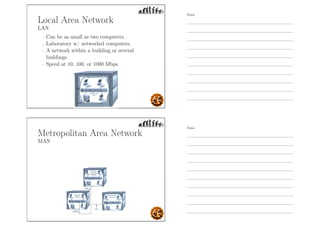
Local Area Network
LAN
Local Area Network
LAN
- Can be as small as two computers.
Notes
Notes
Local Area Network
LAN
- Can be as small as two computers.
- Laboratory w/ networked computers.
Local Area Network
LAN
- Can be as small as two computers.
- Laboratory w/ networked computers.
- A network within a building or several
buildings.
Notes
Notes
Local Area Network
LAN
- Can be as small as two computers.
- Laboratory w/ networked computers.
- A network within a building or several
buildings.
- Speed at 10, 100, or 1000 Mbps
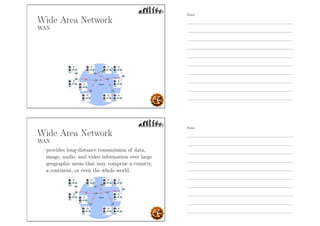
Metropolitan Area Network
MAN
Notes
Notes
Metropolitan Area Network
MAN
- covers the area inside a town or a city.
Metropolitan Area Network
MAN
- covers the area inside a town or a city.
- Ex. Cable TV network
Notes
Notes
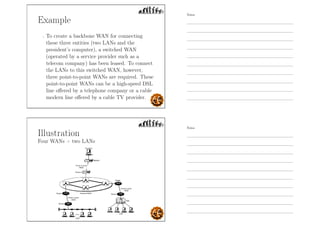
Wide Area Network
WAN
Wide Area Network
WAN
- provides long-distance transmission of data,
image, audio, and video information over large
geographic areas that may comprise a country,
a continent, or even the whole world.
Notes
Notes
Interconnection of Networks:
Internetwork
Interconnection of Networks:
Internetwork
- Today, it is very rare to see a LAN, a MAN in
isolation; they are connected to one another.
Notes
Notes
Interconnection of Networks:
Internetwork
- Today, it is very rare to see a LAN, a MAN in
isolation; they are connected to one another.
- When two or more networks are connected,
they become an internetwork, or internet.
Example
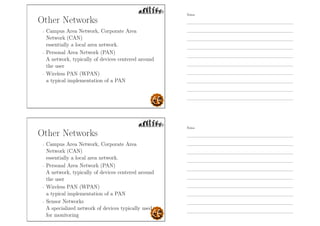
- Assume that an organization has two offices,
one in Manila and the other in Cebu. The
established office on Manila has a bus topology
LAN; the newly opened office on Cebu has a
star topology LAN. The president of the
company lives somewhere in the middle and
needs to have control over the company from
her home in Boracay.
Notes
Notes
Example
- To create a backbone WAN for connecting
these three entities (two LANs and the
president’s computer), a switched WAN
(operated by a service provider such as a
telecom company) has been leased. To connect
the LANs to this switched WAN, however,
three point-to-point WANs are required. These
point-to-point WANs can be a high-speed DSL
line offered by a telephone company or a cable
modern line offered by a cable TV provider.
Illustration
Four WANs + two LANs
Notes
Notes
Virtual Private Network
VPN
Virtual Private Network
VPN
- It enables a host computer to send and receive
data across shared or public networks as if it
were a private network with all the
functionality
Notes
Notes
Other Networks
- Campus Area Network, Corporate Area
Network (CAN)
essentially a local area network.
Other Networks
- Campus Area Network, Corporate Area
Network (CAN)
essentially a local area network.
- Personal Area Network (PAN)
A network, typically of devices centered around
the user
Notes
Notes
Other Networks
- Campus Area Network, Corporate Area
Network (CAN)
essentially a local area network.
- Personal Area Network (PAN)
A network, typically of devices centered around
the user
- Wireless PAN (WPAN)
a typical implementation of a PAN
Other Networks
- Campus Area Network, Corporate Area
Network (CAN)
essentially a local area network.
- Personal Area Network (PAN)
A network, typically of devices centered around
the user
- Wireless PAN (WPAN)
a typical implementation of a PAN
- Sensor Networks
A specialized network of devices typically used
for monitoring
Notes
Notes
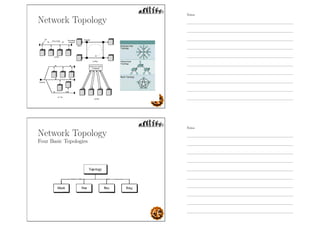
Network Topology
Network Topology
Four Basic Topologies
Notes
Notes
Mesh Topology
- Every device has a dedicated point-to-point
link to every other device.
Possible Quiz Question
- How many duplex-mode links do we have on a
mesh network with n nodes?
Notes
Notes
Mesh Topology
Advantages
- Dedicated links guarantees that each
connection can carry its own data load, thus
eliminating the traffic problems.
Mesh Topology
Advantages
- Dedicated links guarantees that each
connection can carry its own data load, thus
eliminating the traffic problems.
- A mesh topology is robust.
Notes
Notes
Mesh Topology
Advantages
- Dedicated links guarantees that each
connection can carry its own data load, thus
eliminating the traffic problems.
- A mesh topology is robust.
- The advantage of privacy or security.
Mesh Topology
Advantages
- Dedicated links guarantees that each
connection can carry its own data load, thus
eliminating the traffic problems.
- A mesh topology is robust.
- The advantage of privacy or security.
- Point-to-point links make fault identification
and fault isolation easy.
Notes
Notes
Mesh Topology
Disadvantages
- Installation and reconnection are difficult
because every device must be connected to
every other device.
Mesh Topology
Disadvantages
- Installation and reconnection are difficult
because every device must be connected to
every other device.
- Bulk of the wiring can be greater than the
available space (in walls, ceilings, or floors) can
accommodate.
Notes
Notes
Mesh Topology
Disadvantages
- Installation and reconnection are difficult
because every device must be connected to
every other device.
- Bulk of the wiring can be greater than the
available space (in walls, ceilings, or floors) can
accommodate.
- Hardware required to connect each link (I/O
ports and cable) can be prohibitively expensive.
Star Topology
- Each device has a dedicated point-to-point link
only to a central controller, usually called a
hub.
Notes
Notes
Star Topology
Advantages
- Less expensive than a mesh topology.
Star Topology
Advantages
- Less expensive than a mesh topology.
- Easy to install and reconfigure.
Notes
Notes
Star Topology
Advantages
- Less expensive than a mesh topology.
- Easy to install and reconfigure.
- Easy fault identification and fault isolation.
Star Topology
Advantages
- Less expensive than a mesh topology.
- Easy to install and reconfigure.
- Easy fault identification and fault isolation.
- Relatively robust because if one link fails, only
that link is affected.
Notes
Notes
Star Topology
Disadvantages
- Dependency of the whole topology on one
single point, the hub. If the hub goes down, the
whole system is dead.
Star Topology
Disadvantages
- Dependency of the whole topology on one
single point, the hub. If the hub goes down, the
whole system is dead.
- Often more cabling is required in a star than in
some other topologies (such as ring or bus).
Notes
Notes
Bus Topology
- One long cable acts as a backbone to link all
the devices in a network.
- Drop line is a connection running between the
device and the main cable.
Bus Topology
Advantages
- Ease of installation.
Notes
Notes
Bus Topology
Advantages
- Ease of installation.
- Uses less cabling than mesh or star topologies,
hence less expensive.
Bus Topology
Disadvantages
- Difficult reconnection and fault isolation.
Notes
Notes
Bus Topology
Disadvantages
- Difficult reconnection and fault isolation.
- Difficult to add new devices.
Bus Topology
Disadvantages
- Difficult reconnection and fault isolation.
- Difficult to add new devices.
- Signal reflection at the taps can cause
degradation in quality.
Notes
Notes
Bus Topology
Disadvantages
- Difficult reconnection and fault isolation.
- Difficult to add new devices.
- Signal reflection at the taps can cause
degradation in quality.
- A fault or break in the bus cable stops all
transmission.
Ring Topology
- Each device has a dedicated point-to-point
connection with only the two devices on either
side of it.
- When a device receives a signal intended for
another device, its repeater regenerates the bits
and passes them along.
Notes
Notes
Ring Topology
Advantages
- Easy to install and reconfigure.
Ring Topology
Advantages
- Easy to install and reconfigure.
- Fault isolation is simplified. Generally in a ring,
a signal is circulating at all times. If one device
does not receive a signal within a specified
period, it can issue an alarm.
Notes
Notes
Ring Topology
Disadvantages
- Unidirectional traffic can be a disadvantage. In
a simple ring, a break in the ring (such as a
disabled station) can disable the entire
network.
Ring Topology
Disadvantages
- Unidirectional traffic can be a disadvantage. In
a simple ring, a break in the ring (such as a
disabled station) can disable the entire
network.
- Today, the need for higher-speed LANs has
made this topology less popular.
Notes
Notes
Network Architecture
According to Security Relationships
- Peer-to-peer Network (P2P).
Network Architecture
According to Security Relationships
- Peer-to-peer Network (P2P).
- Client-server Network.
Notes
Notes
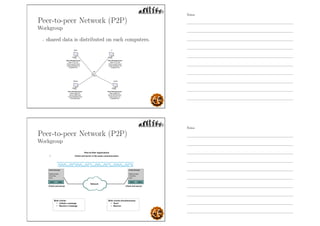
Peer-to-peer Network (P2P)
Workgroup
- shared data is distributed on each computers.
Peer-to-peer Network (P2P)
Workgroup
Notes
Notes
Peer-to-peer Network (P2P)
Pros and Cons
- Advantages
◦ Low cost
◦ Easy to set up
◦ No server required
Peer-to-peer Network (P2P)
Pros and Cons
- Advantages
◦ Low cost
◦ Easy to set up
◦ No server required
- Disadvantages
◦ No centralized control of security
◦ Administrative burden of maintaining
accounts on all computers ◦ Not scalable
Notes
Notes
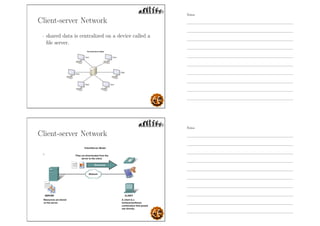
Client-server Network
- shared data is centralized on a device called a
file server.
Client-server Network
Notes
Notes
Client-server Network
Pros and Cons
- Advantages
◦ Centralized administration
◦ Single sign-on
◦ Reduced broadcast traffic
◦ Scalability
Client-server Network
Pros and Cons
- Advantages
◦ Centralized administration
◦ Single sign-on
◦ Reduced broadcast traffic
◦ Scalability
- Disadvantages
◦ Higher cost
◦ More challenging technically
◦ Single point of failure with a single file server
Notes
Notes
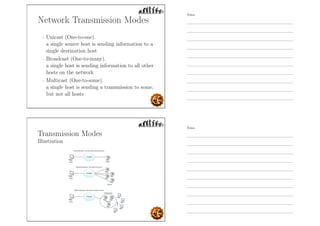
Network Transmission Modes
- Unicast (One-to-one).
a single source host is sending information to a
single destination host
Network Transmission Modes
- Unicast (One-to-one).
a single source host is sending information to a
single destination host
- Broadcast (One-to-many).
a single host is sending information to all other
hosts on the network
Notes
Notes
Network Transmission Modes
- Unicast (One-to-one).
a single source host is sending information to a
single destination host
- Broadcast (One-to-many).
a single host is sending information to all other
hosts on the network
- Multicast (One-to-some).
a single host is sending a transmission to some,
but not all hosts
Transmission Modes
Illustration
Notes
Notes
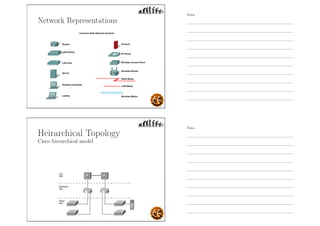
Network Representations
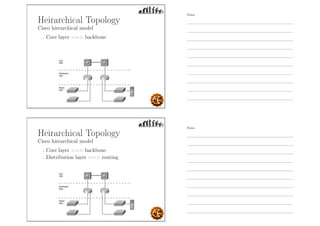
Heirarchical Topology
Cisco hierarchical model
Notes
Notes
Heirarchical Topology
Cisco hierarchical model
- Core layer == backbone
Heirarchical Topology
Cisco hierarchical model
- Core layer == backbone
- Distribution layer == routing
Notes
Notes
Heirarchical Topology
Cisco hierarchical model
- Core layer == backbone
- Distribution layer == routing
- Access layer == switching
Cisco hierarchical model
Core layer (Backbone)
Notes
Notes
Cisco hierarchical model
Core layer (Backbone)
- Literally the core of the network.
Cisco hierarchical model
Core layer (Backbone)
- Literally the core of the network.
- Switch large amounts of traffic both reliably
and quickly.
Notes
Notes
Cisco hierarchical model
Core layer (Backbone)
- Literally the core of the network.
- Switch large amounts of traffic both reliably
and quickly.
- If there is a failure in the core, every single user
can be affected.
Cisco hierarchical model
Distribution layer (Routing)
Notes
Notes
Cisco hierarchical model
Distribution layer (Routing)
- sometimes referred to as the workgroup layer.
Cisco hierarchical model
Distribution layer (Routing)
- sometimes referred to as the workgroup layer.
- provides routing, filtering, and WAN access
and to determine how packets can access the
core, if needed.
Notes
Notes
Cisco hierarchical model
Distribution layer (Routing)
- sometimes referred to as the workgroup layer.
- provides routing, filtering, and WAN access
and to determine how packets can access the
core, if needed.
- Place to implement security and policies for the
network including address translation and
firewalls.
Cisco hierarchical model
Access layer (Switching)
Notes
Notes
Cisco hierarchical model
Access layer (Switching)
- sometimes referred to as the desktop layer.
Cisco hierarchical model
Access layer (Switching)
- sometimes referred to as the desktop layer.
- controls user and workgroup access to
internetwork resources.
Notes
Notes
Cisco hierarchical model
Access layer (Switching)
- sometimes referred to as the desktop layer.
- controls user and workgroup access to
internetwork resources.
- segmentation
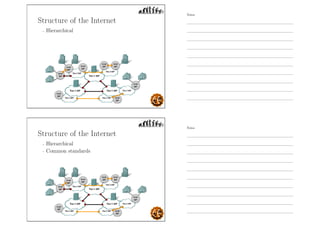
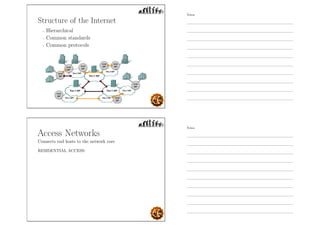
Structure of the Internet
Notes
Notes
Structure of the Internet
- Hierarchical
Structure of the Internet
- Hierarchical
- Common standards
Notes
Notes
Structure of the Internet
- Hierarchical
- Common standards
- Common protocols
Access Networks
Connects end hosts to the network core
RESIDENTIAL ACCESS:
Notes
Notes
Access Networks
Connects end hosts to the network core
RESIDENTIAL ACCESS:
- Dial-up modem via Public Switched Telephone
Network
Access Networks
Connects end hosts to the network core
RESIDENTIAL ACCESS:
- Dial-up modem via Public Switched Telephone
Network
- DSL
Notes
Notes
Access Networks
Connects end hosts to the network core
RESIDENTIAL ACCESS:
- Dial-up modem via Public Switched Telephone
Network
- DSL
- Cable Broadband
Access Networks
Connects end hosts to the network core
RESIDENTIAL ACCESS:
- Dial-up modem via Public Switched Telephone
Network
- DSL
- Cable Broadband
- Wireless Broadband (Wimax, etc.)
Notes
Notes
Access Networks
Connects end hosts to the network core
RESIDENTIAL ACCESS:
- Dial-up modem via Public Switched Telephone
Network
- DSL
- Cable Broadband
- Wireless Broadband (Wimax, etc.)
- FTTH
Access Networks
Connects end hosts to the network core
RESIDENTIAL ACCESS:
- Dial-up modem via Public Switched Telephone
Network
- DSL
- Cable Broadband
- Wireless Broadband (Wimax, etc.)
- FTTH
ACCESS WITHIN ENTERPRISE LAN’s:
- Ethernet/IEEE 802.3 and Wifi
Notes
Notes
WAN Technologies
WAN Technologies
- Links the components of the Internetwork core.
Notes
Notes
WAN Technologies
- Links the components of the Internetwork core.
- Includes:
X.25
Frame Relay
ISDN, BISDN
ATM
SONET/SDH
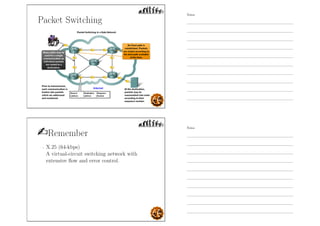
Packet Switching
The Internet and other computer networks use
packet switching
Notes
Notes
Packet Switching
The Internet and other computer networks use
packet switching
- A persistent path for signals/data (circuit) is
not necessary for duration of communications.
Packet Switching
The Internet and other computer networks use
packet switching
- A persistent path for signals/data (circuit) is
not necessary for duration of communications.
- Data is broken down into chunks (packets) and
each piece is sent through the network.
Notes
Notes
Packet Switching
The Internet and other computer networks use
packet switching
- A persistent path for signals/data (circuit) is
not necessary for duration of communications.
- Data is broken down into chunks (packets) and
each piece is sent through the network.
- Each packet may take various paths through
the network.
Packet Switching
The Internet and other computer networks use
packet switching
- A persistent path for signals/data (circuit) is
not necessary for duration of communications.
- Data is broken down into chunks (packets) and
each piece is sent through the network.
- Each packet may take various paths through
the network.
- Packets may arrive out of sequence.
Notes
Notes
Packet Switching
Remember
- X.25 (64-kbps)
A virtual-circuit switching network with
extensive flow and error control.
Notes
Notes
Remember
- X.25 (64-kbps)
A virtual-circuit switching network with
extensive flow and error control.
- Frame Relay (1.544 - 44.376 Mbps)
uses variable-length packets, called frames;
strips out most of the overhead involved with
error control.
Remember
- X.25 (64-kbps)
A virtual-circuit switching network with
extensive flow and error control.
- Frame Relay (1.544 - 44.376 Mbps)
uses variable-length packets, called frames;
strips out most of the overhead involved with
error control.
- Asynchronous transfer mode (ATM)
uses fixed-length packets, called cells.
(10s, 100s of Mbps, and Gbps range)
Notes
Notes
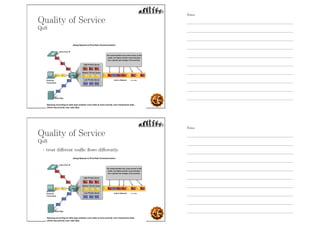
Quality of Service
QoS
Quality of Service
QoS
- treat different traffic flows differently.
Notes
Notes
Quality of Service
QoS
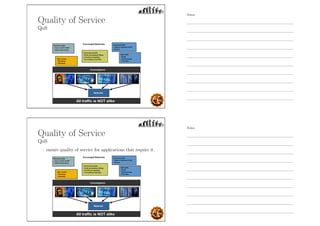
Quality of Service
QoS
- ensure quality of service for applications that require it.
Notes
Notes
Quality of Service
QoS
Quality of Service
QoS
- appropriate QoS strategy for a given type of traffic.
Notes
Notes
Protocols
Rules
Protocols
Rules
- shared conventions for communicating
information.
Notes
Notes
Protocols
Rules
- shared conventions for communicating
information.
- defines WHAT is communicated, HOW it is
communicated, and WHEN it is communicated.
Protocols
Rules
- shared conventions for communicating
information.
- defines WHAT is communicated, HOW it is
communicated, and WHEN it is communicated.
- Protocols specify
Syntax: Data format, and Signal levels
Semantics: Meaning of each bit section; Flow
control, Error handling
Timing: Speed match, and Sequencing
Notes
Notes
Protocols
Illustration
Protocol Architecture
Notes
Notes
Protocol Architecture
- specifies how a protocol is organized and
implemented.
Protocol Architecture
- specifies how a protocol is organized and
implemented.
- layered structure of hardware and software that
supports the exchange of data between systems
and supports distributed applications, such as
email and file transfer.
Notes
Notes
Protocol Architecture
- specifies how a protocol is organized and
implemented.
- layered structure of hardware and software that
supports the exchange of data between systems
and supports distributed applications, such as
email and file transfer.
- at each layer of a protocol architecture, one or
more common protocols are implemented in
communicating systems.
Protocol Architecture
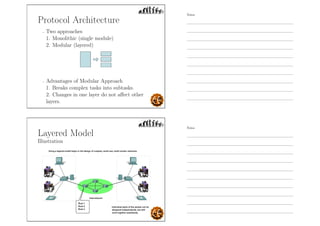
- Two approaches
1. Monolithic (single module)
2. Modular (layered)
Notes
Notes
Protocol Architecture
- Two approaches
1. Monolithic (single module)
2. Modular (layered)
- Advantages of Modular Approach
1. Breaks complex tasks into subtasks.
2. Changes in one layer do not affect other
layers.
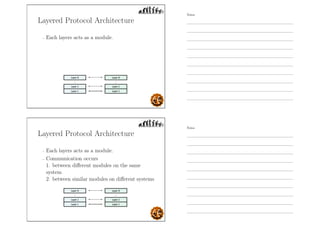
Layered Model
Illustration
Notes
Notes
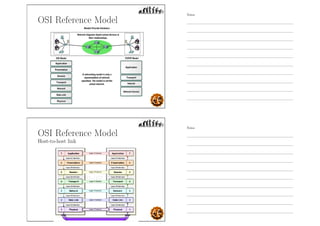
Layered Protocol Architecture
- Each layers acts as a module.
Layered Protocol Architecture
- Each layers acts as a module.
- Communication occurs
1. between different modules on the same
system
2. between similar modules on different systems
Notes
Notes
Layered Architecture
Example
- Open Systems Interconnection model (OSI).
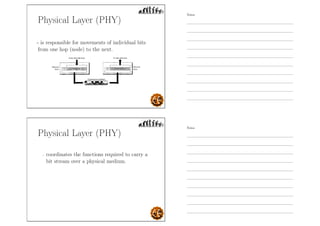
OSI Reference Model
- layered framework developed by International
Organization for Standardization (ISO) for the
design of network systems that allows
communication between all types of computer
systems.
Notes
Notes
OSI Reference Model
- layered framework developed by International
Organization for Standardization (ISO) for the
design of network systems that allows
communication between all types of computer
systems.
- consists of seven separate but related layers,
each of which defines a part of the process of
moving information across a network.
OSI Reference Model
- layered framework developed by International
Organization for Standardization (ISO) for the
design of network systems that allows
communication between all types of computer
systems.
- consists of seven separate but related layers,
each of which defines a part of the process of
moving information across a network.
- not a protocol; it is a reference model.
Notes
Notes
OSI Reference Model
OSI Reference Model
Host-to-host link
Notes
Notes
OSI Model Layers
- Layers 1, 2, and 3 - physical, data link, and
network - are the network support layers
OSI Model Layers
- Layers 1, 2, and 3 - physical, data link, and
network - are the network support layers
- they deal with the physical aspects of moving
data from one device to another (such as
electrical specifications, physical connections,
physical addressing, and transport timing and
reliability)
Notes
Notes
OSI Model Layers
- Layers 5, 6, and 7 - session, presentation, and
application - can be thought of as the user
support layers;
they allow interoperability among unrelated
software systems.
OSI Model Layers
- Layers 5, 6, and 7 - session, presentation, and
application - can be thought of as the user
support layers;
they allow interoperability among unrelated
software systems.
- Layer 4, the transport layer, links the two
subgroups and ensures that what the lower
layers have transmitted is in a form that the
upper layers can use.
Notes
Notes
Physical Layer (PHY)
- is responsible for movements of individual bits
from one hop (node) to the next.
Physical Layer (PHY)
- coordinates the functions required to carry a
bit stream over a physical medium.
Notes
Notes
Physical Layer (PHY)
- coordinates the functions required to carry a
bit stream over a physical medium.
- deals with the mechanical and electrical
specifications of the interface and transmission
medium.
Physical Layer (PHY)
- coordinates the functions required to carry a
bit stream over a physical medium.
- deals with the mechanical and electrical
specifications of the interface and transmission
medium.
- defines the procedures and functions that
physical devices and interfaces have to perform
for transmission to occur
Notes
Notes
Physical Layer Concerns
- Physical characteristics of interfaces and
medium.
Physical Layer Concerns
- Physical characteristics of interfaces and
medium.
- Representation of bits.
Notes
Notes
Physical Layer Concerns
- Physical characteristics of interfaces and
medium.
- Representation of bits.
- Data rate.
Physical Layer Concerns
- Physical characteristics of interfaces and
medium.
- Representation of bits.
- Data rate.
- Synchronization of bits.
Notes
Notes
Physical Layer Concerns
- Physical characteristics of interfaces and
medium.
- Representation of bits.
- Data rate.
- Synchronization of bits.
- Physical topology.
Physical Layer Concerns
- Physical characteristics of interfaces and
medium.
- Representation of bits.
- Data rate.
- Synchronization of bits.
- Physical topology.
- Line configuration.
Notes
Notes
Physical Layer Concerns
- Physical characteristics of interfaces and
medium.
- Representation of bits.
- Data rate.
- Synchronization of bits.
- Physical topology.
- Line configuration.
- Transmission mode.
Remember
Line Configuration
connection of devices to the media.
- Point-to-point configuration
two devices are connected through a dedicated
link.
Notes
Notes
Remember
Line Configuration
connection of devices to the media.
- Point-to-point configuration
two devices are connected through a dedicated
link.
- Multipoint configuration
a link is shared among several devices
Remember
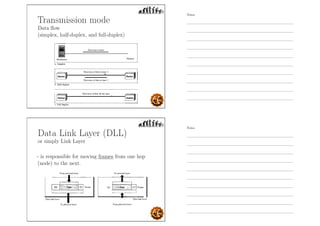
Transmission mode
direction of transmission between two devices.
- Simplex mode
only one device can send; the other can only
receive.
Notes
Notes
Remember
Transmission mode
direction of transmission between two devices.
- Simplex mode
only one device can send; the other can only
receive.
- Half-duplex mode
two devices can send and receive, but not at
the same time.
Remember
Transmission mode
direction of transmission between two devices.
- Simplex mode
only one device can send; the other can only
receive.
- Half-duplex mode
two devices can send and receive, but not at
the same time.
- Full-duplex mode
two devices can send and receive at the same
time.
Notes
Notes
Transmission mode
Data flow
(simplex, half-duplex, and full-duplex)
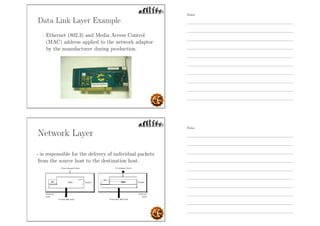
Data Link Layer (DLL)
or simply Link Layer
- is responsible for moving frames from one hop
(node) to the next.
Notes
Notes
Data Link Layer (DLL)
- transforms the physical layer, a raw
transmission facility, to a reliable link.
Data Link Layer (DLL)
- transforms the physical layer, a raw
transmission facility, to a reliable link.
- makes the physical layer appear error-free to
the upper layer (network layer).
Notes
Notes
Data Link Layer Concerns
- Framing
divides the stream of bits received from the
network layer into manageable data units
called frames
Data Link Layer Concerns
- Framing
divides the stream of bits received from the
network layer into manageable data units
called frames
- Physical addressing
adds a header to the frame to define the sender
and/or receiver of the frame. If the frame is
intended for a system outside the sender’s
network, the receiver address is the address of
the device that connects the network to the
next one.
Notes
Notes
Data Link Layer (DLL)
Hop-to-hop delivery
- communication at the data link layer occurs
between two adjacent nodes
Data Link Layer Concerns
- Flow control
imposes a flow control mechanism to avoid
overwhelming the receiver.
Notes
Notes
Data Link Layer Concerns
- Flow control
imposes a flow control mechanism to avoid
overwhelming the receiver.
- Error control
Adds reliability to the physical layer by adding
mechanisms to detect and retransmit damaged
or lost frames.
Data Link Layer Concerns
- Flow control
imposes a flow control mechanism to avoid
overwhelming the receiver.
- Error control
Adds reliability to the physical layer by adding
mechanisms to detect and retransmit damaged
or lost frames.
- Access control
in multipoint configuration, link layer protocols
are necessary to determine which device has
control over the link at any given time.
Notes
Notes
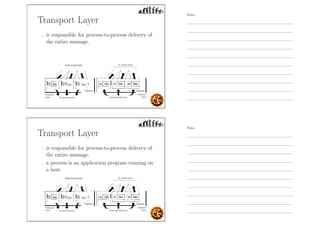
Data Link Layer Example
- Ethernet (802.3) and Media Access Control
(MAC) address applied to the network adaptor
by the manufacturer during production.
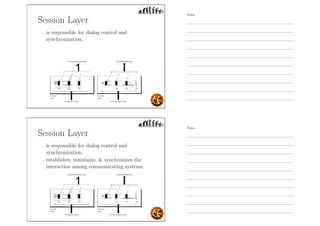
Network Layer
- is responsible for the delivery of individual packets
from the source host to the destination host.
Notes
Notes
Network Layer
- ensures that each packet gets from its point of
origin to its final destination.
Network Layer
- ensures that each packet gets from its point of
origin to its final destination.
- If two systems are connected to the same link,
there is usually no need for a network layer.
Notes
Notes
Network Layer
- ensures that each packet gets from its point of
origin to its final destination.
- If two systems are connected to the same link,
there is usually no need for a network layer.
- If the two systems are attached to different
networks with connecting devices between the
networks, there is often a need for the network
layer to accomplish source-to-destination
delivery.
Network Layer Concerns
- Logical addressing
if a packet passes the network boundary, we
need another addressing system to help
distinguish the source and destination systems.
Notes
Notes
Network Layer Concerns
- Logical addressing
if a packet passes the network boundary, we
need another addressing system to help
distinguish the source and destination systems.
- Routing
provides mechanism to route or set the path of
the packets to their final destination
Network Layer
Notes
Notes
Transport Layer
- is responsible for process-to-process delivery of
the entire message.
Transport Layer
- is responsible for process-to-process delivery of
the entire message.
- a process is an application program running on
a host.
Notes
Notes
Transport Layer
- ensures that the whole message arrives intact
and in order.
Understand
- The network layer gets each packet to the
correct computer; the transport layer gets the
entire message to the correct process on that
computer.
Notes
Notes
Understand
- The network layer gets each packet to the
correct computer; the transport layer gets the
entire message to the correct process on that
computer.
- Network layer does not recognize any
relationship between the packets it delivers and
treats each one independently.
Understand
- The network layer gets each packet to the
correct computer; the transport layer gets the
entire message to the correct process on that
computer.
- Network layer does not recognize any
relationship between the packets it delivers and
treats each one independently.
- The transport layer, however, ensures that the
whole message arrives intact and in order,
overseeing both error control and flow control.
Notes
Notes
Transport Layer Concerns
- Service-point addressing
address for delivery from a specific process
(running program) on one computer to a
specific process (running program) on the
other.
Transport Layer Concerns
- Service-point addressing
address for delivery from a specific process
(running program) on one computer to a
specific process (running program) on the
other.
- Segmentation and reassembly
message is divided into transmittable segments,
with each segment containing a sequence
numbers enabling the transport layer to
reassemble the message correctly.
Notes
Notes
Transport Layer Concerns
- Connection control
either connectionless or connection-oriented.
Transport Layer Concerns
- Connection control
either connectionless or connection-oriented.
- End-to-end Flow control
Notes
Notes
Transport Layer Concerns
- Connection control
either connectionless or connection-oriented.
- End-to-end Flow control
- Process-to-process Error control
Transport Layer Concerns
- Connection control
either connectionless or connection-oriented.
- End-to-end Flow control
- Process-to-process Error control
- Transport layer protocol and the port number
Notes
Notes
Session Layer
- is responsible for dialog control and
synchronization.
Session Layer
- is responsible for dialog control and
synchronization.
- establishes, maintains,  synchronizes the
interaction among communicating systems.
Notes
Notes
Session Layer Concerns
- Dialog control
allows two systems to enter into a dialog
allows the communication between two
processes to take place in either half-duplex or
full-duplex mode.
Session Layer Concerns
- Dialog control
allows two systems to enter into a dialog
allows the communication between two
processes to take place in either half-duplex or
full-duplex mode.
- Synchronization
allows a process to add checkpoints, or
synchronization points, to a stream of data.
Notes
Notes
Presentation Layer
- is responsible for translation, compression, and
encryption.
Presentation Layer
- is responsible for translation, compression, and
encryption.
- concerned with the syntax and semantics of the
information exchanged between two systems.
Notes
Notes
Presentation Layer Concerns
- Translation
responsible for interoperability between
different encoding methods
Presentation Layer Concerns
- Translation
responsible for interoperability between
different encoding methods
- Encryption
the sender transforms the original information
to another form and sends the resulting
message.
Notes
Notes
Presentation Layer Concerns
- Translation
responsible for interoperability between
different encoding methods
- Encryption
the sender transforms the original information
to another form and sends the resulting
message.
- Compression
reduce the number of bits.
Presentation Layer Examples
- JPEG- Joint Photographic Experts Group
Notes
Notes
Presentation Layer Examples
- JPEG- Joint Photographic Experts Group
- MPEG- The Moving Picture Experts Group’s
standard
Presentation Layer Examples
- JPEG- Joint Photographic Experts Group
- MPEG- The Moving Picture Experts Group’s
standard
- MIDI- Musical Instrument Digital Interface
Notes
Notes
Presentation Layer Examples
- JPEG- Joint Photographic Experts Group
- MPEG- The Moving Picture Experts Group’s
standard
- MIDI- Musical Instrument Digital Interface
- TIFF- Tagged Image File Format
Application Layer
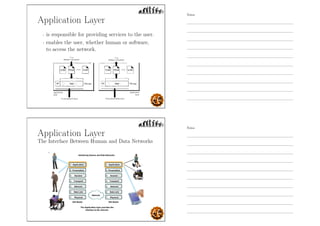
- is responsible for providing services to the user.
Notes
Notes
Application Layer
- is responsible for providing services to the user.
- enables the user, whether human or software,
to access the network.
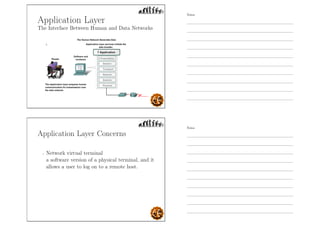
Application Layer
The Interface Between Human and Data Networks
Notes
Notes
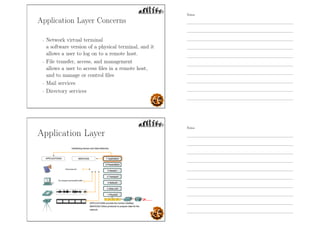
Application Layer
The Interface Between Human and Data Networks
Application Layer Concerns
- Network virtual terminal
a software version of a physical terminal, and it
allows a user to log on to a remote host.
Notes
Notes
Application Layer Concerns
- Network virtual terminal
a software version of a physical terminal, and it
allows a user to log on to a remote host.
- File transfer, access, and management
allows a user to access files in a remote host,
and to manage or control files
Application Layer Concerns
- Network virtual terminal
a software version of a physical terminal, and it
allows a user to log on to a remote host.
- File transfer, access, and management
allows a user to access files in a remote host,
and to manage or control files
- Mail services
Notes
Notes
Application Layer Concerns
- Network virtual terminal
a software version of a physical terminal, and it
allows a user to log on to a remote host.
- File transfer, access, and management
allows a user to access files in a remote host,
and to manage or control files
- Mail services
- Directory services
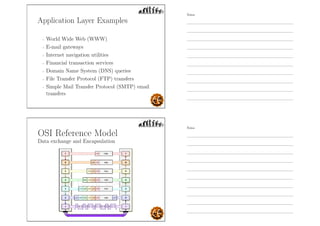
Application Layer
Notes
Notes
Application Layer Examples
- World Wide Web (WWW)
Application Layer Examples
- World Wide Web (WWW)
- E-mail gateways
Notes
Notes
Application Layer Examples
- World Wide Web (WWW)
- E-mail gateways
- Internet navigation utilities
Application Layer Examples
- World Wide Web (WWW)
- E-mail gateways
- Internet navigation utilities
- Financial transaction services
Notes
Notes
Application Layer Examples
- World Wide Web (WWW)
- E-mail gateways
- Internet navigation utilities
- Financial transaction services
- Domain Name System (DNS) queries
Application Layer Examples
- World Wide Web (WWW)
- E-mail gateways
- Internet navigation utilities
- Financial transaction services
- Domain Name System (DNS) queries
- File Transfer Protocol (FTP) transfers
Notes
Notes
Application Layer Examples
- World Wide Web (WWW)
- E-mail gateways
- Internet navigation utilities
- Financial transaction services
- Domain Name System (DNS) queries
- File Transfer Protocol (FTP) transfers
- Simple Mail Transfer Protocol (SMTP) email
transfers
OSI Reference Model
Data exchange and Encapsulation
Notes
Notes
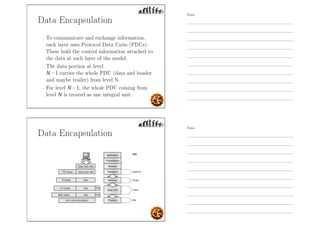
Data Encapsulation
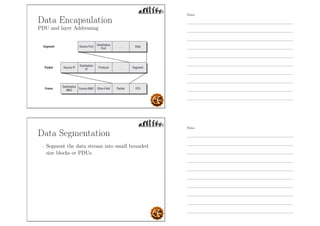
- To communicate and exchange information,
each layer uses Protocol Data Units (PDUs).
These hold the control information attached to
the data at each layer of the model.
Data Encapsulation
- To communicate and exchange information,
each layer uses Protocol Data Units (PDUs).
These hold the control information attached to
the data at each layer of the model.
- The data portion at level
N – 1 carries the whole PDU (data and header
and maybe trailer) from level N.
Notes
Notes
Data Encapsulation
- To communicate and exchange information,
each layer uses Protocol Data Units (PDUs).
These hold the control information attached to
the data at each layer of the model.
- The data portion at level
N – 1 carries the whole PDU (data and header
and maybe trailer) from level N.
- For level N – 1, the whole PDU coming from
level N is treated as one integral unit.
Data Encapsulation
Notes
Notes
Data Encapsulation
PDU and layer Addressing
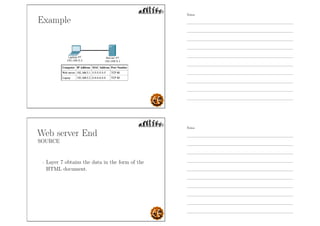
Data Segmentation
- Segment the data stream into small bounded
size blocks or PDUs.
Notes
Notes
Data Segmentation
- Segment the data stream into small bounded
size blocks or PDUs.
- the network may accept data blocks only up to
a certain size (53 octets for atm, 1526 octets
for Ethernet)
Data Segmentation
- Segment the data stream into small bounded
size blocks or PDUs.
- the network may accept data blocks only up to
a certain size (53 octets for atm, 1526 octets
for Ethernet)
- Advantages
◦ Efficient error control with PDU size ◦ Fewer
bits retransmitted in the event of failure ◦
Better access to shared transmission facilities,
with shorter delay ◦ Smaller buffers at receiver
stations
Notes
Notes
Data Segmentation
- Disadvantages
◦ Larger overhead with smaller PDU size
◦ More interrupts as PDUs announce their
arrival
◦ More time spent to process many smaller
PDUs
◦ Reassembly is an issue to be addressed
OSI Example
Imagine that you are on DLSU website and you
have clicked a link on the page. By doing so you
have just made a request of the web server to send
you a document (most web pages exist as
documents with an .html extension). This
document will be sent to your computer which will
use the proper application (your Internet browser)
to display the document so you can view it.
Notes
Notes
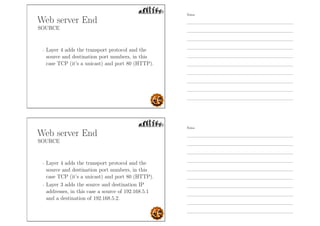
Example
Web server End
SOURCE
- Layer 7 obtains the data in the form of the
HTML document.
Notes
Notes
Web server End
SOURCE
- Layer 7 obtains the data in the form of the
HTML document.
- Layer 6 adds information about the formatting.
Web server End
SOURCE
- Layer 7 obtains the data in the form of the
HTML document.
- Layer 6 adds information about the formatting.
- Layer 5 adds information required to create a
session between the web server and the web
browser on the laptop.
Notes
Notes
Web server End
SOURCE
- Layer 4 adds the transport protocol and the
source and destination port numbers, in this
case TCP (it’s a unicast) and port 80 (HTTP).
Web server End
SOURCE
- Layer 4 adds the transport protocol and the
source and destination port numbers, in this
case TCP (it’s a unicast) and port 80 (HTTP).
- Layer 3 adds the source and destination IP
addresses, in this case a source of 192.168.5.1
and a destination of 192.168.5.2.
Notes
Notes
Web server end
SOURCE
- Layer 2 learns the destination MAC address
and adds the source and destination MAC
addresses, in this case, a source of 5-5-5-5-5-5
and destination of 6-6-6-6-6-6.
Web server end
SOURCE
- Layer 2 learns the destination MAC address
and adds the source and destination MAC
addresses, in this case, a source of 5-5-5-5-5-5
and destination of 6-6-6-6-6-6.
- Layer 1 converts the entire package into bits
and sends it across the network to the laptop.
Notes
Notes
Laptop end
DESTINATION
- Layer 1 receives the bits in electrical format,
converts them to be read by layer 2, and hands
them to layer 2.
Laptop end
DESTINATION
- Layer 1 receives the bits in electrical format,
converts them to be read by layer 2, and hands
them to layer 2.
- Layer 2 examines the destination MAC address
to see whether it is addressed to it, sees the
MAC address of 6-6-6-6-6 (its own), drops that
part of the transmission, and hands the
remaining data to layer 3.
Notes
Notes
Laptop end
DESTINATION
- Layer 1 receives the bits in electrical format,
converts them to be read by layer 2, and hands
them to layer 2.
- Layer 2 examines the destination MAC address
to see whether it is addressed to it, sees the
MAC address of 6-6-6-6-6 (its own), drops that
part of the transmission, and hands the
remaining data to layer 3.
- Layer 3 examines the destination IP address to
ensure that it is its own (192. 168.5.2), drops
that part, and hands the rest of the package to
layer 4.
Laptop end
DESTINATION
- Layer 4 examines the destination port number
(port 80), alerts the browser that HTTP data
is coming in, drops that part, and hands the
rest of the package to layer 5.
Notes
Notes
Laptop end
DESTINATION
- Layer 4 examines the destination port number
(port 80), alerts the browser that HTTP data
is coming in, drops that part, and hands the
rest of the package to layer 5.
- Layer 5 uses the information that was placed
on this layer by the web server to create the
session between the web server and the web
browser and then hands the rest of the
information to layer 6.
Laptop end
DESTINATION
- Layer 6 performs any format translation that
may be required and hands the remaining data
(the HTML document) to layer 7.
Notes
Notes
Laptop end
DESTINATION
- Layer 6 performs any format translation that
may be required and hands the remaining data
(the HTML document) to layer 7.
- The layer 7 application (the web browser)
receives the HTML document and opens the
document in the browser window.
Understand
Which of the following is not an advantage of
networking reference models?
A. They encourage standardization by defining what functions
are performed at particular layers of the model.
B. They prevent changes in one layer from causing a need for
changes in other layers, speeding development.
C. They ensure that networks perform better.
D. They encourage vendors to build on each other’s
developments through use of a common framework.
E. None of the above
Notes
Notes
Understand
Which of the following is not an advantage of
networking reference models?
A. They encourage standardization by defining what functions
are performed at particular layers of the model.
B. They prevent changes in one layer from causing a need for
changes in other layers, speeding development.
C. They ensure that networks perform better.
D. They encourage vendors to build on each other’s
developments through use of a common framework.
E. None of the above
Understand
Which layer of the OSI model is responsible for
coordinating the exchanges of information between
the layer 7 applications or services that are in use?
A. Application
B. Session
C. Data-Link
D. Physical
E. None of the above
Notes
Notes
Understand
Which layer of the OSI model is responsible for
coordinating the exchanges of information between
the layer 7 applications or services that are in use?
A. Application
B. Session
C. Data-Link
D. Physical
E. None of the above
Understand
What is the information that is used on layer 3 of
the OSI model?
A. A bit pattern
B. MAC addresses
C. IP addresses
D. Port numbers
E. All of the above
Notes
Notes
Understand
What is the information that is used on layer 3 of
the OSI model?
A. A bit pattern
B. MAC addresses
C. IP addresses
D. Port numbers
E. All of the above
Reading Assignment
- Illustrate and Contrast OSI and
TCP/IP models.
Notes
Notes
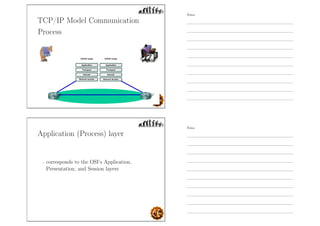
OSI and TCP/IP models
Comparison
OSI and TCP/IP Model
- There are seven layers in the OSI model and
four in the TCP/IP model.
Notes
Notes
OSI and TCP/IP Model
- There are seven layers in the OSI model and
four in the TCP/IP model.
- The top three layers of the OSI model
(Application, Presentation and Session) map to
the Application layer of the TCP/IP model.
OSI and TCP/IP Model
- There are seven layers in the OSI model and
four in the TCP/IP model.
- The top three layers of the OSI model
(Application, Presentation and Session) map to
the Application layer of the TCP/IP model.
- The bottom two layers of the OSI model
(Data-Link and Physical) map to the Network
Access layer of the TCP/IP model.
Notes
Notes
OSI vs. TCP/IP Model
- In the OSI model, it was envisioned that the
Session layer would handle the establishment
and management of the communication session
between the application or service being used.
OSI vs. TCP/IP Model
- In the OSI model, it was envisioned that the
Session layer would handle the establishment
and management of the communication session
between the application or service being used.
- In TCP/IP, those functions are performed by
the TCP /IP protocol itself at a different layer,
the Transport layer.
Notes
Notes
OSI vs. TCP/IP Model
- OSI model envisioned the host devices as deaf,
dumb, and blind bystanders to the networking
process, not participants (dumb terminal).
OSI vs. TCP/IP Model
- OSI model envisioned the host devices as deaf,
dumb, and blind bystanders to the networking
process, not participants (dumb terminal).
- In TCP/IP, the hosts participate and take part
in functions such as end-to-end verification,
routing, and network control (intelligent role
players)
Notes
Notes
OSI vs. TCP/IP Model
- When TCP/IP was developed, it was decided
that the division of the bottom layer into
Data-Link and Physical layers was unnecessary.
OSI vs. TCP/IP Model
- When TCP/IP was developed, it was decided
that the division of the bottom layer into
Data-Link and Physical layers was unnecessary.
- Thus their functions are combined in the
Network Access layer of the TCP/IP model.
Notes
Notes
TCP/IP Model
- Developed by US Defense Advanced Research
Project Agency (DARPA) for ARPANET
packet switched network.
TCP/IP Model
- Developed by US Defense Advanced Research
Project Agency (DARPA) for ARPANET
packet switched network.
- generally referred to as the TCP/IP protocol
suite, which consists of a large collection of
protocols.
Notes
Notes
TCP/IP Model
- Developed by US Defense Advanced Research
Project Agency (DARPA) for ARPANET
packet switched network.
- generally referred to as the TCP/IP protocol
suite, which consists of a large collection of
protocols.
- predates the OSI reference model.
TCP/IP Model
- Transmission Control Protocol (TCP)
is the primary transport layer (layer 4)
protocol, and is responsible for connection
establishment and management and reliable
data transport between software processes on
devices.
Notes
Notes
TCP/IP Model
- Transmission Control Protocol (TCP)
is the primary transport layer (layer 4)
protocol, and is responsible for connection
establishment and management and reliable
data transport between software processes on
devices.
- Internet Protocol (IP)
is the primary OSI network layer (layer 3)
protocol that provides addressing, datagram
routing and other functions in an internetwork.
TCP/IP Model
Notes
Notes
TCP/IP Layers
- Application (Process) Layer
TCP/IP Layers
- Application (Process) Layer
- Host-to-host (Transport) Layer
Notes
Notes
TCP/IP Layers
- Application (Process) Layer
- Host-to-host (Transport) Layer
- Internet Layer
TCP/IP Layers
- Application (Process) Layer
- Host-to-host (Transport) Layer
- Internet Layer
- Network Access/Interface Layer
Notes
Notes
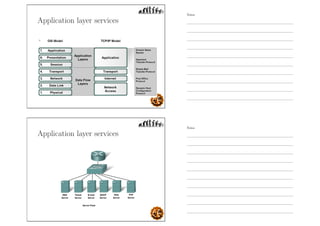
TCP/IP Model Communication
Process
Application (Process) layer
- corresponds to the OSI’s Application,
Presentation, and Session layers
Notes
Notes
Application (Process) layer
- corresponds to the OSI’s Application,
Presentation, and Session layers
- defines protocols for node-to-node application
communication
Application (Process) layer
- corresponds to the OSI’s Application,
Presentation, and Session layers
- defines protocols for node-to-node application
communication
- controls user-interface specifications.
Notes
Notes
Application layer services
Notes
Notes
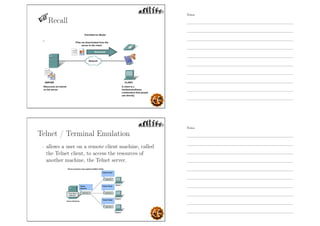
Recall
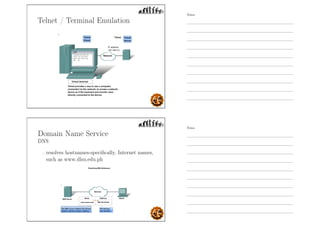
Telnet / Terminal Emulation
- allows a user on a remote client machine, called
the Telnet client, to access the resources of
another machine, the Telnet server.
Notes
Notes
Telnet / Terminal Emulation
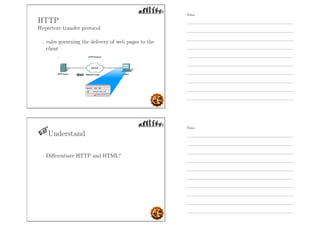
Domain Name Service
DNS
- resolves hostnames-specifically, Internet names,
such as www.dlsu.edu.ph
Notes
Notes
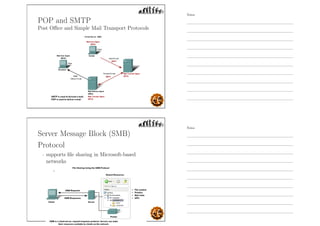
HTTP
Hypertext transfer protocol
- rules governing the delivery of web pages to the
client
Understand
- Differentiate HTTP and HTML?
Notes
Notes
Understand
- Differentiate HTTP and HTML?
- HTML: hypertext markup language
Definitions of tags that are added to Web
documents to control their appearance.
Understand
- Differentiate HTTP and HTML?
- HTML: hypertext markup language
Definitions of tags that are added to Web
documents to control their appearance.
- HTTP: hypertext transfer protocol
The rules governing the conversation between a
Web client and a Web server.
Notes
Notes
POP and SMTP
Post Office and Simple Mail Transport Protocols
Server Message Block (SMB)
Protocol
- supports file sharing in Microsoft-based
networks
Notes
Notes
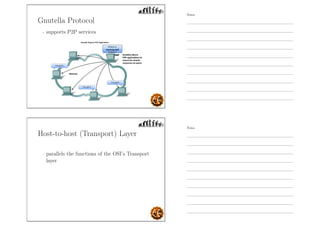
Gnutella Protocol
- supports P2P services
Host-to-host (Transport) Layer
- parallels the functions of the OSI’s Transport
layer
Notes
Notes
Host-to-host (Transport) Layer
- parallels the functions of the OSI’s Transport
layer
- define protocols for setting up the level of
transmission service for applications.
Host-to-host (Transport) Layer
- parallels the functions of the OSI’s Transport
layer
- define protocols for setting up the level of
transmission service for applications.
- concerned with
◦ reliable end-to-end communication
◦ error-free delivery of data
◦ packet sequencing
Notes
Notes
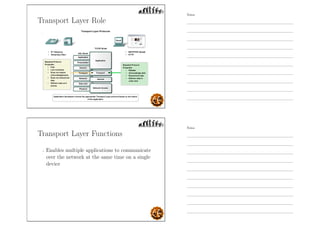
Transport Layer Role
Transport Layer Functions
- Enables multiple applications to communicate
over the network at the same time on a single
device
Notes
Notes
Transport Layer Functions
- Enables multiple applications to communicate
over the network at the same time on a single
device
- Ensures that, if required, all the data is
received reliably and in order by the correct
application
Transport Layer Functions
- Enables multiple applications to communicate
over the network at the same time on a single
device
- Ensures that, if required, all the data is
received reliably and in order by the correct
application
- Employs error handling mechanisms
Notes
Notes
Transport Layer Functions
- Enables multiple applications to communicate
over the network at the same time on a single
device
- Ensures that, if required, all the data is
received reliably and in order by the correct
application
- Employs error handling mechanisms
- UDP- User Datagram protocol- an exchange of
data w/o acknowledgment, sure delivery
Transport Layer Purpose
- Segmenting data  managing each piece -
data must be prepared to be sent across the
media in manageable pieces.
Notes
Notes
Transport Layer Purpose
- Segmenting data  managing each piece -
data must be prepared to be sent across the
media in manageable pieces.
- Tracking the individual communication
between applications on the source and
destination hosts -
maintains the multiple communication streams
between these applications.
Transport Layer Purpose
- Reassembling the segments into streams of
application data -
At the receiving host, each piece of data will be
reconstructed and directed to the appropriate
application.
Notes
Notes
Transport Layer Purpose
- Reassembling the segments into streams of
application data -
At the receiving host, each piece of data will be
reconstructed and directed to the appropriate
application.
- Identifying the different applications-
assigns each application an identifier; the
TCP/IP protocols call this identifier a
port number.
Transport Layer Protocols
- Transmission Control Protocol (TCP)
◦ Connection-oriented
◦ Guaranteed Delivery
◦ Supports Flow Control and Error control
Notes
Notes
Transport Layer Protocols
- Transmission Control Protocol (TCP)
◦ Connection-oriented
◦ Guaranteed Delivery
◦ Supports Flow Control and Error control
- User Datagram Protocol (UDP)
◦ Connectionless-oriented
◦ Nonguaranteed Delivery
◦ No Flow Control and Error control
Internet Layer
- corresponds to the OSI’s Network layer.
Notes
Notes
Internet Layer
- corresponds to the OSI’s Network layer.
- designates the protocols relating to the logical
transmission of packets over the entire network.
Internet Layer
- corresponds to the OSI’s Network layer.
- designates the protocols relating to the logical
transmission of packets over the entire network.
- concerned with
◦ logical addressing, i.e. IP (Internet Protocol)
address
◦ routing of packets among multiple networks
Notes
Notes
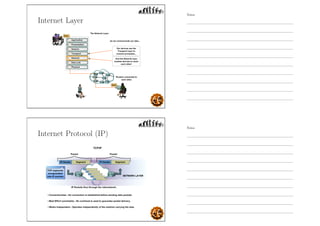
Internet Layer
Internet Protocol (IP)
Notes
Notes
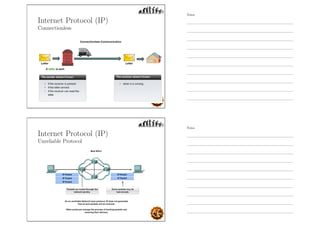
Internet Protocol (IP)
Connectionless
Internet Protocol (IP)
Unreliable Protocol
Notes
Notes
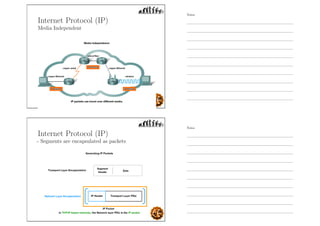
Internet Protocol (IP)
Media Independent
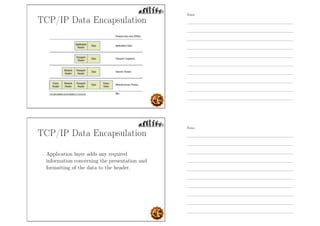
Internet Protocol (IP)
- Segments are encapsulated as packets
Notes
Notes
Network Access Layer
- interface to the local network
Network Access Layer
- interface to the local network
- concerned with the exchange of data between
an end system (server, workstation, etc.) and
the network to which it is attached.
Notes
Notes
Network Access Layer
- interface to the local network
- concerned with the exchange of data between
an end system (server, workstation, etc.) and
the network to which it is attached.
- concerned with
◦ hardware addressing
◦ protocols for the physical transmission of
data
Network Access Layer
- the source and destination physical addresses
are put on the front of the package in a part
called the header.
Notes
Notes
Network Access Layer
- the source and destination physical addresses
are put on the front of the package in a part
called the header.
- Information used to perform a frame check
sequence on the message is placed at the back
of the package in a section called the trailer.
Network Access Layer
- the source and destination physical addresses
are put on the front of the package in a part
called the header.
- Information used to perform a frame check
sequence on the message is placed at the back
of the package in a section called the trailer.
- the package is converted to ones and zeros in
the format required by the physical medium in
use.
Notes
Notes
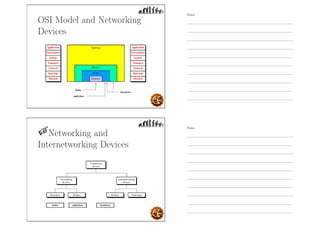
TCP/IP Data Encapsulation
- Application layer adds any required
information concerning the presentation and
formatting of the data to the header.
Notes
Notes
TCP/IP Data Encapsulation
- Application layer adds any required
information concerning the presentation and
formatting of the data to the header.
- Transport layer adds port number information
to the data that was handed down from the
Application layer.
TCP/IP Data Encapsulation
- Application layer adds any required
information concerning the presentation and
formatting of the data to the header.
- Transport layer adds port number information
to the data that was handed down from the
Application layer.
- Internet layer adds the required logical address
information to the segment.
Notes
Notes
TCP/IP Data Encapsulation
- Network Access layer adds physical address
information in the form of a frame header.
TCP/IP Data Encapsulation
- Network Access layer adds physical address
information in the form of a frame header.
- Network Access layer also adds a frame trailer
which contains information that can be used to
check the integrity of the data, called
frame check sequence (FCS).
Notes
Notes
TCP/IP Data Encapsulation
- Network Access layer adds physical address
information in the form of a frame header.
- Network Access layer also adds a frame trailer
which contains information that can be used to
check the integrity of the data, called
frame check sequence (FCS).
- Integrity means that the data has not changed
even 1 bit.
TCP/IP Data Encapsulation
- Network adaptor converts the information into
a series of ones and zeros.
Notes
Notes
TCP/IP Data Encapsulation
- Network adaptor converts the information into
a series of ones and zeros.
- At the beginning of the frame is a series of ones
and zeros that are designed to allow the
receiving device to lock on to or synch up with
the signal.
TCP/IP Data Encapsulation
- Network adaptor converts the information into
a series of ones and zeros.
- At the beginning of the frame is a series of ones
and zeros that are designed to allow the
receiving device to lock on to or synch up with
the signal.
- Once the receiving device has synched up with
the frame, it will start reading.
Notes
Notes
Protocol Operation of Sending
and Receiving
Readings
In what year was it mandated that all computers
connected to the ARPANET use TCP/IP?
A. 1969
B. 1974
C. 1979
D. 1983
E. None of the above
Notes
Notes
Readings
In what year was it mandated that all computers
connected to the ARPANET use TCP/IP?
A. 1969
B. 1974
C. 1979
D. 1983
E. None of the above
TCP/IP Protocol Suite
Notes
Notes
Application Protocols
- Telnet (Terminal emulation)
allows a user on a remote client machine, called
the Telnet client, to access the resources of
another machine, the Telnet server.
- File Transfer Protocol (FTP)
the protocol for transferring files
- Trivial File Transfer Protocol (TFTP)
stripped-down, stock version of FTP; TFTP
has no directory-browsing abilities; it can do
nothing but send and receive files.
Application Protocols
- Network File System (NFS)
allows two different types of file systems to
interoperate. Ex. NT and Unix file systems
- Simple Mail Transfer Protocol (SMTP)
answering our ubiquitous call to email, uses a
spooled, or queued, method of mail delivery.
- Line Printer Daemon (LPD)
designed for printer sharing
Notes
Notes
Application Protocols
- X Window
defines a protocol for writing client/server
applications based on a graphical user interface
(GUI)
- Simple Network Management Protocol (SNMP)
collects and manipulates valuable network
information. It gathers data by polling the
devices on the network from a management
station at fixed or random intervals, requiring
them to disclose certain information.
Application Protocols
- Domain Name Service (DNS)
resolves hostnamesâĂŤspecifically, Internet
names, such as www.dlsu.edu.ph.
- Dynamic Host Configuration Protocol
(DHCP)/Bootstrap Protocol (BootP)
assigns IP addresses to hosts. It allows easier
administration and works well in small to even
very large network environments.
Notes
Notes
Host-to-host (Transport)
Protocols
- Transmission Control Protocol (TCP)
a full-duplex, connection-oriented, reliable, and
accurate protocol, but costly in terms of
network overhead.
- User Datagram Protocol (UDP)
a minimalist protocol mechanism with no
handshaking dialogues, thus exposes any
unreliability of the underlying network protocol
to the user’s program. There is no guarantee of
delivery, ordering or duplicate protection.
Internet Protocols
- Internet Control Message Protocol (ICMP)
a management protocol and messaging service
provider for IP. Its messages are carried as IP
datagrams.
- Address Resolution Protocol (ARP)
finds the hardware address of a host from a
known IP address.
Notes
Notes
Internet Protocols
- Reverse Address Resolution Protocol (RARP)
discovers the identity of the IP address for
diskless machines by sending out a packet that
includes its MAC address and a request for the
IP address assigned to that MAC address.
- Proxy Address Resolution Protocol (Proxy
ARP)
help machines on a subnet reach remote
subnets without configuring routing or even a
default gateway.
Other Terms
- De facto standard
one that becomes the standard simply by being the method
that all parties gradually choose to use over a period of
time, without a formal adoption process.
- Default gateway
This is the IP address of the nearest router in the network.
Notes
Notes
Other Terms
- IP address
a number in a specific format that is used to identify a
computer.
- ISO (International Organization for Standardization)
is the world’s largest developer of voluntary International
Standards. International Standards give state of the art
specifications for products, services and good practice,
helping to make industry more efficient and effective.
Note: ISO is derived from the Greek isos, meaning equal.
Other Terms
- Local vs. Remote
If the source and destination hosts are on the same network,
the destination device is considered to be on the local
network.
If the two computers are on different networks, the
destination device is considered to be on a remote network.
Notes
Notes
Other Terms
- Peripherals
are any devices that operate in conjunction with the
computer yet reside outside the computer’s box. Ex.
display, mouse, keyboard, printer, camera, speakers, and
scanners.
- Resource
refers to anything that a user on one computer may want to
access on a different computer. Ex. files, folders, printers,
and scanners.
- Telecommuting
working from another physical location, usually from home.
Other Terms
- Standard vs. Proprietary
Proprietary refers to any process or way of doing something
that works only on a single vendor’s equipment while
standard any process that the industry has agreed upon.
Notes
Notes
Understand
- How do you ensure that products from different
manufacturers can work together as expected?
Understand
- How do you ensure that products from different
manufacturers can work together as expected?
- Answer:
Using Standards which provide guidelines to
manufacturers, vendors, government agencies,
and other service providers to ensure the kind
of interconnectivity necessary in today’s
marketplace and in international
communications.
Notes
Notes
OSI Model and Networking
Devices
Networking and
Internetworking Devices
Notes
Notes
Networking and
Internetworking Devices
Examples
Repeaters
- a physical layer device used to interconnect the
media segments of an extended network.
Notes
Notes
Repeaters
- a physical layer device used to interconnect the
media segments of an extended network.
- does not actually connect two LANs; it
connects two segments of the same LAN.
Repeaters
- repeaters regenerate signals corrupted
primarily due to distance effects
Notes
Notes
Repeaters
- repeaters regenerate signals corrupted
primarily due to distance effects
- A repeater forwards every frame; it has no
filtering capability.
Hub
Multiport repeater
- a physical-layer device that connects multiple
user stations, each via a dedicated cable
Notes
Notes
Hub
Multiport repeater
- a physical-layer device that connects multiple
user stations, each via a dedicated cable
- used to create a physical star network while
maintaining the logical bus or ring
configuration of the LAN
Bridge
- A physical and data-link layer device that links
one LAN segment to others
Notes
Notes
Bridge
- A physical and data-link layer device that links
one LAN segment to others
- Read all frames transmitted on one LAN and
accept those address to any station on the
other LAN
Bridge
- A physical and data-link layer device that links
one LAN segment to others
- Read all frames transmitted on one LAN and
accept those address to any station on the
other LAN
- Using MAC protocol for second LAN,
retransmit each frame
Notes
Notes
References
TEXTBOOK:
- Data Communications and Networking,
Behrouz Forouzan, 4th Edition, McGraw-Hill,
2007
References
SECONDARY SOURCE:
- Data and Computer Communications, William
Stallings, 2007
Notes
Notes
References
SECONDARY SOURCE:
- TCP/IP Protocol Suite, Behrouz Forouzan, 4th
edition, 2010
References
SECONDARY SOURCE:
- CISCO Networking Essentials, Troy McMillan,
2012
Notes
Notes
References
SECONDARY SOURCE:
- Network Fundamentals, Cisco Networking
Academy, 2007
Thank you for your attention!
Notes
Notes

Data communication part1

  • 1.
    DATCOMM Introduction to Data andComputer Networks Engr. Melvin K. Cabatuan, MsE De La Salle University January 2013 Objectives - Identify the scope and significance of Data Computer Networking in today’s world Notes Notes
  • 2.
    Objectives - Identify thescope and significance of Data Computer Networking in today’s world - Define and illustrate Data Communications and Data Network. Objectives - Identify the scope and significance of Data Computer Networking in today’s world - Define and illustrate Data Communications and Data Network. - Describe the Network Components and its Architecture. Notes Notes
  • 3.
    Objectives - Identify thescope and significance of Data Computer Networking in today’s world - Define and illustrate Data Communications and Data Network. - Describe the Network Components and its Architecture. - Illustrate and explain the Internet. Objectives - Identify the scope and significance of Data Computer Networking in today’s world - Define and illustrate Data Communications and Data Network. - Describe the Network Components and its Architecture. - Illustrate and explain the Internet. - Explain the various Network Communication Models Notes Notes
  • 4.
    Why Study Networks? -Networks support and improve our lives by providing instantaneous local or global communications. Why Study Networks? - Networks improve teaching and learning through sharing and collaboration. Notes Notes
  • 5.
    Why Study Networks? -Networks change the way we work. Why Study Networks? - Networks supports the way we play. Notes Notes
  • 6.
    Data Communications Data Communications -are the transfer of data from one device to another via some form of transmission medium. Notes Notes
  • 7.
    Data Communications - Thefive components that make up a data communications system are the message, sender, receiver, medium, and protocol. Possible Quiz Question A set of rules that govern data communications. It represents an agreement between the communicating devices. Without it, two devices may be connected but not communicating. A. Message B. Sender C. Receiver D. Medium E. Protocol Notes Notes
  • 8.
    Possible Quiz Question Aset of rules that govern data communications. It represents an agreement between the communicating devices. Without it, two devices may be connected but not communicating. A. Message B. Sender C. Receiver D. Medium E. Protocol Possible Quiz Question It is a fundamental characteristics of a data communication system which refers to the variation in the packet arrival time. A. Jitter B. Accuracy C. Timeliness D. Delivery E. All of the above Notes Notes
  • 9.
    Possible Quiz Question Itis a fundamental characteristics of a data communication system which refers to the variation in the packet arrival time. A. Jitter B. Accuracy C. Timeliness D. Delivery E. All of the above Remember - Delivery. The system must deliver data to the correct destination. Notes Notes
  • 10.
    Remember - Delivery. The systemmust deliver data to the correct destination. - Accuracy. The system must deliver the data accurately. Remember - Delivery. The system must deliver data to the correct destination. - Accuracy. The system must deliver the data accurately. - Timeliness. The system must deliver data in a timely manner. Notes Notes
  • 11.
    Remember - Delivery. The systemmust deliver data to the correct destination. - Accuracy. The system must deliver the data accurately. - Timeliness. The system must deliver data in a timely manner. - Jitter. Jitter refers to the variation in the packet arrival time. What is a Network? Notes Notes
  • 12.
    What is aNetwork? - A set of communication devices (nodes) connected by media links capable of carrying different types of communications. Remember - Devices These are used to communicate with one another. Notes Notes
  • 13.
    Remember - Devices These areused to communicate with one another. - Medium This is how the devices are connected together. Remember - Devices These are used to communicate with one another. - Medium This is how the devices are connected together. - Messages Information that travels over the medium. Notes Notes
  • 14.
    Remember - Devices These areused to communicate with one another. - Medium This is how the devices are connected together. - Messages Information that travels over the medium. - Rules / Protocol Governs how messages flow across network. Computer Network Notes Notes
  • 15.
    Computer Network - Anetwork of computers. Why Network Computers? Notes Notes
  • 16.
    Why Network Computers? -To increase productivity by linking computers and computer networks allowing users to share resources and data. Ex. Why Network Computers? - To increase productivity by linking computers and computer networks allowing users to share resources and data. Ex. - Data and applications Notes Notes
  • 17.
    Why Network Computers? -To increase productivity by linking computers and computer networks allowing users to share resources and data. Ex. - Data and applications - Resources, i.e. I/O devices like cameras printers Why Network Computers? - To increase productivity by linking computers and computer networks allowing users to share resources and data. Ex. - Data and applications - Resources, i.e. I/O devices like cameras printers - Network Storage Notes Notes
  • 18.
    Why Network Computers? -To increase productivity by linking computers and computer networks allowing users to share resources and data. Ex. - Data and applications - Resources, i.e. I/O devices like cameras printers - Network Storage - Backup devices Why Network Computers? - Reduced Cost and Easier Installation of Software. - Ex. Network installation Notes Notes
  • 19.
    Why Network Computers? -Improved Security Why Network Computers? - Improved Security - Improved Communications Notes Notes
  • 20.
    Why Network Computers? -Improved Security - Improved Communications - More Workplace Flexibility Why Network Computers? - Improved Security - Improved Communications - More Workplace Flexibility - Reduced Cost of Peripherals Notes Notes
  • 21.
    Why Network Computers? -Improved Security - Improved Communications - More Workplace Flexibility - Reduced Cost of Peripherals - Centralized Administration Network Requirements? - At least two computers Notes Notes
  • 22.
    Network Requirements? - Atleast two computers - A resource that needs to be shared Network Requirements? - At least two computers - A resource that needs to be shared - A transmission medium Notes Notes
  • 23.
    Network Requirements? - Atleast two computers - A resource that needs to be shared - A transmission medium - A communications agreement Network Category By type of MEDIA - Wired and Wireless Notes Notes
  • 24.
    Network Media - thisis the channel over which a message travels Network Category By COVERAGE Notes Notes
  • 25.
    Local Area Network LAN LocalArea Network LAN - Can be as small as two computers. Notes Notes
  • 26.
    Local Area Network LAN -Can be as small as two computers. - Laboratory w/ networked computers. Local Area Network LAN - Can be as small as two computers. - Laboratory w/ networked computers. - A network within a building or several buildings. Notes Notes
  • 27.
    Local Area Network LAN -Can be as small as two computers. - Laboratory w/ networked computers. - A network within a building or several buildings. - Speed at 10, 100, or 1000 Mbps Metropolitan Area Network MAN Notes Notes
  • 28.
    Metropolitan Area Network MAN -covers the area inside a town or a city. Metropolitan Area Network MAN - covers the area inside a town or a city. - Ex. Cable TV network Notes Notes
  • 29.
    Wide Area Network WAN WideArea Network WAN - provides long-distance transmission of data, image, audio, and video information over large geographic areas that may comprise a country, a continent, or even the whole world. Notes Notes
  • 30.
    Interconnection of Networks: Internetwork Interconnectionof Networks: Internetwork - Today, it is very rare to see a LAN, a MAN in isolation; they are connected to one another. Notes Notes
  • 31.
    Interconnection of Networks: Internetwork -Today, it is very rare to see a LAN, a MAN in isolation; they are connected to one another. - When two or more networks are connected, they become an internetwork, or internet. Example - Assume that an organization has two offices, one in Manila and the other in Cebu. The established office on Manila has a bus topology LAN; the newly opened office on Cebu has a star topology LAN. The president of the company lives somewhere in the middle and needs to have control over the company from her home in Boracay. Notes Notes
  • 32.
    Example - To createa backbone WAN for connecting these three entities (two LANs and the president’s computer), a switched WAN (operated by a service provider such as a telecom company) has been leased. To connect the LANs to this switched WAN, however, three point-to-point WANs are required. These point-to-point WANs can be a high-speed DSL line offered by a telephone company or a cable modern line offered by a cable TV provider. Illustration Four WANs + two LANs Notes Notes
  • 33.
    Virtual Private Network VPN VirtualPrivate Network VPN - It enables a host computer to send and receive data across shared or public networks as if it were a private network with all the functionality Notes Notes
  • 34.
    Other Networks - CampusArea Network, Corporate Area Network (CAN) essentially a local area network. Other Networks - Campus Area Network, Corporate Area Network (CAN) essentially a local area network. - Personal Area Network (PAN) A network, typically of devices centered around the user Notes Notes
  • 35.
    Other Networks - CampusArea Network, Corporate Area Network (CAN) essentially a local area network. - Personal Area Network (PAN) A network, typically of devices centered around the user - Wireless PAN (WPAN) a typical implementation of a PAN Other Networks - Campus Area Network, Corporate Area Network (CAN) essentially a local area network. - Personal Area Network (PAN) A network, typically of devices centered around the user - Wireless PAN (WPAN) a typical implementation of a PAN - Sensor Networks A specialized network of devices typically used for monitoring Notes Notes
  • 36.
    Network Topology Network Topology FourBasic Topologies Notes Notes
  • 37.
    Mesh Topology - Everydevice has a dedicated point-to-point link to every other device. Possible Quiz Question - How many duplex-mode links do we have on a mesh network with n nodes? Notes Notes
  • 38.
    Mesh Topology Advantages - Dedicatedlinks guarantees that each connection can carry its own data load, thus eliminating the traffic problems. Mesh Topology Advantages - Dedicated links guarantees that each connection can carry its own data load, thus eliminating the traffic problems. - A mesh topology is robust. Notes Notes
  • 39.
    Mesh Topology Advantages - Dedicatedlinks guarantees that each connection can carry its own data load, thus eliminating the traffic problems. - A mesh topology is robust. - The advantage of privacy or security. Mesh Topology Advantages - Dedicated links guarantees that each connection can carry its own data load, thus eliminating the traffic problems. - A mesh topology is robust. - The advantage of privacy or security. - Point-to-point links make fault identification and fault isolation easy. Notes Notes
  • 40.
    Mesh Topology Disadvantages - Installationand reconnection are difficult because every device must be connected to every other device. Mesh Topology Disadvantages - Installation and reconnection are difficult because every device must be connected to every other device. - Bulk of the wiring can be greater than the available space (in walls, ceilings, or floors) can accommodate. Notes Notes
  • 41.
    Mesh Topology Disadvantages - Installationand reconnection are difficult because every device must be connected to every other device. - Bulk of the wiring can be greater than the available space (in walls, ceilings, or floors) can accommodate. - Hardware required to connect each link (I/O ports and cable) can be prohibitively expensive. Star Topology - Each device has a dedicated point-to-point link only to a central controller, usually called a hub. Notes Notes
  • 42.
    Star Topology Advantages - Lessexpensive than a mesh topology. Star Topology Advantages - Less expensive than a mesh topology. - Easy to install and reconfigure. Notes Notes
  • 43.
    Star Topology Advantages - Lessexpensive than a mesh topology. - Easy to install and reconfigure. - Easy fault identification and fault isolation. Star Topology Advantages - Less expensive than a mesh topology. - Easy to install and reconfigure. - Easy fault identification and fault isolation. - Relatively robust because if one link fails, only that link is affected. Notes Notes
  • 44.
    Star Topology Disadvantages - Dependencyof the whole topology on one single point, the hub. If the hub goes down, the whole system is dead. Star Topology Disadvantages - Dependency of the whole topology on one single point, the hub. If the hub goes down, the whole system is dead. - Often more cabling is required in a star than in some other topologies (such as ring or bus). Notes Notes
  • 45.
    Bus Topology - Onelong cable acts as a backbone to link all the devices in a network. - Drop line is a connection running between the device and the main cable. Bus Topology Advantages - Ease of installation. Notes Notes
  • 46.
    Bus Topology Advantages - Easeof installation. - Uses less cabling than mesh or star topologies, hence less expensive. Bus Topology Disadvantages - Difficult reconnection and fault isolation. Notes Notes
  • 47.
    Bus Topology Disadvantages - Difficultreconnection and fault isolation. - Difficult to add new devices. Bus Topology Disadvantages - Difficult reconnection and fault isolation. - Difficult to add new devices. - Signal reflection at the taps can cause degradation in quality. Notes Notes
  • 48.
    Bus Topology Disadvantages - Difficultreconnection and fault isolation. - Difficult to add new devices. - Signal reflection at the taps can cause degradation in quality. - A fault or break in the bus cable stops all transmission. Ring Topology - Each device has a dedicated point-to-point connection with only the two devices on either side of it. - When a device receives a signal intended for another device, its repeater regenerates the bits and passes them along. Notes Notes
  • 49.
    Ring Topology Advantages - Easyto install and reconfigure. Ring Topology Advantages - Easy to install and reconfigure. - Fault isolation is simplified. Generally in a ring, a signal is circulating at all times. If one device does not receive a signal within a specified period, it can issue an alarm. Notes Notes
  • 50.
    Ring Topology Disadvantages - Unidirectionaltraffic can be a disadvantage. In a simple ring, a break in the ring (such as a disabled station) can disable the entire network. Ring Topology Disadvantages - Unidirectional traffic can be a disadvantage. In a simple ring, a break in the ring (such as a disabled station) can disable the entire network. - Today, the need for higher-speed LANs has made this topology less popular. Notes Notes
  • 51.
    Network Architecture According toSecurity Relationships - Peer-to-peer Network (P2P). Network Architecture According to Security Relationships - Peer-to-peer Network (P2P). - Client-server Network. Notes Notes
  • 52.
    Peer-to-peer Network (P2P) Workgroup -shared data is distributed on each computers. Peer-to-peer Network (P2P) Workgroup Notes Notes
  • 53.
    Peer-to-peer Network (P2P) Prosand Cons - Advantages ◦ Low cost ◦ Easy to set up ◦ No server required Peer-to-peer Network (P2P) Pros and Cons - Advantages ◦ Low cost ◦ Easy to set up ◦ No server required - Disadvantages ◦ No centralized control of security ◦ Administrative burden of maintaining accounts on all computers ◦ Not scalable Notes Notes
  • 54.
    Client-server Network - shareddata is centralized on a device called a file server. Client-server Network Notes Notes
  • 55.
    Client-server Network Pros andCons - Advantages ◦ Centralized administration ◦ Single sign-on ◦ Reduced broadcast traffic ◦ Scalability Client-server Network Pros and Cons - Advantages ◦ Centralized administration ◦ Single sign-on ◦ Reduced broadcast traffic ◦ Scalability - Disadvantages ◦ Higher cost ◦ More challenging technically ◦ Single point of failure with a single file server Notes Notes
  • 56.
    Network Transmission Modes -Unicast (One-to-one). a single source host is sending information to a single destination host Network Transmission Modes - Unicast (One-to-one). a single source host is sending information to a single destination host - Broadcast (One-to-many). a single host is sending information to all other hosts on the network Notes Notes
  • 57.
    Network Transmission Modes -Unicast (One-to-one). a single source host is sending information to a single destination host - Broadcast (One-to-many). a single host is sending information to all other hosts on the network - Multicast (One-to-some). a single host is sending a transmission to some, but not all hosts Transmission Modes Illustration Notes Notes
  • 58.
  • 59.
    Heirarchical Topology Cisco hierarchicalmodel - Core layer == backbone Heirarchical Topology Cisco hierarchical model - Core layer == backbone - Distribution layer == routing Notes Notes
  • 60.
    Heirarchical Topology Cisco hierarchicalmodel - Core layer == backbone - Distribution layer == routing - Access layer == switching Cisco hierarchical model Core layer (Backbone) Notes Notes
  • 61.
    Cisco hierarchical model Corelayer (Backbone) - Literally the core of the network. Cisco hierarchical model Core layer (Backbone) - Literally the core of the network. - Switch large amounts of traffic both reliably and quickly. Notes Notes
  • 62.
    Cisco hierarchical model Corelayer (Backbone) - Literally the core of the network. - Switch large amounts of traffic both reliably and quickly. - If there is a failure in the core, every single user can be affected. Cisco hierarchical model Distribution layer (Routing) Notes Notes
  • 63.
    Cisco hierarchical model Distributionlayer (Routing) - sometimes referred to as the workgroup layer. Cisco hierarchical model Distribution layer (Routing) - sometimes referred to as the workgroup layer. - provides routing, filtering, and WAN access and to determine how packets can access the core, if needed. Notes Notes
  • 64.
    Cisco hierarchical model Distributionlayer (Routing) - sometimes referred to as the workgroup layer. - provides routing, filtering, and WAN access and to determine how packets can access the core, if needed. - Place to implement security and policies for the network including address translation and firewalls. Cisco hierarchical model Access layer (Switching) Notes Notes
  • 65.
    Cisco hierarchical model Accesslayer (Switching) - sometimes referred to as the desktop layer. Cisco hierarchical model Access layer (Switching) - sometimes referred to as the desktop layer. - controls user and workgroup access to internetwork resources. Notes Notes
  • 66.
    Cisco hierarchical model Accesslayer (Switching) - sometimes referred to as the desktop layer. - controls user and workgroup access to internetwork resources. - segmentation Structure of the Internet Notes Notes
  • 67.
    Structure of theInternet - Hierarchical Structure of the Internet - Hierarchical - Common standards Notes Notes
  • 68.
    Structure of theInternet - Hierarchical - Common standards - Common protocols Access Networks Connects end hosts to the network core RESIDENTIAL ACCESS: Notes Notes
  • 69.
    Access Networks Connects endhosts to the network core RESIDENTIAL ACCESS: - Dial-up modem via Public Switched Telephone Network Access Networks Connects end hosts to the network core RESIDENTIAL ACCESS: - Dial-up modem via Public Switched Telephone Network - DSL Notes Notes
  • 70.
    Access Networks Connects endhosts to the network core RESIDENTIAL ACCESS: - Dial-up modem via Public Switched Telephone Network - DSL - Cable Broadband Access Networks Connects end hosts to the network core RESIDENTIAL ACCESS: - Dial-up modem via Public Switched Telephone Network - DSL - Cable Broadband - Wireless Broadband (Wimax, etc.) Notes Notes
  • 71.
    Access Networks Connects endhosts to the network core RESIDENTIAL ACCESS: - Dial-up modem via Public Switched Telephone Network - DSL - Cable Broadband - Wireless Broadband (Wimax, etc.) - FTTH Access Networks Connects end hosts to the network core RESIDENTIAL ACCESS: - Dial-up modem via Public Switched Telephone Network - DSL - Cable Broadband - Wireless Broadband (Wimax, etc.) - FTTH ACCESS WITHIN ENTERPRISE LAN’s: - Ethernet/IEEE 802.3 and Wifi Notes Notes
  • 72.
    WAN Technologies WAN Technologies -Links the components of the Internetwork core. Notes Notes
  • 73.
    WAN Technologies - Linksthe components of the Internetwork core. - Includes: X.25 Frame Relay ISDN, BISDN ATM SONET/SDH Packet Switching The Internet and other computer networks use packet switching Notes Notes
  • 74.
    Packet Switching The Internetand other computer networks use packet switching - A persistent path for signals/data (circuit) is not necessary for duration of communications. Packet Switching The Internet and other computer networks use packet switching - A persistent path for signals/data (circuit) is not necessary for duration of communications. - Data is broken down into chunks (packets) and each piece is sent through the network. Notes Notes
  • 75.
    Packet Switching The Internetand other computer networks use packet switching - A persistent path for signals/data (circuit) is not necessary for duration of communications. - Data is broken down into chunks (packets) and each piece is sent through the network. - Each packet may take various paths through the network. Packet Switching The Internet and other computer networks use packet switching - A persistent path for signals/data (circuit) is not necessary for duration of communications. - Data is broken down into chunks (packets) and each piece is sent through the network. - Each packet may take various paths through the network. - Packets may arrive out of sequence. Notes Notes
  • 76.
    Packet Switching Remember - X.25(64-kbps) A virtual-circuit switching network with extensive flow and error control. Notes Notes
  • 77.
    Remember - X.25 (64-kbps) Avirtual-circuit switching network with extensive flow and error control. - Frame Relay (1.544 - 44.376 Mbps) uses variable-length packets, called frames; strips out most of the overhead involved with error control. Remember - X.25 (64-kbps) A virtual-circuit switching network with extensive flow and error control. - Frame Relay (1.544 - 44.376 Mbps) uses variable-length packets, called frames; strips out most of the overhead involved with error control. - Asynchronous transfer mode (ATM) uses fixed-length packets, called cells. (10s, 100s of Mbps, and Gbps range) Notes Notes
  • 78.
    Quality of Service QoS Qualityof Service QoS - treat different traffic flows differently. Notes Notes
  • 79.
    Quality of Service QoS Qualityof Service QoS - ensure quality of service for applications that require it. Notes Notes
  • 80.
    Quality of Service QoS Qualityof Service QoS - appropriate QoS strategy for a given type of traffic. Notes Notes
  • 81.
    Protocols Rules Protocols Rules - shared conventionsfor communicating information. Notes Notes
  • 82.
    Protocols Rules - shared conventionsfor communicating information. - defines WHAT is communicated, HOW it is communicated, and WHEN it is communicated. Protocols Rules - shared conventions for communicating information. - defines WHAT is communicated, HOW it is communicated, and WHEN it is communicated. - Protocols specify Syntax: Data format, and Signal levels Semantics: Meaning of each bit section; Flow control, Error handling Timing: Speed match, and Sequencing Notes Notes
  • 83.
  • 84.
    Protocol Architecture - specifieshow a protocol is organized and implemented. Protocol Architecture - specifies how a protocol is organized and implemented. - layered structure of hardware and software that supports the exchange of data between systems and supports distributed applications, such as email and file transfer. Notes Notes
  • 85.
    Protocol Architecture - specifieshow a protocol is organized and implemented. - layered structure of hardware and software that supports the exchange of data between systems and supports distributed applications, such as email and file transfer. - at each layer of a protocol architecture, one or more common protocols are implemented in communicating systems. Protocol Architecture - Two approaches 1. Monolithic (single module) 2. Modular (layered) Notes Notes
  • 86.
    Protocol Architecture - Twoapproaches 1. Monolithic (single module) 2. Modular (layered) - Advantages of Modular Approach 1. Breaks complex tasks into subtasks. 2. Changes in one layer do not affect other layers. Layered Model Illustration Notes Notes
  • 87.
    Layered Protocol Architecture -Each layers acts as a module. Layered Protocol Architecture - Each layers acts as a module. - Communication occurs 1. between different modules on the same system 2. between similar modules on different systems Notes Notes
  • 88.
    Layered Architecture Example - OpenSystems Interconnection model (OSI). OSI Reference Model - layered framework developed by International Organization for Standardization (ISO) for the design of network systems that allows communication between all types of computer systems. Notes Notes
  • 89.
    OSI Reference Model -layered framework developed by International Organization for Standardization (ISO) for the design of network systems that allows communication between all types of computer systems. - consists of seven separate but related layers, each of which defines a part of the process of moving information across a network. OSI Reference Model - layered framework developed by International Organization for Standardization (ISO) for the design of network systems that allows communication between all types of computer systems. - consists of seven separate but related layers, each of which defines a part of the process of moving information across a network. - not a protocol; it is a reference model. Notes Notes
  • 90.
    OSI Reference Model OSIReference Model Host-to-host link Notes Notes
  • 91.
    OSI Model Layers -Layers 1, 2, and 3 - physical, data link, and network - are the network support layers OSI Model Layers - Layers 1, 2, and 3 - physical, data link, and network - are the network support layers - they deal with the physical aspects of moving data from one device to another (such as electrical specifications, physical connections, physical addressing, and transport timing and reliability) Notes Notes
  • 92.
    OSI Model Layers -Layers 5, 6, and 7 - session, presentation, and application - can be thought of as the user support layers; they allow interoperability among unrelated software systems. OSI Model Layers - Layers 5, 6, and 7 - session, presentation, and application - can be thought of as the user support layers; they allow interoperability among unrelated software systems. - Layer 4, the transport layer, links the two subgroups and ensures that what the lower layers have transmitted is in a form that the upper layers can use. Notes Notes
  • 93.
    Physical Layer (PHY) -is responsible for movements of individual bits from one hop (node) to the next. Physical Layer (PHY) - coordinates the functions required to carry a bit stream over a physical medium. Notes Notes
  • 94.
    Physical Layer (PHY) -coordinates the functions required to carry a bit stream over a physical medium. - deals with the mechanical and electrical specifications of the interface and transmission medium. Physical Layer (PHY) - coordinates the functions required to carry a bit stream over a physical medium. - deals with the mechanical and electrical specifications of the interface and transmission medium. - defines the procedures and functions that physical devices and interfaces have to perform for transmission to occur Notes Notes
  • 95.
    Physical Layer Concerns -Physical characteristics of interfaces and medium. Physical Layer Concerns - Physical characteristics of interfaces and medium. - Representation of bits. Notes Notes
  • 96.
    Physical Layer Concerns -Physical characteristics of interfaces and medium. - Representation of bits. - Data rate. Physical Layer Concerns - Physical characteristics of interfaces and medium. - Representation of bits. - Data rate. - Synchronization of bits. Notes Notes
  • 97.
    Physical Layer Concerns -Physical characteristics of interfaces and medium. - Representation of bits. - Data rate. - Synchronization of bits. - Physical topology. Physical Layer Concerns - Physical characteristics of interfaces and medium. - Representation of bits. - Data rate. - Synchronization of bits. - Physical topology. - Line configuration. Notes Notes
  • 98.
    Physical Layer Concerns -Physical characteristics of interfaces and medium. - Representation of bits. - Data rate. - Synchronization of bits. - Physical topology. - Line configuration. - Transmission mode. Remember Line Configuration connection of devices to the media. - Point-to-point configuration two devices are connected through a dedicated link. Notes Notes
  • 99.
    Remember Line Configuration connection ofdevices to the media. - Point-to-point configuration two devices are connected through a dedicated link. - Multipoint configuration a link is shared among several devices Remember Transmission mode direction of transmission between two devices. - Simplex mode only one device can send; the other can only receive. Notes Notes
  • 100.
    Remember Transmission mode direction oftransmission between two devices. - Simplex mode only one device can send; the other can only receive. - Half-duplex mode two devices can send and receive, but not at the same time. Remember Transmission mode direction of transmission between two devices. - Simplex mode only one device can send; the other can only receive. - Half-duplex mode two devices can send and receive, but not at the same time. - Full-duplex mode two devices can send and receive at the same time. Notes Notes
  • 101.
    Transmission mode Data flow (simplex,half-duplex, and full-duplex) Data Link Layer (DLL) or simply Link Layer - is responsible for moving frames from one hop (node) to the next. Notes Notes
  • 102.
    Data Link Layer(DLL) - transforms the physical layer, a raw transmission facility, to a reliable link. Data Link Layer (DLL) - transforms the physical layer, a raw transmission facility, to a reliable link. - makes the physical layer appear error-free to the upper layer (network layer). Notes Notes
  • 103.
    Data Link LayerConcerns - Framing divides the stream of bits received from the network layer into manageable data units called frames Data Link Layer Concerns - Framing divides the stream of bits received from the network layer into manageable data units called frames - Physical addressing adds a header to the frame to define the sender and/or receiver of the frame. If the frame is intended for a system outside the sender’s network, the receiver address is the address of the device that connects the network to the next one. Notes Notes
  • 104.
    Data Link Layer(DLL) Hop-to-hop delivery - communication at the data link layer occurs between two adjacent nodes Data Link Layer Concerns - Flow control imposes a flow control mechanism to avoid overwhelming the receiver. Notes Notes
  • 105.
    Data Link LayerConcerns - Flow control imposes a flow control mechanism to avoid overwhelming the receiver. - Error control Adds reliability to the physical layer by adding mechanisms to detect and retransmit damaged or lost frames. Data Link Layer Concerns - Flow control imposes a flow control mechanism to avoid overwhelming the receiver. - Error control Adds reliability to the physical layer by adding mechanisms to detect and retransmit damaged or lost frames. - Access control in multipoint configuration, link layer protocols are necessary to determine which device has control over the link at any given time. Notes Notes
  • 106.
    Data Link LayerExample - Ethernet (802.3) and Media Access Control (MAC) address applied to the network adaptor by the manufacturer during production. Network Layer - is responsible for the delivery of individual packets from the source host to the destination host. Notes Notes
  • 107.
    Network Layer - ensuresthat each packet gets from its point of origin to its final destination. Network Layer - ensures that each packet gets from its point of origin to its final destination. - If two systems are connected to the same link, there is usually no need for a network layer. Notes Notes
  • 108.
    Network Layer - ensuresthat each packet gets from its point of origin to its final destination. - If two systems are connected to the same link, there is usually no need for a network layer. - If the two systems are attached to different networks with connecting devices between the networks, there is often a need for the network layer to accomplish source-to-destination delivery. Network Layer Concerns - Logical addressing if a packet passes the network boundary, we need another addressing system to help distinguish the source and destination systems. Notes Notes
  • 109.
    Network Layer Concerns -Logical addressing if a packet passes the network boundary, we need another addressing system to help distinguish the source and destination systems. - Routing provides mechanism to route or set the path of the packets to their final destination Network Layer Notes Notes
  • 110.
    Transport Layer - isresponsible for process-to-process delivery of the entire message. Transport Layer - is responsible for process-to-process delivery of the entire message. - a process is an application program running on a host. Notes Notes
  • 111.
    Transport Layer - ensuresthat the whole message arrives intact and in order. Understand - The network layer gets each packet to the correct computer; the transport layer gets the entire message to the correct process on that computer. Notes Notes
  • 112.
    Understand - The networklayer gets each packet to the correct computer; the transport layer gets the entire message to the correct process on that computer. - Network layer does not recognize any relationship between the packets it delivers and treats each one independently. Understand - The network layer gets each packet to the correct computer; the transport layer gets the entire message to the correct process on that computer. - Network layer does not recognize any relationship between the packets it delivers and treats each one independently. - The transport layer, however, ensures that the whole message arrives intact and in order, overseeing both error control and flow control. Notes Notes
  • 113.
    Transport Layer Concerns -Service-point addressing address for delivery from a specific process (running program) on one computer to a specific process (running program) on the other. Transport Layer Concerns - Service-point addressing address for delivery from a specific process (running program) on one computer to a specific process (running program) on the other. - Segmentation and reassembly message is divided into transmittable segments, with each segment containing a sequence numbers enabling the transport layer to reassemble the message correctly. Notes Notes
  • 114.
    Transport Layer Concerns -Connection control either connectionless or connection-oriented. Transport Layer Concerns - Connection control either connectionless or connection-oriented. - End-to-end Flow control Notes Notes
  • 115.
    Transport Layer Concerns -Connection control either connectionless or connection-oriented. - End-to-end Flow control - Process-to-process Error control Transport Layer Concerns - Connection control either connectionless or connection-oriented. - End-to-end Flow control - Process-to-process Error control - Transport layer protocol and the port number Notes Notes
  • 116.
    Session Layer - isresponsible for dialog control and synchronization. Session Layer - is responsible for dialog control and synchronization. - establishes, maintains, synchronizes the interaction among communicating systems. Notes Notes
  • 117.
    Session Layer Concerns -Dialog control allows two systems to enter into a dialog allows the communication between two processes to take place in either half-duplex or full-duplex mode. Session Layer Concerns - Dialog control allows two systems to enter into a dialog allows the communication between two processes to take place in either half-duplex or full-duplex mode. - Synchronization allows a process to add checkpoints, or synchronization points, to a stream of data. Notes Notes
  • 118.
    Presentation Layer - isresponsible for translation, compression, and encryption. Presentation Layer - is responsible for translation, compression, and encryption. - concerned with the syntax and semantics of the information exchanged between two systems. Notes Notes
  • 119.
    Presentation Layer Concerns -Translation responsible for interoperability between different encoding methods Presentation Layer Concerns - Translation responsible for interoperability between different encoding methods - Encryption the sender transforms the original information to another form and sends the resulting message. Notes Notes
  • 120.
    Presentation Layer Concerns -Translation responsible for interoperability between different encoding methods - Encryption the sender transforms the original information to another form and sends the resulting message. - Compression reduce the number of bits. Presentation Layer Examples - JPEG- Joint Photographic Experts Group Notes Notes
  • 121.
    Presentation Layer Examples -JPEG- Joint Photographic Experts Group - MPEG- The Moving Picture Experts Group’s standard Presentation Layer Examples - JPEG- Joint Photographic Experts Group - MPEG- The Moving Picture Experts Group’s standard - MIDI- Musical Instrument Digital Interface Notes Notes
  • 122.
    Presentation Layer Examples -JPEG- Joint Photographic Experts Group - MPEG- The Moving Picture Experts Group’s standard - MIDI- Musical Instrument Digital Interface - TIFF- Tagged Image File Format Application Layer - is responsible for providing services to the user. Notes Notes
  • 123.
    Application Layer - isresponsible for providing services to the user. - enables the user, whether human or software, to access the network. Application Layer The Interface Between Human and Data Networks Notes Notes
  • 124.
    Application Layer The InterfaceBetween Human and Data Networks Application Layer Concerns - Network virtual terminal a software version of a physical terminal, and it allows a user to log on to a remote host. Notes Notes
  • 125.
    Application Layer Concerns -Network virtual terminal a software version of a physical terminal, and it allows a user to log on to a remote host. - File transfer, access, and management allows a user to access files in a remote host, and to manage or control files Application Layer Concerns - Network virtual terminal a software version of a physical terminal, and it allows a user to log on to a remote host. - File transfer, access, and management allows a user to access files in a remote host, and to manage or control files - Mail services Notes Notes
  • 126.
    Application Layer Concerns -Network virtual terminal a software version of a physical terminal, and it allows a user to log on to a remote host. - File transfer, access, and management allows a user to access files in a remote host, and to manage or control files - Mail services - Directory services Application Layer Notes Notes
  • 127.
    Application Layer Examples -World Wide Web (WWW) Application Layer Examples - World Wide Web (WWW) - E-mail gateways Notes Notes
  • 128.
    Application Layer Examples -World Wide Web (WWW) - E-mail gateways - Internet navigation utilities Application Layer Examples - World Wide Web (WWW) - E-mail gateways - Internet navigation utilities - Financial transaction services Notes Notes
  • 129.
    Application Layer Examples -World Wide Web (WWW) - E-mail gateways - Internet navigation utilities - Financial transaction services - Domain Name System (DNS) queries Application Layer Examples - World Wide Web (WWW) - E-mail gateways - Internet navigation utilities - Financial transaction services - Domain Name System (DNS) queries - File Transfer Protocol (FTP) transfers Notes Notes
  • 130.
    Application Layer Examples -World Wide Web (WWW) - E-mail gateways - Internet navigation utilities - Financial transaction services - Domain Name System (DNS) queries - File Transfer Protocol (FTP) transfers - Simple Mail Transfer Protocol (SMTP) email transfers OSI Reference Model Data exchange and Encapsulation Notes Notes
  • 131.
    Data Encapsulation - Tocommunicate and exchange information, each layer uses Protocol Data Units (PDUs). These hold the control information attached to the data at each layer of the model. Data Encapsulation - To communicate and exchange information, each layer uses Protocol Data Units (PDUs). These hold the control information attached to the data at each layer of the model. - The data portion at level N – 1 carries the whole PDU (data and header and maybe trailer) from level N. Notes Notes
  • 132.
    Data Encapsulation - Tocommunicate and exchange information, each layer uses Protocol Data Units (PDUs). These hold the control information attached to the data at each layer of the model. - The data portion at level N – 1 carries the whole PDU (data and header and maybe trailer) from level N. - For level N – 1, the whole PDU coming from level N is treated as one integral unit. Data Encapsulation Notes Notes
  • 133.
    Data Encapsulation PDU andlayer Addressing Data Segmentation - Segment the data stream into small bounded size blocks or PDUs. Notes Notes
  • 134.
    Data Segmentation - Segmentthe data stream into small bounded size blocks or PDUs. - the network may accept data blocks only up to a certain size (53 octets for atm, 1526 octets for Ethernet) Data Segmentation - Segment the data stream into small bounded size blocks or PDUs. - the network may accept data blocks only up to a certain size (53 octets for atm, 1526 octets for Ethernet) - Advantages ◦ Efficient error control with PDU size ◦ Fewer bits retransmitted in the event of failure ◦ Better access to shared transmission facilities, with shorter delay ◦ Smaller buffers at receiver stations Notes Notes
  • 135.
    Data Segmentation - Disadvantages ◦Larger overhead with smaller PDU size ◦ More interrupts as PDUs announce their arrival ◦ More time spent to process many smaller PDUs ◦ Reassembly is an issue to be addressed OSI Example Imagine that you are on DLSU website and you have clicked a link on the page. By doing so you have just made a request of the web server to send you a document (most web pages exist as documents with an .html extension). This document will be sent to your computer which will use the proper application (your Internet browser) to display the document so you can view it. Notes Notes
  • 136.
    Example Web server End SOURCE -Layer 7 obtains the data in the form of the HTML document. Notes Notes
  • 137.
    Web server End SOURCE -Layer 7 obtains the data in the form of the HTML document. - Layer 6 adds information about the formatting. Web server End SOURCE - Layer 7 obtains the data in the form of the HTML document. - Layer 6 adds information about the formatting. - Layer 5 adds information required to create a session between the web server and the web browser on the laptop. Notes Notes
  • 138.
    Web server End SOURCE -Layer 4 adds the transport protocol and the source and destination port numbers, in this case TCP (it’s a unicast) and port 80 (HTTP). Web server End SOURCE - Layer 4 adds the transport protocol and the source and destination port numbers, in this case TCP (it’s a unicast) and port 80 (HTTP). - Layer 3 adds the source and destination IP addresses, in this case a source of 192.168.5.1 and a destination of 192.168.5.2. Notes Notes
  • 139.
    Web server end SOURCE -Layer 2 learns the destination MAC address and adds the source and destination MAC addresses, in this case, a source of 5-5-5-5-5-5 and destination of 6-6-6-6-6-6. Web server end SOURCE - Layer 2 learns the destination MAC address and adds the source and destination MAC addresses, in this case, a source of 5-5-5-5-5-5 and destination of 6-6-6-6-6-6. - Layer 1 converts the entire package into bits and sends it across the network to the laptop. Notes Notes
  • 140.
    Laptop end DESTINATION - Layer1 receives the bits in electrical format, converts them to be read by layer 2, and hands them to layer 2. Laptop end DESTINATION - Layer 1 receives the bits in electrical format, converts them to be read by layer 2, and hands them to layer 2. - Layer 2 examines the destination MAC address to see whether it is addressed to it, sees the MAC address of 6-6-6-6-6 (its own), drops that part of the transmission, and hands the remaining data to layer 3. Notes Notes
  • 141.
    Laptop end DESTINATION - Layer1 receives the bits in electrical format, converts them to be read by layer 2, and hands them to layer 2. - Layer 2 examines the destination MAC address to see whether it is addressed to it, sees the MAC address of 6-6-6-6-6 (its own), drops that part of the transmission, and hands the remaining data to layer 3. - Layer 3 examines the destination IP address to ensure that it is its own (192. 168.5.2), drops that part, and hands the rest of the package to layer 4. Laptop end DESTINATION - Layer 4 examines the destination port number (port 80), alerts the browser that HTTP data is coming in, drops that part, and hands the rest of the package to layer 5. Notes Notes
  • 142.
    Laptop end DESTINATION - Layer4 examines the destination port number (port 80), alerts the browser that HTTP data is coming in, drops that part, and hands the rest of the package to layer 5. - Layer 5 uses the information that was placed on this layer by the web server to create the session between the web server and the web browser and then hands the rest of the information to layer 6. Laptop end DESTINATION - Layer 6 performs any format translation that may be required and hands the remaining data (the HTML document) to layer 7. Notes Notes
  • 143.
    Laptop end DESTINATION - Layer6 performs any format translation that may be required and hands the remaining data (the HTML document) to layer 7. - The layer 7 application (the web browser) receives the HTML document and opens the document in the browser window. Understand Which of the following is not an advantage of networking reference models? A. They encourage standardization by defining what functions are performed at particular layers of the model. B. They prevent changes in one layer from causing a need for changes in other layers, speeding development. C. They ensure that networks perform better. D. They encourage vendors to build on each other’s developments through use of a common framework. E. None of the above Notes Notes
  • 144.
    Understand Which of thefollowing is not an advantage of networking reference models? A. They encourage standardization by defining what functions are performed at particular layers of the model. B. They prevent changes in one layer from causing a need for changes in other layers, speeding development. C. They ensure that networks perform better. D. They encourage vendors to build on each other’s developments through use of a common framework. E. None of the above Understand Which layer of the OSI model is responsible for coordinating the exchanges of information between the layer 7 applications or services that are in use? A. Application B. Session C. Data-Link D. Physical E. None of the above Notes Notes
  • 145.
    Understand Which layer ofthe OSI model is responsible for coordinating the exchanges of information between the layer 7 applications or services that are in use? A. Application B. Session C. Data-Link D. Physical E. None of the above Understand What is the information that is used on layer 3 of the OSI model? A. A bit pattern B. MAC addresses C. IP addresses D. Port numbers E. All of the above Notes Notes
  • 146.
    Understand What is theinformation that is used on layer 3 of the OSI model? A. A bit pattern B. MAC addresses C. IP addresses D. Port numbers E. All of the above Reading Assignment - Illustrate and Contrast OSI and TCP/IP models. Notes Notes
  • 147.
    OSI and TCP/IPmodels Comparison OSI and TCP/IP Model - There are seven layers in the OSI model and four in the TCP/IP model. Notes Notes
  • 148.
    OSI and TCP/IPModel - There are seven layers in the OSI model and four in the TCP/IP model. - The top three layers of the OSI model (Application, Presentation and Session) map to the Application layer of the TCP/IP model. OSI and TCP/IP Model - There are seven layers in the OSI model and four in the TCP/IP model. - The top three layers of the OSI model (Application, Presentation and Session) map to the Application layer of the TCP/IP model. - The bottom two layers of the OSI model (Data-Link and Physical) map to the Network Access layer of the TCP/IP model. Notes Notes
  • 149.
    OSI vs. TCP/IPModel - In the OSI model, it was envisioned that the Session layer would handle the establishment and management of the communication session between the application or service being used. OSI vs. TCP/IP Model - In the OSI model, it was envisioned that the Session layer would handle the establishment and management of the communication session between the application or service being used. - In TCP/IP, those functions are performed by the TCP /IP protocol itself at a different layer, the Transport layer. Notes Notes
  • 150.
    OSI vs. TCP/IPModel - OSI model envisioned the host devices as deaf, dumb, and blind bystanders to the networking process, not participants (dumb terminal). OSI vs. TCP/IP Model - OSI model envisioned the host devices as deaf, dumb, and blind bystanders to the networking process, not participants (dumb terminal). - In TCP/IP, the hosts participate and take part in functions such as end-to-end verification, routing, and network control (intelligent role players) Notes Notes
  • 151.
    OSI vs. TCP/IPModel - When TCP/IP was developed, it was decided that the division of the bottom layer into Data-Link and Physical layers was unnecessary. OSI vs. TCP/IP Model - When TCP/IP was developed, it was decided that the division of the bottom layer into Data-Link and Physical layers was unnecessary. - Thus their functions are combined in the Network Access layer of the TCP/IP model. Notes Notes
  • 152.
    TCP/IP Model - Developedby US Defense Advanced Research Project Agency (DARPA) for ARPANET packet switched network. TCP/IP Model - Developed by US Defense Advanced Research Project Agency (DARPA) for ARPANET packet switched network. - generally referred to as the TCP/IP protocol suite, which consists of a large collection of protocols. Notes Notes
  • 153.
    TCP/IP Model - Developedby US Defense Advanced Research Project Agency (DARPA) for ARPANET packet switched network. - generally referred to as the TCP/IP protocol suite, which consists of a large collection of protocols. - predates the OSI reference model. TCP/IP Model - Transmission Control Protocol (TCP) is the primary transport layer (layer 4) protocol, and is responsible for connection establishment and management and reliable data transport between software processes on devices. Notes Notes
  • 154.
    TCP/IP Model - TransmissionControl Protocol (TCP) is the primary transport layer (layer 4) protocol, and is responsible for connection establishment and management and reliable data transport between software processes on devices. - Internet Protocol (IP) is the primary OSI network layer (layer 3) protocol that provides addressing, datagram routing and other functions in an internetwork. TCP/IP Model Notes Notes
  • 155.
    TCP/IP Layers - Application(Process) Layer TCP/IP Layers - Application (Process) Layer - Host-to-host (Transport) Layer Notes Notes
  • 156.
    TCP/IP Layers - Application(Process) Layer - Host-to-host (Transport) Layer - Internet Layer TCP/IP Layers - Application (Process) Layer - Host-to-host (Transport) Layer - Internet Layer - Network Access/Interface Layer Notes Notes
  • 157.
    TCP/IP Model Communication Process Application(Process) layer - corresponds to the OSI’s Application, Presentation, and Session layers Notes Notes
  • 158.
    Application (Process) layer -corresponds to the OSI’s Application, Presentation, and Session layers - defines protocols for node-to-node application communication Application (Process) layer - corresponds to the OSI’s Application, Presentation, and Session layers - defines protocols for node-to-node application communication - controls user-interface specifications. Notes Notes
  • 159.
    Application layer services Applicationlayer services Notes Notes
  • 160.
    Recall Telnet / TerminalEmulation - allows a user on a remote client machine, called the Telnet client, to access the resources of another machine, the Telnet server. Notes Notes
  • 161.
    Telnet / TerminalEmulation Domain Name Service DNS - resolves hostnames-specifically, Internet names, such as www.dlsu.edu.ph Notes Notes
  • 162.
    HTTP Hypertext transfer protocol -rules governing the delivery of web pages to the client Understand - Differentiate HTTP and HTML? Notes Notes
  • 163.
    Understand - Differentiate HTTPand HTML? - HTML: hypertext markup language Definitions of tags that are added to Web documents to control their appearance. Understand - Differentiate HTTP and HTML? - HTML: hypertext markup language Definitions of tags that are added to Web documents to control their appearance. - HTTP: hypertext transfer protocol The rules governing the conversation between a Web client and a Web server. Notes Notes
  • 164.
    POP and SMTP PostOffice and Simple Mail Transport Protocols Server Message Block (SMB) Protocol - supports file sharing in Microsoft-based networks Notes Notes
  • 165.
    Gnutella Protocol - supportsP2P services Host-to-host (Transport) Layer - parallels the functions of the OSI’s Transport layer Notes Notes
  • 166.
    Host-to-host (Transport) Layer -parallels the functions of the OSI’s Transport layer - define protocols for setting up the level of transmission service for applications. Host-to-host (Transport) Layer - parallels the functions of the OSI’s Transport layer - define protocols for setting up the level of transmission service for applications. - concerned with ◦ reliable end-to-end communication ◦ error-free delivery of data ◦ packet sequencing Notes Notes
  • 167.
    Transport Layer Role TransportLayer Functions - Enables multiple applications to communicate over the network at the same time on a single device Notes Notes
  • 168.
    Transport Layer Functions -Enables multiple applications to communicate over the network at the same time on a single device - Ensures that, if required, all the data is received reliably and in order by the correct application Transport Layer Functions - Enables multiple applications to communicate over the network at the same time on a single device - Ensures that, if required, all the data is received reliably and in order by the correct application - Employs error handling mechanisms Notes Notes
  • 169.
    Transport Layer Functions -Enables multiple applications to communicate over the network at the same time on a single device - Ensures that, if required, all the data is received reliably and in order by the correct application - Employs error handling mechanisms - UDP- User Datagram protocol- an exchange of data w/o acknowledgment, sure delivery Transport Layer Purpose - Segmenting data managing each piece - data must be prepared to be sent across the media in manageable pieces. Notes Notes
  • 170.
    Transport Layer Purpose -Segmenting data managing each piece - data must be prepared to be sent across the media in manageable pieces. - Tracking the individual communication between applications on the source and destination hosts - maintains the multiple communication streams between these applications. Transport Layer Purpose - Reassembling the segments into streams of application data - At the receiving host, each piece of data will be reconstructed and directed to the appropriate application. Notes Notes
  • 171.
    Transport Layer Purpose -Reassembling the segments into streams of application data - At the receiving host, each piece of data will be reconstructed and directed to the appropriate application. - Identifying the different applications- assigns each application an identifier; the TCP/IP protocols call this identifier a port number. Transport Layer Protocols - Transmission Control Protocol (TCP) ◦ Connection-oriented ◦ Guaranteed Delivery ◦ Supports Flow Control and Error control Notes Notes
  • 172.
    Transport Layer Protocols -Transmission Control Protocol (TCP) ◦ Connection-oriented ◦ Guaranteed Delivery ◦ Supports Flow Control and Error control - User Datagram Protocol (UDP) ◦ Connectionless-oriented ◦ Nonguaranteed Delivery ◦ No Flow Control and Error control Internet Layer - corresponds to the OSI’s Network layer. Notes Notes
  • 173.
    Internet Layer - correspondsto the OSI’s Network layer. - designates the protocols relating to the logical transmission of packets over the entire network. Internet Layer - corresponds to the OSI’s Network layer. - designates the protocols relating to the logical transmission of packets over the entire network. - concerned with ◦ logical addressing, i.e. IP (Internet Protocol) address ◦ routing of packets among multiple networks Notes Notes
  • 174.
  • 175.
    Internet Protocol (IP) Connectionless InternetProtocol (IP) Unreliable Protocol Notes Notes
  • 176.
    Internet Protocol (IP) MediaIndependent Internet Protocol (IP) - Segments are encapsulated as packets Notes Notes
  • 177.
    Network Access Layer -interface to the local network Network Access Layer - interface to the local network - concerned with the exchange of data between an end system (server, workstation, etc.) and the network to which it is attached. Notes Notes
  • 178.
    Network Access Layer -interface to the local network - concerned with the exchange of data between an end system (server, workstation, etc.) and the network to which it is attached. - concerned with ◦ hardware addressing ◦ protocols for the physical transmission of data Network Access Layer - the source and destination physical addresses are put on the front of the package in a part called the header. Notes Notes
  • 179.
    Network Access Layer -the source and destination physical addresses are put on the front of the package in a part called the header. - Information used to perform a frame check sequence on the message is placed at the back of the package in a section called the trailer. Network Access Layer - the source and destination physical addresses are put on the front of the package in a part called the header. - Information used to perform a frame check sequence on the message is placed at the back of the package in a section called the trailer. - the package is converted to ones and zeros in the format required by the physical medium in use. Notes Notes
  • 180.
    TCP/IP Data Encapsulation TCP/IPData Encapsulation - Application layer adds any required information concerning the presentation and formatting of the data to the header. Notes Notes
  • 181.
    TCP/IP Data Encapsulation -Application layer adds any required information concerning the presentation and formatting of the data to the header. - Transport layer adds port number information to the data that was handed down from the Application layer. TCP/IP Data Encapsulation - Application layer adds any required information concerning the presentation and formatting of the data to the header. - Transport layer adds port number information to the data that was handed down from the Application layer. - Internet layer adds the required logical address information to the segment. Notes Notes
  • 182.
    TCP/IP Data Encapsulation -Network Access layer adds physical address information in the form of a frame header. TCP/IP Data Encapsulation - Network Access layer adds physical address information in the form of a frame header. - Network Access layer also adds a frame trailer which contains information that can be used to check the integrity of the data, called frame check sequence (FCS). Notes Notes
  • 183.
    TCP/IP Data Encapsulation -Network Access layer adds physical address information in the form of a frame header. - Network Access layer also adds a frame trailer which contains information that can be used to check the integrity of the data, called frame check sequence (FCS). - Integrity means that the data has not changed even 1 bit. TCP/IP Data Encapsulation - Network adaptor converts the information into a series of ones and zeros. Notes Notes
  • 184.
    TCP/IP Data Encapsulation -Network adaptor converts the information into a series of ones and zeros. - At the beginning of the frame is a series of ones and zeros that are designed to allow the receiving device to lock on to or synch up with the signal. TCP/IP Data Encapsulation - Network adaptor converts the information into a series of ones and zeros. - At the beginning of the frame is a series of ones and zeros that are designed to allow the receiving device to lock on to or synch up with the signal. - Once the receiving device has synched up with the frame, it will start reading. Notes Notes
  • 185.
    Protocol Operation ofSending and Receiving Readings In what year was it mandated that all computers connected to the ARPANET use TCP/IP? A. 1969 B. 1974 C. 1979 D. 1983 E. None of the above Notes Notes
  • 186.
    Readings In what yearwas it mandated that all computers connected to the ARPANET use TCP/IP? A. 1969 B. 1974 C. 1979 D. 1983 E. None of the above TCP/IP Protocol Suite Notes Notes
  • 187.
    Application Protocols - Telnet(Terminal emulation) allows a user on a remote client machine, called the Telnet client, to access the resources of another machine, the Telnet server. - File Transfer Protocol (FTP) the protocol for transferring files - Trivial File Transfer Protocol (TFTP) stripped-down, stock version of FTP; TFTP has no directory-browsing abilities; it can do nothing but send and receive files. Application Protocols - Network File System (NFS) allows two different types of file systems to interoperate. Ex. NT and Unix file systems - Simple Mail Transfer Protocol (SMTP) answering our ubiquitous call to email, uses a spooled, or queued, method of mail delivery. - Line Printer Daemon (LPD) designed for printer sharing Notes Notes
  • 188.
    Application Protocols - XWindow defines a protocol for writing client/server applications based on a graphical user interface (GUI) - Simple Network Management Protocol (SNMP) collects and manipulates valuable network information. It gathers data by polling the devices on the network from a management station at fixed or random intervals, requiring them to disclose certain information. Application Protocols - Domain Name Service (DNS) resolves hostnamesâĂŤspecifically, Internet names, such as www.dlsu.edu.ph. - Dynamic Host Configuration Protocol (DHCP)/Bootstrap Protocol (BootP) assigns IP addresses to hosts. It allows easier administration and works well in small to even very large network environments. Notes Notes
  • 189.
    Host-to-host (Transport) Protocols - TransmissionControl Protocol (TCP) a full-duplex, connection-oriented, reliable, and accurate protocol, but costly in terms of network overhead. - User Datagram Protocol (UDP) a minimalist protocol mechanism with no handshaking dialogues, thus exposes any unreliability of the underlying network protocol to the user’s program. There is no guarantee of delivery, ordering or duplicate protection. Internet Protocols - Internet Control Message Protocol (ICMP) a management protocol and messaging service provider for IP. Its messages are carried as IP datagrams. - Address Resolution Protocol (ARP) finds the hardware address of a host from a known IP address. Notes Notes
  • 190.
    Internet Protocols - ReverseAddress Resolution Protocol (RARP) discovers the identity of the IP address for diskless machines by sending out a packet that includes its MAC address and a request for the IP address assigned to that MAC address. - Proxy Address Resolution Protocol (Proxy ARP) help machines on a subnet reach remote subnets without configuring routing or even a default gateway. Other Terms - De facto standard one that becomes the standard simply by being the method that all parties gradually choose to use over a period of time, without a formal adoption process. - Default gateway This is the IP address of the nearest router in the network. Notes Notes
  • 191.
    Other Terms - IPaddress a number in a specific format that is used to identify a computer. - ISO (International Organization for Standardization) is the world’s largest developer of voluntary International Standards. International Standards give state of the art specifications for products, services and good practice, helping to make industry more efficient and effective. Note: ISO is derived from the Greek isos, meaning equal. Other Terms - Local vs. Remote If the source and destination hosts are on the same network, the destination device is considered to be on the local network. If the two computers are on different networks, the destination device is considered to be on a remote network. Notes Notes
  • 192.
    Other Terms - Peripherals areany devices that operate in conjunction with the computer yet reside outside the computer’s box. Ex. display, mouse, keyboard, printer, camera, speakers, and scanners. - Resource refers to anything that a user on one computer may want to access on a different computer. Ex. files, folders, printers, and scanners. - Telecommuting working from another physical location, usually from home. Other Terms - Standard vs. Proprietary Proprietary refers to any process or way of doing something that works only on a single vendor’s equipment while standard any process that the industry has agreed upon. Notes Notes
  • 193.
    Understand - How doyou ensure that products from different manufacturers can work together as expected? Understand - How do you ensure that products from different manufacturers can work together as expected? - Answer: Using Standards which provide guidelines to manufacturers, vendors, government agencies, and other service providers to ensure the kind of interconnectivity necessary in today’s marketplace and in international communications. Notes Notes
  • 194.
    OSI Model andNetworking Devices Networking and Internetworking Devices Notes Notes
  • 195.
    Networking and Internetworking Devices Examples Repeaters -a physical layer device used to interconnect the media segments of an extended network. Notes Notes
  • 196.
    Repeaters - a physicallayer device used to interconnect the media segments of an extended network. - does not actually connect two LANs; it connects two segments of the same LAN. Repeaters - repeaters regenerate signals corrupted primarily due to distance effects Notes Notes
  • 197.
    Repeaters - repeaters regeneratesignals corrupted primarily due to distance effects - A repeater forwards every frame; it has no filtering capability. Hub Multiport repeater - a physical-layer device that connects multiple user stations, each via a dedicated cable Notes Notes
  • 198.
    Hub Multiport repeater - aphysical-layer device that connects multiple user stations, each via a dedicated cable - used to create a physical star network while maintaining the logical bus or ring configuration of the LAN Bridge - A physical and data-link layer device that links one LAN segment to others Notes Notes
  • 199.
    Bridge - A physicaland data-link layer device that links one LAN segment to others - Read all frames transmitted on one LAN and accept those address to any station on the other LAN Bridge - A physical and data-link layer device that links one LAN segment to others - Read all frames transmitted on one LAN and accept those address to any station on the other LAN - Using MAC protocol for second LAN, retransmit each frame Notes Notes
  • 200.
    References TEXTBOOK: - Data Communicationsand Networking, Behrouz Forouzan, 4th Edition, McGraw-Hill, 2007 References SECONDARY SOURCE: - Data and Computer Communications, William Stallings, 2007 Notes Notes
  • 201.
    References SECONDARY SOURCE: - TCP/IPProtocol Suite, Behrouz Forouzan, 4th edition, 2010 References SECONDARY SOURCE: - CISCO Networking Essentials, Troy McMillan, 2012 Notes Notes
  • 202.
    References SECONDARY SOURCE: - NetworkFundamentals, Cisco Networking Academy, 2007 Thank you for your attention! Notes Notes