
To w a r d s S L A - b a s e d S c h e d u l i n g o n YA R N
C l u s t e r s
P R E S E N T E D B Y S u m e e t S i n g h , N a t h a n R o b e r t s ⎪ J u n e 9 , 2 0 1 5
H a d o o p S u m m i t 2 0 1 5 , S a n J o s e
Introduction
2
 Manages Cloud Storage and Big Data products team
at Yahoo
 Responsible for Product Management, Strategy and
Customer Engagements
 Managed Cloud Engineering products teams and
headed Strategy functions for the Cloud Platform
Group at Yahoo
 MBA from UCLA and MS from RPI
Sumeet Singh
Sr. Director, Product Management
Cloud Storage and Big Data Platforms
701 First Avenue,
Sunnyvale, CA 94089 USA
@sumeetksingh
 Software Architect with the Hadoop Core team
 With Yahoo since 2007 focused on high performance
storage solutions, Linux kernel, and Hadoop
 Previously with Motorola for 17 years as a
Distinguished Member of Technical Staff
 BS in Computer Science from the University of Illinois
at Urbana-Champaign
Nathan Roberts
Sr. Principle Architect
Core Hadoop
701 First Avenue,
Sunnyvale, CA 94089 USA
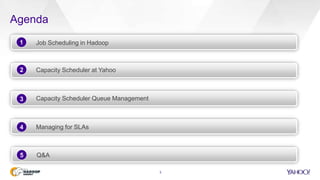
Agenda
3
Job Scheduling in Hadoop
Capacity Scheduler at Yahoo
Capacity Scheduler Queue Management
2
3
Managing for SLAs4
Q&A5
1
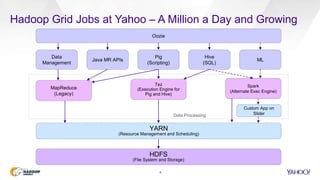
Hadoop Grid Jobs at Yahoo – A Million a Day and Growing
4
HDFS
(File System and Storage)
Pig
(Scripting)
Hive
(SQL)
Java MR APIs
YARN
(Resource Management and Scheduling)
Tez
(Execution Engine for
Pig and Hive)
Spark
(Alternate Exec Engine)
MapReduce
(Legacy)
Data Processing
ML
Custom App on
Slider
Oozie
Data
Management
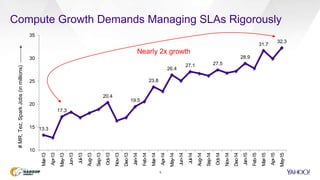
Compute Growth Demands Managing SLAs Rigorously
5
13.3
17.3
20.4
19.5
23.8
26.4
27.1 27.5
28.9
31.7
32.3
10
15
20
25
30
35
Mar-13
Apr-13
May-13
Jun-13
Jul-13
Aug-13
Sep-13
Oct-13
Nov-13
Dec-13
Jan-14
Feb-14
Mar-14
Apr-14
May-14
Jun-14
Jul-14
Aug-14
Sep-14
Oct-14
Nov-14
Dec-14
Jan-15
Feb-15
Mar-15
Apr-15
May-15
#MR,Tez,SparkJobs(inmillions)
Nearly 2x growth
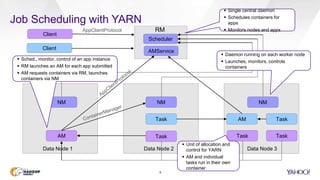
Job Scheduling with YARN
6
AMService
NMNM
AM
NM
Task Task Task
Task AM Task
Client
AppClientProtocol
Data Node 1 Data Node 2 Data Node 3
 Unit of allocation and
control for YARN
 AM and individual
tasks run in their own
container
Client
Scheduler
RM
 Single central daemon
 Schedules containers for
apps
 Monitors nodes and apps
 Daemon running on each worker node
 Launches, monitors, controls
containers
 Sched., monitor, control of an app instance
 RM launches an AM for each app submitted
 AM requests containers via RM, launches
containers via NM
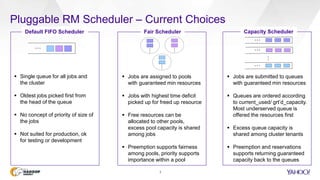
Pluggable RM Scheduler – Current Choices
7
…
Default FIFO Scheduler
 Single queue for all jobs and
the cluster
 Oldest jobs picked first from
the head of the queue
 No concept of priority of size of
the jobs
 Not suited for production, ok
for testing or development
Capacity Scheduler
…
…
…
…
 Jobs are assigned to pools
with guaranteed min resources
 Jobs with highest time deficit
picked up for freed up resource
 Free resources can be
allocated to other pools,
excess pool capacity is shared
among jobs
 Preemption supports fairness
among pools, priority supports
importance within a pool
 Jobs are submitted to queues
with guaranteed min resources
 Queues are ordered according
to current_used/ grt’d_capacity.
Most underserved queue is
offered the resources first
 Excess queue capacity is
shared among cluster tenants
 Preemption and reservations
supports returning guaranteed
capacity back to the queues
…
…
Fair Scheduler
…
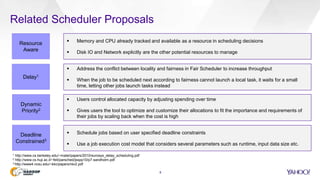
Related Scheduler Proposals
8
Resource
Aware
Delay1
Dynamic
Priority2
Deadline
Constrained3
 Memory and CPU already tracked and available as a resource in scheduling decisions
 Disk IO and Network explicitly are the other potential resources to manage
 Address the conflict between locality and fairness in Fair Scheduler to increase throughput
 When the job to be scheduled next according to fairness cannot launch a local task, it waits for a small
time, letting other jobs launch tasks instead
 Users control allocated capacity by adjusting spending over time
 Gives users the tool to optimize and customize their allocations to fit the importance and requirements of
their jobs by scaling back when the cost is high
 Schedule jobs based on user specified deadline constraints
 Use a job execution cost model that considers several parameters such as runtime, input data size etc.
1 http://www.cs.berkeley.edu/~matei/papers/2010/eurosys_delay_scheduling.pdf
2 http://www.cs.huji.ac.il/~feit/parsched/jsspp10/p7-sandholm.pdf
3 http://www4.ncsu.edu/~kkc/papers/rev2.pdf
So, Fair Scheduler or Capacity Scheduler?
9
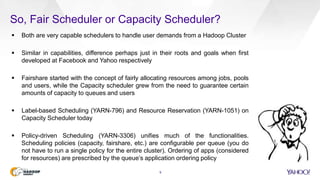
 Both are very capable schedulers to handle user demands from a Hadoop Cluster
 Similar in capabilities, difference perhaps just in their roots and goals when first
developed at Facebook and Yahoo respectively
 Fairshare started with the concept of fairly allocating resources among jobs, pools
and users, while the Capacity scheduler grew from the need to guarantee certain
amounts of capacity to queues and users
 Label-based Scheduling (YARN-796) and Resource Reservation (YARN-1051) on
Capacity Scheduler today
 Policy-driven Scheduling (YARN-3306) unifies much of the functionalities.
Scheduling policies (capacity, fairshare, etc.) are configurable per queue (you do
not have to run a single policy for the entire cluster). Ordering of apps (considered
for resources) are prescribed by the queue’s application ordering policy
Capacity Scheduler at Yahoo
10
 Designed for running applications in
a shared secure multi-tenant
environment
 Meets individual application needs
with capacity guarantees
 Maximizes cluster utilization by
providing elasticity through access to
excess cluster capacity
 Safeguards against misbehaving
applications and users through limits
 Capacity abstractions through
queues and hierarchical queues for
predictable sharing
 Queue ACLs control who can submit
applications
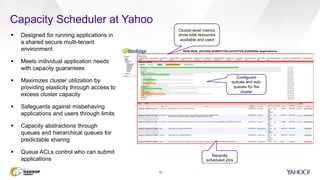
Cluster-level metrics
show total resources
available and used
Configured
queues and sub-
queues for the
cluster
Recently
scheduled jobs
Resources Tracked with Capacity Scheduler
11
Memory CPU Servers
 Scheduler today considers both
Memory and CPU as a resource
 Dominant Resource First Calculator
(used Dominant Resource Fairness) for
resource allocation
 Utilization can suffer if not careful
 Specifying resources for containers is
framework-specific
 mapreduce.[map|reduce].cpu.vcores
 mapreduce.[map|reduce].memory.mb
 MAX(Physical_Memory_Bytes)  memory.mb
 MAX(CPU_time_spent / task_time) 
cpu.vcores
 vCores is tricky, but also more forgiving
 default as 1.5/2 G and 10 vCores
Resource Allocation Container Resources in MapReduce
Speculate execution helps with “slow” nodes,
although can be too late for tighter SLAs
task 1
task 1
Additional Available Optimizations (1 / 2)
12
attempt 0
attempt 1
Node X
Node Y
Node A
Node B
t
Pick faster
attempt 1
output
Speculative Execution
(through MR/ Tez AM)
J2J3J4
J6
Preemptive Execution
J4J5
Running
Queue 1, 40%
(pre-emtable)
Queue 2, 20%
Queue 3, 20%
Queue 4, 20%
J1
Waiting
J6 claims
resources
from J4
mapreduce.map.speculative = true
mapreduce.reduce.speculative = true
yarn.resourcemanager.scheduler.monitor.enable = true,
yarn.resourcemanager.scheduler.monitor.policies =
ProportionalCapacityPreemptionPolicy
Preemption helps SLAs, but careful on queues with long
running tasks and high “max capacity” that can lockdown
a large part of the cluster
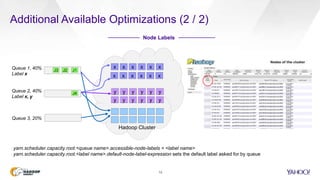
Additional Available Optimizations (2 / 2)
13
Node Labels
J2J3
J4
Queue 1, 40%
Label x
Queue 2, 40%
Label x, y
J1
Queue 3, 20%
x x x x x x
x x x x x x
y y y y y y
y y y y y y
yarn.scheduler.capacity.root.<queue name>.accessible-node-labels = <label name>
yarn.scheduler.capacity.root.<label name>.default-node-label-expression sets the default label asked for by queue
Hadoop Cluster
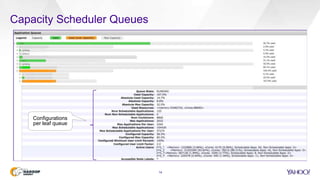
Capacity Scheduler Queues
14
proj_1
proj_2
proj_3
proj_4
Configurations
per leaf queue
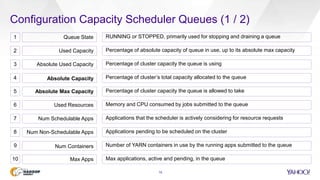
Configuration Capacity Scheduler Queues (1 / 2)
15
Queue State RUNNING or STOPPED, primarily used for stopping and draining a queue
Used Capacity Percentage of absolute capacity of queue in use, up to its absolute max capacity
Absolute Used Capacity Percentage of cluster capacity the queue is using
Absolute Max Capacity Percentage of cluster capacity the queue is allowed to take
Used Resources Memory and CPU consumed by jobs submitted to the queue
Num Schedulable Apps Applications that the scheduler is actively considering for resource requests
Num Non-Schedulable Apps Applications pending to be scheduled on the cluster
1
2
3
5
6
7
8
Absolute Capacity Percentage of cluster’s total capacity allocated to the queue4
Max applications, active and pending, in the queueMax Apps
Number of YARN containers in use by the running apps submitted to the queue9
10
Num Containers
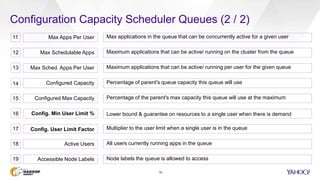
Configuration Capacity Scheduler Queues (2 / 2)
16
Max applications in the queue that can be concurrently active for a given user
Maximum applications that can be active/ running on the cluster from the queue
Maximum applications that can be active/ running per user for the given queue
Percentage of parent's queue capacity this queue will use
Percentage of the parent's max capacity this queue will use at the maximum
Lower bound & guarantee on resources to a single user when there is demand
11
12
13
14
15
16
Max Apps Per User
Max Schedulable Apps
Max Sched. Apps Per User
Configured Capacity
Configured Max Capacity
Config. Min User Limit %
All users currently running apps in the queue
Node labels the queue is allowed to access19
Active Users
Accessible Node Labels
18
Multiplier to the user limit when a single user is in the queue17 Config. User Limit Factor
Capacity Scheduler Parameters – The Important Four
17
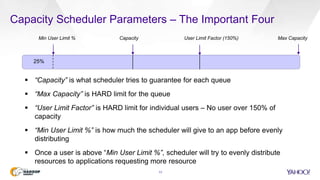
Min User Limit % Capacity User Limit Factor (150%) Max Capacity
 “Capacity” is what scheduler tries to guarantee for each queue
 “Max Capacity” is HARD limit for the queue
 “User Limit Factor” is HARD limit for individual users – No user over 150% of
capacity
 “Min User Limit %” is how much the scheduler will give to an app before evenly
distributing
 Once a user is above “Min User Limit %”, scheduler will try to evenly distribute
resources to applications requesting more resource
25%
Understanding Minimum User Limit Percent
18
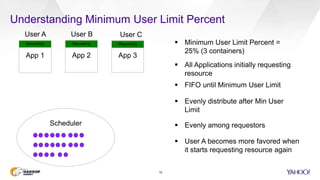
App 1 App 2 App 3
Scheduler
 Minimum User Limit Percent =
25% (3 containers)
 All Applications initially requesting
resource
Requesting Requesting Requesting
User A User B User C
 FIFO until Minimum User Limit
 Evenly distribute after Min User
Limit
 Evenly among requestors
 User A becomes more favored when
it starts requesting resource again
Common Queue Setup and Nomenclature
19
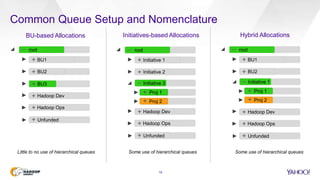
root
BU1
BU2
BU3
Unfunded
Hadoop Dev
Hadoop Ops
_
+
+
+
+
+
+
BU-based Allocations
root
Initiative 1
Initiative 2
Initiative 3
Unfunded
Hadoop Dev
Hadoop Ops
_
+
+
+
+
+
Initiatives-based Allocations
root
BU1
BU2
Unfunded
Hadoop Dev
Hadoop Ops
_
+
+
+
+
+
Hybrid Allocations
Little to no use of hierarchical queues
Proj 1
Proj 2
_
+
+
Some use of hierarchical queues
Initiative 1
Proj 1
Proj 2
+
+
_
Some use of hierarchical queues
Decomposing Production Queues for Seasonality
20
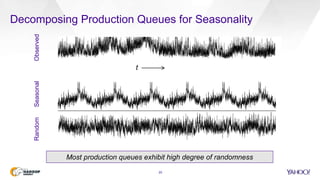
ObservedSeasonalRandom
t
Most production queues exhibit high degree of randomness
Recommended Approach to Queue Setup
21
root
BU1
BU2
default
Hadoop Dev
Hadoop Ops
_
+
+
+
+
+
BU3
Initiative 1
_
_
Initiative 1 - scheduled
Initiative 1 - adhoc
Initiative 2
+
+
+
Cluster 1, 2, …,n
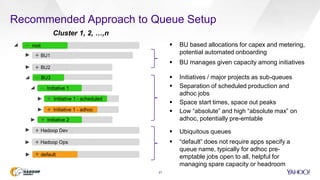
 Ubiquitous queues
 “default” does not require apps specify a
queue name, typically for adhoc pre-
emptable jobs open to all, helpful for
managing spare capacity or headroom
 BU based allocations for capex and metering,
potential automated onboarding
 BU manages given capacity among initiatives
 Initiatives / major projects as sub-queues
 Separation of scheduled production and
adhoc jobs
 Space start times, space out peaks
 Low “absolute” and high “absolute max” on
adhoc, potentially pre-emtable
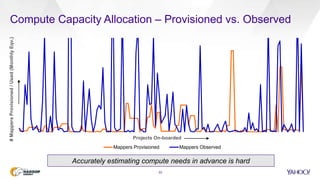
Compute Capacity Allocation – Provisioned vs. Observed
22
Projects On-boarded
#MappersProvisioned/Used(MonthlyEqv.)
Accurately estimating compute needs in advance is hard
Mappers Provisioned Mappers Observed
Notes on Compute Capacity Estimation
23
Step 1: Sample Run (with a tenth of data on a sandbox cluster)
Stages # Map Map Size Map Time # Reduce Reduce Size Reduce Time Shuffle Time
Stage 1 100 1.5 GB 15 Min 50 2 GB 10 Min 3 Min
Stage 2 - L 150 1.5 GB 10 Min 50 2 GB 10 Min 4 Min
Stage 2 - R 100 1.5 GB 5 Min 25 2 GB 5 Min 1 Min
Stage 3 200 1.5 GB 10 Min 75 2 GB 5 Min 2 Min
Notes:
 SLOT_MILLIS_MAPS and SLOT_MILLIS_REDUCES gives the time spent
 TOTAL_LAUNCHED_MAPS and TOTAL_LAUNCHED_REDUCES gives # Map and # Reduce
 Shuffle Time is Data per Reducer / est. 4 MB/s (bandwidth for data transfer from Map to Reduce)
 Reduce time includes the Sort time , Add 10% for speculative execution (failed/killed task attempts)
Step 2: Mappers and Reducers
Number of mappers 278 [ (Max of Stage 1,2 & 3) x 10 ] / (SLA of 6 Hrs. / 35)
Number of reducers 84 [ (Max of Stage 1,2 & 3) x 10 ] / (SLA of 6 Hrs. / 25)
Memory required for mappers and reducers 278 x 1.5 + 84 x 2 = 585 GB
Number of servers 585/ 44 = 14 servers
Observe Queue Utilization
24
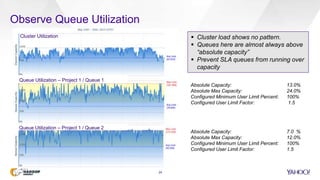
Cluster Utilization
Queue Utilization – Project 1 / Queue 1
Queue Utilization – Project 1 / Queue 2
Absolute Capacity: 13.0%
Absolute Max Capacity: 24.0%
Configured Minimum User Limit Percent: 100%
Configured User Limit Factor: 1.5
Absolute Capacity: 7.0 %
Absolute Max Capacity: 12.0%
Configured Minimum User Limit Percent: 100%
Configured User Limit Factor: 1.5
 Cluster load shows no pattern.
 Queues here are almost always above
“absolute capacity”
 Prevent SLA queues from running over
capacity
Factors Impacting SLAs
25
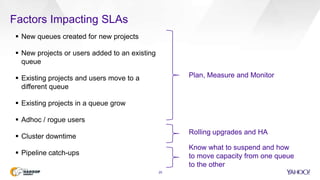
 New queues created for new projects
 New projects or users added to an existing
queue
 Existing projects and users move to a
different queue
 Existing projects in a queue grow
 Adhoc / rogue users
 Cluster downtime
 Pipeline catch-ups
Plan, Measure and Monitor
Rolling upgrades and HA
Know what to suspend and how
to move capacity from one queue
to the other
Measuring Compute Consumption
26
For a queue, user, cluster over time (GB-
Hr / vCore-Hr)
sum(map_slot_seconds +
reduce_slots_seconds) *
yarn.scheduler.minimum-allocation-mb
/1024/60/60
OR,
sum(memoryseconds)/1024/60/60,
sum(vcoreseconds)/60/60 from
rmappsummary by apptype;
0
50,000
100,000
150,000
200,000
250,000
300,000
350,000
400,000
MR Tez
0
50,000
100,000
150,000
200,000
250,000
300,000
350,000
400,000
MR Tez
0
50,000
100,000
150,000
200,000
250,000
300,000
350,000
400,000
MR Tez
April 1-13, 2015 May 16-31, 2015
While chargeback models work, monitoring is critical in preserving SLAs while maximizing cluster util.
Measure Compute Monitor
Measuring and Reporting SLAs
27
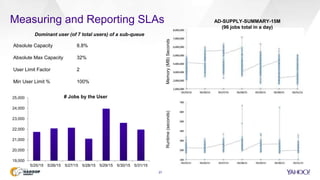
Absolute Capacity 8.8%
Absolute Max Capacity 32%
User Limit Factor 2
Min User Limit % 100%
Dominant user (of 7 total users) of a sub-queue
Memory(MB)SecondsRuntime(seconds)
19,000
20,000
21,000
22,000
23,000
24,000
25,000
5/25/15 5/26/15 5/27/15 5/28/15 5/29/15 5/30/15 5/31/15
# Jobs by the User
AD-SUPPLY-SUMMARY-15M
(96 jobs total in a day)
Measuring and Reporting SLAs ( cont’d)
28
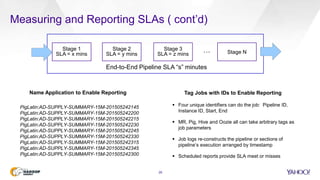
Stage 1
SLA = x mins
Stage 2
SLA = y mins
Stage 3
SLA = z mins Stage N…
End-to-End Pipeline SLA “s” minutes
PigLatin:AD-SUPPLY-SUMMARY-15M-201505242145
PigLatin:AD-SUPPLY-SUMMARY-15M-201505242200
PigLatin:AD-SUPPLY-SUMMARY-15M-201505242215
PigLatin:AD-SUPPLY-SUMMARY-15M-201505242230
PigLatin:AD-SUPPLY-SUMMARY-15M-201505242245
PigLatin:AD-SUPPLY-SUMMARY-15M-201505242330
PigLatin:AD-SUPPLY-SUMMARY-15M-201505242315
PigLatin:AD-SUPPLY-SUMMARY-15M-201505242345
PigLatin:AD-SUPPLY-SUMMARY-15M-201505242300
Name Application to Enable Reporting Tag Jobs with IDs to Enable Reporting
 Four unique identifiers can do the job: Pipeline ID,
Instance ID, Start, End
 MR, Pig, Hive and Oozie all can take arbitrary tags as
job parameters
 Job logs re-constructs the pipeline or sections of
pipeline’s execution arranged by timestamp
 Scheduled reports provide SLA meet or misses
Measuring and Reporting SLAs ( cont’d)
29
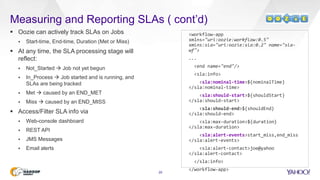
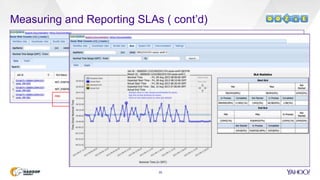
 Oozie can actively track SLAs on Jobs
 Start-time, End-time, Duration (Met or Miss)
 At any time, the SLA processing stage will
reflect:
 Not_Started  Job not yet begun
 In_Process  Job started and is running, and
SLAs are being tracked
 Met  caused by an END_MET
 Miss  caused by an END_MISS
 Access/Filter SLA info via
 Web-console dashboard
 REST API
 JMS Messages
 Email alerts
<workflow-app
xmlns="uri:oozie:workflow:0.5"
xmlns:sla="uri:oozie:sla:0.2" name="sla-
wf">
...
<end name="end"/>
<sla:info>
<sla:nominal-time>${nominalTime}
</sla:nominal-time>
<sla:should-start>${shouldStart}
</sla:should-start>
<sla:should-end>${shouldEnd}
</sla:should-end>
<sla:max-duration>${duration}
</sla:max-duration>
<sla:alert-events>start_miss,end_miss
</sla:alert-events>
<sla:alert-contact>joe@yahoo
</sla:alert-contact>
</sla:info>
</workflow-app>
Measuring and Reporting SLAs ( cont’d)
30
31
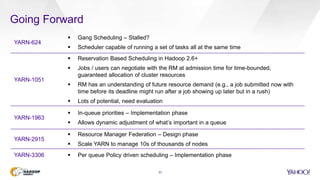
Going Forward
YARN-624
 Gang Scheduling – Stalled?
 Scheduler capable of running a set of tasks all at the same time
YARN-1051
 Reservation Based Scheduling in Hadoop 2.6+
 Jobs / users can negotiate with the RM at admission time for time-bounded,
guaranteed allocation of cluster resources
 RM has an understanding of future resource demand (e.g., a job submitted now with
time before its deadline might run after a job showing up later but in a rush)
 Lots of potential, need evaluation
YARN-1963
 In-queue priorities – Implementation phase
 Allows dynamic adjustment of what’s important in a queue
YARN-2915
 Resource Manager Federation – Design phase
 Scale YARN to manage 10s of thousands of nodes
YARN-3306  Per queue Policy driven scheduling – Implementation phase
32
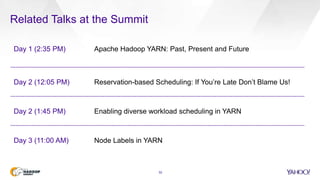
Related Talks at the Summit
Day 1 (2:35 PM) Apache Hadoop YARN: Past, Present and Future
Day 2 (12:05 PM) Reservation-based Scheduling: If You’re Late Don’t Blame Us!
Day 2 (1:45 PM) Enabling diverse workload scheduling in YARN
Day 3 (11:00 AM) Node Labels in YARN
Thank You
@sumeetksingh
We are hiring.
Yahoo Kiosk #D5

Towards SLA-based Scheduling on YARN Clusters

  • 1.
    To w ar d s S L A - b a s e d S c h e d u l i n g o n YA R N C l u s t e r s P R E S E N T E D B Y S u m e e t S i n g h , N a t h a n R o b e r t s ⎪ J u n e 9 , 2 0 1 5 H a d o o p S u m m i t 2 0 1 5 , S a n J o s e
  • 2.
    Introduction 2  Manages CloudStorage and Big Data products team at Yahoo  Responsible for Product Management, Strategy and Customer Engagements  Managed Cloud Engineering products teams and headed Strategy functions for the Cloud Platform Group at Yahoo  MBA from UCLA and MS from RPI Sumeet Singh Sr. Director, Product Management Cloud Storage and Big Data Platforms 701 First Avenue, Sunnyvale, CA 94089 USA @sumeetksingh  Software Architect with the Hadoop Core team  With Yahoo since 2007 focused on high performance storage solutions, Linux kernel, and Hadoop  Previously with Motorola for 17 years as a Distinguished Member of Technical Staff  BS in Computer Science from the University of Illinois at Urbana-Champaign Nathan Roberts Sr. Principle Architect Core Hadoop 701 First Avenue, Sunnyvale, CA 94089 USA
  • 3.
    Agenda 3 Job Scheduling inHadoop Capacity Scheduler at Yahoo Capacity Scheduler Queue Management 2 3 Managing for SLAs4 Q&A5 1
  • 4.
    Hadoop Grid Jobsat Yahoo – A Million a Day and Growing 4 HDFS (File System and Storage) Pig (Scripting) Hive (SQL) Java MR APIs YARN (Resource Management and Scheduling) Tez (Execution Engine for Pig and Hive) Spark (Alternate Exec Engine) MapReduce (Legacy) Data Processing ML Custom App on Slider Oozie Data Management
  • 5.
    Compute Growth DemandsManaging SLAs Rigorously 5 13.3 17.3 20.4 19.5 23.8 26.4 27.1 27.5 28.9 31.7 32.3 10 15 20 25 30 35 Mar-13 Apr-13 May-13 Jun-13 Jul-13 Aug-13 Sep-13 Oct-13 Nov-13 Dec-13 Jan-14 Feb-14 Mar-14 Apr-14 May-14 Jun-14 Jul-14 Aug-14 Sep-14 Oct-14 Nov-14 Dec-14 Jan-15 Feb-15 Mar-15 Apr-15 May-15 #MR,Tez,SparkJobs(inmillions) Nearly 2x growth
  • 6.
    Job Scheduling withYARN 6 AMService NMNM AM NM Task Task Task Task AM Task Client AppClientProtocol Data Node 1 Data Node 2 Data Node 3  Unit of allocation and control for YARN  AM and individual tasks run in their own container Client Scheduler RM  Single central daemon  Schedules containers for apps  Monitors nodes and apps  Daemon running on each worker node  Launches, monitors, controls containers  Sched., monitor, control of an app instance  RM launches an AM for each app submitted  AM requests containers via RM, launches containers via NM
  • 7.
    Pluggable RM Scheduler– Current Choices 7 … Default FIFO Scheduler  Single queue for all jobs and the cluster  Oldest jobs picked first from the head of the queue  No concept of priority of size of the jobs  Not suited for production, ok for testing or development Capacity Scheduler … … … …  Jobs are assigned to pools with guaranteed min resources  Jobs with highest time deficit picked up for freed up resource  Free resources can be allocated to other pools, excess pool capacity is shared among jobs  Preemption supports fairness among pools, priority supports importance within a pool  Jobs are submitted to queues with guaranteed min resources  Queues are ordered according to current_used/ grt’d_capacity. Most underserved queue is offered the resources first  Excess queue capacity is shared among cluster tenants  Preemption and reservations supports returning guaranteed capacity back to the queues … … Fair Scheduler …
  • 8.
    Related Scheduler Proposals 8 Resource Aware Delay1 Dynamic Priority2 Deadline Constrained3 Memory and CPU already tracked and available as a resource in scheduling decisions  Disk IO and Network explicitly are the other potential resources to manage  Address the conflict between locality and fairness in Fair Scheduler to increase throughput  When the job to be scheduled next according to fairness cannot launch a local task, it waits for a small time, letting other jobs launch tasks instead  Users control allocated capacity by adjusting spending over time  Gives users the tool to optimize and customize their allocations to fit the importance and requirements of their jobs by scaling back when the cost is high  Schedule jobs based on user specified deadline constraints  Use a job execution cost model that considers several parameters such as runtime, input data size etc. 1 http://www.cs.berkeley.edu/~matei/papers/2010/eurosys_delay_scheduling.pdf 2 http://www.cs.huji.ac.il/~feit/parsched/jsspp10/p7-sandholm.pdf 3 http://www4.ncsu.edu/~kkc/papers/rev2.pdf
  • 9.
    So, Fair Scheduleror Capacity Scheduler? 9  Both are very capable schedulers to handle user demands from a Hadoop Cluster  Similar in capabilities, difference perhaps just in their roots and goals when first developed at Facebook and Yahoo respectively  Fairshare started with the concept of fairly allocating resources among jobs, pools and users, while the Capacity scheduler grew from the need to guarantee certain amounts of capacity to queues and users  Label-based Scheduling (YARN-796) and Resource Reservation (YARN-1051) on Capacity Scheduler today  Policy-driven Scheduling (YARN-3306) unifies much of the functionalities. Scheduling policies (capacity, fairshare, etc.) are configurable per queue (you do not have to run a single policy for the entire cluster). Ordering of apps (considered for resources) are prescribed by the queue’s application ordering policy
  • 10.
    Capacity Scheduler atYahoo 10  Designed for running applications in a shared secure multi-tenant environment  Meets individual application needs with capacity guarantees  Maximizes cluster utilization by providing elasticity through access to excess cluster capacity  Safeguards against misbehaving applications and users through limits  Capacity abstractions through queues and hierarchical queues for predictable sharing  Queue ACLs control who can submit applications Cluster-level metrics show total resources available and used Configured queues and sub- queues for the cluster Recently scheduled jobs
  • 11.
    Resources Tracked withCapacity Scheduler 11 Memory CPU Servers  Scheduler today considers both Memory and CPU as a resource  Dominant Resource First Calculator (used Dominant Resource Fairness) for resource allocation  Utilization can suffer if not careful  Specifying resources for containers is framework-specific  mapreduce.[map|reduce].cpu.vcores  mapreduce.[map|reduce].memory.mb  MAX(Physical_Memory_Bytes)  memory.mb  MAX(CPU_time_spent / task_time)  cpu.vcores  vCores is tricky, but also more forgiving  default as 1.5/2 G and 10 vCores Resource Allocation Container Resources in MapReduce
  • 12.
    Speculate execution helpswith “slow” nodes, although can be too late for tighter SLAs task 1 task 1 Additional Available Optimizations (1 / 2) 12 attempt 0 attempt 1 Node X Node Y Node A Node B t Pick faster attempt 1 output Speculative Execution (through MR/ Tez AM) J2J3J4 J6 Preemptive Execution J4J5 Running Queue 1, 40% (pre-emtable) Queue 2, 20% Queue 3, 20% Queue 4, 20% J1 Waiting J6 claims resources from J4 mapreduce.map.speculative = true mapreduce.reduce.speculative = true yarn.resourcemanager.scheduler.monitor.enable = true, yarn.resourcemanager.scheduler.monitor.policies = ProportionalCapacityPreemptionPolicy Preemption helps SLAs, but careful on queues with long running tasks and high “max capacity” that can lockdown a large part of the cluster
  • 13.
    Additional Available Optimizations(2 / 2) 13 Node Labels J2J3 J4 Queue 1, 40% Label x Queue 2, 40% Label x, y J1 Queue 3, 20% x x x x x x x x x x x x y y y y y y y y y y y y yarn.scheduler.capacity.root.<queue name>.accessible-node-labels = <label name> yarn.scheduler.capacity.root.<label name>.default-node-label-expression sets the default label asked for by queue Hadoop Cluster
  • 14.
  • 15.
    Configuration Capacity SchedulerQueues (1 / 2) 15 Queue State RUNNING or STOPPED, primarily used for stopping and draining a queue Used Capacity Percentage of absolute capacity of queue in use, up to its absolute max capacity Absolute Used Capacity Percentage of cluster capacity the queue is using Absolute Max Capacity Percentage of cluster capacity the queue is allowed to take Used Resources Memory and CPU consumed by jobs submitted to the queue Num Schedulable Apps Applications that the scheduler is actively considering for resource requests Num Non-Schedulable Apps Applications pending to be scheduled on the cluster 1 2 3 5 6 7 8 Absolute Capacity Percentage of cluster’s total capacity allocated to the queue4 Max applications, active and pending, in the queueMax Apps Number of YARN containers in use by the running apps submitted to the queue9 10 Num Containers
  • 16.
    Configuration Capacity SchedulerQueues (2 / 2) 16 Max applications in the queue that can be concurrently active for a given user Maximum applications that can be active/ running on the cluster from the queue Maximum applications that can be active/ running per user for the given queue Percentage of parent's queue capacity this queue will use Percentage of the parent's max capacity this queue will use at the maximum Lower bound & guarantee on resources to a single user when there is demand 11 12 13 14 15 16 Max Apps Per User Max Schedulable Apps Max Sched. Apps Per User Configured Capacity Configured Max Capacity Config. Min User Limit % All users currently running apps in the queue Node labels the queue is allowed to access19 Active Users Accessible Node Labels 18 Multiplier to the user limit when a single user is in the queue17 Config. User Limit Factor
  • 17.
    Capacity Scheduler Parameters– The Important Four 17 Min User Limit % Capacity User Limit Factor (150%) Max Capacity  “Capacity” is what scheduler tries to guarantee for each queue  “Max Capacity” is HARD limit for the queue  “User Limit Factor” is HARD limit for individual users – No user over 150% of capacity  “Min User Limit %” is how much the scheduler will give to an app before evenly distributing  Once a user is above “Min User Limit %”, scheduler will try to evenly distribute resources to applications requesting more resource 25%
  • 18.
    Understanding Minimum UserLimit Percent 18 App 1 App 2 App 3 Scheduler  Minimum User Limit Percent = 25% (3 containers)  All Applications initially requesting resource Requesting Requesting Requesting User A User B User C  FIFO until Minimum User Limit  Evenly distribute after Min User Limit  Evenly among requestors  User A becomes more favored when it starts requesting resource again
  • 19.
    Common Queue Setupand Nomenclature 19 root BU1 BU2 BU3 Unfunded Hadoop Dev Hadoop Ops _ + + + + + + BU-based Allocations root Initiative 1 Initiative 2 Initiative 3 Unfunded Hadoop Dev Hadoop Ops _ + + + + + Initiatives-based Allocations root BU1 BU2 Unfunded Hadoop Dev Hadoop Ops _ + + + + + Hybrid Allocations Little to no use of hierarchical queues Proj 1 Proj 2 _ + + Some use of hierarchical queues Initiative 1 Proj 1 Proj 2 + + _ Some use of hierarchical queues
  • 20.
    Decomposing Production Queuesfor Seasonality 20 ObservedSeasonalRandom t Most production queues exhibit high degree of randomness
  • 21.
    Recommended Approach toQueue Setup 21 root BU1 BU2 default Hadoop Dev Hadoop Ops _ + + + + + BU3 Initiative 1 _ _ Initiative 1 - scheduled Initiative 1 - adhoc Initiative 2 + + + Cluster 1, 2, …,n  Ubiquitous queues  “default” does not require apps specify a queue name, typically for adhoc pre- emptable jobs open to all, helpful for managing spare capacity or headroom  BU based allocations for capex and metering, potential automated onboarding  BU manages given capacity among initiatives  Initiatives / major projects as sub-queues  Separation of scheduled production and adhoc jobs  Space start times, space out peaks  Low “absolute” and high “absolute max” on adhoc, potentially pre-emtable
  • 22.
    Compute Capacity Allocation– Provisioned vs. Observed 22 Projects On-boarded #MappersProvisioned/Used(MonthlyEqv.) Accurately estimating compute needs in advance is hard Mappers Provisioned Mappers Observed
  • 23.
    Notes on ComputeCapacity Estimation 23 Step 1: Sample Run (with a tenth of data on a sandbox cluster) Stages # Map Map Size Map Time # Reduce Reduce Size Reduce Time Shuffle Time Stage 1 100 1.5 GB 15 Min 50 2 GB 10 Min 3 Min Stage 2 - L 150 1.5 GB 10 Min 50 2 GB 10 Min 4 Min Stage 2 - R 100 1.5 GB 5 Min 25 2 GB 5 Min 1 Min Stage 3 200 1.5 GB 10 Min 75 2 GB 5 Min 2 Min Notes:  SLOT_MILLIS_MAPS and SLOT_MILLIS_REDUCES gives the time spent  TOTAL_LAUNCHED_MAPS and TOTAL_LAUNCHED_REDUCES gives # Map and # Reduce  Shuffle Time is Data per Reducer / est. 4 MB/s (bandwidth for data transfer from Map to Reduce)  Reduce time includes the Sort time , Add 10% for speculative execution (failed/killed task attempts) Step 2: Mappers and Reducers Number of mappers 278 [ (Max of Stage 1,2 & 3) x 10 ] / (SLA of 6 Hrs. / 35) Number of reducers 84 [ (Max of Stage 1,2 & 3) x 10 ] / (SLA of 6 Hrs. / 25) Memory required for mappers and reducers 278 x 1.5 + 84 x 2 = 585 GB Number of servers 585/ 44 = 14 servers
  • 24.
    Observe Queue Utilization 24 ClusterUtilization Queue Utilization – Project 1 / Queue 1 Queue Utilization – Project 1 / Queue 2 Absolute Capacity: 13.0% Absolute Max Capacity: 24.0% Configured Minimum User Limit Percent: 100% Configured User Limit Factor: 1.5 Absolute Capacity: 7.0 % Absolute Max Capacity: 12.0% Configured Minimum User Limit Percent: 100% Configured User Limit Factor: 1.5  Cluster load shows no pattern.  Queues here are almost always above “absolute capacity”  Prevent SLA queues from running over capacity
  • 25.
    Factors Impacting SLAs 25 New queues created for new projects  New projects or users added to an existing queue  Existing projects and users move to a different queue  Existing projects in a queue grow  Adhoc / rogue users  Cluster downtime  Pipeline catch-ups Plan, Measure and Monitor Rolling upgrades and HA Know what to suspend and how to move capacity from one queue to the other
  • 26.
    Measuring Compute Consumption 26 Fora queue, user, cluster over time (GB- Hr / vCore-Hr) sum(map_slot_seconds + reduce_slots_seconds) * yarn.scheduler.minimum-allocation-mb /1024/60/60 OR, sum(memoryseconds)/1024/60/60, sum(vcoreseconds)/60/60 from rmappsummary by apptype; 0 50,000 100,000 150,000 200,000 250,000 300,000 350,000 400,000 MR Tez 0 50,000 100,000 150,000 200,000 250,000 300,000 350,000 400,000 MR Tez 0 50,000 100,000 150,000 200,000 250,000 300,000 350,000 400,000 MR Tez April 1-13, 2015 May 16-31, 2015 While chargeback models work, monitoring is critical in preserving SLAs while maximizing cluster util. Measure Compute Monitor
  • 27.
    Measuring and ReportingSLAs 27 Absolute Capacity 8.8% Absolute Max Capacity 32% User Limit Factor 2 Min User Limit % 100% Dominant user (of 7 total users) of a sub-queue Memory(MB)SecondsRuntime(seconds) 19,000 20,000 21,000 22,000 23,000 24,000 25,000 5/25/15 5/26/15 5/27/15 5/28/15 5/29/15 5/30/15 5/31/15 # Jobs by the User AD-SUPPLY-SUMMARY-15M (96 jobs total in a day)
  • 28.
    Measuring and ReportingSLAs ( cont’d) 28 Stage 1 SLA = x mins Stage 2 SLA = y mins Stage 3 SLA = z mins Stage N… End-to-End Pipeline SLA “s” minutes PigLatin:AD-SUPPLY-SUMMARY-15M-201505242145 PigLatin:AD-SUPPLY-SUMMARY-15M-201505242200 PigLatin:AD-SUPPLY-SUMMARY-15M-201505242215 PigLatin:AD-SUPPLY-SUMMARY-15M-201505242230 PigLatin:AD-SUPPLY-SUMMARY-15M-201505242245 PigLatin:AD-SUPPLY-SUMMARY-15M-201505242330 PigLatin:AD-SUPPLY-SUMMARY-15M-201505242315 PigLatin:AD-SUPPLY-SUMMARY-15M-201505242345 PigLatin:AD-SUPPLY-SUMMARY-15M-201505242300 Name Application to Enable Reporting Tag Jobs with IDs to Enable Reporting  Four unique identifiers can do the job: Pipeline ID, Instance ID, Start, End  MR, Pig, Hive and Oozie all can take arbitrary tags as job parameters  Job logs re-constructs the pipeline or sections of pipeline’s execution arranged by timestamp  Scheduled reports provide SLA meet or misses
  • 29.
    Measuring and ReportingSLAs ( cont’d) 29  Oozie can actively track SLAs on Jobs  Start-time, End-time, Duration (Met or Miss)  At any time, the SLA processing stage will reflect:  Not_Started  Job not yet begun  In_Process  Job started and is running, and SLAs are being tracked  Met  caused by an END_MET  Miss  caused by an END_MISS  Access/Filter SLA info via  Web-console dashboard  REST API  JMS Messages  Email alerts <workflow-app xmlns="uri:oozie:workflow:0.5" xmlns:sla="uri:oozie:sla:0.2" name="sla- wf"> ... <end name="end"/> <sla:info> <sla:nominal-time>${nominalTime} </sla:nominal-time> <sla:should-start>${shouldStart} </sla:should-start> <sla:should-end>${shouldEnd} </sla:should-end> <sla:max-duration>${duration} </sla:max-duration> <sla:alert-events>start_miss,end_miss </sla:alert-events> <sla:alert-contact>joe@yahoo </sla:alert-contact> </sla:info> </workflow-app>
  • 30.
    Measuring and ReportingSLAs ( cont’d) 30
  • 31.
    31 Going Forward YARN-624  GangScheduling – Stalled?  Scheduler capable of running a set of tasks all at the same time YARN-1051  Reservation Based Scheduling in Hadoop 2.6+  Jobs / users can negotiate with the RM at admission time for time-bounded, guaranteed allocation of cluster resources  RM has an understanding of future resource demand (e.g., a job submitted now with time before its deadline might run after a job showing up later but in a rush)  Lots of potential, need evaluation YARN-1963  In-queue priorities – Implementation phase  Allows dynamic adjustment of what’s important in a queue YARN-2915  Resource Manager Federation – Design phase  Scale YARN to manage 10s of thousands of nodes YARN-3306  Per queue Policy driven scheduling – Implementation phase
  • 32.
    32 Related Talks atthe Summit Day 1 (2:35 PM) Apache Hadoop YARN: Past, Present and Future Day 2 (12:05 PM) Reservation-based Scheduling: If You’re Late Don’t Blame Us! Day 2 (1:45 PM) Enabling diverse workload scheduling in YARN Day 3 (11:00 AM) Node Labels in YARN
  • 33.
    Thank You @sumeetksingh We arehiring. Yahoo Kiosk #D5

Editor's Notes

  • #2 Guaranteeing SLAs in terms of app completion times is one of the most frequent requests we get from our customers, yet there is no SLA button on Hadoop that will give you the SLA you want. This talk is not really about changes to the scheduler to get SLAs, but rather understanding the current state of scheduler and practices around it to get closer to the desired SLAs.
  • #3 My name is Sumeet Singh and I manage platform products at Yahoo. I have spent close to four years at Yahoo, and have had a few different roles in my tenure. My co-speaker is Nathan Roberts who is a senior architect with the core hadoop team at Yahoo. He’s been with Yahoo for close to 8 years, and spend many years in the systems area with Motorola prior to Yahoo.
  • #4 Let me outline the agenda for our talk. We will first give you a good overview of scheduler in Hadoop as understanding that is critical for SLAs. We will then dive deeper into capacity scheduler particularly as it relates to managing queues. We will then talk particularly about managing for SLAs. And open it up at the end for Q&A.
  • #5 Let us first talk about the sources of compute in Hadoop at Yahoo. Most of the compute on the platform today comes from MapReduce, and increasingly from Tez and Spark. A variety of applications either data management tools, MR itself, Pig, Hive, ML etc. are responsible for generating that compute and nearly 70% of that gets scheduled through Oozie today.
  • #6 Compute on the platform is growing rapidly, and has nearly doubled in the last 2 years if you just look at the number of jobs, obviously not an accurate measure, but representative measure given most of it is MapReduce. This certainly puts demands on managing the SLAs for the job more rigorously. Let me hand it over to my colleague Nathan Roberts to give you a really good overview of scheduler in Hadoop first and levers that are available today that are important to understand.
  • #21 (30 secs) T: 2 min 30 secs xyz
  • #22 (30 secs) T: 2 min 30 secs xyz
  • #23 (30 secs) T: 2 min 30 secs xyz
  • #25 (30 secs) T: 2 min 30 secs xyz
  • #26 (30 secs) T: 2 min 30 secs xyz
  • #27 (30 secs) T: 2 min 30 secs xyz
  • #28 (30 secs) T: 2 min 30 secs xyz
  • #29 (30 secs) T: 2 min 30 secs xyz
  • #30 (30 secs) T: 2 min 30 secs xyz
  • #31 (30 secs) T: 2 min 30 secs xyz