What is touch screen?
• A touch screen is an electronic visual display that can
detect the presence and location of a touch within the
display area.
• The term generally refers to touching the display of
the device with a finger or hand. Touchscreens can also
sense other passive objects, such as a stylus.
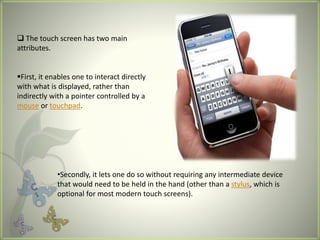
 The touch screen has two main
attributes.
First, it enables one to interact directly
with what is displayed, rather than
indirectly with a pointer controlled by a
mouse or touchpad.
•Secondly, it lets one do so without requiring any intermediate device
that would need to be held in the hand (other than a stylus, which is
optional for most modern touch screens).
HISTORY OF TOUCHSCREEN
The first touch screen was a capacitive touch screen developed
by E.A. Johnson at the Royal Radar Establishment, Malvern,
UK.
The inventor briefly described his work in a short article
published in 1965 and then more fully - along with photographs
and diagrams - in an article published in 1967.
A description of the applicability of the touch technology for air
traffic control was described in an article published in 1968.
.
• The HP-150 from 1983 was one of the world's earliest
commercial touch screen computers.
•The touch technology used employed infrared transmitters and
receivers mounted around the bezel of its 9" Sony Cathode Ray
Tube (CRT), which detected the position of any non-transparent
object on the screen.
•Then came the SEGAS gaming console with
touch screen controls in early 1990’s.
How Does a Touch screen Work?
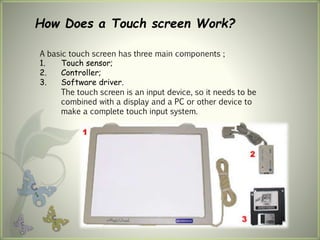
A basic touch screen has three main components ;
1. Touch sensor;
2. Controller;
3. Software driver.
The touch screen is an input device, so it needs to be
combined with a display and a PC or other device to
make a complete touch input system.
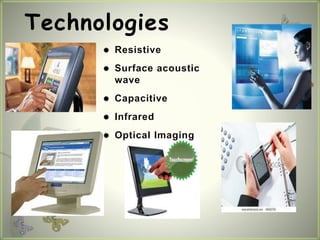
 Resistive
 Surface acoustic
wave
 Capacitive
 Infrared
 Optical Imaging
Technologies
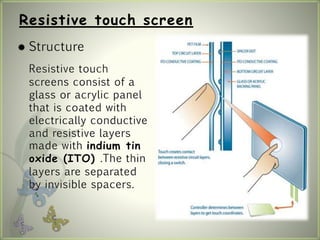
 Structure
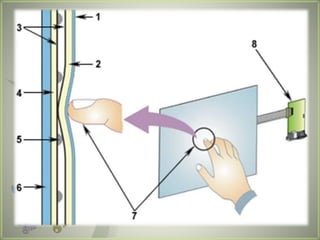
Resistive touch
screens consist of a
glass or acrylic panel
that is coated with
electrically conductive
and resistive layers
made with indium tin
oxide (ITO) .The thin
layers are separated
by invisible spacers.
Resistive touch screen
 Characters:
1. Cost effective solutions
2. Activated by a stylus, a finger or gloved hand
3. Not affected by dirt, dust, water, or light
4. 75%~85% clarify
5. resistive layers can be damaged by a very sharp
object
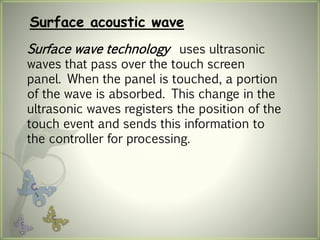
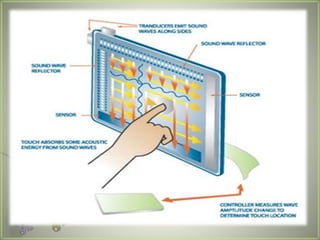
Surface acoustic wave
Surface wave technology uses ultrasonic
waves that pass over the touch screen
panel. When the panel is touched, a portion
of the wave is absorbed. This change in the
ultrasonic waves registers the position of the
touch event and sends this information to
the controller for processing.
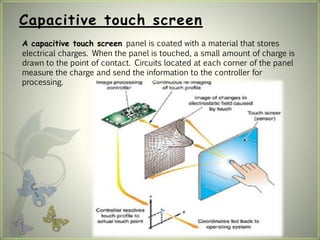
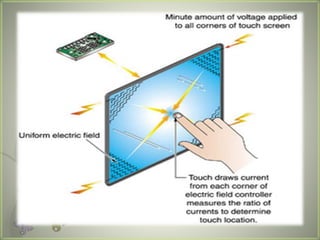
Capacitive touch screen
A capacitive touch screen panel is coated with a material that stores
electrical charges. When the panel is touched, a small amount of charge is
drawn to the point of contact. Circuits located at each corner of the panel
measure the charge and send the information to the controller for
processing.
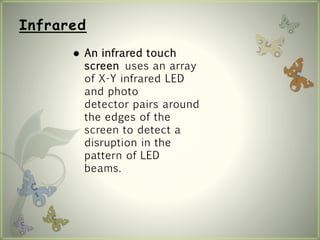
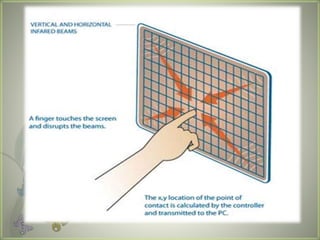
Infrared
 An infrared touch
screen uses an array
of X-Y infrared LED
and photo
detector pairs around
the edges of the
screen to detect a
disruption in the
pattern of LED
beams.
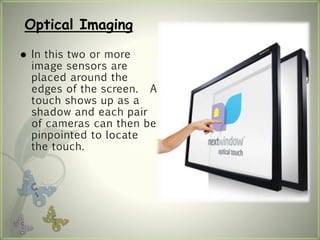
Optical Imaging
 In this two or more
image sensors are
placed around the
edges of the screen. A
touch shows up as a
shadow and each pair
of cameras can then be
pinpointed to locate
the touch.
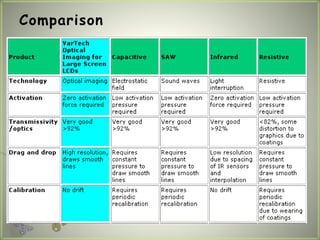
Comparison
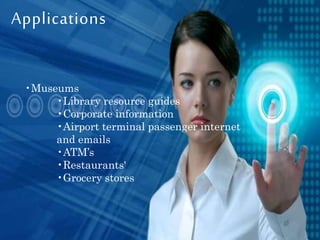
Applications
•Museums
•Library resource guides
•Corporate information
•Airport terminal passenger internet
and emails
•ATM’s
•Restaurants'
•Grocery stores
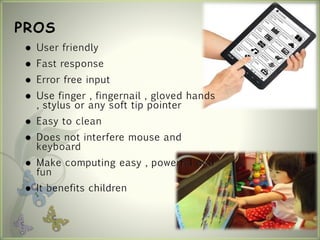
PROS
 User friendly
 Fast response
 Error free input
 Use finger , fingernail , gloved hands
, stylus or any soft tip pointer
 Easy to clean
 Does not interfere mouse and
keyboard
 Make computing easy , powerful and
fun
 It benefits children
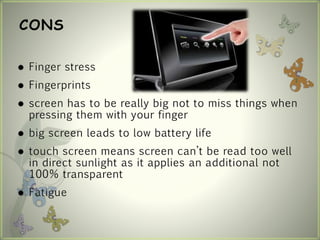
CONS
 Finger stress
 Fingerprints
 screen has to be really big not to miss things when
pressing them with your finger
 big screen leads to low battery life
 touch screen means screen can’t be read too well
in direct sunlight as it applies an additional not
100% transparent
 Fatigue
Presentation on touchscreen

Presentation on touchscreen

  • 2.
    What is touchscreen? • A touch screen is an electronic visual display that can detect the presence and location of a touch within the display area. • The term generally refers to touching the display of the device with a finger or hand. Touchscreens can also sense other passive objects, such as a stylus.
  • 3.
     The touchscreen has two main attributes. First, it enables one to interact directly with what is displayed, rather than indirectly with a pointer controlled by a mouse or touchpad. •Secondly, it lets one do so without requiring any intermediate device that would need to be held in the hand (other than a stylus, which is optional for most modern touch screens).
  • 4.
    HISTORY OF TOUCHSCREEN Thefirst touch screen was a capacitive touch screen developed by E.A. Johnson at the Royal Radar Establishment, Malvern, UK. The inventor briefly described his work in a short article published in 1965 and then more fully - along with photographs and diagrams - in an article published in 1967. A description of the applicability of the touch technology for air traffic control was described in an article published in 1968. .
  • 5.
    • The HP-150from 1983 was one of the world's earliest commercial touch screen computers. •The touch technology used employed infrared transmitters and receivers mounted around the bezel of its 9" Sony Cathode Ray Tube (CRT), which detected the position of any non-transparent object on the screen. •Then came the SEGAS gaming console with touch screen controls in early 1990’s.
  • 6.
    How Does aTouch screen Work? A basic touch screen has three main components ; 1. Touch sensor; 2. Controller; 3. Software driver. The touch screen is an input device, so it needs to be combined with a display and a PC or other device to make a complete touch input system.
  • 7.
     Resistive  Surfaceacoustic wave  Capacitive  Infrared  Optical Imaging Technologies
  • 8.
     Structure Resistive touch screensconsist of a glass or acrylic panel that is coated with electrically conductive and resistive layers made with indium tin oxide (ITO) .The thin layers are separated by invisible spacers. Resistive touch screen
  • 9.
     Characters: 1. Costeffective solutions 2. Activated by a stylus, a finger or gloved hand 3. Not affected by dirt, dust, water, or light 4. 75%~85% clarify 5. resistive layers can be damaged by a very sharp object
  • 11.
    Surface acoustic wave Surfacewave technology uses ultrasonic waves that pass over the touch screen panel. When the panel is touched, a portion of the wave is absorbed. This change in the ultrasonic waves registers the position of the touch event and sends this information to the controller for processing.
  • 13.
    Capacitive touch screen Acapacitive touch screen panel is coated with a material that stores electrical charges. When the panel is touched, a small amount of charge is drawn to the point of contact. Circuits located at each corner of the panel measure the charge and send the information to the controller for processing.
  • 15.
    Infrared  An infraredtouch screen uses an array of X-Y infrared LED and photo detector pairs around the edges of the screen to detect a disruption in the pattern of LED beams.
  • 17.
    Optical Imaging  Inthis two or more image sensors are placed around the edges of the screen. A touch shows up as a shadow and each pair of cameras can then be pinpointed to locate the touch.
  • 18.
  • 19.
    Applications •Museums •Library resource guides •Corporateinformation •Airport terminal passenger internet and emails •ATM’s •Restaurants' •Grocery stores
  • 21.
    PROS  User friendly Fast response  Error free input  Use finger , fingernail , gloved hands , stylus or any soft tip pointer  Easy to clean  Does not interfere mouse and keyboard  Make computing easy , powerful and fun  It benefits children
  • 22.
    CONS  Finger stress Fingerprints  screen has to be really big not to miss things when pressing them with your finger  big screen leads to low battery life  touch screen means screen can’t be read too well in direct sunlight as it applies an additional not 100% transparent  Fatigue