INSTITUTE OF BUSINESS MANAGEMENT


    COLLEGE OF BUSINESS MANAGEMENT
           MIS 102E-Computer Concepts


         Touch Sensor Technology


Student ID:                2012-1-93-
14425
Student Name:   Sohail Mumtaz Khan
Program:                  BBA (H)
Course:         Computer Concepts
Faculty:        Sir Faisal Mushabbar
Points of Discussion
   Introduction to touch technology
   History & Development
   Touch Sensor
   Types of Touch Technologies
   Applications
   Advantages
   Disadvantages
   Closing Thought
Introduction

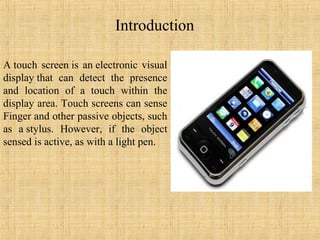
A touch screen is an electronic visual
display that can detect the presence
and location of a touch within the
display area. Touch screens can sense
Finger and other passive objects, such
as a stylus. However, if the object
sensed is active, as with a light pen.
History & Development
• In 1971 Dr. Sam Hurst, founder of Elographics developed the
  first touch opaque sensor “Elograph” at the University of
  Kentucky.
• In 1974 He developed the first real touch screen.
• In 1977, Elographics developed the five-wire resistive
  technology then with the backing of Siemens Corporation,
  developed a curved glass sensor called the touch screen.
• The new transparent technology, AccuTouch, was later
  developed by the founders of Elographics, Dr. Hurst and Bill
  Colwell
Touch Sensor

      A touch screen sensor is a clear glass panel with a touch
    responsive surface which is placed over a display screen so that
    the responsive area of the panel covers the viewable area of the
    display screen.

 The sensor generally has an electrical current or signal going
  through it and touching the screen causes a voltage or signal
  change. This voltage change is used to determine the location
  of the touch to the screen
Types of Touch Technologies
There are mainly 4 types of touch Technologies:-

1.Resistive

2. Surface acoustic wave

3. Capacitive

4. Infrared
Resistive
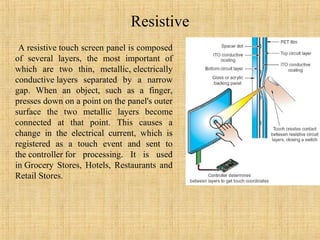
 A resistive touch screen panel is composed
of several layers, the most important of
which are two thin, metallic, electrically
conductive layers separated by a narrow
gap. When an object, such as a finger,
presses down on a point on the panel's outer
surface the two metallic layers become
connected at that point. This causes a
change in the electrical current, which is
registered as a touch event and sent to
the controller for processing. It is used
in Grocery Stores, Hotels, Restaurants and
Retail Stores.
Surface Acoustic Wave (SAW)
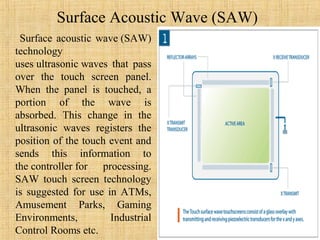
 Surface acoustic wave (SAW)
technology
uses ultrasonic waves that pass
over the touch screen panel.
When the panel is touched, a
portion of the wave is
absorbed. This change in the
ultrasonic waves registers the
position of the touch event and
sends this information to
the controller for processing.
SAW touch screen technology
is suggested for use in ATMs,
Amusement Parks, Gaming
Environments,         Industrial
Control Rooms etc.
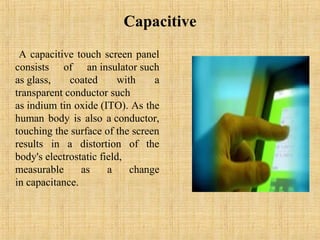
Capacitive
 A capacitive touch screen panel
consists of an insulator such
as glass,    coated       with    a
transparent conductor such
as indium tin oxide (ITO). As the
human body is also a conductor,
touching the surface of the screen
results in a distortion of the
body's electrostatic field,
measurable      as     a     change
in capacitance.
Applications of Touch Screens
•Informational kiosks
•Trade show displays
•Museum / tourism displays
•Point-of-sale terminals
•Restaurant systems
•Employee time clocks
•Industrial process controls
•World Wide Web access kiosks
•Home automation systems
•Casino and other gaming systems
•Computer access for the physically disabled
Advantages of Touch Technology
Touch screens have several advantages over other pointing devices:
• A touch screen is easy to use (as the user simply touches what he or
  she sees on the display).
• Save space as no buttons are required.
• Touching a visual display of choices requires little thinking and is a
  form of direct manipulation that is easy to learn.
• Touch screens are the fastest pointing devices.
• Touch screens have easier hand eye coordination than buttons.
• Touch screens are durable in public access and in high volume usage.
Disadvantages of           Touch Technology
• Screen has to be really big not to miss things when pressing them with
  your finger:
• Big screen leads to low battery life.
• Touch screen means screen can’t be read too well in direct sunlight
  as it applies an additional not 100% transparent.
• Touch screen devices usually has no additional keys (see the iPhone)
  and this means when an app crashes, without crashing the OS, you
  can’t get to the main menu as the whole screen becomes
  unresponsive.
• Most user interfaces are not optimized for thumb operation, so a
  stylus in necessary, and this means using two hands
• Screens get very dirty.
• These devices require massive computing power which leads to slow
  devices.
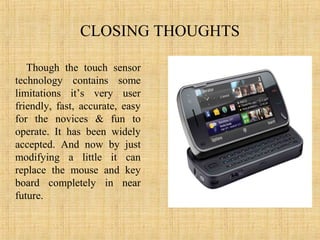
CLOSING THOUGHTS

   Though the touch sensor
technology contains some
limitations it’s very user
friendly, fast, accurate, easy
for the novices & fun to
operate. It has been widely
accepted. And now by just
modifying a little it can
replace the mouse and key
board completely in near
future.

computer

  • 1.
    INSTITUTE OF BUSINESSMANAGEMENT COLLEGE OF BUSINESS MANAGEMENT MIS 102E-Computer Concepts Touch Sensor Technology Student ID: 2012-1-93- 14425 Student Name: Sohail Mumtaz Khan Program: BBA (H) Course: Computer Concepts Faculty: Sir Faisal Mushabbar
  • 2.
    Points of Discussion  Introduction to touch technology  History & Development  Touch Sensor  Types of Touch Technologies  Applications  Advantages  Disadvantages  Closing Thought
  • 3.
    Introduction A touch screenis an electronic visual display that can detect the presence and location of a touch within the display area. Touch screens can sense Finger and other passive objects, such as a stylus. However, if the object sensed is active, as with a light pen.
  • 4.
    History & Development •In 1971 Dr. Sam Hurst, founder of Elographics developed the first touch opaque sensor “Elograph” at the University of Kentucky. • In 1974 He developed the first real touch screen. • In 1977, Elographics developed the five-wire resistive technology then with the backing of Siemens Corporation, developed a curved glass sensor called the touch screen. • The new transparent technology, AccuTouch, was later developed by the founders of Elographics, Dr. Hurst and Bill Colwell
  • 5.
    Touch Sensor  A touch screen sensor is a clear glass panel with a touch responsive surface which is placed over a display screen so that the responsive area of the panel covers the viewable area of the display screen.  The sensor generally has an electrical current or signal going through it and touching the screen causes a voltage or signal change. This voltage change is used to determine the location of the touch to the screen
  • 6.
    Types of TouchTechnologies There are mainly 4 types of touch Technologies:- 1.Resistive 2. Surface acoustic wave 3. Capacitive 4. Infrared
  • 7.
    Resistive A resistivetouch screen panel is composed of several layers, the most important of which are two thin, metallic, electrically conductive layers separated by a narrow gap. When an object, such as a finger, presses down on a point on the panel's outer surface the two metallic layers become connected at that point. This causes a change in the electrical current, which is registered as a touch event and sent to the controller for processing. It is used in Grocery Stores, Hotels, Restaurants and Retail Stores.
  • 8.
    Surface Acoustic Wave(SAW) Surface acoustic wave (SAW) technology uses ultrasonic waves that pass over the touch screen panel. When the panel is touched, a portion of the wave is absorbed. This change in the ultrasonic waves registers the position of the touch event and sends this information to the controller for processing. SAW touch screen technology is suggested for use in ATMs, Amusement Parks, Gaming Environments, Industrial Control Rooms etc.
  • 9.
    Capacitive A capacitivetouch screen panel consists of an insulator such as glass, coated with a transparent conductor such as indium tin oxide (ITO). As the human body is also a conductor, touching the surface of the screen results in a distortion of the body's electrostatic field, measurable as a change in capacitance.
  • 10.
    Applications of TouchScreens •Informational kiosks •Trade show displays •Museum / tourism displays •Point-of-sale terminals •Restaurant systems •Employee time clocks •Industrial process controls •World Wide Web access kiosks •Home automation systems •Casino and other gaming systems •Computer access for the physically disabled
  • 11.
    Advantages of TouchTechnology Touch screens have several advantages over other pointing devices: • A touch screen is easy to use (as the user simply touches what he or she sees on the display). • Save space as no buttons are required. • Touching a visual display of choices requires little thinking and is a form of direct manipulation that is easy to learn. • Touch screens are the fastest pointing devices. • Touch screens have easier hand eye coordination than buttons. • Touch screens are durable in public access and in high volume usage.
  • 12.
    Disadvantages of Touch Technology • Screen has to be really big not to miss things when pressing them with your finger: • Big screen leads to low battery life. • Touch screen means screen can’t be read too well in direct sunlight as it applies an additional not 100% transparent. • Touch screen devices usually has no additional keys (see the iPhone) and this means when an app crashes, without crashing the OS, you can’t get to the main menu as the whole screen becomes unresponsive. • Most user interfaces are not optimized for thumb operation, so a stylus in necessary, and this means using two hands • Screens get very dirty. • These devices require massive computing power which leads to slow devices.
  • 13.
    CLOSING THOUGHTS Though the touch sensor technology contains some limitations it’s very user friendly, fast, accurate, easy for the novices & fun to operate. It has been widely accepted. And now by just modifying a little it can replace the mouse and key board completely in near future.