Touch Typing for Life
What is Touch Type? Touch typing is typing with all 8 fingers and 2 thumbs. This allows you to type without looking at your hands! With a little practice, touch typing will be  easier and faster than the old Hunt-and-Peck method.
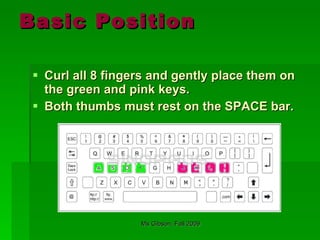
Basic Position Curl all 8 fingers and gently place them on the green and pink keys. Both thumbs must rest on the SPACE bar.
Lesson 1 Remember to rest all 8 fingers on the key board, and to rest both thumbs on the space bar at all times! ffff jjjj ffff jjjj ffff jjjj ffff jjjj ffff jjjj ffff jjjj ffff jjjj ffff jjjj   fjfjfjjj fjfjfjjj fjfjfjjj fjfjfjjj fjfjfjjj fjfjfjjj fjfjfjjj fjfjfjjj fjfjfjjj jfjfjfff jfjfjfff jfjfjfff jfjfjfff jfjfjfff jfjfjfff jfjfjfff jfjfjfff jfjfjfff
Homework  Repeat Lesson 1.  Type SLOWLY. Keep all 8 fingers and 2 thumbs in their basic position. Keep a slow and steady pace, and try to look more at the monitor and less at your hands.
Lesson Two:   Index Fingers only! jjjj uuuu jjjj uuuu jjjj uuuu jjjj uuuu jjjj uuuu Juju juju juju juju juju juju juju juju juju ffff rrrr ffff rrrr ffff rrrr ffff rrrr ffff rrrr ffff Frfr frfr frfr frfr frfr frfr frfr frfr frfr frfr frfr  jujujuuu jujujuuu jujujuuu jujujuuu frfrfrrr frfrfrrr frfrfrrr frfrfrrr frfrfrrr frfrfrrr Remember to rest all 8 fingers on the key board, and to rest both thumbs on the space bar at all times!
Homework for Lesson 2 Repeat Lessons 1 and 2.  Type SLOWLY. Keep all 8 fingers and 2 thumbs in their basic position. Keep a slow and steady pace, and try to look more at the monitor and less at your hands.
Lesson Three: Middle Fingers Only! ddddkkkk ddddkkkk ddddkkkk ddddkkkk kkkkdddd kkkkdddd kkkkdddd kkkkdddd Dd kk dd kk dd kk dd kk dd kk dd kk dd kdkdkkkk kdkdkkkk kdkdkkkk kdkdkkkk dkdkdddd dkdkdddd dkdkdddd dkdkdddd Kkd kkd kkd kkd kkd kkd kkd kkd kkd kkd Remember to rest all 8 fingers on the key board, and to rest both thumbs on the space bar at all times!
How to Become a  Touch Type Ninja Earn your white belt by mastering Lessons 1,2 and 3.  Keep all 8 fingers and 2 thumbs in place, even if you are just typing f,j, and k,d.
Lesson 4: Ring Fingers Only! llllssss llllssss llllssss llllssss llllssss ssssllll ssssllll ssssllll ssssllll ssssllll lslsllll lslsllll lslsllll lslsllll lslsllll lslsllll slslssss slslssss slslssss slslssss  ssssssss llllllll ssssssss llllllll llllllll ssssssss llllllll ssssssss Keep all fingers curled!!!
Homework for  Lessons 3 and 4 Repeat Lessons 1, 2, and 3 and 4. Type SLOWLY. Keep all 8 fingers and 2 thumbs in their basic position. Keep a slow and steady pace, and try to look more at the monitor and less at your hands. Shake out your hands to relax.
Lesson 5 Use only your “pinky” fingers Aaaa ;;;; aaaa ;;;; aaaa ;;;; aaaa ;;;;; aaaa  ;;;;aaaa ;;;;aaaa ;;;;aaaa ;;;;aaaa ;;;; aaaa Aa;; aa;; aa;; aa;; aa;; aa;; aa;; aa;; aa;;  Aaa; aaa; aaa; aaa; aaa; aaa; aaa; aaa; ;aaa ;aaa ;aaa ;aaa ;aaa ;aaa ;aaa ;aaa ;a;a ;a;a ;a;a ;a;a ;a;a ;a;a ;a;a ;a;a ;a;a
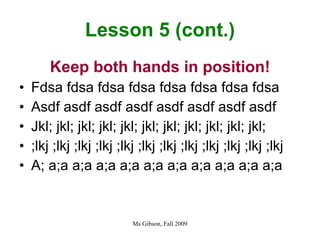
Lesson 5 (cont.) Keep both hands in position! Fdsa fdsa fdsa fdsa fdsa fdsa fdsa fdsa  Asdf asdf asdf asdf asdf asdf asdf asdf Jkl; jkl; jkl; jkl; jkl; jkl; jkl; jkl; jkl; jkl; jkl; ;lkj ;lkj ;lkj ;lkj ;lkj ;lkj ;lkj ;lkj ;lkj ;lkj ;lkj ;lkj  A; a;a a;a a;a a;a a;a a;a a;a a;a a;a a;a
Homework for Lesson 5 Repeat lesson 5. Type slow and steady. Do NOT speed up! Keep BOTH hands in position.
Sources Photo on slide 1 www.rootsweb.ancestry.com Photo on slide 9 http://eaglemartialartsnj.com

Touch Typing

  • 1.
  • 2.
    What is TouchType? Touch typing is typing with all 8 fingers and 2 thumbs. This allows you to type without looking at your hands! With a little practice, touch typing will be easier and faster than the old Hunt-and-Peck method.
  • 3.
    Basic Position Curlall 8 fingers and gently place them on the green and pink keys. Both thumbs must rest on the SPACE bar.
  • 4.
    Lesson 1 Rememberto rest all 8 fingers on the key board, and to rest both thumbs on the space bar at all times! ffff jjjj ffff jjjj ffff jjjj ffff jjjj ffff jjjj ffff jjjj ffff jjjj ffff jjjj fjfjfjjj fjfjfjjj fjfjfjjj fjfjfjjj fjfjfjjj fjfjfjjj fjfjfjjj fjfjfjjj fjfjfjjj jfjfjfff jfjfjfff jfjfjfff jfjfjfff jfjfjfff jfjfjfff jfjfjfff jfjfjfff jfjfjfff
  • 5.
    Homework RepeatLesson 1. Type SLOWLY. Keep all 8 fingers and 2 thumbs in their basic position. Keep a slow and steady pace, and try to look more at the monitor and less at your hands.
  • 6.
    Lesson Two: Index Fingers only! jjjj uuuu jjjj uuuu jjjj uuuu jjjj uuuu jjjj uuuu Juju juju juju juju juju juju juju juju juju ffff rrrr ffff rrrr ffff rrrr ffff rrrr ffff rrrr ffff Frfr frfr frfr frfr frfr frfr frfr frfr frfr frfr frfr jujujuuu jujujuuu jujujuuu jujujuuu frfrfrrr frfrfrrr frfrfrrr frfrfrrr frfrfrrr frfrfrrr Remember to rest all 8 fingers on the key board, and to rest both thumbs on the space bar at all times!
  • 7.
    Homework for Lesson2 Repeat Lessons 1 and 2. Type SLOWLY. Keep all 8 fingers and 2 thumbs in their basic position. Keep a slow and steady pace, and try to look more at the monitor and less at your hands.
  • 8.
    Lesson Three: MiddleFingers Only! ddddkkkk ddddkkkk ddddkkkk ddddkkkk kkkkdddd kkkkdddd kkkkdddd kkkkdddd Dd kk dd kk dd kk dd kk dd kk dd kk dd kdkdkkkk kdkdkkkk kdkdkkkk kdkdkkkk dkdkdddd dkdkdddd dkdkdddd dkdkdddd Kkd kkd kkd kkd kkd kkd kkd kkd kkd kkd Remember to rest all 8 fingers on the key board, and to rest both thumbs on the space bar at all times!
  • 9.
    How to Becomea Touch Type Ninja Earn your white belt by mastering Lessons 1,2 and 3. Keep all 8 fingers and 2 thumbs in place, even if you are just typing f,j, and k,d.
  • 10.
    Lesson 4: RingFingers Only! llllssss llllssss llllssss llllssss llllssss ssssllll ssssllll ssssllll ssssllll ssssllll lslsllll lslsllll lslsllll lslsllll lslsllll lslsllll slslssss slslssss slslssss slslssss ssssssss llllllll ssssssss llllllll llllllll ssssssss llllllll ssssssss Keep all fingers curled!!!
  • 11.
    Homework for Lessons 3 and 4 Repeat Lessons 1, 2, and 3 and 4. Type SLOWLY. Keep all 8 fingers and 2 thumbs in their basic position. Keep a slow and steady pace, and try to look more at the monitor and less at your hands. Shake out your hands to relax.
  • 12.
    Lesson 5 Useonly your “pinky” fingers Aaaa ;;;; aaaa ;;;; aaaa ;;;; aaaa ;;;;; aaaa ;;;;aaaa ;;;;aaaa ;;;;aaaa ;;;;aaaa ;;;; aaaa Aa;; aa;; aa;; aa;; aa;; aa;; aa;; aa;; aa;; Aaa; aaa; aaa; aaa; aaa; aaa; aaa; aaa; ;aaa ;aaa ;aaa ;aaa ;aaa ;aaa ;aaa ;aaa ;a;a ;a;a ;a;a ;a;a ;a;a ;a;a ;a;a ;a;a ;a;a
  • 13.
    Lesson 5 (cont.)Keep both hands in position! Fdsa fdsa fdsa fdsa fdsa fdsa fdsa fdsa Asdf asdf asdf asdf asdf asdf asdf asdf Jkl; jkl; jkl; jkl; jkl; jkl; jkl; jkl; jkl; jkl; jkl; ;lkj ;lkj ;lkj ;lkj ;lkj ;lkj ;lkj ;lkj ;lkj ;lkj ;lkj ;lkj A; a;a a;a a;a a;a a;a a;a a;a a;a a;a a;a
  • 14.
    Homework for Lesson5 Repeat lesson 5. Type slow and steady. Do NOT speed up! Keep BOTH hands in position.
  • 15.
    Sources Photo onslide 1 www.rootsweb.ancestry.com Photo on slide 9 http://eaglemartialartsnj.com