Confidential and Proprietary
© 2013 LucidWorks
1
Scaling Through Partitioning and Shard Splitting
in Solr 4
Bigger, Better, Faster, Stronger, Safer
• Agenda
- Next set of problems
- Shard splitting
- Data partitioning using custom hashing
Confidential and Proprietary
© 2013 LucidWorks2
About me
• Independent consultant specializing in search, machine
learning, and big data analytics
• Co-author Solr In Action from Manning Publishers, with Trey
Grainger
- Use code 12mp45 for 42% off your MEAP
• Previously, lead architect, developer, and dev-ops engineer
for large-scale Solr cloud implementation at Dachis Group
• Coming soon! Big Data Jumpstart: 2-day intensive hands-on
workshop covering Hadoop (Hive, Pig, HDFS), Solr, and
Storm
Confidential and Proprietary
© 2013 LucidWorks3
A nice problem to have …
• Solr cloud can scale!
- 18 shards / ~900M docs
- Indexing rate of 6-8k docs / sec
- Millions of updates, deletes, and new docs per day
• Some lessons learned
- Eventually, your shards will outgrow the hardware they are
hosted on
- Search is addictive to organizations, expect broader usage and
greater query complexity
- Beware of the urge to do online analytics with Solr
Confidential and Proprietary
© 2013 LucidWorks4
Sharding review
• Split large index into multiple “shards” containing
unique slices of the index
- Documents assigned to one and only one shard using a hash of
the unique ID field
- Hash function designed to distribute documents evenly across N
shards (default: MurmurHash3 32-bit)
- Every shard must have at least one active host
• Benefits
- Distribute cost of indexing across multiple nodes
- Parallelize complex query computations such as sorting and
facets across multiple nodes
- Smaller index == less JVM heap == less GC headaches
- Smaller index == More of it fits in OS cache (MMapDirectory)
Confidential and Proprietary
© 2013 LucidWorks5
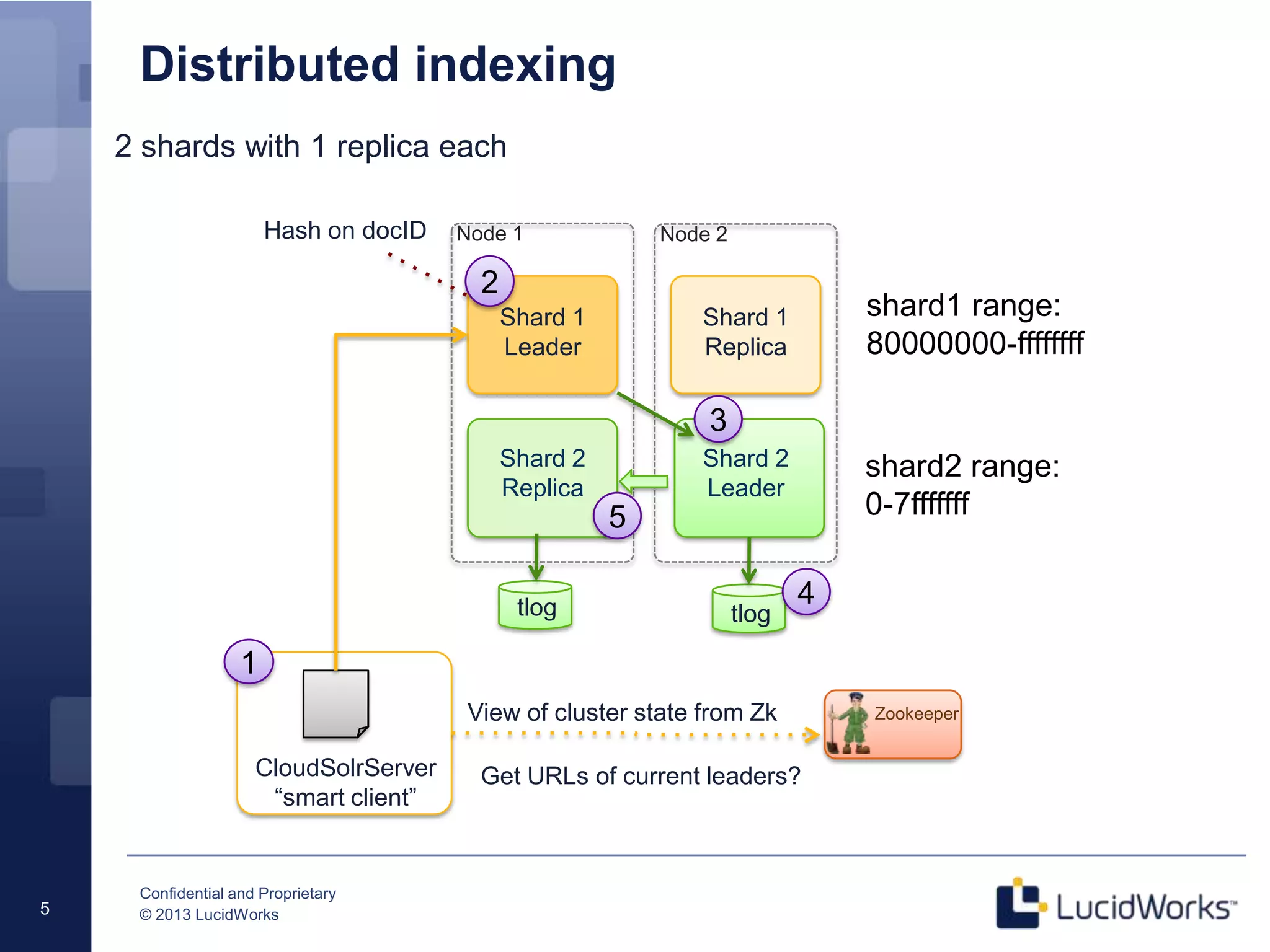
Distributed indexing
View of cluster state from Zk
Shard 1
Leader
Node 1 Node 2
Shard 2
Leader
Shard 2
Replica
Shard 1
Replica
Zookeeper
CloudSolrServer
“smart client”
Hash on docID
1
2
3
tlogtlog
Get URLs of current leaders?
4
5
2 shards with 1 replica each
shard1 range:
80000000-ffffffff
shard2 range:
0-7fffffff
Confidential and Proprietary
© 2013 LucidWorks6
Document routing
• Composite (default)
- numShards specific when collection is bootstrapped
- Each shard has a hash range (32-bit)
• Implicit
- numShards is unknown when collection is bootstrapped
- No “range” for a shard; indexing client is responsible for sending
documents to the correct shard
- Feels a little old school to me ;-)
Confidential and Proprietary
© 2013 LucidWorks7
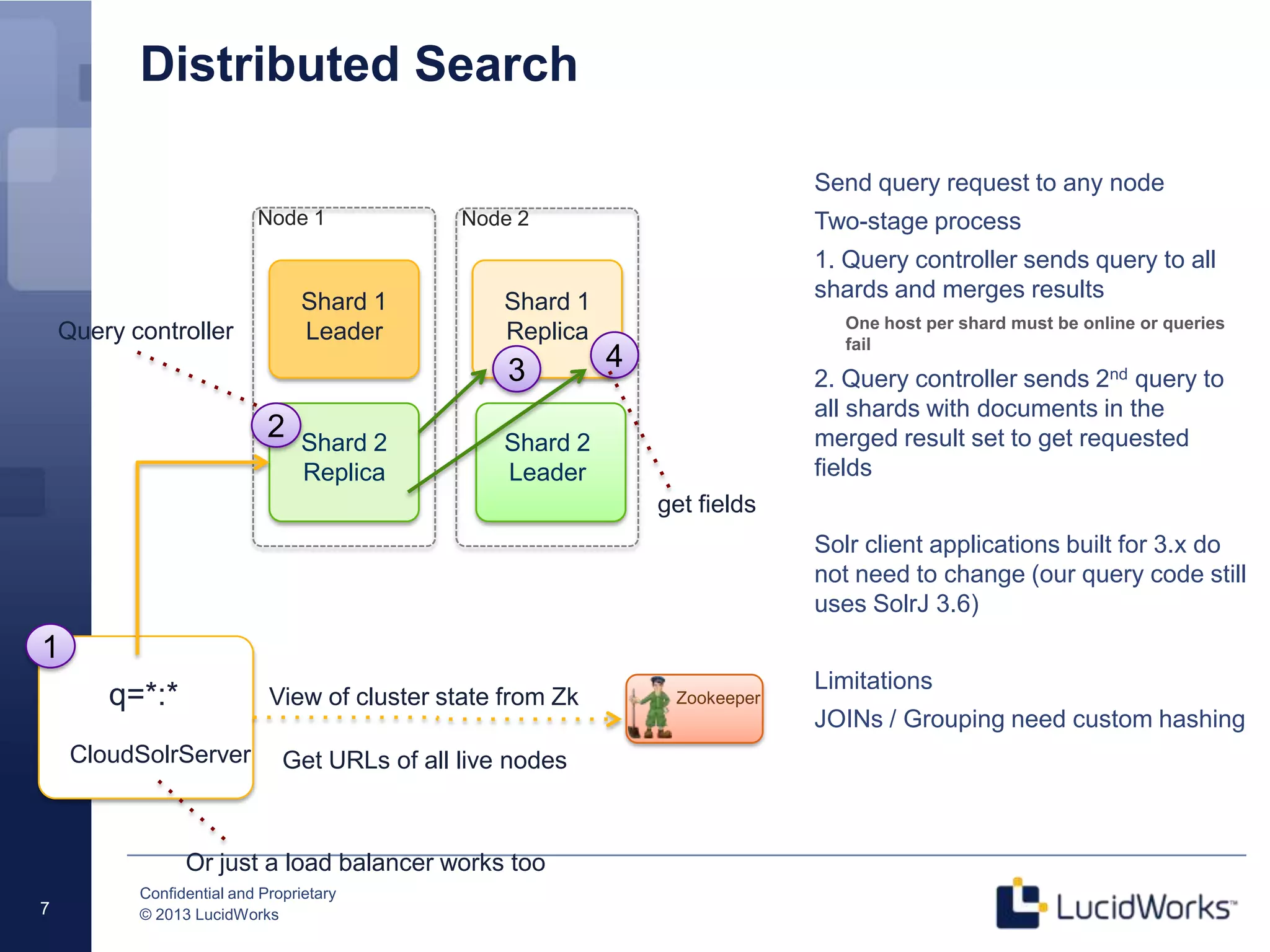
Distributed Search
Send query request to any node
Two-stage process
1. Query controller sends query to all
shards and merges results
One host per shard must be online or queries
fail
2. Query controller sends 2nd query to
all shards with documents in the
merged result set to get requested
fields
Solr client applications built for 3.x do
not need to change (our query code still
uses SolrJ 3.6)
Limitations
JOINs / Grouping need custom hashing
View of cluster state from Zk
Shard 1
Leader
Node 1 Node 2
Shard 2
Leader
Shard 2
Replica
Shard 1
Replica
Zookeeper
CloudSolrServer
1
3
q=*:*
Get URLs of all live nodes
4
2
Query controller
Or just a load balancer works too
get fields
Confidential and Proprietary
© 2013 LucidWorks8
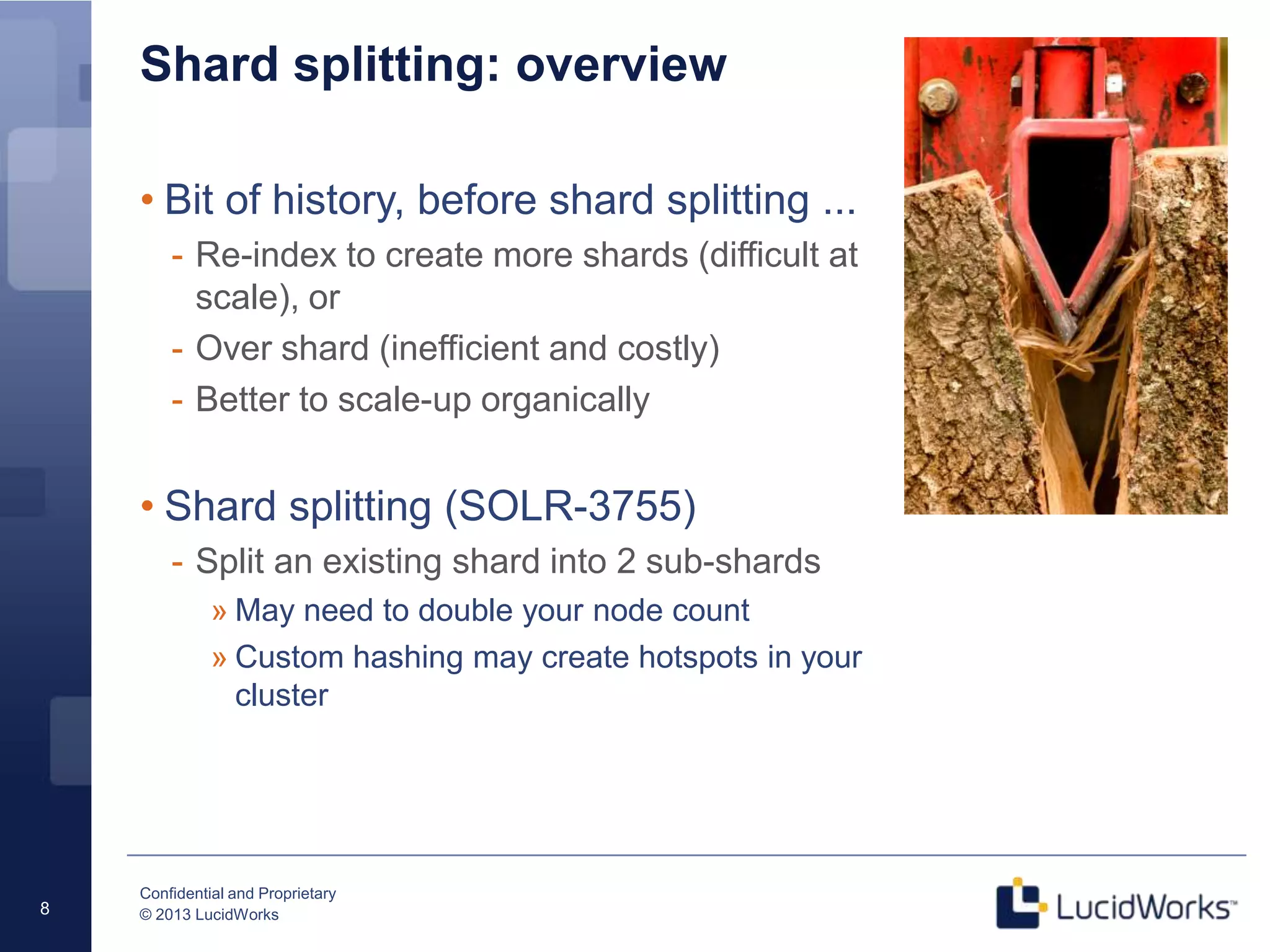
Shard splitting: overview
• Bit of history, before shard splitting ...
- Re-index to create more shards (difficult at
scale), or
- Over shard (inefficient and costly)
- Better to scale-up organically
• Shard splitting (SOLR-3755)
- Split an existing shard into 2 sub-shards
» May need to double your node count
» Custom hashing may create hotspots in your
cluster
Confidential and Proprietary
© 2013 LucidWorks9
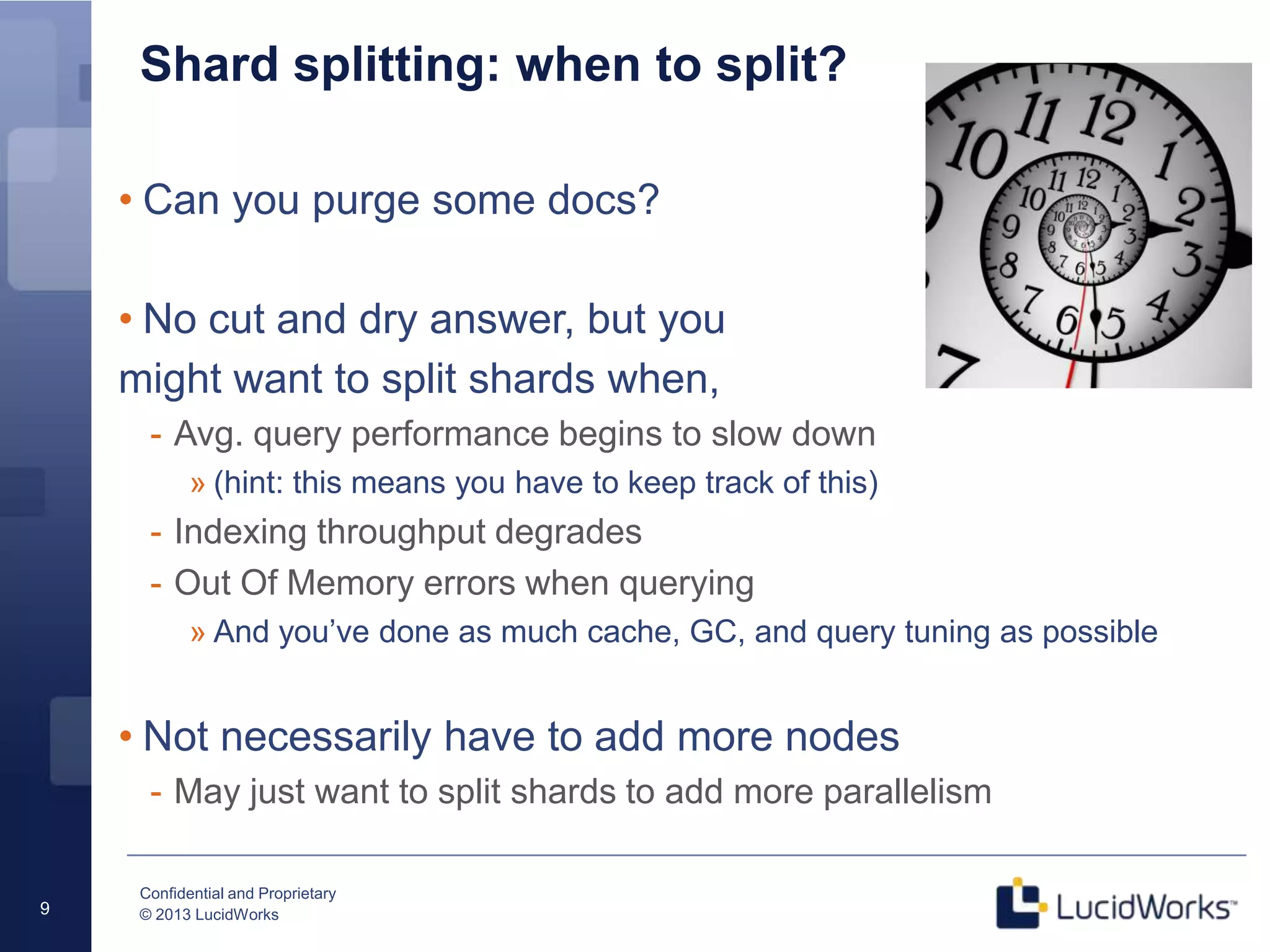
Shard splitting: when to split?
• Can you purge some docs?
• No cut and dry answer, but you
might want to split shards when,
- Avg. query performance begins to slow down
» (hint: this means you have to keep track of this)
- Indexing throughput degrades
- Out Of Memory errors when querying
» And you’ve done as much cache, GC, and query tuning as possible
• Not necessarily have to add more nodes
- May just want to split shards to add more parallelism
Confidential and Proprietary
© 2013 LucidWorks10
Shard splitting mechanics (in Solr 4.3.1)
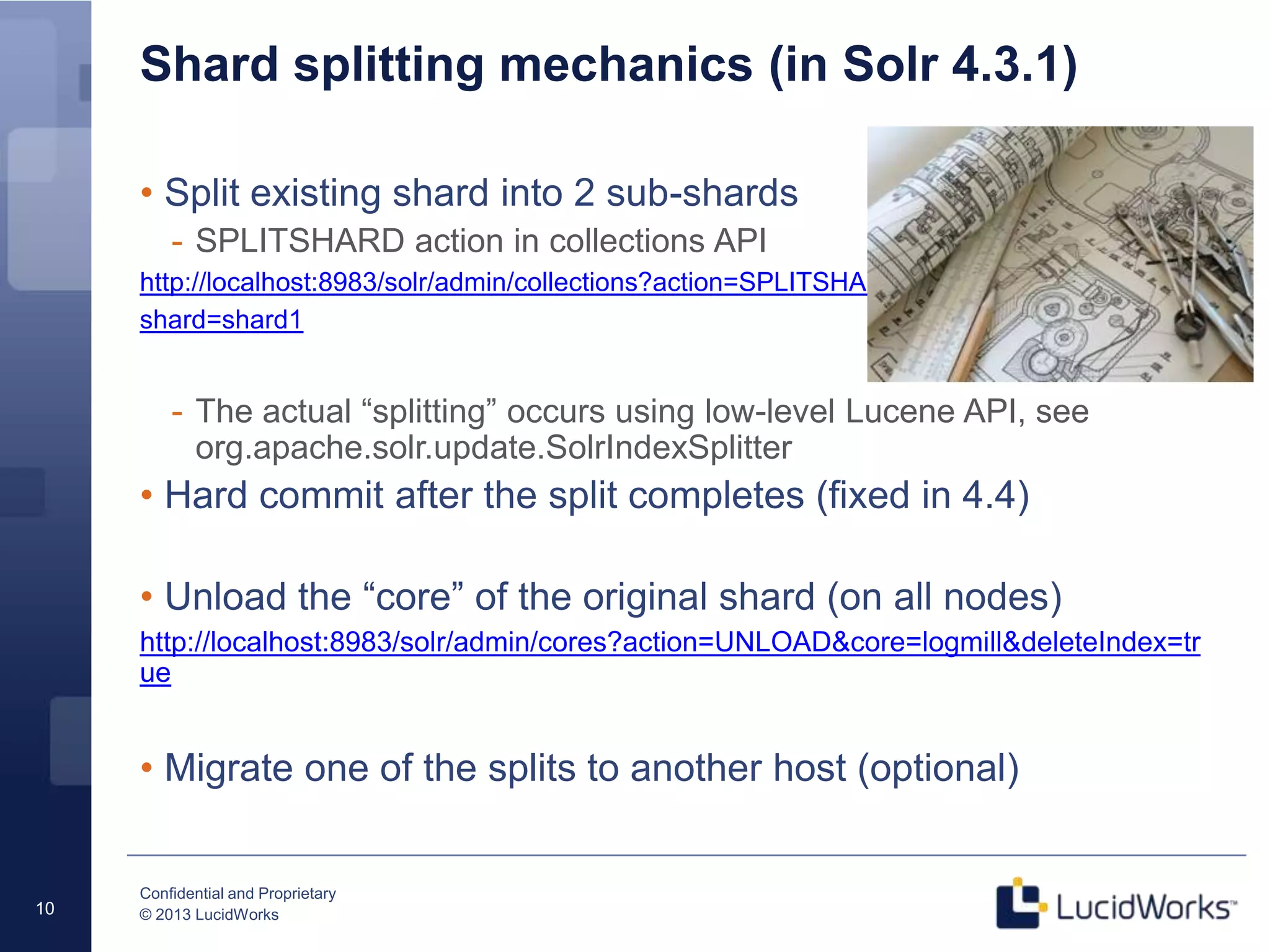
• Split existing shard into 2 sub-shards
- SPLITSHARD action in collections API
http://localhost:8983/solr/admin/collections?action=SPLITSHARD&collection=logmill&
shard=shard1
- The actual “splitting” occurs using low-level Lucene API, see
org.apache.solr.update.SolrIndexSplitter
• Hard commit after the split completes (fixed in 4.4)
• Unload the “core” of the original shard (on all nodes)
http://localhost:8983/solr/admin/cores?action=UNLOAD&core=logmill&deleteIndex=tr
ue
• Migrate one of the splits to another host (optional)
Confidential and Proprietary
© 2013 LucidWorks11
Interesting questions about the process
• What happens to the replicas when
a shard is split?
• What happens to update requests being sent to
the original shard leader during the split operation?
• The original shard remains in the cluster – doesn’t
that create duplicate docs in queries?
New sub-shards are replicated automatically
using Solr replication
Updates are sent to the correct sub-split during “construction”
No, the original shard enters the “inactive” state and no longer
participates in distributed queries for the collection
Confidential and Proprietary
© 2013 LucidWorks12
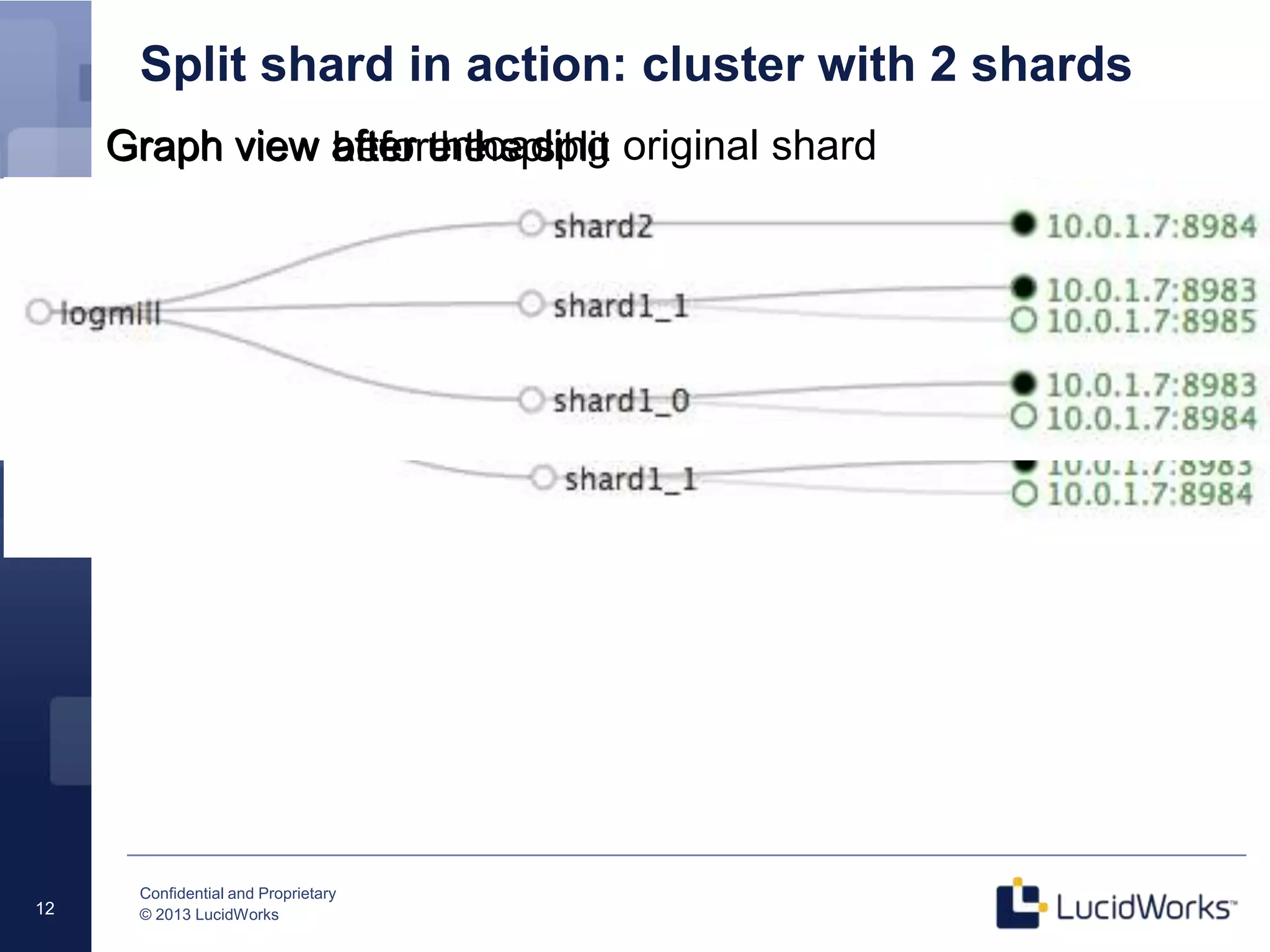
Split shard in action: cluster with 2 shards
Graph view before the split
Graph view after the split
Graph view after unloading original shard
Confidential and Proprietary
© 2013 LucidWorks
Shard 1_1
Leader
Node 1 Node 2
Shard 2
Leader
Shard 2
Replica
Shard 1_1
Replica
shard1_0 range:
80000000-bfffffff
shard2 range:
0-7fffffff
Shard 1_0
Leader
Shard 1_0
Replica
shard1_1 range:
c0000000-ffffffff
13
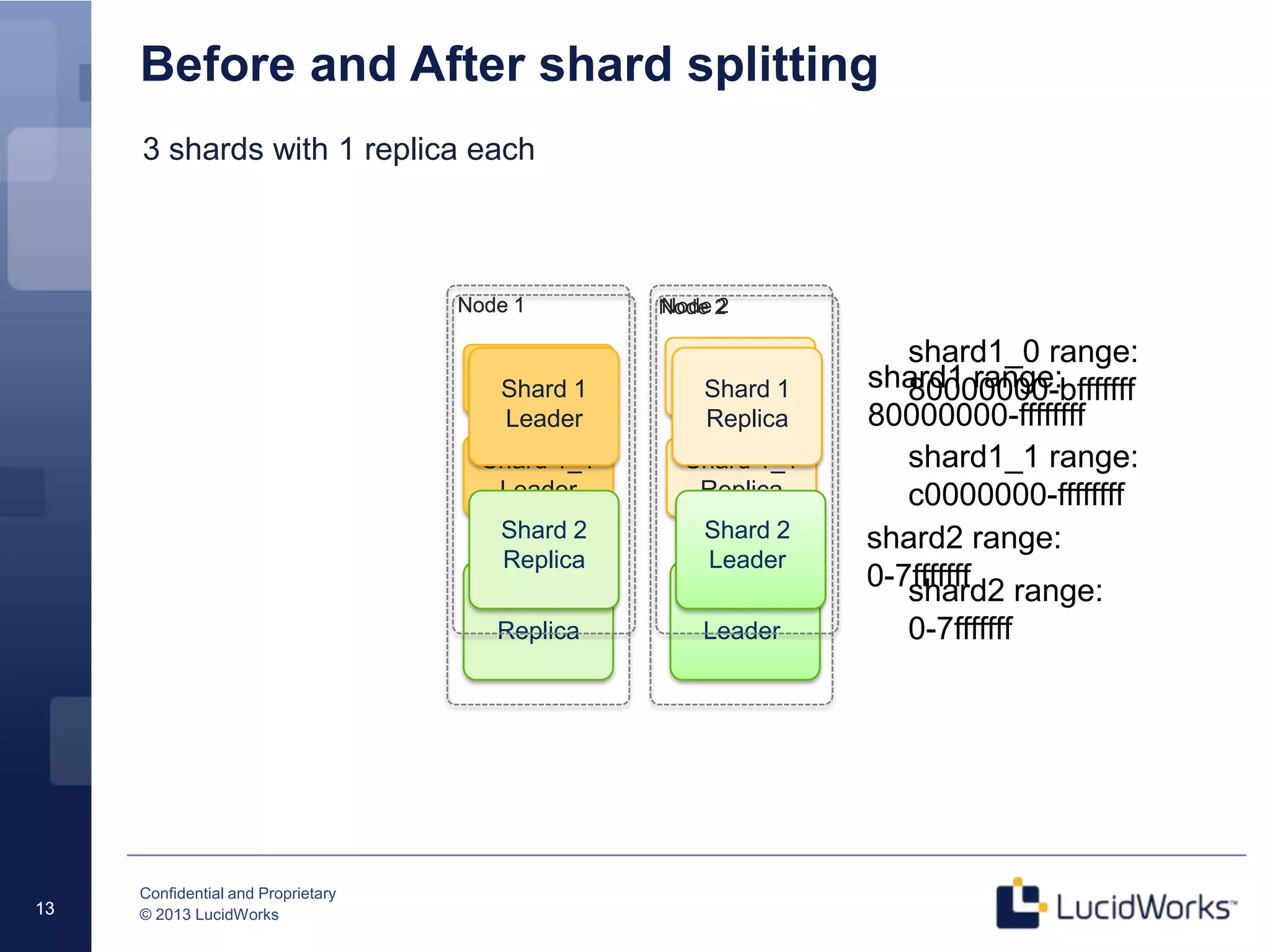
Before and After shard splitting
13
Shard 1
Leader
Node 1 Node 2
Shard 2
Leader
Shard 2
Replica
Shard 1
Replica
shard1 range:
80000000-ffffffff
shard2 range:
0-7fffffff
Before
After
Confidential and Proprietary
© 2013 LucidWorks14
Shard splitting: Limitations
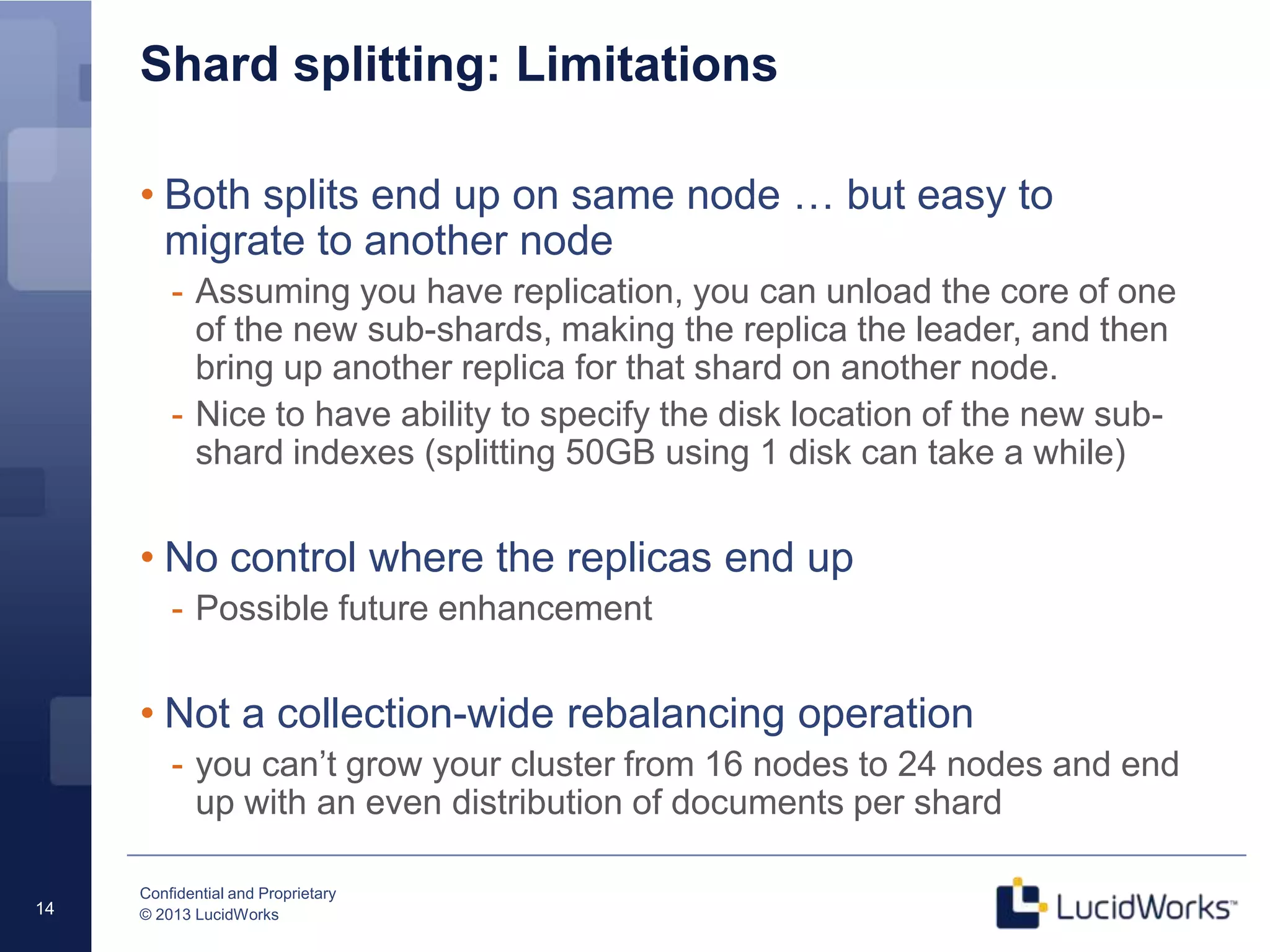
• Both splits end up on same node … but easy to
migrate to another node
- Assuming you have replication, you can unload the core of one
of the new sub-shards, making the replica the leader, and then
bring up another replica for that shard on another node.
- Nice to have ability to specify the disk location of the new sub-
shard indexes (splitting 50GB using 1 disk can take a while)
• No control where the replicas end up
- Possible future enhancement
• Not a collection-wide rebalancing operation
- you can’t grow your cluster from 16 nodes to 24 nodes and end
up with an even distribution of documents per shard
Confidential and Proprietary
© 2013 LucidWorks15
On to data partitioning …
Confidential and Proprietary
© 2013 LucidWorks16
Data Partitioning: Sports Aggregator
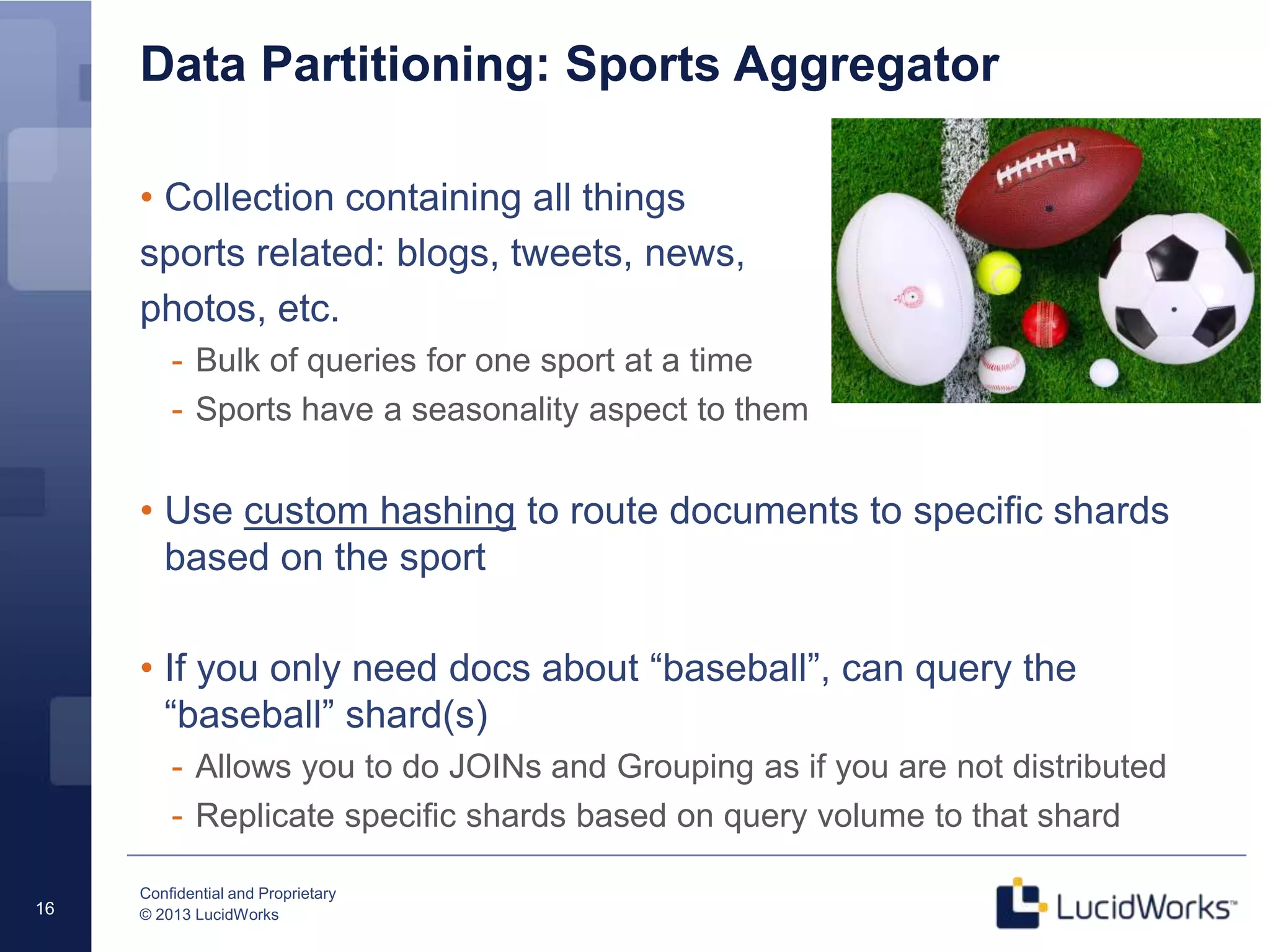
• Collection containing all things
sports related: blogs, tweets, news,
photos, etc.
- Bulk of queries for one sport at a time
- Sports have a seasonality aspect to them
• Use custom hashing to route documents to specific shards
based on the sport
• If you only need docs about “baseball”, can query the
“baseball” shard(s)
- Allows you to do JOINs and Grouping as if you are not distributed
- Replicate specific shards based on query volume to that shard
Confidential and Proprietary
© 2013 LucidWorks17
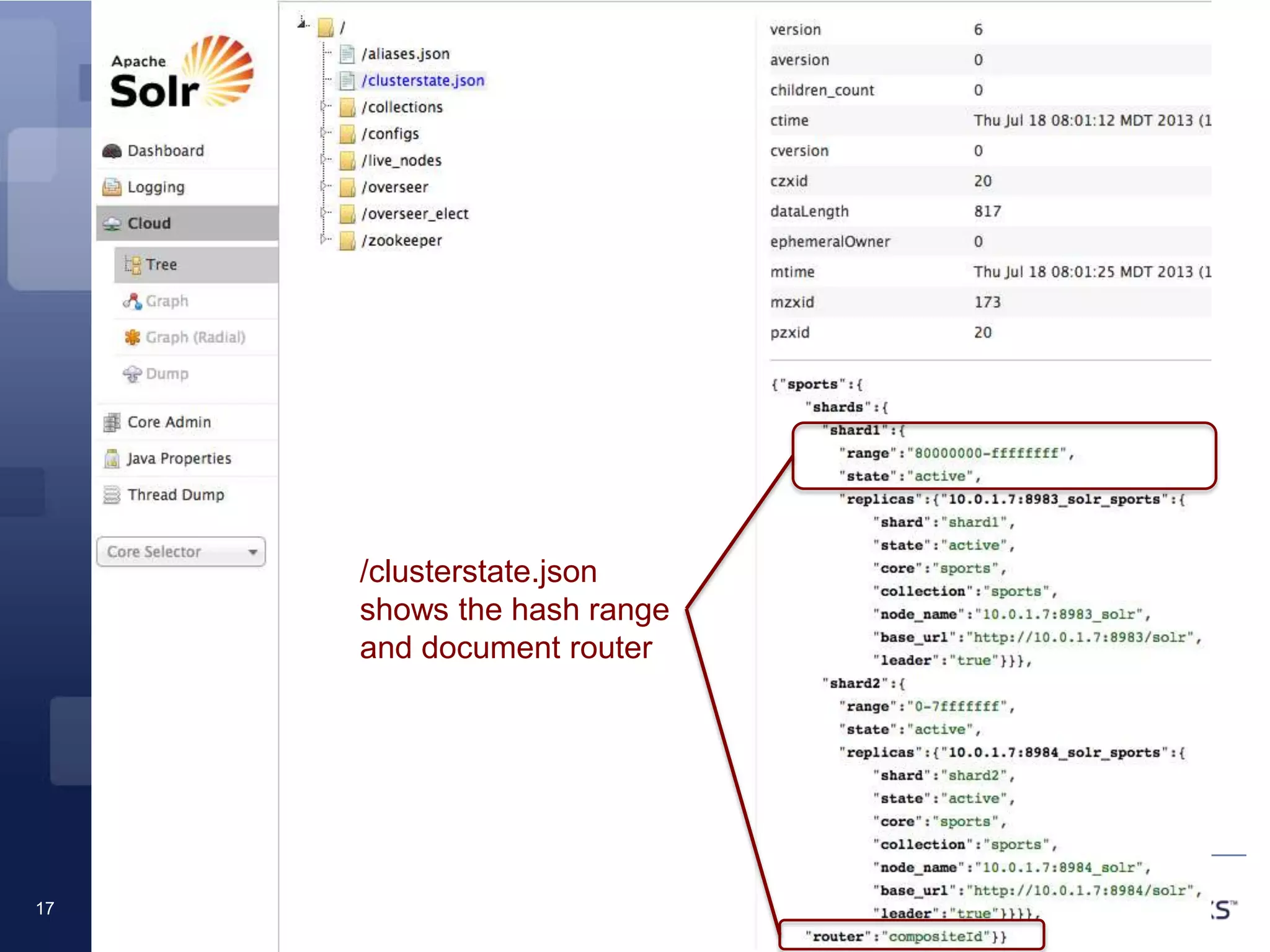
Cluster state
/clusterstate.json
shows the hash range
and document router
Confidential and Proprietary
© 2013 LucidWorks18
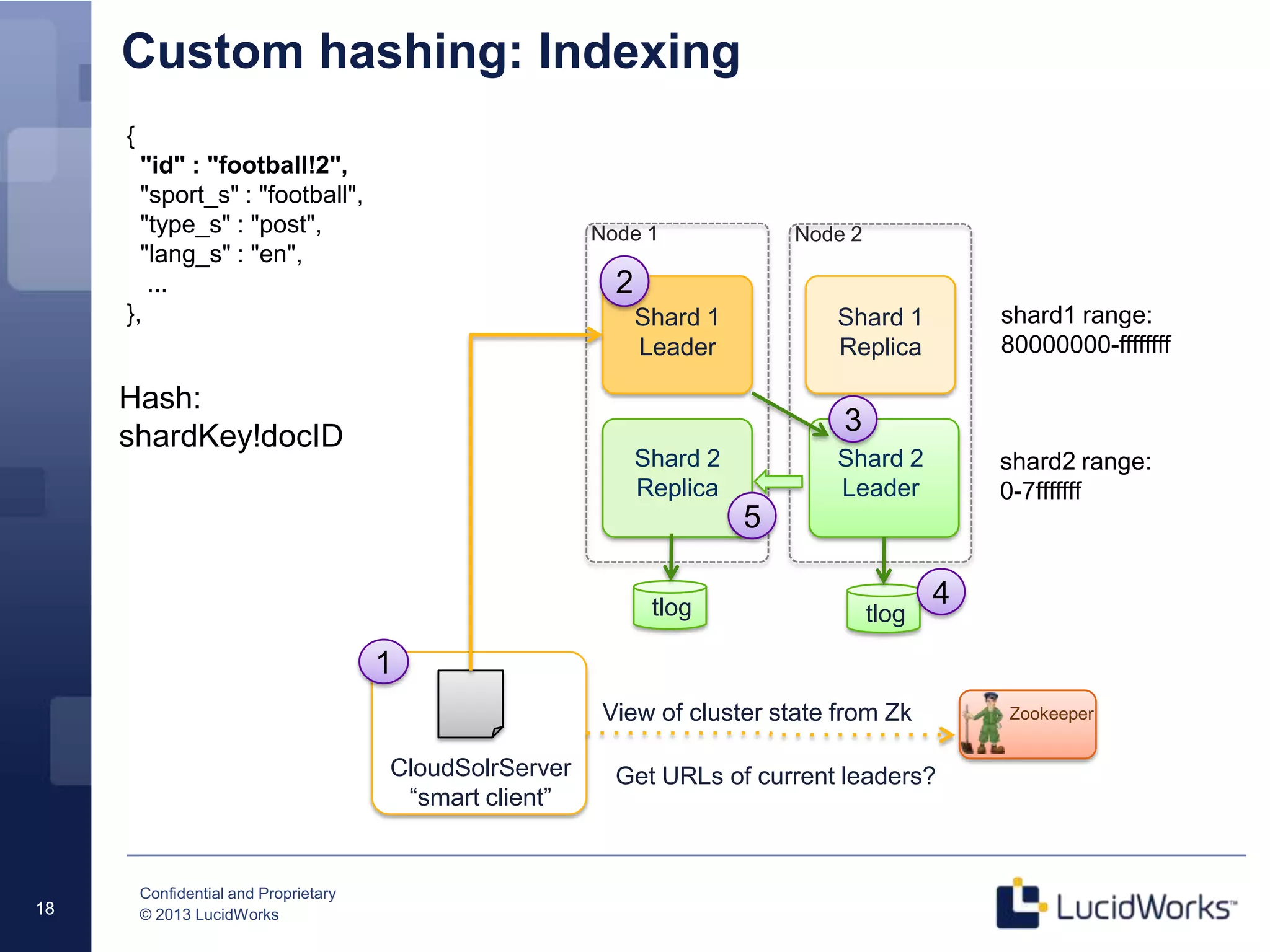
Custom hashing: Indexing
18
View of cluster state from Zk
Shard 1
Leader
Node 1 Node 2
Shard 2
Leader
Shard 2
Replica
Shard 1
Replica
Zookeeper
CloudSolrServer
“smart client”
1
2
3
tlogtlog
Get URLs of current leaders?
4
5
shard1 range:
80000000-ffffffff
shard2 range:
0-7fffffff
{
"id" : "football!2",
"sport_s" : "football",
"type_s" : "post",
"lang_s" : "en",
...
},
Hash:
shardKey!docID
Confidential and Proprietary
© 2013 LucidWorks19
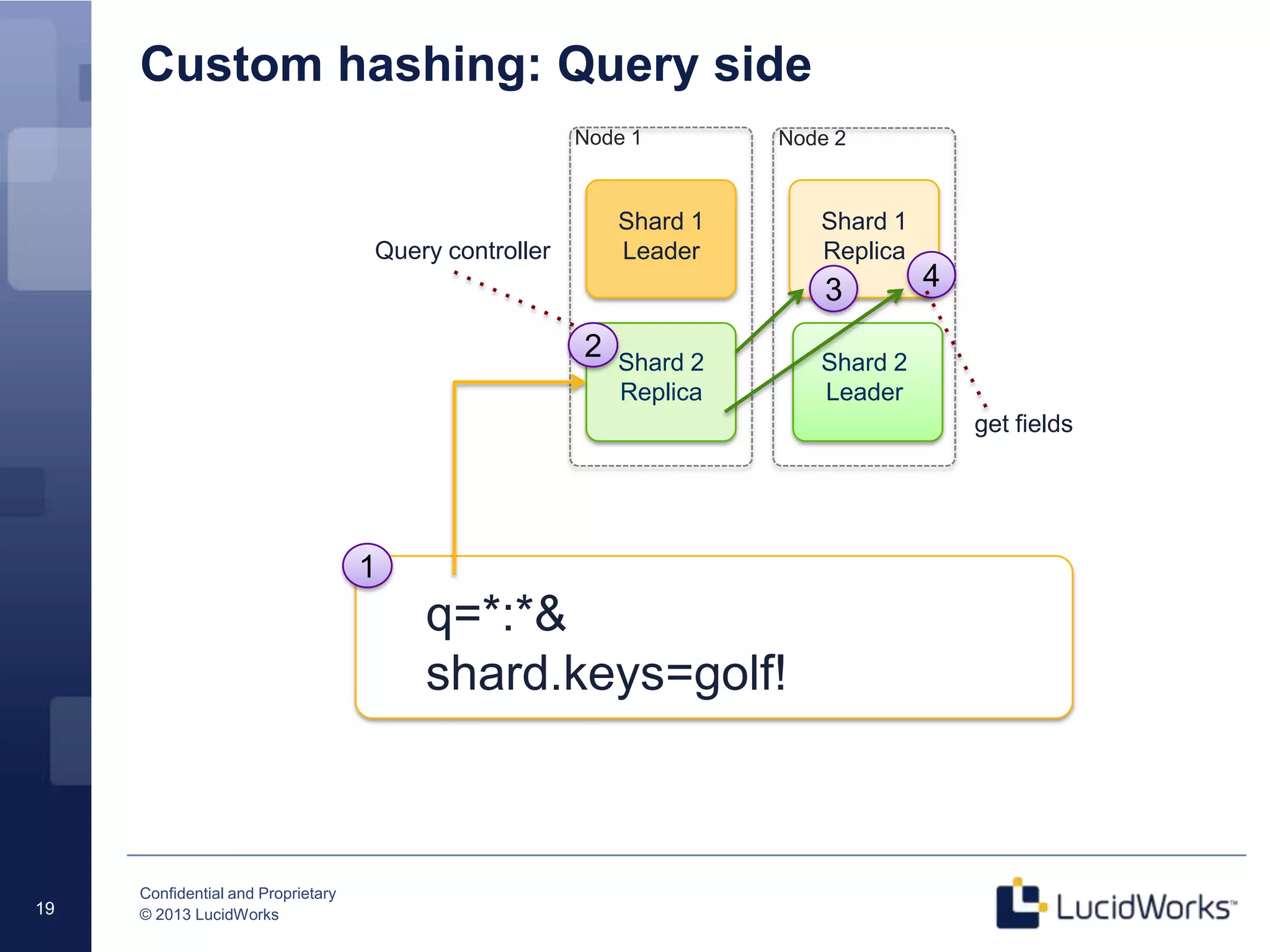
Custom hashing: Query side
19
Shard 1
Leader
Node 1 Node 2
Shard 2
Leader
Shard 2
Replica
Shard 1
Replica
1
3
q=*:*&
shard.keys=golf!
4
2
Query controller
get fields
Confidential and Proprietary
© 2013 LucidWorks20
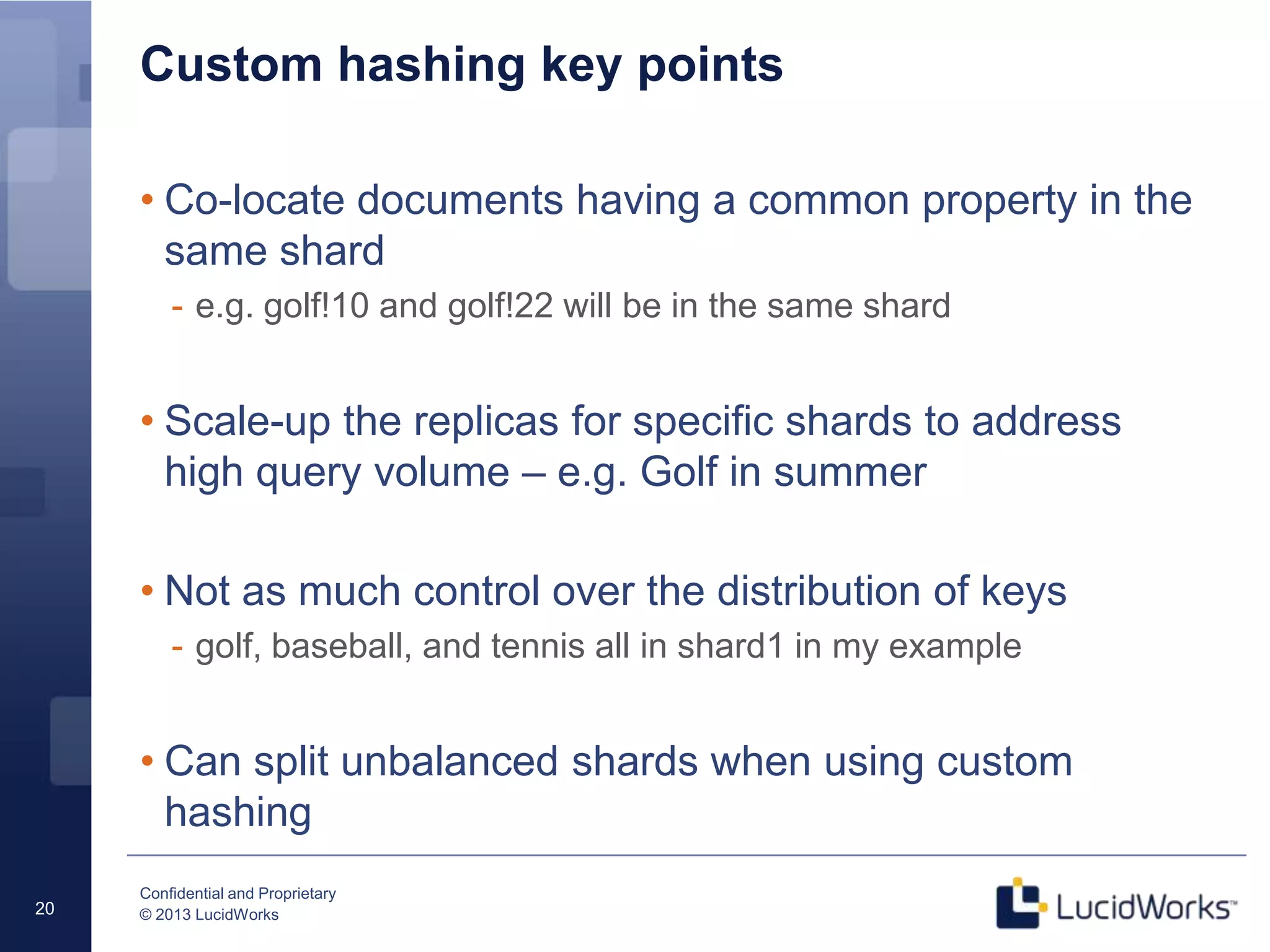
Custom hashing key points
• Co-locate documents having a common property in the
same shard
- e.g. golf!10 and golf!22 will be in the same shard
• Scale-up the replicas for specific shards to address
high query volume – e.g. Golf in summer
• Not as much control over the distribution of keys
- golf, baseball, and tennis all in shard1 in my example
• Can split unbalanced shards when using custom
hashing
Confidential and Proprietary
© 2013 LucidWorks21
What’s next?
• Improvements of splitting
feature coming 4.4
• Client-side routing
- Smart client will decide the best leader to send a document to
- SOLR-4816
• Re-balance collection after adding N more nodes
- SOLR-5025
• Splitting optimizations
- Control the path where sub-shards create their index (similar to
path when doing a snapshot backup)
Confidential and Proprietary
© 2013 LucidWorks22
Thank you for attending!
• Keeping in touch
- Solr mailing list: solr-user@lucene.apache.org
- Solr In Action book: http://www.manning.com/grainger/
- Twitter: @thelabdude
- Email: thelabdude@gmail.com
- LinkedIn: linkedin.com/in/thelabdude
• Questions?

Scaling Through Partitioning and Shard Splitting in Solr 4

  • 1.
    Confidential and Proprietary ©2013 LucidWorks 1 Scaling Through Partitioning and Shard Splitting in Solr 4 Bigger, Better, Faster, Stronger, Safer • Agenda - Next set of problems - Shard splitting - Data partitioning using custom hashing
  • 2.
    Confidential and Proprietary ©2013 LucidWorks2 About me • Independent consultant specializing in search, machine learning, and big data analytics • Co-author Solr In Action from Manning Publishers, with Trey Grainger - Use code 12mp45 for 42% off your MEAP • Previously, lead architect, developer, and dev-ops engineer for large-scale Solr cloud implementation at Dachis Group • Coming soon! Big Data Jumpstart: 2-day intensive hands-on workshop covering Hadoop (Hive, Pig, HDFS), Solr, and Storm
  • 3.
    Confidential and Proprietary ©2013 LucidWorks3 A nice problem to have … • Solr cloud can scale! - 18 shards / ~900M docs - Indexing rate of 6-8k docs / sec - Millions of updates, deletes, and new docs per day • Some lessons learned - Eventually, your shards will outgrow the hardware they are hosted on - Search is addictive to organizations, expect broader usage and greater query complexity - Beware of the urge to do online analytics with Solr
  • 4.
    Confidential and Proprietary ©2013 LucidWorks4 Sharding review • Split large index into multiple “shards” containing unique slices of the index - Documents assigned to one and only one shard using a hash of the unique ID field - Hash function designed to distribute documents evenly across N shards (default: MurmurHash3 32-bit) - Every shard must have at least one active host • Benefits - Distribute cost of indexing across multiple nodes - Parallelize complex query computations such as sorting and facets across multiple nodes - Smaller index == less JVM heap == less GC headaches - Smaller index == More of it fits in OS cache (MMapDirectory)
  • 5.
    Confidential and Proprietary ©2013 LucidWorks5 Distributed indexing View of cluster state from Zk Shard 1 Leader Node 1 Node 2 Shard 2 Leader Shard 2 Replica Shard 1 Replica Zookeeper CloudSolrServer “smart client” Hash on docID 1 2 3 tlogtlog Get URLs of current leaders? 4 5 2 shards with 1 replica each shard1 range: 80000000-ffffffff shard2 range: 0-7fffffff
  • 6.
    Confidential and Proprietary ©2013 LucidWorks6 Document routing • Composite (default) - numShards specific when collection is bootstrapped - Each shard has a hash range (32-bit) • Implicit - numShards is unknown when collection is bootstrapped - No “range” for a shard; indexing client is responsible for sending documents to the correct shard - Feels a little old school to me ;-)
  • 7.
    Confidential and Proprietary ©2013 LucidWorks7 Distributed Search Send query request to any node Two-stage process 1. Query controller sends query to all shards and merges results One host per shard must be online or queries fail 2. Query controller sends 2nd query to all shards with documents in the merged result set to get requested fields Solr client applications built for 3.x do not need to change (our query code still uses SolrJ 3.6) Limitations JOINs / Grouping need custom hashing View of cluster state from Zk Shard 1 Leader Node 1 Node 2 Shard 2 Leader Shard 2 Replica Shard 1 Replica Zookeeper CloudSolrServer 1 3 q=*:* Get URLs of all live nodes 4 2 Query controller Or just a load balancer works too get fields
  • 8.
    Confidential and Proprietary ©2013 LucidWorks8 Shard splitting: overview • Bit of history, before shard splitting ... - Re-index to create more shards (difficult at scale), or - Over shard (inefficient and costly) - Better to scale-up organically • Shard splitting (SOLR-3755) - Split an existing shard into 2 sub-shards » May need to double your node count » Custom hashing may create hotspots in your cluster
  • 9.
    Confidential and Proprietary ©2013 LucidWorks9 Shard splitting: when to split? • Can you purge some docs? • No cut and dry answer, but you might want to split shards when, - Avg. query performance begins to slow down » (hint: this means you have to keep track of this) - Indexing throughput degrades - Out Of Memory errors when querying » And you’ve done as much cache, GC, and query tuning as possible • Not necessarily have to add more nodes - May just want to split shards to add more parallelism
  • 10.
    Confidential and Proprietary ©2013 LucidWorks10 Shard splitting mechanics (in Solr 4.3.1) • Split existing shard into 2 sub-shards - SPLITSHARD action in collections API http://localhost:8983/solr/admin/collections?action=SPLITSHARD&collection=logmill& shard=shard1 - The actual “splitting” occurs using low-level Lucene API, see org.apache.solr.update.SolrIndexSplitter • Hard commit after the split completes (fixed in 4.4) • Unload the “core” of the original shard (on all nodes) http://localhost:8983/solr/admin/cores?action=UNLOAD&core=logmill&deleteIndex=tr ue • Migrate one of the splits to another host (optional)
  • 11.
    Confidential and Proprietary ©2013 LucidWorks11 Interesting questions about the process • What happens to the replicas when a shard is split? • What happens to update requests being sent to the original shard leader during the split operation? • The original shard remains in the cluster – doesn’t that create duplicate docs in queries? New sub-shards are replicated automatically using Solr replication Updates are sent to the correct sub-split during “construction” No, the original shard enters the “inactive” state and no longer participates in distributed queries for the collection
  • 12.
    Confidential and Proprietary ©2013 LucidWorks12 Split shard in action: cluster with 2 shards Graph view before the split Graph view after the split Graph view after unloading original shard
  • 13.
    Confidential and Proprietary ©2013 LucidWorks Shard 1_1 Leader Node 1 Node 2 Shard 2 Leader Shard 2 Replica Shard 1_1 Replica shard1_0 range: 80000000-bfffffff shard2 range: 0-7fffffff Shard 1_0 Leader Shard 1_0 Replica shard1_1 range: c0000000-ffffffff 13 Before and After shard splitting 13 Shard 1 Leader Node 1 Node 2 Shard 2 Leader Shard 2 Replica Shard 1 Replica shard1 range: 80000000-ffffffff shard2 range: 0-7fffffff Before After
  • 14.
    Confidential and Proprietary ©2013 LucidWorks14 Shard splitting: Limitations • Both splits end up on same node … but easy to migrate to another node - Assuming you have replication, you can unload the core of one of the new sub-shards, making the replica the leader, and then bring up another replica for that shard on another node. - Nice to have ability to specify the disk location of the new sub- shard indexes (splitting 50GB using 1 disk can take a while) • No control where the replicas end up - Possible future enhancement • Not a collection-wide rebalancing operation - you can’t grow your cluster from 16 nodes to 24 nodes and end up with an even distribution of documents per shard
  • 15.
    Confidential and Proprietary ©2013 LucidWorks15 On to data partitioning …
  • 16.
    Confidential and Proprietary ©2013 LucidWorks16 Data Partitioning: Sports Aggregator • Collection containing all things sports related: blogs, tweets, news, photos, etc. - Bulk of queries for one sport at a time - Sports have a seasonality aspect to them • Use custom hashing to route documents to specific shards based on the sport • If you only need docs about “baseball”, can query the “baseball” shard(s) - Allows you to do JOINs and Grouping as if you are not distributed - Replicate specific shards based on query volume to that shard
  • 17.
    Confidential and Proprietary ©2013 LucidWorks17 Cluster state /clusterstate.json shows the hash range and document router
  • 18.
    Confidential and Proprietary ©2013 LucidWorks18 Custom hashing: Indexing 18 View of cluster state from Zk Shard 1 Leader Node 1 Node 2 Shard 2 Leader Shard 2 Replica Shard 1 Replica Zookeeper CloudSolrServer “smart client” 1 2 3 tlogtlog Get URLs of current leaders? 4 5 shard1 range: 80000000-ffffffff shard2 range: 0-7fffffff { "id" : "football!2", "sport_s" : "football", "type_s" : "post", "lang_s" : "en", ... }, Hash: shardKey!docID
  • 19.
    Confidential and Proprietary ©2013 LucidWorks19 Custom hashing: Query side 19 Shard 1 Leader Node 1 Node 2 Shard 2 Leader Shard 2 Replica Shard 1 Replica 1 3 q=*:*& shard.keys=golf! 4 2 Query controller get fields
  • 20.
    Confidential and Proprietary ©2013 LucidWorks20 Custom hashing key points • Co-locate documents having a common property in the same shard - e.g. golf!10 and golf!22 will be in the same shard • Scale-up the replicas for specific shards to address high query volume – e.g. Golf in summer • Not as much control over the distribution of keys - golf, baseball, and tennis all in shard1 in my example • Can split unbalanced shards when using custom hashing
  • 21.
    Confidential and Proprietary ©2013 LucidWorks21 What’s next? • Improvements of splitting feature coming 4.4 • Client-side routing - Smart client will decide the best leader to send a document to - SOLR-4816 • Re-balance collection after adding N more nodes - SOLR-5025 • Splitting optimizations - Control the path where sub-shards create their index (similar to path when doing a snapshot backup)
  • 22.
    Confidential and Proprietary ©2013 LucidWorks22 Thank you for attending! • Keeping in touch - Solr mailing list: solr-user@lucene.apache.org - Solr In Action book: http://www.manning.com/grainger/ - Twitter: @thelabdude - Email: thelabdude@gmail.com - LinkedIn: linkedin.com/in/thelabdude • Questions?

Editor's Notes

  • #2 This is my first webinar and I’m used to asking questions to the audience and taking polls and that sort of thing so we’ll see how it works.
  • #3 Some of this content will be released in our chapter on Solr cloud in the next MEAP, hopefully within a week or so.
  • #4 There should be no doubt anymore whether Solr cloud can scale. This gives rise to a new set of problems. My focus today is on dealing with unbounded growth and complexityI became interested in these types of problems after having developed a large-scale Solr cloud cluster. My problems went from understanding sharding and replication and operating a cluster to how to manage unbounded growth of the cluster as well as the urge from the business side to do online, near real-time analytics with Solr, e.g. complex facets, sorting, huge lists of boolean clauses, large page sizes
  • #5 Why shard? - Distribute indexing and query processing to multiple nodes - Parallelize some of the complex query processing stages, such as facets, sortingAsk yourself this question: is it faster to sort 10M docs on 10 nodes each having to sort 1M or on one node having to sort all 10? Probably the former - Achieve a smaller index per node (faster sorting, smaller filters)How to shard? - Each shard covers a hash range - Default – hash of unique document ID field - diagramCustom HashingCustom document routing using composite ID
  • #6 Smart client knows the current leaders by asking Zk, but doesn’t know which leader to assign the doc to (that is planned though)Node accepting the new document computes a hash on the document ID to determine which shard to assign the doc toNew document is sent to the appropriate shard leader, which sets the _version_ and indexes itLeader saves the update request to durable storage in the update log (tlog)Leader sends the update to all active replicas in parallelCommits – sent around the clusterInteresting question is how are batches of updates from the client handled?
  • #10 Shard splitting is more efficient; re-indexing is expensive and time-consuming; over-sharding initially is inefficient and wastefulhttps://issues.apache.org/jira/browse/SOLR-3755Signs your shards are too big for your hardwareOutOfMemory errors begin to appear – you could throw more RAM at itQuery performance begins to slowNew searcher warming slows downConsider whether just adding replicas is what you really needBottom line – take hardware into consideration when considering shard splitting
  • #11 Diagram of the processSplit request blocks until the split finishesWhen you split a shard, two sub-shards are created in new cores on the same node (can you target another node?)Replication factor is maintained.Need to call commit after is fixed in 4.4 - https://issues.apache.org/jira/browse/SOLR-4997IndexWriter can take an IndexReader and do a fast copy on it
  • #12 New sub-shards are replicated automatically using Solr replicationUpdates are buffered and sent to the correct sub-split during “construction”No, the original shard enters the “inactive” state and no longer participates in distributed queries for the collection
  • #13 Simple cluster with 2 shards (shard1 has a replica)We’ll split shard1 using collections APICouple things to notice:The original shard1 core is still active in the clusterEach new sub-shard has a replicashard1 is actually inactive in Zookeeper so queries are not going to go to that shard1 anymore
  • #15 On this last point, I would approach shard splitting as a maintenance operation and not something you just do willy-nilly in production. The actual work gets done in the background and its designed to accept incoming update requests while the split is processing.Note: the original shard remains intact but in the inactive state. This means you can re-activate it by updating clusterstate.json if need be.
  • #17 index about sports - all things sports related, news, blogs, tweets, photos, you name itsome people care about many sports but most of your users care about one sport at a time especially given the seasonality ofsportswe'll use custom document routing to send football related docs to the football shard and baseball related docs to the baseball shard.some of the concerns with this is that you lose some of the benefits from sharding: distributing indexing across multiple nodeshowever there's nothing that prevents you from splitting the football shard onto several nodes as needed. Of course you lose JOINs and ngroups
  • #19 You’ll keep docs for the same sport in the same shard, but could end up with un-even distribution of docs!
  • #20 You can restrict which shards are considered in the distributed query using the shard.keys parameter
  • #21 curl -i -v "http://localhost:8983/solr/admin/collections?action=SPLITSHARD&collection=sports&shard=shard1"