Buffer Cache Waits
In This Section
1. latch: cache buffers chains

2.   latch: cache buffers lru chain
3.   Free Buffer Wait
4.   Buffer Busy Wait
5.   Write Complete Wait
6.   Buffer Exterminate
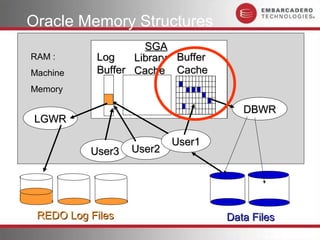
Oracle Memory Structures
                    SGA
RAM :      Log    Library Buffer
Machine    Buffer Cache Cache
                       Buffer Cache
Memory       Log Buffer
                                         DBWR
LGWR

                          User1
          User3   User2


 REDO Log Files                       Data Files
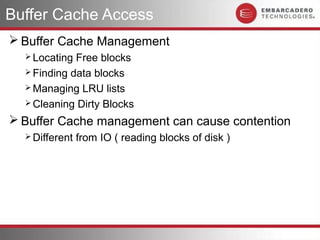
Buffer Cache Access
 Buffer Cache Management
   Locating Free blocks
   Finding data blocks
   Managing LRU lists
   Cleaning Dirty Blocks

 Buffer Cache management can cause contention
   Different   from IO ( reading blocks of disk )
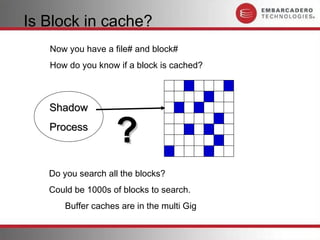
Is Block in cache?
   Now you have a file# and block#
   How do you know if a block is cached?


   Shadow
   Process
                   ?
   Do you search all the blocks?
   Could be 1000s of blocks to search.
      Buffer caches are in the multi Gig
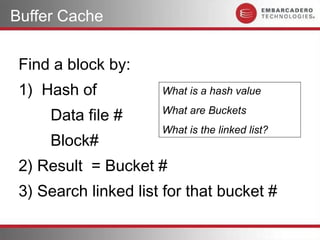
Buffer Cache


 Find a block by:
 1) Hash of           What is a hash value

     Data file #      What are Buckets
                      What is the linked list?
     Block#
 2) Result = Bucket #
 3) Search linked list for that bucket #
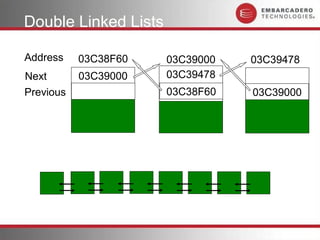
Double Linked Lists

Address    03C38F60   03C39000   03C39478
Next       03C39000   03C39478
Previous              03C38F60   03C39000
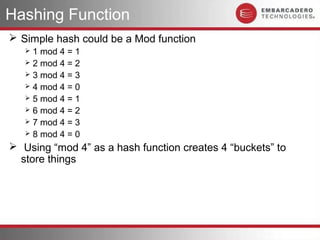
Hashing Function
 Simple hash could be a Mod function
    1 mod 4 = 1
    2 mod 4 = 2
    3 mod 4 = 3
    4 mod 4 = 0
    5 mod 4 = 1
    6 mod 4 = 2
    7 mod 4 = 3
    8 mod 4 = 0

 Using “mod 4” as a hash function creates 4 “buckets” to
  store things
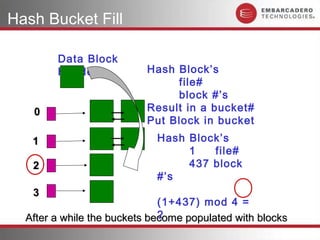
Hash Bucket Fill

        Data Block
        Header             Hash Block’s
                                file#
                                block #’s
   0                       Result in a bucket#
                ?          Put Block in bucket
   1            ?            Hash Block’s
                                  1   file#
   2            ?                 437 block
                             #’s
   3            ?
                              (1+437) mod 4 =
                              2
  After a while the buckets become populated with blocks
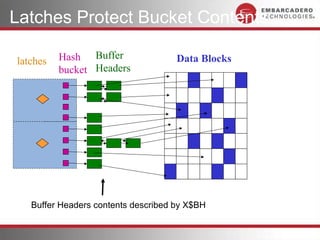
Latches Protect Bucket Contents

latches   Hash Buffer                Data Blocks
          bucket Headers


   Buffer Headers contents described by X$BH
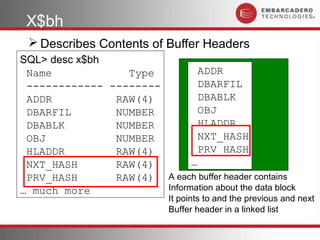
X$bh
  Describes Contents of Buffer Headers
SQL> desc x$bh
 Name            Type          ADDR
 ------------ --------         DBARFIL
 ADDR          RAW(4)          DBABLK
 DBARFIL       NUMBER          OBJ
 DBABLK        NUMBER          HLADDR
 OBJ           NUMBER          NXT_HASH
 HLADDR        RAW(4)          PRV_HASH
 NXT_HASH      RAW(4)        …
 PRV_HASH      RAW(4) A each buffer header contains
… much more            Information about the data block
                             It points to and the previous and next
                             Buffer header in a linked list
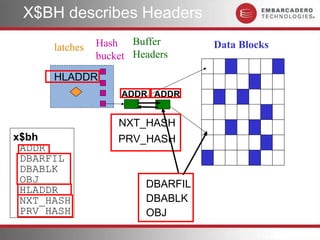
X$BH describes Headers

      latches   Hash Buffer        Data Blocks
                bucket Headers
      HLADDR
                     ADDR ADDR


                    NXT_HASH
x$bh                PRV_HASH
 ADDR
 DBARFIL
 DBABLK
 OBJ                     DBARFIL
 HLADDR
 NXT_HASH                DBABLK
 PRV_HASH                OBJ
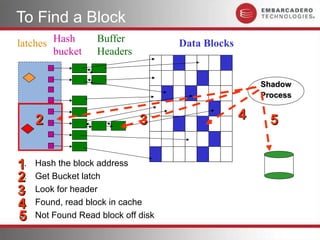
To Find a Block
latches Hash        Buffer           Data Blocks
        bucket      Headers


                                                       Shadow
                                                       Process


     2                        3                    4     5


1
1.   Hash the block address
2
2.   Get Bucket latch
3
3.   Look for header
4
4.   Found, read block in cache
5
5.   Not Found Read block off disk
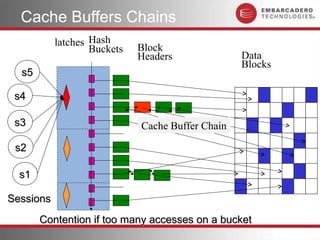
Cache Buffers Chains
           latches Hash      Block
                   Buckets
                             Headers              Data
                                                  Blocks
  s5

 s4

 s3                          Cache Buffer Chain

 s2

  s1

Sessions
       Contention if too many accesses on a bucket
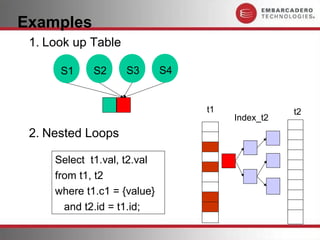
Examples
 1. Look up Table

      S1     S2     S3       S4


                                  t1              t2
                                       Index_t2
 2. Nested Loops

     Select t1.val, t2.val
     from t1, t2
     where t1.c1 = {value}
       and t2.id = t1.id;
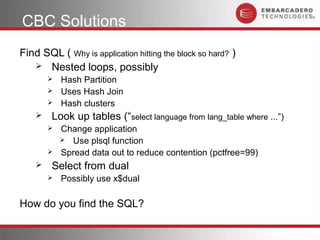
CBC Solutions
Find SQL ( Why is application hitting the block so hard? )
    Nested loops, possibly
           Hash Partition
           Uses Hash Join
           Hash clusters
       Look up tables (“select language from lang_table where ...”)
           Change application
             Use plsql function
           Spread data out to reduce contention (pctfree=99)
       Select from dual
           Possibly use x$dual

How do you find the SQL?
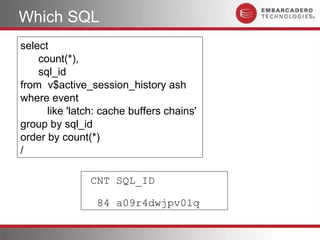
Which SQL
select
    count(*),
    sql_id
from v$active_session_history ash
where event
      like 'latch: cache buffers chains'
group by sql_id
order by count(*)
/

               CNT SQL_ID

                 84 a09r4dwjpv01q
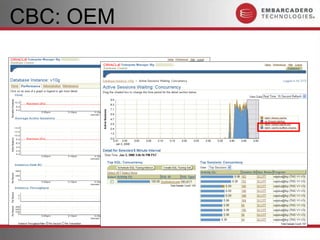
CBC: OEM
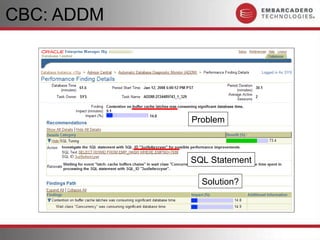
CBC: ADDM


            Problem


            SQL Statement

              Solution?
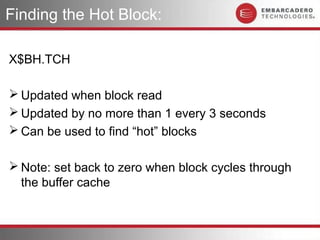
Finding the Hot Block:

X$BH.TCH

 Updated when block read
 Updated by no more than 1 every 3 seconds
 Can be used to find “hot” blocks

 Note: set back to zero when block cycles through
  the buffer cache
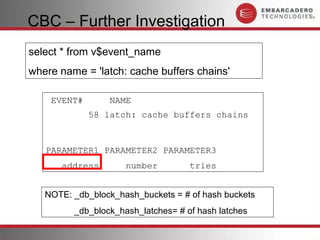
CBC – Further Investigation
select * from v$event_name
where name = 'latch: cache buffers chains'

    EVENT#       NAME
             58 latch: cache buffers chains


   PARAMETER1 PARAMETER2 PARAMETER3
      address        number         tries


   NOTE: _db_block_hash_buckets = # of hash buckets
         _db_block_hash_latches= # of hash latches
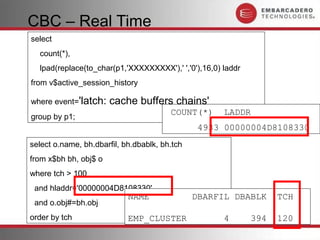
CBC – Real Time
select
  count(*),
  lpad(replace(to_char(p1,'XXXXXXXXX'),' ','0'),16,0) laddr
from v$active_session_history

where event='latch:    cache buffers chains'
                                        COUNT(*)      LADDR
group by p1;
                                                4933 00000004D8108330
select o.name, bh.dbarfil, bh.dbablk, bh.tch
from x$bh bh, obj$ o
where tch > 100
 and hladdr='00000004D8108330'
                            NAME               DBARFIL DBABLK       TCH
 and o.obj#=bh.obj
order by tch                EMP_CLUSTER               4       394   120
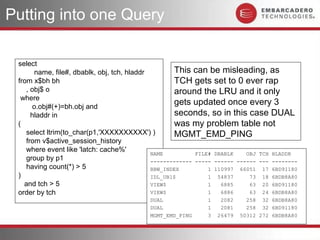
Putting into one Query

 select
       name, file#, dbablk, obj, tch, hladdr        This can be misleading, as
 from x$bh bh                                       TCH gets set to 0 ever rap
    , obj$ o                                        around the LRU and it only
  where
      o.obj#(+)=bh.obj and
                                                    gets updated once every 3
      hladdr in                                     seconds, so in this case DUAL
 (                                                  was my problem table not
    select ltrim(to_char(p1,'XXXXXXXXXX') )         MGMT_EMD_PING
    from v$active_session_history
    where event like 'latch: cache%'
                                             NAME          FILE# DBABLK    OBJ TCH HLADDR
    group by p1                              ------------- ----- ------ ------ --- --------
    having count(*) > 5                      BBW_INDEX         1 110997 66051 17 6BD91180
 )                                           IDL_UB1$          1 54837      73 18 6BDB8A80
   and tch > 5                               VIEW$             1   6885     63 20 6BD91180
 order by tch                                VIEW$             1   6886     63 24 6BDB8A80
                                           DUAL               1    2082     258 32 6BDB8A80
                                           DUAL               1    2081     258 32 6BD91180
                                           MGMT_EMD_PING      3   26479   50312 272 6BDB8A80
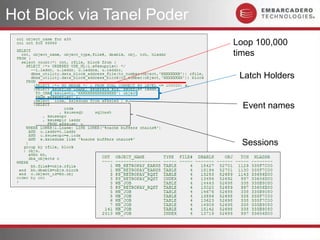
Hot Block via Tanel Poder
                            Loop 100,000
                            times
                             Latch Holders


                              Event names


                             Sessions
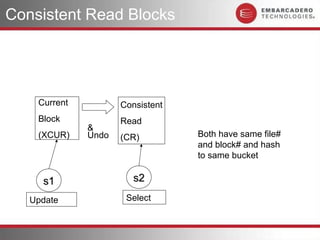
Consistent Read Blocks


    Current          Consistent
    Block            Read
              &
    (XCUR)    Undo   (CR)         Both have same file#
                                  and block# and hash
                                  to same bucket

     s1                 s2

   Update             Select
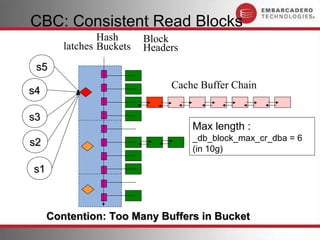
CBC: Consistent Read Blocks
                Hash      Block
        latches Buckets   Headers
 s5
                               Cache Buffer Chain
s4

s3
                                    Max length :
                                    _db_block_max_cr_dba = 6
s2
                                    (in 10g)

s1


     Contention: Too Many Buffers in Bucket
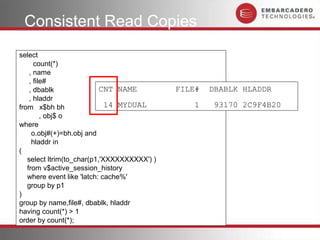
Consistent Read Copies
select
      count(*)
    , name
    , file#
    , dbablk               CNT NAME          FILE#   DBABLK HLADDR
    , hladdr
from x$bh bh                 14 MYDUAL           1    93170 2C9F4B20
         , obj$ o
where
     o.obj#(+)=bh.obj and
     hladdr in
(
   select ltrim(to_char(p1,'XXXXXXXXXX') )
   from v$active_session_history
   where event like 'latch: cache%'
   group by p1
)
group by name,file#, dbablk, hladdr
having count(*) > 1
order by count(*);
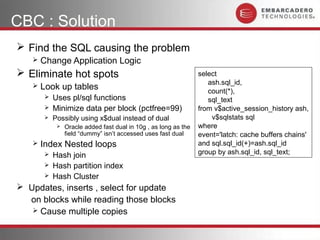
CBC : Solution
 Find the SQL causing the problem
      Change Application Logic
 Eliminate hot spots                                            select
                                                                    ash.sql_id,
      Look up tables                                               count(*),
          Uses pl/sql functions                                    sql_text
          Minimize data per block (pctfree=99)                  from v$active_session_history ash,
          Possibly using x$dual instead of dual                     v$sqlstats sql
               Oracle added fast dual in 10g , as long as the   where
                field “dummy” isn’t accessed uses fast dual      event='latch: cache buffers chains'
      Index Nested loops                                        and sql.sql_id(+)=ash.sql_id
          Hash join                                             group by ash.sql_id, sql_text;
          Hash partition index
          Hash Cluster
 Updates, inserts , select for update
  on blocks while reading those blocks
    Cause multiple copies
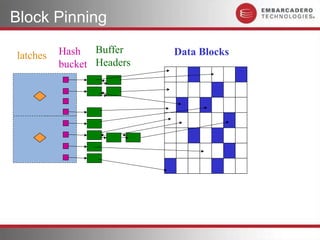
Block Pinning

latches   Hash Buffer      Data Blocks
          bucket Headers
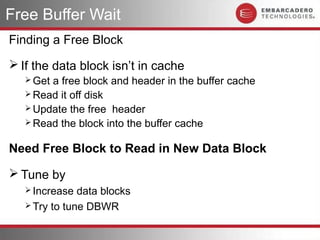
Free Buffer Wait
Finding a Free Block
 If the data block isn’t in cache
    Geta free block and header in the buffer cache
    Read it off disk
    Update the free header
    Read the block into the buffer cache


Need Free Block to Read in New Data Block

 Tune by
    Increase  data blocks
    Try to tune DBWR
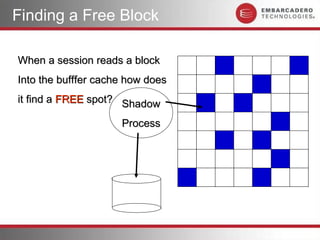
Finding a Free Block

When a session reads a block
Into the bufffer cache how does
it find a FREE spot? Shadow

                     Process
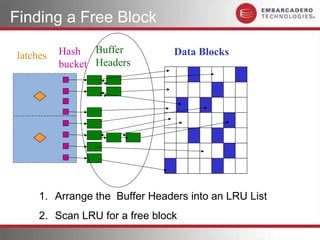
Finding a Free Block

latches   Hash Buffer           Data Blocks
          bucket Headers


     1. Arrange the Buffer Headers into an LRU List
     2. Scan LRU for a free block
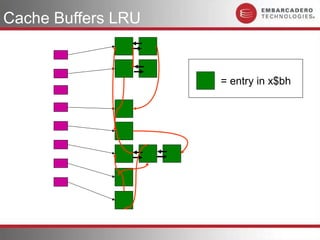
Cache Buffers LRU


                    = entry in x$bh
X$bh
 Describes Buffer Headers
  SQL> desc x$bh
   Name                         Type
   ----------------------    ---------
   ADDR                      RAW(4)
   DBARFIL                   NUMBER
   DBABLK                    NUMBER
   OBJ                       NUMBER
   HLADDR
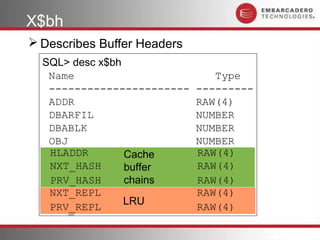
   HLADDR        Cache       RAW(4)
                             RAW(4)
   NXT_HASH
   NXT_HASH      buffer      RAW(4)
                             RAW(4)
   PRV_HASH
   PRV_HASH      chains      RAW(4)
                             RAW(4)
   NXT_REPL                  RAW(4)
                 LRU
   PRV_REPL                  RAW(4)
LRU Chain

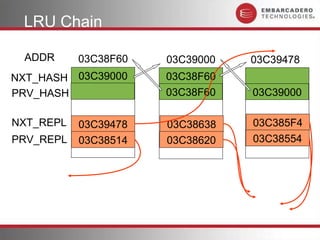
 ADDR      03C38F60   03C39000   03C39478
NXT_HASH 03C39000     03C38F60
PRV_HASH              03C38F60   03C39000

NXT_REPL   03C39478   03C38638   03C385F4
PRV_REPL   03C38514   03C38620   03C38554
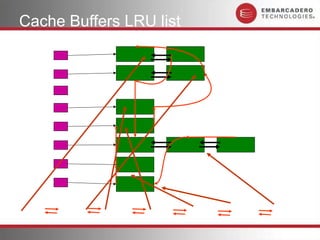
Cache Buffers LRU list

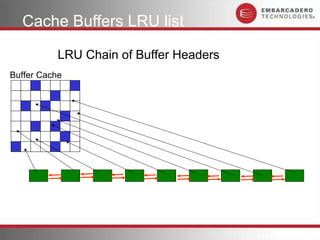
           LRU Chain of Buffer Headers
Buffer Cache
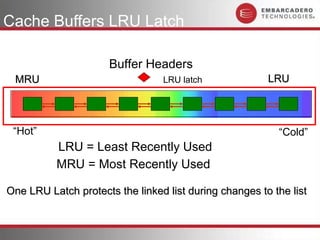
Cache Buffers LRU Latch

                      Buffer Headers
 MRU                             LRU latch              LRU


 “Hot”                                                    “Cold”
          LRU = Least Recently Used
          MRU = Most Recently Used

One LRU Latch protects the linked list during changes to the list
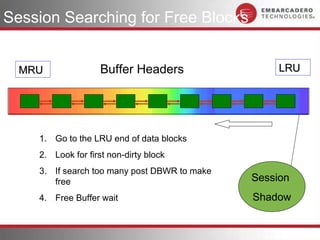
Session Searching for Free Blocks


  MRU               Buffer Headers                 LRU


    1. Go to the LRU end of data blocks
    2. Look for first non-dirty block
    3. If search too many post DBWR to make
       free                                   Session
    4. Free Buffer wait                       Shadow
Free Buffer Wait Solutions
 Tune by
   Increase  data blocks
   Try to tune DBWR
       ASYNC
          If no ASYNC use I/O Slaves (dbwr_io_slaves)
       Multiple DBWR (db_writer_processes)
       Direct I/O
 Tune Inefficient SQL
   requesting   large # of blocks
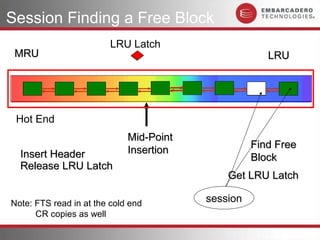
Session Finding a Free Block
                         LRU Latch
 MRU                                                  LRU


 Hot End
                             Mid-Point
                                                   Find Free
  Insert Header              Insertion
                                                   Block
  Release LRU Latch
                                             Get LRU Latch

Note: FTS read in at the cold end        session
      CR copies as well
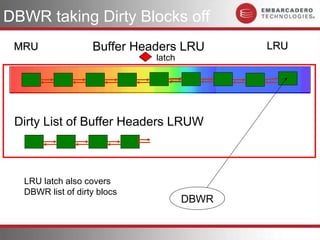
DBWR taking Dirty Blocks off
 MRU               Buffer Headers LRU       LRU
                             latch


 Dirty List of Buffer Headers LRUW


  LRU latch also covers
  DBWR list of dirty blocs
                                     DBWR
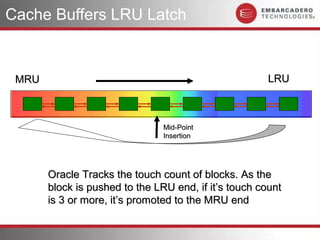
Cache Buffers LRU Latch


 MRU                                                   LRU


                                Mid-Point
                                Insertion


       Oracle Tracks the touch count of blocks. As the
       block is pushed to the LRU end, if it’s touch count
       is 3 or more, it’s promoted to the MRU end
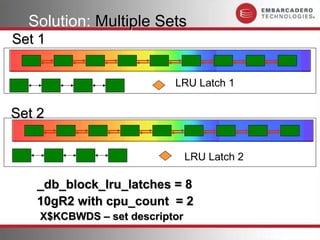
Solution: Multiple Sets
Set 1


                           LRU Latch 1

Set 2

                                LRU Latch 2

   _db_block_lru_latches = 8
   10gR2 with cpu_count = 2
    X$KCBWDS – set descriptor
Test Case
 8 Sessions
 reading separate tables
 Tables were too big to hold in cache
 cache option set on each table

 Result : lots of buffer cache churn
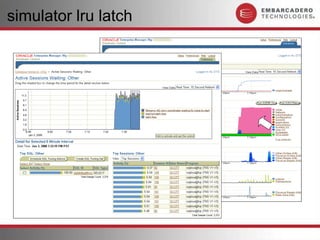
 Expected to get “latch: cache buffer chains LRU”
simulator lru latch
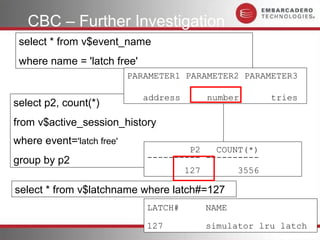
CBC – Further Investigation
 select * from v$event_name
 where name = 'latch free'
                           PARAMETER1 PARAMETER2 PARAMETER3

                             address     number       tries
select p2, count(*)
from v$active_session_history
where event='latch free'
                                      P2   COUNT(*)
group by p2                   ---------- ----------
                                     127       3556

select * from v$latchname where latch#=127
                              LATCH#     NAME

                              127        simulator lru latch
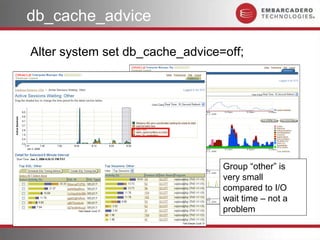
db_cache_advice

Alter system set db_cache_advice=off;


                                 Group “other” is
                                 very small
                                 compared to I/O
                                 wait time – not a
                                 problem
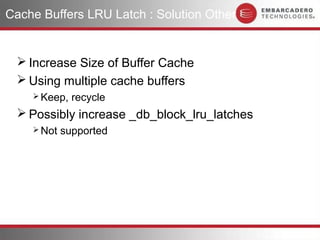
Cache Buffers LRU Latch : Solution Other


  Increase Size of Buffer Cache
  Using multiple cache buffers
     Keep,   recycle
  Possibly increase _db_block_lru_latches
     Not   supported
write complete waits

 Usually happens in tandem with free buffer
 Tune by
      Increase data block cache
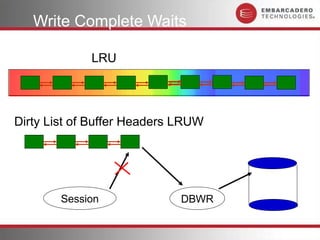
 Happens because shadow wants to access blocks that are
  currently being written to disk by DBWR
 also seen it happen when there is a lot of write to sort the
  waits are on block 2 of the temp tablespace file
Write Complete Waits

             LRU


Dirty List of Buffer Headers LRUW


        Session              DBWR
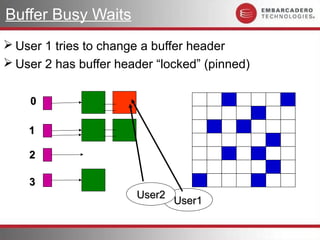
Buffer Busy Waits
 User 1 tries to change a buffer header
 User 2 has buffer header “locked” (pinned)


    0

    1

    2

    3
                       User2
                               User1
10g Buffer Busy Waits
   Mainly, on 10g (There are a few other cases )
     BLOCK CLASS=data block (and some segment header)
  Object Type = INDEX
 Object Type = TABLE

Indicates DML contention
 To verify use P3. P3 = Block Class (on 8.1.6-9iR2 was BBW type)
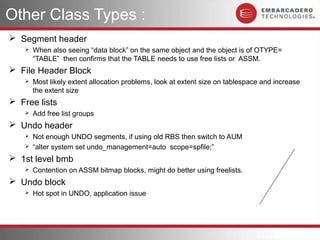
Other Class Types :
 Segment header
       When also seeing “data block” on the same object and the object is of OTYPE=
        “TABLE” then confirms that the TABLE needs to use free lists or ASSM.
 File Header Block
       Most likely extent allocation problems, look at extent size on tablespace and increase
        the extent size
 Free lists
       Add free list groups
 Undo header
       Not enough UNDO segments, if using old RBS then switch to AUM
       “alter system set undo_management=auto scope=spfile;”
 1st level bmb
       Contention on ASSM bitmap blocks, might do better using freelists.
 Undo block
       Hot spot in UNDO, application issue
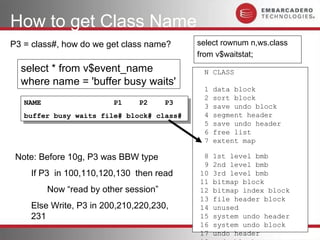
How to get Class Name
P3 = class#, how do we get class name?      select rownum n,ws.class
                                            from v$waitstat;
  select * from v$event_name                 N CLASS
  where name = 'buffer busy waits'
                                             1   data block
                                             2   sort block
   NAME
    NAME                P1
                         P1   P2
                               P2   P3
                                     P3      3   save undo block
   buffer busy waits file# block# class#
    buffer busy waits file# block# class#    4   segment header
                                             5   save undo header
                                             6   free list
                                             7   extent map

 Note: Before 10g, P3 was BBW type           8   1st level bmb
                                             9   2nd level bmb
    If P3 in 100,110,120,130 then read      10   3rd level bmb
                                            11   bitmap block
        Now “read by other session”         12   bitmap index block
                                            13   file header block
    Else Write, P3 in 200,210,220,230,      14   unused
    231                                     15   system undo header
                                            16   system undo block
                                            17   undo header
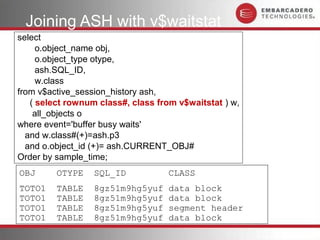
Joining ASH with v$waitstat
select
     o.object_name obj,
     o.object_type otype,
     ash.SQL_ID,
     w.class
from v$active_session_history ash,
   ( select rownum class#, class from v$waitstat ) w,
    all_objects o
where event='buffer busy waits'
  and w.class#(+)=ash.p3
  and o.object_id (+)= ash.CURRENT_OBJ#
Order by sample_time;
OBJ      OTYPE    SQL_ID            CLASS
TOTO1    TABLE    8gz51m9hg5yuf     data block
TOTO1    TABLE    8gz51m9hg5yuf     segment header
TOTO1    TABLE    8gz51m9hg5yuf     data block
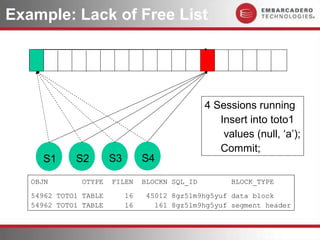
Example: Lack of Free List


                                                 4 Sessions running
                                                    Insert into toto1
                                                     values (null, ‘a’);
                                                    Commit;
     S1      S2        S3        S4

   OBJN       OTYPE    FILEN     BLOCKN SQL_ID         BLOCK_TYPE
   54962 TOTO1 TABLE        16    45012 8gz51m9hg5yuf data block
   54962 TOTO1 TABLE        16      161 8gz51m9hg5yuf segment header
Example: BBW with Insert


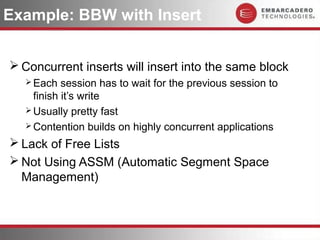
 Concurrent inserts will insert into the same block
   Each   session has to wait for the previous session to
    finish it’s write
   Usually pretty fast
   Contention builds on highly concurrent applications

 Lack of Free Lists
 Not Using ASSM (Automatic Segment Space
  Management)
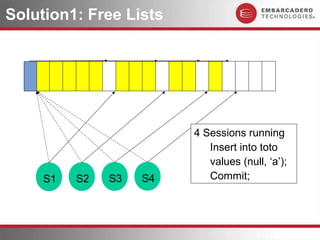
Solution1: Free Lists


                         4 Sessions running
                            Insert into toto
                            values (null, ‘a’);
     S1   S2   S3   S4      Commit;
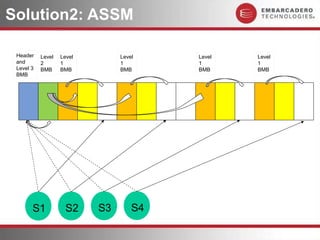
Solution2: ASSM

 Header    Level   Level        Level    Level   Level
 and       2       1            1        1       1
 Level 3   BMB     BMB          BMB      BMB     BMB
 BMB


       S1            S2    S3       S4
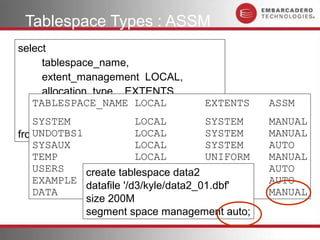
Tablespace Types : ASSM
select
     tablespace_name,
     extent_management LOCAL,
     allocation_type EXTENTS,
   TABLESPACE_NAME LOCAL
     segment_space_management ASSM,       EXTENTS   ASSM
     initial_extent
   SYSTEM                   LOCAL         SYSTEM    MANUAL
from dba_tablespaces LOCAL
   UNDOTBS1                               SYSTEM    MANUAL
   SYSAUX                   LOCAL         SYSTEM    AUTO
   TEMP                     LOCAL         UNIFORM   MANUAL
   USERS        create tablespace data2 SYSTEM
                            LOCAL                   AUTO
   EXAMPLE                  LOCAL         SYSTEM    AUTO
                datafile '/d3/kyle/data2_01.dbf'
   DATA                     LOCAL         SYSTEM    MANUAL
                size 200M
                segment space management auto;
BBW: ASSM
 Consider using Freelists instead of ASSM
 Normally waits on ASSM blocks should be too
  small to warrant using Freelists
 ASSM is easier, automatically managed
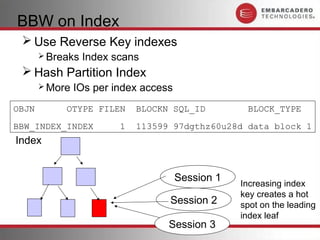
BBW on Index
  Use Reverse Key indexes
        Breaks   Index scans
  Hash Partition Index
        More   IOs per index access
OBJN        OTYPE FILEN      BLOCKN SQL_ID          BLOCK_TYPE
BBW_INDEX_INDEX          1   113599 97dgthz60u28d data block 1
Index


                                       Session 1
                                                   Increasing index
                                                   key creates a hot
                                   Session 2       spot on the leading
                                                   index leaf
                                   Session 3
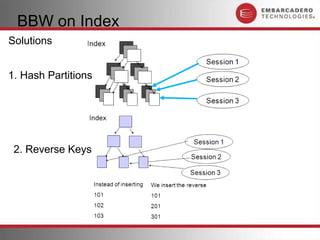
BBW on Index
Solutions


1. Hash Partitions


 2. Reverse Keys
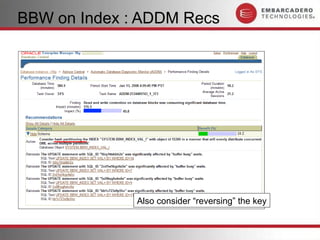
BBW on Index : ADDM Recs


              Also consider “reversing” the key
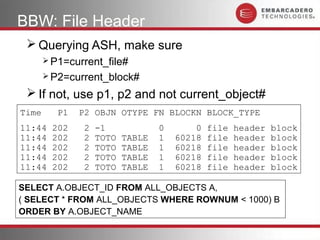
BBW: File Header
  Querying ASH, make sure
        P1=current_file#
        P2=current_block#

  If not, use p1, p2 and not current_object#
Time      P1   P2 OBJN OTYPE FN BLOCKN BLOCK_TYPE
11:44    202    2   -1             0       0   file   header   block
11:44    202    2   TOTO   TABLE   1   60218   file   header   block

SELECT A.OBJECT_ID FROM ALL_OBJECTS A,
( SELECT * FROM ALL_OBJECTS WHERE ROWNUM < 1000) B
ORDER BY A.OBJECT_NAME
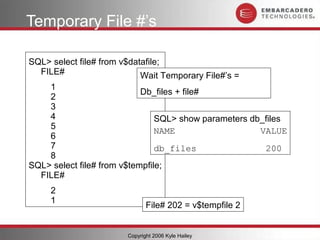
Temporary File #’s

SQL> select file# from v$datafile;
  FILE#                     Wait Temporary File#’s =
    1
                            Db_files + file#
    2
    3
    4                           SQL> show parameters db_files
    5
                                NAME                   VALUE
    6
    7                           db_files                200
    8
SQL> select file# from v$tempfile;
  FILE#
     2
     1
                               File# 202 = v$tempfile 2


                        Copyright 2006 Kyle Hailey
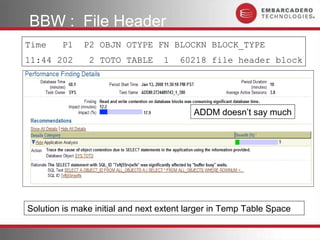
BBW : File Header
Time    P1    P2 OBJN OTYPE FN BLOCKN BLOCK_TYPE
11:44 202      2 TOTO TABLE       1   60218 file header block


                                          ADDM doesn’t say much


Solution is make initial and next extent larger in Temp Table Space
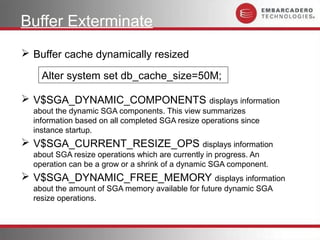
Buffer Exterminate
 Buffer cache dynamically resized

    Alter system set db_cache_size=50M;

 V$SGA_DYNAMIC_COMPONENTS displays information
  about the dynamic SGA components. This view summarizes
  information based on all completed SGA resize operations since
  instance startup.
 V$SGA_CURRENT_RESIZE_OPS displays information
  about SGA resize operations which are currently in progress. An
  operation can be a grow or a shrink of a dynamic SGA component.
 V$SGA_DYNAMIC_FREE_MEMORY displays information
  about the amount of SGA memory available for future dynamic SGA
  resize operations.
Summary Buffer Cache Waits

  1. latch: cache buffers chains - find SQL
       Eliminate hot spots
  1. latch: cache buffers lru chain – increase sets
  2. Free Buffer Wait - increase cache size
  3. Buffer Busy Wait
       Index : alleviate hot spots, partition
       Table: add free lists or use ASSM
       File Segment Header : looked at high extent
        allocations
  1. Write Complete Waits - increase cache size

Oracle 10g Performance: chapter 06 buffer cache

  • 1.
  • 2.
    In This Section 1.latch: cache buffers chains 2. latch: cache buffers lru chain 3. Free Buffer Wait 4. Buffer Busy Wait 5. Write Complete Wait 6. Buffer Exterminate
  • 3.
    Oracle Memory Structures SGA RAM : Log Library Buffer Machine Buffer Cache Cache Buffer Cache Memory Log Buffer DBWR LGWR User1 User3 User2 REDO Log Files Data Files
  • 4.
    Buffer Cache Access Buffer Cache Management  Locating Free blocks  Finding data blocks  Managing LRU lists  Cleaning Dirty Blocks  Buffer Cache management can cause contention  Different from IO ( reading blocks of disk )
  • 5.
    Is Block incache? Now you have a file# and block# How do you know if a block is cached? Shadow Process ? Do you search all the blocks? Could be 1000s of blocks to search. Buffer caches are in the multi Gig
  • 6.
    Buffer Cache Finda block by: 1) Hash of What is a hash value Data file # What are Buckets What is the linked list? Block# 2) Result = Bucket # 3) Search linked list for that bucket #
  • 7.
    Double Linked Lists Address 03C38F60 03C39000 03C39478 Next 03C39000 03C39478 Previous 03C38F60 03C39000
  • 8.
    Hashing Function  Simplehash could be a Mod function  1 mod 4 = 1  2 mod 4 = 2  3 mod 4 = 3  4 mod 4 = 0  5 mod 4 = 1  6 mod 4 = 2  7 mod 4 = 3  8 mod 4 = 0  Using “mod 4” as a hash function creates 4 “buckets” to store things
  • 9.
    Hash Bucket Fill Data Block Header Hash Block’s file# block #’s 0 Result in a bucket# ? Put Block in bucket 1 ? Hash Block’s 1 file# 2 ? 437 block #’s 3 ? (1+437) mod 4 = 2 After a while the buckets become populated with blocks
  • 10.
    Latches Protect BucketContents latches Hash Buffer Data Blocks bucket Headers Buffer Headers contents described by X$BH
  • 11.
    X$bh  DescribesContents of Buffer Headers SQL> desc x$bh Name Type ADDR ------------ -------- DBARFIL ADDR RAW(4) DBABLK DBARFIL NUMBER OBJ DBABLK NUMBER HLADDR OBJ NUMBER NXT_HASH HLADDR RAW(4) PRV_HASH NXT_HASH RAW(4) … PRV_HASH RAW(4) A each buffer header contains … much more Information about the data block It points to and the previous and next Buffer header in a linked list
  • 12.
    X$BH describes Headers latches Hash Buffer Data Blocks bucket Headers HLADDR ADDR ADDR NXT_HASH x$bh PRV_HASH ADDR DBARFIL DBABLK OBJ DBARFIL HLADDR NXT_HASH DBABLK PRV_HASH OBJ
  • 13.
    To Find aBlock latches Hash Buffer Data Blocks bucket Headers Shadow Process 2 3 4 5 1 1. Hash the block address 2 2. Get Bucket latch 3 3. Look for header 4 4. Found, read block in cache 5 5. Not Found Read block off disk
  • 14.
    Cache Buffers Chains latches Hash Block Buckets Headers Data Blocks s5 s4 s3 Cache Buffer Chain s2 s1 Sessions Contention if too many accesses on a bucket
  • 15.
    Examples 1. Lookup Table S1 S2 S3 S4 t1 t2 Index_t2 2. Nested Loops Select t1.val, t2.val from t1, t2 where t1.c1 = {value} and t2.id = t1.id;
  • 16.
    CBC Solutions Find SQL( Why is application hitting the block so hard? )  Nested loops, possibly  Hash Partition  Uses Hash Join  Hash clusters  Look up tables (“select language from lang_table where ...”)  Change application  Use plsql function  Spread data out to reduce contention (pctfree=99)  Select from dual  Possibly use x$dual How do you find the SQL?
  • 17.
    Which SQL select count(*), sql_id from v$active_session_history ash where event like 'latch: cache buffers chains' group by sql_id order by count(*) / CNT SQL_ID 84 a09r4dwjpv01q
  • 18.
  • 19.
    CBC: ADDM Problem SQL Statement Solution?
  • 20.
    Finding the HotBlock: X$BH.TCH  Updated when block read  Updated by no more than 1 every 3 seconds  Can be used to find “hot” blocks  Note: set back to zero when block cycles through the buffer cache
  • 21.
    CBC – FurtherInvestigation select * from v$event_name where name = 'latch: cache buffers chains' EVENT# NAME 58 latch: cache buffers chains PARAMETER1 PARAMETER2 PARAMETER3 address number tries NOTE: _db_block_hash_buckets = # of hash buckets _db_block_hash_latches= # of hash latches
  • 22.
    CBC – RealTime select count(*), lpad(replace(to_char(p1,'XXXXXXXXX'),' ','0'),16,0) laddr from v$active_session_history where event='latch: cache buffers chains' COUNT(*) LADDR group by p1; 4933 00000004D8108330 select o.name, bh.dbarfil, bh.dbablk, bh.tch from x$bh bh, obj$ o where tch > 100 and hladdr='00000004D8108330' NAME DBARFIL DBABLK TCH and o.obj#=bh.obj order by tch EMP_CLUSTER 4 394 120
  • 23.
    Putting into oneQuery select name, file#, dbablk, obj, tch, hladdr This can be misleading, as from x$bh bh TCH gets set to 0 ever rap , obj$ o around the LRU and it only where o.obj#(+)=bh.obj and gets updated once every 3 hladdr in seconds, so in this case DUAL ( was my problem table not select ltrim(to_char(p1,'XXXXXXXXXX') ) MGMT_EMD_PING from v$active_session_history where event like 'latch: cache%' NAME FILE# DBABLK OBJ TCH HLADDR group by p1 ------------- ----- ------ ------ --- -------- having count(*) > 5 BBW_INDEX 1 110997 66051 17 6BD91180 ) IDL_UB1$ 1 54837 73 18 6BDB8A80 and tch > 5 VIEW$ 1 6885 63 20 6BD91180 order by tch VIEW$ 1 6886 63 24 6BDB8A80 DUAL 1 2082 258 32 6BDB8A80 DUAL 1 2081 258 32 6BD91180 MGMT_EMD_PING 3 26479 50312 272 6BDB8A80
  • 24.
    Hot Block viaTanel Poder Loop 100,000 times Latch Holders Event names Sessions
  • 25.
    Consistent Read Blocks Current Consistent Block Read & (XCUR) Undo (CR) Both have same file# and block# and hash to same bucket s1 s2 Update Select
  • 26.
    CBC: Consistent ReadBlocks Hash Block latches Buckets Headers s5 Cache Buffer Chain s4 s3 Max length : _db_block_max_cr_dba = 6 s2 (in 10g) s1 Contention: Too Many Buffers in Bucket
  • 27.
    Consistent Read Copies select count(*) , name , file# , dbablk CNT NAME FILE# DBABLK HLADDR , hladdr from x$bh bh 14 MYDUAL 1 93170 2C9F4B20 , obj$ o where o.obj#(+)=bh.obj and hladdr in ( select ltrim(to_char(p1,'XXXXXXXXXX') ) from v$active_session_history where event like 'latch: cache%' group by p1 ) group by name,file#, dbablk, hladdr having count(*) > 1 order by count(*);
  • 28.
    CBC : Solution Find the SQL causing the problem  Change Application Logic  Eliminate hot spots select ash.sql_id,  Look up tables count(*),  Uses pl/sql functions sql_text  Minimize data per block (pctfree=99) from v$active_session_history ash,  Possibly using x$dual instead of dual v$sqlstats sql  Oracle added fast dual in 10g , as long as the where field “dummy” isn’t accessed uses fast dual event='latch: cache buffers chains'  Index Nested loops and sql.sql_id(+)=ash.sql_id  Hash join group by ash.sql_id, sql_text;  Hash partition index  Hash Cluster  Updates, inserts , select for update on blocks while reading those blocks  Cause multiple copies
  • 29.
    Block Pinning latches Hash Buffer Data Blocks bucket Headers
  • 30.
    Free Buffer Wait Findinga Free Block  If the data block isn’t in cache  Geta free block and header in the buffer cache  Read it off disk  Update the free header  Read the block into the buffer cache Need Free Block to Read in New Data Block  Tune by  Increase data blocks  Try to tune DBWR
  • 31.
    Finding a FreeBlock When a session reads a block Into the bufffer cache how does it find a FREE spot? Shadow Process
  • 32.
    Finding a FreeBlock latches Hash Buffer Data Blocks bucket Headers 1. Arrange the Buffer Headers into an LRU List 2. Scan LRU for a free block
  • 33.
    Cache Buffers LRU = entry in x$bh
  • 34.
    X$bh  Describes BufferHeaders SQL> desc x$bh Name Type ---------------------- --------- ADDR RAW(4) DBARFIL NUMBER DBABLK NUMBER OBJ NUMBER HLADDR HLADDR Cache RAW(4) RAW(4) NXT_HASH NXT_HASH buffer RAW(4) RAW(4) PRV_HASH PRV_HASH chains RAW(4) RAW(4) NXT_REPL RAW(4) LRU PRV_REPL RAW(4)
  • 35.
    LRU Chain ADDR 03C38F60 03C39000 03C39478 NXT_HASH 03C39000 03C38F60 PRV_HASH 03C38F60 03C39000 NXT_REPL 03C39478 03C38638 03C385F4 PRV_REPL 03C38514 03C38620 03C38554
  • 36.
  • 37.
    Cache Buffers LRUlist LRU Chain of Buffer Headers Buffer Cache
  • 38.
    Cache Buffers LRULatch Buffer Headers MRU LRU latch LRU “Hot” “Cold” LRU = Least Recently Used MRU = Most Recently Used One LRU Latch protects the linked list during changes to the list
  • 39.
    Session Searching forFree Blocks MRU Buffer Headers LRU 1. Go to the LRU end of data blocks 2. Look for first non-dirty block 3. If search too many post DBWR to make free Session 4. Free Buffer wait Shadow
  • 40.
    Free Buffer WaitSolutions  Tune by  Increase data blocks  Try to tune DBWR  ASYNC  If no ASYNC use I/O Slaves (dbwr_io_slaves)  Multiple DBWR (db_writer_processes)  Direct I/O  Tune Inefficient SQL  requesting large # of blocks
  • 41.
    Session Finding aFree Block LRU Latch MRU LRU Hot End Mid-Point Find Free Insert Header Insertion Block Release LRU Latch Get LRU Latch Note: FTS read in at the cold end session CR copies as well
  • 42.
    DBWR taking DirtyBlocks off MRU Buffer Headers LRU LRU latch Dirty List of Buffer Headers LRUW LRU latch also covers DBWR list of dirty blocs DBWR
  • 43.
    Cache Buffers LRULatch MRU LRU Mid-Point Insertion Oracle Tracks the touch count of blocks. As the block is pushed to the LRU end, if it’s touch count is 3 or more, it’s promoted to the MRU end
  • 44.
    Solution: Multiple Sets Set1 LRU Latch 1 Set 2 LRU Latch 2 _db_block_lru_latches = 8 10gR2 with cpu_count = 2 X$KCBWDS – set descriptor
  • 45.
    Test Case  8Sessions  reading separate tables  Tables were too big to hold in cache  cache option set on each table  Result : lots of buffer cache churn  Expected to get “latch: cache buffer chains LRU”
  • 46.
  • 47.
    CBC – FurtherInvestigation select * from v$event_name where name = 'latch free' PARAMETER1 PARAMETER2 PARAMETER3 address number tries select p2, count(*) from v$active_session_history where event='latch free' P2 COUNT(*) group by p2 ---------- ---------- 127 3556 select * from v$latchname where latch#=127 LATCH# NAME 127 simulator lru latch
  • 48.
    db_cache_advice Alter system setdb_cache_advice=off; Group “other” is very small compared to I/O wait time – not a problem
  • 49.
    Cache Buffers LRULatch : Solution Other  Increase Size of Buffer Cache  Using multiple cache buffers  Keep, recycle  Possibly increase _db_block_lru_latches  Not supported
  • 50.
    write complete waits Usually happens in tandem with free buffer  Tune by  Increase data block cache  Happens because shadow wants to access blocks that are currently being written to disk by DBWR  also seen it happen when there is a lot of write to sort the waits are on block 2 of the temp tablespace file
  • 51.
    Write Complete Waits LRU Dirty List of Buffer Headers LRUW Session DBWR
  • 52.
    Buffer Busy Waits User 1 tries to change a buffer header  User 2 has buffer header “locked” (pinned) 0 1 2 3 User2 User1
  • 53.
    10g Buffer BusyWaits  Mainly, on 10g (There are a few other cases ) BLOCK CLASS=data block (and some segment header)  Object Type = INDEX  Object Type = TABLE Indicates DML contention  To verify use P3. P3 = Block Class (on 8.1.6-9iR2 was BBW type)
  • 54.
    Other Class Types:  Segment header  When also seeing “data block” on the same object and the object is of OTYPE= “TABLE” then confirms that the TABLE needs to use free lists or ASSM.  File Header Block  Most likely extent allocation problems, look at extent size on tablespace and increase the extent size  Free lists  Add free list groups  Undo header  Not enough UNDO segments, if using old RBS then switch to AUM  “alter system set undo_management=auto scope=spfile;”  1st level bmb  Contention on ASSM bitmap blocks, might do better using freelists.  Undo block  Hot spot in UNDO, application issue
  • 55.
    How to getClass Name P3 = class#, how do we get class name? select rownum n,ws.class from v$waitstat; select * from v$event_name N CLASS where name = 'buffer busy waits' 1 data block 2 sort block NAME NAME P1 P1 P2 P2 P3 P3 3 save undo block buffer busy waits file# block# class# buffer busy waits file# block# class# 4 segment header 5 save undo header 6 free list 7 extent map Note: Before 10g, P3 was BBW type 8 1st level bmb 9 2nd level bmb If P3 in 100,110,120,130 then read 10 3rd level bmb 11 bitmap block Now “read by other session” 12 bitmap index block 13 file header block Else Write, P3 in 200,210,220,230, 14 unused 231 15 system undo header 16 system undo block 17 undo header
  • 56.
    Joining ASH withv$waitstat select o.object_name obj, o.object_type otype, ash.SQL_ID, w.class from v$active_session_history ash, ( select rownum class#, class from v$waitstat ) w, all_objects o where event='buffer busy waits' and w.class#(+)=ash.p3 and o.object_id (+)= ash.CURRENT_OBJ# Order by sample_time; OBJ OTYPE SQL_ID CLASS TOTO1 TABLE 8gz51m9hg5yuf data block TOTO1 TABLE 8gz51m9hg5yuf data block TOTO1 TABLE 8gz51m9hg5yuf segment header TOTO1 TABLE 8gz51m9hg5yuf data block
  • 57.
    Example: Lack ofFree List 4 Sessions running Insert into toto1 values (null, ‘a’); Commit; S1 S2 S3 S4 OBJN OTYPE FILEN BLOCKN SQL_ID BLOCK_TYPE 54962 TOTO1 TABLE 16 45012 8gz51m9hg5yuf data block 54962 TOTO1 TABLE 16 161 8gz51m9hg5yuf segment header
  • 58.
    Example: BBW withInsert  Concurrent inserts will insert into the same block  Each session has to wait for the previous session to finish it’s write  Usually pretty fast  Contention builds on highly concurrent applications  Lack of Free Lists  Not Using ASSM (Automatic Segment Space Management)
  • 59.
    Solution1: Free Lists 4 Sessions running Insert into toto values (null, ‘a’); S1 S2 S3 S4 Commit;
  • 60.
    Solution2: ASSM Header Level Level Level Level Level and 2 1 1 1 1 Level 3 BMB BMB BMB BMB BMB BMB S1 S2 S3 S4
  • 61.
    Tablespace Types :ASSM select tablespace_name, extent_management LOCAL, allocation_type EXTENTS, TABLESPACE_NAME LOCAL segment_space_management ASSM, EXTENTS ASSM initial_extent SYSTEM LOCAL SYSTEM MANUAL from dba_tablespaces LOCAL UNDOTBS1 SYSTEM MANUAL SYSAUX LOCAL SYSTEM AUTO TEMP LOCAL UNIFORM MANUAL USERS create tablespace data2 SYSTEM LOCAL AUTO EXAMPLE LOCAL SYSTEM AUTO datafile '/d3/kyle/data2_01.dbf' DATA LOCAL SYSTEM MANUAL size 200M segment space management auto;
  • 62.
    BBW: ASSM  Considerusing Freelists instead of ASSM  Normally waits on ASSM blocks should be too small to warrant using Freelists  ASSM is easier, automatically managed
  • 63.
    BBW on Index  Use Reverse Key indexes  Breaks Index scans  Hash Partition Index  More IOs per index access OBJN OTYPE FILEN BLOCKN SQL_ID BLOCK_TYPE BBW_INDEX_INDEX 1 113599 97dgthz60u28d data block 1 Index Session 1 Increasing index key creates a hot Session 2 spot on the leading index leaf Session 3
  • 64.
    BBW on Index Solutions 1.Hash Partitions 2. Reverse Keys
  • 65.
    BBW on Index: ADDM Recs Also consider “reversing” the key
  • 66.
    BBW: File Header  Querying ASH, make sure  P1=current_file#  P2=current_block#  If not, use p1, p2 and not current_object# Time P1 P2 OBJN OTYPE FN BLOCKN BLOCK_TYPE 11:44 202 2 -1 0 0 file header block 11:44 202 2 TOTO TABLE 1 60218 file header block 11:44 202 2 TOTO TABLE 1 60218 file header block 11:44 202 2 TOTO TABLE 1 60218 file header block 11:44 202 2 TOTO TABLE 1 60218 file header block SELECT A.OBJECT_ID FROM ALL_OBJECTS A, ( SELECT * FROM ALL_OBJECTS WHERE ROWNUM < 1000) B ORDER BY A.OBJECT_NAME
  • 67.
    Temporary File #’s SQL>select file# from v$datafile; FILE# Wait Temporary File#’s = 1 Db_files + file# 2 3 4 SQL> show parameters db_files 5 NAME VALUE 6 7 db_files 200 8 SQL> select file# from v$tempfile; FILE# 2 1 File# 202 = v$tempfile 2 Copyright 2006 Kyle Hailey
  • 68.
    BBW : FileHeader Time P1 P2 OBJN OTYPE FN BLOCKN BLOCK_TYPE 11:44 202 2 TOTO TABLE 1 60218 file header block ADDM doesn’t say much Solution is make initial and next extent larger in Temp Table Space
  • 69.
    Buffer Exterminate  Buffercache dynamically resized Alter system set db_cache_size=50M;  V$SGA_DYNAMIC_COMPONENTS displays information about the dynamic SGA components. This view summarizes information based on all completed SGA resize operations since instance startup.  V$SGA_CURRENT_RESIZE_OPS displays information about SGA resize operations which are currently in progress. An operation can be a grow or a shrink of a dynamic SGA component.  V$SGA_DYNAMIC_FREE_MEMORY displays information about the amount of SGA memory available for future dynamic SGA resize operations.
  • 70.
    Summary Buffer CacheWaits 1. latch: cache buffers chains - find SQL  Eliminate hot spots 1. latch: cache buffers lru chain – increase sets 2. Free Buffer Wait - increase cache size 3. Buffer Busy Wait  Index : alleviate hot spots, partition  Table: add free lists or use ASSM  File Segment Header : looked at high extent allocations 1. Write Complete Waits - increase cache size

Editor's Notes

  • #4 In the above diagram it is the Buffer Cache that we are going to talk about
  • #5 Buffer Cache management waits differ from IO. IO waits are just from waiting for reads off of disk.
  • #25 SELECT    cnt, object_name, object_type,file#, dbablk, obj, tch, hladdr  FROM (    select count(*) cnt, rfile, block from (      SELECT /*+ ORDERED USE_NL(l.x$ksuprlat) */         --l.laddr, u.laddr, u.laddrx, u.laddrr,        dbms_utility.data_block_address_file(to_number(object,&apos;XXXXXXXX&apos;)) rfile,        dbms_utility.data_block_address_block(to_number(object,&apos;XXXXXXXX&apos;)) block      FROM         (SELECT /*+ NO_MERGE */ 1 FROM DUAL CONNECT BY LEVEL &lt;= 100000) s,        (SELECT ksuprlnm LNAME, ksuprsid sid, ksuprlat laddr,        TO_CHAR(ksulawhy,&apos;XXXXXXXXXXXXXXXX&apos;) object          FROM x$ksuprlat) l,        (select  indx, kslednam from x$ksled ) e,        (SELECT                      indx                    , ksusesqh     sqlhash            , ksuseopc            , ksusep1r laddr              FROM x$ksuse) u      WHERE LOWER(l.Lname) LIKE LOWER(&apos;%cache buffers chains%&apos;)       AND  u.laddr=l.laddr      AND  u.ksuseopc=e.indx      AND  e.kslednam like &apos;%cache buffers chains%&apos;      )    group by rfile, block    ) objs,       x$bh bh,      dba_objects o WHERE         bh.file#=objs.rfile   and  bh.dbablk=objs.block     and  o.object_id=bh.obj order by cnt ;
  • #27 select a.ksppinm parameter, c.ksppstvl instance_value from x$ksppi a, x$ksppsv c where a.indx = c.indx and lower(ksppinm) = &apos;_db_block_max_cr_dba&apos; ; PARAMETER VALUE ------------------------------ ---------- db_block_max_cr_dba 6
  • #45 column parameter format a30 column value format a10 select a.ksppinm parameter, c.ksppstvl value from x$ksppi a, x$ksppcv b, x$ksppsv c where a.indx = b.indx and a.indx = c.indx and substr(ksppinm,1,11)=&apos;_db_block_l&apos; order by a.ksppinm; PARAMETER VALUE ------------------------------ ---------- _db_block_lru_latches 8
  • #57 col objn for a25 select --ash.p1, --ash.p2, --ash.p3, CURRENT_OBJ#||&apos; &apos;||o.object_name objn, o.object_type otype, CURRENT_FILE# filen, CURRENT_BLOCK# blockn, ash.SQL_ID, w.class from v$active_session_history ash, ( select rownum class#, class from v$waitstat ) w, all_objects o where event=&apos;buffer busy waits&apos; and w.class#(+)=ash.p3 and o.object_id (+)= ash.CURRENT_OBJ# Order by sample_time /
  • #67 col block_type for a18 col objn for a25 col otype for a15 col fn for 999 col bsid for 999 select to_char(sample_time,&apos;HH:MI&apos;) st, ash.p1, ash.p2, --ash.p3, nvl(o.object_name,CURRENT_OBJ#) objn, substr(o.object_type,0,15) otype, CURRENT_FILE# fn, CURRENT_BLOCK# blockn, ash.SQL_ID, nvl(w.class,to_char(ash.p3)) block_type, blocking_session bsid from v$active_session_history ash, ( select rownum class#, class from v$waitstat ) w, all_objects o where event=&apos;buffer busy waits&apos; and w.class#(+)=ash.p3 and o.object_id (+)= ash.CURRENT_OBJ# --and w.class# &gt; 18 and sample_time &gt; sysdate - 10 / (24*60) Order by sample_time / Time P1 P2 OBJN OTYPE FN BLOCKN SQL_ID BLOCK_TYPE BSID ----- --- --- ---- ----- -- ------ ------------- ------------------ ---- 11:44 202 2 -1 0 0 7xftj55rvjw9s file header block 137 11:44 202 2 TOTO TABLE 1 60218 7xftj55rvjw9s file header block 147 11:44 202 2 TOTO TABLE 1 60218 7xftj55rvjw9s file header block 147 11:44 202 2 -1 0 0 7xftj55rvjw9s file header block 137 11:44 202 2 -1 0 0 7xftj55rvjw9s file header block 137 11:44 202 2 TOTO TABLE 1 60218 7xftj55rvjw9s file header block 147 11:44 202 2 TOTO TABLE 1 60218 7xftj55rvjw9s file header block 147 11:44 202 2 TOTO TABLE 1 60218 7xftj55rvjw9s file header block 147 11:44 202 2 TOTO TABLE 1 60218 7xftj55rvjw9s file header block 147
  • #70 From Metalink When Does The &quot;Buffer Exterminate&quot; Wait Event Occur ? This wait event usually occurs when you have tried to dynamically resize a component of the SGA such as the buffer cache. The &quot;buffer exterminate&quot; waits can only happen if part of the buffer cache is being dynamically shrunk and a session wants access to a data block that resides in a db cache buffer within a granule chosen to be freed. After the buffer is freed (removed from buffer cache hash chain, LRU chain, etc.), one of the waiting sessions can then reload that block into one of the remaining db cache granules, and everyone else eventually finds the new buffer address for the data block via hash lookup. You can check the following views to see if any recent SGA Component resize operations have taken place : V$SGA_DYNAMIC_COMPONENTS displays information about the dynamic SGA components. This view summarizes information based on all completed SGA resize operations since instance startup. V$SGA_CURRENT_RESIZE_OPS displays information about SGA resize operations which are currently in progress. An operation can be a grow or a shrink of a dynamic SGA component. V$SGA_DYNAMIC_FREE_MEMORY displays information about the amount of SGA memory available for future dynamic SGA resize operations.