Apache airflow
Pavel Alexeev, Taskdata, 2019
Overview
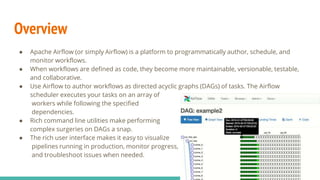
● Apache Airflow (or simply Airflow) is a platform to programmatically author, schedule, and
monitor workflows.
● When workflows are defined as code, they become more maintainable, versionable, testable,
and collaborative.
● Use Airflow to author workflows as directed acyclic graphs (DAGs) of tasks. The Airflow
scheduler executes your tasks on an array of
workers while following the specified
dependencies.
● Rich command line utilities make performing
complex surgeries on DAGs a snap.
● The rich user interface makes it easy to visualize
pipelines running in production, monitor progress,
and troubleshoot issues when needed.
Airflow is not a data streaming solution. Tasks do not move data from one to the other (though tasks can
exchange metadata!). Airflow is not in the Spark Streaming or Storm space, it is more comparable to
Oozie or Azkaban.
Workflows are expected to be mostly static or slowly changing. You can think of the structure of the tasks
in your workflow as slightly more dynamic than a database structure would be. Airflow workflows are
expected to look similar from a run to the next, this allows for clarity around unit of work and continuity.
Beyond the horizon
Principles
● Dynamic: Airflow pipelines are configuration as code (Python), allowing for dynamic pipeline
generation. This allows for writing code that instantiates pipelines dynamically.
● Extensible: Easily define your own operators, executors and extend the library so that it fits the level
of abstraction that suits your environment.
● Elegant: Airflow pipelines are lean and explicit. Parameterizing your scripts is built into the core of
Airflow using the powerful Jinja templating engine.
● Scalable: Airflow has a modular architecture and uses a message queue to orchestrate an arbitrary
number of workers.
Concepts
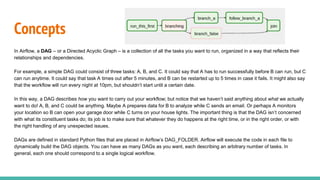
In Airflow, a DAG – or a Directed Acyclic Graph – is a collection of all the tasks you want to run, organized in a way that reflects their
relationships and dependencies.
For example, a simple DAG could consist of three tasks: A, B, and C. It could say that A has to run successfully before B can run, but C
can run anytime. It could say that task A times out after 5 minutes, and B can be restarted up to 5 times in case it fails. It might also say
that the workflow will run every night at 10pm, but shouldn’t start until a certain date.
In this way, a DAG describes how you want to carry out your workflow; but notice that we haven’t said anything about what we actually
want to do! A, B, and C could be anything. Maybe A prepares data for B to analyze while C sends an email. Or perhaps A monitors
your location so B can open your garage door while C turns on your house lights. The important thing is that the DAG isn’t concerned
with what its constituent tasks do; its job is to make sure that whatever they do happens at the right time, or in the right order, or with
the right handling of any unexpected issues.
DAGs are defined in standard Python files that are placed in Airflow’s DAG_FOLDER. Airflow will execute the code in each file to
dynamically build the DAG objects. You can have as many DAGs as you want, each describing an arbitrary number of tasks. In
general, each one should correspond to a single logical workflow.
Important features
Default Arguments
If a dictionary of default_args is passed to a DAG, it will apply them to any of its operators. This makes it easy to apply a common parameter to many
operators without having to type it many times.
Context Manager
DAGs can be used as context managers to automatically assign new operators to that DAG.
Operators
While DAGs describe how to run a workflow, Operators determine what actually gets done.
Hooks
Hooks are interfaces to external platforms and databases like Hive, S3, MySQL, Postgres, HDFS, and Pig.
Pools
Some systems can get overwhelmed when too many processes hit them at the same time. Airflow pools can be used to limit the execution
parallelism on arbitrary sets of tasks. The list of pools is managed in the UI (Menu -> Admin -> Pools)
Important features
Connections
The connection information to external systems is stored in the Airflow metadata database and managed in the UI (Menu -> Admin ->
Connections). A conn_id is defined there and hostname / login / password / schema information attached to it. Airflow pipelines can
simply refer to the centrally managed conn_id without having to hard code any of this information anywhere.
Queues
When using the CeleryExecutor, the Celery queues that tasks are sent to can be specified. queue is an attribute of BaseOperator, so
any task can be assigned to any queue.
XComs
XComs let tasks exchange messages, allowing more nuanced forms of control and shared state. The name is an abbreviation of
“cross-communication”. XComs are principally defined by a key, value, and timestamp, but also track attributes like the task/DAG that
created the XCom and when it should become visible. Any object that can be pickled can be used as an XCom value, so users should
make sure to use objects of appropriate size. XComs can be “pushed” (sent) or “pulled” (received).
Important features
Variables
Variables are a generic way to store and retrieve arbitrary content or settings as a simple key value store within Airflow. Variables can
be listed, created, updated and deleted from the UI (Admin -> Variables), code or CLI.
Branching
Sometimes you need a workflow to branch, or only go down a certain path based on an arbitrary condition which is typically related to
something that happened in an upstream task
SubDAGs
SubDAGs are perfect for repeating patterns. Defining a function that returns a DAG object is a nice design pattern when using Airflow.
SLAs
Service Level Agreements, or time by which a task or DAG should have succeeded, can be set at a task level as a timedelta. If one or
many instances have not succeeded by that time, an alert email is sent detailing the list of tasks that missed their SLA.
Important features
Trigger Rules
Though the normal workflow behavior is to trigger tasks when all their directly upstream tasks have succeeded, Airflow allows for more
complex dependency settings. All operators have a trigger_rule argument which defines the rule by which the generated task get
triggered.
Latest Run Only
Standard workflow behavior involves running a series of tasks for a particular date/time range. Some workflows, however, perform
tasks that are independent of run time but need to be run on a schedule, much like a standard cron job. In these cases, backfills or
running jobs missed during a pause just wastes CPU cycles.
Zombies & Undeads
Task instances die all the time, usually as part of their normal life cycle, but sometimes unexpectedly.
Zombie tasks are characterized by the absence of an heartbeat (emitted by the job periodically) and a running status in the database.
They can occur when a worker node can’t reach the database, when Airflow processes are killed externally, or when a node gets
rebooted for instance. Zombie killing is performed periodically by the scheduler’s process.
Important features
Cluster Policy
Your local airflow settings file can define a policy function that has the ability to mutate task attributes based on other task or DAG
attributes. It receives a single argument as a reference to task objects, and is expected to alter its attributes.
Jinja Templating
Airflow leverages the power of Jinja Templating and this can be a powerful tool to use in combination with macros (see the Macros
reference section).
Packaged dags
While often you will specify dags in a single .py file it might sometimes be required to combine dag and its dependencies. For example,
you might want to combine several dags together to version them together or you might want to manage them together or you might
need an extra module that is not available by default on the system you are running airflow on. To allow this you can create a zip file
that contains the dag(s) in the root of the zip file and have the extra modules unpacked in directories.
Operators
While DAGs describe how to run a workflow, Operators determine what actually gets done.
Airflow provides operators for many common tasks, including:
● BashOperator - executes a bash command
● PythonOperator - calls an arbitrary Python function
● EmailOperator - sends an email
● SimpleHttpOperator - sends an HTTP request
● MySqlOperator, SqliteOperator, PostgresOperator, MsSqlOperator, OracleOperator, JdbcOperator, etc. - executes a SQL
command
● Sensor - waits for a certain time, file, database row, S3 key, etc…
In addition to these basic building blocks, there are many more specific operators: DockerOperator, HiveOperator,
S3FileTransformOperator(, PrestoToMySqlTransfer, SlackAPIOperator… you get the idea!
Alternatives
● https://azkaban.github.io - from Linkedin
● https://oozie.apache.org - for Hadoop stack native tool

Apache airflow

  • 1.
  • 2.
    Overview ● Apache Airflow(or simply Airflow) is a platform to programmatically author, schedule, and monitor workflows. ● When workflows are defined as code, they become more maintainable, versionable, testable, and collaborative. ● Use Airflow to author workflows as directed acyclic graphs (DAGs) of tasks. The Airflow scheduler executes your tasks on an array of workers while following the specified dependencies. ● Rich command line utilities make performing complex surgeries on DAGs a snap. ● The rich user interface makes it easy to visualize pipelines running in production, monitor progress, and troubleshoot issues when needed.
  • 3.
    Airflow is nota data streaming solution. Tasks do not move data from one to the other (though tasks can exchange metadata!). Airflow is not in the Spark Streaming or Storm space, it is more comparable to Oozie or Azkaban. Workflows are expected to be mostly static or slowly changing. You can think of the structure of the tasks in your workflow as slightly more dynamic than a database structure would be. Airflow workflows are expected to look similar from a run to the next, this allows for clarity around unit of work and continuity. Beyond the horizon
  • 4.
    Principles ● Dynamic: Airflowpipelines are configuration as code (Python), allowing for dynamic pipeline generation. This allows for writing code that instantiates pipelines dynamically. ● Extensible: Easily define your own operators, executors and extend the library so that it fits the level of abstraction that suits your environment. ● Elegant: Airflow pipelines are lean and explicit. Parameterizing your scripts is built into the core of Airflow using the powerful Jinja templating engine. ● Scalable: Airflow has a modular architecture and uses a message queue to orchestrate an arbitrary number of workers.
  • 5.
    Concepts In Airflow, aDAG – or a Directed Acyclic Graph – is a collection of all the tasks you want to run, organized in a way that reflects their relationships and dependencies. For example, a simple DAG could consist of three tasks: A, B, and C. It could say that A has to run successfully before B can run, but C can run anytime. It could say that task A times out after 5 minutes, and B can be restarted up to 5 times in case it fails. It might also say that the workflow will run every night at 10pm, but shouldn’t start until a certain date. In this way, a DAG describes how you want to carry out your workflow; but notice that we haven’t said anything about what we actually want to do! A, B, and C could be anything. Maybe A prepares data for B to analyze while C sends an email. Or perhaps A monitors your location so B can open your garage door while C turns on your house lights. The important thing is that the DAG isn’t concerned with what its constituent tasks do; its job is to make sure that whatever they do happens at the right time, or in the right order, or with the right handling of any unexpected issues. DAGs are defined in standard Python files that are placed in Airflow’s DAG_FOLDER. Airflow will execute the code in each file to dynamically build the DAG objects. You can have as many DAGs as you want, each describing an arbitrary number of tasks. In general, each one should correspond to a single logical workflow.
  • 6.
    Important features Default Arguments Ifa dictionary of default_args is passed to a DAG, it will apply them to any of its operators. This makes it easy to apply a common parameter to many operators without having to type it many times. Context Manager DAGs can be used as context managers to automatically assign new operators to that DAG. Operators While DAGs describe how to run a workflow, Operators determine what actually gets done. Hooks Hooks are interfaces to external platforms and databases like Hive, S3, MySQL, Postgres, HDFS, and Pig. Pools Some systems can get overwhelmed when too many processes hit them at the same time. Airflow pools can be used to limit the execution parallelism on arbitrary sets of tasks. The list of pools is managed in the UI (Menu -> Admin -> Pools)
  • 7.
    Important features Connections The connectioninformation to external systems is stored in the Airflow metadata database and managed in the UI (Menu -> Admin -> Connections). A conn_id is defined there and hostname / login / password / schema information attached to it. Airflow pipelines can simply refer to the centrally managed conn_id without having to hard code any of this information anywhere. Queues When using the CeleryExecutor, the Celery queues that tasks are sent to can be specified. queue is an attribute of BaseOperator, so any task can be assigned to any queue. XComs XComs let tasks exchange messages, allowing more nuanced forms of control and shared state. The name is an abbreviation of “cross-communication”. XComs are principally defined by a key, value, and timestamp, but also track attributes like the task/DAG that created the XCom and when it should become visible. Any object that can be pickled can be used as an XCom value, so users should make sure to use objects of appropriate size. XComs can be “pushed” (sent) or “pulled” (received).
  • 8.
    Important features Variables Variables area generic way to store and retrieve arbitrary content or settings as a simple key value store within Airflow. Variables can be listed, created, updated and deleted from the UI (Admin -> Variables), code or CLI. Branching Sometimes you need a workflow to branch, or only go down a certain path based on an arbitrary condition which is typically related to something that happened in an upstream task SubDAGs SubDAGs are perfect for repeating patterns. Defining a function that returns a DAG object is a nice design pattern when using Airflow. SLAs Service Level Agreements, or time by which a task or DAG should have succeeded, can be set at a task level as a timedelta. If one or many instances have not succeeded by that time, an alert email is sent detailing the list of tasks that missed their SLA.
  • 9.
    Important features Trigger Rules Thoughthe normal workflow behavior is to trigger tasks when all their directly upstream tasks have succeeded, Airflow allows for more complex dependency settings. All operators have a trigger_rule argument which defines the rule by which the generated task get triggered. Latest Run Only Standard workflow behavior involves running a series of tasks for a particular date/time range. Some workflows, however, perform tasks that are independent of run time but need to be run on a schedule, much like a standard cron job. In these cases, backfills or running jobs missed during a pause just wastes CPU cycles. Zombies & Undeads Task instances die all the time, usually as part of their normal life cycle, but sometimes unexpectedly. Zombie tasks are characterized by the absence of an heartbeat (emitted by the job periodically) and a running status in the database. They can occur when a worker node can’t reach the database, when Airflow processes are killed externally, or when a node gets rebooted for instance. Zombie killing is performed periodically by the scheduler’s process.
  • 10.
    Important features Cluster Policy Yourlocal airflow settings file can define a policy function that has the ability to mutate task attributes based on other task or DAG attributes. It receives a single argument as a reference to task objects, and is expected to alter its attributes. Jinja Templating Airflow leverages the power of Jinja Templating and this can be a powerful tool to use in combination with macros (see the Macros reference section). Packaged dags While often you will specify dags in a single .py file it might sometimes be required to combine dag and its dependencies. For example, you might want to combine several dags together to version them together or you might want to manage them together or you might need an extra module that is not available by default on the system you are running airflow on. To allow this you can create a zip file that contains the dag(s) in the root of the zip file and have the extra modules unpacked in directories.
  • 11.
    Operators While DAGs describehow to run a workflow, Operators determine what actually gets done. Airflow provides operators for many common tasks, including: ● BashOperator - executes a bash command ● PythonOperator - calls an arbitrary Python function ● EmailOperator - sends an email ● SimpleHttpOperator - sends an HTTP request ● MySqlOperator, SqliteOperator, PostgresOperator, MsSqlOperator, OracleOperator, JdbcOperator, etc. - executes a SQL command ● Sensor - waits for a certain time, file, database row, S3 key, etc… In addition to these basic building blocks, there are many more specific operators: DockerOperator, HiveOperator, S3FileTransformOperator(, PrestoToMySqlTransfer, SlackAPIOperator… you get the idea!
  • 12.
    Alternatives ● https://azkaban.github.io -from Linkedin ● https://oozie.apache.org - for Hadoop stack native tool

Editor's Notes

  • #3 https://hub.docker.com/r/apache/airflow
  • #4 https://hub.docker.com/r/apache/airflow
  • #6 https://airflow.apache.org/concepts.html
  • #12 https://airflow.apache.org/concepts.html#operators