
#ConferenceHashtag


Sharding
Speaker Name
Job Title, 10gen
Agenda

• Scaling data
• Why shard
• Architecture
• Configuration
• Mechanics
• Solutions
The story of scaling
data
Visual representation of vertical scaling


AltaVista, 1995: Vertical Scalability
Visual representation of horizontal scaling


Google, ~2000: Horizontal Scalability
Data Store Scalability in 2005

• Custom Hardware
  – Oracle

• Custom Software
  – Facebook + MySQL
Data Store Scalability Today

• MongoDB auto-sharding available in 2009
• A data store that is
   –   Free
   –   Publicly available
   –   Open source
   –   Horizontally scalable
Why shard?
Working Set Exceeds Physical
Memory
Read/Write Throughput Exceeds I/O
MongoDB Auto-Sharding

• Minimal effort required
   – Same interface as single mongod

• Two steps
   – Enable Sharding for a database
   – Shard collection within database
Architecture
Architecture – Components

• shard
   – Can be stand alone or replica set
Architecture – Components

• Config Server
   – Stores cluster meta-data (chunk ranges and
     locations)
   – Can have only 1 or 3 (production must have 3)
   – Two phase commit (not a replica set)
Architecture – Components

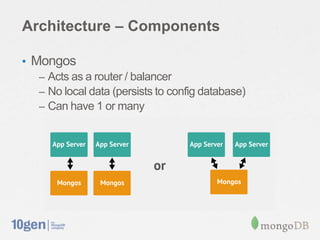
• Mongos
   – Acts as a router / balancer
   – No local data (persists to config database)
   – Can have 1 or many
Sharding infrastructure
Configuration
Example cluster setup


• Don‟t use this setup in production!
   - Only one Config server (No Fault Tolerance)
   - Shard not in a replica set (Low Availability)
   - Only one Mongos and shard (No Performance Improvement)
Start the config server


• “mongod --configsvr”
• Starts a config server on the default port (27019)
Start the mongos router


• “mongos --configdb <hostname>:27019”
• For 3 config servers: “mongos --configdb
  <host1>:<port1>,<host2>:<port2>,<host3>:<port3>”
• This is always how to start a new mongos, even if the cluster
  is already running
Start the shard database


•   “mongod --shardsvr”
•   Starts a mongod with the default shard port (27018)
•   Shard is not yet connected to the rest of the cluster
•   Shard may have already been running in production
Add the shard


• On mongos: “sh.addShard(„<host>:27018‟)”
• Adding a replica set: “sh.addShard(„<rsname>/<seedlist>‟)
Verify that the shard was added


• db.runCommand({ listshards:1 })
• { "shards" :
      [ { "_id”: "shard0000”, "host”: ”<hostname>:27018” } ],
       "ok" : 1
  }
Enabling Sharding

• Enable sharding on a database
   – sh.enableSharding(“records”)

• Shard a collection with the given key
   – sh.shardCollection(“records.people”,{“country”:1})

• Use a compound shard key to prevent
 duplicates
   – sh.shardCollection(“records.cars”,{“year”:1, ”uniqueid”:1})
Tag Aware Sharding

• Tag aware sharding allows you to control the
 distribution of your data
• Tag a range of shard keys
   – sh.addTagRange(<collection>,<min>,<max>,<tag>)

• Tag a shard
   – sh.addShardTag(<shard>,<tag>)
Mechanics
Partitioning

• User defined shard key
• Range based partitioning
• Initially 1 chunk
• Default max chunk size: 64mb
• Once max size is reached a split occurs
Partitioning
Chunk splitting


• Balancer is running on mongos
• Once the difference in chunks between the most dense shard
 and the least dense shard is above the migration threshold, a
 balancing round starts
Balancing


• Balancer is running on mongos
• Once the difference in chunks between the most dense shard
 and the least dense shard is above the migration threshold, a
 balancing round starts
Acquiring the Balancer Lock


• The balancer on mongos takes out a “balancer lock”
• To see the status of these locks:
   - use config
   - db.locks.find({ _id: “balancer” })
Moving the chunk


• The mongos sends a “moveChunk” command to source
  shard
• The source shard then notifies destination shard
• The destination clears the chunk shard-key range
• Destination shard starts pulling documents from source shard
Committing Migration


• When complete, destination shard updates config server
  - Provides new locations of the chunks
Cleanup


• Source shard deletes moved data
   - Must wait for open cursors to either close or time out
   - NoTimeout cursors may prevent the release of the lock
• Mongos releases the balancer lock after old chunks are
  deleted
Cluster Request Routing

• Targeted Queries
• Scatter Gather Queries
• Scatter Gather Queries with Sort
Cluster Request Routing: Targeted
Query
Routable request received
Request routed to appropriate shard
Shard returns results
Mongos returns results to client
Cluster Request Routing: Non-Targeted
Query
Non-Targeted Request Received
Request sent to all shards
Shards return results to mongos
Mongos returns results to client
Cluster Request Routing: Non-Targeted
Query with Sort
Non-Targeted request with sort
received
Request sent to all shards
Query and sort performed locally
Shards return results to mongos
Mongos merges sorted results
Mongos returns results to client
Shard Key

• Choose a field common to queries
• Shard key is immutable
• Shard key values are immutable
• Shard key requires index on fields contained in
 key
• Uniqueness of `_id` field is only guaranteed
 within individual shard
• Shard key limited to 512 bytes in size
Shard Key Considerations

• Cardinality
• Write distribution
• Query isolation
• Data Distribution
Sharding enables scale
Working Set Exceeds Physical
Memory
Read/Write throughput exceeds I/O

                Click tracking
#ConferenceHashTag


Thank You
Speaker Name
Job Title, 10gen

Sharding

Editor's Notes

  • #3 Ops will be most interested in ConfigurationDev will be most interested in Mechanics
  • #6 Build - Document oriented database maps perfectly to object oriented languagesScale - MongoDB presents clear path to scalability that isn&apos;t ops intensive - Provides same interface for sharded cluster as single instance
  • #7 In 2005, two ways to achieve datastore scalability:Lots of money to purchase custom hardwareLots of money to develop custom software
  • #10 Indexes should be contained in working set.
  • #12 The solution to the preceding problemsAdd graphic??
  • #17 Add arrows for or mention that there is communication between shards (migrations)
  • #30 Once chunk size is reached, mongos asks mongod to split a chunk + internal function called splitVector()mongod counts number of documents on each side of split + based on avg. document size `db.stats()`Chunk split is a **logical** operation (no data has moved)Max on first chunk should be 14
  • #33 Moved chunk on shard2 should be gray
  • #57 Use this slide to talk about clients that have had this problem and worked around it by sharding.
  • #58 Use this slide to talk about clients that have had this problem and worked around it by sharding.