Sharding
Robert Walters
Robert.walters@mongodb.com
Solutions Architect
Agenda
• When to Scale
• How to Scale
• Sharding Concepts
• MongoDB Sharding
• Shard Keys
• Hashed Shard Keys
Contrast with Replication
• In an earlier module, we discussed Replication.
• This should never be confused with sharding.
• Replication is about high availability and durability.
– Taking your data and constantly copying it
– Being ready to have another machine step in to
field requests.
Sharding is Concerned with Scale
• What happens when a system is unable to handle the
application load?
• It is time to consider scaling.
• There are 2 types of scaling we want to consider:
– Vertical scaling
– Horizontal scaling
How to Scale
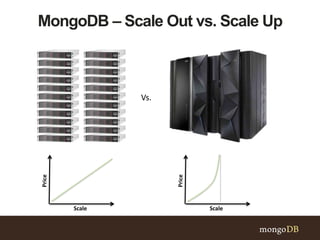
MongoDB – Scale Out vs. Scale Up
Vs.
Price
Scale
Price
Scale
When to Scale
Disk I/O Limitations
Working Set Exceeds Physical Memory
Working Set
Indexes Data
Working Set
Indexes Data
Sharding Concepts
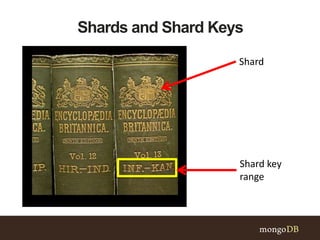
Shards and Shard Keys
Shard
Shard key
range
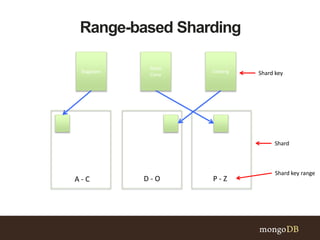
Range-based Sharding
Bagpipes Iceberg
Snow
Cone
A - C D - O P - Z
Shard
Shard key range
Shard key
Possible Imbalance?
• Depending on how you configure sharding, data can
become unbalanced on your sharded cluster.
– Some shards might receive more inserts than
others.
– Some shards might have documents that grow
more than those in other shards.
• This may result in too much load on a single shard.
– Reads and writes
– Disk activity
• This would defeat the purpose of sharding.
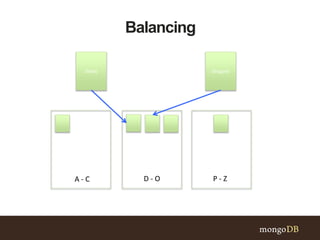
Balancing
Dates Dragons
A - C D - O P - Z
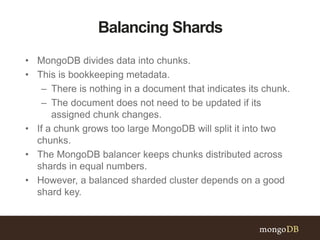
Balancing Shards
• MongoDB divides data into chunks.
• This is bookkeeping metadata.
– There is nothing in a document that indicates its chunk.
– The document does not need to be updated if its
assigned chunk changes.
• If a chunk grows too large MongoDB will split it into two
chunks.
• The MongoDB balancer keeps chunks distributed across
shards in equal numbers.
• However, a balanced sharded cluster depends on a good
shard key.
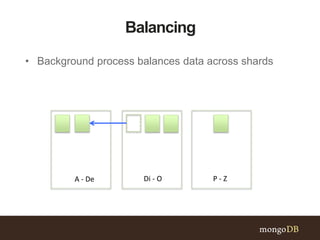
Balancing
A - De Di - O P - Z
• Background process balances data across shards
Mongos
• A mongos is responsible for accepting requests and
returning results to an application driver.
• In a sharded cluster, nearly all operations go through a
mongos.
• A sharded cluster can have as many mongos routers
as required.
• It is typical for each application server to have one
mongos.
• Always use more than one mongos to avoid a single
point of failure.
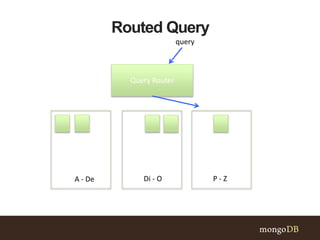
Routed Query
A - De Di - O P - Z
Query Router
query
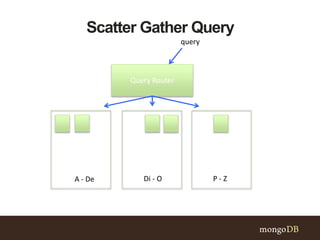
Scatter Gather Query
A - De Di - O P - Z
Query Router
query
MongoDB Sharding
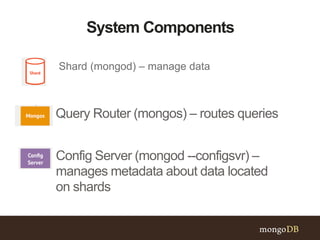
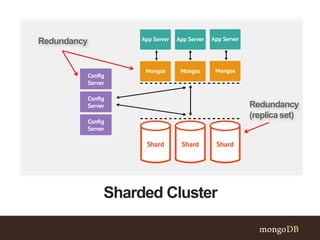
System Components
Shard (mongod) – manage data
Query Router (mongos) – routes queries
Config Server (mongod --configsvr) –
manages metadata about data located
on shards
Sharded Cluster
Redundancy
Redundancy
(replicaset)
Config Server Hardware Requirements
• Quality network interfaces
• A small amount of disk space (typically a few
GB)
• A small amount of RAM (typically a few GB)
• The larger the sharded cluster, the greater the
config server hardware requirements.
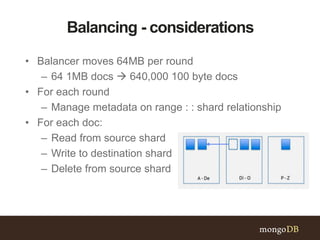
Balancing - considerations
• Balancer moves 64MB per round
– 64 1MB docs  640,000 100 byte docs
• For each round
– Manage metadata on range : : shard relationship
• For each doc:
– Read from source shard
– Write to destination shard
– Delete from source shard
Shard Keys
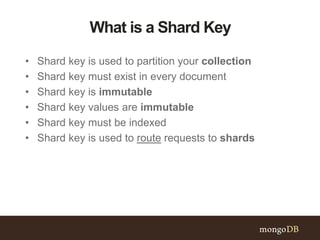
What is a Shard Key
• Shard key is used to partition your collection
• Shard key must exist in every document
• Shard key is immutable
• Shard key values are immutable
• Shard key must be indexed
• Shard key is used to route requests to shards
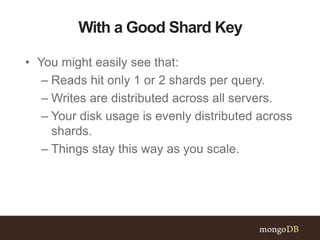
With a Good Shard Key
• You might easily see that:
– Reads hit only 1 or 2 shards per query.
– Writes are distributed across all servers.
– Your disk usage is evenly distributed across
shards.
– Things stay this way as you scale.
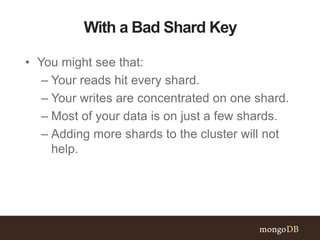
With a Bad Shard Key
• You might see that:
– Your reads hit every shard.
– Your writes are concentrated on one shard.
– Most of your data is on just a few shards.
– Adding more shards to the cluster will not
help.
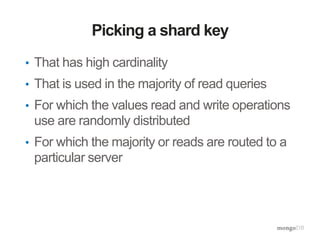
Picking a shard key
• That has high cardinality
• That is used in the majority of read queries
• For which the values read and write operations
use are randomly distributed
• For which the majority or reads are routed to a
particular server
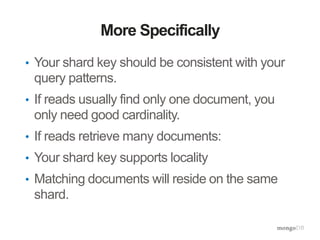
More Specifically
• Your shard key should be consistent with your
query patterns.
• If reads usually find only one document, you
only need good cardinality.
• If reads retrieve many documents:
• Your shard key supports locality
• Matching documents will reside on the same
shard.
Cardinality
• A good shard key will have high cardinality.
• A relatively small number of documents should
have the same shard key.
• Otherwise operations become isolated to the
same server.
• Because documents with the same shard key
reside on the same shard.
• Adding more servers will not help.
• Hashing will not help
Non-Monotonic
• A good shard key will generate new values
non-monotonically.
• Datetimes, counters, and ObjectIds make bad
shard keys.
• Monotonic shard keys cause all inserts to
happen on the same shard.
• Hashing will solve this problem.
• However, doing range queries with a hashed
shard key will perform a scatter-gather query
across the cluster.
Hashed Shard Keys
Hashed Shard Keys
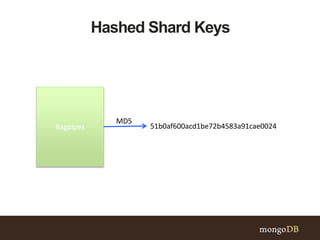
Bagpipes 51b0af600acd1be72b4583a91cae0024
MD5
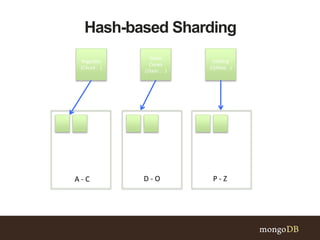
Hash-based Sharding
Bagpipes
(C4ca4 . .)
Iceberg
(Q46eb. .)
Snow
Cones
(J3adc . . )
A - C D - O P - Z
Under the hood
• Create a hashed index used for sharding
• Uses the first 64-bits of md5 hash of field
– Still need to thoughtfully choose key
• Uses existing hash index, or creates a new one on a
collection
Using hashed indexes
• Create index:
– db.collection.createIndex( {field : “hashed”} )
• Enable sharding on collection:
– sh.ShardCollection(“test.collection”, {field:
“hashed”})
• Good for
– Equality query routed to a specific shard
– Will make use of hashed index
– Most efficient query possible
Using hashed indexes
• Not good for
– Range queries will be scatter / gather
– Cannot utilize a hashed index
• Supplement, ordered index may be used at
shard level
– Inefficient query pattern
Other Limitations
• Cannot be used in compound or unique indexes
• No support for multi-key indexes
• Incompatible with tag aware sharding
– Tags would be assigned hashed values, not the
original key
• Will not overcome keys with poor cardinality
– Floating point numbers are truncated before
hashing
Summary
Resources
• Tutorial: Sharding (laptop friendly)
• Tutorial: Converting a Replica Set to a Replicated Sharded Cluster
(laptop friendly)
• Manual: Select a Shard Key
• Manual: Hash-based Sharding
• Manual: Tag Aware Sharding
• Manual: Strategies for Bulk Inserts in Sharded Clusters
• Manual: Manage Sharded Cluster Balancer
MongoDB Sharding

MongoDB Sharding

  • 1.
  • 2.
    Agenda • When toScale • How to Scale • Sharding Concepts • MongoDB Sharding • Shard Keys • Hashed Shard Keys
  • 3.
    Contrast with Replication •In an earlier module, we discussed Replication. • This should never be confused with sharding. • Replication is about high availability and durability. – Taking your data and constantly copying it – Being ready to have another machine step in to field requests.
  • 4.
    Sharding is Concernedwith Scale • What happens when a system is unable to handle the application load? • It is time to consider scaling. • There are 2 types of scaling we want to consider: – Vertical scaling – Horizontal scaling
  • 5.
  • 6.
    MongoDB – ScaleOut vs. Scale Up Vs. Price Scale Price Scale
  • 7.
  • 8.
  • 9.
    Working Set ExceedsPhysical Memory Working Set Indexes Data Working Set Indexes Data
  • 10.
  • 11.
    Shards and ShardKeys Shard Shard key range
  • 12.
    Range-based Sharding Bagpipes Iceberg Snow Cone A- C D - O P - Z Shard Shard key range Shard key
  • 13.
    Possible Imbalance? • Dependingon how you configure sharding, data can become unbalanced on your sharded cluster. – Some shards might receive more inserts than others. – Some shards might have documents that grow more than those in other shards. • This may result in too much load on a single shard. – Reads and writes – Disk activity • This would defeat the purpose of sharding.
  • 14.
  • 15.
    Balancing Shards • MongoDBdivides data into chunks. • This is bookkeeping metadata. – There is nothing in a document that indicates its chunk. – The document does not need to be updated if its assigned chunk changes. • If a chunk grows too large MongoDB will split it into two chunks. • The MongoDB balancer keeps chunks distributed across shards in equal numbers. • However, a balanced sharded cluster depends on a good shard key.
  • 16.
    Balancing A - DeDi - O P - Z • Background process balances data across shards
  • 17.
    Mongos • A mongosis responsible for accepting requests and returning results to an application driver. • In a sharded cluster, nearly all operations go through a mongos. • A sharded cluster can have as many mongos routers as required. • It is typical for each application server to have one mongos. • Always use more than one mongos to avoid a single point of failure.
  • 18.
    Routed Query A -De Di - O P - Z Query Router query
  • 19.
    Scatter Gather Query A- De Di - O P - Z Query Router query
  • 20.
  • 21.
    System Components Shard (mongod)– manage data Query Router (mongos) – routes queries Config Server (mongod --configsvr) – manages metadata about data located on shards
  • 22.
  • 23.
    Config Server HardwareRequirements • Quality network interfaces • A small amount of disk space (typically a few GB) • A small amount of RAM (typically a few GB) • The larger the sharded cluster, the greater the config server hardware requirements.
  • 24.
    Balancing - considerations •Balancer moves 64MB per round – 64 1MB docs  640,000 100 byte docs • For each round – Manage metadata on range : : shard relationship • For each doc: – Read from source shard – Write to destination shard – Delete from source shard
  • 25.
  • 26.
    What is aShard Key • Shard key is used to partition your collection • Shard key must exist in every document • Shard key is immutable • Shard key values are immutable • Shard key must be indexed • Shard key is used to route requests to shards
  • 27.
    With a GoodShard Key • You might easily see that: – Reads hit only 1 or 2 shards per query. – Writes are distributed across all servers. – Your disk usage is evenly distributed across shards. – Things stay this way as you scale.
  • 28.
    With a BadShard Key • You might see that: – Your reads hit every shard. – Your writes are concentrated on one shard. – Most of your data is on just a few shards. – Adding more shards to the cluster will not help.
  • 29.
    Picking a shardkey • That has high cardinality • That is used in the majority of read queries • For which the values read and write operations use are randomly distributed • For which the majority or reads are routed to a particular server
  • 30.
    More Specifically • Yourshard key should be consistent with your query patterns. • If reads usually find only one document, you only need good cardinality. • If reads retrieve many documents: • Your shard key supports locality • Matching documents will reside on the same shard.
  • 31.
    Cardinality • A goodshard key will have high cardinality. • A relatively small number of documents should have the same shard key. • Otherwise operations become isolated to the same server. • Because documents with the same shard key reside on the same shard. • Adding more servers will not help. • Hashing will not help
  • 32.
    Non-Monotonic • A goodshard key will generate new values non-monotonically. • Datetimes, counters, and ObjectIds make bad shard keys. • Monotonic shard keys cause all inserts to happen on the same shard. • Hashing will solve this problem. • However, doing range queries with a hashed shard key will perform a scatter-gather query across the cluster.
  • 33.
  • 34.
    Hashed Shard Keys Bagpipes51b0af600acd1be72b4583a91cae0024 MD5
  • 35.
    Hash-based Sharding Bagpipes (C4ca4 ..) Iceberg (Q46eb. .) Snow Cones (J3adc . . ) A - C D - O P - Z
  • 36.
    Under the hood •Create a hashed index used for sharding • Uses the first 64-bits of md5 hash of field – Still need to thoughtfully choose key • Uses existing hash index, or creates a new one on a collection
  • 37.
    Using hashed indexes •Create index: – db.collection.createIndex( {field : “hashed”} ) • Enable sharding on collection: – sh.ShardCollection(“test.collection”, {field: “hashed”}) • Good for – Equality query routed to a specific shard – Will make use of hashed index – Most efficient query possible
  • 38.
    Using hashed indexes •Not good for – Range queries will be scatter / gather – Cannot utilize a hashed index • Supplement, ordered index may be used at shard level – Inefficient query pattern
  • 39.
    Other Limitations • Cannotbe used in compound or unique indexes • No support for multi-key indexes • Incompatible with tag aware sharding – Tags would be assigned hashed values, not the original key • Will not overcome keys with poor cardinality – Floating point numbers are truncated before hashing
  • 40.
  • 41.
    Resources • Tutorial: Sharding(laptop friendly) • Tutorial: Converting a Replica Set to a Replicated Sharded Cluster (laptop friendly) • Manual: Select a Shard Key • Manual: Hash-based Sharding • Manual: Tag Aware Sharding • Manual: Strategies for Bulk Inserts in Sharded Clusters • Manual: Manage Sharded Cluster Balancer

Editor's Notes

  • #5 Ops will be most interested in Configuration Dev will be most interested in Mechanics
  • #7 “Clients can also opt to run zEC12 without a raised datacenter floor -- a first for high-end IBM mainframes.” IBM Press Release 28 Aug, 2012
  • #10 Working Set = most frequently accessed Indexes + Data
  • #12 Each “shard” in an encyclopedia is approximately the same size, ~1000 pages.
  • #15 Now add new documents to the D – O shard. After adding new documents the distribution is non-uniform.
  • #17 When the system has a non-uniform distribution of data, a background process will rebalance the data.
  • #19 Route queries to single shard for single key or key range  best scalability. Examples that can be routed: “pirate” can be routed to P – Z shard. “pirate” to “potato” can be routed to P – Z shard. “opera” to “pirate” can be routed to two shards: Di – O and P – Z.
  • #20 Route queries to single shard for single key or key range  best scalability. Examples that cannot be routed: All documents with images . All documents last updated after 2007.
  • #22 Shard – beefy, server Query router – lightweight, caches the config server metadata and does some cpu-intesive work, not unusual to co-locate with the application server Config server – lightweight, but needs to be on resilient hardware. Accessed infrequently, data usage is relatively lightweight  one document per 64MB of data  64TB system will have 1M documents, each less than 1KB, so on the order of GB of data. If one fails, then the balancer will not run. If two fail, things get worse. If all fail, you can’t run queries .
  • #25 Rebalancing is expensive
  • #27 Isolating queries (to a few shards) Scatter -- gather ( high latency but not bad ) hash keys
  • #28 Ops will be most interested in Configuration Dev will be most interested in Mechanics
  • #29 Ops will be most interested in Configuration Dev will be most interested in Mechanics
  • #36 Placement of documents is based on their hashed shard key value, so they are effectively randomly distributed  uniform distribution of writes.