THERMAL POWER PLANT
OPERATIONS
Simulator Part 2- Day1
MANOHAR TATWAWADI
Director, tops
A2-806, PALLADION, BALEWADI, PUNE 411045
Mob: 9372167165, Email:-mtatwawadi@gmail.com
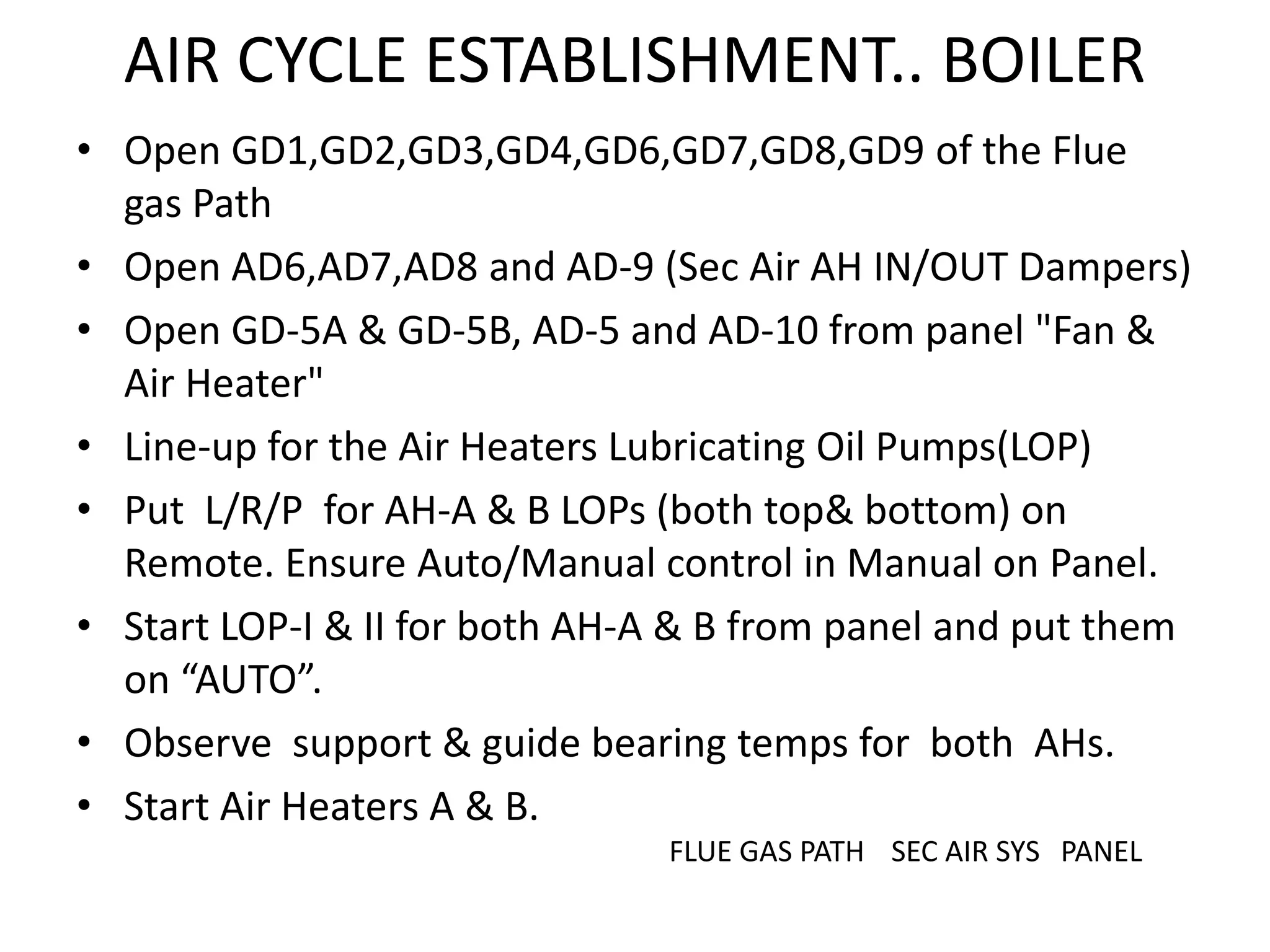
AIR CYCLE ESTABLISHMENT.. BOILER
• Open GD1,GD2,GD3,GD4,GD6,GD7,GD8,GD9 of the Flue
gas Path
• Open AD6,AD7,AD8 and AD-9 (Sec Air AH IN/OUT Dampers)
• Open GD-5A & GD-5B, AD-5 and AD-10 from panel "Fan &
Air Heater"
• Line-up for the Air Heaters Lubricating Oil Pumps(LOP)
• Put L/R/P for AH-A & B LOPs (both top& bottom) on
Remote. Ensure Auto/Manual control in Manual on Panel.
• Start LOP-I & II for both AH-A & B from panel and put them
on “AUTO”.
• Observe support & guide bearing temps for both AHs.
• Start Air Heaters A & B.
FLUE GAS PATH SEC AIR SYS PANEL
FLUE GAS PATH
SECONDARY AIR SYSTEM
AH, ID, FD and PA FANS PANEL
Starting of ID & FD Fans
• Lineup for LOPs of all Fans, AUTO/MANUAL Switches
on MANUAL & LRPs on REMOTE.
• Check Lub oil levels and Temps.
• Start the ID Fan A & B LOPs and check Lub Oil
pressure and Bearing Temp. < 500C
• Similarly start FD Fans LOPs and check Lub Oil
pressure and Bearing Temp. < 500C.
• Check the operation of vanes of all ID & FD Fans and
put them on minimum position.
• ID fans Outlet Dampers GD12 &GD13 are closed and
put on “INTERLOCK”
AH,ID,FD Fans control
Starting of ID & FD Fans
 Check the dampers in the flue gas path (GD1,GD2,GD3,GD4)
open.
 Check the dampers of AH Secondary air ( AD6, AD7,AD8,AD9)
OPEN
 Check the Interconnecting Dampers Sec Air(AD6 & AD6)
 Start ID fan A from panel and observe:
• The normalized current on panel.
• Outlet damper GD-12 opens on interlock after time delay.
 Start ID Fan B from Panel and observe:
• The normalized current on panel.
• Outlet damper GD-13 opens on interlock after time delay.
PANEL MIMIC
Starting of ID & FD Fans……..
 Operate inlet vanes of ID fan A & B slowly from minimum to
get a furnace vacuum of about 10 mm. of water.
• Put ID fan A vane opening and ID fan B vane opening into
manual mode. Increase both vane openings in increment of
5% till ID fan master control reads -7.00mm pressure.
• Make sure ID fan master controller is in manual mode. Adjust
its output till setpoint of ID fan A vane controller and ID fan B
vane controller matches to its respective measured value.
• Once error in both the vane controllers is zero(difference
between SP & MV) then put both into Auto mode.
• Adjust set point to match the measured value of ID fan master
controller and put them into Auto mode of operation.
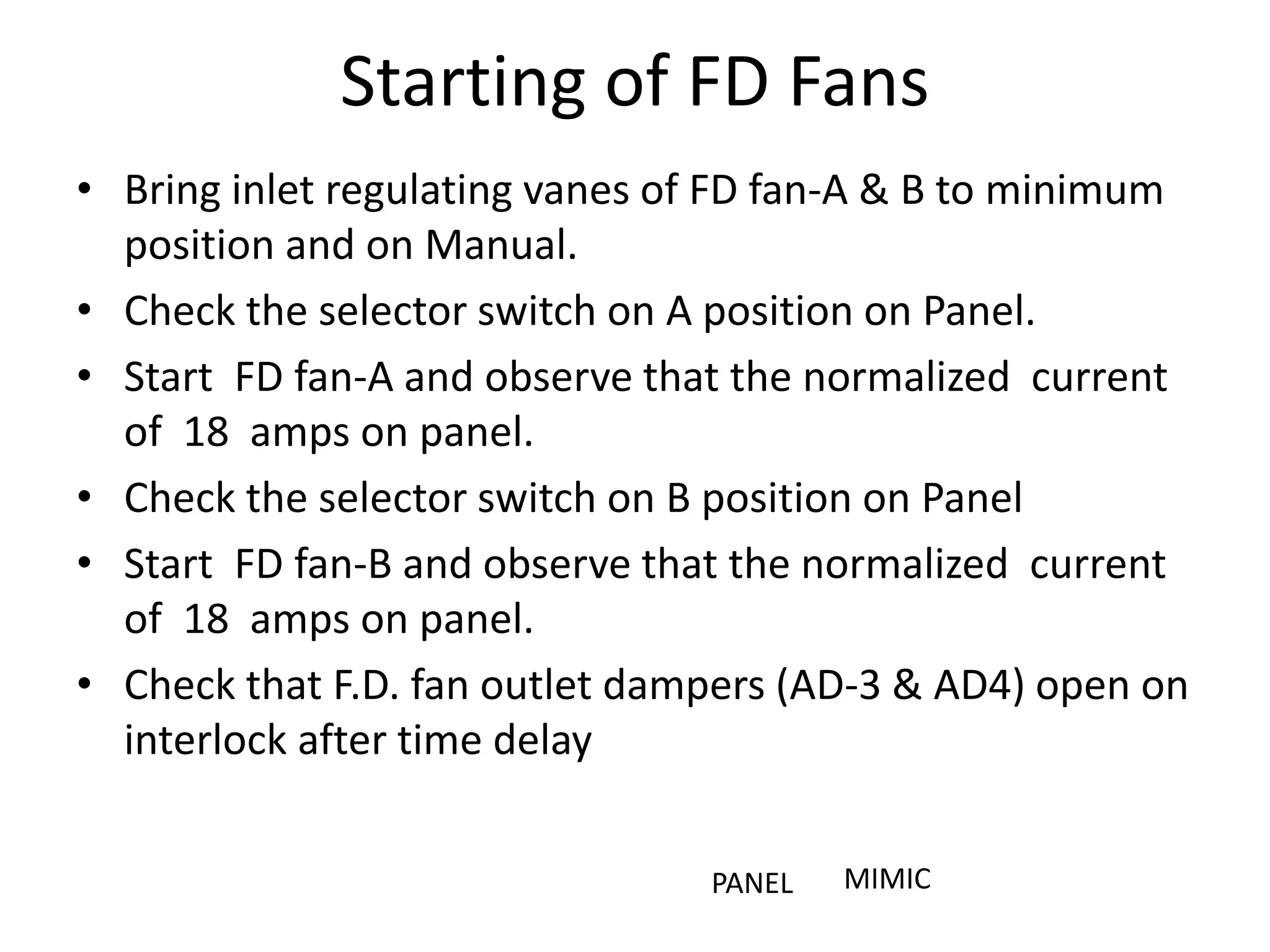
Starting of FD Fans
• Bring inlet regulating vanes of FD fan-A & B to minimum
position and on Manual.
• Check the selector switch on A position on Panel.
• Start FD fan-A and observe that the normalized current
of 18 amps on panel.
• Check the selector switch on B position on Panel
• Start FD fan-B and observe that the normalized current
of 18 amps on panel.
• Check that F.D. fan outlet dampers (AD-3 & AD4) open on
interlock after time delay
PANEL MIMIC
Starting of FD Fans
Starting of FD Fans & Auxiliary Air
• Open the Auxiliary air dampers (AA, BC, DE and
FF) of the windbox to 20% and then put them on
AUTO.
• Slowly increase the regulating vanes of both the
FD fans and check the increase TOTAL AIR FLOW
on the Panel.
• Increase the TOTAL AIR FLOW to about 300 TPH.
• Observe the ID Fan Vanes also opening on AUTO.
• Note :- The trials for Fans Bearing oil pressure
low, Temp high and other interlock tripping may
also be taken and logged.
AUXILIARY AIR DAMPERS
• The secondary air enters into the furnace from
the windbox through the secondary air
dampers at AA,BC,DE and FF elevations.
• The dampers at these elevations and 4 corners
of the furnace are called Auxiliary air dampers
• The WB to Furnace DP is maintained at 150
mmwcl by these dampers when put on AUTO.
AUXILIARY AIR DAMPERS
AA BC DE FF A B C D E
Turbine Trip to Boiler Trip Switch
• Ensure the TT/BT switch on Turbine Control
Panel is in M Position
SCANNER AIR FANS
• Scanner Fans selector switch is in off position. Check that
scanner fan (SCF-A) is not running. It is taking suction from
atmosphere through emergency air damper which is open on
interlock mode.
• Ensure before starting scanner fans that Discharge
dampers(both SCF-A & B) are in de-interlock mode, closed on
panel.
• Put Discharge dampers in interlock mode
• Scanner fan A-B selector is on Fan-A
• Start the scanner fans from panel and observe the start
indication on same panel
• Observe discharger damper of running scanner fan A or B will
open depending on fan select & emergency damper closes on
interlock.
• Observe scanner air header pressure on the panel.
SCANNER & IGNITER FANS
IGNITER AIR FANS
• Ensure before starting igniter fans:
• Put Discharge dampers in interlock mode
• Igniter fan A-B selector is on fan-A
• Start the igniter fans from panel and observe the
start indication on same panel
• Observe discharger damper of running igniter fan
A or B will open depending on fan selection
interlock. Observe igniter air header pressure.
• Note: Observe the scanner & igniter fan
indications on graphics "Air fans"
AIR FANS GRAPHICS
Oil Handling Plant
FURNACE PURGE
• Ensure the HO pump is OFF.
• Close H.O. trip valve on FSSS console.
• Open H.O. recirculation valves 1 & 2 by 50 %.
• Check that Startup / generator trip on is on OFF
position
• There are three conditions for the furnace
PURGING. They are;-
1. Boiler Drum Level Normal
2. Total Air Flow is more than 30%
3. All the scanners showing “No Flame”
Furnace Purging
• On completion of conditions the light of `Purge ready' and
the yellow light of `Push to purge' would light on FSSS
console.
• On getting these `Purge ready' signal, press `Push to Purge'
button on FSSS console. And observe the `Purge-cycle' would
start and would be indicated by yellow `Purging' light on
FSSS console.
• After completion of 1 minutes(in simulator it is one minute
and in Power station it takes 5 min) of `Purge-cycle', yellow
light of `Purge complete' would light and yellow light of
`Purging" would go off indicating the completed process of
furnace purging.
• Check that Burner tilt is at horizontal position on interlock
and its control is in Manual mode on panel.
FURNACE PURGING
Atomizing Air
• Close the atomizing steam valve to HO
burners AS-89
• (Note: If the fuel selection is on HO then only
open AS-89 valve and check atomizing steam
pressure on panel-2.)
• Open the atomizing air valve to Igniter/LDO
oils and observe atomizing air pressure on
panel.
WO/LDO/HSD Fuel Supply
Line up for WO fuel supply:-
• Fuel selection is WO on panel-2
• Start the WO pump from Field OHP
• Start the Igniter oil pump from field OHP
• Open igniter oil trip valve on FSSS console. Ensure igniter oil and
atomising air pressures.
• Open warm up oil trip valve on FSSS console. Regulate pressure from
control valve on Panel.
• Observe WO pressure and ensure WO atomizing air pressures.
• Set the WO pressure set point conveniently on panel.
• (Note: WO pressure controller operation involves only the set point
adjustment)
• Check for appropriate nozzle pair indication on the oil guns for WO firing
by depressing appropriate push button at AB elevation of gun pair select
on FSSS console.
FIRING SEQUENCE
A. Light up the boiler by depressing the push button `Pair 1-3
start' on FSSS console AB elevation. This will start 90 seconds of
start time of the oil guns. Green light of `Elevation AB Igniters
stop' would go off.
B. Check that within 10 seconds, all the 4 igniters at AB elevation
are proven `ON' as indicated by their respective red lights on
FSSS console. Observe igniter oil pressure and igniter
atomizing pressure.
C. At end of igniter start time (10 seconds), a start command
would be initiated for W.U. oil gun No. 1 and 15 seconds later
for WO gun No. 3.It would be indicated by green light of gun
`Re-tracted' going off.
• Watch closely and maintain furnace draft and drum level
whenever any heat input change (oil/coal) is being made to the
boiler.
FIRING SEQUENCE
D. As WO gun nozzle valve starts opening, the respective red light goes off
on FSSS console. When the nozzle valve is full open and gun is
proven, to respective green light comes up on FSSS console. During this
period, observe that WO pressure is maintained at 4.5 kg/cm2 by setting
warm up oil pressure setpoint.
E. The warm up oil pressure would start going down very fast as WO gun
nozzle valve starts opening. Watch that warm up oil pressure control
valve maintains a pressure of 4.5kg/cm2 after WO pressure control
valve whenever any warm up oil gun is being put in service.
F. Observe atomizing air pressure for WO firing which should be 1 kg/cm2
more than the oil pressure.
As warming of the boiler has started, temperature of flue gas and air would
rise gradually, Steaming would start. Water would swell and drum level
would go up.
• Open Drum/Economiser vent on Field. Open SH drain valve by 10 %.
• Put oil elevation sec. air damper controller into auto mode.
FSSS PANEL
Thermal Power Plant Simulator Operations Training

Thermal Power Plant Simulator Operations Training

  • 1.
    THERMAL POWER PLANT OPERATIONS SimulatorPart 2- Day1 MANOHAR TATWAWADI Director, tops A2-806, PALLADION, BALEWADI, PUNE 411045 Mob: 9372167165, Email:-mtatwawadi@gmail.com
  • 2.
    AIR CYCLE ESTABLISHMENT..BOILER • Open GD1,GD2,GD3,GD4,GD6,GD7,GD8,GD9 of the Flue gas Path • Open AD6,AD7,AD8 and AD-9 (Sec Air AH IN/OUT Dampers) • Open GD-5A & GD-5B, AD-5 and AD-10 from panel "Fan & Air Heater" • Line-up for the Air Heaters Lubricating Oil Pumps(LOP) • Put L/R/P for AH-A & B LOPs (both top& bottom) on Remote. Ensure Auto/Manual control in Manual on Panel. • Start LOP-I & II for both AH-A & B from panel and put them on “AUTO”. • Observe support & guide bearing temps for both AHs. • Start Air Heaters A & B. FLUE GAS PATH SEC AIR SYS PANEL
  • 3.
  • 4.
  • 5.
    AH, ID, FDand PA FANS PANEL
  • 6.
    Starting of ID& FD Fans • Lineup for LOPs of all Fans, AUTO/MANUAL Switches on MANUAL & LRPs on REMOTE. • Check Lub oil levels and Temps. • Start the ID Fan A & B LOPs and check Lub Oil pressure and Bearing Temp. < 500C • Similarly start FD Fans LOPs and check Lub Oil pressure and Bearing Temp. < 500C. • Check the operation of vanes of all ID & FD Fans and put them on minimum position. • ID fans Outlet Dampers GD12 &GD13 are closed and put on “INTERLOCK”
  • 7.
  • 8.
    Starting of ID& FD Fans  Check the dampers in the flue gas path (GD1,GD2,GD3,GD4) open.  Check the dampers of AH Secondary air ( AD6, AD7,AD8,AD9) OPEN  Check the Interconnecting Dampers Sec Air(AD6 & AD6)  Start ID fan A from panel and observe: • The normalized current on panel. • Outlet damper GD-12 opens on interlock after time delay.  Start ID Fan B from Panel and observe: • The normalized current on panel. • Outlet damper GD-13 opens on interlock after time delay. PANEL MIMIC
  • 9.
    Starting of ID& FD Fans……..  Operate inlet vanes of ID fan A & B slowly from minimum to get a furnace vacuum of about 10 mm. of water. • Put ID fan A vane opening and ID fan B vane opening into manual mode. Increase both vane openings in increment of 5% till ID fan master control reads -7.00mm pressure. • Make sure ID fan master controller is in manual mode. Adjust its output till setpoint of ID fan A vane controller and ID fan B vane controller matches to its respective measured value. • Once error in both the vane controllers is zero(difference between SP & MV) then put both into Auto mode. • Adjust set point to match the measured value of ID fan master controller and put them into Auto mode of operation.
  • 10.
    Starting of FDFans • Bring inlet regulating vanes of FD fan-A & B to minimum position and on Manual. • Check the selector switch on A position on Panel. • Start FD fan-A and observe that the normalized current of 18 amps on panel. • Check the selector switch on B position on Panel • Start FD fan-B and observe that the normalized current of 18 amps on panel. • Check that F.D. fan outlet dampers (AD-3 & AD4) open on interlock after time delay PANEL MIMIC
  • 11.
  • 12.
    Starting of FDFans & Auxiliary Air • Open the Auxiliary air dampers (AA, BC, DE and FF) of the windbox to 20% and then put them on AUTO. • Slowly increase the regulating vanes of both the FD fans and check the increase TOTAL AIR FLOW on the Panel. • Increase the TOTAL AIR FLOW to about 300 TPH. • Observe the ID Fan Vanes also opening on AUTO. • Note :- The trials for Fans Bearing oil pressure low, Temp high and other interlock tripping may also be taken and logged.
  • 13.
    AUXILIARY AIR DAMPERS •The secondary air enters into the furnace from the windbox through the secondary air dampers at AA,BC,DE and FF elevations. • The dampers at these elevations and 4 corners of the furnace are called Auxiliary air dampers • The WB to Furnace DP is maintained at 150 mmwcl by these dampers when put on AUTO.
  • 14.
    AUXILIARY AIR DAMPERS AABC DE FF A B C D E
  • 15.
    Turbine Trip toBoiler Trip Switch • Ensure the TT/BT switch on Turbine Control Panel is in M Position
  • 16.
    SCANNER AIR FANS •Scanner Fans selector switch is in off position. Check that scanner fan (SCF-A) is not running. It is taking suction from atmosphere through emergency air damper which is open on interlock mode. • Ensure before starting scanner fans that Discharge dampers(both SCF-A & B) are in de-interlock mode, closed on panel. • Put Discharge dampers in interlock mode • Scanner fan A-B selector is on Fan-A • Start the scanner fans from panel and observe the start indication on same panel • Observe discharger damper of running scanner fan A or B will open depending on fan select & emergency damper closes on interlock. • Observe scanner air header pressure on the panel.
  • 17.
  • 18.
    IGNITER AIR FANS •Ensure before starting igniter fans: • Put Discharge dampers in interlock mode • Igniter fan A-B selector is on fan-A • Start the igniter fans from panel and observe the start indication on same panel • Observe discharger damper of running igniter fan A or B will open depending on fan selection interlock. Observe igniter air header pressure. • Note: Observe the scanner & igniter fan indications on graphics "Air fans"
  • 19.
  • 20.
  • 21.
    FURNACE PURGE • Ensurethe HO pump is OFF. • Close H.O. trip valve on FSSS console. • Open H.O. recirculation valves 1 & 2 by 50 %. • Check that Startup / generator trip on is on OFF position • There are three conditions for the furnace PURGING. They are;- 1. Boiler Drum Level Normal 2. Total Air Flow is more than 30% 3. All the scanners showing “No Flame”
  • 22.
    Furnace Purging • Oncompletion of conditions the light of `Purge ready' and the yellow light of `Push to purge' would light on FSSS console. • On getting these `Purge ready' signal, press `Push to Purge' button on FSSS console. And observe the `Purge-cycle' would start and would be indicated by yellow `Purging' light on FSSS console. • After completion of 1 minutes(in simulator it is one minute and in Power station it takes 5 min) of `Purge-cycle', yellow light of `Purge complete' would light and yellow light of `Purging" would go off indicating the completed process of furnace purging. • Check that Burner tilt is at horizontal position on interlock and its control is in Manual mode on panel.
  • 23.
  • 24.
    Atomizing Air • Closethe atomizing steam valve to HO burners AS-89 • (Note: If the fuel selection is on HO then only open AS-89 valve and check atomizing steam pressure on panel-2.) • Open the atomizing air valve to Igniter/LDO oils and observe atomizing air pressure on panel.
  • 25.
    WO/LDO/HSD Fuel Supply Lineup for WO fuel supply:- • Fuel selection is WO on panel-2 • Start the WO pump from Field OHP • Start the Igniter oil pump from field OHP • Open igniter oil trip valve on FSSS console. Ensure igniter oil and atomising air pressures. • Open warm up oil trip valve on FSSS console. Regulate pressure from control valve on Panel. • Observe WO pressure and ensure WO atomizing air pressures. • Set the WO pressure set point conveniently on panel. • (Note: WO pressure controller operation involves only the set point adjustment) • Check for appropriate nozzle pair indication on the oil guns for WO firing by depressing appropriate push button at AB elevation of gun pair select on FSSS console.
  • 26.
    FIRING SEQUENCE A. Lightup the boiler by depressing the push button `Pair 1-3 start' on FSSS console AB elevation. This will start 90 seconds of start time of the oil guns. Green light of `Elevation AB Igniters stop' would go off. B. Check that within 10 seconds, all the 4 igniters at AB elevation are proven `ON' as indicated by their respective red lights on FSSS console. Observe igniter oil pressure and igniter atomizing pressure. C. At end of igniter start time (10 seconds), a start command would be initiated for W.U. oil gun No. 1 and 15 seconds later for WO gun No. 3.It would be indicated by green light of gun `Re-tracted' going off. • Watch closely and maintain furnace draft and drum level whenever any heat input change (oil/coal) is being made to the boiler.
  • 27.
    FIRING SEQUENCE D. AsWO gun nozzle valve starts opening, the respective red light goes off on FSSS console. When the nozzle valve is full open and gun is proven, to respective green light comes up on FSSS console. During this period, observe that WO pressure is maintained at 4.5 kg/cm2 by setting warm up oil pressure setpoint. E. The warm up oil pressure would start going down very fast as WO gun nozzle valve starts opening. Watch that warm up oil pressure control valve maintains a pressure of 4.5kg/cm2 after WO pressure control valve whenever any warm up oil gun is being put in service. F. Observe atomizing air pressure for WO firing which should be 1 kg/cm2 more than the oil pressure. As warming of the boiler has started, temperature of flue gas and air would rise gradually, Steaming would start. Water would swell and drum level would go up. • Open Drum/Economiser vent on Field. Open SH drain valve by 10 %. • Put oil elevation sec. air damper controller into auto mode.
  • 28.