ssyysstteemmdd:: EEvvoolluuttiioonn,, 
RReevvoolluuttiioonn oorr DDeecclliinnee ?? 
______________________________________________________ 
““HHuuhh?? WWhhaatt''ss tthhiiss ssyysstteemmdd tthhiinnggiiee ddooiinngg 
Normation – CC-BY-SA 
normation.com 
aass PPIIDD 11 ??”” 
Matthieu CERDA
Normation – CC-BY-SA 
normation.com 2 
Who are you ? 
Name Matthieu CERDA 
Email : matthieu.cerda@normation.com 
Web site : http://www.normation.com 
Twitter : @Kegeruneku 
Job System engineer at Normation 
CFEngine Enthusiast, power user and trainer 
Rudder Integrator, packager 
Infrastructure Team member
Normation – CC-BY-SA 
normation.com 3 
What are we going to talk about 
Systemd 
(but not only)
Normation – CC-BY-SA 
normation.com 4 
What are we going to talk about 
● The current situation of open init systems 
● What is systemd? 
● What can we do with it? 
● Why all this controversy about it?
Normation – CC-BY-SA 
normation.com 5 
Today's major open init systems (1/2) 
● SysVinit / BSDinit: Historical, shell script based simple 
init systems, using LSB extensions on GNU/Linux and 
dependency tags on BSD to add dependencies. 
● Upstart: Ubuntu's init flavour, uses specific 
configuration files (“jobs”) to manage services. 
● OpenRC: Gentoo's init flavour, enhanced SysVinit 
version with more powerful service configuration / 
dependency handling.
Normation – CC-BY-SA 
normation.com 6 
Today's major open init systems (2/2) 
● SMF: Solaris init system, using XML + shell 
scripts to define how a service is to be managed. 
● launchd, uses plist (xml/binary xml) files to 
define how a service is to be managed. 
● *src, runit, daemon-tools, epoch, ...
Normation – CC-BY-SA 
normation.com 7 
Why so many reimplementations ? 
● Performance: init used to work in a serialized 
fashion, one script after the other. Long / hung 
scripts = slow / hung boot. 
● Definition: No dependency definition, restart 
behaviour, ...) 
● Security: Every process is awarded full root 
privileges by default and have to handle privilege 
dropping by itself. 
● Ego: “Mine is bigger.”
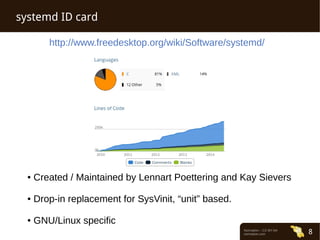
http://www.freedesktop.org/wiki/Software/systemd/ 
Normation – CC-BY-SA 
normation.com 8 
systemd ID card 
● Created / Maintained by Lennart Poettering and Kay Sievers 
● Drop-in replacement for SysVinit, “unit” based. 
● GNU/Linux specific
Normation – CC-BY-SA 
normation.com 9 
systemd goals 
● Replace SysVinit, D-Bus and udev with 
enhanced features 
● Completely separate the system and the 
applications 
● Provide unified system components 
● Enable the use of an “appliance” type of 
operating system
Normation – CC-BY-SA 
normation.com 10 
Service management capabilities 
● Uses systemd “units” 
● Provides: 
● A possibility to make sure a service is always 
started 
● A possibility to restrict a process to a specific 
Cgroup 
● Native Socket / D-Bus activation
Normation – CC-BY-SA 
normation.com 11 
Service management capabilities 
Example: OpenSSH unit (Debian) 
[Unit] 
Description=OpenBSD Secure Shell server 
After=network.target auditd.service 
ConditionPathExists=!/etc/ssh/sshd_not_to_be_run 
[Service] 
EnvironmentFile=-/etc/default/ssh 
ExecStart=/usr/sbin/sshd -D $SSHD_OPTS 
ExecReload=/bin/kill -HUP $MAINPID 
KillMode=process 
Restart=on-failure 
[Install] 
WantedBy=multi-user.target 
Alias=sshd.service
Normation – CC-BY-SA 
normation.com 12 
Socket activation capabilities 
Example: CUPS socket unit (Debian) 
[Unit] 
Description=CUPS Printing Service Sockets 
[Socket] 
ListenStream=/var/run/cups/cups.sock 
BindIPv6Only=ipv6-only 
[Install] 
WantedBy=sockets.target 
This unit will start the service provided by the “cups” 
unit if someone tries to access /var/run/cups/cups.sock
Normation – CC-BY-SA 
normation.com 13 
Process isolation 
● One may want a process to be started with an isolated 
environment for security reasons 
● systemd provides several ways to run a process in a 
restricted environment: 
● Traditionnal chroots, using the “RootDirectory” unit 
specification 
● Namespace restrictions, to forbid some operations to the 
service (Example: InaccessibleDirectories to forbid 
access to a directory) 
● Containerization: Using a lightweight containerization 
approach
Normation – CC-BY-SA 
normation.com 14 
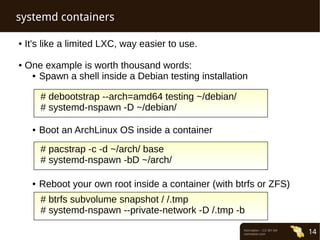
systemd containers 
● It's like a limited LXC, way easier to use. 
● One example is worth thousand words: 
● Spawn a shell inside a Debian testing installation 
# debootstrap --arch=amd64 testing ~/debian/ 
# systemd-nspawn -D ~/debian/ 
● Boot an ArchLinux OS inside a container 
# pacstrap -c -d ~/arch/ base 
# systemd-nspawn -bD ~/arch/ 
● Reboot your own root inside a container (with btrfs or ZFS) 
# btrfs subvolume snapshot / /.tmp 
# systemd-nspawn --private-network -D /.tmp -b
Normation – CC-BY-SA 
normation.com 15 
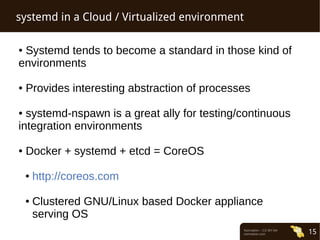
systemd in a Cloud / Virtualized environment 
● Systemd tends to become a standard in those kind of 
environments 
● Provides interesting abstraction of processes 
● systemd-nspawn is a great ally for testing/continuous 
integration environments 
● Docker + systemd + etcd = CoreOS 
● http://coreos.com 
● Clustered GNU/Linux based Docker appliance 
serving OS
Normation – CC-BY-SA 
normation.com 16 
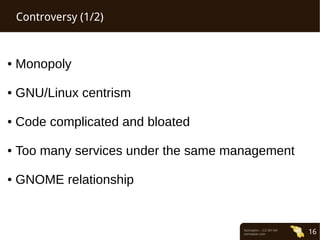
Controversy (1/2) 
● Monopoly 
● GNU/Linux centrism 
● Code complicated and bloated 
● Too many services under the same management 
● GNOME relationship
Normation – CC-BY-SA 
normation.com 17 
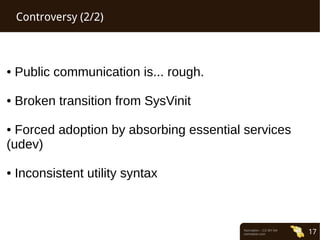
Controversy (2/2) 
● Public communication is... rough. 
● Broken transition from SysVinit 
● Forced adoption by absorbing essential services 
(udev) 
● Inconsistent utility syntax
Normation – CC-BY-SA 
normation.com 18 
QQuueessttiioonnss ?? ::))

Systemd evolution revolution_regression

  • 1.
    ssyysstteemmdd:: EEvvoolluuttiioonn,, RReevvoolluuttiioonnoorr DDeecclliinnee ?? ______________________________________________________ ““HHuuhh?? WWhhaatt''ss tthhiiss ssyysstteemmdd tthhiinnggiiee ddooiinngg Normation – CC-BY-SA normation.com aass PPIIDD 11 ??”” Matthieu CERDA
  • 2.
    Normation – CC-BY-SA normation.com 2 Who are you ? Name Matthieu CERDA Email : matthieu.cerda@normation.com Web site : http://www.normation.com Twitter : @Kegeruneku Job System engineer at Normation CFEngine Enthusiast, power user and trainer Rudder Integrator, packager Infrastructure Team member
  • 3.
    Normation – CC-BY-SA normation.com 3 What are we going to talk about Systemd (but not only)
  • 4.
    Normation – CC-BY-SA normation.com 4 What are we going to talk about ● The current situation of open init systems ● What is systemd? ● What can we do with it? ● Why all this controversy about it?
  • 5.
    Normation – CC-BY-SA normation.com 5 Today's major open init systems (1/2) ● SysVinit / BSDinit: Historical, shell script based simple init systems, using LSB extensions on GNU/Linux and dependency tags on BSD to add dependencies. ● Upstart: Ubuntu's init flavour, uses specific configuration files (“jobs”) to manage services. ● OpenRC: Gentoo's init flavour, enhanced SysVinit version with more powerful service configuration / dependency handling.
  • 6.
    Normation – CC-BY-SA normation.com 6 Today's major open init systems (2/2) ● SMF: Solaris init system, using XML + shell scripts to define how a service is to be managed. ● launchd, uses plist (xml/binary xml) files to define how a service is to be managed. ● *src, runit, daemon-tools, epoch, ...
  • 7.
    Normation – CC-BY-SA normation.com 7 Why so many reimplementations ? ● Performance: init used to work in a serialized fashion, one script after the other. Long / hung scripts = slow / hung boot. ● Definition: No dependency definition, restart behaviour, ...) ● Security: Every process is awarded full root privileges by default and have to handle privilege dropping by itself. ● Ego: “Mine is bigger.”
  • 8.
    http://www.freedesktop.org/wiki/Software/systemd/ Normation –CC-BY-SA normation.com 8 systemd ID card ● Created / Maintained by Lennart Poettering and Kay Sievers ● Drop-in replacement for SysVinit, “unit” based. ● GNU/Linux specific
  • 9.
    Normation – CC-BY-SA normation.com 9 systemd goals ● Replace SysVinit, D-Bus and udev with enhanced features ● Completely separate the system and the applications ● Provide unified system components ● Enable the use of an “appliance” type of operating system
  • 10.
    Normation – CC-BY-SA normation.com 10 Service management capabilities ● Uses systemd “units” ● Provides: ● A possibility to make sure a service is always started ● A possibility to restrict a process to a specific Cgroup ● Native Socket / D-Bus activation
  • 11.
    Normation – CC-BY-SA normation.com 11 Service management capabilities Example: OpenSSH unit (Debian) [Unit] Description=OpenBSD Secure Shell server After=network.target auditd.service ConditionPathExists=!/etc/ssh/sshd_not_to_be_run [Service] EnvironmentFile=-/etc/default/ssh ExecStart=/usr/sbin/sshd -D $SSHD_OPTS ExecReload=/bin/kill -HUP $MAINPID KillMode=process Restart=on-failure [Install] WantedBy=multi-user.target Alias=sshd.service
  • 12.
    Normation – CC-BY-SA normation.com 12 Socket activation capabilities Example: CUPS socket unit (Debian) [Unit] Description=CUPS Printing Service Sockets [Socket] ListenStream=/var/run/cups/cups.sock BindIPv6Only=ipv6-only [Install] WantedBy=sockets.target This unit will start the service provided by the “cups” unit if someone tries to access /var/run/cups/cups.sock
  • 13.
    Normation – CC-BY-SA normation.com 13 Process isolation ● One may want a process to be started with an isolated environment for security reasons ● systemd provides several ways to run a process in a restricted environment: ● Traditionnal chroots, using the “RootDirectory” unit specification ● Namespace restrictions, to forbid some operations to the service (Example: InaccessibleDirectories to forbid access to a directory) ● Containerization: Using a lightweight containerization approach
  • 14.
    Normation – CC-BY-SA normation.com 14 systemd containers ● It's like a limited LXC, way easier to use. ● One example is worth thousand words: ● Spawn a shell inside a Debian testing installation # debootstrap --arch=amd64 testing ~/debian/ # systemd-nspawn -D ~/debian/ ● Boot an ArchLinux OS inside a container # pacstrap -c -d ~/arch/ base # systemd-nspawn -bD ~/arch/ ● Reboot your own root inside a container (with btrfs or ZFS) # btrfs subvolume snapshot / /.tmp # systemd-nspawn --private-network -D /.tmp -b
  • 15.
    Normation – CC-BY-SA normation.com 15 systemd in a Cloud / Virtualized environment ● Systemd tends to become a standard in those kind of environments ● Provides interesting abstraction of processes ● systemd-nspawn is a great ally for testing/continuous integration environments ● Docker + systemd + etcd = CoreOS ● http://coreos.com ● Clustered GNU/Linux based Docker appliance serving OS
  • 16.
    Normation – CC-BY-SA normation.com 16 Controversy (1/2) ● Monopoly ● GNU/Linux centrism ● Code complicated and bloated ● Too many services under the same management ● GNOME relationship
  • 17.
    Normation – CC-BY-SA normation.com 17 Controversy (2/2) ● Public communication is... rough. ● Broken transition from SysVinit ● Forced adoption by absorbing essential services (udev) ● Inconsistent utility syntax
  • 18.
    Normation – CC-BY-SA normation.com 18 QQuueessttiioonnss ?? ::))