Demystifying systemd 
A Practical Guide 
Ben Breard, RHCA 
Solutions Architect, Red Hat 
Lennart Poettering 
Senior Engineer, Red Hat
Agenda 
•systemd 101 
•Customizing Units 
•Resource Management 
•Converting init scripts 
•The journal
systemd 
•Controls “units” rather than just daemons 
•Handles dependency between units. 
•Tracks processes with service information 
•Services are owned by a cgroup. 
• Simple to configure “SLAs” based on CPU, Memory, and IO 
•Properly kill daemons 
•Minimal boot times 
•Debuggability – no early boot messages are lost 
•Easy to learn and backwards compatible
RESISTANCE IS FUTILE!
systemd 101 
units, systemctl, troubleshooting
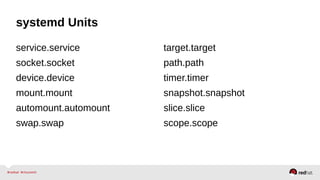
systemd Units 
service.service 
socket.socket 
device.device 
mount.mount 
automount.automount 
swap.swap 
target.target 
path.path 
timer.timer 
snapshot.snapshot 
slice.slice 
scope.scope
systemd Units – httpd.service 
[Unit] 
Description=The Apache HTTP Server 
After=remote-fs.target nss-lookup.target 
[Service] 
Type=notify 
EnvironmentFile=/etc/sysconfig/httpd 
ExecStart=/usr/sbin/httpd $OPTIONS -DFOREGROUND 
ExecReload=/usr/sbin/httpd $OPTIONS -k graceful 
ExecStop=/usr/sbin/httpd $OPTIONS -k graceful-stop 
KillSignal=SIGCONT 
PrivateTmp=true 
[Install] 
WantedBy=multi-user.target *Comments were removed for readability
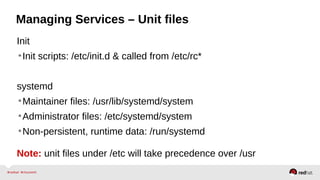
Managing Services – Unit files 
Init 
•Init scripts: /etc/init.d & called from /etc/rc* 
systemd 
•Maintainer files: /usr/lib/systemd/system 
•Administrator files: /etc/systemd/system 
•Non-persistent, runtime data: /run/systemd 
Note: unit files under /etc will take precedence over /usr
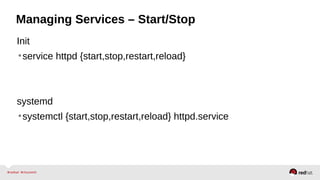
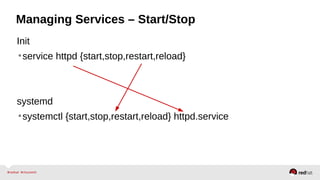
Managing Services – Start/Stop 
Init 
•service httpd {start,stop,restart,reload} 
systemd 
•systemctl {start,stop,restart,reload} httpd.service
Managing Services – Start/Stop 
Init 
•service httpd {start,stop,restart,reload} 
systemd 
•systemctl {start,stop,restart,reload} httpd.service
Managing Services – Start/Stop 
•Glob units when needed. 
• systemctl restart httpd mariadb 
• systemctl enable httpd mariadb ntpd lm_sensors [etc] 
•If a unit type isn't specified, .service is assumed. 
• systemctl start httpd == systemctl start httpd.service 
•Shell completion is highly recommended 
• Install bash-completion 
• Add bash-completion to minimal kickstarts 
•Connect to remote hosts over SSH using “-H”
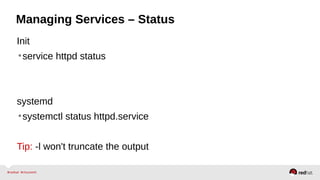
Managing Services – Status 
Init 
•service httpd status 
systemd 
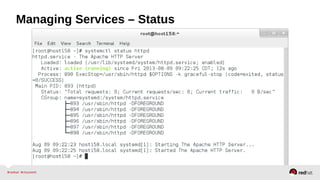
•systemctl status httpd.service 
Tip: -l won't truncate the output
Managing Services – Status
Managing Services – Status 
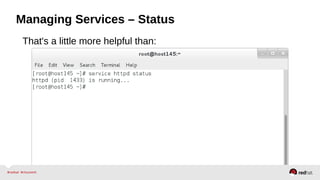
That's a little more helpful than:
Managing Services – Status 
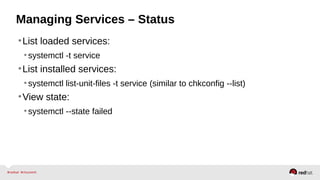
•List loaded services: 
• systemctl -t service 
•List installed services: 
• systemctl list-unit-files -t service (similar to chkconfig --list) 
•View state: 
• systemctl --state failed
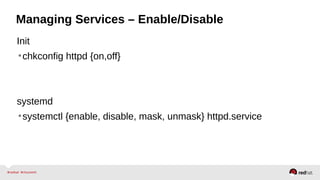
Managing Services – Enable/Disable 
Init 
•chkconfig httpd {on,off} 
systemd 
•systemctl {enable, disable, mask, unmask} httpd.service
Targets == Runlevels 
•“Runlevels” are exposed as target units 
•Target names are more relevant: 
•multi-user.target vs. runlevel3 
•graphical.target vs. runlevel5 
•View the default target via: `systemctl get-default` 
•Set the default target via: `systemctl set-default [target]` 
•Change at run-time via: `systemctl isolate [target]` 
Note: /etc/inittab is no longer used.
Troubleshooting 
•Append systemd.unit=[target] to the kernel 
• Rescue mode: single, s, S, or 1 
• Emergency (similar to init=/bin/bash): -b or emergency 
•Interactive boot append: systemd.confirm_spawn=1 
•Enable debugging append: 
• debug 
• debug systemd.log_target=kmsg log_buf_len=1M 
• debug systemd.log_target=console console=ttyS0 
http://freedesktop.org/wiki/Software/systemd/Debugging/
Troubleshooting 
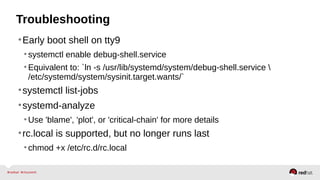
•Early boot shell on tty9 
• systemctl enable debug-shell.service 
• Equivalent to: `ln -s /usr/lib/systemd/system/debug-shell.service  
/etc/systemd/system/sysinit.target.wants/` 
•systemctl list-jobs 
•systemd-analyze 
•Use 'blame', 'plot', or 'critical-chain' for more details 
•rc.local is supported, but no longer runs last 
• chmod +x /etc/rc.d/rc.local
Customizing Units 
drop-ins
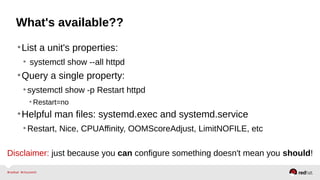
What's available?? 
•List a unit's properties: 
• systemctl show --all httpd 
•Query a single property: 
• systemctl show -p Restart httpd 
• Restart=no 
•Helpful man files: systemd.exec and systemd.service 
•Restart, Nice, CPUAffinity, OOMScoreAdjust, LimitNOFILE, etc 
Disclaimer: just because you can configure something doesn't mean you should!
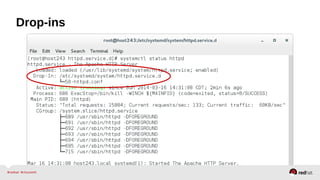
Drop-ins 
1) mkdir /etc/systemd/system/[name.type.d]/*.conf 
2) vim /etc/systemd/system/httpd.service.d/50-httpd.conf 
[Service] Remember the 'S' is capitalized 
Restart=always 
CPUAffinity=0 1 2 3 
OOMScoreAdjust=-1000 
3) systemctl daemon-reload 
• Changes will be applied on top of maintainer unit files.
Drop-ins
Drop-ins 
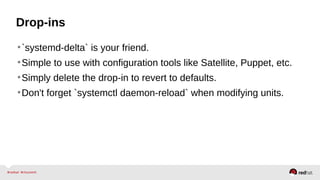
•`systemd-delta` is your friend. 
•Simple to use with configuration tools like Satellite, Puppet, etc. 
•Simply delete the drop-in to revert to defaults. 
•Don't forget `systemctl daemon-reload` when modifying units.
Resource Management 
slices, scopes, services
Control Groups Made Simple 
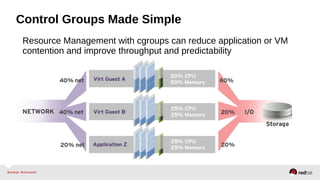
Resource Management with cgroups can reduce application or VM 
contention and improve throughput and predictability
Easily the best RHEL 6 feature that no one uses
Contain Your Applications and Guarantee Service 
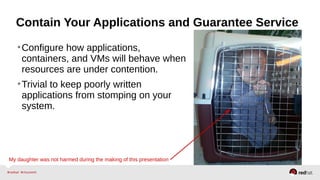
•Configure how applications, 
containers, and VMs will behave when 
resources are under contention. 
•Trivial to keep poorly written 
applications from stomping on your 
system. 
My daughter was not harmed during the making of this presentation
Slices, Scopes, Services 
•Slice – Unit type for creating the cgroup hierarchy for resource 
management. 
•Scope – Organizational unit that groups a services' worker 
processes. 
•Service – Process or group of processes controlled by systemd
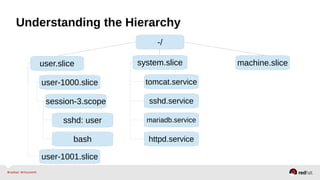
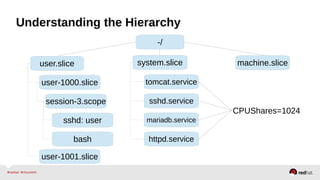
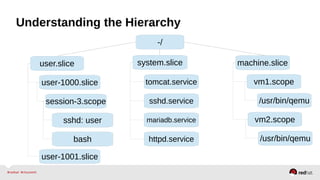
Understanding the Hierarchy 
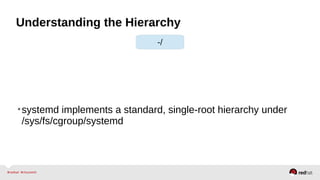
-/ 
•systemd implements a standard, single-root hierarchy under 
/sys/fs/cgroup/systemd
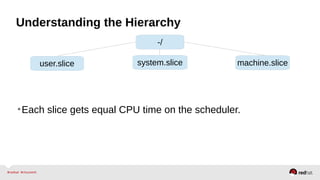
Understanding the Hierarchy 
-/ 
user.slice system.slice machine.slice 
•Each slice gets equal CPU time on the scheduler.
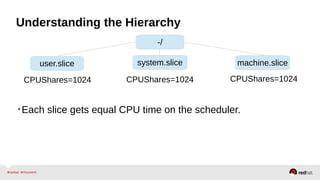
Understanding the Hierarchy 
-/ 
user.slice system.slice machine.slice 
CPUShares=1024 CPUShares=1024 
CPUShares=1024 
•Each slice gets equal CPU time on the scheduler.
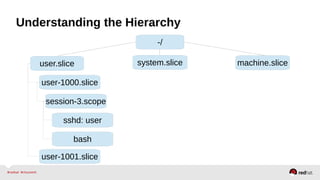
Understanding the Hierarchy 
-/ 
user.slice system.slice machine.slice 
user-1000.slice 
session-3.scope 
sshd: user 
bash 
user-1001.slice
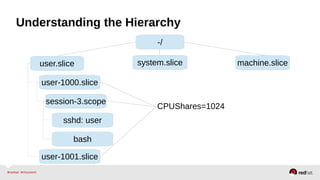
Understanding the Hierarchy 
-/ 
user.slice system.slice machine.slice 
user-1000.slice 
session-3.scope 
sshd: user 
bash 
user-1001.slice 
CPUShares=1024
Understanding the Hierarchy 
-/ 
user.slice system.slice machine.slice 
user-1000.slice 
session-3.scope 
sshd: user 
bash 
tomcat.service 
sshd.service 
mariadb.service 
httpd.service 
user-1001.slice
Understanding the Hierarchy 
-/ 
user.slice system.slice machine.slice 
user-1000.slice 
session-3.scope 
sshd: user 
bash 
tomcat.service 
sshd.service 
mariadb.service 
httpd.service 
user-1001.slice 
CPUShares=1024
Understanding the Hierarchy 
-/ 
user.slice system.slice machine.slice 
user-1000.slice 
session-3.scope 
sshd: user 
bash 
tomcat.service 
sshd.service 
mariadb.service 
httpd.service 
user-1001.slice 
vm1.scope 
/usr/bin/qemu 
vm2.scope 
/usr/bin/qemu
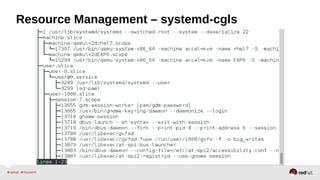
Resource Management – systemd-cgls
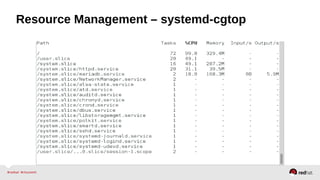
Resource Management – systemd-cgtop
Resource Management – Configuration 
•Enable the desired controller(s) – CPU, Memory, BlockIO 
•Configure cgroup attributes: 
• systemctl set-property --runtime httpd.service CPUShares=2048 
•Drop “--runtime” to persist: 
• systemctl set-property httpd.service CPUShares=2048 
•Or place in the unit file: 
• [Service] 
•CPUShares=2048 
http://0pointer.de/blog/projects/resources.html
Resource Management - CPU 
•CPUAccounting=1 to enable 
•CPUShares – default is 1024. 
•Increase to assign more CPU to a service 
• e.g. CPUShares=1600 
https://www.kernel.org/doc/Documentation/scheduler/sched-design-CFS.txt
Resource Management - Memory 
•MemoryAccounting=1 to enable 
•MemoryLimit= 
•Use K, M, G, T suffixes 
•MemoryLimit=1G 
https://www.kernel.org/doc/Documentation/cgroups/memory.txt
Resource Management - BlkIO 
•BlockIOAccounting=1 
•BlockIOWeight= assigns an IO weight to a specific service 
(requires CFQ) 
•Similar to CPU shares 
•Default is 1000 
•Range 10 – 1000 
•Can be defined per device (or mount point) 
•BlockIOReadBandwidth & BlockIOWriteBandwidth 
•BlockIOWriteBandwith=/var/log 5M 
https://www.kernel.org/doc/Documentation/cgroups/blkio-controller.txt
Converting Init Scripts 
You can do it! It's easy!
Remember what init scripts look like?
/etc/init.d/httpd 
. /etc/rc.d/init.d/functions 
if [ -f /etc/sysconfig/httpd ]; then 
. /etc/sysconfig/httpd 
fi HTTPD_LANG=${HTTPD_LANG-"C"} 
INITLOG_ARGS="" 
apachectl=/usr/sbin/apachectl 
httpd=${HTTPD-/usr/sbin/httpd} 
prog=httpd 
pidfile=${PIDFILE-/var/run/httpd/httpd.pid} 
lockfile=${LOCKFILE-/var/lock/subsys/httpd} 
RETVAL=0 
STOP_TIMEOUT=${STOP_TIMEOUT-10} 
start() { 
echo -n $"Starting $prog: " 
LANG=$HTTPD_LANG daemon --pidfile=${pidfile} $httpd $OPTIONS 
RETVAL=$? 
echo 
[ $RETVAL = 0 ] && touch ${lockfile} 
return $RETVAL 
} 
stop() { 
echo -n $"Stopping $prog: " 
killproc -p ${pidfile} -d ${STOP_TIMEOUT} $httpd 
RETVAL=$? 
echo 
[ $RETVAL = 0 ] && rm -f ${lockfile} ${pidfile} 
} 
From RHEL 6.4; comments removed
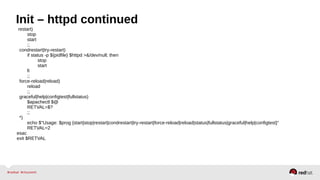
Init – httpd continued 
reload() { 
echo -n $"Reloading $prog: " 
if ! LANG=$HTTPD_LANG $httpd $OPTIONS -t >&/dev/null; then 
RETVAL=6 
echo $"not reloading due to configuration syntax error" 
failure $"not reloading $httpd due to configuration syntax error" 
else 
LSB=1 killproc -p ${pidfile} $httpd -HUP 
RETVAL=$? 
if [ $RETVAL -eq 7 ]; then 
failure $"httpd shutdown" 
fi 
fi 
echo 
} 
case "$1" in 
start) 
start 
;; 
stop) 
stop 
;; 
status) 
status -p ${pidfile} $httpd 
RETVAL=$? 
;;
Init – httpd continued 
restart) 
stop 
start 
;; 
condrestart|try-restart) 
if status -p ${pidfile} $httpd >&/dev/null; then 
stop 
start 
fi 
;; 
force-reload|reload) 
reload 
;; 
graceful|help|configtest|fullstatus) 
$apachectl $@ 
RETVAL=$? 
;; 
*) 
echo $"Usage: $prog {start|stop|restart|condrestart|try-restart|force-reload|reload|status|fullstatus|graceful|help|configtest}" 
RETVAL=2 
esac 
exit $RETVAL
Systemd – httpd.service 
[Unit] 
Description=The Apache HTTP Server 
After=remote-fs.target nss-lookup.target 
[Service] 
Type=notify 
EnvironmentFile=/etc/sysconfig/httpd 
ExecStart=/usr/sbin/httpd $OPTIONS -DFOREGROUND 
ExecReload=/usr/sbin/httpd $OPTIONS -k graceful 
ExecStop=/usr/sbin/httpd $OPTIONS -k graceful-stop 
KillSignal=SIGCONT 
PrivateTmp=true 
[Install] 
WantedBy=multi-user.target *Comments were removed for readability
To be clear 
•Systemd maintains 99% backwards compatibility with LSB 
compatible initscripts and the exceptions are well documented. 
•While we do encourage everyone to convert legacy scripts to 
service unit files, it's not a requirement. 
•Incompatibilities are listed here: 
http://www.freedesktop.org/wiki/Software/systemd/Incompatibilities/ 
•Converting SysV Init Scripts: 
http://0pointer.de/blog/projects/systemd-for-admins-3.html
Unit file layout – Custom application example 
[Unit] 
Description=Describe the daemon 
[Service] 
ExecStart=/usr/sbin/[myapp] -D 
Type=forking 
PIDFile=/var/run/myapp.pid 
[Install] 
WantedBy=multi-user.target
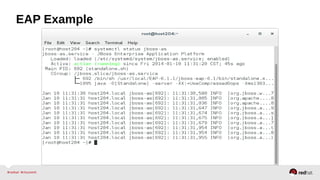
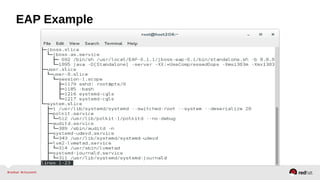
[Unit] EAP Example 
Description=JBoss Enterprise Application Platform 
Note: If you don't define “Type=” it will be “simple” by default 
[Service] 
User=jboss-as 
Environment=JBOSS_USER=jboss-as 
Environment=JBOSS_HOME=/usr/local/EAP-6.1.1/jboss-eap-6.1 
Environment=JBOSS_CONSOLE_LOG=/var/log/jbossas/console.log 
ExecStart=/usr/local/EAP-6.1.1/jboss-eap-6.1/bin/standalone.sh 
PIDFile=/run/jboss-as/jboss-as-standalone.pid 
SyslogIdentifier=jboss-as 
LimitNOFILE=102642 
Slice=jboss.slice 
[Install] 
WantedBy=multi-user.target
EAP Example
EAP Example
Unit file layout – Test your unit file 
•Copy the unit file 
• cp [myapp].service /etc/systemd/system/ 
•Alert systemd of the changes: 
• systemctl daemon-reload 
•Start service 
• systemctl start [myapp].service 
•View status 
• systemctl status [myapp].service 
http://0pointer.de/blog/projects/systemd-for-admins-3.html
The Journal 
journalctl 101
Journal 
•Indexed 
•Formatted 
•Errors in red 
•Warnings in bold 
•Security 
•Reliability 
•Intelligently rotated 
http://0pointer.de/blog/projects/journalctl.html
Journal 
•Does not replace rsyslog in RHEL 7 
• rsyslog is enabled by default 
•The journal is not persistent by default. 
•Enable persistence: `mkdir /var/log/journal` 
•Stored in key-value pairs 
• journalctl [tab] [tab] 
•Man 7 systemd.journal-fields 
•Collects event metadata along with the message 
•Simple to filter 
• Interleave units, binaries, etc.
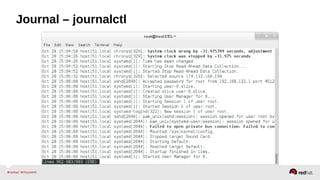
Journal – journalctl
Using the Journal 
•Tail the journal: `journalctl -f` 
•Show X number of lines: `journalctl -n 50` 
•View from boot: `journalctl -b` 
•Filter by priority: `journalctl -p [level]` 
0 emerg 
1 alert 
2 crit 
3 err 
4 warning 
5 notice 
6 debug
Using the Journal 
•Other useful filters: 
• -r reverse order 
• -u [unit] 
• binary e.g. /usr/sbin/dnsmasq [additional binaries] 
• --since=yesterday or YYYY-MM-DD (HH:MM:SS) 
• --until=YYYY-MM-DD 
•View entire journal 
• journalctl -o verbose (useful for grep)
Systemd Resources 
•RHEL 7 documentation: 
https://access.redhat.com/site/documentation/Red_Hat_Enterprise_Linux/ 
•Systemd project page: 
http://www.freedesktop.org/wiki/Software/systemd/ 
•Lennart Poettering's systemd blog entries: (read them all) 
http://0pointer.de/blog/projects/systemd-for-admins-1.html 
•Red Hat System Administration II & III (RH134/RH254) 
http://redhat.com/training/ 
•Systemd FAQ 
•Tips & Tricks
 
“Questions?”
THANK YOU
Summit demystifying systemd1

Summit demystifying systemd1

  • 1.
    Demystifying systemd APractical Guide Ben Breard, RHCA Solutions Architect, Red Hat Lennart Poettering Senior Engineer, Red Hat
  • 2.
    Agenda •systemd 101 •Customizing Units •Resource Management •Converting init scripts •The journal
  • 3.
    systemd •Controls “units”rather than just daemons •Handles dependency between units. •Tracks processes with service information •Services are owned by a cgroup. • Simple to configure “SLAs” based on CPU, Memory, and IO •Properly kill daemons •Minimal boot times •Debuggability – no early boot messages are lost •Easy to learn and backwards compatible
  • 4.
  • 5.
  • 6.
    systemd 101 units,systemctl, troubleshooting
  • 7.
    systemd Units service.service socket.socket device.device mount.mount automount.automount swap.swap target.target path.path timer.timer snapshot.snapshot slice.slice scope.scope
  • 8.
    systemd Units –httpd.service [Unit] Description=The Apache HTTP Server After=remote-fs.target nss-lookup.target [Service] Type=notify EnvironmentFile=/etc/sysconfig/httpd ExecStart=/usr/sbin/httpd $OPTIONS -DFOREGROUND ExecReload=/usr/sbin/httpd $OPTIONS -k graceful ExecStop=/usr/sbin/httpd $OPTIONS -k graceful-stop KillSignal=SIGCONT PrivateTmp=true [Install] WantedBy=multi-user.target *Comments were removed for readability
  • 9.
    Managing Services –Unit files Init •Init scripts: /etc/init.d & called from /etc/rc* systemd •Maintainer files: /usr/lib/systemd/system •Administrator files: /etc/systemd/system •Non-persistent, runtime data: /run/systemd Note: unit files under /etc will take precedence over /usr
  • 10.
    Managing Services –Start/Stop Init •service httpd {start,stop,restart,reload} systemd •systemctl {start,stop,restart,reload} httpd.service
  • 11.
    Managing Services –Start/Stop Init •service httpd {start,stop,restart,reload} systemd •systemctl {start,stop,restart,reload} httpd.service
  • 12.
    Managing Services –Start/Stop •Glob units when needed. • systemctl restart httpd mariadb • systemctl enable httpd mariadb ntpd lm_sensors [etc] •If a unit type isn't specified, .service is assumed. • systemctl start httpd == systemctl start httpd.service •Shell completion is highly recommended • Install bash-completion • Add bash-completion to minimal kickstarts •Connect to remote hosts over SSH using “-H”
  • 13.
    Managing Services –Status Init •service httpd status systemd •systemctl status httpd.service Tip: -l won't truncate the output
  • 14.
  • 15.
    Managing Services –Status That's a little more helpful than:
  • 17.
    Managing Services –Status •List loaded services: • systemctl -t service •List installed services: • systemctl list-unit-files -t service (similar to chkconfig --list) •View state: • systemctl --state failed
  • 18.
    Managing Services –Enable/Disable Init •chkconfig httpd {on,off} systemd •systemctl {enable, disable, mask, unmask} httpd.service
  • 19.
    Targets == Runlevels •“Runlevels” are exposed as target units •Target names are more relevant: •multi-user.target vs. runlevel3 •graphical.target vs. runlevel5 •View the default target via: `systemctl get-default` •Set the default target via: `systemctl set-default [target]` •Change at run-time via: `systemctl isolate [target]` Note: /etc/inittab is no longer used.
  • 20.
    Troubleshooting •Append systemd.unit=[target]to the kernel • Rescue mode: single, s, S, or 1 • Emergency (similar to init=/bin/bash): -b or emergency •Interactive boot append: systemd.confirm_spawn=1 •Enable debugging append: • debug • debug systemd.log_target=kmsg log_buf_len=1M • debug systemd.log_target=console console=ttyS0 http://freedesktop.org/wiki/Software/systemd/Debugging/
  • 21.
    Troubleshooting •Early bootshell on tty9 • systemctl enable debug-shell.service • Equivalent to: `ln -s /usr/lib/systemd/system/debug-shell.service /etc/systemd/system/sysinit.target.wants/` •systemctl list-jobs •systemd-analyze •Use 'blame', 'plot', or 'critical-chain' for more details •rc.local is supported, but no longer runs last • chmod +x /etc/rc.d/rc.local
  • 22.
  • 23.
    What's available?? •Lista unit's properties: • systemctl show --all httpd •Query a single property: • systemctl show -p Restart httpd • Restart=no •Helpful man files: systemd.exec and systemd.service •Restart, Nice, CPUAffinity, OOMScoreAdjust, LimitNOFILE, etc Disclaimer: just because you can configure something doesn't mean you should!
  • 24.
    Drop-ins 1) mkdir/etc/systemd/system/[name.type.d]/*.conf 2) vim /etc/systemd/system/httpd.service.d/50-httpd.conf [Service] Remember the 'S' is capitalized Restart=always CPUAffinity=0 1 2 3 OOMScoreAdjust=-1000 3) systemctl daemon-reload • Changes will be applied on top of maintainer unit files.
  • 25.
  • 26.
    Drop-ins •`systemd-delta` isyour friend. •Simple to use with configuration tools like Satellite, Puppet, etc. •Simply delete the drop-in to revert to defaults. •Don't forget `systemctl daemon-reload` when modifying units.
  • 27.
  • 28.
    Control Groups MadeSimple Resource Management with cgroups can reduce application or VM contention and improve throughput and predictability
  • 29.
    Easily the bestRHEL 6 feature that no one uses
  • 30.
    Contain Your Applicationsand Guarantee Service •Configure how applications, containers, and VMs will behave when resources are under contention. •Trivial to keep poorly written applications from stomping on your system. My daughter was not harmed during the making of this presentation
  • 31.
    Slices, Scopes, Services •Slice – Unit type for creating the cgroup hierarchy for resource management. •Scope – Organizational unit that groups a services' worker processes. •Service – Process or group of processes controlled by systemd
  • 32.
    Understanding the Hierarchy -/ •systemd implements a standard, single-root hierarchy under /sys/fs/cgroup/systemd
  • 33.
    Understanding the Hierarchy -/ user.slice system.slice machine.slice •Each slice gets equal CPU time on the scheduler.
  • 34.
    Understanding the Hierarchy -/ user.slice system.slice machine.slice CPUShares=1024 CPUShares=1024 CPUShares=1024 •Each slice gets equal CPU time on the scheduler.
  • 35.
    Understanding the Hierarchy -/ user.slice system.slice machine.slice user-1000.slice session-3.scope sshd: user bash user-1001.slice
  • 36.
    Understanding the Hierarchy -/ user.slice system.slice machine.slice user-1000.slice session-3.scope sshd: user bash user-1001.slice CPUShares=1024
  • 37.
    Understanding the Hierarchy -/ user.slice system.slice machine.slice user-1000.slice session-3.scope sshd: user bash tomcat.service sshd.service mariadb.service httpd.service user-1001.slice
  • 38.
    Understanding the Hierarchy -/ user.slice system.slice machine.slice user-1000.slice session-3.scope sshd: user bash tomcat.service sshd.service mariadb.service httpd.service user-1001.slice CPUShares=1024
  • 39.
    Understanding the Hierarchy -/ user.slice system.slice machine.slice user-1000.slice session-3.scope sshd: user bash tomcat.service sshd.service mariadb.service httpd.service user-1001.slice vm1.scope /usr/bin/qemu vm2.scope /usr/bin/qemu
  • 40.
  • 41.
  • 42.
    Resource Management –Configuration •Enable the desired controller(s) – CPU, Memory, BlockIO •Configure cgroup attributes: • systemctl set-property --runtime httpd.service CPUShares=2048 •Drop “--runtime” to persist: • systemctl set-property httpd.service CPUShares=2048 •Or place in the unit file: • [Service] •CPUShares=2048 http://0pointer.de/blog/projects/resources.html
  • 43.
    Resource Management -CPU •CPUAccounting=1 to enable •CPUShares – default is 1024. •Increase to assign more CPU to a service • e.g. CPUShares=1600 https://www.kernel.org/doc/Documentation/scheduler/sched-design-CFS.txt
  • 44.
    Resource Management -Memory •MemoryAccounting=1 to enable •MemoryLimit= •Use K, M, G, T suffixes •MemoryLimit=1G https://www.kernel.org/doc/Documentation/cgroups/memory.txt
  • 45.
    Resource Management -BlkIO •BlockIOAccounting=1 •BlockIOWeight= assigns an IO weight to a specific service (requires CFQ) •Similar to CPU shares •Default is 1000 •Range 10 – 1000 •Can be defined per device (or mount point) •BlockIOReadBandwidth & BlockIOWriteBandwidth •BlockIOWriteBandwith=/var/log 5M https://www.kernel.org/doc/Documentation/cgroups/blkio-controller.txt
  • 46.
    Converting Init Scripts You can do it! It's easy!
  • 47.
    Remember what initscripts look like?
  • 48.
    /etc/init.d/httpd . /etc/rc.d/init.d/functions if [ -f /etc/sysconfig/httpd ]; then . /etc/sysconfig/httpd fi HTTPD_LANG=${HTTPD_LANG-"C"} INITLOG_ARGS="" apachectl=/usr/sbin/apachectl httpd=${HTTPD-/usr/sbin/httpd} prog=httpd pidfile=${PIDFILE-/var/run/httpd/httpd.pid} lockfile=${LOCKFILE-/var/lock/subsys/httpd} RETVAL=0 STOP_TIMEOUT=${STOP_TIMEOUT-10} start() { echo -n $"Starting $prog: " LANG=$HTTPD_LANG daemon --pidfile=${pidfile} $httpd $OPTIONS RETVAL=$? echo [ $RETVAL = 0 ] && touch ${lockfile} return $RETVAL } stop() { echo -n $"Stopping $prog: " killproc -p ${pidfile} -d ${STOP_TIMEOUT} $httpd RETVAL=$? echo [ $RETVAL = 0 ] && rm -f ${lockfile} ${pidfile} } From RHEL 6.4; comments removed
  • 49.
    Init – httpdcontinued reload() { echo -n $"Reloading $prog: " if ! LANG=$HTTPD_LANG $httpd $OPTIONS -t >&/dev/null; then RETVAL=6 echo $"not reloading due to configuration syntax error" failure $"not reloading $httpd due to configuration syntax error" else LSB=1 killproc -p ${pidfile} $httpd -HUP RETVAL=$? if [ $RETVAL -eq 7 ]; then failure $"httpd shutdown" fi fi echo } case "$1" in start) start ;; stop) stop ;; status) status -p ${pidfile} $httpd RETVAL=$? ;;
  • 50.
    Init – httpdcontinued restart) stop start ;; condrestart|try-restart) if status -p ${pidfile} $httpd >&/dev/null; then stop start fi ;; force-reload|reload) reload ;; graceful|help|configtest|fullstatus) $apachectl $@ RETVAL=$? ;; *) echo $"Usage: $prog {start|stop|restart|condrestart|try-restart|force-reload|reload|status|fullstatus|graceful|help|configtest}" RETVAL=2 esac exit $RETVAL
  • 52.
    Systemd – httpd.service [Unit] Description=The Apache HTTP Server After=remote-fs.target nss-lookup.target [Service] Type=notify EnvironmentFile=/etc/sysconfig/httpd ExecStart=/usr/sbin/httpd $OPTIONS -DFOREGROUND ExecReload=/usr/sbin/httpd $OPTIONS -k graceful ExecStop=/usr/sbin/httpd $OPTIONS -k graceful-stop KillSignal=SIGCONT PrivateTmp=true [Install] WantedBy=multi-user.target *Comments were removed for readability
  • 53.
    To be clear •Systemd maintains 99% backwards compatibility with LSB compatible initscripts and the exceptions are well documented. •While we do encourage everyone to convert legacy scripts to service unit files, it's not a requirement. •Incompatibilities are listed here: http://www.freedesktop.org/wiki/Software/systemd/Incompatibilities/ •Converting SysV Init Scripts: http://0pointer.de/blog/projects/systemd-for-admins-3.html
  • 54.
    Unit file layout– Custom application example [Unit] Description=Describe the daemon [Service] ExecStart=/usr/sbin/[myapp] -D Type=forking PIDFile=/var/run/myapp.pid [Install] WantedBy=multi-user.target
  • 55.
    [Unit] EAP Example Description=JBoss Enterprise Application Platform Note: If you don't define “Type=” it will be “simple” by default [Service] User=jboss-as Environment=JBOSS_USER=jboss-as Environment=JBOSS_HOME=/usr/local/EAP-6.1.1/jboss-eap-6.1 Environment=JBOSS_CONSOLE_LOG=/var/log/jbossas/console.log ExecStart=/usr/local/EAP-6.1.1/jboss-eap-6.1/bin/standalone.sh PIDFile=/run/jboss-as/jboss-as-standalone.pid SyslogIdentifier=jboss-as LimitNOFILE=102642 Slice=jboss.slice [Install] WantedBy=multi-user.target
  • 56.
  • 57.
  • 58.
    Unit file layout– Test your unit file •Copy the unit file • cp [myapp].service /etc/systemd/system/ •Alert systemd of the changes: • systemctl daemon-reload •Start service • systemctl start [myapp].service •View status • systemctl status [myapp].service http://0pointer.de/blog/projects/systemd-for-admins-3.html
  • 59.
  • 60.
    Journal •Indexed •Formatted •Errors in red •Warnings in bold •Security •Reliability •Intelligently rotated http://0pointer.de/blog/projects/journalctl.html
  • 61.
    Journal •Does notreplace rsyslog in RHEL 7 • rsyslog is enabled by default •The journal is not persistent by default. •Enable persistence: `mkdir /var/log/journal` •Stored in key-value pairs • journalctl [tab] [tab] •Man 7 systemd.journal-fields •Collects event metadata along with the message •Simple to filter • Interleave units, binaries, etc.
  • 62.
  • 63.
    Using the Journal •Tail the journal: `journalctl -f` •Show X number of lines: `journalctl -n 50` •View from boot: `journalctl -b` •Filter by priority: `journalctl -p [level]` 0 emerg 1 alert 2 crit 3 err 4 warning 5 notice 6 debug
  • 64.
    Using the Journal •Other useful filters: • -r reverse order • -u [unit] • binary e.g. /usr/sbin/dnsmasq [additional binaries] • --since=yesterday or YYYY-MM-DD (HH:MM:SS) • --until=YYYY-MM-DD •View entire journal • journalctl -o verbose (useful for grep)
  • 65.
    Systemd Resources •RHEL7 documentation: https://access.redhat.com/site/documentation/Red_Hat_Enterprise_Linux/ •Systemd project page: http://www.freedesktop.org/wiki/Software/systemd/ •Lennart Poettering's systemd blog entries: (read them all) http://0pointer.de/blog/projects/systemd-for-admins-1.html •Red Hat System Administration II & III (RH134/RH254) http://redhat.com/training/ •Systemd FAQ •Tips & Tricks
  • 66.
  • 67.