CoreOS
or, How I Learned to Stop
Worrying and Love Systemd
or, some pragmatic patterns for running docker in
production
Hello!
I AM RIC LISTER
director of devops at spree commerce
@bnzmnzhnz
github.com/rlister
open-source
Spree
complete open-source e-commerce for rails
github.com/spree/spree
599 contributors 6181 stars
e-commerce platform
Wombat
connect any store to any service
wombat.co
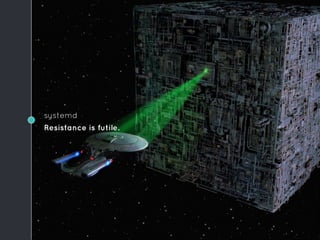
systemd
Resistance is futile.
Docker frees us from the operating system
No more
dependency hell.
Since the OS no
longer needs to
support our app, we
can go minimalist.
Which makes it
easier to patch, and
more secure.
What do we need?
Some way to run containers:
◦ docker pull, start, stop, rm
◦ set environment variables
◦ restart policies
◦ capture output
And an OS that can update itself in
a sane way.
And some orchestration …
CoreOS
Originally based on
ChromiumOS.
Which is based on
Gentoo.
No packaging
system.
Well ... there is:
docker.
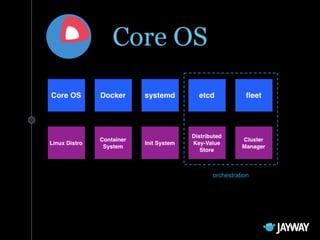
orchestration
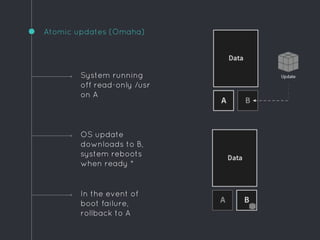
Atomic updates (Omaha)
In the event of
boot failure,
rollback to A
System running
off read-only /usr
on A
OS update
downloads to B,
system reboots
when ready *
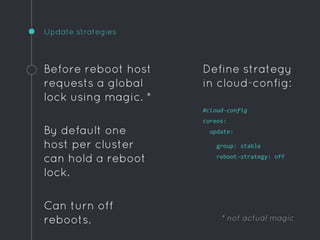
Update strategies
Before reboot host
requests a global
lock using magic. *
By default one
host per cluster
can hold a reboot
lock.
Can turn off
reboots.
Define strategy
in cloud-config:
#cloud-config
coreos:
update:
group: stable
reboot-strategy: off
* not actual magic
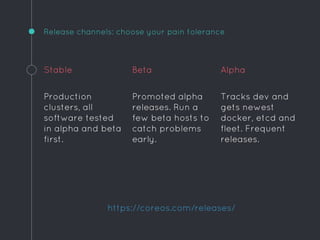
Release channels: choose your pain tolerance
Stable
Production
clusters, all
software tested
in alpha and beta
first.
Beta
Promoted alpha
releases. Run a
few beta hosts to
catch problems
early.
Alpha
Tracks dev and
gets newest
docker, etcd and
fleet. Frequent
releases.
https://coreos.com/releases/
ETCD
Open-source distributed key-value
store. Uses Raft protocol (consensus).
Provides shared configuration and
service discovery.
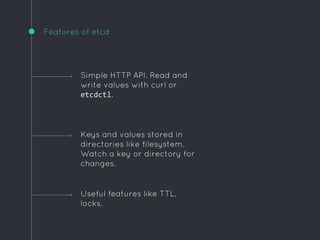
Features of etcd
Useful features like TTL,
locks.
Simple HTTP API. Read and
write values with curl or
etcdctl.
Keys and values stored in
directories like filesystem.
Watch a key or directory for
changes.
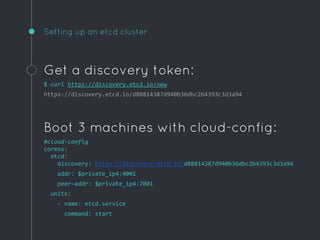
Setting up an etcd cluster
Get a discovery token:
$ curl https://discovery.etcd.io/new
https://discovery.etcd.io/d88814387d940b36dbc2b4393c3d3a94
Boot 3 machines with cloud-config:
#cloud-config
coreos:
etcd:
discovery: https://discovery.etcd.io/d88814387d940b36dbc2b4393c3d3a94
addr: $private_ip4:4001
peer-addr: $private_ip4:7001
units:
- name: etcd.service
command: start
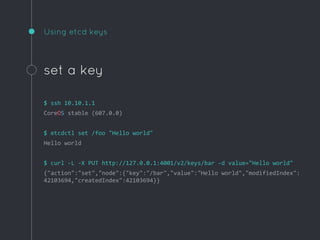
Using etcd keys
set a key
$ ssh 10.10.1.1
CoreOS stable (607.0.0)
$ etcdctl set /foo "Hello world"
Hello world
$ curl -L -X PUT http://127.0.0.1:4001/v2/keys/bar -d value="Hello world"
{"action":"set","node":{"key":"/bar","value":"Hello world","modifiedIndex":
42103694,"createdIndex":42103694}}
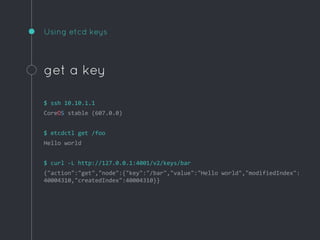
Using etcd keys
get a key
$ ssh 10.10.1.1
CoreOS stable (607.0.0)
$ etcdctl get /foo
Hello world
$ curl -L http://127.0.0.1:4001/v2/keys/bar
{"action":"get","node":{"key":"/bar","value":"Hello world","modifiedIndex":
40004310,"createdIndex":40004310}}
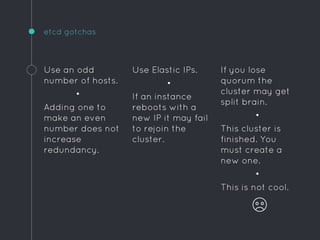
If you lose
quorum the
cluster may get
split brain.
•
This cluster is
finished. You
must create a
new one.
•
This is not cool.
etcd gotchas
Use an odd
number of hosts.
•
Adding one to
make an even
number does not
increase
redundancy.
Use Elastic IPs.
•
If an instance
reboots with a
new IP it may fail
to rejoin the
cluster.
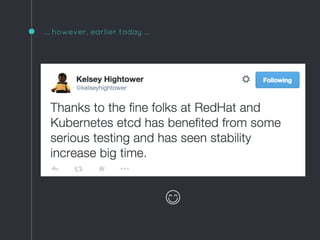
… however, earlier today ...
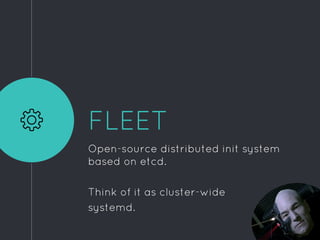
FLEET
Open-source distributed init system
based on etcd.
Think of it as cluster-wide
systemd.
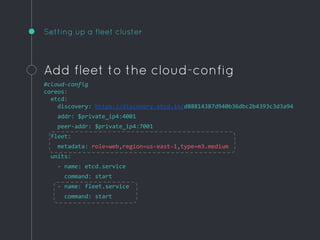
Setting up a fleet cluster
Add fleet to the cloud-config
#cloud-config
coreos:
etcd:
discovery: https://discovery.etcd.io/d88814387d940b36dbc2b4393c3d3a94
addr: $private_ip4:4001
peer-addr: $private_ip4:7001
fleet:
metadata: role=web,region=us-east-1,type=m3.medium
units:
- name: etcd.service
command: start
- name: fleet.service
command: start
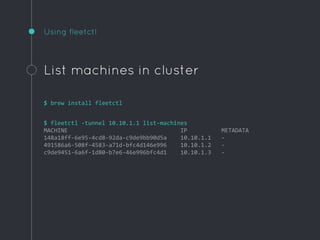
Using fleetctl
List machines in cluster
$ brew install fleetctl
$ fleetctl -tunnel 10.10.1.1 list-machines
MACHINE IP METADATA
148a18ff-6e95-4cd8-92da-c9de9bb90d5a 10.10.1.1 -
491586a6-508f-4583-a71d-bfc4d146e996 10.10.1.2 -
c9de9451-6a6f-1d80-b7e6-46e996bfc4d1 10.10.1.3 -
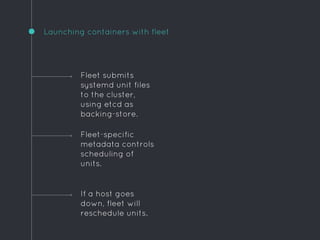
Launching containers with fleet
If a host goes
down, fleet will
reschedule units.
Fleet submits
systemd unit files
to the cluster,
using etcd as
backing-store.
Fleet-specific
metadata controls
scheduling of
units.
Example unit
[Unit]
Description=Hello world
After=docker.service
Requires=docker.service
[Service]
TimeoutStartSec=0
ExecStartPre=-/usr/bin/docker rm hello
ExecStartPre=/usr/bin/docker pull busybox
ExecStart=/usr/bin/docker run 
--name hello 
busybox /bin/sh -c "while true; do echo Hello World; sleep 1; done"
ExecStop=/usr/bin/docker stop hello
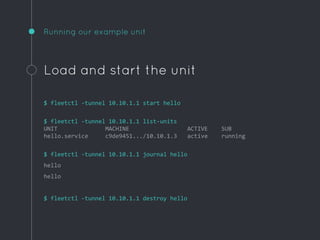
Running our example unit
Load and start the unit
$ fleetctl -tunnel 10.10.1.1 start hello
$ fleetctl -tunnel 10.10.1.1 list-units
UNIT MACHINE ACTIVE SUB
hello.service c9de9451.../10.10.1.3 active running
$ fleetctl -tunnel 10.10.1.1 journal hello
hello
hello
$ fleetctl -tunnel 10.10.1.1 destroy hello
Example global unit
[Unit]
Description=Hello world
After=docker.service
Requires=docker.service
[Service]
TimeoutStartSec=0
ExecStartPre=-/usr/bin/docker rm hello
ExecStartPre=/usr/bin/docker pull busybox
ExecStart=/usr/bin/docker run --name hello busybox /bin/sh -c "while
true; do echo Hello World; sleep 1; done"
ExecStop=/usr/bin/docker stop hello
[X-Fleet]
MachineMetadata=region=us-east-1
Global=true
Run on all instances with this
fleet metadata
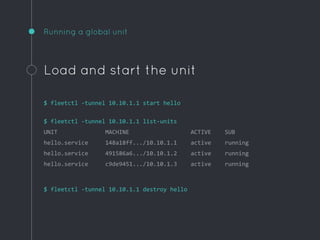
Running a global unit
Load and start the unit
$ fleetctl -tunnel 10.10.1.1 start hello
$ fleetctl -tunnel 10.10.1.1 list-units
UNIT MACHINE ACTIVE SUB
hello.service 148a18ff.../10.10.1.1 active running
hello.service 491586a6.../10.10.1.2 active running
hello.service c9de9451.../10.10.1.3 active running
$ fleetctl -tunnel 10.10.1.1 destroy hello
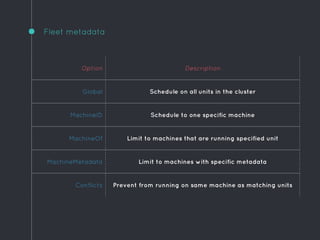
Fleet metadata
Option Description
Global Schedule on all units in the cluster
MachineID Schedule to one specific machine
MachineOf Limit to machines that are running specified unit
MachineMetadata Limit to machines with specific metadata
Conflicts Prevent from running on same machine as matching units
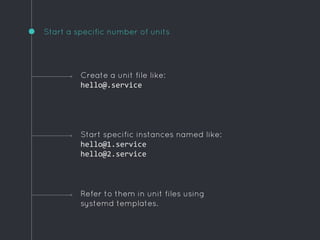
Start a specific number of units
Refer to them in unit files using
systemd templates.
Create a unit file like:
hello@.service
Start specific instances named like:
hello@1.service
hello@2.service
Example template unit
[Unit]
Description=Hello world
After=docker.service
Requires=docker.service
[Service]
TimeoutStartSec=0
ExecStartPre=-/usr/bin/docker rm hello
ExecStartPre=/usr/bin/docker pull busybox
ExecStart=/usr/bin/docker run --name hello busybox /bin/sh -c "while
true; do echo Hello World; sleep 1; done"
ExecStop=/usr/bin/docker stop hello
[X-Fleet]
Conflicts=hello@*
Ensure there is only one of these on each instance
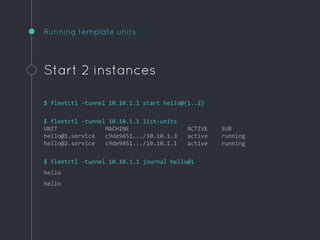
Running template units
Start 2 instances
$ fleetctl -tunnel 10.10.1.1 start hello@{1..2}
$ fleetctl -tunnel 10.10.1.1 list-units
UNIT MACHINE ACTIVE SUB
hello@1.service c9de9451.../10.10.1.3 active running
hello@2.service c9de9451.../10.10.1.1 active running
$ fleetctl -tunnel 10.10.1.1 journal hello@1
hello
hello
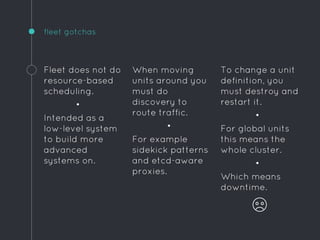
To change a unit
definition, you
must destroy and
restart it.
•
For global units
this means the
whole cluster.
•
Which means
downtime.
fleet gotchas
Fleet does not do
resource-based
scheduling.
•
Intended as a
low-level system
to build more
advanced
systems on.
When moving
units around you
must do
discovery to
route traffic.
•
For example
sidekick patterns
and etcd-aware
proxies.
puppy break
Any questions so far?
PATTERNS
How can I use CoreOS for real?
Here are three patterns I use in
production today ...
Simple homogeneous ops cluster
This is the most textbook “toy” cluster you will see in
CoreOS docs.
It is suitable for all those random little internal tools that
can tolerate brief downtime.
1
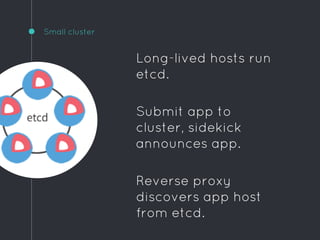
Small cluster
Long-lived hosts run
etcd.
Submit app to
cluster, sidekick
announces app.
Reverse proxy
discovers app host
from etcd.
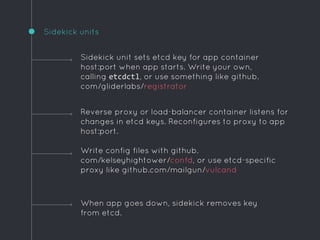
Sidekick units
When app goes down, sidekick removes key
from etcd.
Sidekick unit sets etcd key for app container
host:port when app starts. Write your own,
calling etcdctl, or use something like github.
com/gliderlabs/registrator
Reverse proxy or load-balancer container listens for
changes in etcd keys. Reconfigures to proxy to app
host:port.
Write config files with github.
com/kelseyhightower/confd, or use etcd-specific
proxy like github.com/mailgun/vulcand
Etcd + workers
Great for low-traffic websites that need a couple of
instances behind a load-balancer.
Works well with autoscaling.
2
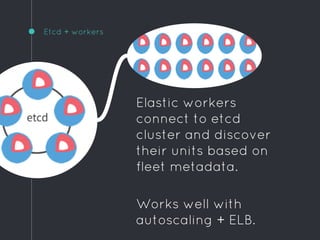
Etcd + workers
Elastic workers
connect to etcd
cluster and discover
their units based on
fleet metadata.
Works well with
autoscaling + ELB.
Immutable servers with no etcd
We use this for a high-traffic cluster of micro-services that
demands very high availability and strict change control.
Systemd units are hard-coded into cloud-config with user-
data.
Demands some orchestration such as autoscaling groups.
3
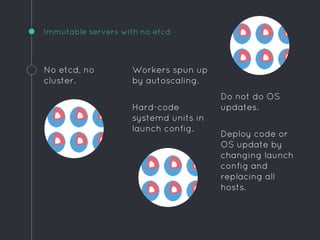
Do not do OS
updates.
Deploy code or
OS update by
changing launch
config and
replacing all
hosts.
Immutable servers with no etcd
No etcd, no
cluster.
Workers spun up
by autoscaling.
Hard-code
systemd units in
launch config.
Logs
Get ‘em off the host ASAP.
github.com/gliderlabs/logspout is a
tiny docker container that ships all
other container output to udp/514.
Send to logstash/splunk/papertrail ...
Monitoring
◦ AWS cloudwatch
◦ newrelic for apps
◦ newrelic-sysmond for instances
◦ … but it doesn’t understand cgroups
◦ datadog has better container
support
◦ cadvisor presents container stats
over http
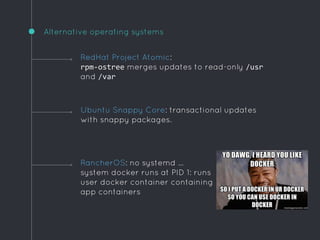
Alternative operating systems
RancherOS: no systemd …
system docker runs at PID 1: runs
user docker container containing
app containers
RedHat Project Atomic:
rpm-ostree merges updates to read-only /usr
and /var
Ubuntu Snappy Core: transactional updates
with snappy packages.
Schedulers
Fleet is intentionally simple. Build on it
for more sophistication:
◦ Google’s Kubernetes
◦ Apache Mesos/Marathon
◦ paz.sh … PaaS based-on CoreOS
◦ Deis … private heroku-like on CoreOS
It seems like something new pops up every day at the moment ...
ok, I’m done
Any questions?
Place your screenshot here
We’re hiring
DevOps
Ruby dev
UI/UX design
Product

CoreOS, or How I Learned to Stop Worrying and Love Systemd

  • 1.
  • 2.
    or, How ILearned to Stop Worrying and Love Systemd or, some pragmatic patterns for running docker in production
  • 3.
    Hello! I AM RICLISTER director of devops at spree commerce @bnzmnzhnz github.com/rlister
  • 4.
    open-source Spree complete open-source e-commercefor rails github.com/spree/spree 599 contributors 6181 stars
  • 5.
    e-commerce platform Wombat connect anystore to any service wombat.co
  • 6.
  • 7.
    Docker frees usfrom the operating system No more dependency hell. Since the OS no longer needs to support our app, we can go minimalist. Which makes it easier to patch, and more secure.
  • 8.
    What do weneed? Some way to run containers: ◦ docker pull, start, stop, rm ◦ set environment variables ◦ restart policies ◦ capture output And an OS that can update itself in a sane way. And some orchestration …
  • 9.
    CoreOS Originally based on ChromiumOS. Whichis based on Gentoo. No packaging system. Well ... there is: docker.
  • 10.
  • 11.
    Atomic updates (Omaha) Inthe event of boot failure, rollback to A System running off read-only /usr on A OS update downloads to B, system reboots when ready *
  • 12.
    Update strategies Before reboothost requests a global lock using magic. * By default one host per cluster can hold a reboot lock. Can turn off reboots. Define strategy in cloud-config: #cloud-config coreos: update: group: stable reboot-strategy: off * not actual magic
  • 13.
    Release channels: chooseyour pain tolerance Stable Production clusters, all software tested in alpha and beta first. Beta Promoted alpha releases. Run a few beta hosts to catch problems early. Alpha Tracks dev and gets newest docker, etcd and fleet. Frequent releases. https://coreos.com/releases/
  • 14.
    ETCD Open-source distributed key-value store.Uses Raft protocol (consensus). Provides shared configuration and service discovery.
  • 15.
    Features of etcd Usefulfeatures like TTL, locks. Simple HTTP API. Read and write values with curl or etcdctl. Keys and values stored in directories like filesystem. Watch a key or directory for changes.
  • 16.
    Setting up anetcd cluster Get a discovery token: $ curl https://discovery.etcd.io/new https://discovery.etcd.io/d88814387d940b36dbc2b4393c3d3a94 Boot 3 machines with cloud-config: #cloud-config coreos: etcd: discovery: https://discovery.etcd.io/d88814387d940b36dbc2b4393c3d3a94 addr: $private_ip4:4001 peer-addr: $private_ip4:7001 units: - name: etcd.service command: start
  • 17.
    Using etcd keys seta key $ ssh 10.10.1.1 CoreOS stable (607.0.0) $ etcdctl set /foo "Hello world" Hello world $ curl -L -X PUT http://127.0.0.1:4001/v2/keys/bar -d value="Hello world" {"action":"set","node":{"key":"/bar","value":"Hello world","modifiedIndex": 42103694,"createdIndex":42103694}}
  • 18.
    Using etcd keys geta key $ ssh 10.10.1.1 CoreOS stable (607.0.0) $ etcdctl get /foo Hello world $ curl -L http://127.0.0.1:4001/v2/keys/bar {"action":"get","node":{"key":"/bar","value":"Hello world","modifiedIndex": 40004310,"createdIndex":40004310}}
  • 19.
    If you lose quorumthe cluster may get split brain. • This cluster is finished. You must create a new one. • This is not cool. etcd gotchas Use an odd number of hosts. • Adding one to make an even number does not increase redundancy. Use Elastic IPs. • If an instance reboots with a new IP it may fail to rejoin the cluster.
  • 20.
  • 21.
    FLEET Open-source distributed initsystem based on etcd. Think of it as cluster-wide systemd.
  • 22.
    Setting up afleet cluster Add fleet to the cloud-config #cloud-config coreos: etcd: discovery: https://discovery.etcd.io/d88814387d940b36dbc2b4393c3d3a94 addr: $private_ip4:4001 peer-addr: $private_ip4:7001 fleet: metadata: role=web,region=us-east-1,type=m3.medium units: - name: etcd.service command: start - name: fleet.service command: start
  • 23.
    Using fleetctl List machinesin cluster $ brew install fleetctl $ fleetctl -tunnel 10.10.1.1 list-machines MACHINE IP METADATA 148a18ff-6e95-4cd8-92da-c9de9bb90d5a 10.10.1.1 - 491586a6-508f-4583-a71d-bfc4d146e996 10.10.1.2 - c9de9451-6a6f-1d80-b7e6-46e996bfc4d1 10.10.1.3 -
  • 24.
    Launching containers withfleet If a host goes down, fleet will reschedule units. Fleet submits systemd unit files to the cluster, using etcd as backing-store. Fleet-specific metadata controls scheduling of units.
  • 25.
    Example unit [Unit] Description=Hello world After=docker.service Requires=docker.service [Service] TimeoutStartSec=0 ExecStartPre=-/usr/bin/dockerrm hello ExecStartPre=/usr/bin/docker pull busybox ExecStart=/usr/bin/docker run --name hello busybox /bin/sh -c "while true; do echo Hello World; sleep 1; done" ExecStop=/usr/bin/docker stop hello
  • 26.
    Running our exampleunit Load and start the unit $ fleetctl -tunnel 10.10.1.1 start hello $ fleetctl -tunnel 10.10.1.1 list-units UNIT MACHINE ACTIVE SUB hello.service c9de9451.../10.10.1.3 active running $ fleetctl -tunnel 10.10.1.1 journal hello hello hello $ fleetctl -tunnel 10.10.1.1 destroy hello
  • 27.
    Example global unit [Unit] Description=Helloworld After=docker.service Requires=docker.service [Service] TimeoutStartSec=0 ExecStartPre=-/usr/bin/docker rm hello ExecStartPre=/usr/bin/docker pull busybox ExecStart=/usr/bin/docker run --name hello busybox /bin/sh -c "while true; do echo Hello World; sleep 1; done" ExecStop=/usr/bin/docker stop hello [X-Fleet] MachineMetadata=region=us-east-1 Global=true Run on all instances with this fleet metadata
  • 28.
    Running a globalunit Load and start the unit $ fleetctl -tunnel 10.10.1.1 start hello $ fleetctl -tunnel 10.10.1.1 list-units UNIT MACHINE ACTIVE SUB hello.service 148a18ff.../10.10.1.1 active running hello.service 491586a6.../10.10.1.2 active running hello.service c9de9451.../10.10.1.3 active running $ fleetctl -tunnel 10.10.1.1 destroy hello
  • 29.
    Fleet metadata Option Description GlobalSchedule on all units in the cluster MachineID Schedule to one specific machine MachineOf Limit to machines that are running specified unit MachineMetadata Limit to machines with specific metadata Conflicts Prevent from running on same machine as matching units
  • 30.
    Start a specificnumber of units Refer to them in unit files using systemd templates. Create a unit file like: hello@.service Start specific instances named like: hello@1.service hello@2.service
  • 31.
    Example template unit [Unit] Description=Helloworld After=docker.service Requires=docker.service [Service] TimeoutStartSec=0 ExecStartPre=-/usr/bin/docker rm hello ExecStartPre=/usr/bin/docker pull busybox ExecStart=/usr/bin/docker run --name hello busybox /bin/sh -c "while true; do echo Hello World; sleep 1; done" ExecStop=/usr/bin/docker stop hello [X-Fleet] Conflicts=hello@* Ensure there is only one of these on each instance
  • 32.
    Running template units Start2 instances $ fleetctl -tunnel 10.10.1.1 start hello@{1..2} $ fleetctl -tunnel 10.10.1.1 list-units UNIT MACHINE ACTIVE SUB hello@1.service c9de9451.../10.10.1.3 active running hello@2.service c9de9451.../10.10.1.1 active running $ fleetctl -tunnel 10.10.1.1 journal hello@1 hello hello
  • 33.
    To change aunit definition, you must destroy and restart it. • For global units this means the whole cluster. • Which means downtime. fleet gotchas Fleet does not do resource-based scheduling. • Intended as a low-level system to build more advanced systems on. When moving units around you must do discovery to route traffic. • For example sidekick patterns and etcd-aware proxies.
  • 34.
  • 35.
    PATTERNS How can Iuse CoreOS for real? Here are three patterns I use in production today ...
  • 36.
    Simple homogeneous opscluster This is the most textbook “toy” cluster you will see in CoreOS docs. It is suitable for all those random little internal tools that can tolerate brief downtime. 1
  • 37.
    Small cluster Long-lived hostsrun etcd. Submit app to cluster, sidekick announces app. Reverse proxy discovers app host from etcd.
  • 38.
    Sidekick units When appgoes down, sidekick removes key from etcd. Sidekick unit sets etcd key for app container host:port when app starts. Write your own, calling etcdctl, or use something like github. com/gliderlabs/registrator Reverse proxy or load-balancer container listens for changes in etcd keys. Reconfigures to proxy to app host:port. Write config files with github. com/kelseyhightower/confd, or use etcd-specific proxy like github.com/mailgun/vulcand
  • 39.
    Etcd + workers Greatfor low-traffic websites that need a couple of instances behind a load-balancer. Works well with autoscaling. 2
  • 40.
    Etcd + workers Elasticworkers connect to etcd cluster and discover their units based on fleet metadata. Works well with autoscaling + ELB.
  • 41.
    Immutable servers withno etcd We use this for a high-traffic cluster of micro-services that demands very high availability and strict change control. Systemd units are hard-coded into cloud-config with user- data. Demands some orchestration such as autoscaling groups. 3
  • 42.
    Do not doOS updates. Deploy code or OS update by changing launch config and replacing all hosts. Immutable servers with no etcd No etcd, no cluster. Workers spun up by autoscaling. Hard-code systemd units in launch config.
  • 43.
    Logs Get ‘em offthe host ASAP. github.com/gliderlabs/logspout is a tiny docker container that ships all other container output to udp/514. Send to logstash/splunk/papertrail ...
  • 44.
    Monitoring ◦ AWS cloudwatch ◦newrelic for apps ◦ newrelic-sysmond for instances ◦ … but it doesn’t understand cgroups ◦ datadog has better container support ◦ cadvisor presents container stats over http
  • 45.
    Alternative operating systems RancherOS:no systemd … system docker runs at PID 1: runs user docker container containing app containers RedHat Project Atomic: rpm-ostree merges updates to read-only /usr and /var Ubuntu Snappy Core: transactional updates with snappy packages.
  • 46.
    Schedulers Fleet is intentionallysimple. Build on it for more sophistication: ◦ Google’s Kubernetes ◦ Apache Mesos/Marathon ◦ paz.sh … PaaS based-on CoreOS ◦ Deis … private heroku-like on CoreOS It seems like something new pops up every day at the moment ...
  • 47.
  • 48.
    Place your screenshothere We’re hiring DevOps Ruby dev UI/UX design Product