Effective Service + Resource
Management with systemd
Adventures running millions of systemd services for
About Me and Pantheon
● Production users
of systemd since 2011
● Millions of units in
deployment across hundreds
of servers
● Committer since 2012
● Focus has been on journal
logging, control group
scalability, and general
systemd scalability
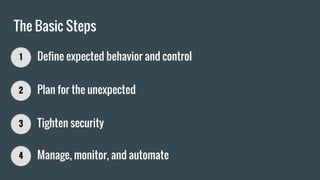
The Basic Steps
1 Define expected behavior and control
2 Plan for the unexpected
3 Tighten security
4 Manage, monitor, and automate
Service Types
1 Define expected behavior and control
Type=simple (the default)
systemctl start foo.service systemctl stop foo.service
ExecStart=/usr/bin/foo
/etc/systemd/system/foo.service
Considered started for dependencies
Considered stopped for dependencies
[Service]
ExecStart=/usr/bin/foo
# systemctl daemon-reload
Type=oneshot
systemctl start foo.service systemctl stop foo.service
*Unless RemainAfterExit=true
*
ExecStart=/usr/bin/foo
[Service]
Type=oneshot
ExecStart=/usr/bin/foo
RuntimeMaxSec=30
/etc/systemd/system/foo.service
RuntimeMaxSec=30
Type=forking
systemctl start foo.service
systemctl stop foo.service
ExecStart...
PIDFile=/var/run/foo.pid
[Service]
Type=forking
ExecStart=/usr/bin/foo
PIDFile=/var/run/foo.pid
TimeoutStartSec=30
/etc/systemd/system/foo.service
TimeoutStartSec=30
Type=notify
systemctl start foo.service systemctl stop foo.service
ExecStart...
[Service]
Type=notify
ExecStart=/usr/bin/foo
TimeoutStartSec=30
NotifyAccess=all ⬅maybe
/etc/systemd/system/foo.service
Called from daemon:
systemd-notify --ready
Best of
All
Types
Service Shutdown and Reloading
1 Define expected behavior and control
KillMode=control-group (the default)
systemctl stop foo.service
[Service]
ExecStart=/usr/bin/foo
KillMode=control-group
TimeoutStopSec=30
/etc/systemd/system/foo.service
PID=100
101
102
103
…or “Oprah’s Favorite Signals”
SIGTERM
PID=100
101
102
103
SIGKILL
TimeoutStopSec=30
KillMode=none
systemctl stop foo.service
[Service]
ExecStart=/usr/bin/foo
KillMode=none
ExecStop=/usr/bin/fooctl
stop
/etc/systemd/system/foo.service
PID=100
101
102
103
PID=100
101
102
103
No CleanupExecStop=/usr/bin/fooctl stop
KillMode=process
systemctl stop foo.service
[Service]
ExecStart=/usr/bin/foo
KillMode=process
/etc/systemd/system/foo.service
PID=100
101
102
103
SIGTERM PID=100
101
102
103
No Cleanup
KillMode=mixed
systemctl stop foo.service
[Service]
ExecStart=/usr/bin/foo
KillMode=mixed
TimeoutStopSec=30
/etc/systemd/system/foo.service
PID=100
101
102
103
SIGTERM PID=100
101
102
103
SIGKILL
TimeoutStopSec=30
Best
for
Most
ExecReload=
systemctl reload foo.service
[Service]
ExecStart=/usr/bin/foo
ExecReload=/bin/kill -HUP $MAINPID
/etc/systemd/system/foo.service
Use Me
ExecReload=/bin/kill -HUP $MAINPID
Dependencies and Transactions
1 Define expected behavior and control
WantedBy=
Implicit in late bootup:
systemctl start multi-user.target
[Service]
ExecStart=/usr/bin/foo
[Install]
WantedBy=multi-user.target
/etc/systemd/system/foo.service
Use Me
# systemctl enable foo.service
Added to transaction by wants:
systemctl start foo.service
multi-user.target completes startup
Operations in systemd happen in transactions, which are ordered sets of jobs.
…the successor to runlevels
Other Dependencies
Inclusion
These dependencies will add more units to a
transaction. There is no effect on ordering.
● Requires=bar.service
○ If foo.service is starting, starting bar.service
will also happen. A failure to start bar.service
will cause the entire transaction to fail.
○ Inverse of RequiredBy=
● Wants=bar.service
○ A weak form of Requires=. If bar.service fails
to start, the transaction will still succeed.
○ Inverse of WantedBy=
● Also=bar.service
○ When foo.service is enabled to start by
default, bar.service will also be enabled.
Ordering
These dependencies will order units in the
transaction. They will not add specified units if
they are not already in the transaction.
● Before=bar.service
○ If bar.service is in the same transaction, bar.
service will not begin starting until foo.
service is finished starting.
● After=bar.service
○ If bar.service is in the same transaction, foo.
service will not begin starting until bar.
service is finished starting.
[Unit]
Requires=bar.service
After=bar.service
...
/etc/systemd/system/foo.service
Controlling Resources
1 Define expected behavior and control
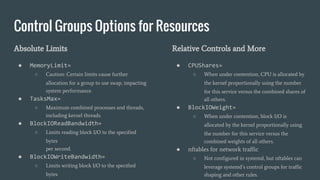
Control Groups Options for Resources
Absolute Limits
● MemoryLimit=
○ Caution: Certain limits cause further
allocation for a group to use swap, impacting
system performance.
● TasksMax=
○ Maximum combined processes and threads,
including kernel threads.
● BlockIOReadBandwidth=
○ Limits reading block I/O to the specified
bytes
per second.
● BlockIOWriteBandwidth=
○ Limits writing block I/O to the specified
bytes
Relative Controls and More
● CPUShares=
○ When under contention, CPU is allocated by
the kernel proportionally using the number
for this service versus the combined shares of
all others.
● BlockIOWeight=
○ When under contention, block I/O is
allocated by the kernel proportionally using
the number for this service versus the
combined weights of all others.
● nftables for network traffic
○ Not configured in systemd, but nftables can
leverage systemd’s control groups for traffic
shaping and other rules.
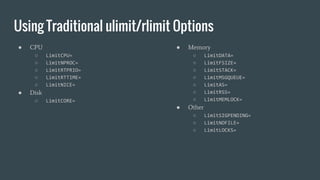
Using Traditional ulimit/rlimit Options
● CPU
○ LimitCPU=
○ LimitNPROC=
○ LimitRTPRIO=
○ LimitRTTIME=
○ LimitNICE=
● Disk
○ LimitCORE=
● Memory
○ LimitDATA=
○ LimitFSIZE=
○ LimitSTACK=
○ LimitMSGQUEUE=
○ LimitAS=
○ LimitRSS=
○ LimitMEMLOCK=
● Other
○ LimitSIGPENDING=
○ LimitNOFILE=
○ LimitLOCKS=
Handling Timeouts and Abnormal Exits
2 Plan for the unexpected
Directives for Detecting and Responding to Failure
Detecting Failure
● SuccessExitStatus=
○ Whitelist of exit codes and signals to indicate a
normal exit. Defaults to zero and the usual process
signals for healthy processes.
● RestartPreventExitStatus=
○ Blacklist of exit codes and signals to not trigger
restarts. Useful to restart on most failures but not
unrecoverable ones like a bad configuration.
● RestartForceExitStatus=
○ The opposite of the previous option.
● StartLimitInterval= and StartLimitBurst=
○ Thresholds at which attempted failure recovery
becomes a stickier failure.
Responding to Failure
● Restart=
○ Allows many options, but on-failure is
probably best for most cases.
● FailureAction=
○ Supports options like rebooting or shutting
down the system on service failure.
● StartLimitAction=
○ Same as FailureAction= but triggered when
StartLimit… thresholds get hit.
● systemctl reset-failed
○ Resets status units marked as failed.
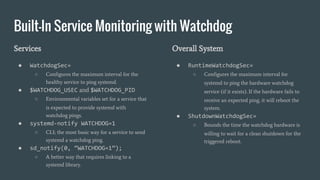
Built-In Service Monitoring with Watchdog
Services
● WatchdogSec=
○ Configures the maximum interval for the
healthy service to ping systemd.
● $WATCHDOG_USEC and $WATCHDOG_PID
○ Environmental variables set for a service that
is expected to provide systemd with
watchdog pings.
● systemd-notify WATCHDOG=1
○ CLI; the most basic way for a service to send
systemd a watchdog ping.
● sd_notify(0, “WATCHDOG=1”);
○ A better way that requires linking to a
systemd library.
Overall System
● RuntimeWatchdogSec=
○ Configures the maximum interval for
systemd to ping the hardware watchdog
service (if it exists). If the hardware fails to
receive an expected ping, it will reboot the
system.
● ShutdownWatchdogSec=
○ Bounds the time the watchdog hardware is
willing to wait for a clean shutdown for the
triggered reboot.
Dropping Privileges and Access Early
3 Tighten security
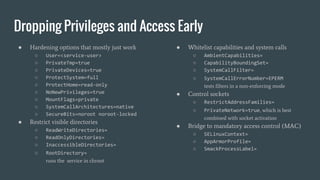
Dropping Privileges and Access Early
● Hardening options that mostly just work
○ User=<service-user>
○ PrivateTmp=true
○ PrivateDevices=true
○ ProtectSystem=full
○ ProtectHome=read-only
○ NoNewPrivileges=true
○ MountFlags=private
○ SystemCallArchitectures=native
○ SecureBits=noroot noroot-locked
● Restrict visible directories
○ ReadWriteDirectories=
○ ReadOnlyDirectories=
○ InaccessibleDirectories=
○ RootDirectory=
runs the service in chroot
● Whitelist capabilities and system calls
○ AmbientCapabilities=
○ CapabilityBoundingSet=
○ SystemCallFilter=
○ SystemCallErrorNumber=EPERM
tests filters in a non-enforcing mode
● Control sockets
○ RestrictAddressFamilies=
○ PrivateNetwork=true, which is best
combined with socket activation
● Bridge to mandatory access control (MAC)
○ SELinuxContext=
○ AppArmorProfile=
○ SmackProcessLabel=
Monitoring
4 Manage, monitor, and automate
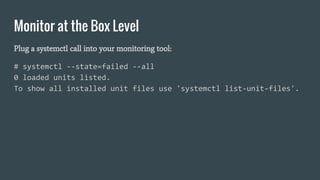
Monitor at the Box Level
Plug a systemctl call into your monitoring tool:
# systemctl --state=failed --all
0 loaded units listed.
To show all installed unit files use 'systemctl list-unit-files'.
Automation
4 Manage, monitor, and automate
Pantheon is a Chef Shop
template '/etc/systemd/system/foo.service' do
mode '0644'
source 'foo.service.erb'
end
service 'foo.service' do
provider Chef::Provider::Service::Systemd
supports :status => true, :restart => true, :reload => true
action [ :enable, :start ]
end
Questions? Follow Ups?
Reach out to me @DavidStrauss.
Want to get more hands-on? We’re hiring!
pantheon.io/careers

Effective service and resource management with systemd

  • 1.
    Effective Service +Resource Management with systemd Adventures running millions of systemd services for
  • 2.
    About Me andPantheon ● Production users of systemd since 2011 ● Millions of units in deployment across hundreds of servers ● Committer since 2012 ● Focus has been on journal logging, control group scalability, and general systemd scalability
  • 3.
    The Basic Steps 1Define expected behavior and control 2 Plan for the unexpected 3 Tighten security 4 Manage, monitor, and automate
  • 4.
    Service Types 1 Defineexpected behavior and control
  • 5.
    Type=simple (the default) systemctlstart foo.service systemctl stop foo.service ExecStart=/usr/bin/foo /etc/systemd/system/foo.service Considered started for dependencies Considered stopped for dependencies [Service] ExecStart=/usr/bin/foo # systemctl daemon-reload
  • 6.
    Type=oneshot systemctl start foo.servicesystemctl stop foo.service *Unless RemainAfterExit=true * ExecStart=/usr/bin/foo [Service] Type=oneshot ExecStart=/usr/bin/foo RuntimeMaxSec=30 /etc/systemd/system/foo.service RuntimeMaxSec=30
  • 7.
    Type=forking systemctl start foo.service systemctlstop foo.service ExecStart... PIDFile=/var/run/foo.pid [Service] Type=forking ExecStart=/usr/bin/foo PIDFile=/var/run/foo.pid TimeoutStartSec=30 /etc/systemd/system/foo.service TimeoutStartSec=30
  • 8.
    Type=notify systemctl start foo.servicesystemctl stop foo.service ExecStart... [Service] Type=notify ExecStart=/usr/bin/foo TimeoutStartSec=30 NotifyAccess=all ⬅maybe /etc/systemd/system/foo.service Called from daemon: systemd-notify --ready Best of All Types
  • 9.
    Service Shutdown andReloading 1 Define expected behavior and control
  • 10.
    KillMode=control-group (the default) systemctlstop foo.service [Service] ExecStart=/usr/bin/foo KillMode=control-group TimeoutStopSec=30 /etc/systemd/system/foo.service PID=100 101 102 103 …or “Oprah’s Favorite Signals” SIGTERM PID=100 101 102 103 SIGKILL TimeoutStopSec=30
  • 11.
  • 12.
  • 13.
  • 14.
    ExecReload= systemctl reload foo.service [Service] ExecStart=/usr/bin/foo ExecReload=/bin/kill-HUP $MAINPID /etc/systemd/system/foo.service Use Me ExecReload=/bin/kill -HUP $MAINPID
  • 15.
    Dependencies and Transactions 1Define expected behavior and control
  • 16.
    WantedBy= Implicit in latebootup: systemctl start multi-user.target [Service] ExecStart=/usr/bin/foo [Install] WantedBy=multi-user.target /etc/systemd/system/foo.service Use Me # systemctl enable foo.service Added to transaction by wants: systemctl start foo.service multi-user.target completes startup Operations in systemd happen in transactions, which are ordered sets of jobs. …the successor to runlevels
  • 17.
    Other Dependencies Inclusion These dependencieswill add more units to a transaction. There is no effect on ordering. ● Requires=bar.service ○ If foo.service is starting, starting bar.service will also happen. A failure to start bar.service will cause the entire transaction to fail. ○ Inverse of RequiredBy= ● Wants=bar.service ○ A weak form of Requires=. If bar.service fails to start, the transaction will still succeed. ○ Inverse of WantedBy= ● Also=bar.service ○ When foo.service is enabled to start by default, bar.service will also be enabled. Ordering These dependencies will order units in the transaction. They will not add specified units if they are not already in the transaction. ● Before=bar.service ○ If bar.service is in the same transaction, bar. service will not begin starting until foo. service is finished starting. ● After=bar.service ○ If bar.service is in the same transaction, foo. service will not begin starting until bar. service is finished starting. [Unit] Requires=bar.service After=bar.service ... /etc/systemd/system/foo.service
  • 18.
    Controlling Resources 1 Defineexpected behavior and control
  • 19.
    Control Groups Optionsfor Resources Absolute Limits ● MemoryLimit= ○ Caution: Certain limits cause further allocation for a group to use swap, impacting system performance. ● TasksMax= ○ Maximum combined processes and threads, including kernel threads. ● BlockIOReadBandwidth= ○ Limits reading block I/O to the specified bytes per second. ● BlockIOWriteBandwidth= ○ Limits writing block I/O to the specified bytes Relative Controls and More ● CPUShares= ○ When under contention, CPU is allocated by the kernel proportionally using the number for this service versus the combined shares of all others. ● BlockIOWeight= ○ When under contention, block I/O is allocated by the kernel proportionally using the number for this service versus the combined weights of all others. ● nftables for network traffic ○ Not configured in systemd, but nftables can leverage systemd’s control groups for traffic shaping and other rules.
  • 20.
    Using Traditional ulimit/rlimitOptions ● CPU ○ LimitCPU= ○ LimitNPROC= ○ LimitRTPRIO= ○ LimitRTTIME= ○ LimitNICE= ● Disk ○ LimitCORE= ● Memory ○ LimitDATA= ○ LimitFSIZE= ○ LimitSTACK= ○ LimitMSGQUEUE= ○ LimitAS= ○ LimitRSS= ○ LimitMEMLOCK= ● Other ○ LimitSIGPENDING= ○ LimitNOFILE= ○ LimitLOCKS=
  • 21.
    Handling Timeouts andAbnormal Exits 2 Plan for the unexpected
  • 22.
    Directives for Detectingand Responding to Failure Detecting Failure ● SuccessExitStatus= ○ Whitelist of exit codes and signals to indicate a normal exit. Defaults to zero and the usual process signals for healthy processes. ● RestartPreventExitStatus= ○ Blacklist of exit codes and signals to not trigger restarts. Useful to restart on most failures but not unrecoverable ones like a bad configuration. ● RestartForceExitStatus= ○ The opposite of the previous option. ● StartLimitInterval= and StartLimitBurst= ○ Thresholds at which attempted failure recovery becomes a stickier failure. Responding to Failure ● Restart= ○ Allows many options, but on-failure is probably best for most cases. ● FailureAction= ○ Supports options like rebooting or shutting down the system on service failure. ● StartLimitAction= ○ Same as FailureAction= but triggered when StartLimit… thresholds get hit. ● systemctl reset-failed ○ Resets status units marked as failed.
  • 23.
    Built-In Service Monitoringwith Watchdog Services ● WatchdogSec= ○ Configures the maximum interval for the healthy service to ping systemd. ● $WATCHDOG_USEC and $WATCHDOG_PID ○ Environmental variables set for a service that is expected to provide systemd with watchdog pings. ● systemd-notify WATCHDOG=1 ○ CLI; the most basic way for a service to send systemd a watchdog ping. ● sd_notify(0, “WATCHDOG=1”); ○ A better way that requires linking to a systemd library. Overall System ● RuntimeWatchdogSec= ○ Configures the maximum interval for systemd to ping the hardware watchdog service (if it exists). If the hardware fails to receive an expected ping, it will reboot the system. ● ShutdownWatchdogSec= ○ Bounds the time the watchdog hardware is willing to wait for a clean shutdown for the triggered reboot.
  • 24.
    Dropping Privileges andAccess Early 3 Tighten security
  • 25.
    Dropping Privileges andAccess Early ● Hardening options that mostly just work ○ User=<service-user> ○ PrivateTmp=true ○ PrivateDevices=true ○ ProtectSystem=full ○ ProtectHome=read-only ○ NoNewPrivileges=true ○ MountFlags=private ○ SystemCallArchitectures=native ○ SecureBits=noroot noroot-locked ● Restrict visible directories ○ ReadWriteDirectories= ○ ReadOnlyDirectories= ○ InaccessibleDirectories= ○ RootDirectory= runs the service in chroot ● Whitelist capabilities and system calls ○ AmbientCapabilities= ○ CapabilityBoundingSet= ○ SystemCallFilter= ○ SystemCallErrorNumber=EPERM tests filters in a non-enforcing mode ● Control sockets ○ RestrictAddressFamilies= ○ PrivateNetwork=true, which is best combined with socket activation ● Bridge to mandatory access control (MAC) ○ SELinuxContext= ○ AppArmorProfile= ○ SmackProcessLabel=
  • 26.
  • 27.
    Monitor at theBox Level Plug a systemctl call into your monitoring tool: # systemctl --state=failed --all 0 loaded units listed. To show all installed unit files use 'systemctl list-unit-files'.
  • 28.
  • 29.
    Pantheon is aChef Shop template '/etc/systemd/system/foo.service' do mode '0644' source 'foo.service.erb' end service 'foo.service' do provider Chef::Provider::Service::Systemd supports :status => true, :restart => true, :reload => true action [ :enable, :start ] end
  • 30.
    Questions? Follow Ups? Reachout to me @DavidStrauss. Want to get more hands-on? We’re hiring! pantheon.io/careers