Simplifying ML Model
Management with .
ML development is harder than
traditional software development
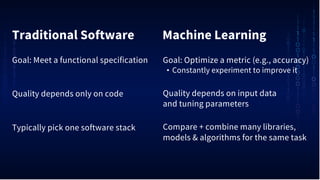
Traditional Software Machine Learning
Goal: Optimize a metric (e.g., accuracy)
• Constantly experiment to improve it
Quality depends on input data
and tuning parameters
Compare + combine many libraries,
models & algorithms for the same task
Goal: Meet a functional specification
Quality depends only on code
Typically pick one software stack
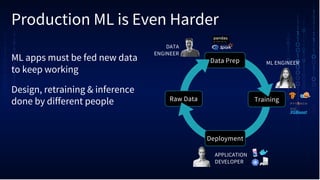
Production ML is Even Harder
Data Prep
Training
Deployment
Raw Data
ML ENGINEER
APPLICATION
DEVELOPER
DATA
ENGINEER
ML apps must be fed new data
to keep working
Design, retraining & inference
done by different people
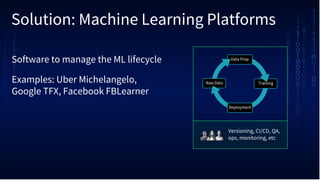
Solution: Machine Learning Platforms
Software to manage the ML lifecycle
Examples: Uber Michelangelo,
Google TFX, Facebook FBLearner
Data Prep
Training
Deployment
Raw Data
Versioning, CI/CD, QA,
ops, monitoring, etc
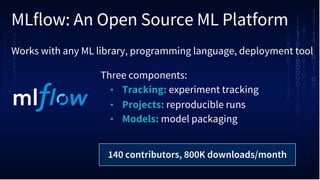
MLflow: An Open Source ML Platform
Three components:
• Tracking: experiment tracking
• Projects: reproducible runs
• Models: model packaging
140 contributors, 800K downloads/month
Works with any ML library, programming language, deployment tool
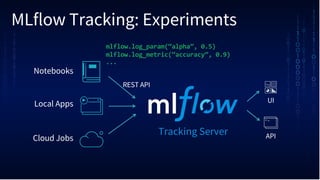
MLflow Tracking: Experiments
Notebooks
Local Apps
Cloud Jobs
Tracking Server
UI
API
mlflow.log_param(“alpha”, 0.5)
mlflow.log_metric(“accuracy”, 0.9)
...
REST API
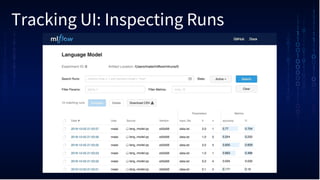
Tracking UI: Inspecting Runs
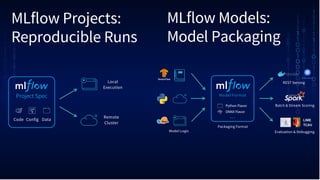
MLflow Projects:
Reproducible Runs
Project Spec
Code DataConfig
Local
Execution
Remote
Cluster
MLflow Models:
Model Packaging
Model Format
ONNX Flavor
Python Flavor
Model Logic
Batch & Stream Scoring
REST Serving
Packaging Format
. . .
Evaluation & Debugging
LIME
TCAV
MLflow Talks at This Summit
New in Last 6 Months
MLflow 1.0 (and 1.1, 1.2, 1.3)
Autologging in TensorFlow & Keras
DataFrame search API
Kubernetes, HDFS & Seldon integrations
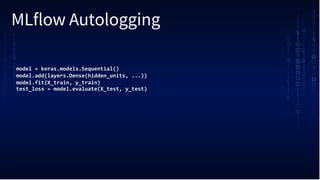
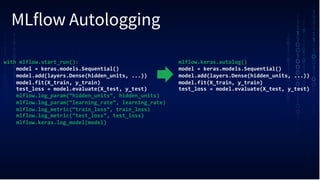
MLflow Autologging
model = keras.models.Sequential()
model.add(layers.Dense(hidden_units, ...))
model.fit(X_train, y_train)
test_loss = model.evaluate(X_test, y_test)
MLflow Autologging
with mlflow.start_run():
model = keras.models.Sequential()
model.add(layers.Dense(hidden_units, ...))
model.fit(X_train, y_train)
test_loss = model.evaluate(X_test, y_test)
mlflow.log_param(“hidden_units”, hidden_units)
mlflow.log_param(“learning_rate”, learning_rate)
mlflow.log_metric(“train_loss”, train_loss)
mlflow.log_metric(“test_loss”, test_loss)
mlflow.keras.log_model(model)
mlflow.keras.autolog()
model = keras.models.Sequential()
model.add(layers.Dense(hidden_units, ...))
model.fit(X_train, y_train)
test_loss = model.evaluate(X_test, y_test)
MLflow’s Next Goal:
Model Management
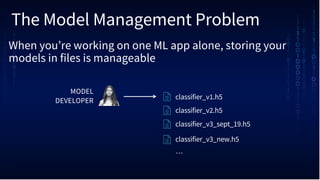
The Model Management Problem
When you’re working on one ML app alone, storing your
models in files is manageable
MODEL
DEVELOPER
classifier_v1.h5
classifier_v2.h5
classifier_v3_sept_19.h5
classifier_v3_new.h5
…
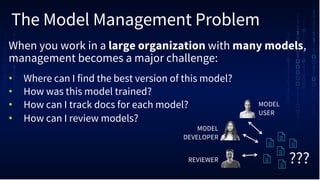
The Model Management Problem
When you work in a large organization with many models,
management becomes a major challenge:
• Where can I find the best version of this model?
• How was this model trained?
• How can I track docs for each model?
• How can I review models?
MODEL
DEVELOPER
REVIEWER
MODEL
USER
???
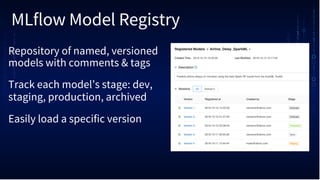
MLflow Model Registry
Repository of named, versioned
models with comments & tags
Track each model’s stage: dev,
staging, production, archived
Easily load a specific version
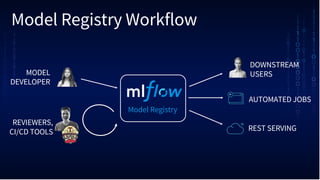
Model Registry Workflow
Model Registry
MODEL
DEVELOPER
DOWNSTREAM
USERS
AUTOMATED JOBS
REST SERVING
REVIEWERS,
CI/CD TOOLS
Model Registry Availability
Pull request available: tinyurl.com/registry-pr
Available to Databricks customers
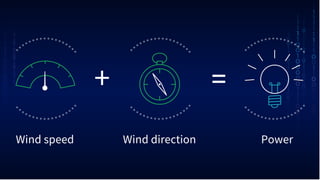
Wind directionWind speed Power
+ =
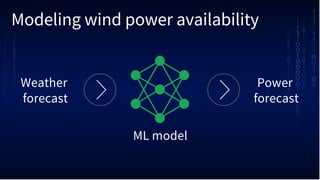
Modeling wind power availability
Weather
forecast
Power
forecast
ML model
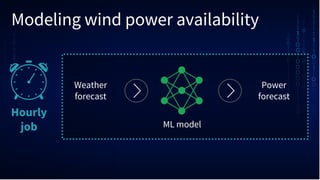
Modeling wind power availability
Hourly
job
Weather
forecast
Power
forecast
ML model
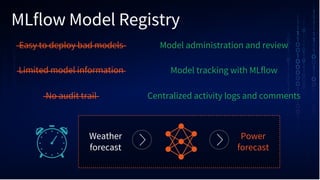
MLflow Model Registry
Weather
forecast
Power
forecast
Easy to deploy bad models
Limited model information
No audit trail
Model administration and review
Model tracking with MLflow
Centralized activity logs and comments
Thank you
Getting Started with
pip install mlflow
Docs and tutorials: mlflow.org
Databricks Community Edition: databricks.com/try
Simplifying Model Management with MLflow

Simplifying Model Management with MLflow

  • 1.
  • 2.
    ML development isharder than traditional software development
  • 3.
    Traditional Software MachineLearning Goal: Optimize a metric (e.g., accuracy) • Constantly experiment to improve it Quality depends on input data and tuning parameters Compare + combine many libraries, models & algorithms for the same task Goal: Meet a functional specification Quality depends only on code Typically pick one software stack
  • 4.
    Production ML isEven Harder Data Prep Training Deployment Raw Data ML ENGINEER APPLICATION DEVELOPER DATA ENGINEER ML apps must be fed new data to keep working Design, retraining & inference done by different people
  • 5.
    Solution: Machine LearningPlatforms Software to manage the ML lifecycle Examples: Uber Michelangelo, Google TFX, Facebook FBLearner Data Prep Training Deployment Raw Data Versioning, CI/CD, QA, ops, monitoring, etc
  • 6.
    MLflow: An OpenSource ML Platform Three components: • Tracking: experiment tracking • Projects: reproducible runs • Models: model packaging 140 contributors, 800K downloads/month Works with any ML library, programming language, deployment tool
  • 7.
    MLflow Tracking: Experiments Notebooks LocalApps Cloud Jobs Tracking Server UI API mlflow.log_param(“alpha”, 0.5) mlflow.log_metric(“accuracy”, 0.9) ... REST API
  • 8.
  • 9.
    MLflow Projects: Reproducible Runs ProjectSpec Code DataConfig Local Execution Remote Cluster MLflow Models: Model Packaging Model Format ONNX Flavor Python Flavor Model Logic Batch & Stream Scoring REST Serving Packaging Format . . . Evaluation & Debugging LIME TCAV
  • 10.
    MLflow Talks atThis Summit
  • 11.
    New in Last6 Months MLflow 1.0 (and 1.1, 1.2, 1.3) Autologging in TensorFlow & Keras DataFrame search API Kubernetes, HDFS & Seldon integrations
  • 12.
    MLflow Autologging model =keras.models.Sequential() model.add(layers.Dense(hidden_units, ...)) model.fit(X_train, y_train) test_loss = model.evaluate(X_test, y_test)
  • 13.
    MLflow Autologging with mlflow.start_run(): model= keras.models.Sequential() model.add(layers.Dense(hidden_units, ...)) model.fit(X_train, y_train) test_loss = model.evaluate(X_test, y_test) mlflow.log_param(“hidden_units”, hidden_units) mlflow.log_param(“learning_rate”, learning_rate) mlflow.log_metric(“train_loss”, train_loss) mlflow.log_metric(“test_loss”, test_loss) mlflow.keras.log_model(model) mlflow.keras.autolog() model = keras.models.Sequential() model.add(layers.Dense(hidden_units, ...)) model.fit(X_train, y_train) test_loss = model.evaluate(X_test, y_test)
  • 14.
  • 15.
    The Model ManagementProblem When you’re working on one ML app alone, storing your models in files is manageable MODEL DEVELOPER classifier_v1.h5 classifier_v2.h5 classifier_v3_sept_19.h5 classifier_v3_new.h5 …
  • 16.
    The Model ManagementProblem When you work in a large organization with many models, management becomes a major challenge: • Where can I find the best version of this model? • How was this model trained? • How can I track docs for each model? • How can I review models? MODEL DEVELOPER REVIEWER MODEL USER ???
  • 17.
    MLflow Model Registry Repositoryof named, versioned models with comments & tags Track each model’s stage: dev, staging, production, archived Easily load a specific version
  • 18.
    Model Registry Workflow ModelRegistry MODEL DEVELOPER DOWNSTREAM USERS AUTOMATED JOBS REST SERVING REVIEWERS, CI/CD TOOLS
  • 19.
    Model Registry Availability Pullrequest available: tinyurl.com/registry-pr Available to Databricks customers
  • 21.
  • 23.
    Modeling wind poweravailability Weather forecast Power forecast ML model
  • 24.
    Modeling wind poweravailability Hourly job Weather forecast Power forecast ML model
  • 25.
    MLflow Model Registry Weather forecast Power forecast Easyto deploy bad models Limited model information No audit trail Model administration and review Model tracking with MLflow Centralized activity logs and comments
  • 26.
  • 27.
    Getting Started with pipinstall mlflow Docs and tutorials: mlflow.org Databricks Community Edition: databricks.com/try