Subnetting
Finding Hosts and subnets
Subnetting: Finding Hosts and Subnets
Knowing how to subnet a very important part of
creating a computer network. You must know how
to divide your IP addresses among your routers,
switches and workstations. This is to use all your IP
addresses efficiently and to ensure your network
operates with as few problems as possible. When
you are creating your network you must determine
the number of hosts and subnets that will need to
be used.
So what are Hosts and
Subnets?
Subnetting: Finding Hosts and Subnets
A Host in relationship to a network is a
computer/device that connectivity to your
network and is able to communicate with
other computer and devices. A host address is
used to identify a device that is on the
network. When this host address is combined
with a network address a 32 bit IP address is
created.
Subnetting: Finding Hosts and Subnets
A Subnet or subnetwork is a subdivision of
your IP network. Subnetting allows you to
create multiple logical networks that exist
within a single Class A, B, or C network. If you
do not subnet, you are only able to use one
network from your Class A, B, or C network,
which is unrealistic.
Subnet Address: How are they constructed?
Subnetting: Finding Hosts and Subnets
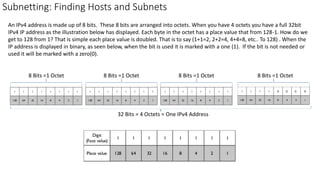
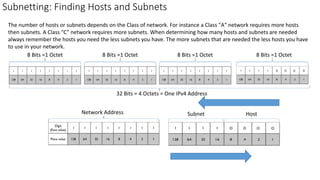
An IPv4 address is made up of 8 bits. These 8 bits are arranged into octets. When you have 4 octets you have a full 32bit
IPv4 IP address as the illustration below has displayed. Each byte in the octet has a place value that from 128-1. How do we
get to 128 from 1? That is simple each place value is doubled. That is to say (1+1=2, 2+2=4, 4+4=8, etc.. To 128) . When the
IP address is displayed in binary, as seen below, when the bit is used it is marked with a one (1). If the bit is not needed or
used it will be marked with a zero(0).
8 Bits =1 Octet 8 Bits =1 Octet8 Bits =1 Octet8 Bits =1 Octet
32 Bits = 4 Octets = One IPv4 Address
Subnetting: Finding Hosts and Subnets
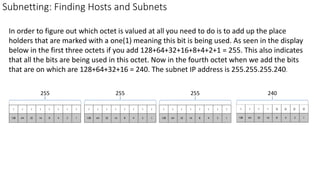
In order to figure out which octet is valued at all you need to do is to add up the place
holders that are marked with a one(1) meaning this bit is being used. As seen in the display
below in the first three octets if you add 128+64+32+16+8+4+2+1 = 255. This also indicates
that all the bits are being used in this octet. Now in the fourth octet when we add the bits
that are on which are 128+64+32+16 = 240. The subnet IP address is 255.255.255.240.
255 240255255
IP Addresses: The divide between Hosts and Subnets
Subnetting: Finding Hosts and Subnets
The number of hosts or subnets depends on the Class of network. For instance a Class "A" network requires more hosts
then subnets. A Class "C" network requires more subnets. When determining how many hosts and subnets are needed
always remember the hosts you need the less subnets you have. The more subnets that are needed the less hosts you have
to use in your network.
8 Bits =1 Octet 8 Bits =1 Octet8 Bits =1 Octet8 Bits =1 Octet
32 Bits = 4 Octets = One IPv4 Address
Network Address HostSubnet
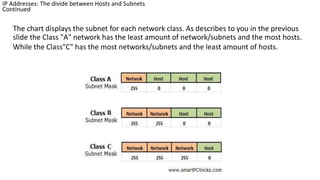
The chart displays the subnet for each network class. As describes to you in the previous
slide the Class "A" network has the least amount of network/subnets and the most hosts.
While the Class"C" has the most networks/subnets and the least amount of hosts.
IP Addresses: The divide between Hosts and Subnets
Continued
Subnetting: Finding Hosts and Subnets
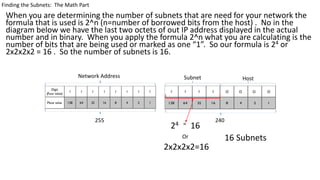
Finding the Subnets: The Math Part
When you are determining the number of subnets that are need for your network the
formula that is used is 2^n (n=number of borrowed bits from the host) . No in the
diagram below we have the last two octets of out IP address displayed in the actual
number and in binary. When you apply the formula 2^n what you are calculating is the
number of bits that are being used or marked as one “1”. So our formula is 24 or
2x2x2x2 = 16 . So the number of subnets is 16.
Finding the Subnets: The Math Part
HostNetwork Address Subnet
255 240
24 = 16
2x2x2x2=16
Or 16 Subnets
Subnetting: Finding Hosts and Subnets
Finding the Hosts per Subnet:
The Math Part
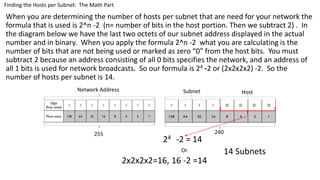
When you are determining the number of hosts per subnet that are need for your network the
formula that is used is 2^n -2 (n= number of bits in the host portion. Then we subtract 2) . In
the diagram below we have the last two octets of our subnet address displayed in the actual
number and in binary. When you apply the formula 2^n -2 what you are calculating is the
number of bits that are not being used or marked as zero “0” from the host bits. You must
subtract 2 because an address consisting of all 0 bits specifies the network, and an address of
all 1 bits is used for network broadcasts. So our formula is 24 -2 or (2x2x2x2) -2. So the
number of hosts per subnet is 14.
Finding the Hosts per Subnet: The Math Part
HostNetwork Address Subnet
255 240
24 -2 = 14
2x2x2x2=16, 16 -2 =14
Or 14 Subnets
Now that you understand how to find hosts and subnets how do you find the
subnet mask when all you have is an IP address and the number of subnets?
IP 192.168.10.0 You need 14 subnets. What is the subnet mask?
To solve this you need to work the 2^n -2 formula in reverse. The formula will
be 2^n +2. 14 subnets = 24 +2 = 16 which is the number of subnets. You use
the 24 which indicates the number of bits that are used in the subnet and add
then together for the subnet address or 128+64+32+16 which is 240.
Subnetting: Finding Hosts and Subnets
HostNetwork Address Subnet
255 240
24 +2 = 16
14 +2 =16, 2x2x2x2=16
Or
The subnet mask is
255.255.255.240
Now that you have reviewed this presentation you should now know how to
find Subnets, Hosts per Subnet , or find the subnet mask. Of course you need
to practice these skills to keep them sharp. If you have any questions always
feel free to ask.
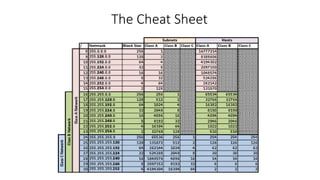
Oh yes I nearly forgot. There is a cheat sheet on the last slide. Don’t always
depend on knowing the cheat sheet. It’s good to have when you are taking a
test, it is always better to know how to find the solution on your own.
Subnetting: Finding Hosts and Subnets
The Cheat Sheet

Subnetting

  • 1.
  • 2.
    Subnetting: Finding Hostsand Subnets Knowing how to subnet a very important part of creating a computer network. You must know how to divide your IP addresses among your routers, switches and workstations. This is to use all your IP addresses efficiently and to ensure your network operates with as few problems as possible. When you are creating your network you must determine the number of hosts and subnets that will need to be used.
  • 3.
    So what areHosts and Subnets? Subnetting: Finding Hosts and Subnets
  • 4.
    A Host inrelationship to a network is a computer/device that connectivity to your network and is able to communicate with other computer and devices. A host address is used to identify a device that is on the network. When this host address is combined with a network address a 32 bit IP address is created. Subnetting: Finding Hosts and Subnets
  • 5.
    Subnetting: Finding Hostsand Subnets A Subnet or subnetwork is a subdivision of your IP network. Subnetting allows you to create multiple logical networks that exist within a single Class A, B, or C network. If you do not subnet, you are only able to use one network from your Class A, B, or C network, which is unrealistic.
  • 6.
    Subnet Address: Howare they constructed? Subnetting: Finding Hosts and Subnets
  • 7.
    Subnetting: Finding Hostsand Subnets An IPv4 address is made up of 8 bits. These 8 bits are arranged into octets. When you have 4 octets you have a full 32bit IPv4 IP address as the illustration below has displayed. Each byte in the octet has a place value that from 128-1. How do we get to 128 from 1? That is simple each place value is doubled. That is to say (1+1=2, 2+2=4, 4+4=8, etc.. To 128) . When the IP address is displayed in binary, as seen below, when the bit is used it is marked with a one (1). If the bit is not needed or used it will be marked with a zero(0). 8 Bits =1 Octet 8 Bits =1 Octet8 Bits =1 Octet8 Bits =1 Octet 32 Bits = 4 Octets = One IPv4 Address
  • 8.
    Subnetting: Finding Hostsand Subnets In order to figure out which octet is valued at all you need to do is to add up the place holders that are marked with a one(1) meaning this bit is being used. As seen in the display below in the first three octets if you add 128+64+32+16+8+4+2+1 = 255. This also indicates that all the bits are being used in this octet. Now in the fourth octet when we add the bits that are on which are 128+64+32+16 = 240. The subnet IP address is 255.255.255.240. 255 240255255
  • 9.
    IP Addresses: Thedivide between Hosts and Subnets Subnetting: Finding Hosts and Subnets
  • 10.
    Subnetting: Finding Hostsand Subnets The number of hosts or subnets depends on the Class of network. For instance a Class "A" network requires more hosts then subnets. A Class "C" network requires more subnets. When determining how many hosts and subnets are needed always remember the hosts you need the less subnets you have. The more subnets that are needed the less hosts you have to use in your network. 8 Bits =1 Octet 8 Bits =1 Octet8 Bits =1 Octet8 Bits =1 Octet 32 Bits = 4 Octets = One IPv4 Address Network Address HostSubnet
  • 11.
    The chart displaysthe subnet for each network class. As describes to you in the previous slide the Class "A" network has the least amount of network/subnets and the most hosts. While the Class"C" has the most networks/subnets and the least amount of hosts. IP Addresses: The divide between Hosts and Subnets Continued
  • 12.
    Subnetting: Finding Hostsand Subnets Finding the Subnets: The Math Part
  • 13.
    When you aredetermining the number of subnets that are need for your network the formula that is used is 2^n (n=number of borrowed bits from the host) . No in the diagram below we have the last two octets of out IP address displayed in the actual number and in binary. When you apply the formula 2^n what you are calculating is the number of bits that are being used or marked as one “1”. So our formula is 24 or 2x2x2x2 = 16 . So the number of subnets is 16. Finding the Subnets: The Math Part HostNetwork Address Subnet 255 240 24 = 16 2x2x2x2=16 Or 16 Subnets
  • 14.
    Subnetting: Finding Hostsand Subnets Finding the Hosts per Subnet: The Math Part
  • 15.
    When you aredetermining the number of hosts per subnet that are need for your network the formula that is used is 2^n -2 (n= number of bits in the host portion. Then we subtract 2) . In the diagram below we have the last two octets of our subnet address displayed in the actual number and in binary. When you apply the formula 2^n -2 what you are calculating is the number of bits that are not being used or marked as zero “0” from the host bits. You must subtract 2 because an address consisting of all 0 bits specifies the network, and an address of all 1 bits is used for network broadcasts. So our formula is 24 -2 or (2x2x2x2) -2. So the number of hosts per subnet is 14. Finding the Hosts per Subnet: The Math Part HostNetwork Address Subnet 255 240 24 -2 = 14 2x2x2x2=16, 16 -2 =14 Or 14 Subnets
  • 16.
    Now that youunderstand how to find hosts and subnets how do you find the subnet mask when all you have is an IP address and the number of subnets? IP 192.168.10.0 You need 14 subnets. What is the subnet mask? To solve this you need to work the 2^n -2 formula in reverse. The formula will be 2^n +2. 14 subnets = 24 +2 = 16 which is the number of subnets. You use the 24 which indicates the number of bits that are used in the subnet and add then together for the subnet address or 128+64+32+16 which is 240. Subnetting: Finding Hosts and Subnets HostNetwork Address Subnet 255 240 24 +2 = 16 14 +2 =16, 2x2x2x2=16 Or The subnet mask is 255.255.255.240
  • 17.
    Now that youhave reviewed this presentation you should now know how to find Subnets, Hosts per Subnet , or find the subnet mask. Of course you need to practice these skills to keep them sharp. If you have any questions always feel free to ask. Oh yes I nearly forgot. There is a cheat sheet on the last slide. Don’t always depend on knowing the cheat sheet. It’s good to have when you are taking a test, it is always better to know how to find the solution on your own. Subnetting: Finding Hosts and Subnets
  • 18.