1
IP Subnetting
(Modified version of slides from Rick Graziani)
Karim El Defrawy
Donald Bren School of Information and Computer Science
University of California Irvine
The Catch
Before subnetting:
• In any network (or subnet) one can use most of the IP
addresses for host addresses.
• One loses two addresses for every network or subnet.
1. Network Address - One address is reserved to that of the
network.
2. Broadcast Address – One address is reserved to address all
hosts in that network or subnet.
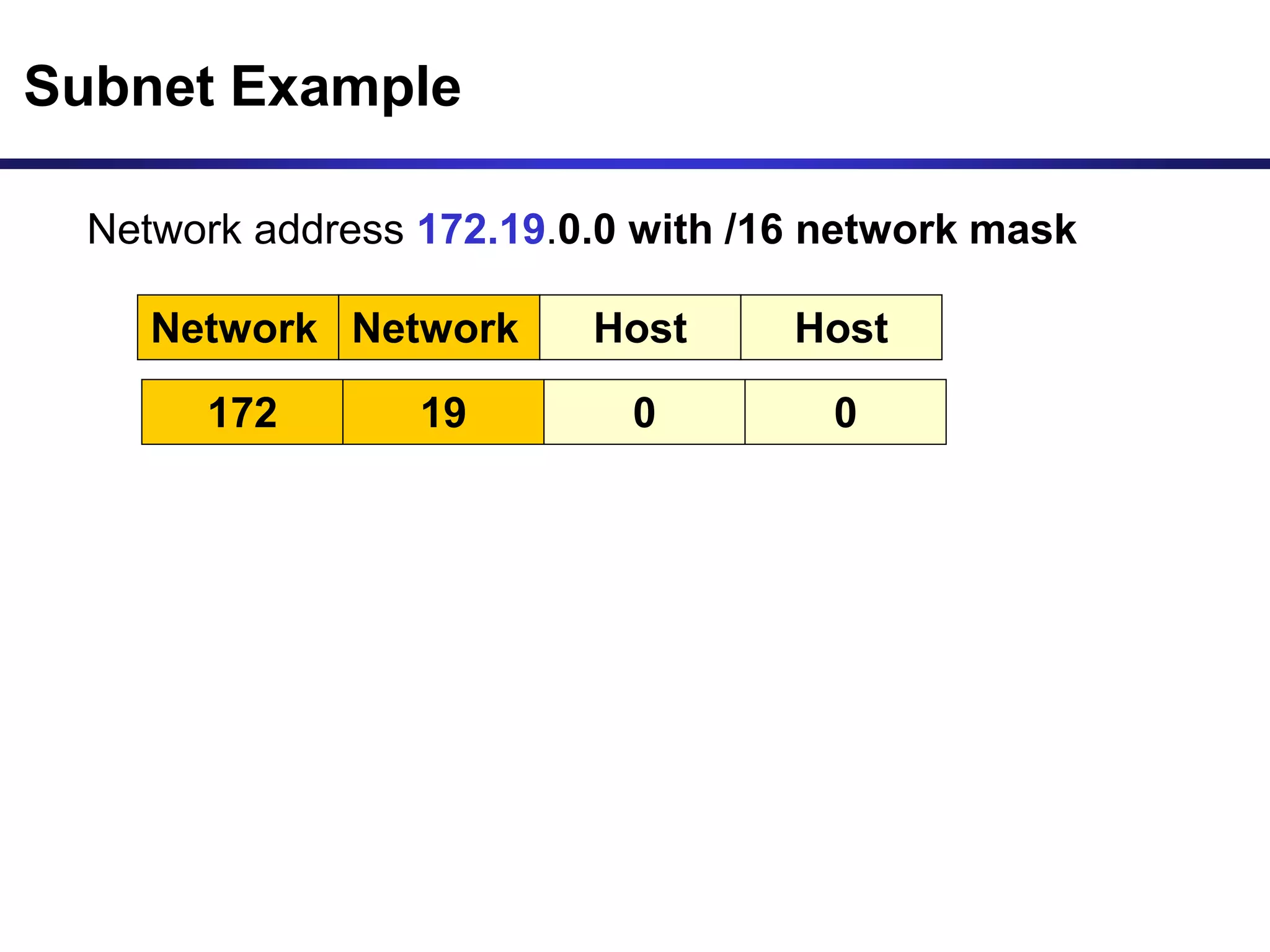
Subnet Example
Network address 172.19.0.0 with /16 network mask
Network Network Host Host
172 19 0 0
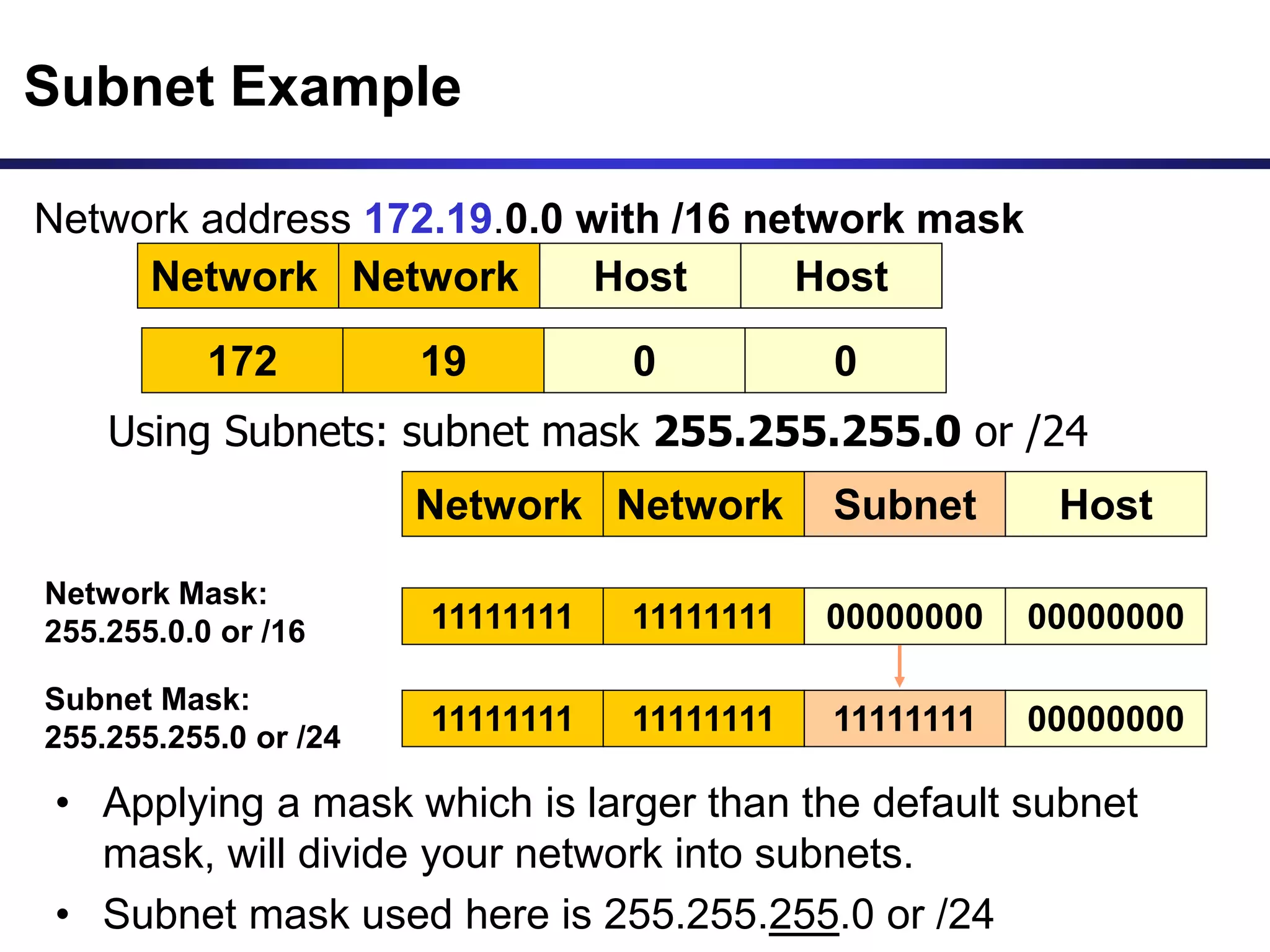
Subnet Example
Network Network Subnet Host
Network address 172.19.0.0 with /16 network mask
Using Subnets: subnet mask 255.255.255.0 or /24
• Applying a mask which is larger than the default subnet
mask, will divide your network into subnets.
• Subnet mask used here is 255.255.255.0 or /24
Network Mask:
255.255.0.0 or /16
Subnet Mask:
255.255.255.0 or /24
11111111 11111111 00000000 00000000
11111111 11111111 11111111 00000000
Network Network Host Host
172 19 0 0
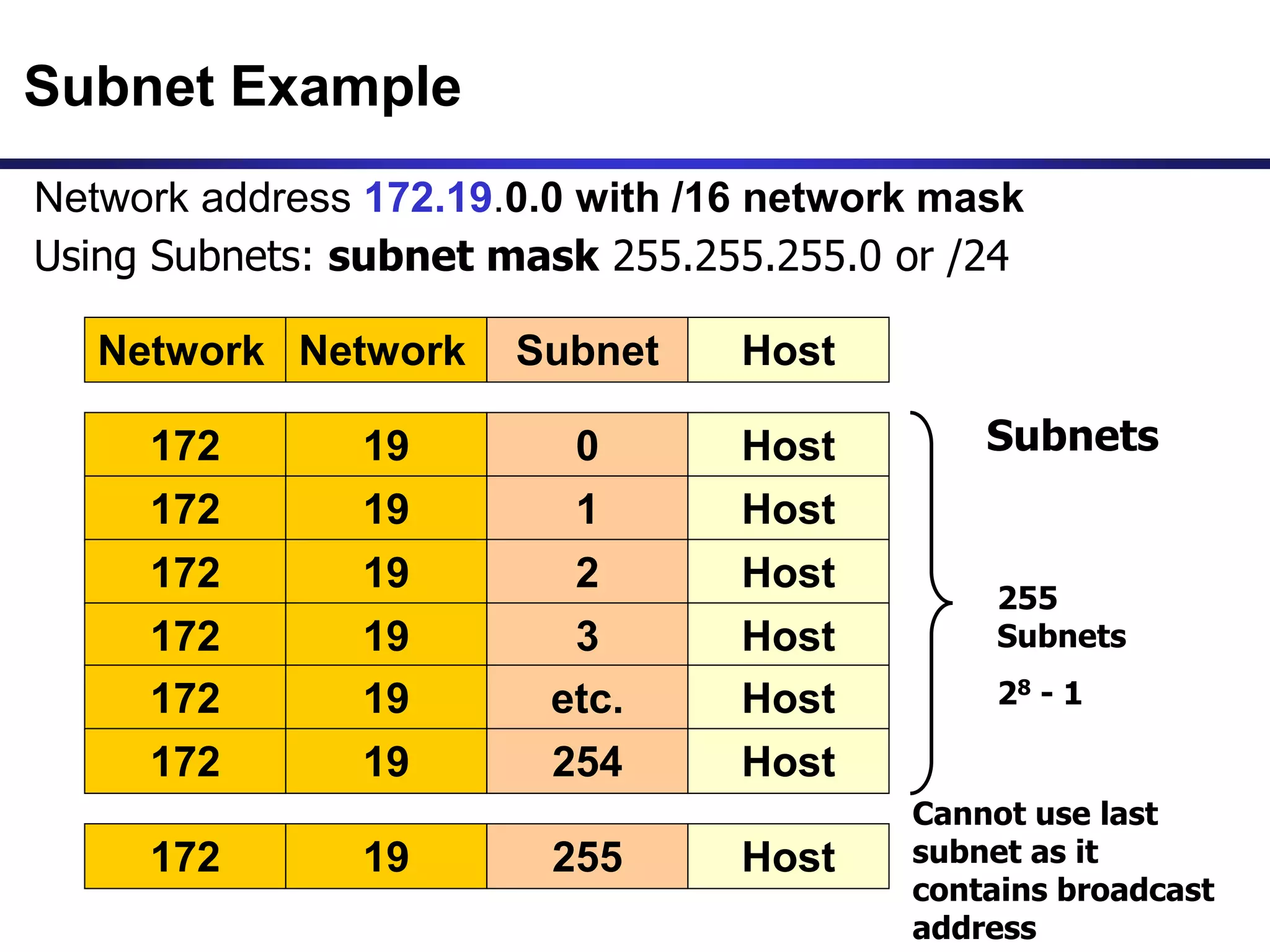
Subnet Example
Network Network Subnet Host
Network address 172.19.0.0 with /16 network mask
172 19 0 Host
172 19 1 Host
172 19 2 Host
Using Subnets: subnet mask 255.255.255.0 or /24
172 19 3 Host
172 19 etc. Host
172 19 254 Host
172 19 255 Host
255
Subnets
28 - 1
Cannot use last
subnet as it
contains broadcast
address
Subnets
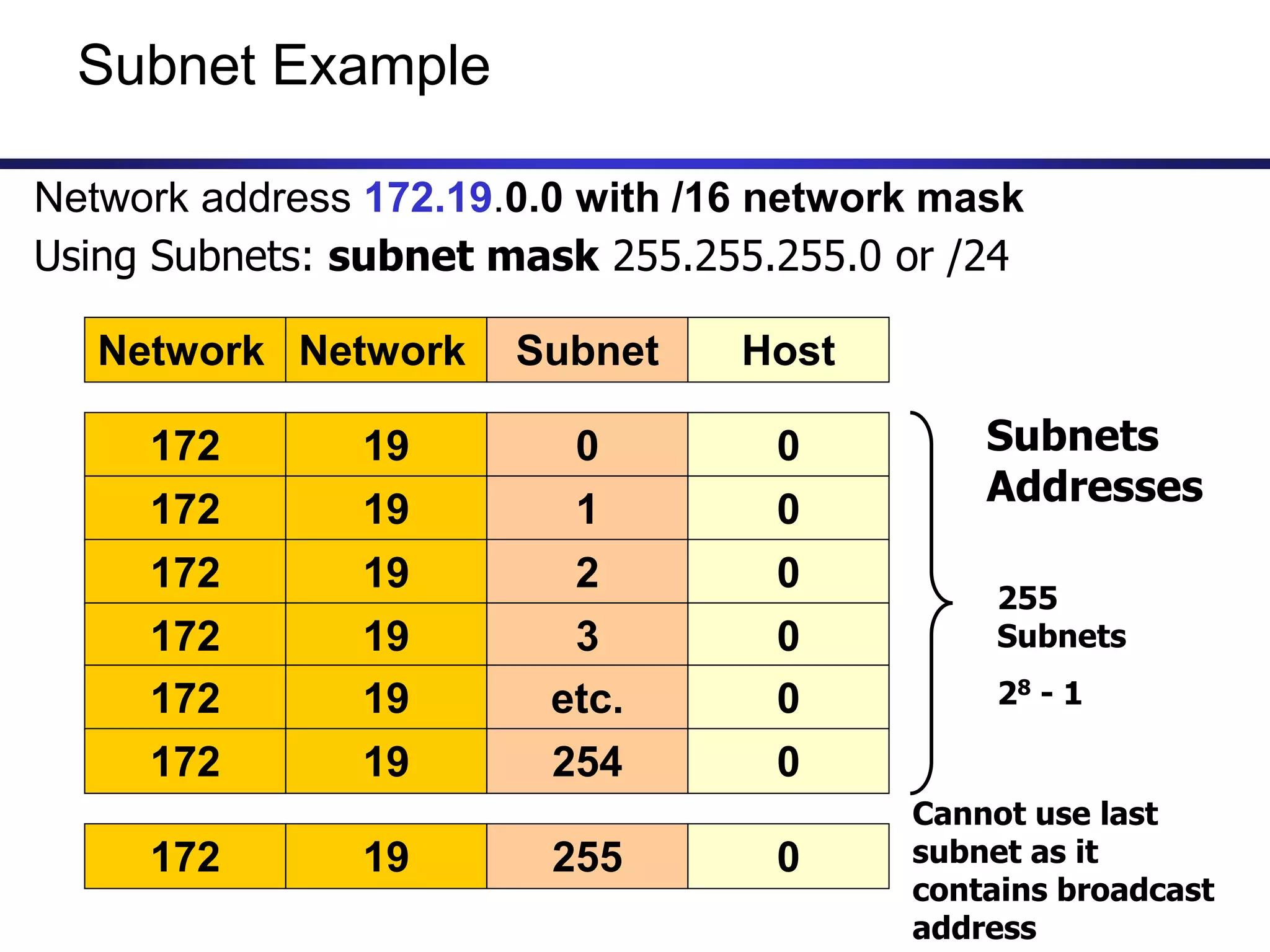
Subnet Example
Network Network Subnet Host
Network address 172.19.0.0 with /16 network mask
172 19 0 0
172 19 1 0
172 19 2 0
Using Subnets: subnet mask 255.255.255.0 or /24
172 19 3 0
172 19 etc. 0
172 19 254 0
172 19 255 0
255
Subnets
28 - 1
Cannot use last
subnet as it
contains broadcast
address
Subnets
Addresses
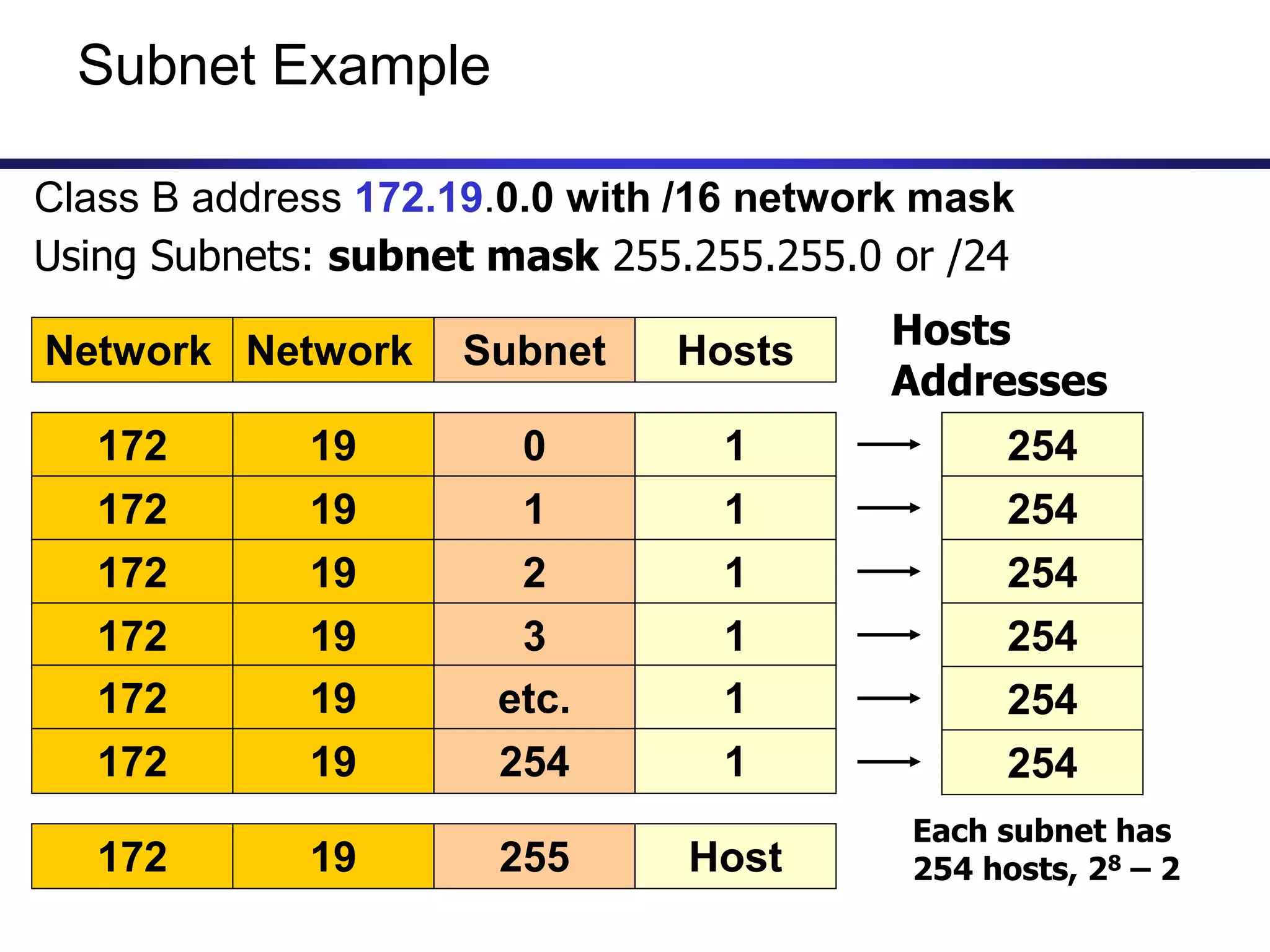
Subnet Example
Network Network Subnet Hosts
Class B address 172.19.0.0 with /16 network mask
172 19 0 1
172 19 1 1
172 19 2 1
Using Subnets: subnet mask 255.255.255.0 or /24
172 19 3 1
172 19 etc. 1
172 19 254 1
172 19 255 Host
Each subnet has
254 hosts, 28 – 2
254
254
254
254
254
254
Hosts
Addresses
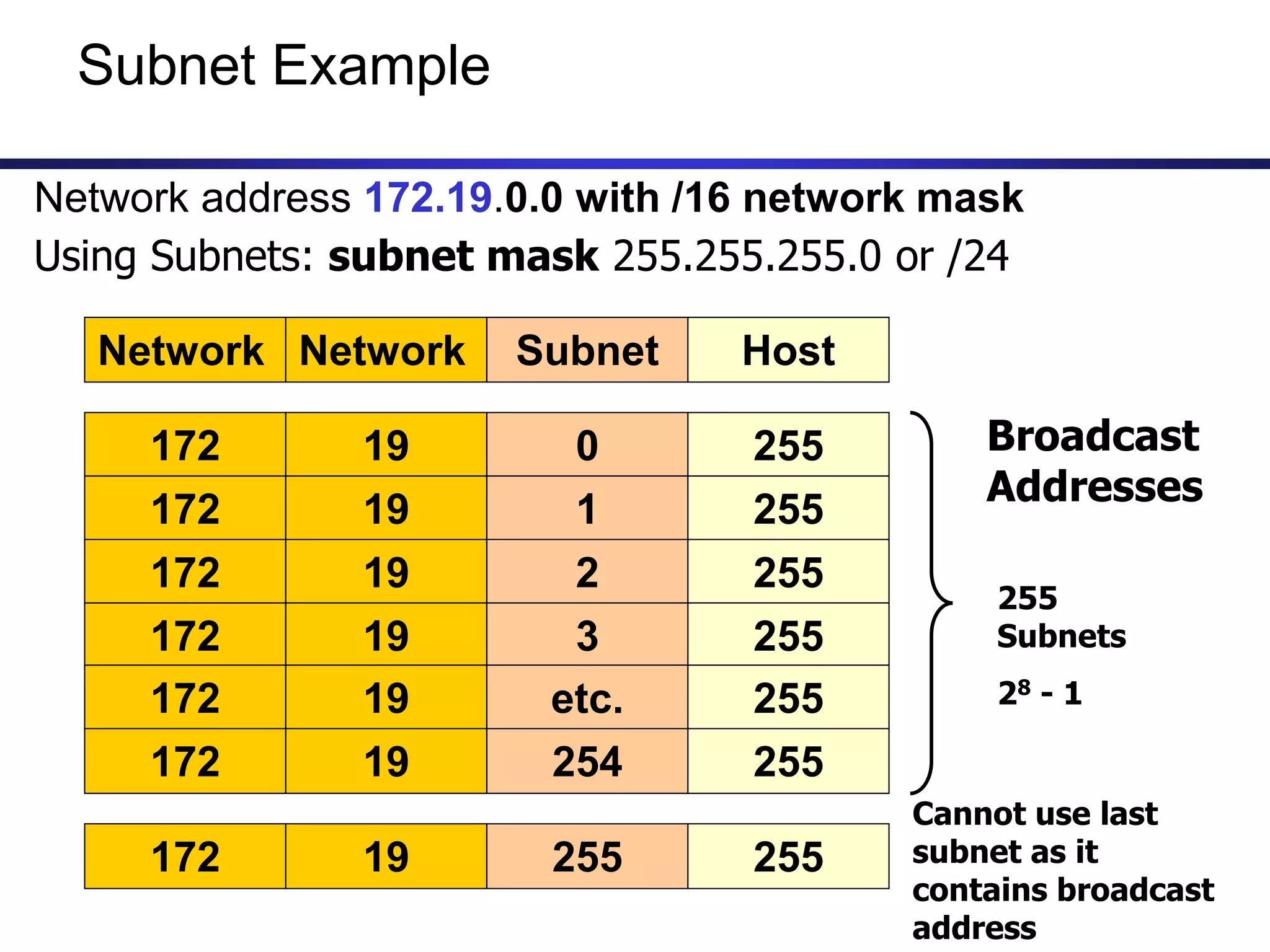
Subnet Example
Network Network Subnet Host
Network address 172.19.0.0 with /16 network mask
172 19 0 255
172 19 1 255
172 19 2 255
Using Subnets: subnet mask 255.255.255.0 or /24
172 19 3 255
172 19 etc. 255
172 19 254 255
172 19 255 255
255
Subnets
28 - 1
Cannot use last
subnet as it
contains broadcast
address
Broadcast
Addresses
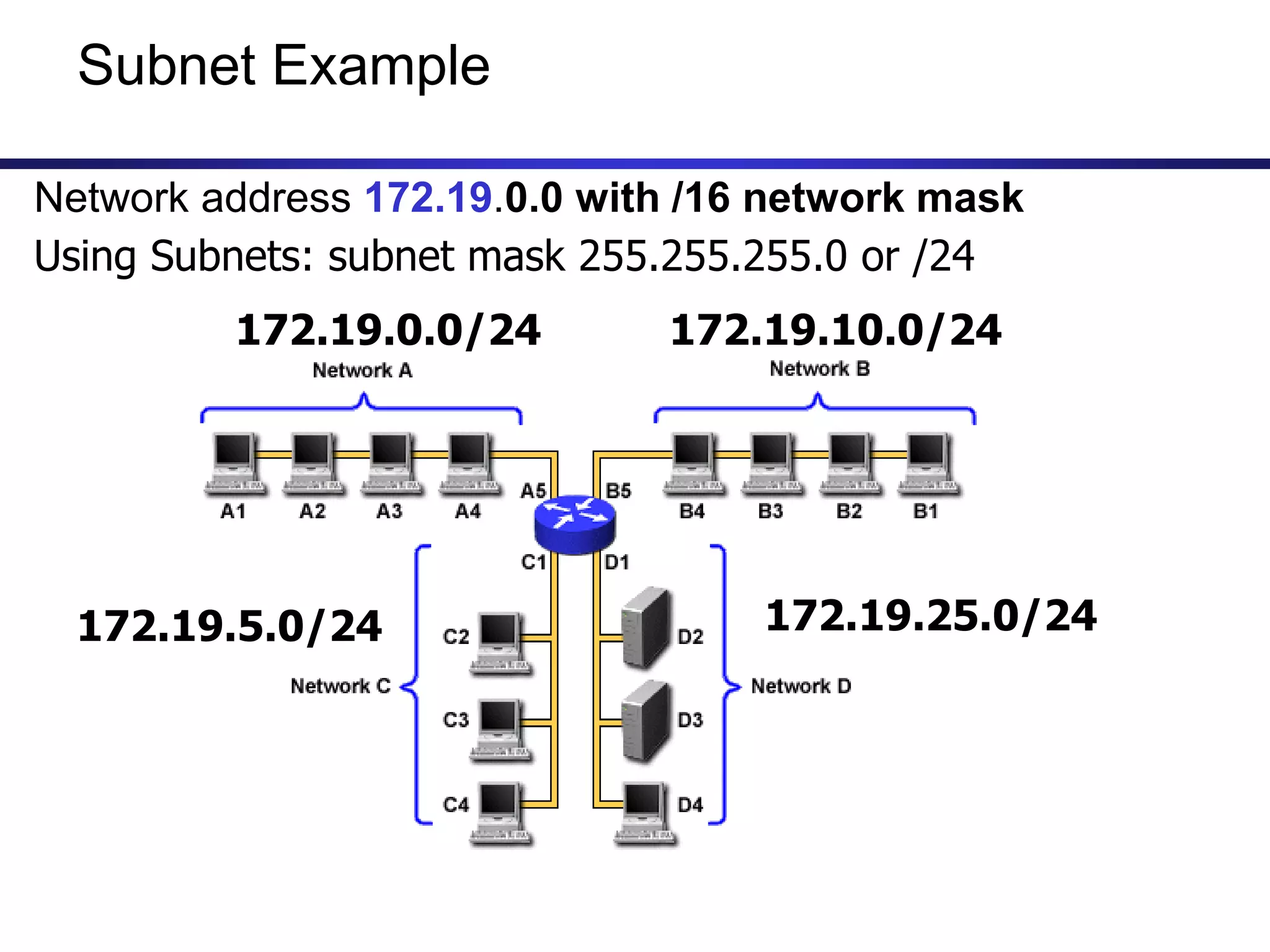
Subnet Example
Network address 172.19.0.0 with /16 network mask
Using Subnets: subnet mask 255.255.255.0 or /24
172.19.0.0/24 172.19.10.0/24
172.19.5.0/24 172.19.25.0/24
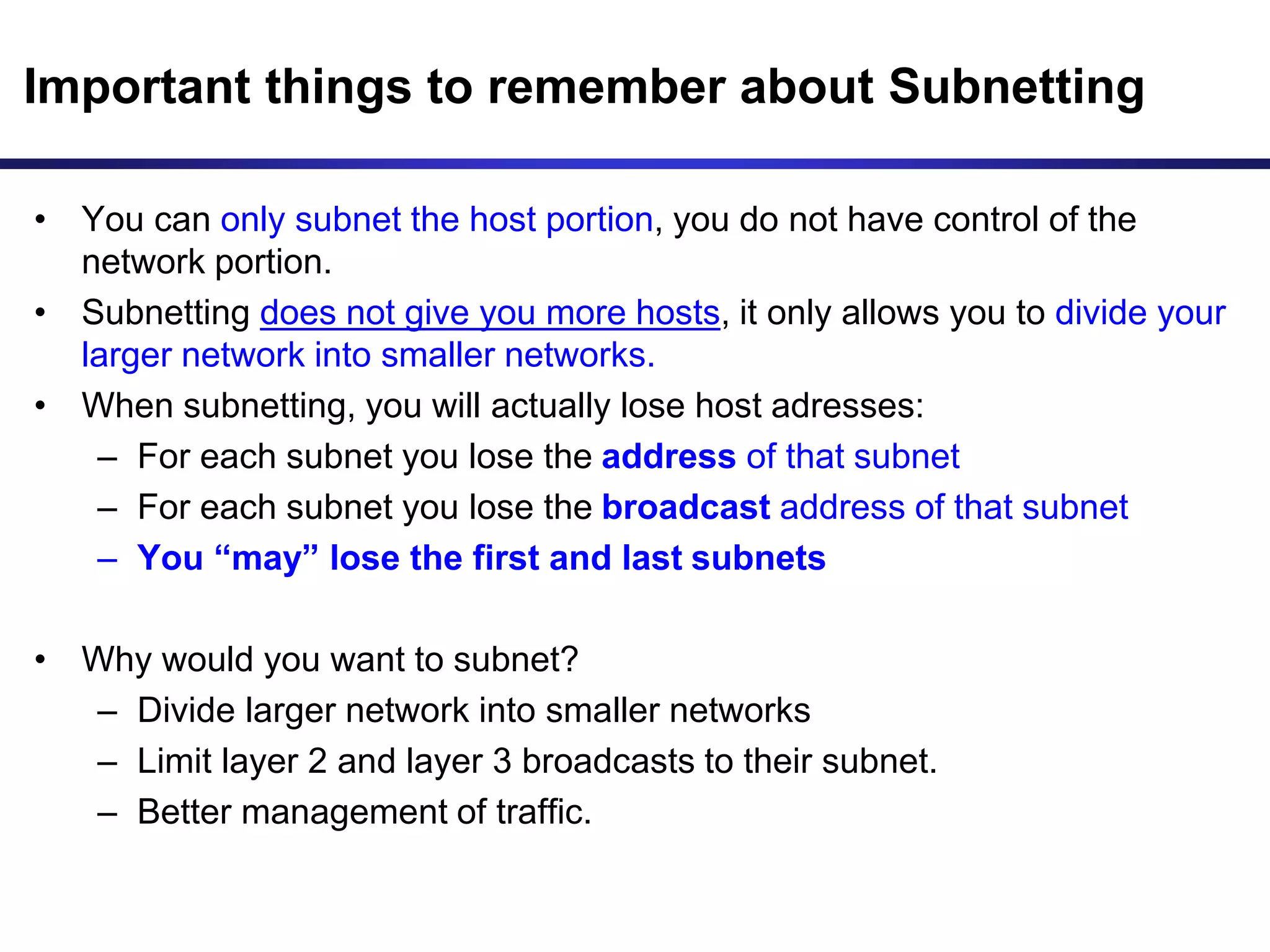
Important things to remember about Subnetting
• You can only subnet the host portion, you do not have control of the
network portion.
• Subnetting does not give you more hosts, it only allows you to divide your
larger network into smaller networks.
• When subnetting, you will actually lose host adresses:
– For each subnet you lose the address of that subnet
– For each subnet you lose the broadcast address of that subnet
– You “may” lose the first and last subnets
• Why would you want to subnet?
– Divide larger network into smaller networks
– Limit layer 2 and layer 3 broadcasts to their subnet.
– Better management of traffic.
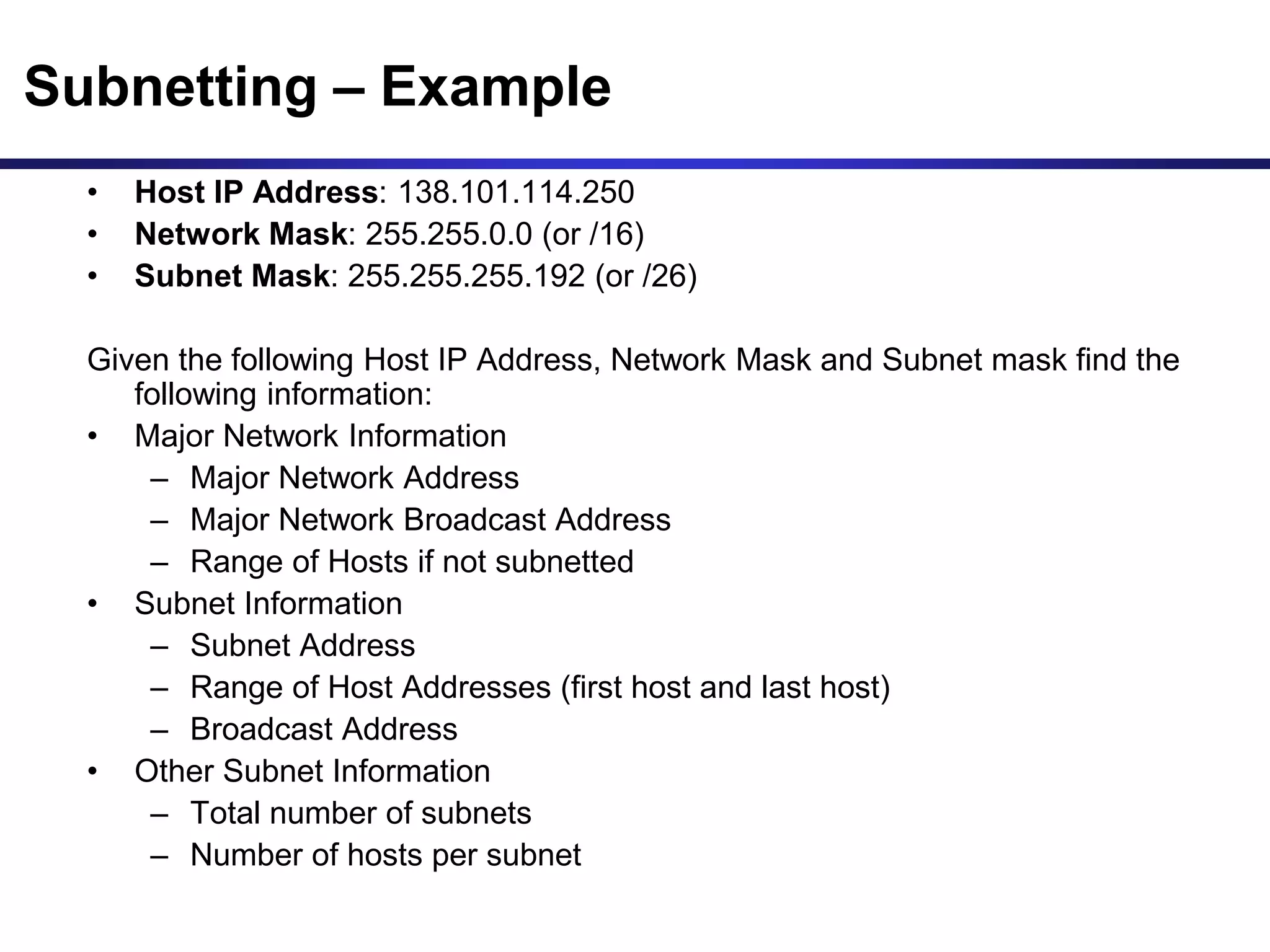
Subnetting – Example
• Host IP Address: 138.101.114.250
• Network Mask: 255.255.0.0 (or /16)
• Subnet Mask: 255.255.255.192 (or /26)
Given the following Host IP Address, Network Mask and Subnet mask find the
following information:
• Major Network Information
– Major Network Address
– Major Network Broadcast Address
– Range of Hosts if not subnetted
• Subnet Information
– Subnet Address
– Range of Host Addresses (first host and last host)
– Broadcast Address
• Other Subnet Information
– Total number of subnets
– Number of hosts per subnet
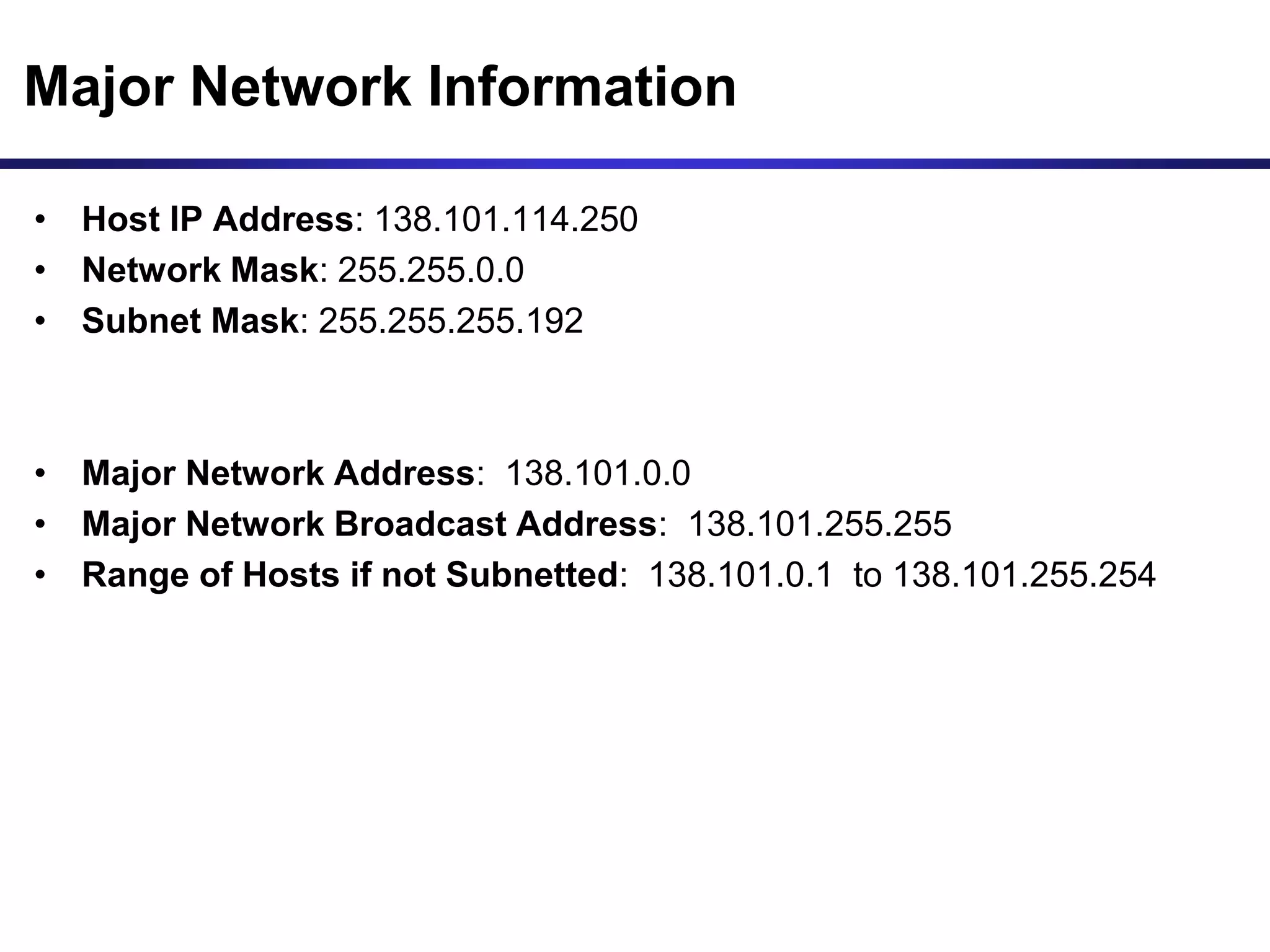
Major Network Information
• Host IP Address: 138.101.114.250
• Network Mask: 255.255.0.0
• Subnet Mask: 255.255.255.192
• Major Network Address: 138.101.0.0
• Major Network Broadcast Address: 138.101.255.255
• Range of Hosts if not Subnetted: 138.101.0.1 to 138.101.255.254
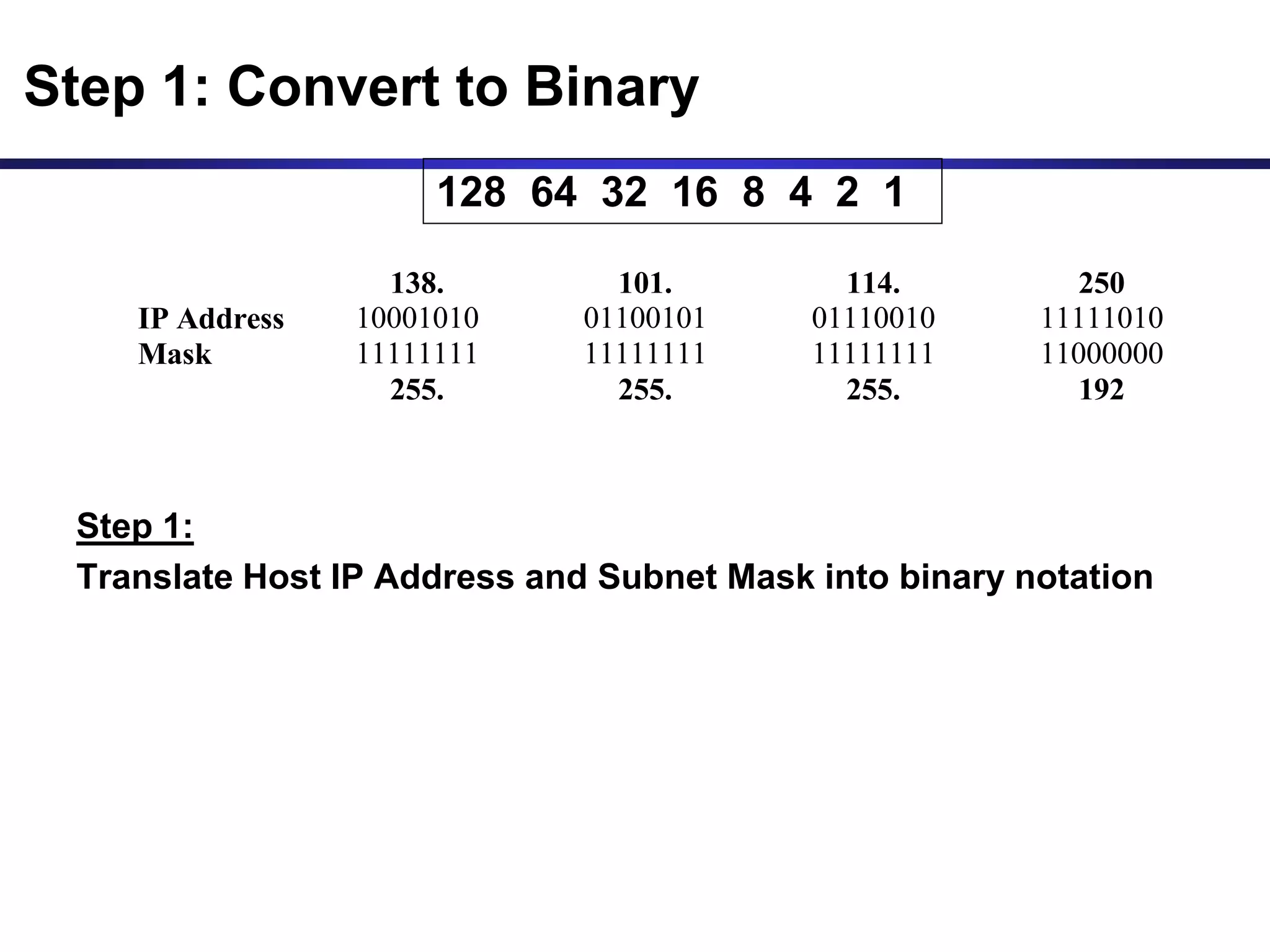
Step 1:
Translate Host IP Address and Subnet Mask into binary notation
138. 101. 114. 250
IP Address 10001010 01100101 01110010 11111010
Mask 11111111 11111111 11111111 11000000
255. 255. 255. 192
Step 1: Convert to Binary
128 64 32 16 8 4 2 1
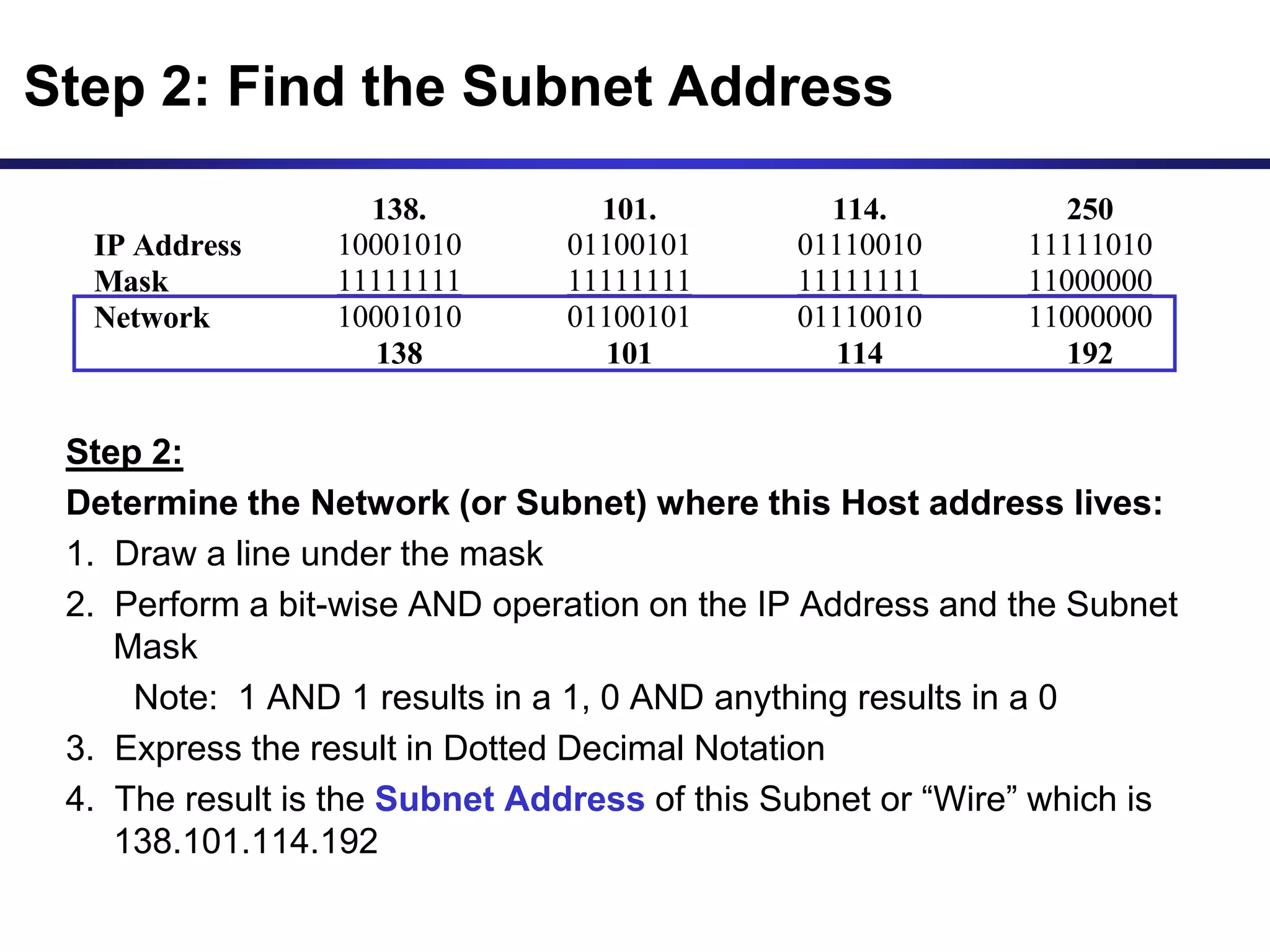
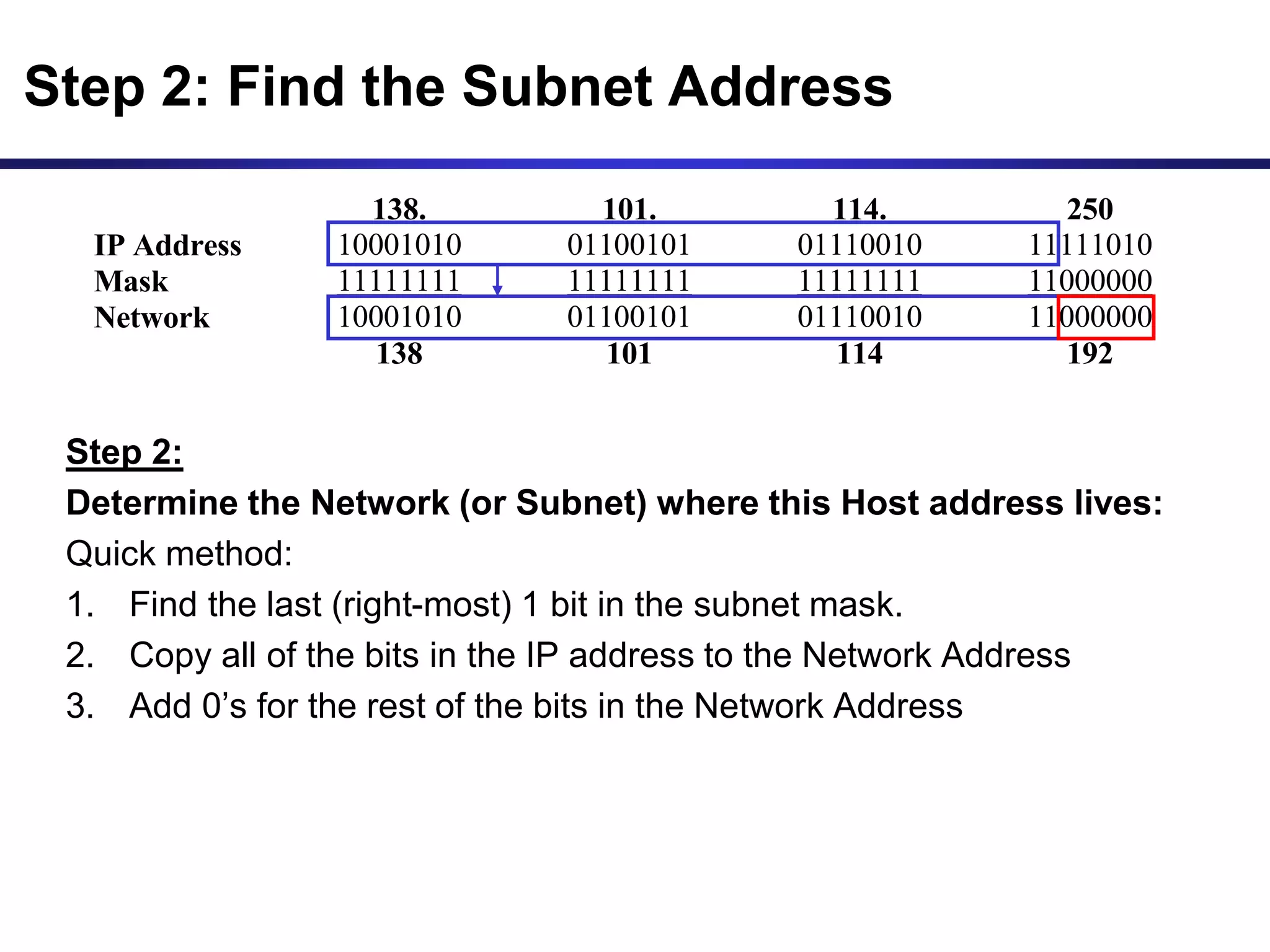
Step 2:
Determine the Network (or Subnet) where this Host address lives:
1. Draw a line under the mask
2. Perform a bit-wise AND operation on the IP Address and the Subnet
Mask
Note: 1 AND 1 results in a 1, 0 AND anything results in a 0
3. Express the result in Dotted Decimal Notation
4. The result is the Subnet Address of this Subnet or “Wire” which is
138.101.114.192
138. 101. 114. 250
IP Address 10001010 01100101 01110010 11111010
Mask 11111111 11111111 11111111 11000000
Network 10001010 01100101 01110010 11000000
138 101 114 192
Step 2: Find the Subnet Address
Step 2:
Determine the Network (or Subnet) where this Host address lives:
Quick method:
1. Find the last (right-most) 1 bit in the subnet mask.
2. Copy all of the bits in the IP address to the Network Address
3. Add 0’s for the rest of the bits in the Network Address
138. 101. 114. 250
IP Address 10001010 01100101 01110010 11111010
Mask 11111111 11111111 11111111 11000000
Network 10001010 01100101 01110010 11000000
138 101 114 192
Step 2: Find the Subnet Address
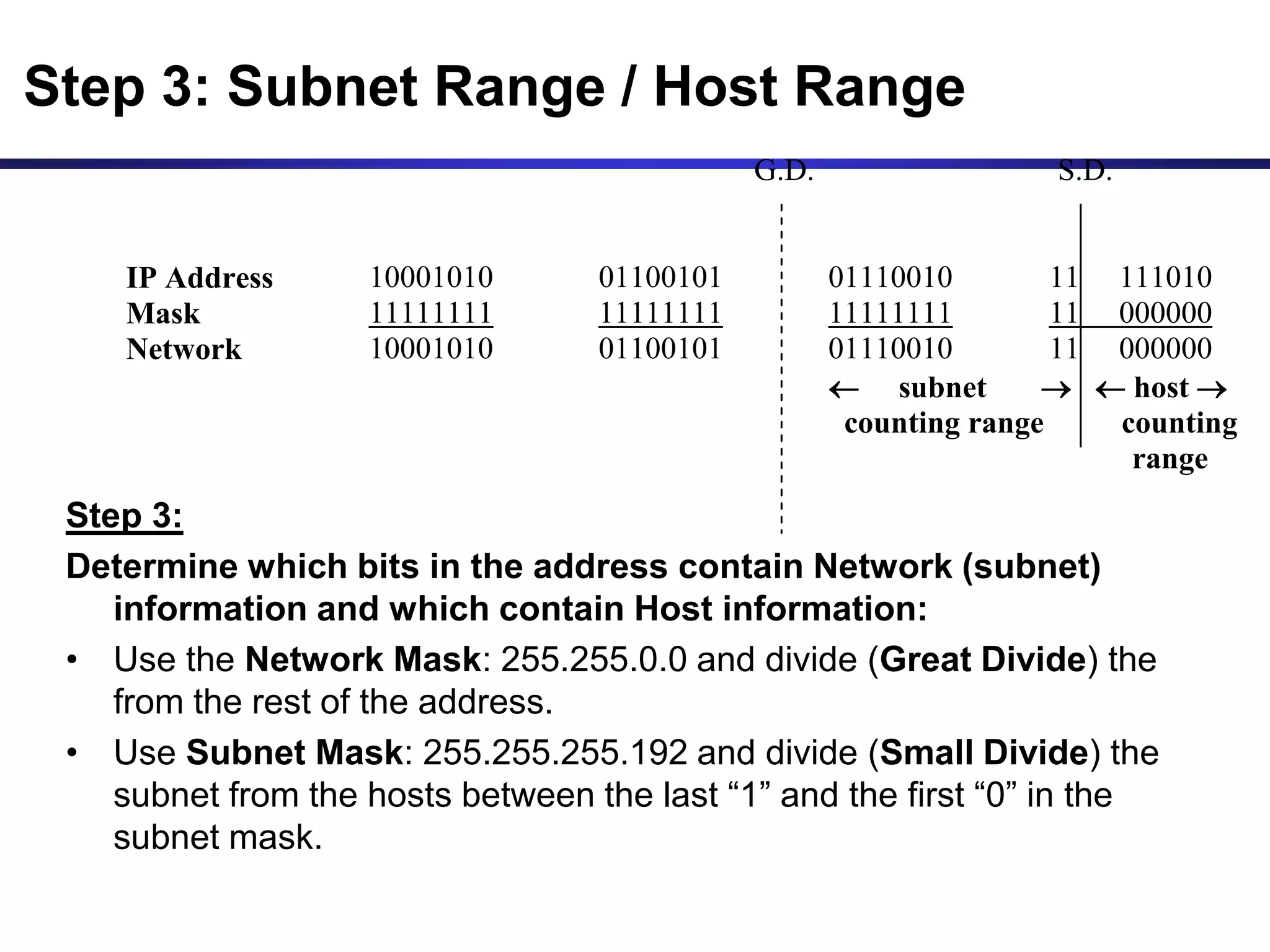
Step 3:
Determine which bits in the address contain Network (subnet)
information and which contain Host information:
• Use the Network Mask: 255.255.0.0 and divide (Great Divide) the
from the rest of the address.
• Use Subnet Mask: 255.255.255.192 and divide (Small Divide) the
subnet from the hosts between the last “1” and the first “0” in the
subnet mask.
G.D. S.D.
IP Address 10001010 01100101 01110010 11 111010
Mask 11111111 11111111 11111111 11 000000
Network 10001010 01100101 01110010 11 000000
 subnet   host 
counting range counting
range
Step 3: Subnet Range / Host Range
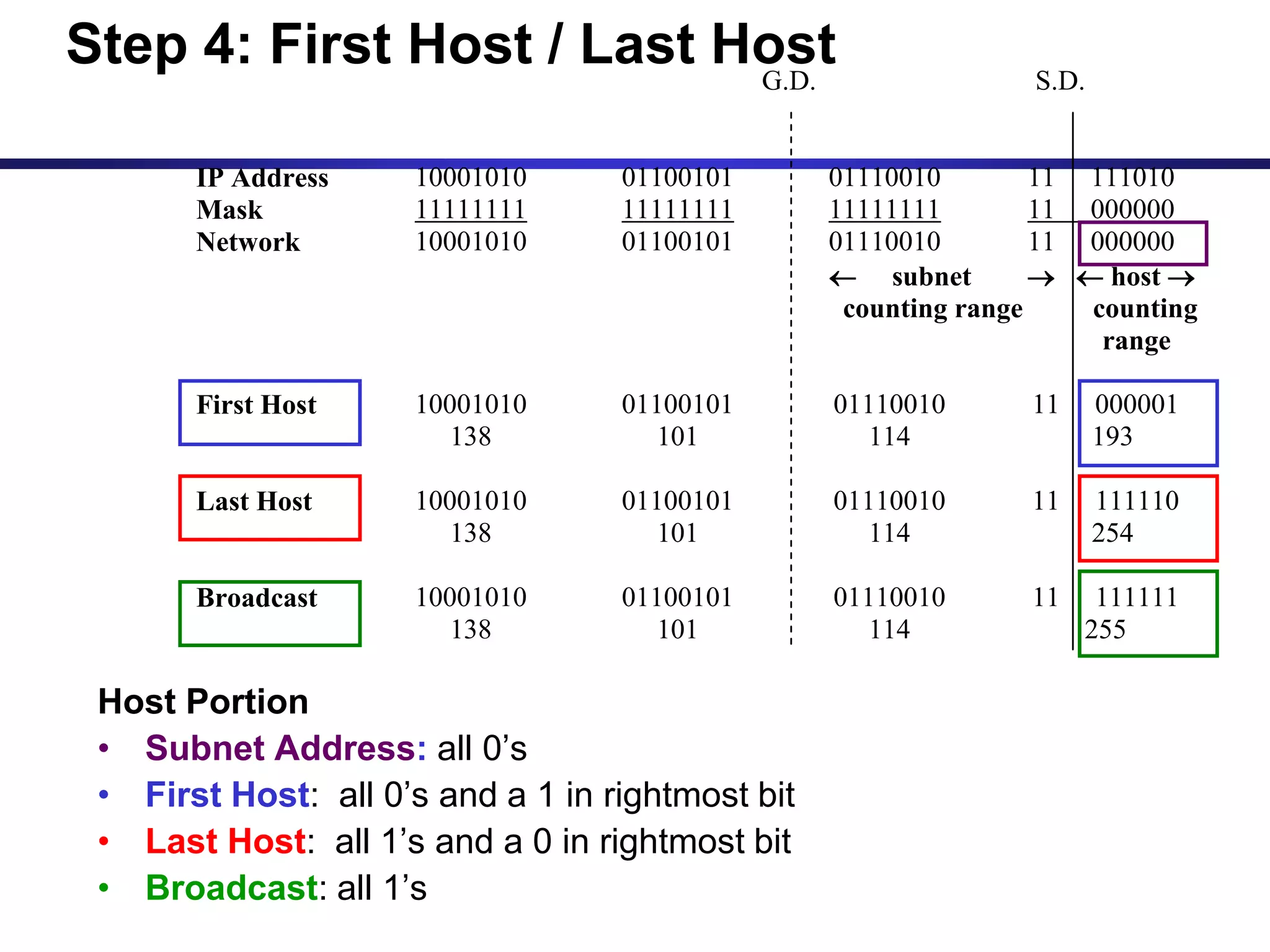
Host Portion
• Subnet Address: all 0’s
• First Host: all 0’s and a 1 in rightmost bit
• Last Host: all 1’s and a 0 in rightmost bit
• Broadcast: all 1’s
G.D. S.D.
IP Address 10001010 01100101 01110010 11 111010
Mask 11111111 11111111 11111111 11 000000
Network 10001010 01100101 01110010 11 000000
 subnet   host 
counting range counting
range
First Host 10001010 01100101 01110010 11 000001
138 101 114 193
Last Host 10001010 01100101 01110010 11 111110
138 101 114 254
Broadcast 10001010 01100101 01110010 11 111111
138 101 114 255
Step 4: First Host / Last Host
G.D. S.D.
IP Address 10001010 01100101 01110010 11 111010
Mask 11111111 11111111 11111111 11 000000
Network 10001010 01100101 01110010 11 000000
 subnet   host 
counting range counting
range
First Host 10001010 01100101 01110010 11 000001
138 101 114 193
Last Host 10001010 01100101 01110010 11 111110
138 101 114 254
Broadcast 10001010 01100101 01110010 11 111111
138 101 114 255
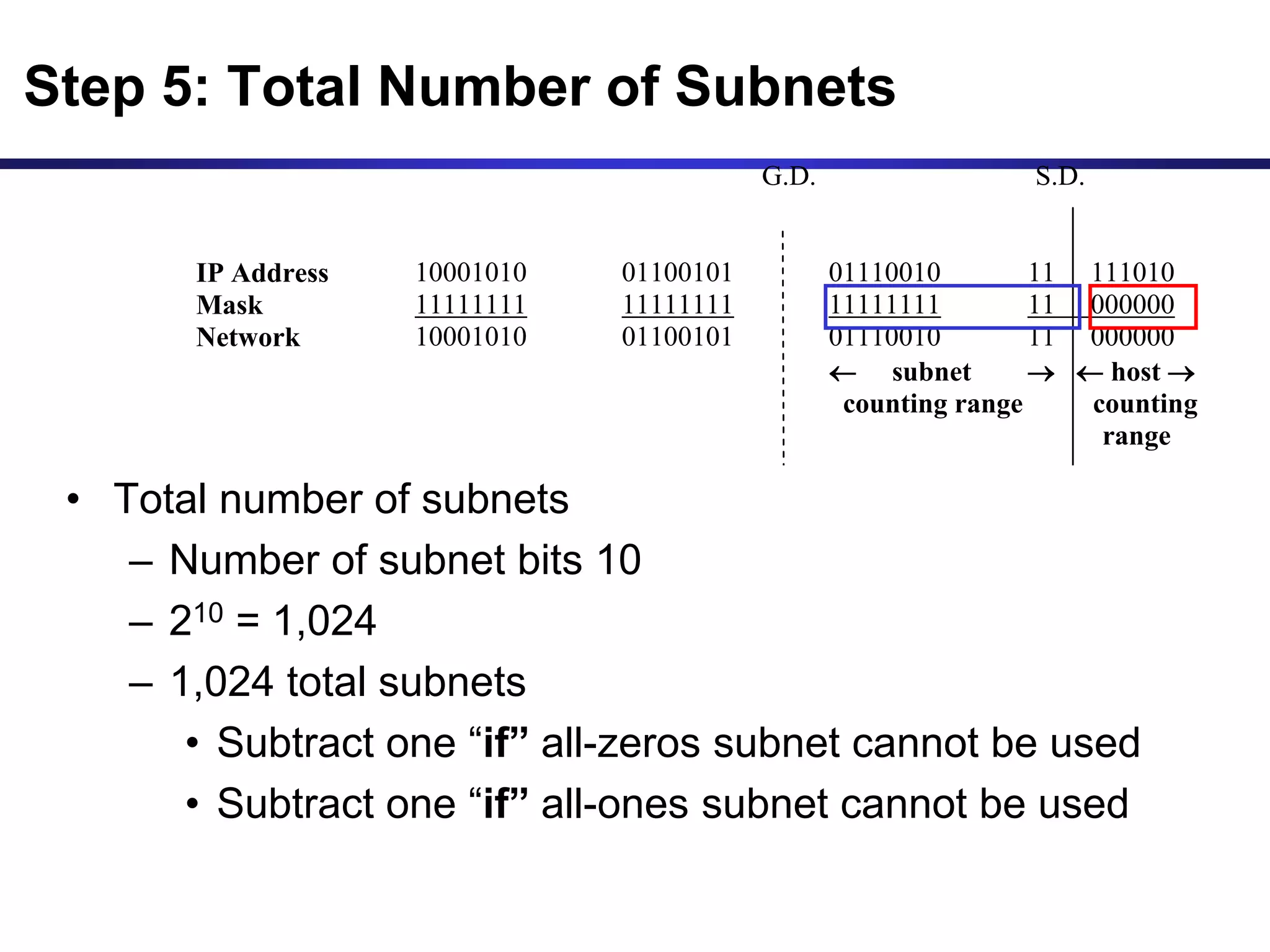
• Total number of subnets
– Number of subnet bits 10
– 210 = 1,024
– 1,024 total subnets
• Subtract one “if” all-zeros subnet cannot be used
• Subtract one “if” all-ones subnet cannot be used
Step 5: Total Number of Subnets
G.D. S.D.
IP Address 10001010 01100101 01110010 11 111010
Mask 11111111 11111111 11111111 11 000000
Network 10001010 01100101 01110010 11 000000
 subnet   host 
counting range counting
range
First Host 10001010 01100101 01110010 11 000001
138 101 114 193
Last Host 10001010 01100101 01110010 11 111110
138 101 114 254
Broadcast 10001010 01100101 01110010 11 111111
138 101 114 255
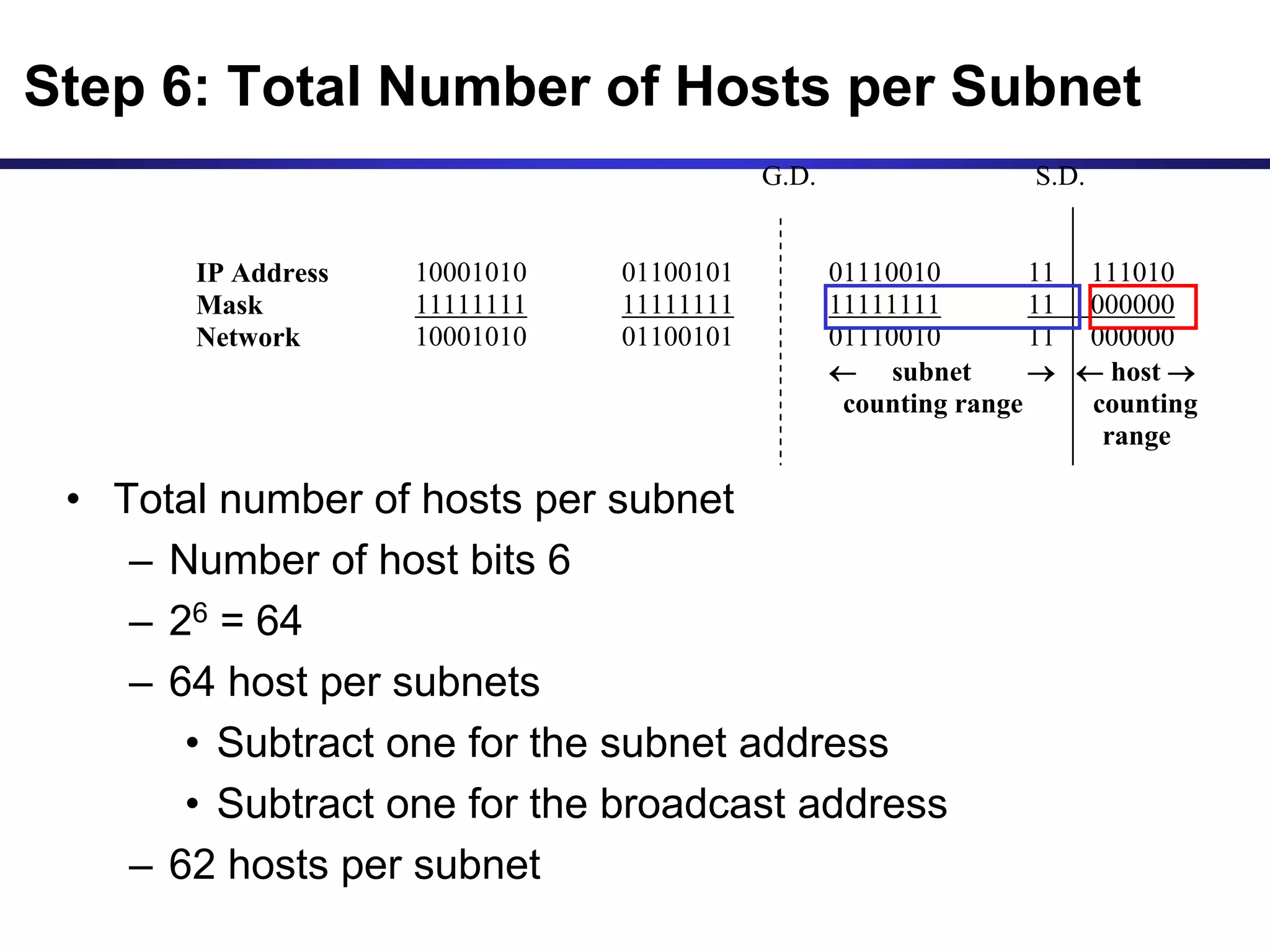
• Total number of hosts per subnet
– Number of host bits 6
– 26 = 64
– 64 host per subnets
• Subtract one for the subnet address
• Subtract one for the broadcast address
– 62 hosts per subnet
Step 6: Total Number of Hosts per Subnet
8-Additional_IPSubnetting_KED (2).ppt

  • 1.
    1 IP Subnetting (Modified versionof slides from Rick Graziani) Karim El Defrawy Donald Bren School of Information and Computer Science University of California Irvine
  • 2.
    The Catch Before subnetting: •In any network (or subnet) one can use most of the IP addresses for host addresses. • One loses two addresses for every network or subnet. 1. Network Address - One address is reserved to that of the network. 2. Broadcast Address – One address is reserved to address all hosts in that network or subnet.
  • 3.
    Subnet Example Network address172.19.0.0 with /16 network mask Network Network Host Host 172 19 0 0
  • 4.
    Subnet Example Network NetworkSubnet Host Network address 172.19.0.0 with /16 network mask Using Subnets: subnet mask 255.255.255.0 or /24 • Applying a mask which is larger than the default subnet mask, will divide your network into subnets. • Subnet mask used here is 255.255.255.0 or /24 Network Mask: 255.255.0.0 or /16 Subnet Mask: 255.255.255.0 or /24 11111111 11111111 00000000 00000000 11111111 11111111 11111111 00000000 Network Network Host Host 172 19 0 0
  • 5.
    Subnet Example Network NetworkSubnet Host Network address 172.19.0.0 with /16 network mask 172 19 0 Host 172 19 1 Host 172 19 2 Host Using Subnets: subnet mask 255.255.255.0 or /24 172 19 3 Host 172 19 etc. Host 172 19 254 Host 172 19 255 Host 255 Subnets 28 - 1 Cannot use last subnet as it contains broadcast address Subnets
  • 6.
    Subnet Example Network NetworkSubnet Host Network address 172.19.0.0 with /16 network mask 172 19 0 0 172 19 1 0 172 19 2 0 Using Subnets: subnet mask 255.255.255.0 or /24 172 19 3 0 172 19 etc. 0 172 19 254 0 172 19 255 0 255 Subnets 28 - 1 Cannot use last subnet as it contains broadcast address Subnets Addresses
  • 7.
    Subnet Example Network NetworkSubnet Hosts Class B address 172.19.0.0 with /16 network mask 172 19 0 1 172 19 1 1 172 19 2 1 Using Subnets: subnet mask 255.255.255.0 or /24 172 19 3 1 172 19 etc. 1 172 19 254 1 172 19 255 Host Each subnet has 254 hosts, 28 – 2 254 254 254 254 254 254 Hosts Addresses
  • 8.
    Subnet Example Network NetworkSubnet Host Network address 172.19.0.0 with /16 network mask 172 19 0 255 172 19 1 255 172 19 2 255 Using Subnets: subnet mask 255.255.255.0 or /24 172 19 3 255 172 19 etc. 255 172 19 254 255 172 19 255 255 255 Subnets 28 - 1 Cannot use last subnet as it contains broadcast address Broadcast Addresses
  • 9.
    Subnet Example Network address172.19.0.0 with /16 network mask Using Subnets: subnet mask 255.255.255.0 or /24 172.19.0.0/24 172.19.10.0/24 172.19.5.0/24 172.19.25.0/24
  • 10.
    Important things toremember about Subnetting • You can only subnet the host portion, you do not have control of the network portion. • Subnetting does not give you more hosts, it only allows you to divide your larger network into smaller networks. • When subnetting, you will actually lose host adresses: – For each subnet you lose the address of that subnet – For each subnet you lose the broadcast address of that subnet – You “may” lose the first and last subnets • Why would you want to subnet? – Divide larger network into smaller networks – Limit layer 2 and layer 3 broadcasts to their subnet. – Better management of traffic.
  • 11.
    Subnetting – Example •Host IP Address: 138.101.114.250 • Network Mask: 255.255.0.0 (or /16) • Subnet Mask: 255.255.255.192 (or /26) Given the following Host IP Address, Network Mask and Subnet mask find the following information: • Major Network Information – Major Network Address – Major Network Broadcast Address – Range of Hosts if not subnetted • Subnet Information – Subnet Address – Range of Host Addresses (first host and last host) – Broadcast Address • Other Subnet Information – Total number of subnets – Number of hosts per subnet
  • 12.
    Major Network Information •Host IP Address: 138.101.114.250 • Network Mask: 255.255.0.0 • Subnet Mask: 255.255.255.192 • Major Network Address: 138.101.0.0 • Major Network Broadcast Address: 138.101.255.255 • Range of Hosts if not Subnetted: 138.101.0.1 to 138.101.255.254
  • 13.
    Step 1: Translate HostIP Address and Subnet Mask into binary notation 138. 101. 114. 250 IP Address 10001010 01100101 01110010 11111010 Mask 11111111 11111111 11111111 11000000 255. 255. 255. 192 Step 1: Convert to Binary 128 64 32 16 8 4 2 1
  • 14.
    Step 2: Determine theNetwork (or Subnet) where this Host address lives: 1. Draw a line under the mask 2. Perform a bit-wise AND operation on the IP Address and the Subnet Mask Note: 1 AND 1 results in a 1, 0 AND anything results in a 0 3. Express the result in Dotted Decimal Notation 4. The result is the Subnet Address of this Subnet or “Wire” which is 138.101.114.192 138. 101. 114. 250 IP Address 10001010 01100101 01110010 11111010 Mask 11111111 11111111 11111111 11000000 Network 10001010 01100101 01110010 11000000 138 101 114 192 Step 2: Find the Subnet Address
  • 15.
    Step 2: Determine theNetwork (or Subnet) where this Host address lives: Quick method: 1. Find the last (right-most) 1 bit in the subnet mask. 2. Copy all of the bits in the IP address to the Network Address 3. Add 0’s for the rest of the bits in the Network Address 138. 101. 114. 250 IP Address 10001010 01100101 01110010 11111010 Mask 11111111 11111111 11111111 11000000 Network 10001010 01100101 01110010 11000000 138 101 114 192 Step 2: Find the Subnet Address
  • 16.
    Step 3: Determine whichbits in the address contain Network (subnet) information and which contain Host information: • Use the Network Mask: 255.255.0.0 and divide (Great Divide) the from the rest of the address. • Use Subnet Mask: 255.255.255.192 and divide (Small Divide) the subnet from the hosts between the last “1” and the first “0” in the subnet mask. G.D. S.D. IP Address 10001010 01100101 01110010 11 111010 Mask 11111111 11111111 11111111 11 000000 Network 10001010 01100101 01110010 11 000000  subnet   host  counting range counting range Step 3: Subnet Range / Host Range
  • 17.
    Host Portion • SubnetAddress: all 0’s • First Host: all 0’s and a 1 in rightmost bit • Last Host: all 1’s and a 0 in rightmost bit • Broadcast: all 1’s G.D. S.D. IP Address 10001010 01100101 01110010 11 111010 Mask 11111111 11111111 11111111 11 000000 Network 10001010 01100101 01110010 11 000000  subnet   host  counting range counting range First Host 10001010 01100101 01110010 11 000001 138 101 114 193 Last Host 10001010 01100101 01110010 11 111110 138 101 114 254 Broadcast 10001010 01100101 01110010 11 111111 138 101 114 255 Step 4: First Host / Last Host
  • 18.
    G.D. S.D. IP Address10001010 01100101 01110010 11 111010 Mask 11111111 11111111 11111111 11 000000 Network 10001010 01100101 01110010 11 000000  subnet   host  counting range counting range First Host 10001010 01100101 01110010 11 000001 138 101 114 193 Last Host 10001010 01100101 01110010 11 111110 138 101 114 254 Broadcast 10001010 01100101 01110010 11 111111 138 101 114 255 • Total number of subnets – Number of subnet bits 10 – 210 = 1,024 – 1,024 total subnets • Subtract one “if” all-zeros subnet cannot be used • Subtract one “if” all-ones subnet cannot be used Step 5: Total Number of Subnets
  • 19.
    G.D. S.D. IP Address10001010 01100101 01110010 11 111010 Mask 11111111 11111111 11111111 11 000000 Network 10001010 01100101 01110010 11 000000  subnet   host  counting range counting range First Host 10001010 01100101 01110010 11 000001 138 101 114 193 Last Host 10001010 01100101 01110010 11 111110 138 101 114 254 Broadcast 10001010 01100101 01110010 11 111111 138 101 114 255 • Total number of hosts per subnet – Number of host bits 6 – 26 = 64 – 64 host per subnets • Subtract one for the subnet address • Subtract one for the broadcast address – 62 hosts per subnet Step 6: Total Number of Hosts per Subnet