Computer Networking
Fundamentals
By,
Uma
Module - 1
Basic
Internetworking
What is Networks?
 Networks - Link computers together to share files and
communicate and do all the things we like to do.
 Networks range in size from the smallest and simplest
network—two computers connected together—to the largest
and most complex network of all—the Internet.
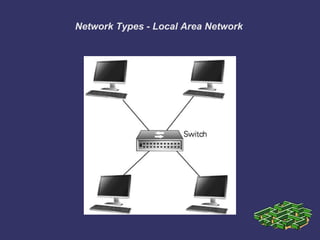
Network Types - Local Area Network
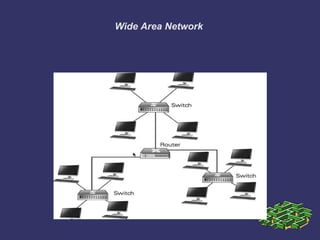
Wide Area Network
Architecture of Networks
 Client/Server
 Peer to Peer
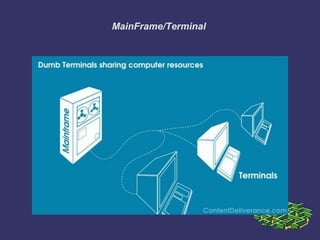
 Mainframe/Terminal
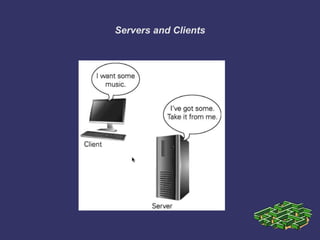
Servers and Clients
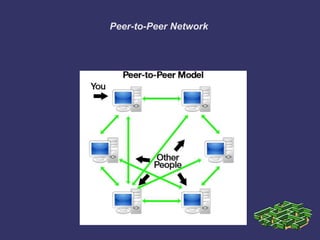
Peer-to-Peer Network
MainFrame/Terminal
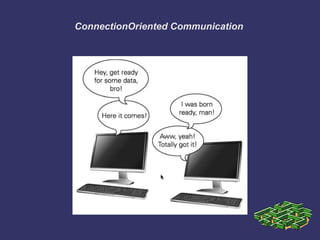
ConnectionOriented Communication
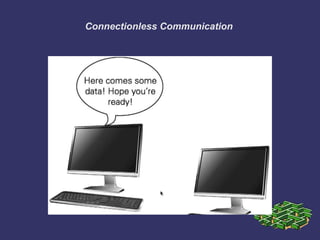
Connectionless Communication
Module - 2
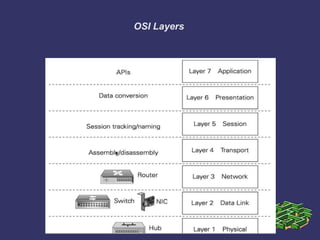
OSI Reference Model
OSI Layers
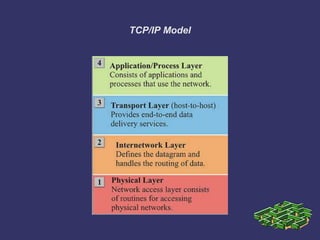
TCP/IP Model
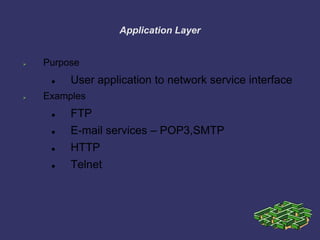
Application Layer
 Purpose
 User application to network service interface
 Examples
 FTP
 E-mail services – POP3,SMTP
 HTTP
 Telnet
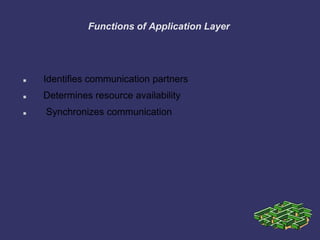
Functions of Application Layer
 Identifies communication partners
 Determines resource availability
 Synchronizes communication
Presentation Layer
 Purpose
 Formats data for exchange between points of
communication
 Example:
 Redirector software
 Formats for transmission to the server
Functions of Presentation Layer
 Protocol conversion
 Data translation
 Encryption
 Character set conversion
 Expansion of graphics command
Session Layer
 Purpose
 Oversee a communication session
Establish
Maintain
Terminate
Functions of Session Layer
 Performs name recognition and related security
 Synchronization between sender and receiver
 Assignment of time for transmission
 Start time
 End time etc.
Transport Layer
 Purpose
 Repackage proper and efficient delivery of
packages
Error free
In sequence
Without duplication
Functions of Transport Layer
 For sending data
 Repackage the message to fit into packets
Split long messages
Assemble small messages
 On receiving data
 Perform the reverse
 Send an acknowledgment to the sender
 Solve packet problems
 During transmission and reception
Network Layer
 Purpose
 Addressing and routing the packets
 Example application at the router
 If the packet size is large, splits into small
packets
Functions of Network Layer
 Address messages
 Address translation from logical to physical
 Ex: nganesa ----------> 102.13.345.25
 Routing of data
 Based on priority
 Best path at the time of transmission
 Congestion control
Data Link Layer
 Purpose
 Manages the flow of data over the physical
media
 Responsible for error-free transmission over the physical
media
 Assures error-free data submission to the Network Layer
Datalink Layer Functions
 Point of origin
 Packages data for transmission over physical line
 Receiving end
 Packages data for submission to the network layer
 Deals with network transmission protocols
 IEEE 802. protocols
Datalink Layer Subdivision
 Logical Link Control (LLC) sub-layer
 Manages service access points (logical link)
 Error and flow control
 Media Access Control (MAC) sub-layer
 Applies directly to network card
communication
 Access control
Physical Layer
 Purpose
 Deals with the transmission of 0s and 1s over
the physical media
Translation of bits into signals
 Example
 Pulse duration determination
 Transmission synchronization
Functions of Physical Layer
 Encode bits into signals
 Carry data from the h higher layers
 Define the interface to the card
 Electrical
 Mechanical
 Functional
 Example: Pin count on the connector
Module - 3
Ethernet
Technologies
Ethernet Cabling Types
 Coaxial cabling
Thinnet
Thicknet
 Twisted-pair cabling
Cat 3
Cat 5
Cat 5e
Cat 6
 Fiber optic cabling
Single mode and Multi mode
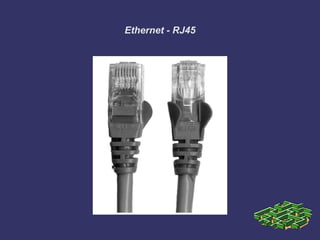
Ethernet - RJ45
Types of Ethernets
 10BaseT – runs at 10Mbps
 100BaseT – runs at 100Mbps – Fast Ethernet
 1000BaseT – runs at 1000Mbps or 1Gbps – Gigabit
Ethernet
 10000BaseT – runs at 10000Mbps or 10Gbps Ethernet
Module - 4
Hubs,Switches and
Routers
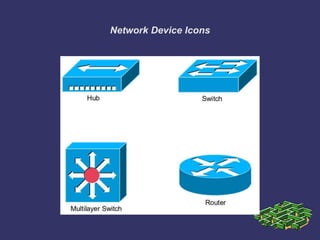
Network Device Icons
Layer 1 Hubs
 no intelligent forwarding whatsoever
 hubs will always forward every frame out every port
 operate at half-duplex, which allows a device to either
transmit or receive data, but not simultaneously
 Ethernet utilizes Carrier Sense Multiple Access with Collision
Detect (CSMA/CD) to control media access.
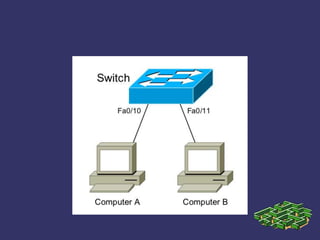
Layer 2 Switches
 Layer-2 devices build hardware address tables, which will
contain the following at a minimum:
 Hardware addresses for host devices
 The port each hardware address is associated
with
 intelligent forwarding decisions based on frame (Data-Link)
headers.
 Can operate in full duplex.
Networking Fundamentals

Networking Fundamentals

  • 1.
  • 2.
  • 3.
    What is Networks? Networks - Link computers together to share files and communicate and do all the things we like to do.  Networks range in size from the smallest and simplest network—two computers connected together—to the largest and most complex network of all—the Internet.
  • 4.
    Network Types -Local Area Network
  • 5.
  • 6.
    Architecture of Networks Client/Server  Peer to Peer  Mainframe/Terminal
  • 7.
  • 8.
  • 9.
  • 10.
  • 11.
  • 12.
    Module - 2 OSIReference Model
  • 13.
  • 14.
  • 15.
    Application Layer  Purpose User application to network service interface  Examples  FTP  E-mail services – POP3,SMTP  HTTP  Telnet
  • 16.
    Functions of ApplicationLayer  Identifies communication partners  Determines resource availability  Synchronizes communication
  • 17.
    Presentation Layer  Purpose Formats data for exchange between points of communication  Example:  Redirector software  Formats for transmission to the server
  • 18.
    Functions of PresentationLayer  Protocol conversion  Data translation  Encryption  Character set conversion  Expansion of graphics command
  • 19.
    Session Layer  Purpose Oversee a communication session Establish Maintain Terminate
  • 20.
    Functions of SessionLayer  Performs name recognition and related security  Synchronization between sender and receiver  Assignment of time for transmission  Start time  End time etc.
  • 21.
    Transport Layer  Purpose Repackage proper and efficient delivery of packages Error free In sequence Without duplication
  • 22.
    Functions of TransportLayer  For sending data  Repackage the message to fit into packets Split long messages Assemble small messages  On receiving data  Perform the reverse  Send an acknowledgment to the sender  Solve packet problems  During transmission and reception
  • 23.
    Network Layer  Purpose Addressing and routing the packets  Example application at the router  If the packet size is large, splits into small packets
  • 24.
    Functions of NetworkLayer  Address messages  Address translation from logical to physical  Ex: nganesa ----------> 102.13.345.25  Routing of data  Based on priority  Best path at the time of transmission  Congestion control
  • 25.
    Data Link Layer Purpose  Manages the flow of data over the physical media  Responsible for error-free transmission over the physical media  Assures error-free data submission to the Network Layer
  • 26.
    Datalink Layer Functions Point of origin  Packages data for transmission over physical line  Receiving end  Packages data for submission to the network layer  Deals with network transmission protocols  IEEE 802. protocols
  • 27.
    Datalink Layer Subdivision Logical Link Control (LLC) sub-layer  Manages service access points (logical link)  Error and flow control  Media Access Control (MAC) sub-layer  Applies directly to network card communication  Access control
  • 28.
    Physical Layer  Purpose Deals with the transmission of 0s and 1s over the physical media Translation of bits into signals  Example  Pulse duration determination  Transmission synchronization
  • 29.
    Functions of PhysicalLayer  Encode bits into signals  Carry data from the h higher layers  Define the interface to the card  Electrical  Mechanical  Functional  Example: Pin count on the connector
  • 30.
  • 31.
    Ethernet Cabling Types Coaxial cabling Thinnet Thicknet  Twisted-pair cabling Cat 3 Cat 5 Cat 5e Cat 6  Fiber optic cabling Single mode and Multi mode
  • 32.
  • 33.
    Types of Ethernets 10BaseT – runs at 10Mbps  100BaseT – runs at 100Mbps – Fast Ethernet  1000BaseT – runs at 1000Mbps or 1Gbps – Gigabit Ethernet  10000BaseT – runs at 10000Mbps or 10Gbps Ethernet
  • 34.
  • 35.
  • 36.
    Layer 1 Hubs no intelligent forwarding whatsoever  hubs will always forward every frame out every port  operate at half-duplex, which allows a device to either transmit or receive data, but not simultaneously  Ethernet utilizes Carrier Sense Multiple Access with Collision Detect (CSMA/CD) to control media access.
  • 37.
    Layer 2 Switches Layer-2 devices build hardware address tables, which will contain the following at a minimum:  Hardware addresses for host devices  The port each hardware address is associated with  intelligent forwarding decisions based on frame (Data-Link) headers.  Can operate in full duplex.