The Hierarchical IP Addressing 
Scheme 
IP address consists of 32 bits of information. 
You can depict an IP address using one of three methods: 
Dotted-decimal, as in 172.16.30.56 
Binary, as in 
10101100.00010000.00011110.00111000 
Hexadecimal, as in AC.10.1E.38 
11/11/14 OIT,RMUTT. 1
Octets 
• The 32-bit IP address is broken up into 4 
octets, which are arranged into a dotted-decimal 
notation scheme. 
• An octet is a set of 8 bits 
• Example of an IP version 4: 
172.64.126.52
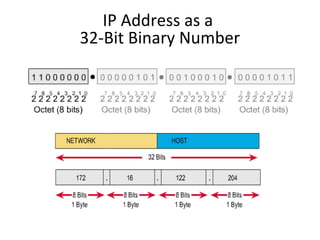
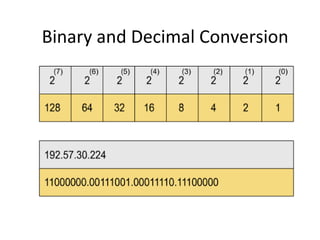
IP Address as a 
32-Bit Binary Number
Binary and Decimal Conversion
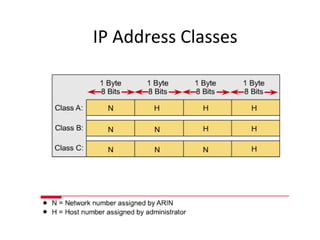
IP Address Classes
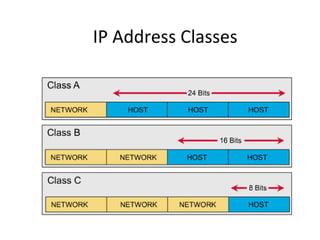
IP Address Classes
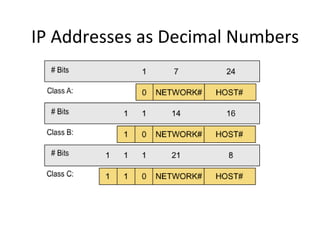
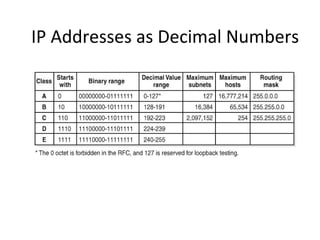
IP Addresses as Decimal Numbers
Hosts for Classes of 
IP Addresses 
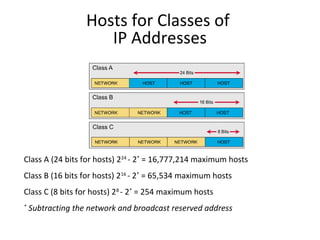
Class A (24 bits for hosts) 224 - 2* = 16,777,214 maximum hosts 
Class B (16 bits for hosts) 216 - 2* = 65,534 maximum hosts 
Class C (8 bits for hosts) 28 - 2* = 254 maximum hosts 
* Subtracting the network and broadcast reserved address
IP Addresses as Decimal Numbers
Network IDs and Broadcast 
Addresses 
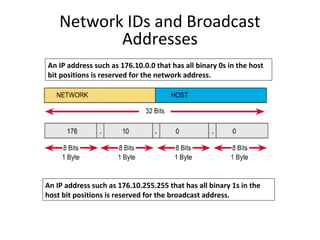
An IP address such as 176.10.0.0 that has all binary 0s in the host 
bit positions is reserved for the network address. 
An IP address such as 176.10.255.255 that has all binary 1s in the 
host bit positions is reserved for the broadcast address.
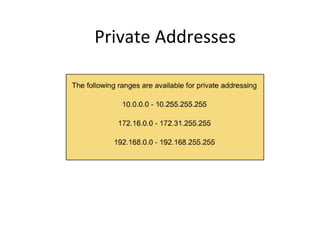
Private Addresses
Reserved Address Space 
• Network ID 
• Broadcast address 
• Hosts for classes of IP addresses
Basics of Subnetting 
• Classical IP addressing 
• Subnetworks 
• Subnet mask 
• Boolean operations: AND, OR, and NOT 
• Performing the AND function
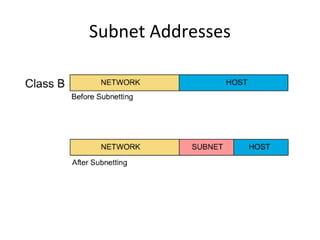
Subnetworks 
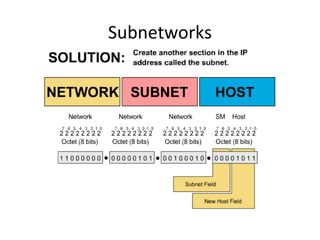
To create a subnet address, a network administrator 
borrows bits from the original host portion and 
designates them as the subnet field.
Subnetworks
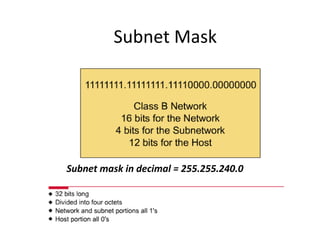
Subnet Mask 
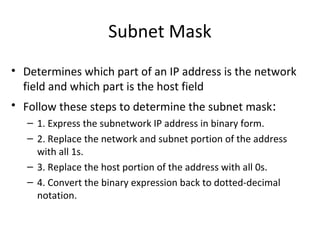
• Determines which part of an IP address is the network 
field and which part is the host field 
• Follow these steps to determine the subnet mask: 
– 1. Express the subnetwork IP address in binary form. 
– 2. Replace the network and subnet portion of the address 
with all 1s. 
– 3. Replace the host portion of the address with all 0s. 
– 4. Convert the binary expression back to dotted-decimal 
notation.
Subnet Mask 
Subnet mask in decimal = 255.255.240.0
Boolean Operations: 
AND, OR, and NOT 
• AND is like multiplication. 
• OR is like addition. 
• NOT changes 1 to 0, and 0 to 1.
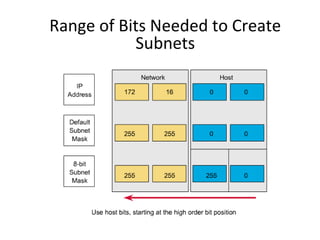
Range of Bits Needed to Create 
Subnets
Subnet Addresses
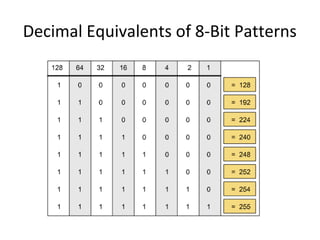
Decimal Equivalents of 8-Bit Patterns
Creating a Subnet 
• Determining subnet mask size 
• Computing subnet mask and IP address 
• Computing hosts per subnetwork 
• Boolean AND operation 
• IP configuration on a network diagram 
• Host and subnet schemes 
• Private addresses
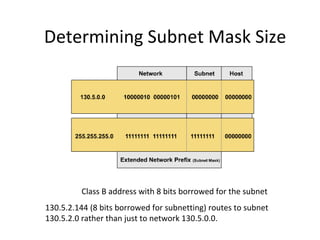
Determining Subnet Mask Size 
Class B address with 8 bits borrowed for the subnet 
130.5.2.144 (8 bits borrowed for subnetting) routes to subnet 
130.5.2.0 rather than just to network 130.5.0.0.
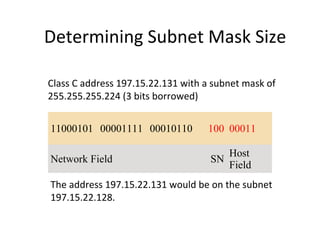
Determining Subnet Mask Size 
Class C address 197.15.22.131 with a subnet mask of 
255.255.255.224 (3 bits borrowed) 
11000101 00001111 00010110 100 00011 
Network Field SN Host 
Field 
The address 197.15.22.131 would be on the subnet 
197.15.22.128.
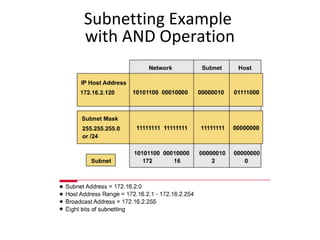
Subnetting Example 
with AND Operation
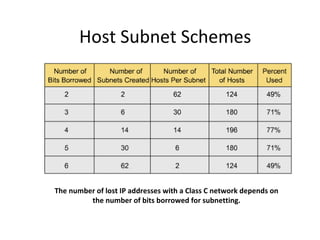
Host Subnet Schemes 
The number of lost IP addresses with a Class C network depends on 
the number of bits borrowed for subnetting.
Working with Addresses (The Easy 
Way) 
• The key is to work in octets, rather than trying to 
work with the entire IP address at once!
Subnetting Exercise 
• What would be the case if the Network Administrator were 
given the following network address 192.12.8.0, and the 
number of departments were 7. 
• 1. What class is the network address? 
• 2. How many subnets are needed? 
• 3. How many bits are borrowed from the host part of the address? 
• 4. How many subnets are defined and how many of these are useable? 
• 5. What is the default subnet mask? 
• 6. What is the new customised subnet mask? 
• 7. What is the decimal value of each subnet? 
• 8. What is the total number of hosts?
Subnetting 
• 1. What class is the network address? 
– Class C as it is above 191 
• 2. How many subnets are needed? 
– 7 subnets -why not use just 3 bits 
• 3. How many bits are borrowed from the host part of the address? 
– 4 bits are needed 
• 4. How many subnets are defined and how many of these are useable? 
– 2 x 2 x 2 x 2 = 16 are defined - 16 - 2 = 14 are useable 
• 5. What is the default subnet mask? 
– 255.255.255.0 class C 
• 6. What is the new customised subnet mask? 
– 255.255.255.240
Subnetting a Class C Network 
• First you must determine the reason you 
are subnetting a network. 
• There are many reasons. We will choose 
one. 
• If we put all 254 hosts on this one major 
network, and the bandwidth is 100 Mbps, 
each host will have approximately 393,700 
bps of bandwidth (~394 kbps)
Subnetting a Class C Network 
• Suppose that we wish to give 4 Mbps of 
bandwidth to each user, 
• Then we will subnet the network and put a 
maximum of 25 users on each subnet.
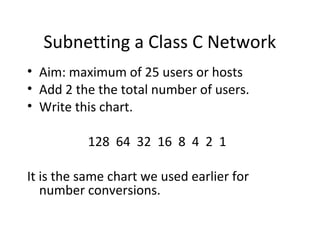
Subnetting a Class C Network 
• Aim: maximum of 25 users or hosts 
• Add 2 the the total number of users. 
• Write this chart. 
128 64 32 16 8 4 2 1 
It is the same chart we used earlier for 
number conversions.
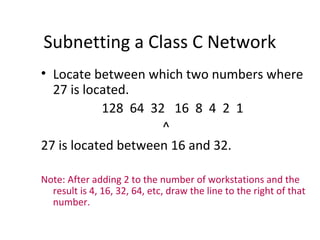
Subnetting a Class C Network 
• Locate between which two numbers where 
27 is located. 
128 64 32 16 8 4 2 1 
^ 
27 is located between 16 and 32. 
Note: After adding 2 to the number of workstations and the 
result is 4, 16, 32, 64, etc, draw the line to the right of that 
number.
Subnetting a Class C Network 
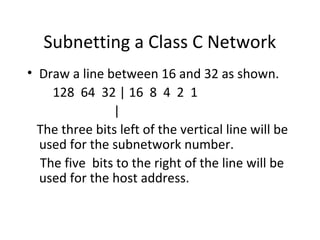
• Draw a line between 16 and 32 as shown. 
128 64 32 | 16 8 4 2 1 
| 
The three bits left of the vertical line will be 
used for the subnetwork number. 
The five bits to the right of the line will be 
used for the host address.
Subnetting a Class C Network 
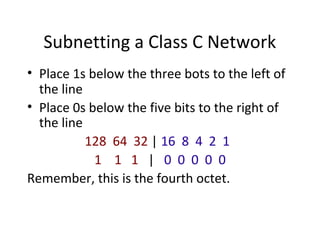
• Place 1s below the three bots to the left of 
the line 
• Place 0s below the five bits to the right of 
the line 
128 64 32 | 16 8 4 2 1 
1 1 1 | 0 0 0 0 0 
Remember, this is the fourth octet.
Determining the Subnet Mask 
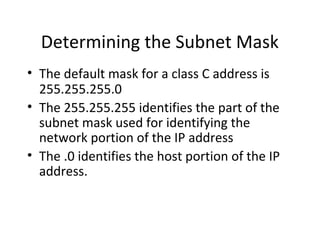
• The default mask for a class C address is 
255.255.255.0 
• The 255.255.255 identifies the part of the 
subnet mask used for identifying the 
network portion of the IP address 
• The .0 identifies the host portion of the IP 
address.
Determining the Subnet Mask 
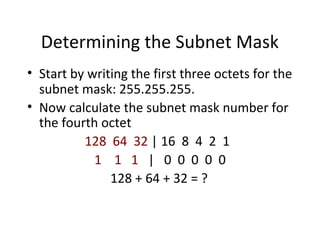
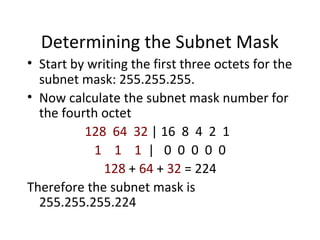
• Start by writing the first three octets for the 
subnet mask: 255.255.255. 
• Now calculate the subnet mask number for 
the fourth octet 
128 64 32 | 16 8 4 2 1 
1 1 1 | 0 0 0 0 0 
128 + 64 + 32 = ?
Determining the Subnet Mask 
• Start by writing the first three octets for the 
subnet mask: 255.255.255. 
• Now calculate the subnet mask number for 
the fourth octet 
128 64 32 | 16 8 4 2 1 
1 1 1 | 0 0 0 0 0 
128 + 64 + 32 = 224 
Therefore the subnet mask is 
255.255.255.224
Addresses 
• The last steps. 
• Calculate each subnet address 
• Calculate the 1st host address 
• Calculate the last host address 
• Calculate the broadcast address for each 
subnetwork
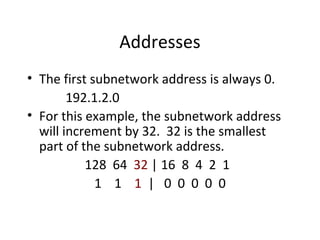
Addresses 
• The first subnetwork address is always 0. 
192.1.2.0 
• For this example, the subnetwork address 
will increment by 32. 32 is the smallest 
part of the subnetwork address. 
128 64 32 | 16 8 4 2 1 
1 1 1 | 0 0 0 0 0
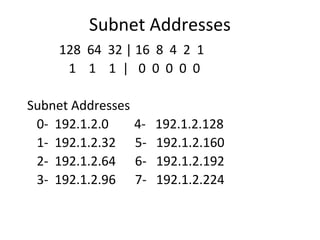
Subnet Addresses 
128 64 32 | 16 8 4 2 1 
1 1 1 | 0 0 0 0 0 
Subnet Addresses 
0- 192.1.2.0 4- 192.1.2.128 
1- 192.1.2.32 5- 192.1.2.160 
2- 192.1.2.64 6- 192.1.2.192 
3- 192.1.2.96 7- 192.1.2.224
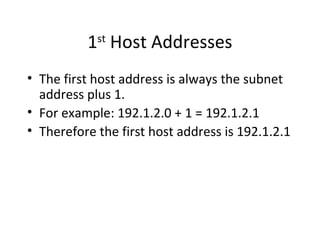
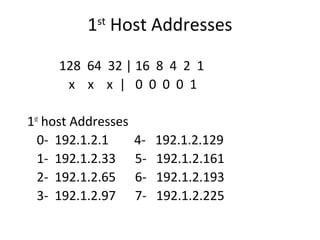
1st Host Addresses 
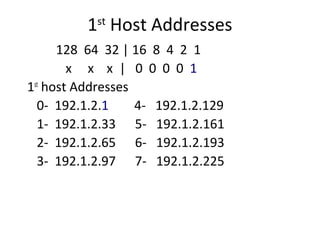
• The first host address is always the subnet 
address plus 1. 
• For example: 192.1.2.0 + 1 = 192.1.2.1 
• Therefore the first host address is 192.1.2.1
1st Host Addresses 
128 64 32 | 16 8 4 2 1 
x x x | 0 0 0 0 1 
1st host Addresses 
0- 192.1.2.1 4- 192.1.2.129 
1- 192.1.2.33 5- 192.1.2.161 
2- 192.1.2.65 6- 192.1.2.193 
3- 192.1.2.97 7- 192.1.2.225
1st Host Addresses 
128 64 32 | 16 8 4 2 1 
x x x | 0 0 0 0 1 
1st host Addresses 
0- 192.1.2.1 4- 192.1.2.129 
1- 192.1.2.33 5- 192.1.2.161 
2- 192.1.2.65 6- 192.1.2.193 
3- 192.1.2.97 7- 192.1.2.225
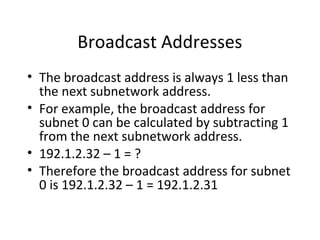
Broadcast Addresses 
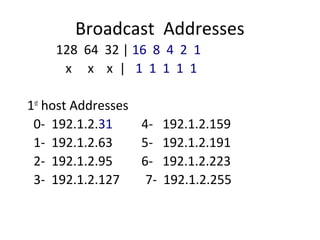
• The broadcast address is always 1 less than 
the next subnetwork address. 
• For example, the broadcast address for 
subnet 0 can be calculated by subtracting 1 
from the next subnetwork address. 
• 192.1.2.32 – 1 = ? 
• Therefore the broadcast address for subnet 
0 is 192.1.2.32 – 1 = 192.1.2.31
Broadcast Addresses 
128 64 32 | 16 8 4 2 1 
x x x | 1 1 1 1 1 
1st host Addresses 
0- 192.1.2.31 4- 192.1.2.159 
1- 192.1.2.63 5- 192.1.2.191 
2- 192.1.2.95 6- 192.1.2.223 
3- 192.1.2.127 7- 192.1.2.255
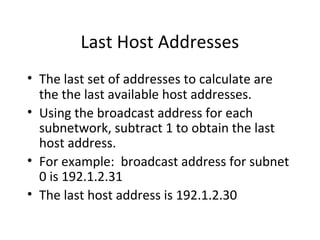
Last Host Addresses 
• The last set of addresses to calculate are 
the the last available host addresses. 
• Using the broadcast address for each 
subnetwork, subtract 1 to obtain the last 
host address. 
• For example: broadcast address for subnet 
0 is 192.1.2.31 
• The last host address is 192.1.2.30
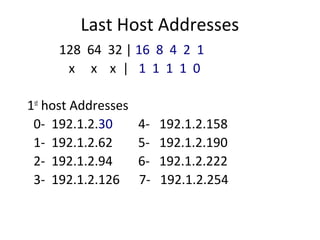
Last Host Addresses 
128 64 32 | 16 8 4 2 1 
x x x | 1 1 1 1 0 
1st host Addresses 
0- 192.1.2.30 4- 192.1.2.158 
1- 192.1.2.62 5- 192.1.2.190 
2- 192.1.2.94 6- 192.1.2.222 
3- 192.1.2.126 7- 192.1.2.254
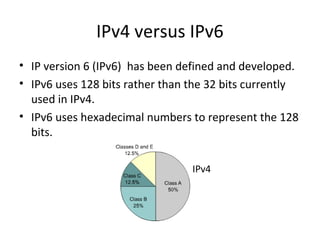
IPv4 versus IPv6 
• IP version 6 (IPv6) has been defined and developed. 
• IPv6 uses 128 bits rather than the 32 bits currently 
used in IPv4. 
• IPv6 uses hexadecimal numbers to represent the 128 
bits. 
IPv4

Ipaddress presentationdemoclass

  • 1.
    The Hierarchical IPAddressing Scheme IP address consists of 32 bits of information. You can depict an IP address using one of three methods: Dotted-decimal, as in 172.16.30.56 Binary, as in 10101100.00010000.00011110.00111000 Hexadecimal, as in AC.10.1E.38 11/11/14 OIT,RMUTT. 1
  • 2.
    Octets • The32-bit IP address is broken up into 4 octets, which are arranged into a dotted-decimal notation scheme. • An octet is a set of 8 bits • Example of an IP version 4: 172.64.126.52
  • 3.
    IP Address asa 32-Bit Binary Number
  • 4.
  • 5.
  • 6.
  • 7.
    IP Addresses asDecimal Numbers
  • 8.
    Hosts for Classesof IP Addresses Class A (24 bits for hosts) 224 - 2* = 16,777,214 maximum hosts Class B (16 bits for hosts) 216 - 2* = 65,534 maximum hosts Class C (8 bits for hosts) 28 - 2* = 254 maximum hosts * Subtracting the network and broadcast reserved address
  • 9.
    IP Addresses asDecimal Numbers
  • 10.
    Network IDs andBroadcast Addresses An IP address such as 176.10.0.0 that has all binary 0s in the host bit positions is reserved for the network address. An IP address such as 176.10.255.255 that has all binary 1s in the host bit positions is reserved for the broadcast address.
  • 11.
  • 12.
    Reserved Address Space • Network ID • Broadcast address • Hosts for classes of IP addresses
  • 13.
    Basics of Subnetting • Classical IP addressing • Subnetworks • Subnet mask • Boolean operations: AND, OR, and NOT • Performing the AND function
  • 14.
    Subnetworks To createa subnet address, a network administrator borrows bits from the original host portion and designates them as the subnet field.
  • 15.
  • 16.
    Subnet Mask •Determines which part of an IP address is the network field and which part is the host field • Follow these steps to determine the subnet mask: – 1. Express the subnetwork IP address in binary form. – 2. Replace the network and subnet portion of the address with all 1s. – 3. Replace the host portion of the address with all 0s. – 4. Convert the binary expression back to dotted-decimal notation.
  • 17.
    Subnet Mask Subnetmask in decimal = 255.255.240.0
  • 18.
    Boolean Operations: AND,OR, and NOT • AND is like multiplication. • OR is like addition. • NOT changes 1 to 0, and 0 to 1.
  • 19.
    Range of BitsNeeded to Create Subnets
  • 20.
  • 21.
    Decimal Equivalents of8-Bit Patterns
  • 22.
    Creating a Subnet • Determining subnet mask size • Computing subnet mask and IP address • Computing hosts per subnetwork • Boolean AND operation • IP configuration on a network diagram • Host and subnet schemes • Private addresses
  • 23.
    Determining Subnet MaskSize Class B address with 8 bits borrowed for the subnet 130.5.2.144 (8 bits borrowed for subnetting) routes to subnet 130.5.2.0 rather than just to network 130.5.0.0.
  • 24.
    Determining Subnet MaskSize Class C address 197.15.22.131 with a subnet mask of 255.255.255.224 (3 bits borrowed) 11000101 00001111 00010110 100 00011 Network Field SN Host Field The address 197.15.22.131 would be on the subnet 197.15.22.128.
  • 25.
  • 26.
    Host Subnet Schemes The number of lost IP addresses with a Class C network depends on the number of bits borrowed for subnetting.
  • 27.
    Working with Addresses(The Easy Way) • The key is to work in octets, rather than trying to work with the entire IP address at once!
  • 28.
    Subnetting Exercise •What would be the case if the Network Administrator were given the following network address 192.12.8.0, and the number of departments were 7. • 1. What class is the network address? • 2. How many subnets are needed? • 3. How many bits are borrowed from the host part of the address? • 4. How many subnets are defined and how many of these are useable? • 5. What is the default subnet mask? • 6. What is the new customised subnet mask? • 7. What is the decimal value of each subnet? • 8. What is the total number of hosts?
  • 29.
    Subnetting • 1.What class is the network address? – Class C as it is above 191 • 2. How many subnets are needed? – 7 subnets -why not use just 3 bits • 3. How many bits are borrowed from the host part of the address? – 4 bits are needed • 4. How many subnets are defined and how many of these are useable? – 2 x 2 x 2 x 2 = 16 are defined - 16 - 2 = 14 are useable • 5. What is the default subnet mask? – 255.255.255.0 class C • 6. What is the new customised subnet mask? – 255.255.255.240
  • 30.
    Subnetting a ClassC Network • First you must determine the reason you are subnetting a network. • There are many reasons. We will choose one. • If we put all 254 hosts on this one major network, and the bandwidth is 100 Mbps, each host will have approximately 393,700 bps of bandwidth (~394 kbps)
  • 31.
    Subnetting a ClassC Network • Suppose that we wish to give 4 Mbps of bandwidth to each user, • Then we will subnet the network and put a maximum of 25 users on each subnet.
  • 32.
    Subnetting a ClassC Network • Aim: maximum of 25 users or hosts • Add 2 the the total number of users. • Write this chart. 128 64 32 16 8 4 2 1 It is the same chart we used earlier for number conversions.
  • 33.
    Subnetting a ClassC Network • Locate between which two numbers where 27 is located. 128 64 32 16 8 4 2 1 ^ 27 is located between 16 and 32. Note: After adding 2 to the number of workstations and the result is 4, 16, 32, 64, etc, draw the line to the right of that number.
  • 34.
    Subnetting a ClassC Network • Draw a line between 16 and 32 as shown. 128 64 32 | 16 8 4 2 1 | The three bits left of the vertical line will be used for the subnetwork number. The five bits to the right of the line will be used for the host address.
  • 35.
    Subnetting a ClassC Network • Place 1s below the three bots to the left of the line • Place 0s below the five bits to the right of the line 128 64 32 | 16 8 4 2 1 1 1 1 | 0 0 0 0 0 Remember, this is the fourth octet.
  • 36.
    Determining the SubnetMask • The default mask for a class C address is 255.255.255.0 • The 255.255.255 identifies the part of the subnet mask used for identifying the network portion of the IP address • The .0 identifies the host portion of the IP address.
  • 37.
    Determining the SubnetMask • Start by writing the first three octets for the subnet mask: 255.255.255. • Now calculate the subnet mask number for the fourth octet 128 64 32 | 16 8 4 2 1 1 1 1 | 0 0 0 0 0 128 + 64 + 32 = ?
  • 38.
    Determining the SubnetMask • Start by writing the first three octets for the subnet mask: 255.255.255. • Now calculate the subnet mask number for the fourth octet 128 64 32 | 16 8 4 2 1 1 1 1 | 0 0 0 0 0 128 + 64 + 32 = 224 Therefore the subnet mask is 255.255.255.224
  • 39.
    Addresses • Thelast steps. • Calculate each subnet address • Calculate the 1st host address • Calculate the last host address • Calculate the broadcast address for each subnetwork
  • 40.
    Addresses • Thefirst subnetwork address is always 0. 192.1.2.0 • For this example, the subnetwork address will increment by 32. 32 is the smallest part of the subnetwork address. 128 64 32 | 16 8 4 2 1 1 1 1 | 0 0 0 0 0
  • 41.
    Subnet Addresses 12864 32 | 16 8 4 2 1 1 1 1 | 0 0 0 0 0 Subnet Addresses 0- 192.1.2.0 4- 192.1.2.128 1- 192.1.2.32 5- 192.1.2.160 2- 192.1.2.64 6- 192.1.2.192 3- 192.1.2.96 7- 192.1.2.224
  • 42.
    1st Host Addresses • The first host address is always the subnet address plus 1. • For example: 192.1.2.0 + 1 = 192.1.2.1 • Therefore the first host address is 192.1.2.1
  • 43.
    1st Host Addresses 128 64 32 | 16 8 4 2 1 x x x | 0 0 0 0 1 1st host Addresses 0- 192.1.2.1 4- 192.1.2.129 1- 192.1.2.33 5- 192.1.2.161 2- 192.1.2.65 6- 192.1.2.193 3- 192.1.2.97 7- 192.1.2.225
  • 44.
    1st Host Addresses 128 64 32 | 16 8 4 2 1 x x x | 0 0 0 0 1 1st host Addresses 0- 192.1.2.1 4- 192.1.2.129 1- 192.1.2.33 5- 192.1.2.161 2- 192.1.2.65 6- 192.1.2.193 3- 192.1.2.97 7- 192.1.2.225
  • 45.
    Broadcast Addresses •The broadcast address is always 1 less than the next subnetwork address. • For example, the broadcast address for subnet 0 can be calculated by subtracting 1 from the next subnetwork address. • 192.1.2.32 – 1 = ? • Therefore the broadcast address for subnet 0 is 192.1.2.32 – 1 = 192.1.2.31
  • 46.
    Broadcast Addresses 12864 32 | 16 8 4 2 1 x x x | 1 1 1 1 1 1st host Addresses 0- 192.1.2.31 4- 192.1.2.159 1- 192.1.2.63 5- 192.1.2.191 2- 192.1.2.95 6- 192.1.2.223 3- 192.1.2.127 7- 192.1.2.255
  • 47.
    Last Host Addresses • The last set of addresses to calculate are the the last available host addresses. • Using the broadcast address for each subnetwork, subtract 1 to obtain the last host address. • For example: broadcast address for subnet 0 is 192.1.2.31 • The last host address is 192.1.2.30
  • 48.
    Last Host Addresses 128 64 32 | 16 8 4 2 1 x x x | 1 1 1 1 0 1st host Addresses 0- 192.1.2.30 4- 192.1.2.158 1- 192.1.2.62 5- 192.1.2.190 2- 192.1.2.94 6- 192.1.2.222 3- 192.1.2.126 7- 192.1.2.254
  • 49.
    IPv4 versus IPv6 • IP version 6 (IPv6) has been defined and developed. • IPv6 uses 128 bits rather than the 32 bits currently used in IPv4. • IPv6 uses hexadecimal numbers to represent the 128 bits. IPv4