CHAPTER 4
List and Table
Handling in HTML
Part 2 – Table in HTML
Table
 Representation of information in
proper format increases degree
of understanding and facilitates
ease of its use.
 A table contains information
sequence in form of grids.
 Information can be presented in
the form of rows and columns in
a table.
Four tags in Table
 To create table <table> and </table>
 A row in a table <tr> and </tr>
 Table heading tag <th> and </th>
 Table data <td> and </td>
Border Attribute
 To create border around the whole table as well as each individual cell.
 The width of the border is given in pixel.
 Usage of border attribute is optional.
 If you use the attribute with value 0, no border will be visible.
 For example <table border=2>
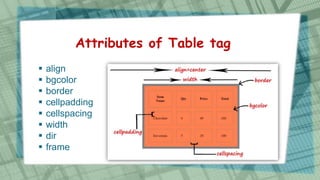
Attributes of Table tag
 align
 bgcolor
 border
 cellpadding
 cellspacing
 width
 dir
 frame
Bgcolor Attribute
 To make table more attractive and colourful by adding background
colour.
 The bgcolor attribute sets the background color for the table.
 The value of this attribute is either a color name or a six digit
hexadecimal code.
Align Attribute
 To specify the alignment of the table
 Three possible value of this attribute can be left, right or center
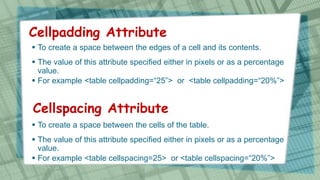
Cellpadding Attribute
 To create a space between the edges of a cell and its contents.
 The value of this attribute specified either in pixels or as a percentage
value.
 For example <table cellpadding=“25”> or <table cellpadding=“20%”>
Cellspacing Attribute
 To create a space between the cells of the table.
 The value of this attribute specified either in pixels or as a percentage
value.
 For example <table cellspacing=25> or <table cellspacing=“20%”>
dir Attribute
 dir attribute specify the direction of the text that is displayed in the table
Width Attribute
 To specify the width of the table
 The value of this attribute specified either in pixels or as a percentage
value.
 For example <table width=50> or <table width=“50%”>
frame Attribute
 frame attribute control the outermost border of the table
Table row Tag
 The <tr> tag is used to display a row in a table.
 Three attributes of <tr> tag are:
 align
 Bgcolor
 valign
Align Attribute
 To position of the content of all of the cells in the row.
 5 possible values for the align attribute are:
left content is left aligned and this is the default case for normal text
right content is right aligned
center content is centered horizontally within the cell and this is default
case for headings
justify Text within the cell is justified to fill the cell.
char cell contents are aligned horizontally around the first instance of
a specific character.
valign Attribute
 specifies the vertical alignment of the contents of each cell in a row.
 Four possible values for the valign attribute are:
Top aligns content with the top of the cell
Middle aligns content in the center of the cell
Bottom aligns content with the bottom of the cell
Baseline aligns content so that first line of text in each cell starts on
the same horizontal line
bgcolor Attribute
 specifies the background color for selected row
Cell representation using th and td
 Each cell in a table is either represented either
by <td> or <th>. They facilitate breaking of a
row into multiple columns.
 To specify heading <th> is used and the
content of <th> is displayed in bold and center
aligned.
 To specify content of a cell <td> is used and the
content of <td> is displayed in normal and left
aligned.
 Both <td> and <th> holds the same attributes
and effects of this is limited to a single cell.
Attributes of th and td tag
abbr an abbreviated version of content of the cell.
align aligns content of the cell.
bgcolor add background to the cell
char Manages the cell content to be aligned around the first instance of the
specified character
headers Indicate corresponding headers to the cell
height Specifies height of the cell
rowspan Indicates number of rows that the cell spans across
colspan Indicate number of columns that the cell spans across
nowrap Stops text from automatically wrapping into a new line within the cell
valign Specifies vertical alignment of the cell.
width Specifies the width of the cell.
Adding caption to a table
 To give name to the table <caption> tag is used.
 <caption> My Table </caption>
Thanks for Watching

Std 10 Computer Chapter 4 List and Table Handling in HTML (Part 2 Table in HTML)

  • 1.
    CHAPTER 4 List andTable Handling in HTML Part 2 – Table in HTML
  • 2.
    Table  Representation ofinformation in proper format increases degree of understanding and facilitates ease of its use.  A table contains information sequence in form of grids.  Information can be presented in the form of rows and columns in a table.
  • 3.
    Four tags inTable  To create table <table> and </table>  A row in a table <tr> and </tr>  Table heading tag <th> and </th>  Table data <td> and </td>
  • 4.
    Border Attribute  Tocreate border around the whole table as well as each individual cell.  The width of the border is given in pixel.  Usage of border attribute is optional.  If you use the attribute with value 0, no border will be visible.  For example <table border=2>
  • 5.
    Attributes of Tabletag  align  bgcolor  border  cellpadding  cellspacing  width  dir  frame
  • 6.
    Bgcolor Attribute  Tomake table more attractive and colourful by adding background colour.  The bgcolor attribute sets the background color for the table.  The value of this attribute is either a color name or a six digit hexadecimal code. Align Attribute  To specify the alignment of the table  Three possible value of this attribute can be left, right or center
  • 7.
    Cellpadding Attribute  Tocreate a space between the edges of a cell and its contents.  The value of this attribute specified either in pixels or as a percentage value.  For example <table cellpadding=“25”> or <table cellpadding=“20%”> Cellspacing Attribute  To create a space between the cells of the table.  The value of this attribute specified either in pixels or as a percentage value.  For example <table cellspacing=25> or <table cellspacing=“20%”>
  • 8.
    dir Attribute  dirattribute specify the direction of the text that is displayed in the table Width Attribute  To specify the width of the table  The value of this attribute specified either in pixels or as a percentage value.  For example <table width=50> or <table width=“50%”> frame Attribute  frame attribute control the outermost border of the table
  • 9.
    Table row Tag The <tr> tag is used to display a row in a table.  Three attributes of <tr> tag are:  align  Bgcolor  valign
  • 10.
    Align Attribute  Toposition of the content of all of the cells in the row.  5 possible values for the align attribute are: left content is left aligned and this is the default case for normal text right content is right aligned center content is centered horizontally within the cell and this is default case for headings justify Text within the cell is justified to fill the cell. char cell contents are aligned horizontally around the first instance of a specific character.
  • 11.
    valign Attribute  specifiesthe vertical alignment of the contents of each cell in a row.  Four possible values for the valign attribute are: Top aligns content with the top of the cell Middle aligns content in the center of the cell Bottom aligns content with the bottom of the cell Baseline aligns content so that first line of text in each cell starts on the same horizontal line bgcolor Attribute  specifies the background color for selected row
  • 12.
    Cell representation usingth and td  Each cell in a table is either represented either by <td> or <th>. They facilitate breaking of a row into multiple columns.  To specify heading <th> is used and the content of <th> is displayed in bold and center aligned.  To specify content of a cell <td> is used and the content of <td> is displayed in normal and left aligned.  Both <td> and <th> holds the same attributes and effects of this is limited to a single cell.
  • 13.
    Attributes of thand td tag abbr an abbreviated version of content of the cell. align aligns content of the cell. bgcolor add background to the cell char Manages the cell content to be aligned around the first instance of the specified character headers Indicate corresponding headers to the cell height Specifies height of the cell rowspan Indicates number of rows that the cell spans across colspan Indicate number of columns that the cell spans across nowrap Stops text from automatically wrapping into a new line within the cell valign Specifies vertical alignment of the cell. width Specifies the width of the cell.
  • 14.
    Adding caption toa table  To give name to the table <caption> tag is used.  <caption> My Table </caption>
  • 15.