Standards Based  Approach to  User Interface Development Easy6 ACM CHI-SI Conference Bangalore Jan 2006 http://www.chi-si.org Sameer Chavan Applications User Experience Oracle
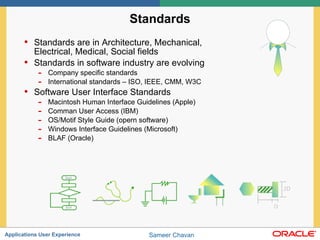
Standards Standards are in Architecture, Mechanical, Electrical, Medical, Social fields Standards in software industry are evolving Company specific standards International standards – ISO, IEEE, CMM, W3C Software User Interface Standards Macintosh Human Interface Guidelines (Apple) Comman User Access (IBM) OS/Motif Style Guide (opern software) Windows Interface Guidelines (Microsoft) BLAF (Oracle)
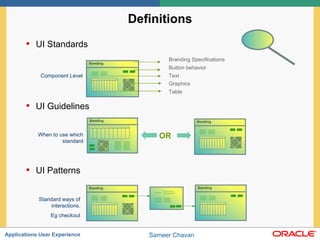
Definitions UI Standards  UI Guidelines UI Patterns Component Level When to use which standard Standard ways of interactions. Eg checkout Branding Specifications Button behavior Text Graphics Table OR
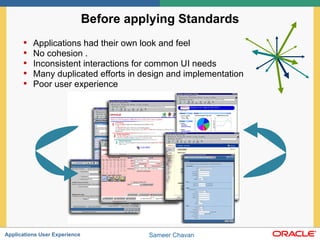
Before applying Standards Applications had their own look and feel No cohesion . Inconsistent interactions for common UI needs Many duplicated efforts in design and implementation Poor user experience
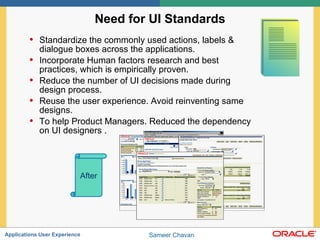
Need for UI Standards Standardize the commonly used actions, labels & dialogue boxes across the applications.  Incorporate Human factors research and best practices, which is empirically proven. Reduce the number of UI decisions made during design process.  Reuse the user experience. Avoid reinventing same designs. To help Product Managers. Reduced the dependency on UI designers . After
Limitations of Standards Standards are very generic so they don’t  know  exact requirements for a particular task. Standards are often compromised solution across all products. So it cannot guarantee best interaction for that task. Having just consistent UI will not insure usability. All the designs cannot be documented and have UI standard. Standards cannot give design solution
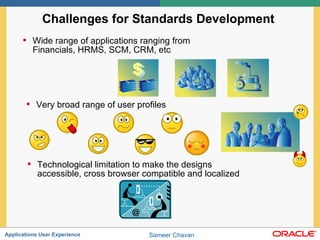
Challenges for Standards Development  Wide range of applications ranging from Financials, HRMS, SCM, CRM, etc Very broad range of user profiles Technological limitation to make the designs accessible, cross browser compatible and localized
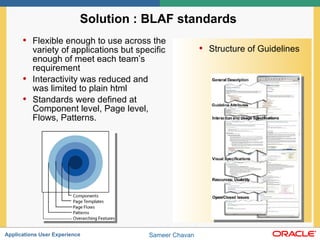
Solution : BLAF standards  Flexible enough to use across the variety of applications but specific enough of meet each team’s requirement  Interactivity was reduced and was limited to plain html  Standards were defined at Component level, Page level, Flows, Patterns. Structure of Guidelines
Standards were result of..  Functional requirements from many product teams. (tasks & flows) Technical constraints after discussing with development. (Browsers & bandwidth) Legal constraints (Accessibility) Competitive pressure (e.g. “Save for later” feature ) Cost constraints Human cognitive limitations (e.g. reduce memory load)
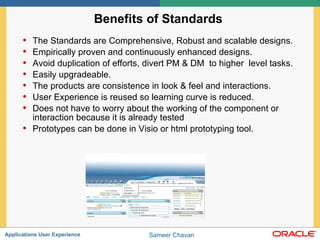
Benefits of Standards  The Standards are Comprehensive, Robust and scalable designs. Empirically proven and continuously enhanced designs. Avoid duplication of efforts, divert PM & DM  to higher  level tasks. Easily upgradeable.  The products are consistence in look & feel and interactions.  User Experience is reused so learning curve is reduced. Does not have to worry about the working of the component or interaction because it is already tested  Prototypes can be done in Visio or html prototyping tool.
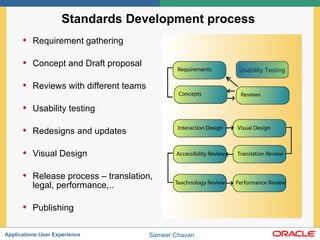
Standards Development process  Requirement gathering Concept and Draft proposal Reviews with different teams Usability testing Redesigns and updates Visual Design Release process – translation, legal, performance,.. Publishing Usability Testing
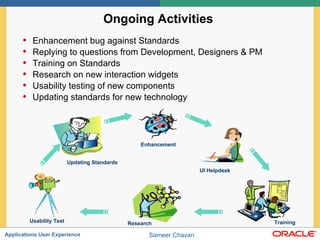
Ongoing Activities  Enhancement bug against Standards Replying to questions from Development, Designers & PM Training on Standards  Research on new interaction widgets Usability testing of new components Updating standards for new technology Enhancement UI Helpdesk Training Research Usability Test Updating Standards
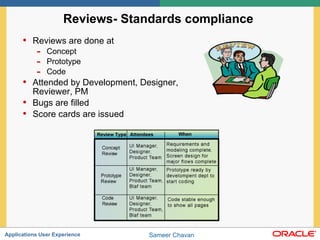
Reviews- Standards compliance  Reviews are done at Concept Prototype Code Attended by Development, Designer, Reviewer, PM Bugs are filled Score cards are issued
Challenges due to Standards based Design  Dose not insure best design.  The designer needs to apply right standards for given task flow.  A designer needs to know each standard before designing. You cannot design freely.  Interpreting the meaning of standards become difficult. Standards constrains the flexibility and innovation in design. Lengthy process of standards. Standards become absolute after certain time.
Future perspective on Standards  Can we have a wizard based design  Can a designer becomes redundant using patterns. Common standards across the platform (windows, Unix, mac) Can different companies have same flow for same task(eg. Shopping cart)
Questions and Answers Q A & [email_address]

Standards Based Approach to User Interface Development

  • 1.
    Standards Based Approach to User Interface Development Easy6 ACM CHI-SI Conference Bangalore Jan 2006 http://www.chi-si.org Sameer Chavan Applications User Experience Oracle
  • 2.
    Standards Standards arein Architecture, Mechanical, Electrical, Medical, Social fields Standards in software industry are evolving Company specific standards International standards – ISO, IEEE, CMM, W3C Software User Interface Standards Macintosh Human Interface Guidelines (Apple) Comman User Access (IBM) OS/Motif Style Guide (opern software) Windows Interface Guidelines (Microsoft) BLAF (Oracle)
  • 3.
    Definitions UI Standards UI Guidelines UI Patterns Component Level When to use which standard Standard ways of interactions. Eg checkout Branding Specifications Button behavior Text Graphics Table OR
  • 4.
    Before applying StandardsApplications had their own look and feel No cohesion . Inconsistent interactions for common UI needs Many duplicated efforts in design and implementation Poor user experience
  • 5.
    Need for UIStandards Standardize the commonly used actions, labels & dialogue boxes across the applications. Incorporate Human factors research and best practices, which is empirically proven. Reduce the number of UI decisions made during design process. Reuse the user experience. Avoid reinventing same designs. To help Product Managers. Reduced the dependency on UI designers . After
  • 6.
    Limitations of StandardsStandards are very generic so they don’t know exact requirements for a particular task. Standards are often compromised solution across all products. So it cannot guarantee best interaction for that task. Having just consistent UI will not insure usability. All the designs cannot be documented and have UI standard. Standards cannot give design solution
  • 7.
    Challenges for StandardsDevelopment Wide range of applications ranging from Financials, HRMS, SCM, CRM, etc Very broad range of user profiles Technological limitation to make the designs accessible, cross browser compatible and localized
  • 8.
    Solution : BLAFstandards Flexible enough to use across the variety of applications but specific enough of meet each team’s requirement Interactivity was reduced and was limited to plain html Standards were defined at Component level, Page level, Flows, Patterns. Structure of Guidelines
  • 9.
    Standards were resultof.. Functional requirements from many product teams. (tasks & flows) Technical constraints after discussing with development. (Browsers & bandwidth) Legal constraints (Accessibility) Competitive pressure (e.g. “Save for later” feature ) Cost constraints Human cognitive limitations (e.g. reduce memory load)
  • 10.
    Benefits of Standards The Standards are Comprehensive, Robust and scalable designs. Empirically proven and continuously enhanced designs. Avoid duplication of efforts, divert PM & DM to higher level tasks. Easily upgradeable. The products are consistence in look & feel and interactions. User Experience is reused so learning curve is reduced. Does not have to worry about the working of the component or interaction because it is already tested Prototypes can be done in Visio or html prototyping tool.
  • 11.
    Standards Development process Requirement gathering Concept and Draft proposal Reviews with different teams Usability testing Redesigns and updates Visual Design Release process – translation, legal, performance,.. Publishing Usability Testing
  • 12.
    Ongoing Activities Enhancement bug against Standards Replying to questions from Development, Designers & PM Training on Standards Research on new interaction widgets Usability testing of new components Updating standards for new technology Enhancement UI Helpdesk Training Research Usability Test Updating Standards
  • 13.
    Reviews- Standards compliance Reviews are done at Concept Prototype Code Attended by Development, Designer, Reviewer, PM Bugs are filled Score cards are issued
  • 14.
    Challenges due toStandards based Design Dose not insure best design. The designer needs to apply right standards for given task flow. A designer needs to know each standard before designing. You cannot design freely. Interpreting the meaning of standards become difficult. Standards constrains the flexibility and innovation in design. Lengthy process of standards. Standards become absolute after certain time.
  • 15.
    Future perspective onStandards Can we have a wizard based design Can a designer becomes redundant using patterns. Common standards across the platform (windows, Unix, mac) Can different companies have same flow for same task(eg. Shopping cart)
  • 16.
    Questions and AnswersQ A & [email_address]