DOORS/Analyst Modeling for Requirements Engineering
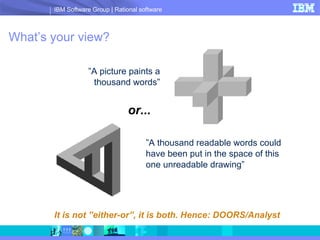
What’s your view? ” A picture paints a thousand words” ” A thousand readable words could have been put in the space of this one unreadable drawing” or... It is not ”either-or”, it is both. Hence: DOORS/Analyst
Requirements Engineering Challenges Requirements elicitation Elicitating  all requirements from all stake-holders Define scope and boundaries for the problem as well as the suggested solution Requirements clarification Specify unambiguous requirements Attain mutual understanding of requirements among involved stakeholders  Foundation for reuse Shorten development times by being able to reuse information created early later in the development lifecycle
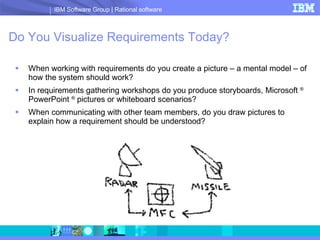
Do You Visualize Requirements Today? When working with requirements do you create a picture – a mental model – of how the system should work? In requirements gathering workshops do you produce storyboards, Microsoft  ®  PowerPoint  ®  pictures or whiteboard scenarios? When communicating with other team members, do you draw pictures to explain how a requirement should be understood?
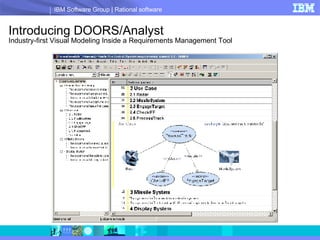
Introducing DOORS/Analyst   Industry-first Visual Modeling Inside a Requirements Management Tool
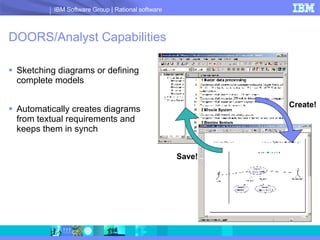
DOORS/Analyst Capabilities Sketching diagrams or defining complete models Automatically creates diagrams from textual requirements and keeps them in synch Create! Save!
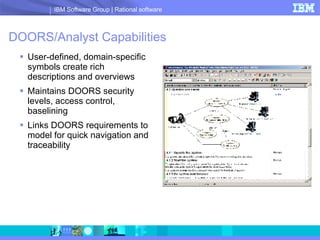
DOORS/Analyst Capabilities User-defined, domain-specific symbols create rich descriptions and overviews Maintains DOORS security levels, access control, baselining  Links DOORS requirements to model for quick navigation and traceability
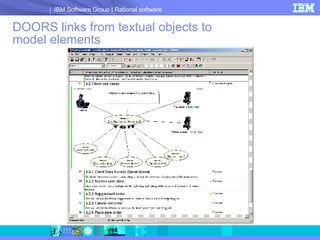
DOORS links from textual objects to model elements
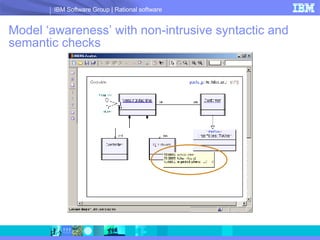
Model ‘awareness’ with non-intrusive syntactic and semantic checks
Benefits of DOORS/Analyst Low learning curve and easy to get started No need to worry about keeping the different representations – visual and texual – up to date Based on familiar usability paradigms and standardized pictures and diagrams Improved requirements elicitation Get richer input from customers Less ambiguous requirements Easier to demonstrate requirements to end users Maintained traceability of requirements Quickly find the relevant model element via bi-directional links from textual requirements
Benefits of DOORS/Analyst (cont) Enhanced feedback and buy-in from stakeholders Elicit better feedback from key people in the organization Involve also non-technical people in the requirements management process Strengthened collaboration with other team members Quickly embellish requirements with sketches Ensure that requirements are completely understood by implementers Symbols and diagrams used are familiar to most system and software developers Simplified international cooperation Visual models provide ”common ground” for all
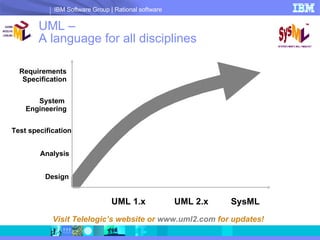
UML –  A language for all disciplines Visit Telelogic’s website or  www.uml2.com  for updates! Design Analysis Test specification System  Engineering Requirements Specification UML 1.x UML 2.x SysML
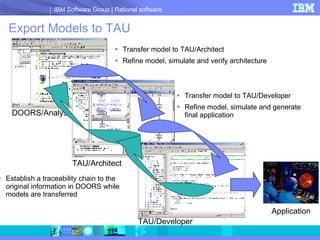
Export Models to TAU Transfer model to TAU/Architect Refine model, simulate and verify architecture DOORS/Analyst Transfer model to TAU/Developer Refine model, simulate and generate final application Establish a traceability chain to the original information in DOORS while models are transferred TAU/Architect TAU/Developer Application
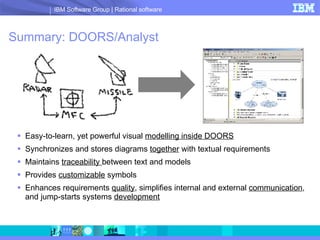
Summary: DOORS/Analyst Easy-to-learn, yet powerful visual  modelling inside DOORS   Synchronizes and stores diagrams  together  with textual requirements Maintains  traceability  between text and models Provides  customizable  symbols Enhances requirements  quality , simplifies internal and external  communication , and jump-starts systems  development
© Copyright IBM Corporation 2008.  All rights reserved.  The information contained in these materials is provided for informational purposes only, and is provided AS IS without warranty of any kind, express or implied.  IBM shall not be responsible for any damages arising out of the use of, or otherwise related to, these materials.  Nothing contained in these materials is intended to, nor shall have the effect of, creating any warranties or representations from IBM or its suppliers or licensors, or altering the terms and conditions of the applicable license agreement  governing the use of IBM software. References in these materials to IBM products, programs, or services do not imply that they will be available in all countries in which IBM operates.  Product release dates and/or capabilities referenced in these materials may change at any time at IBM’s sole discretion based on market opportunities or other factors, and are not intended to be a commitment to future product or feature availability in any way.  IBM, the IBM logo, Rational, the Rational logo, Telelogic, the Telelogic logo, and other IBM products and services are trademarks of the International Business Machines Corporation, in the United States, other countries or both. Other company, product, or service names may be trademarks or service marks of others. Learn more at: IBM Rational software IBM Rational Software Delivery Platform Process and portfolio management Change and release management Quality management Architecture  management Rational trial downloads Leading Innovation Web site developerWorks Rational IBM Rational TV IBM Business Partners IBM Rational Case Studies

Doors Analyst

  • 1.
    DOORS/Analyst Modeling forRequirements Engineering
  • 2.
    What’s your view?” A picture paints a thousand words” ” A thousand readable words could have been put in the space of this one unreadable drawing” or... It is not ”either-or”, it is both. Hence: DOORS/Analyst
  • 3.
    Requirements Engineering ChallengesRequirements elicitation Elicitating all requirements from all stake-holders Define scope and boundaries for the problem as well as the suggested solution Requirements clarification Specify unambiguous requirements Attain mutual understanding of requirements among involved stakeholders Foundation for reuse Shorten development times by being able to reuse information created early later in the development lifecycle
  • 4.
    Do You VisualizeRequirements Today? When working with requirements do you create a picture – a mental model – of how the system should work? In requirements gathering workshops do you produce storyboards, Microsoft ® PowerPoint ® pictures or whiteboard scenarios? When communicating with other team members, do you draw pictures to explain how a requirement should be understood?
  • 5.
    Introducing DOORS/Analyst Industry-first Visual Modeling Inside a Requirements Management Tool
  • 6.
    DOORS/Analyst Capabilities Sketchingdiagrams or defining complete models Automatically creates diagrams from textual requirements and keeps them in synch Create! Save!
  • 7.
    DOORS/Analyst Capabilities User-defined,domain-specific symbols create rich descriptions and overviews Maintains DOORS security levels, access control, baselining Links DOORS requirements to model for quick navigation and traceability
  • 8.
    DOORS links fromtextual objects to model elements
  • 9.
    Model ‘awareness’ withnon-intrusive syntactic and semantic checks
  • 10.
    Benefits of DOORS/AnalystLow learning curve and easy to get started No need to worry about keeping the different representations – visual and texual – up to date Based on familiar usability paradigms and standardized pictures and diagrams Improved requirements elicitation Get richer input from customers Less ambiguous requirements Easier to demonstrate requirements to end users Maintained traceability of requirements Quickly find the relevant model element via bi-directional links from textual requirements
  • 11.
    Benefits of DOORS/Analyst(cont) Enhanced feedback and buy-in from stakeholders Elicit better feedback from key people in the organization Involve also non-technical people in the requirements management process Strengthened collaboration with other team members Quickly embellish requirements with sketches Ensure that requirements are completely understood by implementers Symbols and diagrams used are familiar to most system and software developers Simplified international cooperation Visual models provide ”common ground” for all
  • 12.
    UML – A language for all disciplines Visit Telelogic’s website or www.uml2.com for updates! Design Analysis Test specification System Engineering Requirements Specification UML 1.x UML 2.x SysML
  • 13.
    Export Models toTAU Transfer model to TAU/Architect Refine model, simulate and verify architecture DOORS/Analyst Transfer model to TAU/Developer Refine model, simulate and generate final application Establish a traceability chain to the original information in DOORS while models are transferred TAU/Architect TAU/Developer Application
  • 14.
    Summary: DOORS/Analyst Easy-to-learn,yet powerful visual modelling inside DOORS Synchronizes and stores diagrams together with textual requirements Maintains traceability between text and models Provides customizable symbols Enhances requirements quality , simplifies internal and external communication , and jump-starts systems development
  • 15.
    © Copyright IBMCorporation 2008. All rights reserved. The information contained in these materials is provided for informational purposes only, and is provided AS IS without warranty of any kind, express or implied. IBM shall not be responsible for any damages arising out of the use of, or otherwise related to, these materials. Nothing contained in these materials is intended to, nor shall have the effect of, creating any warranties or representations from IBM or its suppliers or licensors, or altering the terms and conditions of the applicable license agreement governing the use of IBM software. References in these materials to IBM products, programs, or services do not imply that they will be available in all countries in which IBM operates. Product release dates and/or capabilities referenced in these materials may change at any time at IBM’s sole discretion based on market opportunities or other factors, and are not intended to be a commitment to future product or feature availability in any way. IBM, the IBM logo, Rational, the Rational logo, Telelogic, the Telelogic logo, and other IBM products and services are trademarks of the International Business Machines Corporation, in the United States, other countries or both. Other company, product, or service names may be trademarks or service marks of others. Learn more at: IBM Rational software IBM Rational Software Delivery Platform Process and portfolio management Change and release management Quality management Architecture management Rational trial downloads Leading Innovation Web site developerWorks Rational IBM Rational TV IBM Business Partners IBM Rational Case Studies