Twitter: twitter.com/hortonworksCall: 855-HADOOP-HELP
Web:qubole.com/try
We Do Hadoop	


Contents
Cheat Sheet
Hive for SQL Users
	
  
1 Additional Resources
2 Query, Metadata
3 Current SQL Compatibility, Command Line, Hive Shell


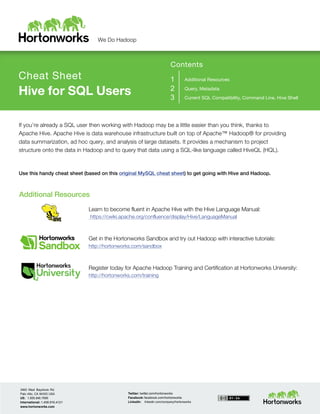
If you’re already a SQL user then working with Hadoop may be a little easier than you think, thanks to
Apache Hive. Apache Hive is data warehouse infrastructure built on top of Apache™ Hadoop® for providing
data summarization, ad hoc query, and analysis of large datasets. It provides a mechanism to project
structure onto the data in Hadoop and to query that data using a SQL-like language called HiveQL (HQL).


Use this handy cheat sheet (based on this original MySQL cheat sheet) to get going with Hive and Hadoop.


Additional Resources
	
  
Learn to become fluent in Apache Hive with the Hive Language Manual:
https://cwiki.apache.org/confluence/display/Hive/LanguageManual


Get in the Hortonworks Sandbox and try out Hadoop with interactive tutorials:
http://hortonworks.com/sandbox


Try out Qubole Data Service (QDS) for free:
http://www.qubole.com/try


Twitter: twitter.com/hortonworksCall: 855-HADOOP-HELP
Web:qubole.com/try
We Do Hadoop	


Query
Function MySQL HiveQL
Retrieving information SELECT	
  from_columns	
  FROM	
  table	
  WHERE	
  conditions;	
   SELECT	
  from_columns	
  FROM	
  table	
  WHERE	
  conditions;	
  
All values SELECT	
  *	
  FROM	
  table;	
   SELECT	
  *	
  FROM	
  table;	
  
Some values SELECT	
  *	
  FROM	
  table	
  WHERE	
  rec_name	
  =	
  “value”;	
   SELECT	
  *	
  FROM	
  table	
  WHERE	
  rec_name	
  =	
  "value";	


Multiple criteria SELECT	
  *	
  FROM	
  table	
  WHERE	
  rec1=”value1”	
  AND	
  
rec2=”value2”;	
  
SELECT	
  *	
  FROM	
  TABLE	
  WHERE	
  rec1	
  =	
  "value1"	
  AND	
  
rec2	
  =	
  "value2";	


Selecting specific columns SELECT	
  column_name	
  FROM	
  table;	
   SELECT	
  column_name	
  FROM	
  table;	


Retrieving unique output records SELECT	
  DISTINCT	
  column_name	
  FROM	
  table;	
   SELECT	
  DISTINCT	
  column_name	
  FROM	
  table;	


Sorting SELECT	
  col1,	
  col2	
  FROM	
  table	
  ORDER	
  BY	
  col2;	
   SELECT	
  col1,	
  col2	
  FROM	
  table	
  ORDER	
  BY	
  col2;	


Sorting backward SELECT	
  col1,	
  col2	
  FROM	
  table	
  ORDER	
  BY	
  col2	
  DESC;	
   SELECT	
  col1,	
  col2	
  FROM	
  table	
  ORDER	
  BY	
  col2	
  DESC;	


Counting rows SELECT	
  COUNT(*)	
  FROM	
  table;	
   SELECT	
  COUNT(*)	
  FROM	
  table;	


Grouping with counting SELECT	
  owner,	
  COUNT(*)	
  FROM	
  table	
  GROUP	
  BY	
  
owner;	
  
SELECT	
  owner,	
  COUNT(*)	
  FROM	
  table	
  GROUP	
  BY	
  
owner;	


Maximum value SELECT	
  MAX(col_name)	
  AS	
  label	
  FROM	
  table;	
   SELECT	
  MAX(col_name)	
  AS	
  label	
  FROM	
  table;	


Selecting from multiple tables
(Join same table using alias
w/”AS”)
SELECT	
  pet.name,	
  comment	
  FROM	
  pet,	
  event	
  WHERE	
  
pet.name	
  =	
  event.name;	
  
SELECT	
  pet.name,	
  comment	
  FROM	
  pet	
  JOIN	
  event	
  ON	
  
(pet.name	
  =	
  event.name);	


Metadata
	
  
Function MySQL HiveQL
Selecting a database USE	
  database;	
   USE	
  database;
Listing databases SHOW	
  DATABASES;	
   SHOW	
  DATABASES;
Listing tables in a database SHOW	
  TABLES;	
   SHOW	
  TABLES;	
  
Describing the format of a table DESCRIBE	
  table;	
   DESCRIBE	
  (FORMATTED|EXTENDED)	
  table;	
  
Creating a database CREATE	
  DATABASE	
  db_name;	
   CREATE	
  DATABASE	
  db_name;	
  
Dropping a database DROP	
  DATABASE	
  db_name;	
   DROP	
  DATABASE	
  db_name	
  (CASCADE);	


Twitter: twitter.com/hortonworksCall: 855-HADOOP-HELP
Web:qubole.com/try
We Do Hadoop	


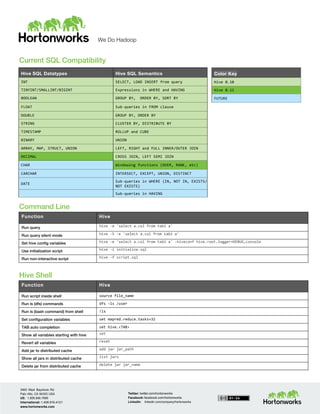
Color Key
Hive	
  0.10	
  
Hive	
  0.11	
  
FUTURE	


Current SQL Compatibility


Command Line
Function Hive
Run query hive	
  -­‐e	
  'select	
  a.col	
  from	
  tab1	
  a'	
  
Run query silent mode hive	
  -­‐S	
  -­‐e	
  'select	
  a.col	
  from	
  tab1	
  a'	
  
Set hive config variables hive	
  -­‐e	
  'select	
  a.col	
  from	
  tab1	
  a'	
  -­‐hiveconf	
  hive.root.logger=DEBUG,console	
  
Use initialization script hive	
  -­‐i	
  initialize.sql	
  
Run non-interactive script hive	
  -­‐f	
  script.sql	


Hive Shell
Function Hive
Run script inside shell source	
  file_name	
  
Run ls (dfs) commands dfs	
  –ls	
  /user	
  
Run ls (bash command) from shell !ls	
  
Set configuration variables set	
  mapred.reduce.tasks=32	
  
TAB auto completion set	
  hive.<TAB>	
  
Show all variables starting with hive set	
  
Revert all variables reset	
  
Add jar to distributed cache add	
  jar	
  jar_path	
  
Show all jars in distributed cache list	
  jars	
  
Delete jar from distributed cache delete	
  jar	
  jar_name	


Hive SQL Datatypes Hive SQL Semantics
INT	
   SELECT,	
  LOAD	
  INSERT	
  from	
  query	
  
TINYINT/SMALLINT/BIGINT	
   Expressions	
  in	
  WHERE	
  and	
  HAVING	
  
BOOLEAN	
   GROUP	
  BY,	
  	
  ORDER	
  BY,	
  SORT	
  BY	
  
FLOAT	
   Sub-­‐queries	
  in	
  FROM	
  clause	
  
DOUBLE	
   GROUP	
  BY,	
  ORDER	
  BY	
  
STRING	
   CLUSTER	
  BY,	
  DISTRIBUTE	
  BY	
  
TIMESTAMP	
   ROLLUP	
  and	
  CUBE	
  
BINARY	
   UNION	
  
ARRAY,	
  MAP,	
  STRUCT,	
  UNION	
   LEFT,	
  RIGHT	
  and	
  FULL	
  INNER/OUTER	
  JOIN	
  
DECIMAL	
   CROSS	
  JOIN,	
  LEFT	
  SEMI	
  JOIN	
  
CHAR	
   Windowing	
  functions	
  (OVER,	
  RANK,	
  etc)	
  
VARCHAR	
   INTERSECT,	
  EXCEPT,	
  UNION,	
  DISTINCT	


DATE	
  
Sub-­‐queries	
  in	
  WHERE	
  (IN,	
  NOT	
  IN,	
  EXISTS/	
  
NOT	
  EXISTS)	
  
	
   Sub-­‐queries	
  in	
  HAVING	
  

SQL to Hive Cheat Sheet

  • 1.
    Twitter: twitter.com/hortonworksCall: 855-HADOOP-HELP Web:qubole.com/try WeDo Hadoop           Contents Cheat Sheet Hive for SQL Users   1 Additional Resources 2 Query, Metadata 3 Current SQL Compatibility, Command Line, Hive Shell         If you’re already a SQL user then working with Hadoop may be a little easier than you think, thanks to Apache Hive. Apache Hive is data warehouse infrastructure built on top of Apache™ Hadoop® for providing data summarization, ad hoc query, and analysis of large datasets. It provides a mechanism to project structure onto the data in Hadoop and to query that data using a SQL-like language called HiveQL (HQL).       Use this handy cheat sheet (based on this original MySQL cheat sheet) to get going with Hive and Hadoop.     Additional Resources   Learn to become fluent in Apache Hive with the Hive Language Manual: https://cwiki.apache.org/confluence/display/Hive/LanguageManual       Get in the Hortonworks Sandbox and try out Hadoop with interactive tutorials: http://hortonworks.com/sandbox       Try out Qubole Data Service (QDS) for free: http://www.qubole.com/try    
  • 2.
    Twitter: twitter.com/hortonworksCall: 855-HADOOP-HELP Web:qubole.com/try WeDo Hadoop     Query Function MySQL HiveQL Retrieving information SELECT  from_columns  FROM  table  WHERE  conditions;   SELECT  from_columns  FROM  table  WHERE  conditions;   All values SELECT  *  FROM  table;   SELECT  *  FROM  table;   Some values SELECT  *  FROM  table  WHERE  rec_name  =  “value”;   SELECT  *  FROM  table  WHERE  rec_name  =  "value";     Multiple criteria SELECT  *  FROM  table  WHERE  rec1=”value1”  AND   rec2=”value2”;   SELECT  *  FROM  TABLE  WHERE  rec1  =  "value1"  AND   rec2  =  "value2";     Selecting specific columns SELECT  column_name  FROM  table;   SELECT  column_name  FROM  table;     Retrieving unique output records SELECT  DISTINCT  column_name  FROM  table;   SELECT  DISTINCT  column_name  FROM  table;     Sorting SELECT  col1,  col2  FROM  table  ORDER  BY  col2;   SELECT  col1,  col2  FROM  table  ORDER  BY  col2;     Sorting backward SELECT  col1,  col2  FROM  table  ORDER  BY  col2  DESC;   SELECT  col1,  col2  FROM  table  ORDER  BY  col2  DESC;     Counting rows SELECT  COUNT(*)  FROM  table;   SELECT  COUNT(*)  FROM  table;     Grouping with counting SELECT  owner,  COUNT(*)  FROM  table  GROUP  BY   owner;   SELECT  owner,  COUNT(*)  FROM  table  GROUP  BY   owner;     Maximum value SELECT  MAX(col_name)  AS  label  FROM  table;   SELECT  MAX(col_name)  AS  label  FROM  table;     Selecting from multiple tables (Join same table using alias w/”AS”) SELECT  pet.name,  comment  FROM  pet,  event  WHERE   pet.name  =  event.name;   SELECT  pet.name,  comment  FROM  pet  JOIN  event  ON   (pet.name  =  event.name);         Metadata   Function MySQL HiveQL Selecting a database USE  database;   USE  database; Listing databases SHOW  DATABASES;   SHOW  DATABASES; Listing tables in a database SHOW  TABLES;   SHOW  TABLES;   Describing the format of a table DESCRIBE  table;   DESCRIBE  (FORMATTED|EXTENDED)  table;   Creating a database CREATE  DATABASE  db_name;   CREATE  DATABASE  db_name;   Dropping a database DROP  DATABASE  db_name;   DROP  DATABASE  db_name  (CASCADE);      
  • 3.
    Twitter: twitter.com/hortonworksCall: 855-HADOOP-HELP Web:qubole.com/try WeDo Hadoop       Color Key Hive  0.10   Hive  0.11   FUTURE     Current SQL Compatibility       Command Line Function Hive Run query hive  -­‐e  'select  a.col  from  tab1  a'   Run query silent mode hive  -­‐S  -­‐e  'select  a.col  from  tab1  a'   Set hive config variables hive  -­‐e  'select  a.col  from  tab1  a'  -­‐hiveconf  hive.root.logger=DEBUG,console   Use initialization script hive  -­‐i  initialize.sql   Run non-interactive script hive  -­‐f  script.sql       Hive Shell Function Hive Run script inside shell source  file_name   Run ls (dfs) commands dfs  –ls  /user   Run ls (bash command) from shell !ls   Set configuration variables set  mapred.reduce.tasks=32   TAB auto completion set  hive.<TAB>   Show all variables starting with hive set   Revert all variables reset   Add jar to distributed cache add  jar  jar_path   Show all jars in distributed cache list  jars   Delete jar from distributed cache delete  jar  jar_name     Hive SQL Datatypes Hive SQL Semantics INT   SELECT,  LOAD  INSERT  from  query   TINYINT/SMALLINT/BIGINT   Expressions  in  WHERE  and  HAVING   BOOLEAN   GROUP  BY,    ORDER  BY,  SORT  BY   FLOAT   Sub-­‐queries  in  FROM  clause   DOUBLE   GROUP  BY,  ORDER  BY   STRING   CLUSTER  BY,  DISTRIBUTE  BY   TIMESTAMP   ROLLUP  and  CUBE   BINARY   UNION   ARRAY,  MAP,  STRUCT,  UNION   LEFT,  RIGHT  and  FULL  INNER/OUTER  JOIN   DECIMAL   CROSS  JOIN,  LEFT  SEMI  JOIN   CHAR   Windowing  functions  (OVER,  RANK,  etc)   VARCHAR   INTERSECT,  EXCEPT,  UNION,  DISTINCT     DATE   Sub-­‐queries  in  WHERE  (IN,  NOT  IN,  EXISTS/   NOT  EXISTS)     Sub-­‐queries  in  HAVING