




1Pivotal Confidential–Internal Use Only 1
Hadoop 2.x Configuration &
Map/Reduce Performance Tuning
Suhas Gogate, Architect Hadoop Engg
CF-Meetup, SFO (20th May 2014 )
A NEW PLATFORM FOR A NEW ERA
3Pivotal Confidential–Internal Use Only
About Me (https://www.linkedin.com/in/vgogate)
 Since 2008, active in Hadoop infrastructure and ecosystem components
with lead Hadoop technology based companies
– Yahoo, Netflix, Hortonworks, EMC-Greenplum/Pivotal
 Founder and PMC member/committer of the Apache Ambari project
 Contributed Apache “Hadoop Vaidya” – Performance diagnostics for M/R
 Prior to Hadoop,
– IBM Almaden Research (2000-2008), CS Software & Storage systems.
– In early days (1993) of my career, worked with a team that built first Indian
super computer, PARAM (Transputer based MPP system) at Center for
Development of Advance Computing (CDAC, Pune)
4Pivotal Confidential–Internal Use Only
Agenda
 Introduction to Hadoop 2.0
– HDFS, YARN, Map/Reduce (M/R)
 Hadoop Cluster
– Hardware selection & Capacity Planning
 Key Hadoop Configuration Parameters
– Operating System, Local FS, HDFS, YARN
 Performance Tuning of M/R Applications
– Hadoop Vaidya demo (MAPREDUCE-3202)
5Pivotal Confidential–Internal Use Only
Introduction to Hadoop
6Pivotal Confidential–Internal Use Only
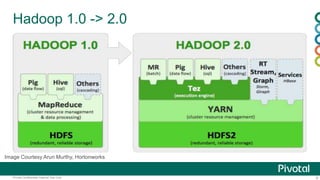
Hadoop 1.0 -> 2.0
Image Courtesy Arun Murthy, Hortonworks
7Pivotal Confidential–Internal Use Only
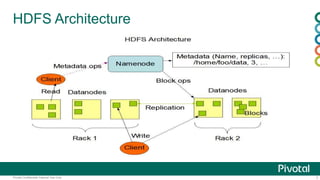
HDFS Architecture
8Pivotal Confidential–Internal Use Only
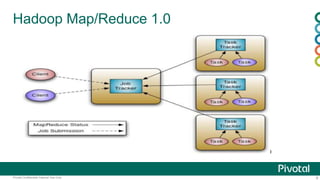
Hadoop Map/Reduce 1.0
9Pivotal Confidential–Internal Use Only
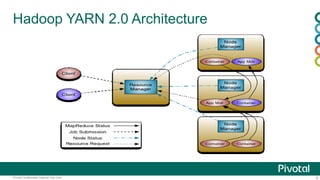
Hadoop YARN 2.0 Architecture
10Pivotal Confidential–Internal Use Only
Hardware selection & Capacity planning
11Pivotal Confidential–Internal Use Only
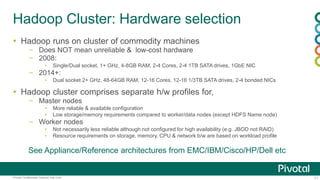
Hadoop Cluster: Hardware selection
 Hadoop runs on cluster of commodity machines
– Does NOT mean unreliable & low-cost hardware
– 2008:
▪ Single/Dual socket, 1+ GHz, 4-8GB RAM, 2-4 Cores, 2-4 1TB SATA drives, 1GbE NIC
– 2014+:
▪ Dual socket 2+ GHz, 48-64GB RAM, 12-16 Cores, 12-16 1/3TB SATA drives, 2-4 bonded NICs
 Hadoop cluster comprises separate h/w profiles for,
– Master nodes
▪ More reliable & available configuration
▪ Low storage/memory requirements compared to worker/data nodes (except HDFS Name node)
– Worker nodes
▪ Not necessarily less reliable although not configured for high availability (e.g. JBOD not RAID)
▪ Resource requirements on storage, memory, CPU & network b/w are based on workload profile
See Appliance/Reference architectures from EMC/IBM/Cisco/HP/Dell etc
12Pivotal Confidential–Internal Use Only
Cluster capacity planning
 Initial cluster capacity is commonly based on HDFS data size & growth projection
– Keep data compression in mind
 Cluster size
– HDFS space per node = (Raw disk space per node – 20/25% non-DFS local storage) / 3 (RF)
– Cluster nodes = Total HDFS space / HDFS space per node
 Start with balanced individual node configuration in terms of CPU/Memory/Number of disks
– Keep provision for growth as you learn more about the workload
– Guidelines for individual worker node configuration
▪ Latest generation processor(s) with 12/16 cores total, is a reasonable start
▪ 4 to 6 GB memory per core
▪ 1/1.5 disks per core
▪ 1 to 3 TB SATA disks per core
▪ 1GbE NIC
 Derive resource requirements service roles (typically Name node)
– NN -> 4-6 cores, default 2GB + 1 GB roughly every 100TB of raw disk space, 1M Objects
– RM/NN/DN -> 2GB RAM, 1 core (thumb rule)
13Pivotal Confidential–Internal Use Only
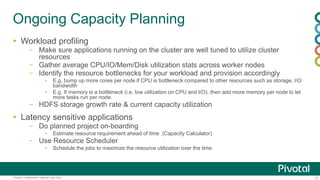
Ongoing Capacity Planning
 Workload profiling
– Make sure applications running on the cluster are well tuned to utilize cluster
resources
– Gather average CPU/IO/Mem/Disk utilization stats across worker nodes
– Identify the resource bottlenecks for your workload and provision accordingly
▪ E,g, bump up more cores per node if CPU is bottleneck compared to other resources such as storage, I/O
bandwidth
▪ E.g. If memory is a bottleneck (i.e. low utilization on CPU and I/O), then add more memory per node to let
more tasks run per node.
– HDFS storage growth rate & current capacity utilization
 Latency sensitive applications
– Do planned project on-boarding
▪ Estimate resource requirement ahead of time (Capacity Calculator)
– Use Resource Scheduler
▪ Schedule the jobs to maximize the resource utilization over the time
14Pivotal Confidential–Internal Use Only
Hadoop Cluster Configuration
15Pivotal Confidential–Internal Use Only
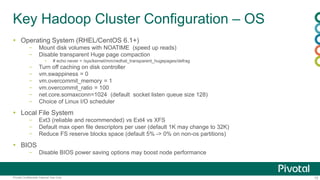
Key Hadoop Cluster Configuration – OS
 Operating System (RHEL/CentOS 6.1+)
– Mount disk volumes with NOATIME (speed up reads)
– Disable transparent Huge page compaction
▪ # echo never > /sys/kernel/mm/redhat_transparent_hugepages/defrag
– Turn off caching on disk controller
– vm.swappiness = 0
– vm.overcommit_memory = 1
– vm.overcommit_ratio = 100
– net.core.somaxconn=1024 (default socket listen queue size 128)
– Choice of Linux I/O scheduler
 Local File System
– Ext3 (reliable and recommended) vs Ext4 vs XFS
– Default max open file descriptors per user (default 1K may change to 32K)
– Reduce FS reserve blocks space (default 5% -> 0% on non-os partitions)
 BIOS
– Disable BIOS power saving options may boost node performance
16Pivotal Confidential–Internal Use Only
Key Hadoop Cluster Configuration - HDFS
 Use multiple disk mount points
– dfs.datanode.data.dir (use all attached disks to data node)
– dfs.namenode.name.dir (NN metadata redundancy on disk)
 DFS Block size
– 128MB (you can override it while writing new files with different block size)
 Local file system buffer
– io.file.buffer.size = 131072 (128KB)
– Io.sort.factor = 50 to 100 (number merge streams while sorting file)
 NN/DN concurrency
– dfs.namenode.handler.count (100)
– dfs.datanode.max.transfer.threads (4096)
 Datanode Failed volumes tolerated
– dfs.datanode.failed.volumes.tolerated
17Pivotal Confidential–Internal Use Only
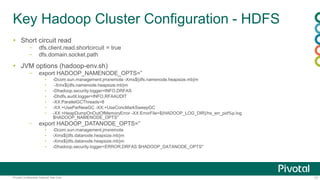
Key Hadoop Cluster Configuration - HDFS
 Short circuit read
– dfs.client.read.shortcircuit = true
– dfs.domain.socket.path
 JVM options (hadoop-env.sh)
– export HADOOP_NAMENODE_OPTS=”
▪ -Dcom.sun.management.jmxremote -Xms${dfs.namenode.heapsize.mb}m
▪ -Xmx${dfs.namenode.heapsize.mb}m
▪ -Dhadoop.security.logger=INFO,DRFAS
▪ -Dhdfs.audit.logger=INFO,RFAAUDIT
▪ -XX:ParallelGCThreads=8
▪ -XX:+UseParNewGC -XX:+UseConcMarkSweepGC
▪ -XX:+HeapDumpOnOutOfMemoryError -XX:ErrorFile=${HADOOP_LOG_DIR}/hs_err_pid%p.log
$HADOOP_NAMENODE_OPTS”
– export HADOOP_DATANODE_OPTS=”
▪ -Dcom.sun.management.jmxremote
▪ -Xms${dfs.datanode.heapsize.mb}m
▪ -Xmx${dfs.datanode.heapsize.mb}m
▪ -Dhadoop.security.logger=ERROR,DRFAS $HADOOP_DATANODE_OPTS"
18Pivotal Confidential–Internal Use Only
Key Hadoop Cluster Configuration - YARN
 Use multiple disk mount points on the worker node
– yarn.nodemanager.local-dirs
– yarn.nodemanager.log-dirs
 Memory allocated for node manager containers
– yarn.nodemanager.resource.memory-mb
▪ Total memory on worker node allocated for all the containers running in parallel
– yarn.scheduler.minimum-allocation-mb
▪ Minimum memory requested for map/reduce task container.
▪ Based on CPU cores and available memory on the node, this parameter can limit number of max containers
per node
– yarn.nodemanager.maximum-allocation-mb
▪ Default to yarn.nodemanager.resource.memory-mb
– yarn.mapreduce.map.memory.mb, yarn.mapreduce.reduce.memory.mb
▪ Default values for map/reduce task container memory. User can override them through job configuration
– yarn.nodemanager.vmem-pmem-ratio = 2.1
19Pivotal Confidential–Internal Use Only
Key Hadoop Cluster Configuration - YARN
 Use Yarn log aggregation
– yarn.log-aggregation-enable
 RM/NM JVM options (yarn-env.sh)
– export YARN_RESOURCEMANAGER_HEAPSIZE=2GB
– export YARN_NODEMANAGER_HEAPSIZE=2GB
– YARN_OPTS="$YARN_OPTS -server
– -Djava.net.preferIPv4Stack=true
– -XX:+UseParNewGC -XX:+UseConcMarkSweepGC
– -XX:+HeapDumpOnOutOfMemoryError
– -XX:ErrorFile=${YARN_LOG_DIR}/hs_err_pid%p.log"
20Pivotal Confidential–Internal Use Only
Hadoop Configuration Advisor - Tool
 Given
– Data size, Growth rate, Workload profile, Latency/QoS requirements
 Suggests
– Capacity requirement for Hadoop cluster (reasonable starting point)
▪ Resource requirements for various services roles
▪ Hardware profiles for master/worker nodes (No specific h/w vendor )
– Cluster services topology i.e. placement of service roles to nodes
– Optimal services configuration for given hardware specs
21Pivotal Confidential–Internal Use Only
Performance Tuning of M/R applications
22Pivotal Confidential–Internal Use Only
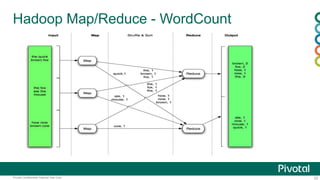
Hadoop Map/Reduce - WordCount
23Pivotal Confidential–Internal Use Only
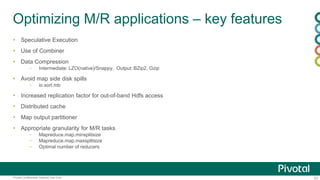
Optimizing M/R applications – key features
 Speculative Execution
 Use of Combiner
 Data Compression
– Intermediate: LZO(native)/Snappy, Output: BZip2, Gzip
 Avoid map side disk spills
– io.sort.mb
 Increased replication factor for out-of-band Hdfs access
 Distributed cache
 Map output partitioner
 Appropriate granularity for M/R tasks
– Mapreduce.map.minsplitsize
– Mapreduce.map.maxsplitsize
– Optimal number of reducers
24Pivotal Confidential–Internal Use Only
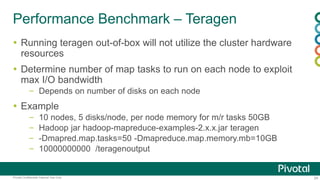
Performance Benchmark – Teragen
 Running teragen out-of-box will not utilize the cluster hardware
resources
 Determine number of map tasks to run on each node to exploit
max I/O bandwidth
– Depends on number of disks on each node
 Example
– 10 nodes, 5 disks/node, per node memory for m/r tasks 50GB
– Hadoop jar hadoop-mapreduce-examples-2.x.x.jar teragen
– -Dmapred.map.tasks=50 -Dmapreduce.map.memory.mb=10GB
– 10000000000 /teragenoutput
25Pivotal Confidential–Internal Use Only
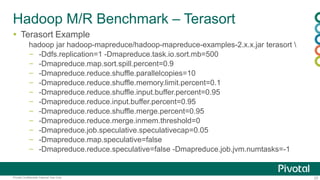
Hadoop M/R Benchmark – Terasort
 Terasort Example
hadoop jar hadoop-mapreduce/hadoop-mapreduce-examples-2.x.x.jar terasort 
– -Ddfs.replication=1 -Dmapreduce.task.io.sort.mb=500
– -Dmapreduce.map.sort.spill.percent=0.9
– -Dmapreduce.reduce.shuffle.parallelcopies=10
– -Dmapreduce.reduce.shuffle.memory.limit.percent=0.1
– -Dmapreduce.reduce.shuffle.input.buffer.percent=0.95
– -Dmapreduce.reduce.input.buffer.percent=0.95
– -Dmapreduce.reduce.shuffle.merge.percent=0.95
– -Dmapreduce.reduce.merge.inmem.threshold=0
– -Dmapreduce.job.speculative.speculativecap=0.05
– -Dmapreduce.map.speculative=false
– -Dmapreduce.reduce.speculative=false -Dmapreduce.job.jvm.numtasks=-1
26Pivotal Confidential–Internal Use Only
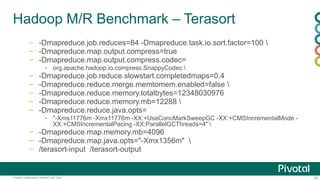
Hadoop M/R Benchmark – Terasort
– -Dmapreduce.job.reduces=84 -Dmapreduce.task.io.sort.factor=100 
– -Dmapreduce.map.output.compress=true
– -Dmapreduce.map.output.compress.codec=
▪ org.apache.hadoop.io.compress.SnappyCodec 
– -Dmapreduce.job.reduce.slowstart.completedmaps=0.4
– -Dmapreduce.reduce.merge.memtomem.enabled=false 
– -Dmapreduce.reduce.memory.totalbytes=12348030976
– -Dmapreduce.reduce.memory.mb=12288 
– -Dmapreduce.reduce.java.opts=
▪ "-Xms11776m -Xmx11776m -XX:+UseConcMarkSweepGC -XX:+CMSIncrementalMode -
XX:+CMSIncrementalPacing -XX:ParallelGCThreads=4" 
– -Dmapreduce.map.memory.mb=4096
– -Dmapreduce.map.java.opts="-Xmx1356m" 
– /terasort-input /terasort-output
27Pivotal Confidential–Internal Use Only
Hadoop Vaidya: Performance diagnostic tool
28Pivotal Confidential–Internal Use Only
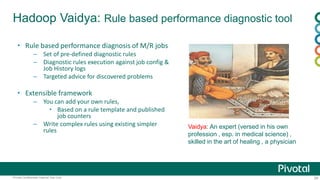
Hadoop Vaidya: Rule based performance diagnostic tool
• Rule based performance diagnosis of M/R jobs
– Set of pre-defined diagnostic rules
– Diagnostic rules execution against job config &
Job History logs
– Targeted advice for discovered problems
• Extensible framework
– You can add your own rules,
• Based on a rule template and published
job counters
– Write complex rules using existing simpler
rules
Vaidya: An expert (versed in his own
profession , esp. in medical science) ,
skilled in the art of healing , a physician
29Pivotal Confidential–Internal Use Only
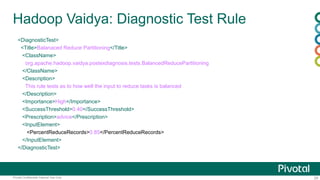
Hadoop Vaidya: Diagnostic Test Rule
<DiagnosticTest>
<Title>Balanaced Reduce Partitioning</Title>
<ClassName>
org.apache.hadoop.vaidya.postexdiagnosis.tests.BalancedReducePartitioning
</ClassName>
<Description>
This rule tests as to how well the input to reduce tasks is balanced
</Description>
<Importance>High</Importance>
<SuccessThreshold>0.40</SuccessThreshold>
<Prescription>advice</Prescription>
<InputElement>
<PercentReduceRecords>0.85</PercentReduceRecords>
</InputElement>
</DiagnosticTest>
30Pivotal Confidential–Internal Use Only
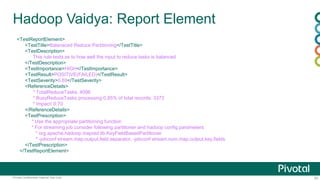
Hadoop Vaidya: Report Element
<TestReportElement>
<TestTitle>Balanaced Reduce Partitioning</TestTitle>
<TestDescription>
This rule tests as to how well the input to reduce tasks is balanced
</TestDescription>
<TestImportance>HIGH</TestImportance>
<TestResult>POSITIVE(FAILED)</TestResult>
<TestSeverity>0.69</TestSeverity>
<ReferenceDetails>
* TotalReduceTasks: 4096
* BusyReduceTasks processing 0.85% of total records: 3373
* Impact: 0.70
</ReferenceDetails>
<TestPrescription>
* Use the appropriate partitioning function
* For streaming job consider following partitioner and hadoop config parameters
* org.apache.hadoop.mapred.lib.KeyFieldBasedPartitioner
* -jobconf stream.map.output.field.separator, -jobconf stream.num.map.output.key.fields
</TestPrescription>
</TestReportElement>
31Pivotal Confidential–Internal Use Only
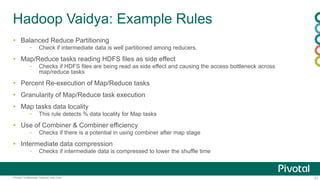
Hadoop Vaidya: Example Rules
 Balanced Reduce Partitioning
– Check if intermediate data is well partitioned among reducers.
 Map/Reduce tasks reading HDFS files as side effect
– Checks if HDFS files are being read as side effect and causing the access bottleneck across
map/reduce tasks
 Percent Re-execution of Map/Reduce tasks
 Granularity of Map/Reduce task execution
 Map tasks data locality
– This rule detects % data locality for Map tasks
 Use of Combiner & Combiner efficiency
– Checks if there is a potential in using combiner after map stage
 Intermediate data compression
– Checks if intermediate data is compressed to lower the shuffle time
32Pivotal Confidential–Internal Use Only
Hadoop Vaidya: Demo
Thank you!
• For Hadoop Vaidya demo
• Download Pivotal HD single node VM
(https://network.gopivotal.com/products/pivotal-hd)
• Run M/R job
• After job completed, go Resource Manager UI
• Select Job History
• To look at the diagnostic report click on “Vaidya Report” link in left
menu
• Vaidya Patch submitted to Apache Hadoop
• https://issues.apache.org/jira/browse/MAPREDUCE-3202
A NEW PLATFORM FOR A NEW ERA

Hadoop configuration & performance tuning

  • 1.
    1Pivotal Confidential–Internal UseOnly 1 Hadoop 2.x Configuration & Map/Reduce Performance Tuning Suhas Gogate, Architect Hadoop Engg CF-Meetup, SFO (20th May 2014 )
  • 2.
    A NEW PLATFORMFOR A NEW ERA
  • 3.
    3Pivotal Confidential–Internal UseOnly About Me (https://www.linkedin.com/in/vgogate)  Since 2008, active in Hadoop infrastructure and ecosystem components with lead Hadoop technology based companies – Yahoo, Netflix, Hortonworks, EMC-Greenplum/Pivotal  Founder and PMC member/committer of the Apache Ambari project  Contributed Apache “Hadoop Vaidya” – Performance diagnostics for M/R  Prior to Hadoop, – IBM Almaden Research (2000-2008), CS Software & Storage systems. – In early days (1993) of my career, worked with a team that built first Indian super computer, PARAM (Transputer based MPP system) at Center for Development of Advance Computing (CDAC, Pune)
  • 4.
    4Pivotal Confidential–Internal UseOnly Agenda  Introduction to Hadoop 2.0 – HDFS, YARN, Map/Reduce (M/R)  Hadoop Cluster – Hardware selection & Capacity Planning  Key Hadoop Configuration Parameters – Operating System, Local FS, HDFS, YARN  Performance Tuning of M/R Applications – Hadoop Vaidya demo (MAPREDUCE-3202)
  • 5.
    5Pivotal Confidential–Internal UseOnly Introduction to Hadoop
  • 6.
    6Pivotal Confidential–Internal UseOnly Hadoop 1.0 -> 2.0 Image Courtesy Arun Murthy, Hortonworks
  • 7.
  • 8.
    8Pivotal Confidential–Internal UseOnly Hadoop Map/Reduce 1.0
  • 9.
    9Pivotal Confidential–Internal UseOnly Hadoop YARN 2.0 Architecture
  • 10.
    10Pivotal Confidential–Internal UseOnly Hardware selection & Capacity planning
  • 11.
    11Pivotal Confidential–Internal UseOnly Hadoop Cluster: Hardware selection  Hadoop runs on cluster of commodity machines – Does NOT mean unreliable & low-cost hardware – 2008: ▪ Single/Dual socket, 1+ GHz, 4-8GB RAM, 2-4 Cores, 2-4 1TB SATA drives, 1GbE NIC – 2014+: ▪ Dual socket 2+ GHz, 48-64GB RAM, 12-16 Cores, 12-16 1/3TB SATA drives, 2-4 bonded NICs  Hadoop cluster comprises separate h/w profiles for, – Master nodes ▪ More reliable & available configuration ▪ Low storage/memory requirements compared to worker/data nodes (except HDFS Name node) – Worker nodes ▪ Not necessarily less reliable although not configured for high availability (e.g. JBOD not RAID) ▪ Resource requirements on storage, memory, CPU & network b/w are based on workload profile See Appliance/Reference architectures from EMC/IBM/Cisco/HP/Dell etc
  • 12.
    12Pivotal Confidential–Internal UseOnly Cluster capacity planning  Initial cluster capacity is commonly based on HDFS data size & growth projection – Keep data compression in mind  Cluster size – HDFS space per node = (Raw disk space per node – 20/25% non-DFS local storage) / 3 (RF) – Cluster nodes = Total HDFS space / HDFS space per node  Start with balanced individual node configuration in terms of CPU/Memory/Number of disks – Keep provision for growth as you learn more about the workload – Guidelines for individual worker node configuration ▪ Latest generation processor(s) with 12/16 cores total, is a reasonable start ▪ 4 to 6 GB memory per core ▪ 1/1.5 disks per core ▪ 1 to 3 TB SATA disks per core ▪ 1GbE NIC  Derive resource requirements service roles (typically Name node) – NN -> 4-6 cores, default 2GB + 1 GB roughly every 100TB of raw disk space, 1M Objects – RM/NN/DN -> 2GB RAM, 1 core (thumb rule)
  • 13.
    13Pivotal Confidential–Internal UseOnly Ongoing Capacity Planning  Workload profiling – Make sure applications running on the cluster are well tuned to utilize cluster resources – Gather average CPU/IO/Mem/Disk utilization stats across worker nodes – Identify the resource bottlenecks for your workload and provision accordingly ▪ E,g, bump up more cores per node if CPU is bottleneck compared to other resources such as storage, I/O bandwidth ▪ E.g. If memory is a bottleneck (i.e. low utilization on CPU and I/O), then add more memory per node to let more tasks run per node. – HDFS storage growth rate & current capacity utilization  Latency sensitive applications – Do planned project on-boarding ▪ Estimate resource requirement ahead of time (Capacity Calculator) – Use Resource Scheduler ▪ Schedule the jobs to maximize the resource utilization over the time
  • 14.
    14Pivotal Confidential–Internal UseOnly Hadoop Cluster Configuration
  • 15.
    15Pivotal Confidential–Internal UseOnly Key Hadoop Cluster Configuration – OS  Operating System (RHEL/CentOS 6.1+) – Mount disk volumes with NOATIME (speed up reads) – Disable transparent Huge page compaction ▪ # echo never > /sys/kernel/mm/redhat_transparent_hugepages/defrag – Turn off caching on disk controller – vm.swappiness = 0 – vm.overcommit_memory = 1 – vm.overcommit_ratio = 100 – net.core.somaxconn=1024 (default socket listen queue size 128) – Choice of Linux I/O scheduler  Local File System – Ext3 (reliable and recommended) vs Ext4 vs XFS – Default max open file descriptors per user (default 1K may change to 32K) – Reduce FS reserve blocks space (default 5% -> 0% on non-os partitions)  BIOS – Disable BIOS power saving options may boost node performance
  • 16.
    16Pivotal Confidential–Internal UseOnly Key Hadoop Cluster Configuration - HDFS  Use multiple disk mount points – dfs.datanode.data.dir (use all attached disks to data node) – dfs.namenode.name.dir (NN metadata redundancy on disk)  DFS Block size – 128MB (you can override it while writing new files with different block size)  Local file system buffer – io.file.buffer.size = 131072 (128KB) – Io.sort.factor = 50 to 100 (number merge streams while sorting file)  NN/DN concurrency – dfs.namenode.handler.count (100) – dfs.datanode.max.transfer.threads (4096)  Datanode Failed volumes tolerated – dfs.datanode.failed.volumes.tolerated
  • 17.
    17Pivotal Confidential–Internal UseOnly Key Hadoop Cluster Configuration - HDFS  Short circuit read – dfs.client.read.shortcircuit = true – dfs.domain.socket.path  JVM options (hadoop-env.sh) – export HADOOP_NAMENODE_OPTS=” ▪ -Dcom.sun.management.jmxremote -Xms${dfs.namenode.heapsize.mb}m ▪ -Xmx${dfs.namenode.heapsize.mb}m ▪ -Dhadoop.security.logger=INFO,DRFAS ▪ -Dhdfs.audit.logger=INFO,RFAAUDIT ▪ -XX:ParallelGCThreads=8 ▪ -XX:+UseParNewGC -XX:+UseConcMarkSweepGC ▪ -XX:+HeapDumpOnOutOfMemoryError -XX:ErrorFile=${HADOOP_LOG_DIR}/hs_err_pid%p.log $HADOOP_NAMENODE_OPTS” – export HADOOP_DATANODE_OPTS=” ▪ -Dcom.sun.management.jmxremote ▪ -Xms${dfs.datanode.heapsize.mb}m ▪ -Xmx${dfs.datanode.heapsize.mb}m ▪ -Dhadoop.security.logger=ERROR,DRFAS $HADOOP_DATANODE_OPTS"
  • 18.
    18Pivotal Confidential–Internal UseOnly Key Hadoop Cluster Configuration - YARN  Use multiple disk mount points on the worker node – yarn.nodemanager.local-dirs – yarn.nodemanager.log-dirs  Memory allocated for node manager containers – yarn.nodemanager.resource.memory-mb ▪ Total memory on worker node allocated for all the containers running in parallel – yarn.scheduler.minimum-allocation-mb ▪ Minimum memory requested for map/reduce task container. ▪ Based on CPU cores and available memory on the node, this parameter can limit number of max containers per node – yarn.nodemanager.maximum-allocation-mb ▪ Default to yarn.nodemanager.resource.memory-mb – yarn.mapreduce.map.memory.mb, yarn.mapreduce.reduce.memory.mb ▪ Default values for map/reduce task container memory. User can override them through job configuration – yarn.nodemanager.vmem-pmem-ratio = 2.1
  • 19.
    19Pivotal Confidential–Internal UseOnly Key Hadoop Cluster Configuration - YARN  Use Yarn log aggregation – yarn.log-aggregation-enable  RM/NM JVM options (yarn-env.sh) – export YARN_RESOURCEMANAGER_HEAPSIZE=2GB – export YARN_NODEMANAGER_HEAPSIZE=2GB – YARN_OPTS="$YARN_OPTS -server – -Djava.net.preferIPv4Stack=true – -XX:+UseParNewGC -XX:+UseConcMarkSweepGC – -XX:+HeapDumpOnOutOfMemoryError – -XX:ErrorFile=${YARN_LOG_DIR}/hs_err_pid%p.log"
  • 20.
    20Pivotal Confidential–Internal UseOnly Hadoop Configuration Advisor - Tool  Given – Data size, Growth rate, Workload profile, Latency/QoS requirements  Suggests – Capacity requirement for Hadoop cluster (reasonable starting point) ▪ Resource requirements for various services roles ▪ Hardware profiles for master/worker nodes (No specific h/w vendor ) – Cluster services topology i.e. placement of service roles to nodes – Optimal services configuration for given hardware specs
  • 21.
    21Pivotal Confidential–Internal UseOnly Performance Tuning of M/R applications
  • 22.
    22Pivotal Confidential–Internal UseOnly Hadoop Map/Reduce - WordCount
  • 23.
    23Pivotal Confidential–Internal UseOnly Optimizing M/R applications – key features  Speculative Execution  Use of Combiner  Data Compression – Intermediate: LZO(native)/Snappy, Output: BZip2, Gzip  Avoid map side disk spills – io.sort.mb  Increased replication factor for out-of-band Hdfs access  Distributed cache  Map output partitioner  Appropriate granularity for M/R tasks – Mapreduce.map.minsplitsize – Mapreduce.map.maxsplitsize – Optimal number of reducers
  • 24.
    24Pivotal Confidential–Internal UseOnly Performance Benchmark – Teragen  Running teragen out-of-box will not utilize the cluster hardware resources  Determine number of map tasks to run on each node to exploit max I/O bandwidth – Depends on number of disks on each node  Example – 10 nodes, 5 disks/node, per node memory for m/r tasks 50GB – Hadoop jar hadoop-mapreduce-examples-2.x.x.jar teragen – -Dmapred.map.tasks=50 -Dmapreduce.map.memory.mb=10GB – 10000000000 /teragenoutput
  • 25.
    25Pivotal Confidential–Internal UseOnly Hadoop M/R Benchmark – Terasort  Terasort Example hadoop jar hadoop-mapreduce/hadoop-mapreduce-examples-2.x.x.jar terasort – -Ddfs.replication=1 -Dmapreduce.task.io.sort.mb=500 – -Dmapreduce.map.sort.spill.percent=0.9 – -Dmapreduce.reduce.shuffle.parallelcopies=10 – -Dmapreduce.reduce.shuffle.memory.limit.percent=0.1 – -Dmapreduce.reduce.shuffle.input.buffer.percent=0.95 – -Dmapreduce.reduce.input.buffer.percent=0.95 – -Dmapreduce.reduce.shuffle.merge.percent=0.95 – -Dmapreduce.reduce.merge.inmem.threshold=0 – -Dmapreduce.job.speculative.speculativecap=0.05 – -Dmapreduce.map.speculative=false – -Dmapreduce.reduce.speculative=false -Dmapreduce.job.jvm.numtasks=-1
  • 26.
    26Pivotal Confidential–Internal UseOnly Hadoop M/R Benchmark – Terasort – -Dmapreduce.job.reduces=84 -Dmapreduce.task.io.sort.factor=100 – -Dmapreduce.map.output.compress=true – -Dmapreduce.map.output.compress.codec= ▪ org.apache.hadoop.io.compress.SnappyCodec – -Dmapreduce.job.reduce.slowstart.completedmaps=0.4 – -Dmapreduce.reduce.merge.memtomem.enabled=false – -Dmapreduce.reduce.memory.totalbytes=12348030976 – -Dmapreduce.reduce.memory.mb=12288 – -Dmapreduce.reduce.java.opts= ▪ "-Xms11776m -Xmx11776m -XX:+UseConcMarkSweepGC -XX:+CMSIncrementalMode - XX:+CMSIncrementalPacing -XX:ParallelGCThreads=4" – -Dmapreduce.map.memory.mb=4096 – -Dmapreduce.map.java.opts="-Xmx1356m" – /terasort-input /terasort-output
  • 27.
    27Pivotal Confidential–Internal UseOnly Hadoop Vaidya: Performance diagnostic tool
  • 28.
    28Pivotal Confidential–Internal UseOnly Hadoop Vaidya: Rule based performance diagnostic tool • Rule based performance diagnosis of M/R jobs – Set of pre-defined diagnostic rules – Diagnostic rules execution against job config & Job History logs – Targeted advice for discovered problems • Extensible framework – You can add your own rules, • Based on a rule template and published job counters – Write complex rules using existing simpler rules Vaidya: An expert (versed in his own profession , esp. in medical science) , skilled in the art of healing , a physician
  • 29.
    29Pivotal Confidential–Internal UseOnly Hadoop Vaidya: Diagnostic Test Rule <DiagnosticTest> <Title>Balanaced Reduce Partitioning</Title> <ClassName> org.apache.hadoop.vaidya.postexdiagnosis.tests.BalancedReducePartitioning </ClassName> <Description> This rule tests as to how well the input to reduce tasks is balanced </Description> <Importance>High</Importance> <SuccessThreshold>0.40</SuccessThreshold> <Prescription>advice</Prescription> <InputElement> <PercentReduceRecords>0.85</PercentReduceRecords> </InputElement> </DiagnosticTest>
  • 30.
    30Pivotal Confidential–Internal UseOnly Hadoop Vaidya: Report Element <TestReportElement> <TestTitle>Balanaced Reduce Partitioning</TestTitle> <TestDescription> This rule tests as to how well the input to reduce tasks is balanced </TestDescription> <TestImportance>HIGH</TestImportance> <TestResult>POSITIVE(FAILED)</TestResult> <TestSeverity>0.69</TestSeverity> <ReferenceDetails> * TotalReduceTasks: 4096 * BusyReduceTasks processing 0.85% of total records: 3373 * Impact: 0.70 </ReferenceDetails> <TestPrescription> * Use the appropriate partitioning function * For streaming job consider following partitioner and hadoop config parameters * org.apache.hadoop.mapred.lib.KeyFieldBasedPartitioner * -jobconf stream.map.output.field.separator, -jobconf stream.num.map.output.key.fields </TestPrescription> </TestReportElement>
  • 31.
    31Pivotal Confidential–Internal UseOnly Hadoop Vaidya: Example Rules  Balanced Reduce Partitioning – Check if intermediate data is well partitioned among reducers.  Map/Reduce tasks reading HDFS files as side effect – Checks if HDFS files are being read as side effect and causing the access bottleneck across map/reduce tasks  Percent Re-execution of Map/Reduce tasks  Granularity of Map/Reduce task execution  Map tasks data locality – This rule detects % data locality for Map tasks  Use of Combiner & Combiner efficiency – Checks if there is a potential in using combiner after map stage  Intermediate data compression – Checks if intermediate data is compressed to lower the shuffle time
  • 32.
    32Pivotal Confidential–Internal UseOnly Hadoop Vaidya: Demo Thank you! • For Hadoop Vaidya demo • Download Pivotal HD single node VM (https://network.gopivotal.com/products/pivotal-hd) • Run M/R job • After job completed, go Resource Manager UI • Select Job History • To look at the diagnostic report click on “Vaidya Report” link in left menu • Vaidya Patch submitted to Apache Hadoop • https://issues.apache.org/jira/browse/MAPREDUCE-3202
  • 33.
    A NEW PLATFORMFOR A NEW ERA