Chapter 3
Office
Automation
 A spreadsheet is grid of rows and
columns in which user enter data
in form of numbers and text .
 They are use for multiple tasks
and capable of maintaining data
record in various ways ( i.e. table
, pie chart, any other type of
charts,marksheets) etc.
5/3/2020Contd 2
 Spreadsheets are used in School
for various purpose .
 It is used by teachers to maintain
the academic result record of
students in different subjects .
 Admin department use
spreadsheet for maintaining the
record of employees (staff
members and teachers )working
in the school. Students records
5/3/2020Contd 3
 Students uses Spreadsheet in
order to complete the
assignment given by teacher .
 They can make class record on
basis of result achieved in
various subjects.
 Class list can be maintained.
 Grouping can be done .
5/3/2020Contd 4
 Microsoft Excel is the world's most popular
spreadsheet software. It is designed to help
users perform a myriad of business tasks,
from to-do lists to forecasts to macros and
VBA.
 ADVANTAGES OF PROTECTING AN
EXCEL WORKSHEET
 When a worksheet is protected, other users
can only view the information in it but
changes cannot be made.
5/3/2020Contd 5
MICROSOFT
Founded by Bill Gates
and Paul Allen in
April 1975 .
5/3/2020Contd 6
 Identifying Cells
 Active Cells
 Size of Spreadsheet
 Filling Columns and Rows
 Relative Cell Addressing
 Absolute Cell Addressing
 Paste Special
5/3/2020Contd 7
IDENTIFYING CELLS
 BOXES FORMED BY THE INTERSECTION
OF INDIVIUAL ROWS AND COLUMNS ARE
KNOWN AS CELLS .
 CELLS ARE IDENTIFY WILL THE COLUMN
AND ROW NUMBER.
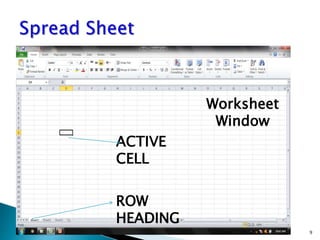
ACTIVE CELLS
 AT ANY MOMENT USER IS POSITIONED
IN SINGLE CELL KNOWN AS ACTIVE CELL
OR CURRENT CELL
5/3/2020Contd 8
5/3/2020Contd 9
ACTIVE
CELL
ROW
HEADING
Worksheet
Window
5/3/2020Contd 10
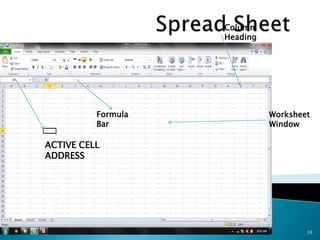
ACTIVE CELL
ADDRESS
Formula
Bar
Column
Heading
Worksheet
Window
SIZE OF SPREADSHEET
 Each worksheet has 16,234 columns and
1,048,576 rows
 User can move window sideways to view
additional columns
5/3/2020Contd 11
REMEMEBER
Worksheet name can be changed by right
click on sheet1 and rename it
PASTE SPECIAL COMMAND
IN EXCEL
 Excel’s Paste Special command allows
many other options while pasting cells
such as paste only formats of selected
cells without contents o paste contents
without formulas.
 Commonly used options of Paste
Special dialog box are explained below.
 All: Used to paste text, numbers and
formulas without formatting.
 Formulas: Used to paste text, numbers
and formulas without formatting.
5/3/2020Contd 12
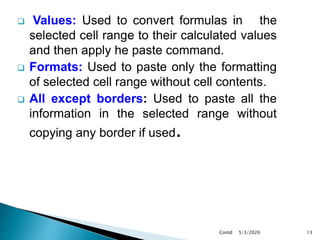
 Values: Used to convert formulas in the
selected cell range to their calculated values
and then apply he paste command.
 Formats: Used to paste only the formatting
of selected cell range without cell contents.
 All except borders: Used to paste all the
information in the selected range without
copying any border if used.
5/3/2020Contd 13
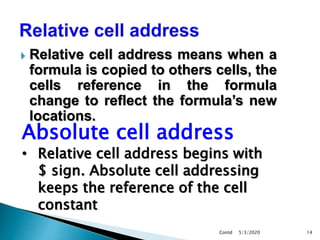
 Relative cell address means when a
formula is copied to others cells, the
cells reference in the formula
change to reflect the formula’s new
locations.
5/3/2020Contd 14
Absolute cell address
• Relative cell address begins with
$ sign. Absolute cell addressing
keeps the reference of the cell
constant
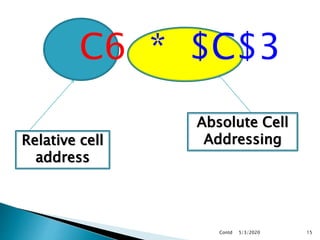
C6 * $C$3
5/3/2020Contd 15
Relative cell
address
Absolute Cell
Addressing
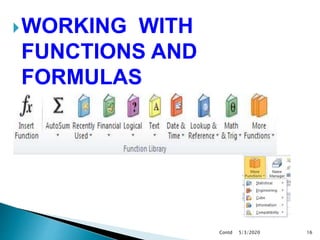
WORKING WITH
FUNCTIONS AND
FORMULAS
5/3/2020Contd 16
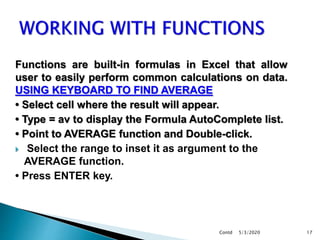
Functions are built-in formulas in Excel that allow
user to easily perform common calculations on data.
USING KEYBOARD TO FIND AVERAGE
• Select cell where the result will appear.
• Type = av to display the Formula AutoComplete list.
• Point to AVERAGE function and Double-click.
 Select the range to inset it as argument to the
AVERAGE function.
• Press ENTER key.
5/3/2020Contd 17
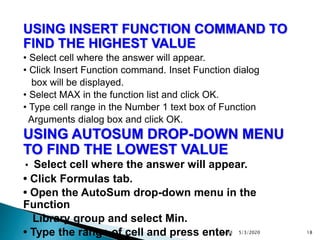
USING INSERT FUNCTION COMMAND TO
FIND THE HIGHEST VALUE
• Select cell where the answer will appear.
• Click Insert Function command. Inset Function dialog
box will be displayed.
• Select MAX in the function list and click OK.
• Type cell range in the Number 1 text box of Function
Arguments dialog box and click OK.
USING AUTOSUM DROP-DOWN MENU
TO FIND THE LOWEST VALUE
• Select cell where the answer will appear.
• Click Formulas tab.
• Open the AutoSum drop-down menu in the
Function
Library group and select Min.
• Type the range of cell and press enter. 5/3/2020Contd 18
 A formula is an expression that performs
calculations. It consists of operators,
constants and cell addresses.
 All the Excel formulas begin with equal
sign [=].
 EXAMPLE:
To multiply two numbers 4 and 7, the
formula will be =4*7. User can also use cell5/3/2020Contd 19
ARITHMETIC OPERATION EXCEL OPERATOR
Addition +
Subtraction -
Multiplication *
Division /
Exponent ^
 A chart is used to represent the
spreadsheet data graphically. It
helps in explanation and
communication of the meaning of
data in a worksheet.
5/3/2020Contd 20
5/3/2020Contd 21
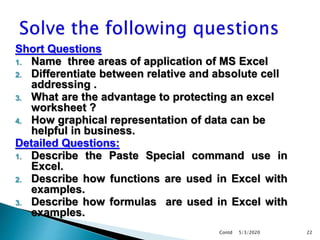
Short Questions
1. Name three areas of application of MS Excel
2. Differentiate between relative and absolute cell
addressing .
3. What are the advantage to protecting an excel
worksheet ?
4. How graphical representation of data can be
helpful in business.
Detailed Questions:
1. Describe the Paste Special command use in
Excel.
2. Describe how functions are used in Excel with
examples.
3. Describe how formulas are used in Excel with
examples.
5/3/2020Contd 22

Spreadsheet new

  • 1.
  • 2.
     A spreadsheetis grid of rows and columns in which user enter data in form of numbers and text .  They are use for multiple tasks and capable of maintaining data record in various ways ( i.e. table , pie chart, any other type of charts,marksheets) etc. 5/3/2020Contd 2
  • 3.
     Spreadsheets areused in School for various purpose .  It is used by teachers to maintain the academic result record of students in different subjects .  Admin department use spreadsheet for maintaining the record of employees (staff members and teachers )working in the school. Students records 5/3/2020Contd 3
  • 4.
     Students usesSpreadsheet in order to complete the assignment given by teacher .  They can make class record on basis of result achieved in various subjects.  Class list can be maintained.  Grouping can be done . 5/3/2020Contd 4
  • 5.
     Microsoft Excelis the world's most popular spreadsheet software. It is designed to help users perform a myriad of business tasks, from to-do lists to forecasts to macros and VBA.  ADVANTAGES OF PROTECTING AN EXCEL WORKSHEET  When a worksheet is protected, other users can only view the information in it but changes cannot be made. 5/3/2020Contd 5
  • 6.
    MICROSOFT Founded by BillGates and Paul Allen in April 1975 . 5/3/2020Contd 6
  • 7.
     Identifying Cells Active Cells  Size of Spreadsheet  Filling Columns and Rows  Relative Cell Addressing  Absolute Cell Addressing  Paste Special 5/3/2020Contd 7
  • 8.
    IDENTIFYING CELLS  BOXESFORMED BY THE INTERSECTION OF INDIVIUAL ROWS AND COLUMNS ARE KNOWN AS CELLS .  CELLS ARE IDENTIFY WILL THE COLUMN AND ROW NUMBER. ACTIVE CELLS  AT ANY MOMENT USER IS POSITIONED IN SINGLE CELL KNOWN AS ACTIVE CELL OR CURRENT CELL 5/3/2020Contd 8
  • 9.
  • 10.
  • 11.
    SIZE OF SPREADSHEET Each worksheet has 16,234 columns and 1,048,576 rows  User can move window sideways to view additional columns 5/3/2020Contd 11 REMEMEBER Worksheet name can be changed by right click on sheet1 and rename it
  • 12.
    PASTE SPECIAL COMMAND INEXCEL  Excel’s Paste Special command allows many other options while pasting cells such as paste only formats of selected cells without contents o paste contents without formulas.  Commonly used options of Paste Special dialog box are explained below.  All: Used to paste text, numbers and formulas without formatting.  Formulas: Used to paste text, numbers and formulas without formatting. 5/3/2020Contd 12
  • 13.
     Values: Usedto convert formulas in the selected cell range to their calculated values and then apply he paste command.  Formats: Used to paste only the formatting of selected cell range without cell contents.  All except borders: Used to paste all the information in the selected range without copying any border if used. 5/3/2020Contd 13
  • 14.
     Relative celladdress means when a formula is copied to others cells, the cells reference in the formula change to reflect the formula’s new locations. 5/3/2020Contd 14 Absolute cell address • Relative cell address begins with $ sign. Absolute cell addressing keeps the reference of the cell constant
  • 15.
    C6 * $C$3 5/3/2020Contd15 Relative cell address Absolute Cell Addressing
  • 16.
  • 17.
    Functions are built-informulas in Excel that allow user to easily perform common calculations on data. USING KEYBOARD TO FIND AVERAGE • Select cell where the result will appear. • Type = av to display the Formula AutoComplete list. • Point to AVERAGE function and Double-click.  Select the range to inset it as argument to the AVERAGE function. • Press ENTER key. 5/3/2020Contd 17
  • 18.
    USING INSERT FUNCTIONCOMMAND TO FIND THE HIGHEST VALUE • Select cell where the answer will appear. • Click Insert Function command. Inset Function dialog box will be displayed. • Select MAX in the function list and click OK. • Type cell range in the Number 1 text box of Function Arguments dialog box and click OK. USING AUTOSUM DROP-DOWN MENU TO FIND THE LOWEST VALUE • Select cell where the answer will appear. • Click Formulas tab. • Open the AutoSum drop-down menu in the Function Library group and select Min. • Type the range of cell and press enter. 5/3/2020Contd 18
  • 19.
     A formulais an expression that performs calculations. It consists of operators, constants and cell addresses.  All the Excel formulas begin with equal sign [=].  EXAMPLE: To multiply two numbers 4 and 7, the formula will be =4*7. User can also use cell5/3/2020Contd 19 ARITHMETIC OPERATION EXCEL OPERATOR Addition + Subtraction - Multiplication * Division / Exponent ^
  • 20.
     A chartis used to represent the spreadsheet data graphically. It helps in explanation and communication of the meaning of data in a worksheet. 5/3/2020Contd 20
  • 21.
  • 22.
    Short Questions 1. Namethree areas of application of MS Excel 2. Differentiate between relative and absolute cell addressing . 3. What are the advantage to protecting an excel worksheet ? 4. How graphical representation of data can be helpful in business. Detailed Questions: 1. Describe the Paste Special command use in Excel. 2. Describe how functions are used in Excel with examples. 3. Describe how formulas are used in Excel with examples. 5/3/2020Contd 22