OFFICE PRODUCTIVITY
TOOLS
By Ullysses D. Selim
The most popular office productivity tool
available under a brand name is from
Microsoft office which contains Microsoft
Word, Excel, PowerPoint and Access.
Excel
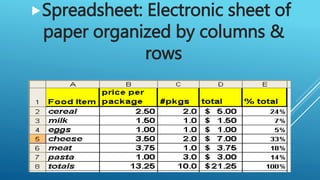
Spreadsheet: Electronic sheet of
paper organized by columns &
rows
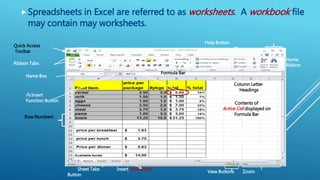
Spreadsheets in Excel are referred to as worksheets. A workbook file
may contain may worksheets.
Home
Ribbon
Help Button
Quick Access
Toolbar
Column Letter
Headings
Row Numbers
Ribbon Tabs
Formula Bar
Contents of
Active Cell displayed on
Formula Bar
View Buttons Zoom
Sheet Tabs Insert Worksheet
Button
Scroll Bars
Fx Insert
Function Button
Name Box
Each box is referred to as a “cell”. Cells may contain
Labels, Values or Formulas that result in a value or
label. A cell is identified first by its column letter
and then by its row number
Rows
Columns
Cell D2
Contains
the Formula
= B2*C2
Labels
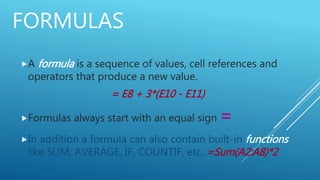
FORMULAS
A formula is a sequence of values, cell references and
operators that produce a new value.
= E8 + 3*(E10 - E11)
Formulas always start with an equal sign =
In addition a formula can also contain built-in functions
like SUM, AVERAGE, IF, COUNTIF, etc. =Sum(A2:A8)*2
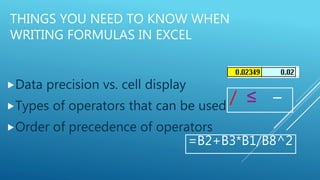
THINGS YOU NEED TO KNOW WHEN
WRITING FORMULAS IN EXCEL
Data precision vs. cell display
Types of operators that can be used
Order of precedence of operators
/ ≤ −
=B2+B3*B1/B8^2
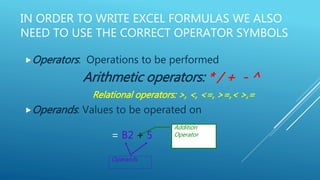
IN ORDER TO WRITE EXCEL FORMULAS WE ALSO
NEED TO USE THE CORRECT OPERATOR SYMBOLS
Operators: Operations to be performed
Arithmetic operators: * / + - ^
Relational operators: >, <, <=, >=,< >,=
Operands: Values to be operated on
= B2 + 5
Operands
Addition
Operator
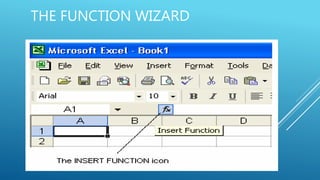
THE FUNCTION WIZARD
FUNCTION ARGUMENTS
Q & A

Office productivity tools

  • 1.
  • 2.
    The most popularoffice productivity tool available under a brand name is from Microsoft office which contains Microsoft Word, Excel, PowerPoint and Access.
  • 3.
  • 4.
    Spreadsheet: Electronic sheetof paper organized by columns & rows
  • 5.
    Spreadsheets in Excelare referred to as worksheets. A workbook file may contain may worksheets. Home Ribbon Help Button Quick Access Toolbar Column Letter Headings Row Numbers Ribbon Tabs Formula Bar Contents of Active Cell displayed on Formula Bar View Buttons Zoom Sheet Tabs Insert Worksheet Button Scroll Bars Fx Insert Function Button Name Box
  • 6.
    Each box isreferred to as a “cell”. Cells may contain Labels, Values or Formulas that result in a value or label. A cell is identified first by its column letter and then by its row number Rows Columns Cell D2 Contains the Formula = B2*C2 Labels
  • 7.
    FORMULAS A formula isa sequence of values, cell references and operators that produce a new value. = E8 + 3*(E10 - E11) Formulas always start with an equal sign = In addition a formula can also contain built-in functions like SUM, AVERAGE, IF, COUNTIF, etc. =Sum(A2:A8)*2
  • 8.
    THINGS YOU NEEDTO KNOW WHEN WRITING FORMULAS IN EXCEL Data precision vs. cell display Types of operators that can be used Order of precedence of operators / ≤ − =B2+B3*B1/B8^2
  • 9.
    IN ORDER TOWRITE EXCEL FORMULAS WE ALSO NEED TO USE THE CORRECT OPERATOR SYMBOLS Operators: Operations to be performed Arithmetic operators: * / + - ^ Relational operators: >, <, <=, >=,< >,= Operands: Values to be operated on = B2 + 5 Operands Addition Operator
  • 11.
  • 13.
  • 15.