5 points
5
4
3
2
1
Scanners/Barcode Reader
1. Three-dimensional scanners.
2. Application of 2D scanners at an
airport.
3. Application of 3D scanning –
computed tomographic (CT)
scanners .
4. Barcode readers/scanners.
5. Quick Response (QR) Code Readers
THREE-DIMENSIONAL SCANNERS
• 3D scanners scan solid objects and produce a three-
dimensional image.
• The solid objects have x, y and z coordinates, these
scanners take images at several points
along these three coordinates.
• The scanned images can be used in
COMPUTER AIDED DESIGN (CAD)
• Computer have long been used in engineering
design
• Computer Aided Design (CAD) are software
programs for the design of product and
structures
• One Advantage of Computer Aided Design
(CAD) is that the product can be drawn in
three dimensions and then rotated on the
screen so the designer can see all the sides .
COMPUTER AIDED DESIGN (CAD)
• Examples of Computer Aided
Design (CAD) programs for
beginners are
Auto Sketch
Easy CAD2
Turbo CAD
Application
of
2D scanners
Application of 2D scanners at an
Airport
• 2D scanners are used at airports to read
passports .
• They make use of OCR technology to produce
digital images which represent the passport
pages
What is OCR ?
Optical
Character
Recognition
What is OCR ?
Device that reads preprinted characters in a
particular font and converts them into digital codes
Examples: Utility Bill
Price tag of department –store merchandise
The wand reader is common OCR scanning
Device .
Optical
Character
Recognition
Application of 2D scanners at an
Airport
• At many airports the two-dimensional
photograph in the passport is also scanned
and stored as a jpeg image. The passenger’s
face is also photographed using a digital
camera (a 2D image is taken so it can be
matched to the image taken from the
passport).
Application of 2D scanners at an
Airport
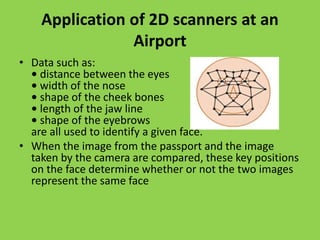
• Data such as:
• distance between the eyes
• width of the nose
• shape of the cheek bones
• length of the jaw line
• shape of the eyebrows
are all used to identify a given face.
• When the image from the passport and the image
taken by the camera are compared, these key positions
on the face determine whether or not the two images
represent the same face
Application
of
3D scanners
COMPUTED TOMOGRAPHIC (CT)
SCANNERS
• COMPUTED TOMOGRAPHIC (CT) SCANNERS are used to
create a 3D image of a solid object.
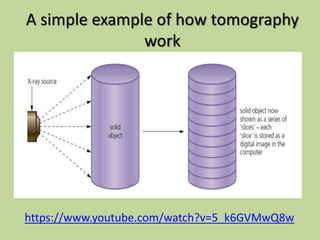
• This is based on TOMOGRAPHY technology which basically
builds up an image of the solid object through a series of
very thin ‘slices’ Together.
• These 2‘slices’ make up a representation of the 3D
solid object.
• Each slice is built up by use of X-rays, radio frequencies or
gamma imaging; although a number of other methods
exist. Each ‘slice’ is then stored as a digital image in the
computer memory. The whole of the solid object is
represented digitally in the computer memory.
A simple example of how tomography
work
https://www.youtube.com/watch?v=5_k6GVMwQ8w
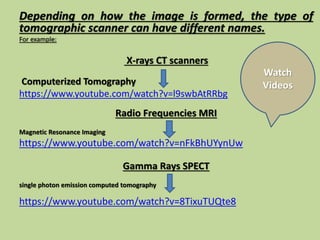
Depending on how the image is formed, the type of
tomographic scanner can have different names.
For example:
X-rays CT scanners
Computerized Tomography
https://www.youtube.com/watch?v=l9swbAtRRbg
Radio Frequencies MRI
Magnetic Resonance Imaging
https://www.youtube.com/watch?v=nFkBhUYynUw
Gamma Rays SPECT
single photon emission computed tomography
https://www.youtube.com/watch?v=8TixuTUQte8
Watch
Videos
Barcode
Readers/Scanners
Barcode Readers/Scanners
• Difference Between Barcode Reader and
Barcode Scanner
Barcode Reader vs Barcode Scanner
• In common words there is no Difference
Between Barcode Reader and Barcode Scanner.
Because some people used to call barcode reader a
barcode scanner. So there is not much difference
between these two terms. One should not get
confused about their differences. It’s only what you call
it (a barcode reader) you can call it a barcode scanner
or barcode reader whatever you want.
Barcode Readers/Scanners
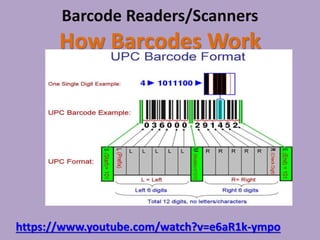
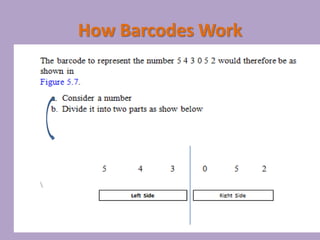
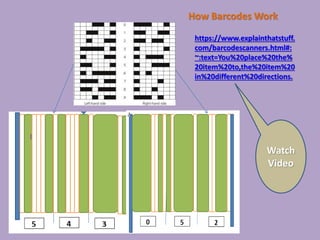
• A barcode is a series of dark and light parallel
lines of varying thickness. The
numbers 0 to 9 are each represented by a unique
series of lines. Various barcode
methods for representing these digits exist.
• The example we shall use adopts different
codes for digits appearing on the left and for
digits appearing on the right (known as
UPC(Universal Product Code)
Barcode Readers/Scanners
How Barcodes Work
https://www.youtube.com/watch?v=e6aR1k-ympo
How Barcodes Work
How Barcodes Work
https://www.explainthatstuff.
com/barcodescanners.html#:
~:text=You%20place%20the%
20item%20to,the%20item%20
in%20different%20directions.
Watch
Video
Read the following from text book
So what happens when a barcode is scanned?
Page 87
So the barcode has been read, then what
happens?
Page 88
Advantages of using barcodes
Page 88
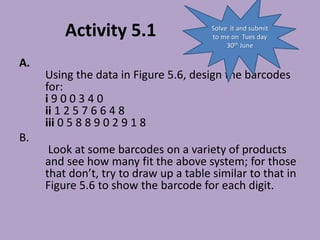
Activity 5.1
A.
Using the data in Figure 5.6, design the barcodes
for:
i 9 0 0 3 4 0
ii 1 2 5 7 6 6 4 8
iii 0 5 8 8 9 0 2 9 1 8
B.
Look at some barcodes on a variety of products
and see how many fit the above system; for those
that don’t, try to draw up a table similar to that in
Figure 5.6 to show the barcode for each digit.
Solve it and submit
to me on Tues day
30th June
Solve it
Activity 5.2
Find out more about how barcodes can be used in a library. Consider
the types of files needed and how the system can track where books
are in the library, which books are out on loan, which customer has
borrowed a book
and so on.
Activity 5.3
Carry out some research and find out about as many different barcode
applications as you can. Try to find out why barcodes are used in each
application and determine the advantage of using this type of
technology.
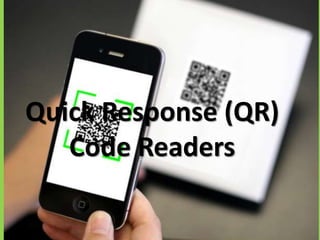
Quick Response (QR)
Code Readers
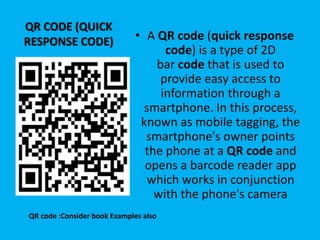
QR CODE (QUICK
RESPONSE CODE) • A QR code (quick response
code) is a type of 2D
bar code that is used to
provide easy access to
information through a
smartphone. In this process,
known as mobile tagging, the
smartphone's owner points
the phone at a QR code and
opens a barcode reader app
which works in conjunction
with the phone's camera
QR code :Consider book Examples also
THANK YOU

scanners touchscreen bar code readers

  • 1.
    5 points 5 4 3 2 1 Scanners/Barcode Reader 1.Three-dimensional scanners. 2. Application of 2D scanners at an airport. 3. Application of 3D scanning – computed tomographic (CT) scanners . 4. Barcode readers/scanners. 5. Quick Response (QR) Code Readers
  • 2.
    THREE-DIMENSIONAL SCANNERS • 3Dscanners scan solid objects and produce a three- dimensional image. • The solid objects have x, y and z coordinates, these scanners take images at several points along these three coordinates. • The scanned images can be used in COMPUTER AIDED DESIGN (CAD)
  • 3.
    COMPUTER AIDED DESIGN(CAD) • Computer have long been used in engineering design • Computer Aided Design (CAD) are software programs for the design of product and structures • One Advantage of Computer Aided Design (CAD) is that the product can be drawn in three dimensions and then rotated on the screen so the designer can see all the sides .
  • 4.
    COMPUTER AIDED DESIGN(CAD) • Examples of Computer Aided Design (CAD) programs for beginners are Auto Sketch Easy CAD2 Turbo CAD
  • 5.
  • 6.
    Application of 2Dscanners at an Airport • 2D scanners are used at airports to read passports . • They make use of OCR technology to produce digital images which represent the passport pages What is OCR ? Optical Character Recognition
  • 7.
    What is OCR? Device that reads preprinted characters in a particular font and converts them into digital codes Examples: Utility Bill Price tag of department –store merchandise The wand reader is common OCR scanning Device . Optical Character Recognition
  • 8.
    Application of 2Dscanners at an Airport • At many airports the two-dimensional photograph in the passport is also scanned and stored as a jpeg image. The passenger’s face is also photographed using a digital camera (a 2D image is taken so it can be matched to the image taken from the passport).
  • 9.
    Application of 2Dscanners at an Airport • Data such as: • distance between the eyes • width of the nose • shape of the cheek bones • length of the jaw line • shape of the eyebrows are all used to identify a given face. • When the image from the passport and the image taken by the camera are compared, these key positions on the face determine whether or not the two images represent the same face
  • 10.
  • 11.
    COMPUTED TOMOGRAPHIC (CT) SCANNERS •COMPUTED TOMOGRAPHIC (CT) SCANNERS are used to create a 3D image of a solid object. • This is based on TOMOGRAPHY technology which basically builds up an image of the solid object through a series of very thin ‘slices’ Together. • These 2‘slices’ make up a representation of the 3D solid object. • Each slice is built up by use of X-rays, radio frequencies or gamma imaging; although a number of other methods exist. Each ‘slice’ is then stored as a digital image in the computer memory. The whole of the solid object is represented digitally in the computer memory.
  • 12.
    A simple exampleof how tomography work https://www.youtube.com/watch?v=5_k6GVMwQ8w
  • 13.
    Depending on howthe image is formed, the type of tomographic scanner can have different names. For example: X-rays CT scanners Computerized Tomography https://www.youtube.com/watch?v=l9swbAtRRbg Radio Frequencies MRI Magnetic Resonance Imaging https://www.youtube.com/watch?v=nFkBhUYynUw Gamma Rays SPECT single photon emission computed tomography https://www.youtube.com/watch?v=8TixuTUQte8 Watch Videos
  • 14.
  • 15.
    Barcode Readers/Scanners • DifferenceBetween Barcode Reader and Barcode Scanner Barcode Reader vs Barcode Scanner • In common words there is no Difference Between Barcode Reader and Barcode Scanner. Because some people used to call barcode reader a barcode scanner. So there is not much difference between these two terms. One should not get confused about their differences. It’s only what you call it (a barcode reader) you can call it a barcode scanner or barcode reader whatever you want.
  • 16.
    Barcode Readers/Scanners • Abarcode is a series of dark and light parallel lines of varying thickness. The numbers 0 to 9 are each represented by a unique series of lines. Various barcode methods for representing these digits exist. • The example we shall use adopts different codes for digits appearing on the left and for digits appearing on the right (known as UPC(Universal Product Code)
  • 17.
    Barcode Readers/Scanners How BarcodesWork https://www.youtube.com/watch?v=e6aR1k-ympo
  • 18.
  • 19.
  • 20.
    Read the followingfrom text book So what happens when a barcode is scanned? Page 87 So the barcode has been read, then what happens? Page 88 Advantages of using barcodes Page 88
  • 21.
    Activity 5.1 A. Using thedata in Figure 5.6, design the barcodes for: i 9 0 0 3 4 0 ii 1 2 5 7 6 6 4 8 iii 0 5 8 8 9 0 2 9 1 8 B. Look at some barcodes on a variety of products and see how many fit the above system; for those that don’t, try to draw up a table similar to that in Figure 5.6 to show the barcode for each digit. Solve it and submit to me on Tues day 30th June
  • 22.
    Solve it Activity 5.2 Findout more about how barcodes can be used in a library. Consider the types of files needed and how the system can track where books are in the library, which books are out on loan, which customer has borrowed a book and so on. Activity 5.3 Carry out some research and find out about as many different barcode applications as you can. Try to find out why barcodes are used in each application and determine the advantage of using this type of technology.
  • 23.
  • 24.
    QR CODE (QUICK RESPONSECODE) • A QR code (quick response code) is a type of 2D bar code that is used to provide easy access to information through a smartphone. In this process, known as mobile tagging, the smartphone's owner points the phone at a QR code and opens a barcode reader app which works in conjunction with the phone's camera QR code :Consider book Examples also
  • 25.