INTRODUCTION SPREADSHEET
R.D.SIVAKUMAR, M.Sc.,M.Phil.,M.Tech.,
Assistant Professor of Computer Science &
Assistant Professor and Head, Department of M.Com.(CA),
Ayya Nadar Janaki Ammal College,
Sivakasi – 626 124.
Mobile: 099440-42243
e-mail : sivamsccsit@gmail.com
website: www.rdsivakumar.blogspot.in
INTRODUCTION
VisiCalc, “The visible calculator” was the first electronic spreadsheet.
This attracted accountants, book keepers, managers and all those who created budget,
analyzed statistics or collected numerical research data.
This powerful computational tool could save time, help avoid endless and brain-
numbing arithmetic, and eliminate mathematical errors.
 It was acknowledged by many that the invention of the Spreadsheet, more than any
other event, launched the personal computer revolution.
WHAT IS AN ELECTRONIC SPREADSHEET?
An electronic spreadsheet is a worksheet used in a computer to create and quickly
perform “What if” analysis of interrelated columnar data in workspaces.
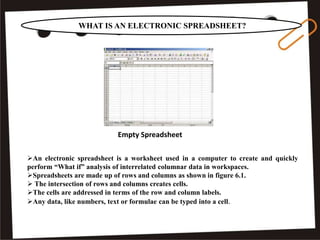
Spreadsheets are made up of rows and columns as shown in figure 6.1.
 The intersection of rows and columns creates cells.
The cells are addressed in terms of the row and column labels.
Any data, like numbers, text or formulae can be typed into a cell.
Empty Spreadsheet
WHAT IS AN ELECTRONIC SPREADSHEET?
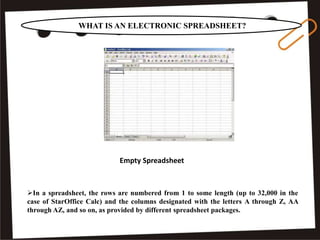
In a spreadsheet, the rows are numbered from 1 to some length (up to 32,000 in the
case of StarOffice Calc) and the columns designated with the letters A through Z, AA
through AZ, and so on, as provided by different spreadsheet packages.
Empty Spreadsheet
WHAT IS AN ELECTRONIC SPREADSHEET?
The following simple example illustrates how to use spreadsheets:
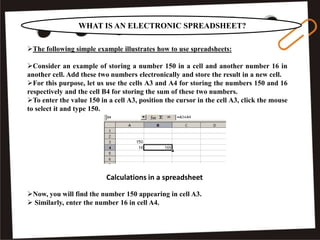
Consider an example of storing a number 150 in a cell and another number 16 in
another cell. Add these two numbers electronically and store the result in a new cell.
For this purpose, let us use the cells A3 and A4 for storing the numbers 150 and 16
respectively and the cell B4 for storing the sum of these two numbers.
To enter the value 150 in a cell A3, position the cursor in the cell A3, click the mouse
to select it and type 150.
Now, you will find the number 150 appearing in cell A3.
 Similarly, enter the number 16 in cell A4.
Calculations in a spreadsheet
WHAT IS AN ELECTRONIC SPREADSHEET?
Calculations in a spreadsheet
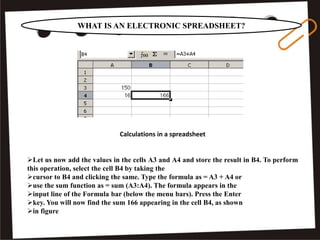
Let us now add the values in the cells A3 and A4 and store the result in B4. To perform
this operation, select the cell B4 by taking the
cursor to B4 and clicking the same. Type the formula as = A3 + A4 or
use the sum function as = sum (A3:A4). The formula appears in the
input line of the Formula bar (below the menu bars). Press the Enter
key. You will now find the sum 166 appearing in the cell B4, as shown
in figure
WHAT IS AN ELECTRONIC SPREADSHEET?
Recalculations in a spreadsheet
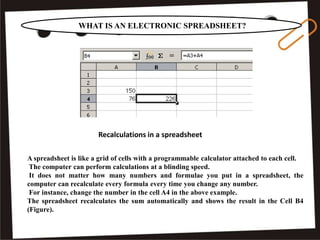
A spreadsheet is like a grid of cells with a programmable calculator attached to each cell.
The computer can perform calculations at a blinding speed.
It does not matter how many numbers and formulae you put in a spreadsheet, the
computer can recalculate every formula every time you change any number.
For instance, change the number in the cell A4 in the above example.
The spreadsheet recalculates the sum automatically and shows the result in the Cell B4
(Figure).
WHAT IS AN ELECTRONIC SPREADSHEET?
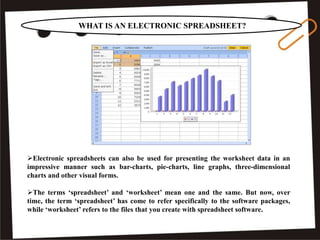
Electronic spreadsheets can also be used for presenting the worksheet data in an
impressive manner such as bar-charts, pie-charts, line graphs, three-dimensional
charts and other visual forms.
The terms ‘spreadsheet’ and ‘worksheet’ mean one and the same. But now, over
time, the term ‘spreadsheet’ has come to refer specifically to the software packages,
while ‘worksheet’ refers to the files that you create with spreadsheet software.
SPREADSHEET APPLICATIONS
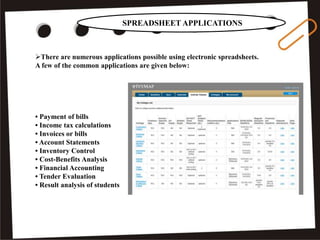
There are numerous applications possible using electronic spreadsheets.
A few of the common applications are given below:
• Payment of bills
• Income tax calculations
• Invoices or bills
• Account Statements
• Inventory Control
• Cost-Benefits Analysis
• Financial Accounting
• Tender Evaluation
• Result analysis of students
ADVANTAGES OF USING ELECTRONIC SPREADSHEETS
The electronic spreadsheet offers several advantages over the manual one.
The following are some of the main advantages of electronic spreadsheets:
• Calculations are automated through the built-in mathematical, financial and statistical functions.
• Accurate results to any desired level of decimal points are possible
• Worksheets can be quite big in size
• Any part of the worksheet can be viewed or edited.
ADVANTAGES OF USING ELECTRONIC SPREADSHEETS
The electronic spreadsheet offers several advantages over the manual one.
• Any part or whole of an existing worksheet can be merged with any existing or new worksheet.
• Any part or whole of the worksheet can be printed in a desired format.
• Worksheet data can be viewed in the form of graphs or charts
• The worksheet information can be transferred to any database or word processing software.
POPULAR SPREADSHEET SOFTWARE
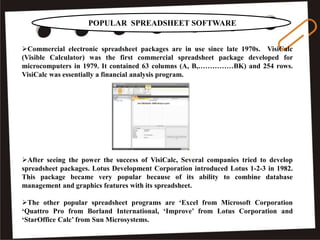
Commercial electronic spreadsheet packages are in use since late 1970s. VisiCalc
(Visible Calculator) was the first commercial spreadsheet package developed for
microcomputers in 1979. It contained 63 columns (A, B,……………BK) and 254 rows.
VisiCalc was essentially a financial analysis program.
After seeing the power the success of VisiCalc, Several companies tried to develop
spreadsheet packages. Lotus Development Corporation introduced Lotus 1-2-3 in 1982.
This package became very popular because of its ability to combine database
management and graphics features with its spreadsheet.
The other popular spreadsheet programs are ‘Excel from Microsoft Corporation
‘Quattro Pro from Borland International, ‘Improve’ from Lotus Corporation and
‘StarOffice Calc’ from Sun Microsystems.
THANK YOU..!!
.

Spreadsheet Introduction - R.D.Sivakumar

  • 1.
    INTRODUCTION SPREADSHEET R.D.SIVAKUMAR, M.Sc.,M.Phil.,M.Tech., AssistantProfessor of Computer Science & Assistant Professor and Head, Department of M.Com.(CA), Ayya Nadar Janaki Ammal College, Sivakasi – 626 124. Mobile: 099440-42243 e-mail : sivamsccsit@gmail.com website: www.rdsivakumar.blogspot.in
  • 2.
    INTRODUCTION VisiCalc, “The visiblecalculator” was the first electronic spreadsheet. This attracted accountants, book keepers, managers and all those who created budget, analyzed statistics or collected numerical research data. This powerful computational tool could save time, help avoid endless and brain- numbing arithmetic, and eliminate mathematical errors.  It was acknowledged by many that the invention of the Spreadsheet, more than any other event, launched the personal computer revolution.
  • 3.
    WHAT IS ANELECTRONIC SPREADSHEET? An electronic spreadsheet is a worksheet used in a computer to create and quickly perform “What if” analysis of interrelated columnar data in workspaces. Spreadsheets are made up of rows and columns as shown in figure 6.1.  The intersection of rows and columns creates cells. The cells are addressed in terms of the row and column labels. Any data, like numbers, text or formulae can be typed into a cell. Empty Spreadsheet
  • 4.
    WHAT IS ANELECTRONIC SPREADSHEET? In a spreadsheet, the rows are numbered from 1 to some length (up to 32,000 in the case of StarOffice Calc) and the columns designated with the letters A through Z, AA through AZ, and so on, as provided by different spreadsheet packages. Empty Spreadsheet
  • 5.
    WHAT IS ANELECTRONIC SPREADSHEET? The following simple example illustrates how to use spreadsheets: Consider an example of storing a number 150 in a cell and another number 16 in another cell. Add these two numbers electronically and store the result in a new cell. For this purpose, let us use the cells A3 and A4 for storing the numbers 150 and 16 respectively and the cell B4 for storing the sum of these two numbers. To enter the value 150 in a cell A3, position the cursor in the cell A3, click the mouse to select it and type 150. Now, you will find the number 150 appearing in cell A3.  Similarly, enter the number 16 in cell A4. Calculations in a spreadsheet
  • 6.
    WHAT IS ANELECTRONIC SPREADSHEET? Calculations in a spreadsheet Let us now add the values in the cells A3 and A4 and store the result in B4. To perform this operation, select the cell B4 by taking the cursor to B4 and clicking the same. Type the formula as = A3 + A4 or use the sum function as = sum (A3:A4). The formula appears in the input line of the Formula bar (below the menu bars). Press the Enter key. You will now find the sum 166 appearing in the cell B4, as shown in figure
  • 7.
    WHAT IS ANELECTRONIC SPREADSHEET? Recalculations in a spreadsheet A spreadsheet is like a grid of cells with a programmable calculator attached to each cell. The computer can perform calculations at a blinding speed. It does not matter how many numbers and formulae you put in a spreadsheet, the computer can recalculate every formula every time you change any number. For instance, change the number in the cell A4 in the above example. The spreadsheet recalculates the sum automatically and shows the result in the Cell B4 (Figure).
  • 8.
    WHAT IS ANELECTRONIC SPREADSHEET? Electronic spreadsheets can also be used for presenting the worksheet data in an impressive manner such as bar-charts, pie-charts, line graphs, three-dimensional charts and other visual forms. The terms ‘spreadsheet’ and ‘worksheet’ mean one and the same. But now, over time, the term ‘spreadsheet’ has come to refer specifically to the software packages, while ‘worksheet’ refers to the files that you create with spreadsheet software.
  • 9.
    SPREADSHEET APPLICATIONS There arenumerous applications possible using electronic spreadsheets. A few of the common applications are given below: • Payment of bills • Income tax calculations • Invoices or bills • Account Statements • Inventory Control • Cost-Benefits Analysis • Financial Accounting • Tender Evaluation • Result analysis of students
  • 10.
    ADVANTAGES OF USINGELECTRONIC SPREADSHEETS The electronic spreadsheet offers several advantages over the manual one. The following are some of the main advantages of electronic spreadsheets: • Calculations are automated through the built-in mathematical, financial and statistical functions. • Accurate results to any desired level of decimal points are possible • Worksheets can be quite big in size • Any part of the worksheet can be viewed or edited.
  • 11.
    ADVANTAGES OF USINGELECTRONIC SPREADSHEETS The electronic spreadsheet offers several advantages over the manual one. • Any part or whole of an existing worksheet can be merged with any existing or new worksheet. • Any part or whole of the worksheet can be printed in a desired format. • Worksheet data can be viewed in the form of graphs or charts • The worksheet information can be transferred to any database or word processing software.
  • 12.
    POPULAR SPREADSHEET SOFTWARE Commercialelectronic spreadsheet packages are in use since late 1970s. VisiCalc (Visible Calculator) was the first commercial spreadsheet package developed for microcomputers in 1979. It contained 63 columns (A, B,……………BK) and 254 rows. VisiCalc was essentially a financial analysis program. After seeing the power the success of VisiCalc, Several companies tried to develop spreadsheet packages. Lotus Development Corporation introduced Lotus 1-2-3 in 1982. This package became very popular because of its ability to combine database management and graphics features with its spreadsheet. The other popular spreadsheet programs are ‘Excel from Microsoft Corporation ‘Quattro Pro from Borland International, ‘Improve’ from Lotus Corporation and ‘StarOffice Calc’ from Sun Microsystems.
  • 13.