By Digvijay Gabhane
Mtech (CAD/CAM) pursuing,
BE (Mechanical),
Diploma (Mechanical)
INTRODUCTION TO SOLIDWORKS
SOLIDWORKS
SolidWorks is a solid modeling computer-aided design(CAD)
and computer-aided engineering(CAE) application.
Published by Dassault Systems.
SolidWorks Corporation was founded in December 1993.
Initial released on November 1, 1995.
In 1997 Dassault, best known for its CATIA CAD software.
Stable release – SolidWorks 2023.
WHY SOLIDWORKS ?
 SolidWorks provides a wide range of tools and features that enable engineers, designers, and
architects to create detailed 3D models of various products, from simple components to
complex assemblies. Some key features of SolidWorks include:
1.Efficient Design: SolidWorks offers 3D modelling tools that streamline design creation and visualization.
2.Design Validation: Virtual simulations help identify and resolve issues before physical prototyping.
3.Collaboration: Supports collaborative design, enhancing team communication and productivity.
4.Interdisciplinary Integration: Enables seamless integration of mechanical, electrical, and software
components.
5.Prototyping Cost Reduction: Virtual testing minimizes the need for costly physical prototypes.
6.Visual Communication: Realistic renderings and animations aid in conveying design concepts to
stakeholders.
7.Manufacturability: Design tools ensure efficient fabrication and assembly processes.
8.Documentation and Compliance: Assists in generating accurate engineering drawings and compliance
documents.
9.Innovation and Iteration: Quick design iterations faster innovation and optimal solutions.
10.Education and Skill Development: Used in education to teach modern design and engineering practices.
11.Industry Standardization: Widely adopted, simplifying collaboration and communication in various
industries.
WHAT WE CAN DO IN SOLIDWORKS
 SolidWorks is a popular computer-aided design (CAD) software application used primarily
for designing 3D models and drawings of mechanical and engineering products.
1.3D Design: SolidWorks is used to design three-dimensional models of various products, from simple parts to
complex assemblies.
2.Parametric Modelling: It uses parameters and relationships to create designs, enabling easy modification
and updates.
3.Assembly Design: Allows users to create and simulate the interaction of multiple parts within an assembly.
4.2D Drawing Generation: Helps create accurate 2D engineering drawings with dimensions and annotations
for manufacturing.
5.Simulation and Analysis: Offers virtual testing of designs for factors like structural integrity and motion
before physical prototypes are made.
6.Rendering and Visualization: Generates realistic renderings and visualizations for presentations and
marketing.
7.Sheet Metal Design: Includes tools for designing sheet metal parts and unfolding them for fabrication.
8.Electrical and PCB Design: Offers modules for integrating electronic aspects into designs.
9.Collaboration: Supports sharing and collaborative design among team members.
10.Industry Standard: Widely used in industries like aerospace, automotive, and manufacturing due to its
user-friendly interface and comprehensive features.
TYPES OF DESIGN
Adaptive Design
Development Design
New Design
SIZES
BASIC SIZE : Theoretical data , dimension are in
rectangle , apply tolerances.
ACTUAL SIZE : Size after manufacturing
PRODUCTS : Collections of parts . Ex: Lathe Machine
PARTS : Collections of features . Sketch based Features
and Applied based features
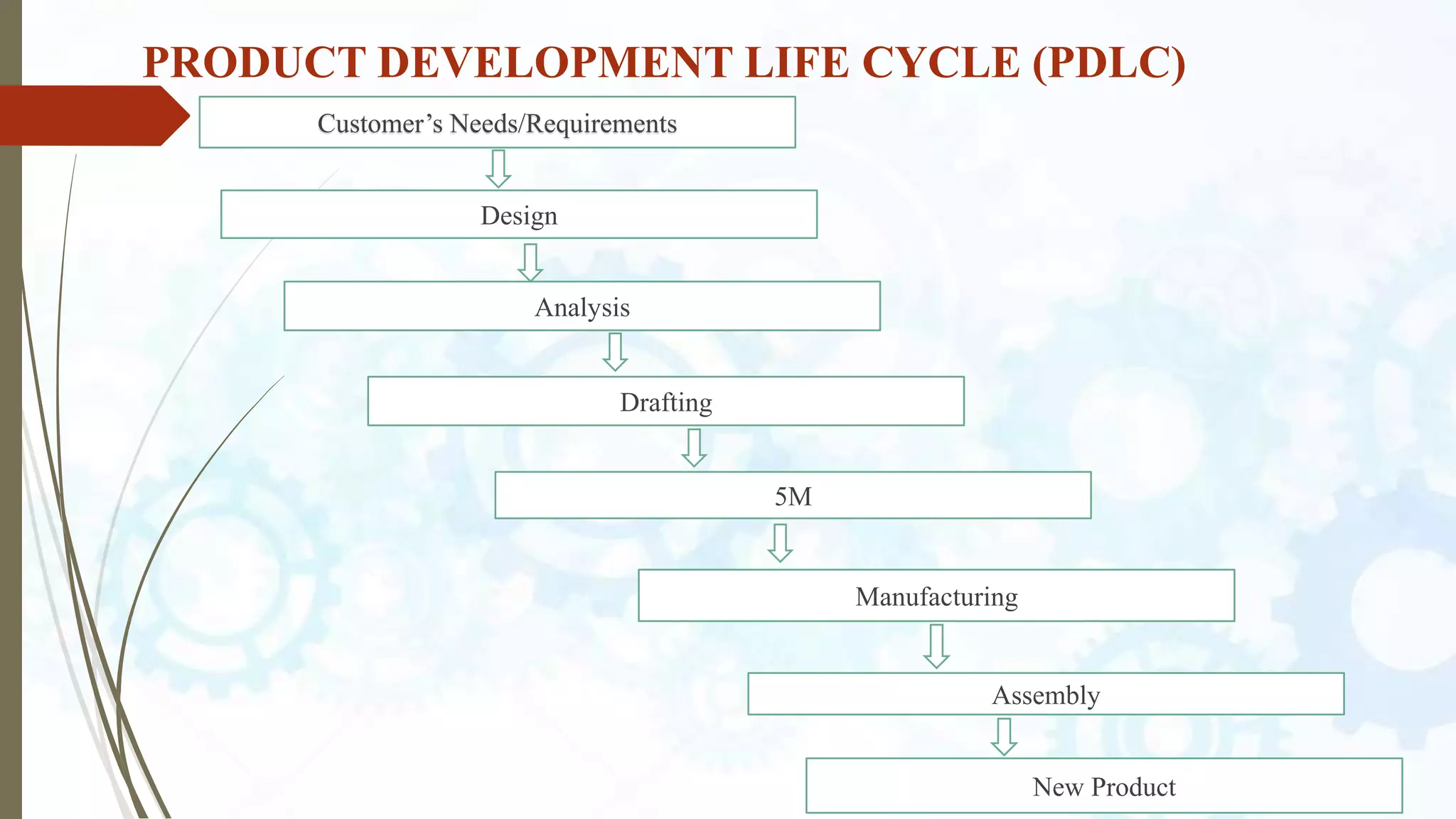
PRODUCT DEVELOPMENT LIFE CYCLE (PDLC)
Customer’s Needs/Requirements
Design
Analysis
Drafting
5M
Manufacturing
Assembly
New Product
CONCEPT RELATED TO CAD
 DESIGN INTENT
 FEATURE – BASED MODELLING : SKETCHED FEATURES & APPLIED
FEATURES
 PARAMETRIC DESIGN
 FULLY ASSOCIATIVE
 SWIFT (SOLIDWORKS INTELLIGENT FEATURE TECHNOLOGY)
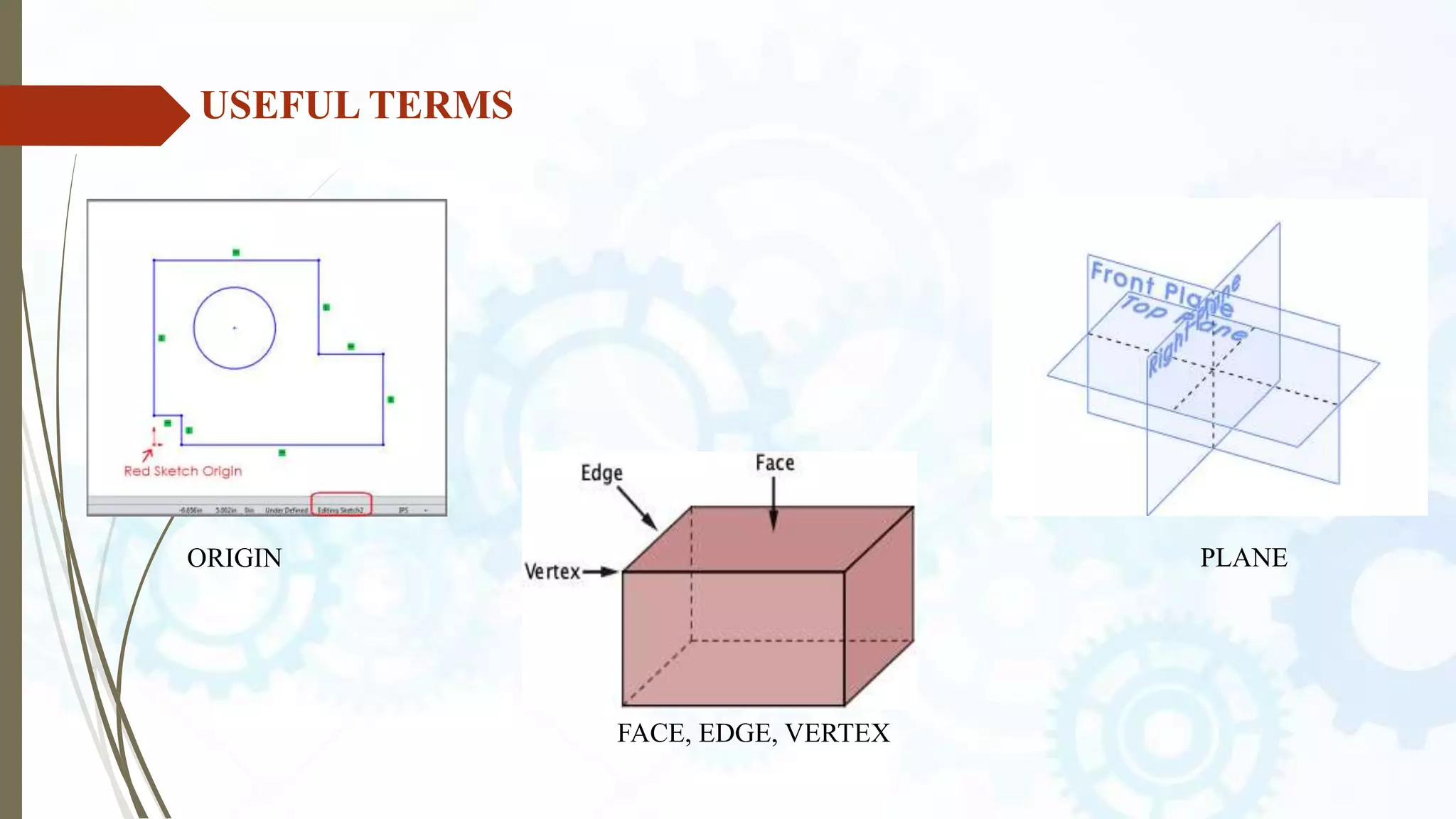
USEFUL TERMS
ORIGIN PLANE
FACE, EDGE, VERTEX
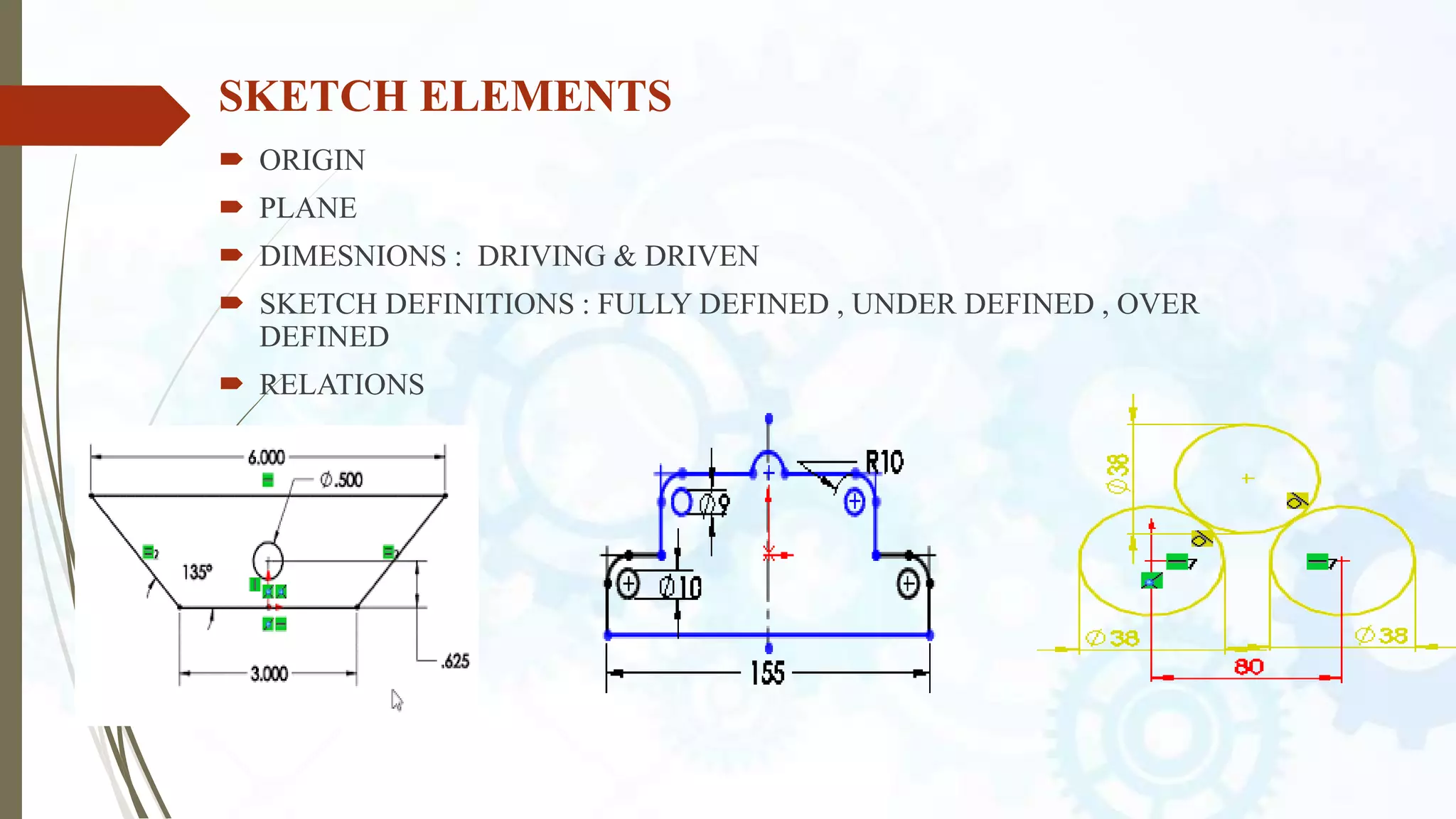
SKETCH ELEMENTS
 ORIGIN
 PLANE
 DIMESNIONS : DRIVING & DRIVEN
 SKETCH DEFINITIONS : FULLY DEFINED , UNDER DEFINED , OVER
DEFINED
 RELATIONS
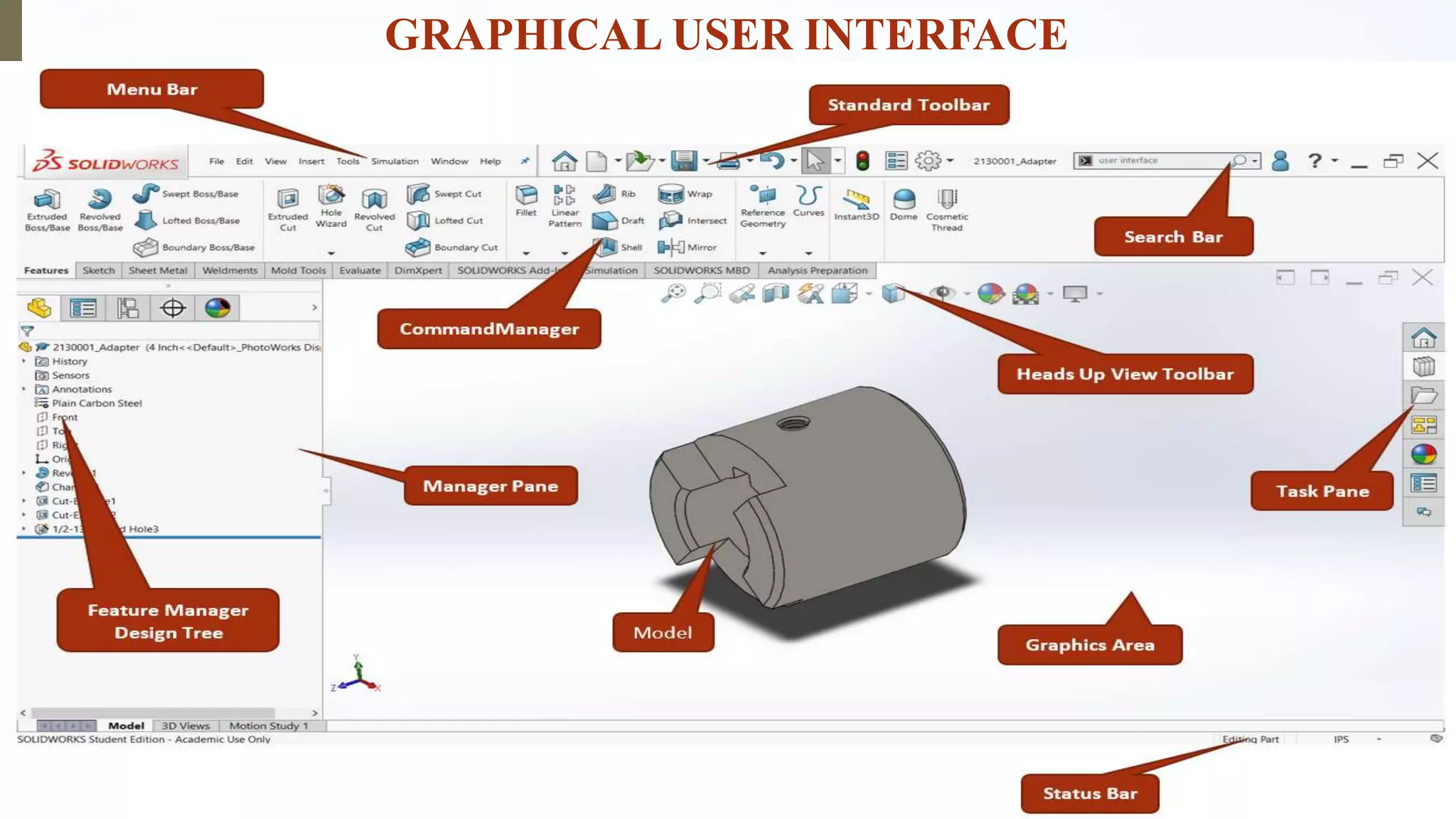
GRAPHICAL USER INTERFACE
SKETCH ENTITIES
 LINE : CONSTRUCTIONS , HORIZONTAL, VERTICAL , ANGLE
 CENTERLINE
 MIDPOINT LINE
 CIRCLE
 ARC
 ELLIPSE
 RECTANGLE
 SLOT
 POLYGON
SKETCH RELATIONS
THE RELATIONS BETWEEN SKETCH ENTITIES AND MODEL
GEOMETRY.
 GEOMETRIC RELATIONS : VERTCAL , HORIZONTAL,
 SKETCH RELATIONS TYPES
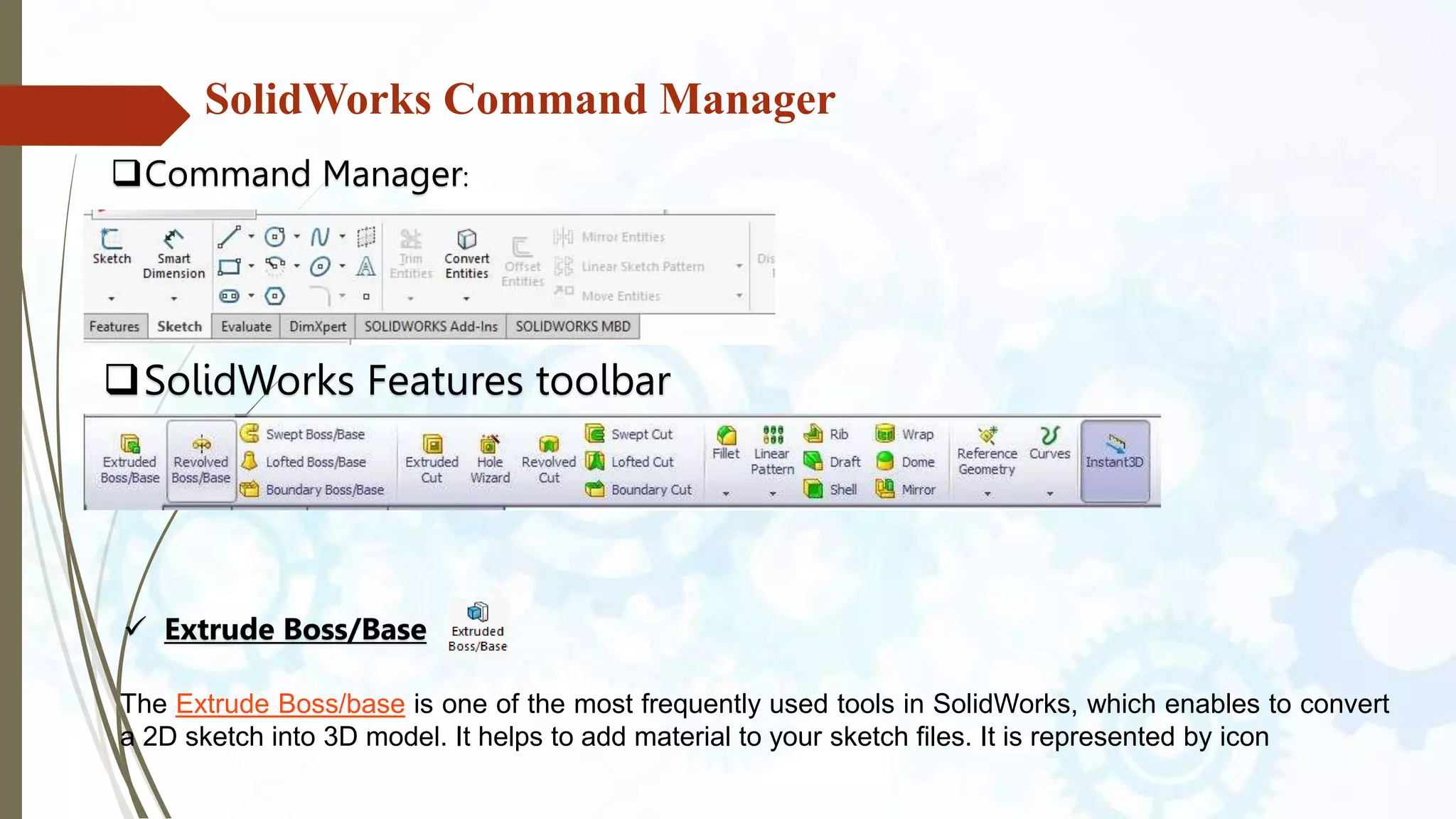
SolidWorks Command Manager
SolidWorks Features toolbar
 Extrude Boss/Base
Command Manager:
The Extrude Boss/base is one of the most frequently used tools in SolidWorks, which enables to convert
a 2D sketch into 3D model. It helps to add material to your sketch files. It is represented by icon
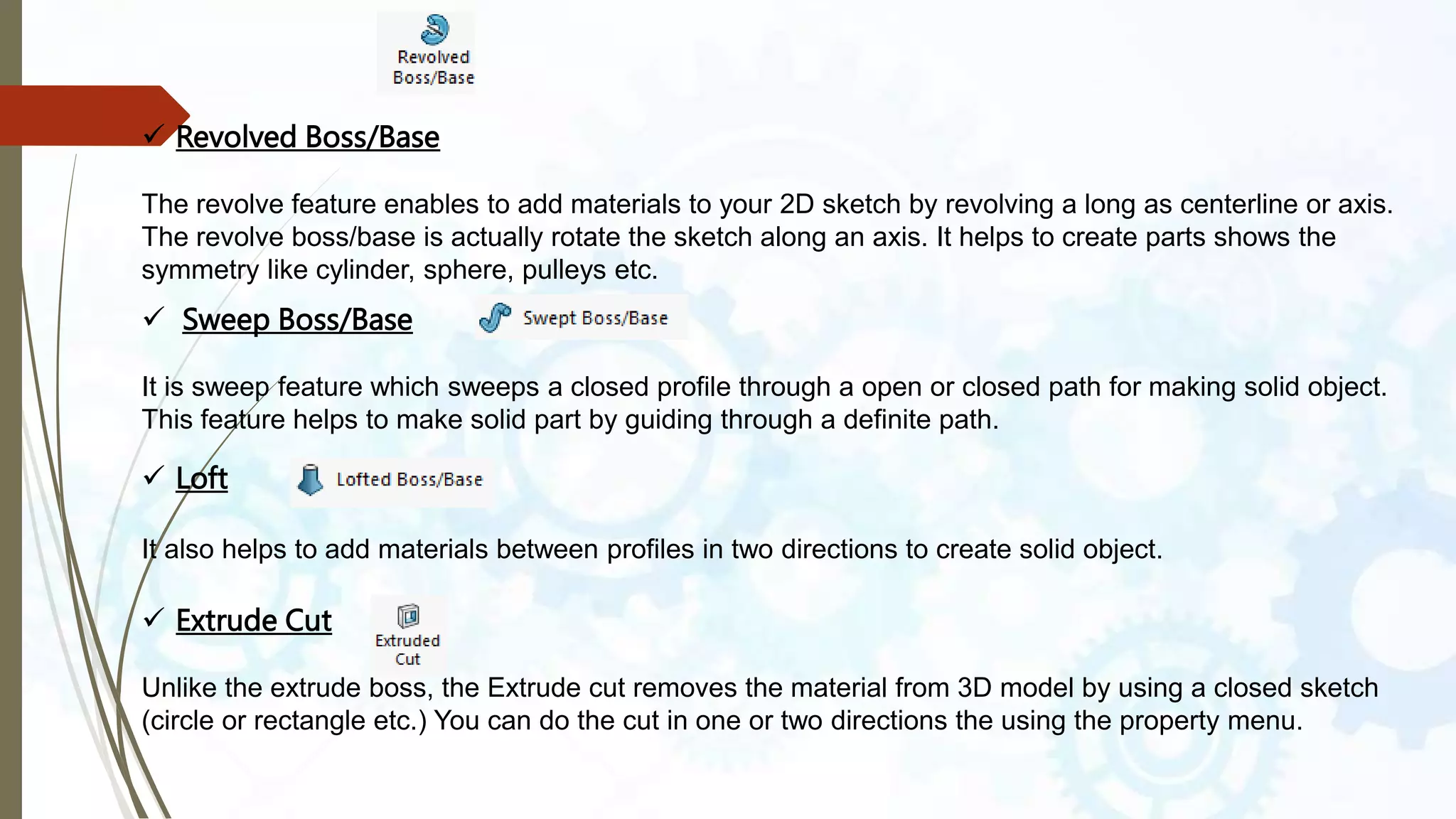
 Revolved Boss/Base
The revolve feature enables to add materials to your 2D sketch by revolving a long as centerline or axis.
The revolve boss/base is actually rotate the sketch along an axis. It helps to create parts shows the
symmetry like cylinder, sphere, pulleys etc.
 Sweep Boss/Base
It is sweep feature which sweeps a closed profile through a open or closed path for making solid object.
This feature helps to make solid part by guiding through a definite path.
 Loft
It also helps to add materials between profiles in two directions to create solid object.
 Extrude Cut
Unlike the extrude boss, the Extrude cut removes the material from 3D model by using a closed sketch
(circle or rectangle etc.) You can do the cut in one or two directions the using the property menu.
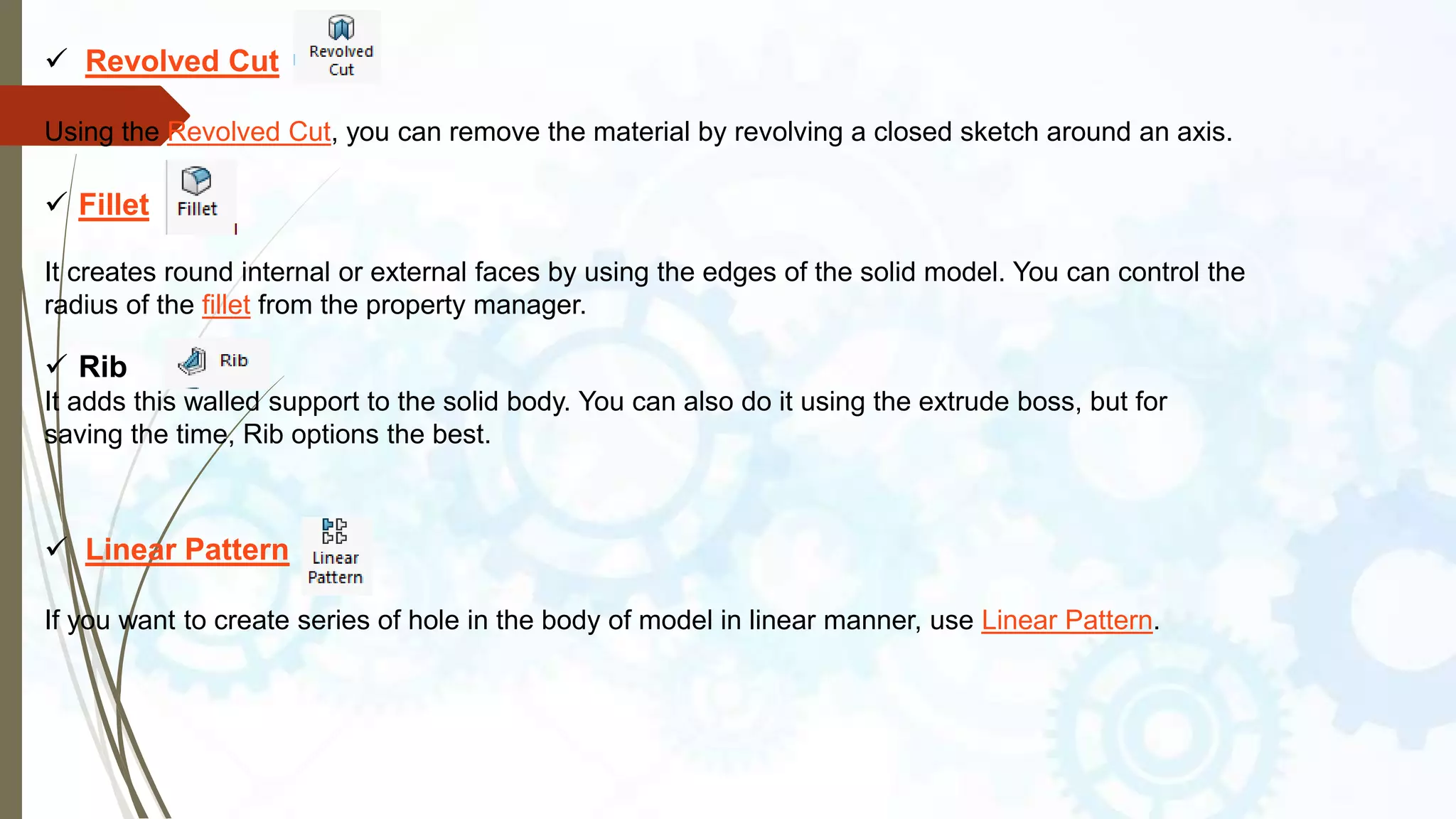
 Revolved Cut
Using the Revolved Cut, you can remove the material by revolving a closed sketch around an axis.
 Fillet
It creates round internal or external faces by using the edges of the solid model. You can control the
radius of the fillet from the property manager.
 Linear Pattern
If you want to create series of hole in the body of model in linear manner, use Linear Pattern.
 Rib
It adds this walled support to the solid body. You can also do it using the extrude boss, but for
saving the time, Rib options the best.
 Wraps
It helps to create a closed contour on the face of a solid body.
These are the features tools which are contained in the SolidWorks Command
manager. These tools help to make solid 3D designs of various shapes or profiles.
 Mirror
If you want to create the mirror of a model, use the Mirror feature.
 Shell
To create thin walled solid box, use the shell feature.
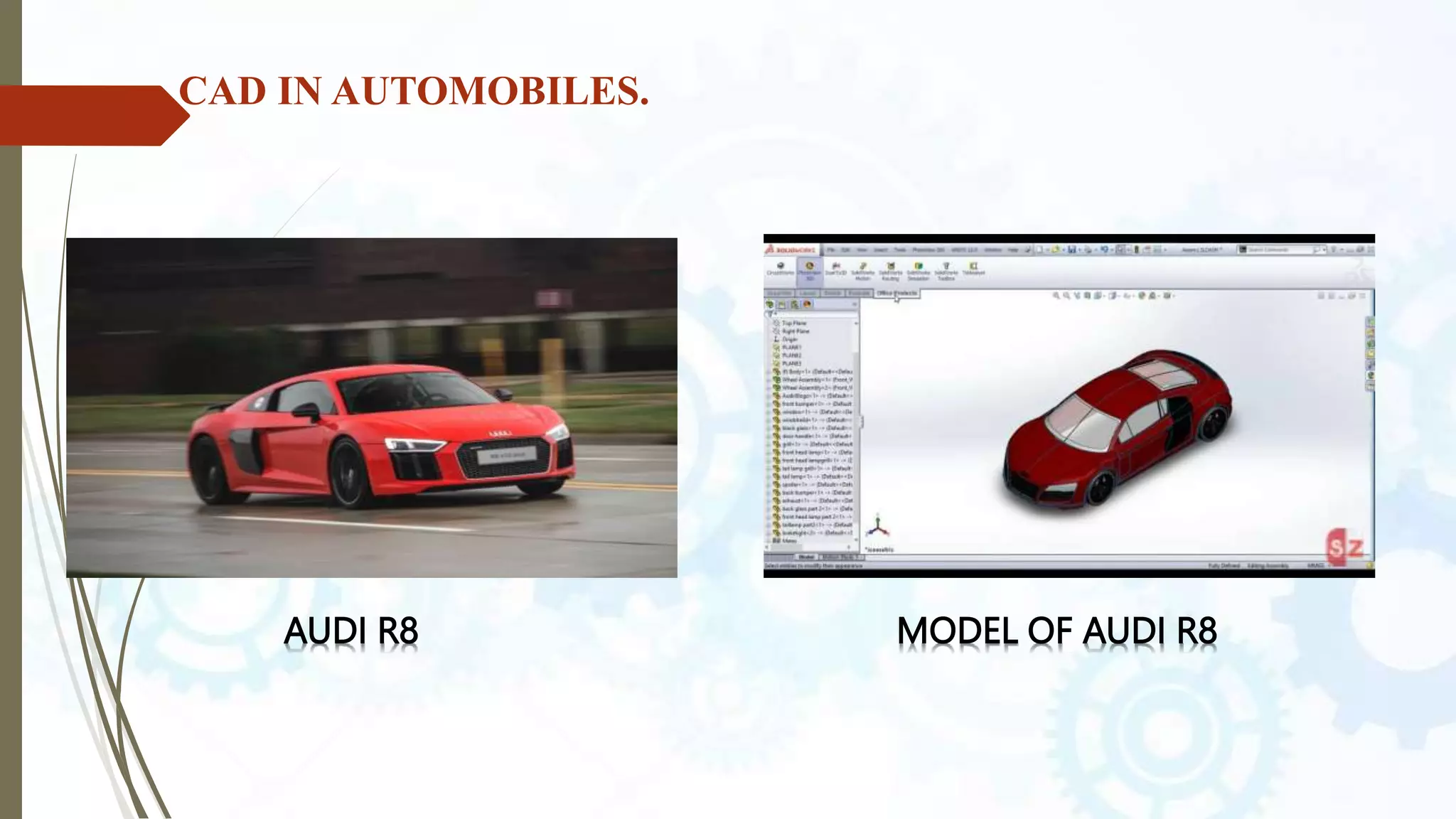
CAD IN AUTOMOBILES.
AUDI R8 MODEL OF AUDI R8
MODELING METHOD:-
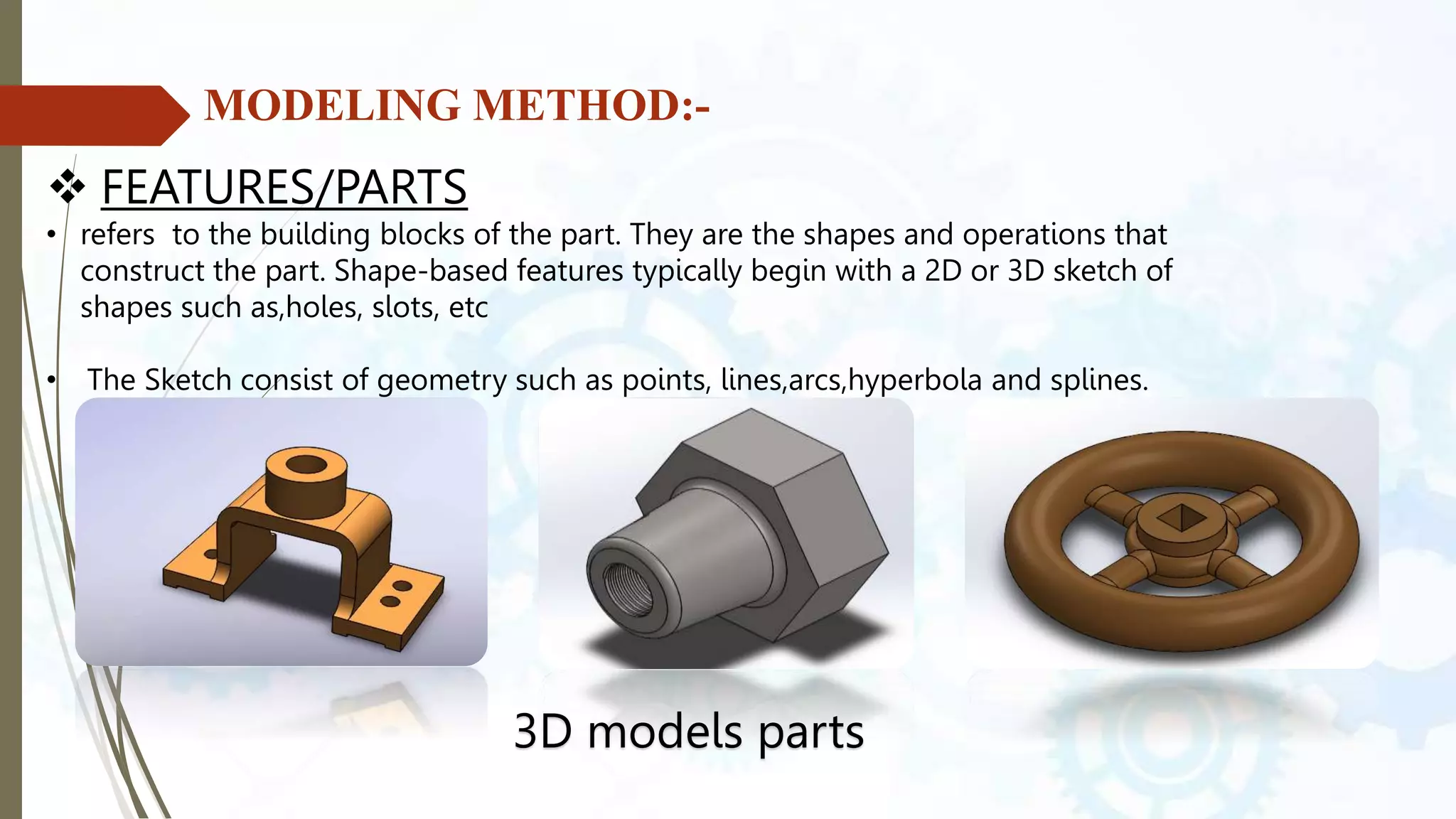
 FEATURES/PARTS
• refers to the building blocks of the part. They are the shapes and operations that
construct the part. Shape-based features typically begin with a 2D or 3D sketch of
shapes such as,holes, slots, etc
• The Sketch consist of geometry such as points, lines,arcs,hyperbola and splines.
3D models parts
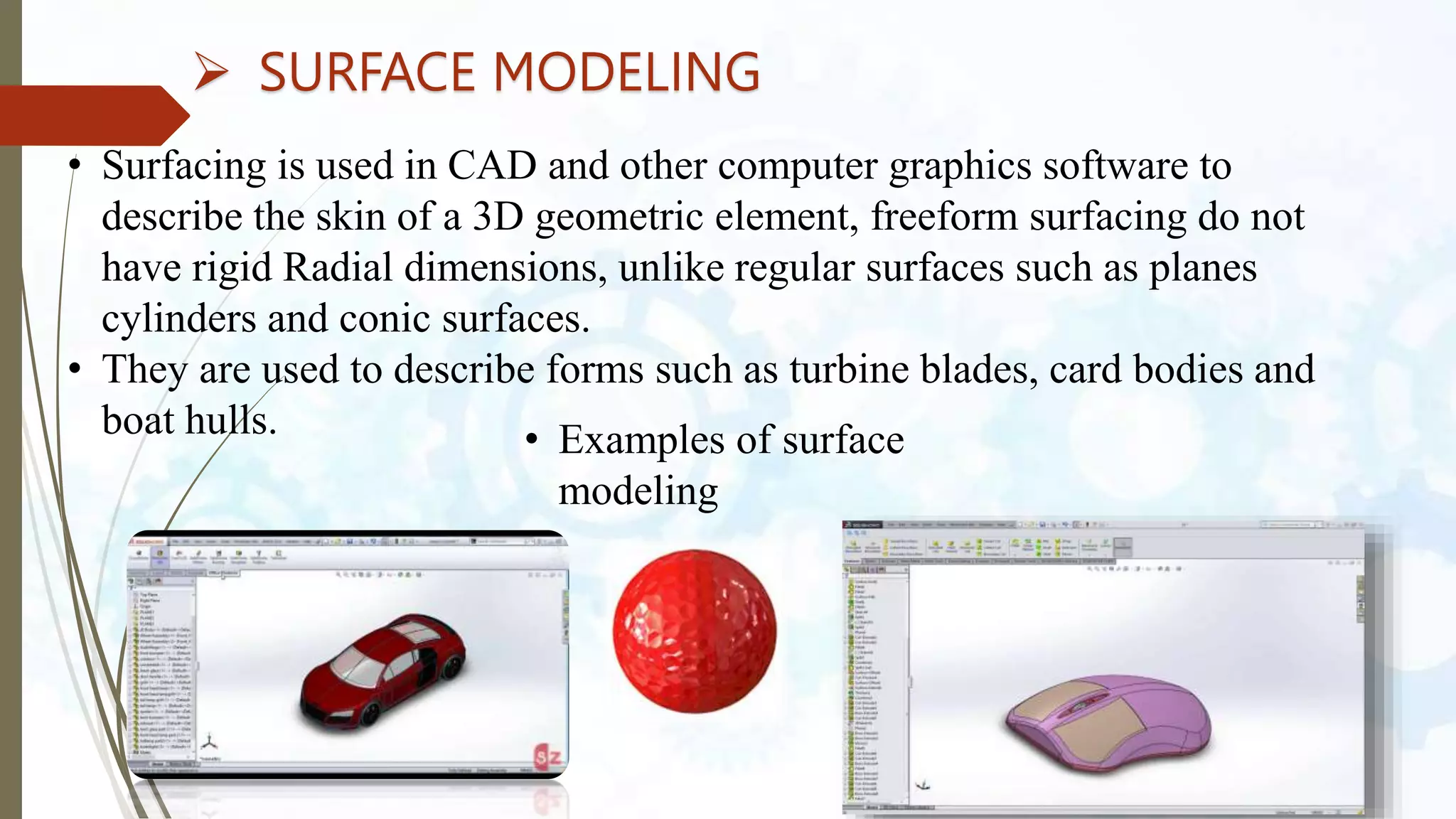
 SURFACE MODELING
• Surfacing is used in CAD and other computer graphics software to
describe the skin of a 3D geometric element, freeform surfacing do not
have rigid Radial dimensions, unlike regular surfaces such as planes
cylinders and conic surfaces.
• They are used to describe forms such as turbine blades, card bodies and
boat hulls. • Examples of surface
modeling
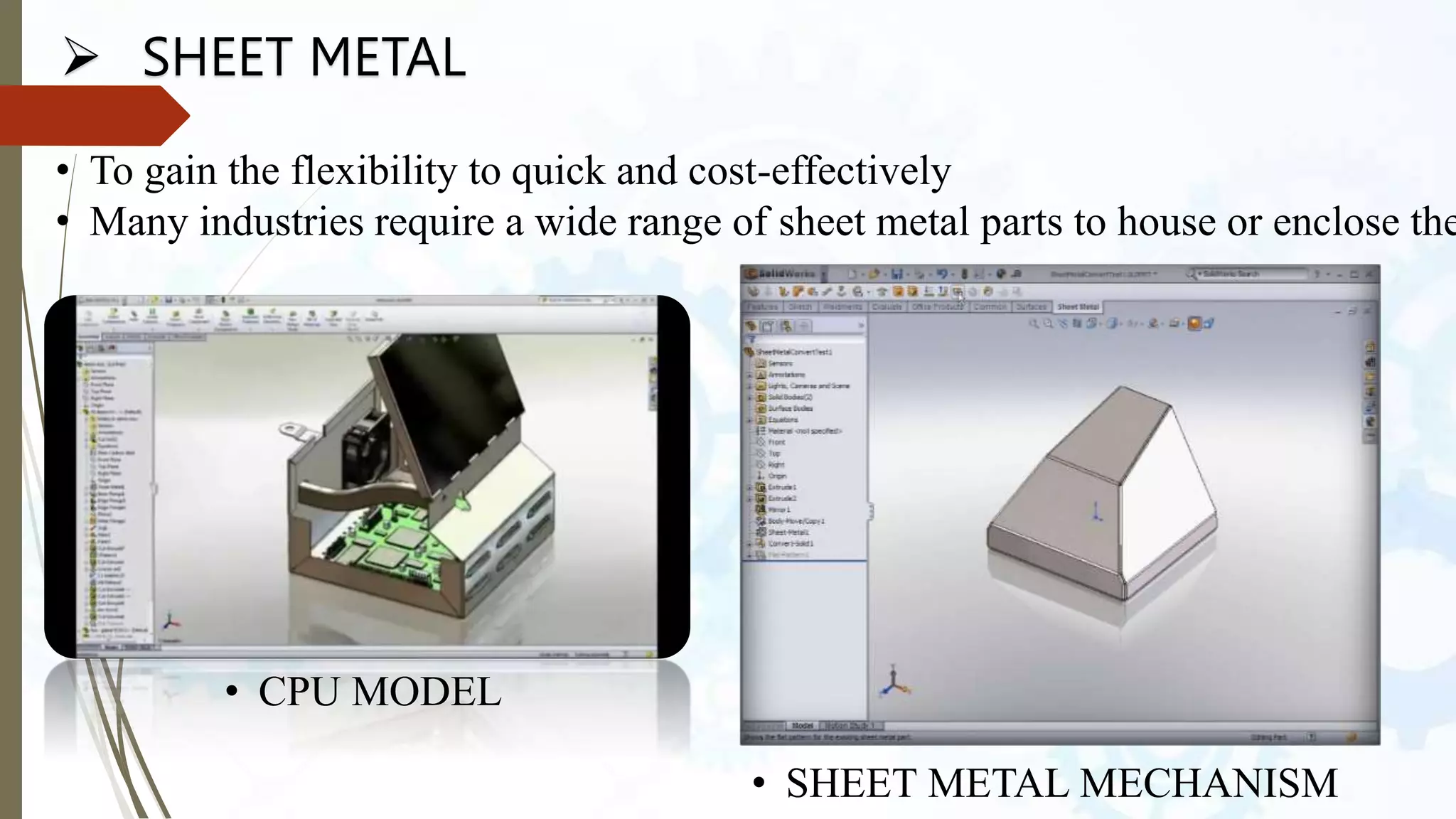
 SHEET METAL
• To gain the flexibility to quick and cost-effectively
• Many industries require a wide range of sheet metal parts to house or enclose the
• CPU MODEL
• SHEET METAL MECHANISM
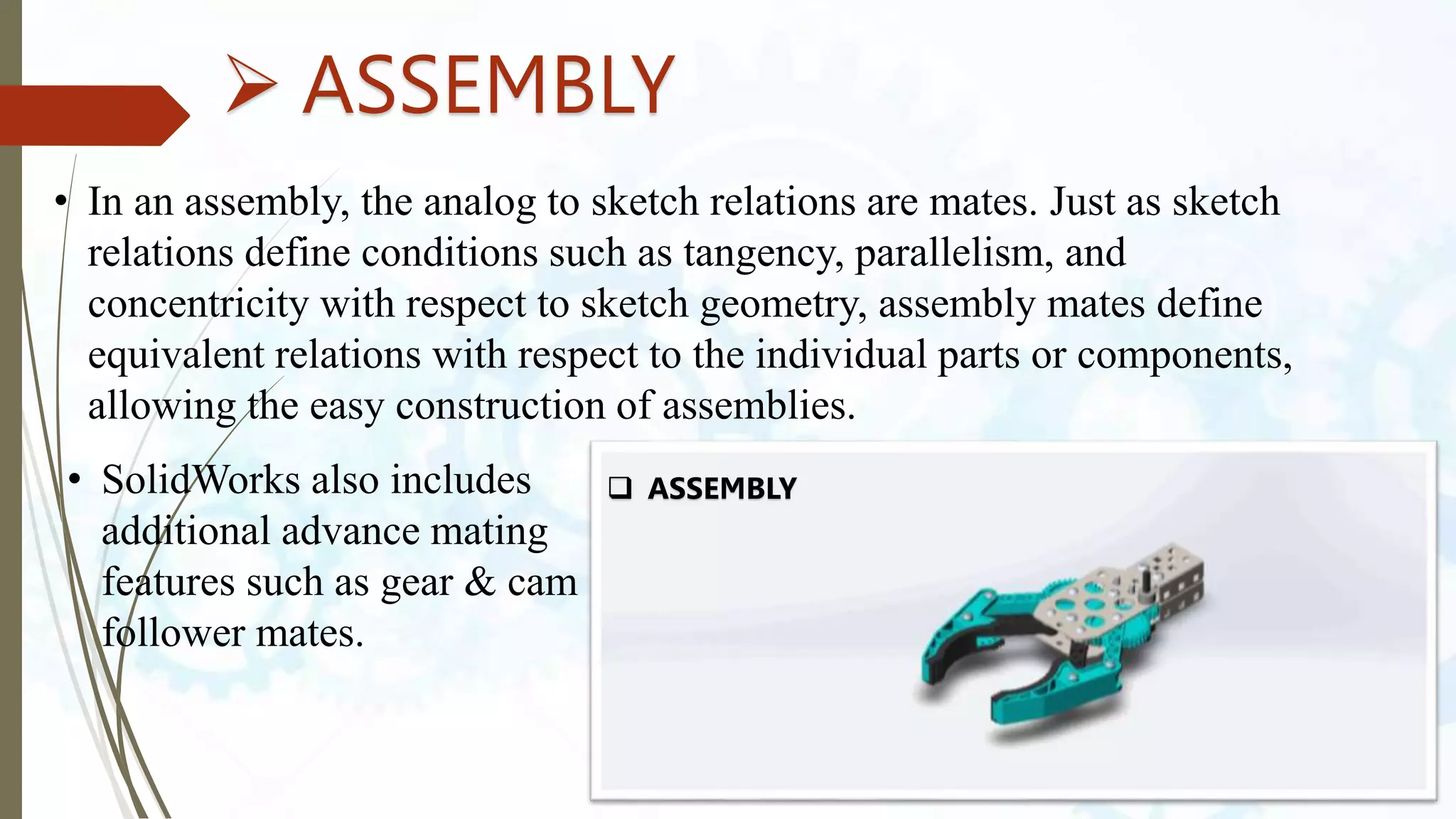
 ASSEMBLY
• In an assembly, the analog to sketch relations are mates. Just as sketch
relations define conditions such as tangency, parallelism, and
concentricity with respect to sketch geometry, assembly mates define
equivalent relations with respect to the individual parts or components,
allowing the easy construction of assemblies.
• SolidWorks also includes
additional advance mating
features such as gear & cam
follower mates.
 ASSEMBLY
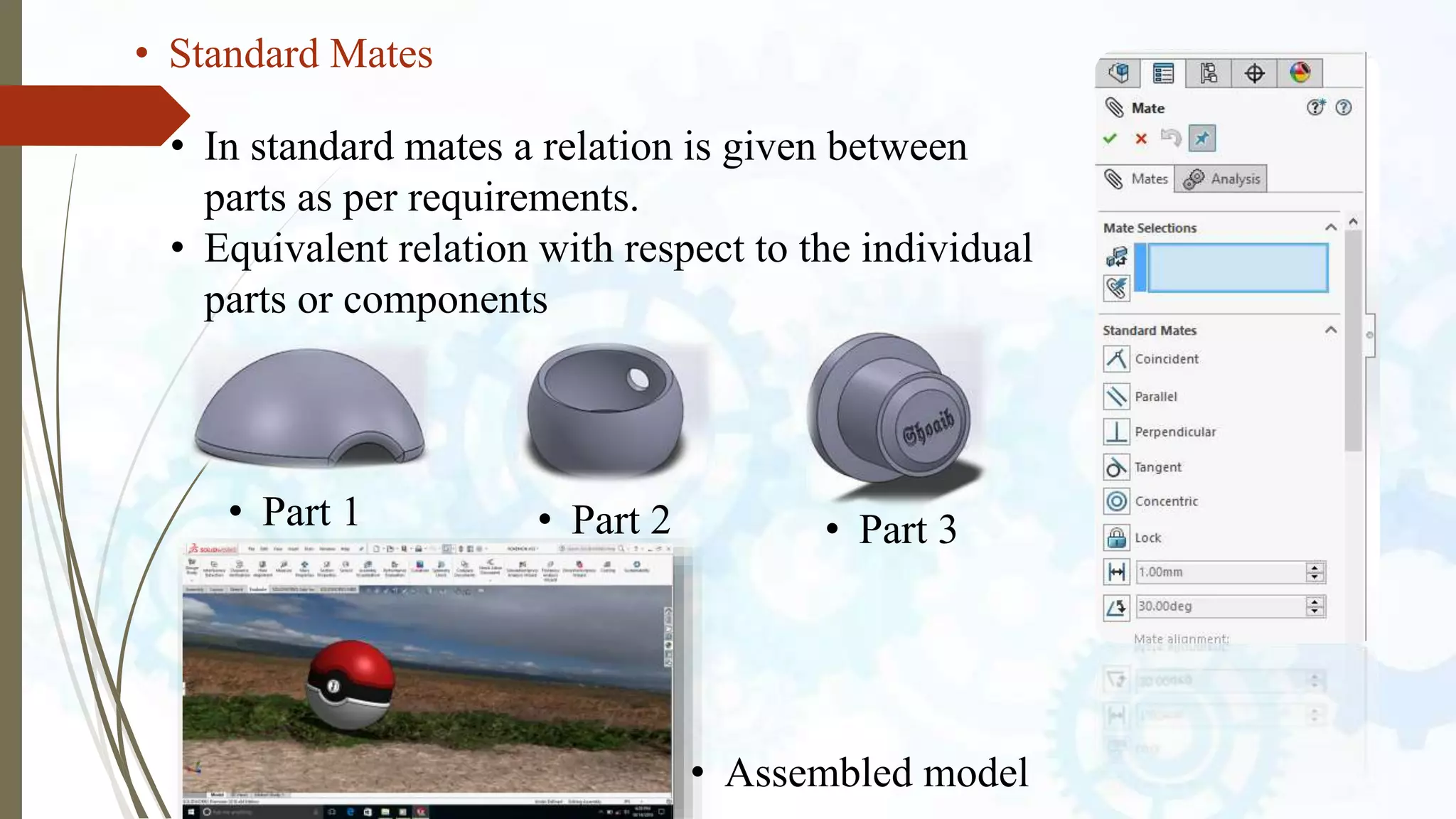
• Standard Mates
• In standard mates a relation is given between
parts as per requirements.
• Equivalent relation with respect to the individual
parts or components
• Part 1 • Part 2 • Part 3
• Assembled model
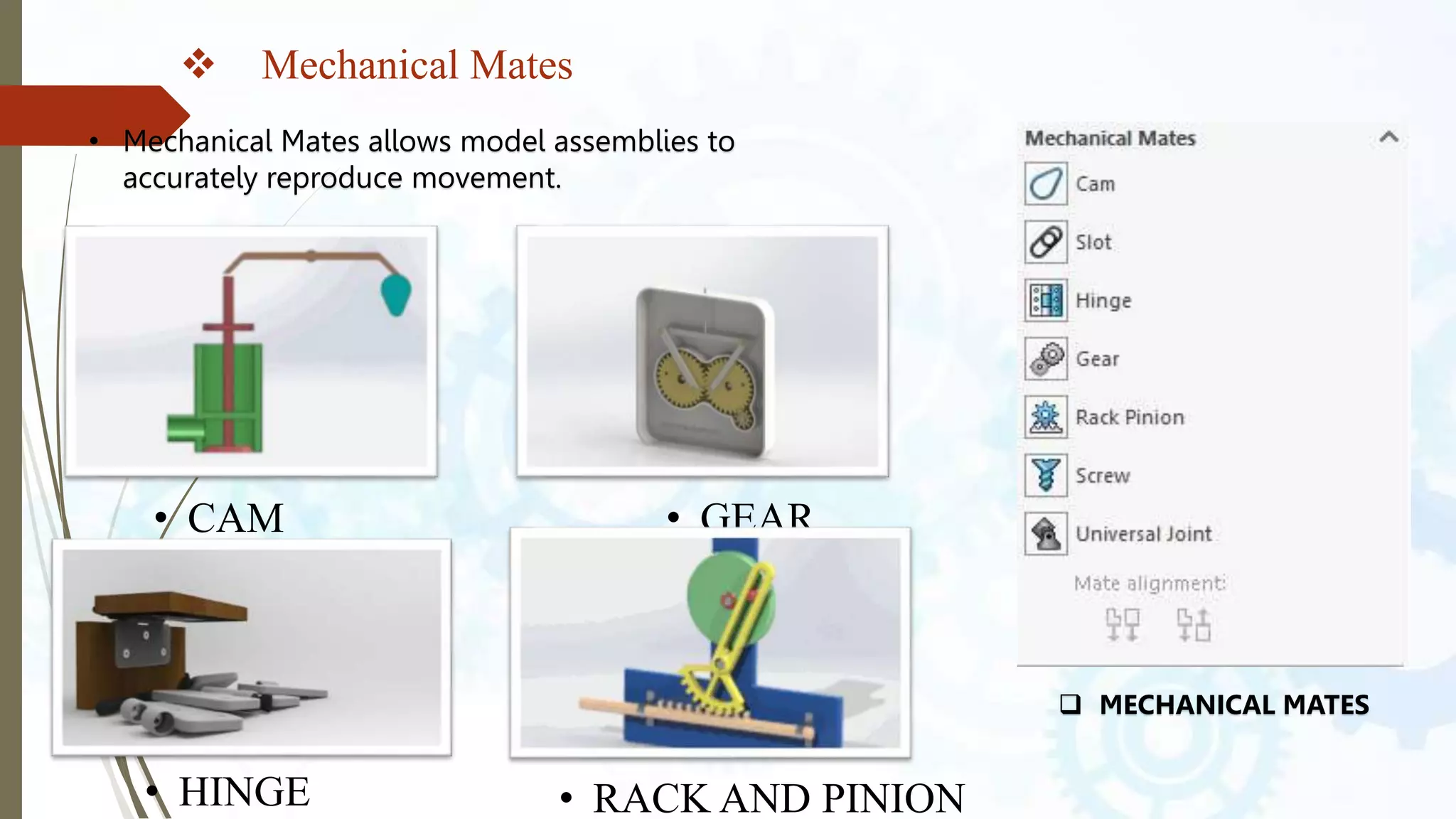
 Mechanical Mates
• Mechanical Mates allows model assemblies to
accurately reproduce movement.
• CAM
• HINGE
• GEAR
• RACK AND PINION
 MECHANICAL MATES
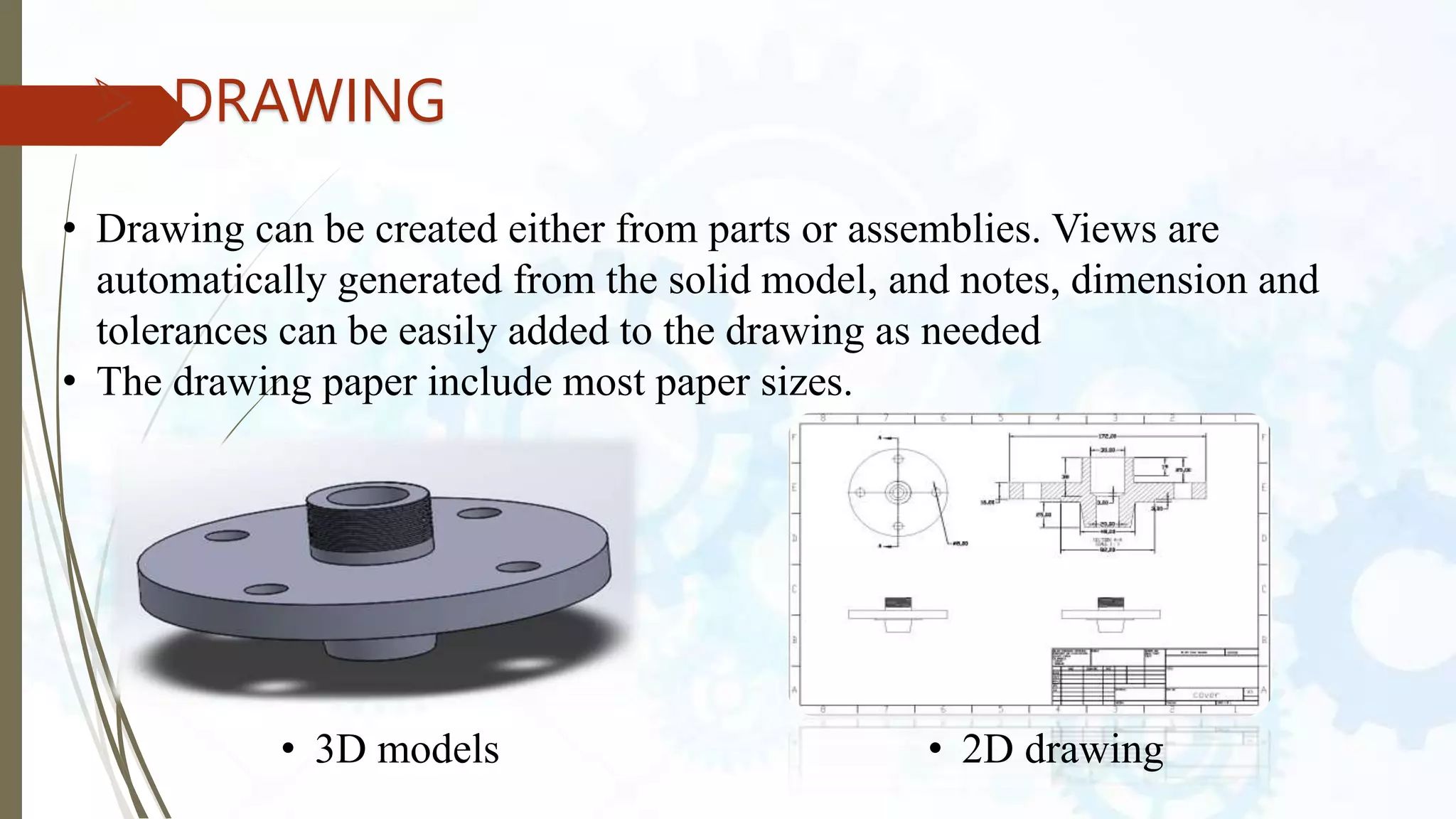
 DRAWING
• Drawing can be created either from parts or assemblies. Views are
automatically generated from the solid model, and notes, dimension and
tolerances can be easily added to the drawing as needed
• The drawing paper include most paper sizes.
• 3D models • 2D drawing
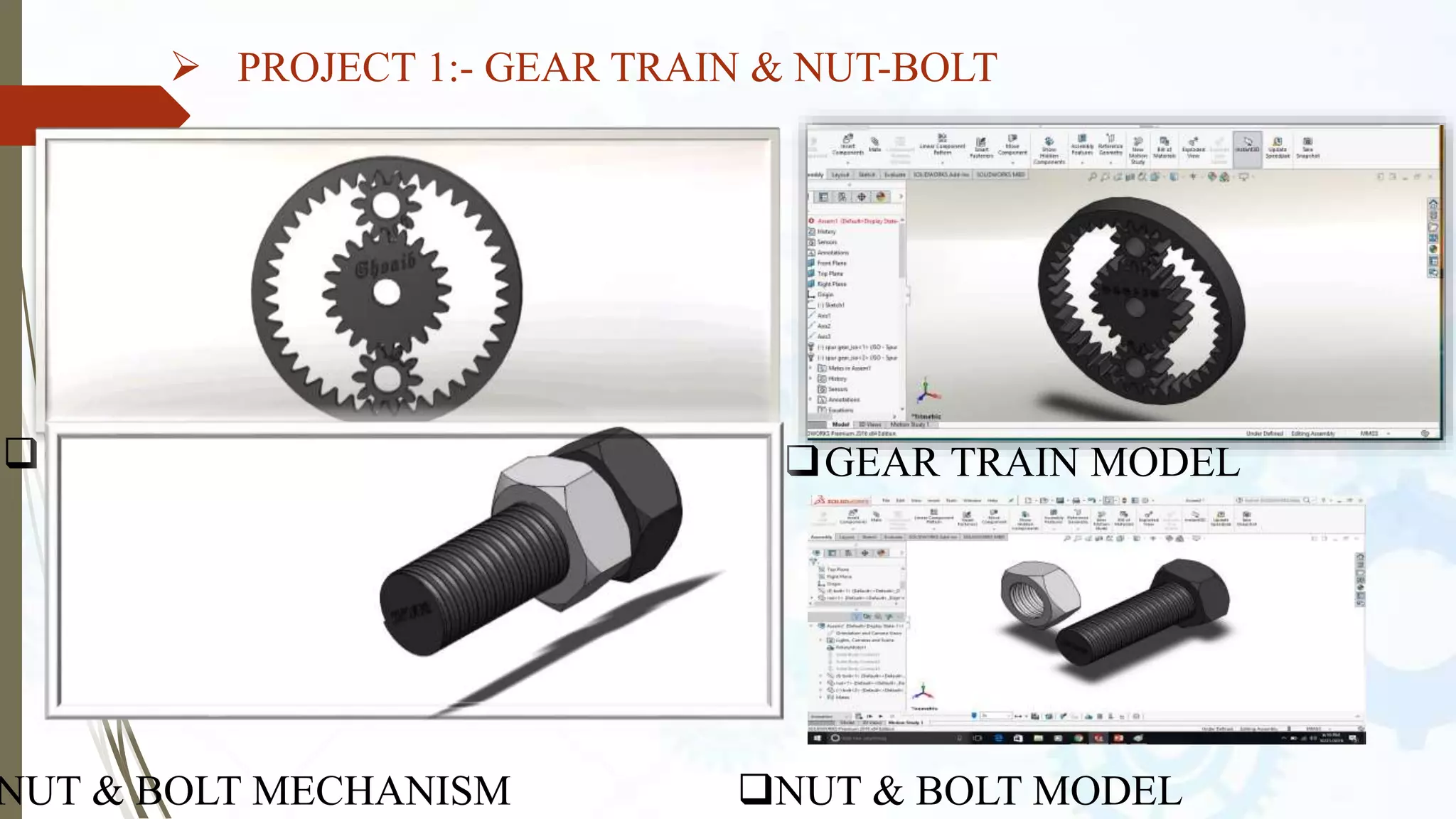
 PROJECT 1:- GEAR TRAIN & NUT-BOLT
GEAR TRAIN MECHANISM GEAR TRAIN MODEL
NUT & BOLT MECHANISM NUT & BOLT MODEL
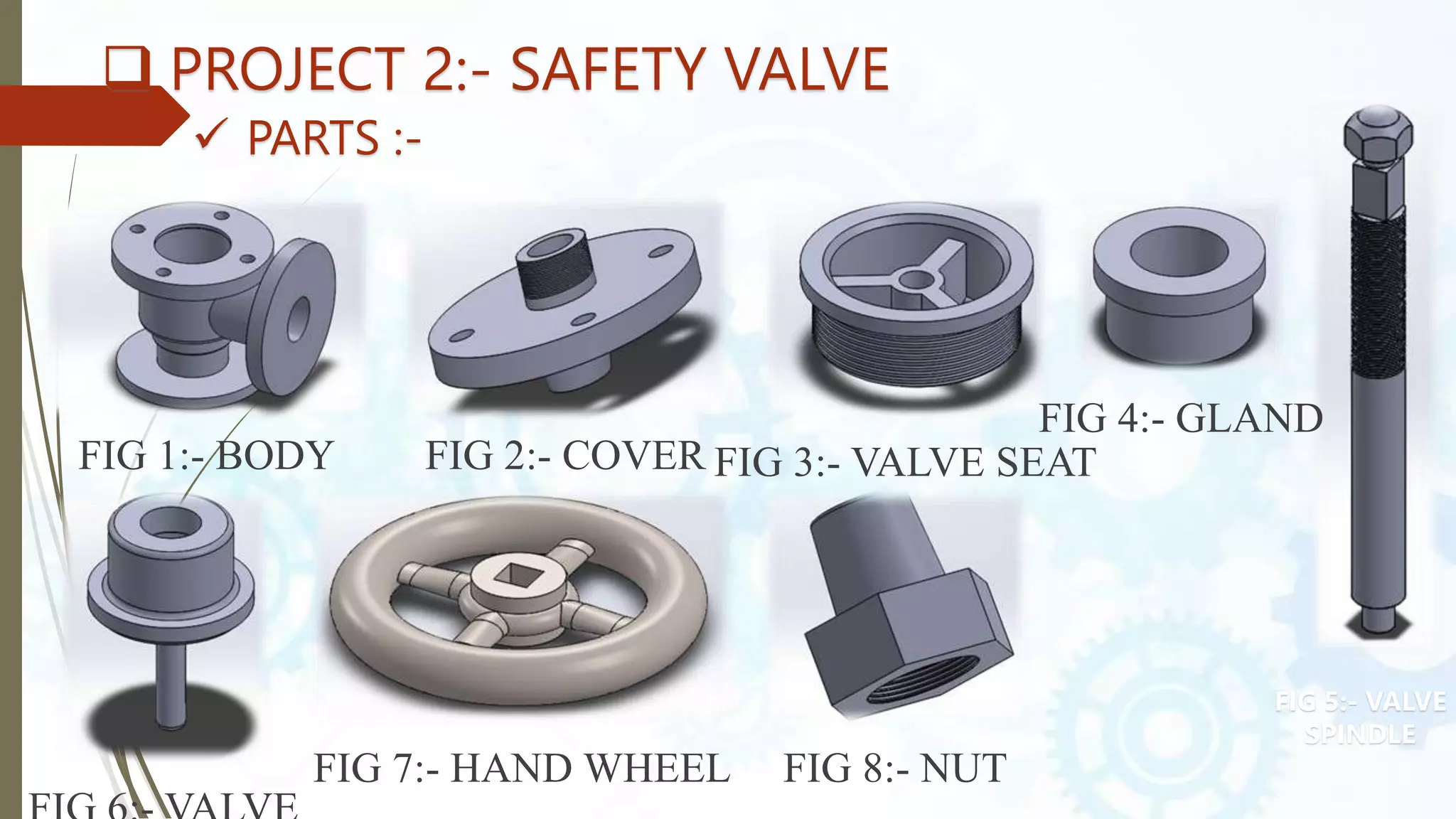
 PROJECT 2:- SAFETY VALVE
 PARTS :-
FIG 1:- BODY FIG 2:- COVER FIG 3:- VALVE SEAT
FIG 4:- GLAND
FIG 7:- HAND WHEEL FIG 8:- NUT
FIG 5:- VALVE
SPINDLE
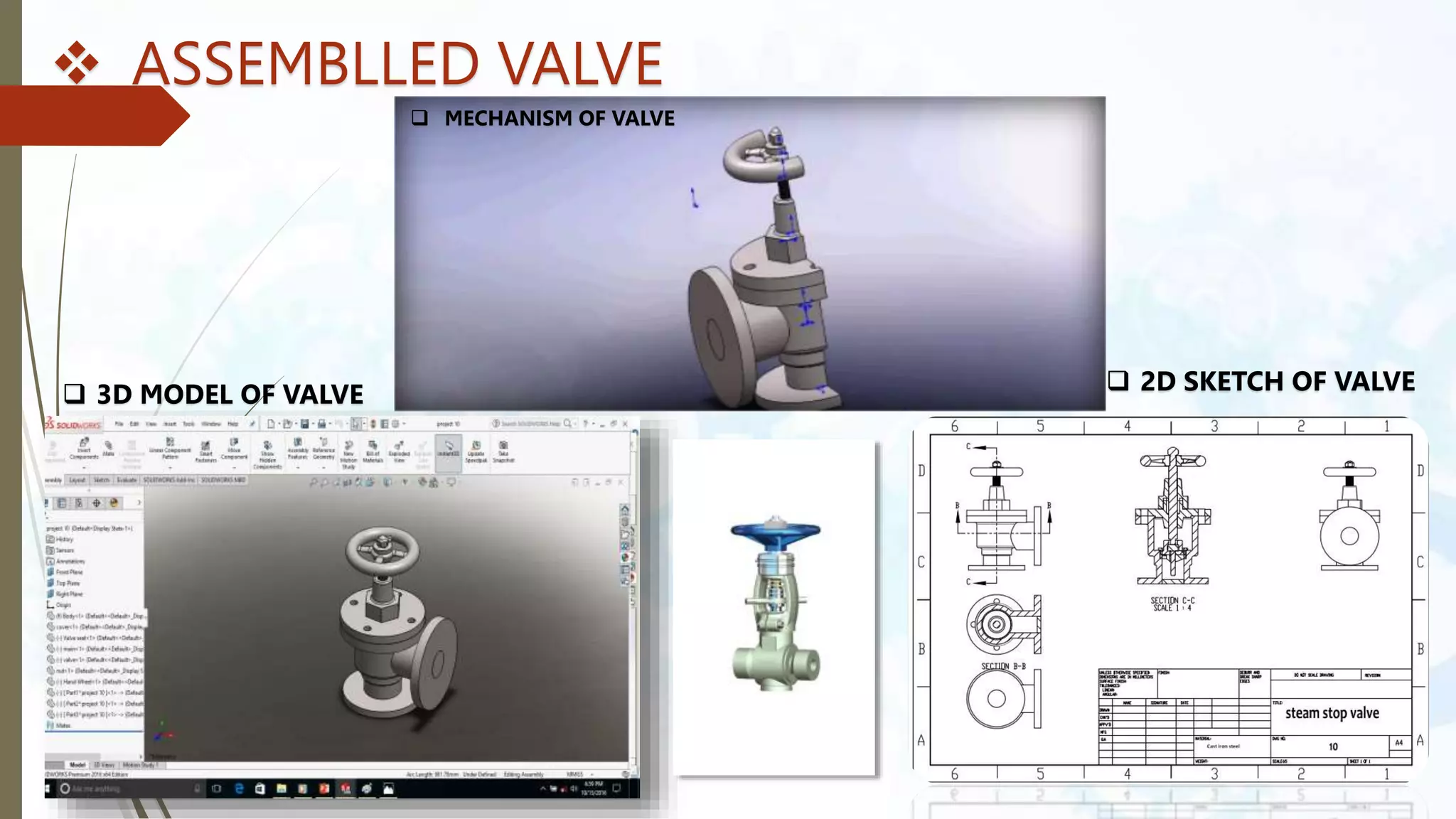
 ASSEMBLLED VALVE
 MECHANISM OF VALVE
 3D MODEL OF VALVE  2D SKETCH OF VALVE
ANY QUESTION?

Solidworks Presentation

  • 1.
    By Digvijay Gabhane Mtech(CAD/CAM) pursuing, BE (Mechanical), Diploma (Mechanical) INTRODUCTION TO SOLIDWORKS
  • 2.
    SOLIDWORKS SolidWorks is asolid modeling computer-aided design(CAD) and computer-aided engineering(CAE) application. Published by Dassault Systems. SolidWorks Corporation was founded in December 1993. Initial released on November 1, 1995. In 1997 Dassault, best known for its CATIA CAD software. Stable release – SolidWorks 2023.
  • 3.
    WHY SOLIDWORKS ? SolidWorks provides a wide range of tools and features that enable engineers, designers, and architects to create detailed 3D models of various products, from simple components to complex assemblies. Some key features of SolidWorks include: 1.Efficient Design: SolidWorks offers 3D modelling tools that streamline design creation and visualization. 2.Design Validation: Virtual simulations help identify and resolve issues before physical prototyping. 3.Collaboration: Supports collaborative design, enhancing team communication and productivity. 4.Interdisciplinary Integration: Enables seamless integration of mechanical, electrical, and software components. 5.Prototyping Cost Reduction: Virtual testing minimizes the need for costly physical prototypes. 6.Visual Communication: Realistic renderings and animations aid in conveying design concepts to stakeholders. 7.Manufacturability: Design tools ensure efficient fabrication and assembly processes. 8.Documentation and Compliance: Assists in generating accurate engineering drawings and compliance documents. 9.Innovation and Iteration: Quick design iterations faster innovation and optimal solutions. 10.Education and Skill Development: Used in education to teach modern design and engineering practices. 11.Industry Standardization: Widely adopted, simplifying collaboration and communication in various industries.
  • 4.
    WHAT WE CANDO IN SOLIDWORKS  SolidWorks is a popular computer-aided design (CAD) software application used primarily for designing 3D models and drawings of mechanical and engineering products. 1.3D Design: SolidWorks is used to design three-dimensional models of various products, from simple parts to complex assemblies. 2.Parametric Modelling: It uses parameters and relationships to create designs, enabling easy modification and updates. 3.Assembly Design: Allows users to create and simulate the interaction of multiple parts within an assembly. 4.2D Drawing Generation: Helps create accurate 2D engineering drawings with dimensions and annotations for manufacturing. 5.Simulation and Analysis: Offers virtual testing of designs for factors like structural integrity and motion before physical prototypes are made. 6.Rendering and Visualization: Generates realistic renderings and visualizations for presentations and marketing. 7.Sheet Metal Design: Includes tools for designing sheet metal parts and unfolding them for fabrication. 8.Electrical and PCB Design: Offers modules for integrating electronic aspects into designs. 9.Collaboration: Supports sharing and collaborative design among team members. 10.Industry Standard: Widely used in industries like aerospace, automotive, and manufacturing due to its user-friendly interface and comprehensive features.
  • 5.
    TYPES OF DESIGN AdaptiveDesign Development Design New Design
  • 6.
    SIZES BASIC SIZE :Theoretical data , dimension are in rectangle , apply tolerances. ACTUAL SIZE : Size after manufacturing PRODUCTS : Collections of parts . Ex: Lathe Machine PARTS : Collections of features . Sketch based Features and Applied based features
  • 7.
    PRODUCT DEVELOPMENT LIFECYCLE (PDLC) Customer’s Needs/Requirements Design Analysis Drafting 5M Manufacturing Assembly New Product
  • 8.
    CONCEPT RELATED TOCAD  DESIGN INTENT  FEATURE – BASED MODELLING : SKETCHED FEATURES & APPLIED FEATURES  PARAMETRIC DESIGN  FULLY ASSOCIATIVE  SWIFT (SOLIDWORKS INTELLIGENT FEATURE TECHNOLOGY)
  • 9.
  • 10.
    SKETCH ELEMENTS  ORIGIN PLANE  DIMESNIONS : DRIVING & DRIVEN  SKETCH DEFINITIONS : FULLY DEFINED , UNDER DEFINED , OVER DEFINED  RELATIONS
  • 11.
  • 12.
    SKETCH ENTITIES  LINE: CONSTRUCTIONS , HORIZONTAL, VERTICAL , ANGLE  CENTERLINE  MIDPOINT LINE  CIRCLE  ARC  ELLIPSE  RECTANGLE  SLOT  POLYGON
  • 13.
    SKETCH RELATIONS THE RELATIONSBETWEEN SKETCH ENTITIES AND MODEL GEOMETRY.  GEOMETRIC RELATIONS : VERTCAL , HORIZONTAL,  SKETCH RELATIONS TYPES
  • 14.
    SolidWorks Command Manager SolidWorksFeatures toolbar  Extrude Boss/Base Command Manager: The Extrude Boss/base is one of the most frequently used tools in SolidWorks, which enables to convert a 2D sketch into 3D model. It helps to add material to your sketch files. It is represented by icon
  • 15.
     Revolved Boss/Base Therevolve feature enables to add materials to your 2D sketch by revolving a long as centerline or axis. The revolve boss/base is actually rotate the sketch along an axis. It helps to create parts shows the symmetry like cylinder, sphere, pulleys etc.  Sweep Boss/Base It is sweep feature which sweeps a closed profile through a open or closed path for making solid object. This feature helps to make solid part by guiding through a definite path.  Loft It also helps to add materials between profiles in two directions to create solid object.  Extrude Cut Unlike the extrude boss, the Extrude cut removes the material from 3D model by using a closed sketch (circle or rectangle etc.) You can do the cut in one or two directions the using the property menu.
  • 16.
     Revolved Cut Usingthe Revolved Cut, you can remove the material by revolving a closed sketch around an axis.  Fillet It creates round internal or external faces by using the edges of the solid model. You can control the radius of the fillet from the property manager.  Linear Pattern If you want to create series of hole in the body of model in linear manner, use Linear Pattern.  Rib It adds this walled support to the solid body. You can also do it using the extrude boss, but for saving the time, Rib options the best.
  • 17.
     Wraps It helpsto create a closed contour on the face of a solid body. These are the features tools which are contained in the SolidWorks Command manager. These tools help to make solid 3D designs of various shapes or profiles.  Mirror If you want to create the mirror of a model, use the Mirror feature.  Shell To create thin walled solid box, use the shell feature.
  • 18.
    CAD IN AUTOMOBILES. AUDIR8 MODEL OF AUDI R8
  • 19.
    MODELING METHOD:-  FEATURES/PARTS •refers to the building blocks of the part. They are the shapes and operations that construct the part. Shape-based features typically begin with a 2D or 3D sketch of shapes such as,holes, slots, etc • The Sketch consist of geometry such as points, lines,arcs,hyperbola and splines. 3D models parts
  • 20.
     SURFACE MODELING •Surfacing is used in CAD and other computer graphics software to describe the skin of a 3D geometric element, freeform surfacing do not have rigid Radial dimensions, unlike regular surfaces such as planes cylinders and conic surfaces. • They are used to describe forms such as turbine blades, card bodies and boat hulls. • Examples of surface modeling
  • 21.
     SHEET METAL •To gain the flexibility to quick and cost-effectively • Many industries require a wide range of sheet metal parts to house or enclose the • CPU MODEL • SHEET METAL MECHANISM
  • 22.
     ASSEMBLY • Inan assembly, the analog to sketch relations are mates. Just as sketch relations define conditions such as tangency, parallelism, and concentricity with respect to sketch geometry, assembly mates define equivalent relations with respect to the individual parts or components, allowing the easy construction of assemblies. • SolidWorks also includes additional advance mating features such as gear & cam follower mates.  ASSEMBLY
  • 23.
    • Standard Mates •In standard mates a relation is given between parts as per requirements. • Equivalent relation with respect to the individual parts or components • Part 1 • Part 2 • Part 3 • Assembled model
  • 24.
     Mechanical Mates •Mechanical Mates allows model assemblies to accurately reproduce movement. • CAM • HINGE • GEAR • RACK AND PINION  MECHANICAL MATES
  • 25.
     DRAWING • Drawingcan be created either from parts or assemblies. Views are automatically generated from the solid model, and notes, dimension and tolerances can be easily added to the drawing as needed • The drawing paper include most paper sizes. • 3D models • 2D drawing
  • 26.
     PROJECT 1:-GEAR TRAIN & NUT-BOLT GEAR TRAIN MECHANISM GEAR TRAIN MODEL NUT & BOLT MECHANISM NUT & BOLT MODEL
  • 27.
     PROJECT 2:-SAFETY VALVE  PARTS :- FIG 1:- BODY FIG 2:- COVER FIG 3:- VALVE SEAT FIG 4:- GLAND FIG 7:- HAND WHEEL FIG 8:- NUT FIG 5:- VALVE SPINDLE
  • 28.
     ASSEMBLLED VALVE MECHANISM OF VALVE  3D MODEL OF VALVE  2D SKETCH OF VALVE
  • 29.

Editor's Notes

  • #8 5M (MONEY, MATERIAL, MANAGEMENT, MENPOWER, MACHINES)