
Software Engineering
&
Project Management
Module 4
Introduction to Project Management: Introduction, Project and Importance of Project Management, Contract
Management, Activities Covered by Software Project Management, Plans, Methods and Methodologies, some ways of
categorizing Software Projects, Stakeholders, Setting Objectives, Business Case, Project Success and Failure, Management
and Management Control, Project Management life cycle, Traditional versus Modern Project Management Practices.
Presented By: Dr. Prakhyath Rai
Project Management
Project Management – Defining and achieving targets while optimizing the use of
resources over the course of project.
Resources: Time, Money, People, Materials, Energy, Space etc.
Project Course: Set of activities with finite duration
Importance of Project Management
Large amount of money invested in ICT
Project often fail – Exceeding Schedule or
Money
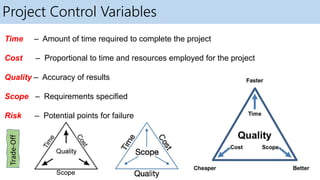
Project Control Variables
Time – Amount of time required to complete the project
Cost – Proportional to time and resources employed for the project
Quality – Accuracy of results
Scope – Requirements specified
Risk – Potential points for failure
Trade-Off
Contract Management
• Contract management is the process of managing contract creation, execution, and analysis
to maximize operational and financial performance while minimizing risk.
• Ensures that contractual obligations are met, tracking performance, and making necessary
adjustments to achieve project goals.
Types of Contracts:
 Fixed Contracts - A set price is agreed upon for the entire project or specific deliverables.
 Time and Material Contracts - The client pays for the actual time spent by the contractor
and the materials used.
 Cost-Reimbursement Contracts - The client reimburses the contractor for allowable costs
incurred during the project, plus a fee.
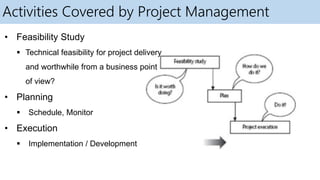
Activities Covered by Project Management
• Feasibility Study
 Technical feasibility for project delivery
and worthwhile from a business point
of view?
• Planning
 Schedule, Monitor
• Execution
 Implementation / Development
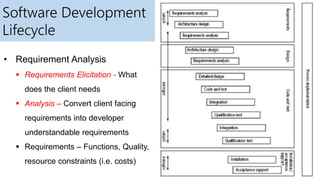
Software Development
Lifecycle
• Requirement Analysis
 Requirements Elicitation - What
does the client needs
 Analysis – Convert client facing
requirements into developer
understandable requirements
 Requirements – Functions, Quality,
resource constraints (i.e. costs)
Software Development Lifecycle Cont..
• Architectural Design
 Developed based on requirements
 Components – Hardware, Software, Organizational entities
• Code and Test
 Component wise implementation
 Unit testing
• Integration
 Combine the components + integration testing
• Qualification Testing – System Testing
Software Development Lifecycle Cont..
• Installation – Deployment
 Getting the system operational
 Setting Up – Standing Data + Initializing Parameters + Installing h/w and s/w +
User Training (KT- Knowledge Transfer)
• Acceptance Support
 Acceptance Testing
 Feedback
 Maintenance + Support
Plans, Methods and Methodologies
Plans:
A detailed proposal for achieving specific objectives.
Purpose: Provides direction, aligns resources, and sets timelines.
Examples: Project plan, risk management plan, quality plan.
Methods:
Specific procedures or techniques used to accomplish tasks.
Purpose: Ensures tasks are carried out systematically and consistently.
Examples: Waterfall, Agile, Scrum.
Methodologies:
A system of practices, techniques, procedures, and rules used by those who work in a discipline.
Purpose: Provides a framework for managing projects, ensuring consistency and quality.
Categorizing Software
Categorization is important as different types of tasks need different project
approaches
• Information Systems vs Embedded Systems
Information Systems:
 Focus: Data management, software applications, user interface.
 Approach: Agile methodologies, rapid prototyping, continuous integration.
 Examples: CRM systems, ERP software, online banking systems.
Embedded Systems:
 Focus: Hardware-software integration, real-time processing, system reliability.
 Approach: V-Model, waterfall model, thorough testing, and validation.
 Examples: Automotive control systems, medical devices, IoT devices.
Categorizing Software Cont..
• Objective-Based vs Product-Based
Objective-Based Projects:
 Goal: Achieve specific outcomes or performance targets.
 Approach: Milestone tracking, performance metrics, adaptive planning.
 Examples: Website performance optimization, cybersecurity enhancement, sales
process improvement.
Product-Based Projects:
 Goal: Develop a tangible product or deliverable.
 Approach: Stage-gate process, detailed requirements analysis, user feedback loops.
 Examples: New mobile app development, consumer electronics, e-commerce platform.
Categorizing Software Cont..
• Voluntary Systems vs Compulsory Systems
Voluntary Systems:
 Systems where participation is optional and based on individual or organizational choice.
 Examples: Open-source software development.
Compulsory Systems:
 Systems where participation is mandatory and enforced by laws, regulations, or
organizational policies.
 Examples: Mandatory safety regulations.
Categorizing Software Cont..
• Voluntary Systems vs Compulsory Systems
Voluntary Systems:
 Systems where participation is optional and based on individual or organizational choice.
 Examples: Open-source software development.
Compulsory Systems:
 Systems where participation is mandatory and enforced by laws, regulations, or
organizational policies.
 Examples: Mandatory safety regulations.
Stakeholders
• People who have a stake or interest in Project
• Stakeholders can be,
 Within the project team
 Outside the project team but within the same organization
 Outside both the project team and the organization
• Example: Clients / Users, Developers / Implementers
Setting Objectives
• What do we have to do to have a success ?
• Need for Project Authority (Control Finance + Monitor/Modify Objectives)
 Sets the project scope
 Allocates / Approves Costs
• Could be one person or group
 Project Board
 Project Management Board
 Steering Committee
Objectives
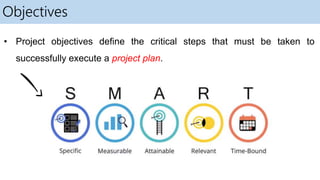
• Project objectives define the critical steps that must be taken to
successfully execute a project plan.
Objectives – Need to be SMART
• Specific: Speak with stakeholders and get them to give you all the requirements so that
you’re not surprised down the line when they say they’ve forgotten something.
• Measurable: Be sure that each of the requirements from stakeholders can be measured.
That is, each requirement should be tested and then checked off the list.
• Achievable: Look over the list of requirements. If some are not realistic then go back to the
stakeholder and tell them why it’s not feasible considering the time and costs involved.
• Relevant: Again, look over the list of requirements you received from your stakeholders
and make sure each is relevant to the product. If it’s not, it’s got to go.
• Time-Related: Can the requirements requested be completed by the deadline? Will the
requirement lead to overspending the budget? Unless the requirement can be delivered on
time and within budget it should be removed.
Goals / Sub-Objectives
• Steps along the way to achieving objective.
• Goal can be allocated to an individual but not the objective.
Consider,
Objective: User satisfaction with software product
 Analyst Goal: Accurate Requirements
 Developer Goal: Reliable Software
Measure Effectiveness:
• How do we know that the goal or objective has been achieved ?
 Practical Tests to measure
 Repeat Business or Low Number of Complaints
Business Case
• Benefits of project must
outweigh costs incurred
• Project Costs:
 Development
 Operation
• Benefits:
 Quantifiable
 Non-Quantifiable
Management
What is management ?
• Planning – Scheduling, deciding what needs to be done
• Organizing – Making arrangements
• Staffing – Resource Allocation (Selecting right people for the job)
• Directing – Giving instructions
• Monitoring – Review progress
• Controlling – Taking action to remedy holdups
• Innovating – Solutions to solve the problem
• Representing – Liaising with clients, users, developers and other
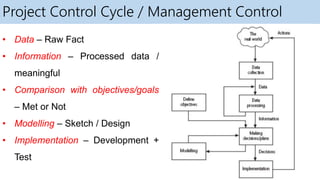
Project Control Cycle / Management Control
• Data – Raw Fact
• Information – Processed data /
meaningful
• Comparison with objectives/goals
– Met or Not
• Modelling – Sketch / Design
• Implementation – Development +
Test
Traditional versus Modern Project Management Practices
• Planning Incremental Delivery
 Traditional long-term planning has given way to short term planning – Incremental Delivery with
Evolving Functionalities
• Quality Management
 Focus on quality management keeping customer focus rather than only delivery
• Change Management
 Changes are rarely entertained after sign-off in traditional systems
 Incremental Delivery with Customer Feedback: To accommodate customer changes
 Version Control: Crucial since incremental delivery leads to multiple versions of project
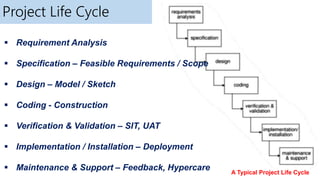
Project Life Cycle
A Typical Project Life Cycle
 Requirement Analysis
 Specification – Feasible Requirements / Scope
 Design – Model / Sketch
 Coding - Construction
 Verification & Validation – SIT, UAT
 Implementation / Installation – Deployment
 Maintenance & Support – Feedback, Hypercare
Software Engineering and Project Management - Introduction to Project Management

Software Engineering and Project Management - Introduction to Project Management

  • 1.
    Software Engineering & Project Management Module4 Introduction to Project Management: Introduction, Project and Importance of Project Management, Contract Management, Activities Covered by Software Project Management, Plans, Methods and Methodologies, some ways of categorizing Software Projects, Stakeholders, Setting Objectives, Business Case, Project Success and Failure, Management and Management Control, Project Management life cycle, Traditional versus Modern Project Management Practices. Presented By: Dr. Prakhyath Rai
  • 2.
    Project Management Project Management– Defining and achieving targets while optimizing the use of resources over the course of project. Resources: Time, Money, People, Materials, Energy, Space etc. Project Course: Set of activities with finite duration Importance of Project Management Large amount of money invested in ICT Project often fail – Exceeding Schedule or Money
  • 3.
    Project Control Variables Time– Amount of time required to complete the project Cost – Proportional to time and resources employed for the project Quality – Accuracy of results Scope – Requirements specified Risk – Potential points for failure Trade-Off
  • 4.
    Contract Management • Contractmanagement is the process of managing contract creation, execution, and analysis to maximize operational and financial performance while minimizing risk. • Ensures that contractual obligations are met, tracking performance, and making necessary adjustments to achieve project goals. Types of Contracts:  Fixed Contracts - A set price is agreed upon for the entire project or specific deliverables.  Time and Material Contracts - The client pays for the actual time spent by the contractor and the materials used.  Cost-Reimbursement Contracts - The client reimburses the contractor for allowable costs incurred during the project, plus a fee.
  • 5.
    Activities Covered byProject Management • Feasibility Study  Technical feasibility for project delivery and worthwhile from a business point of view? • Planning  Schedule, Monitor • Execution  Implementation / Development
  • 6.
    Software Development Lifecycle • RequirementAnalysis  Requirements Elicitation - What does the client needs  Analysis – Convert client facing requirements into developer understandable requirements  Requirements – Functions, Quality, resource constraints (i.e. costs)
  • 7.
    Software Development LifecycleCont.. • Architectural Design  Developed based on requirements  Components – Hardware, Software, Organizational entities • Code and Test  Component wise implementation  Unit testing • Integration  Combine the components + integration testing • Qualification Testing – System Testing
  • 8.
    Software Development LifecycleCont.. • Installation – Deployment  Getting the system operational  Setting Up – Standing Data + Initializing Parameters + Installing h/w and s/w + User Training (KT- Knowledge Transfer) • Acceptance Support  Acceptance Testing  Feedback  Maintenance + Support
  • 9.
    Plans, Methods andMethodologies Plans: A detailed proposal for achieving specific objectives. Purpose: Provides direction, aligns resources, and sets timelines. Examples: Project plan, risk management plan, quality plan. Methods: Specific procedures or techniques used to accomplish tasks. Purpose: Ensures tasks are carried out systematically and consistently. Examples: Waterfall, Agile, Scrum. Methodologies: A system of practices, techniques, procedures, and rules used by those who work in a discipline. Purpose: Provides a framework for managing projects, ensuring consistency and quality.
  • 10.
    Categorizing Software Categorization isimportant as different types of tasks need different project approaches • Information Systems vs Embedded Systems Information Systems:  Focus: Data management, software applications, user interface.  Approach: Agile methodologies, rapid prototyping, continuous integration.  Examples: CRM systems, ERP software, online banking systems. Embedded Systems:  Focus: Hardware-software integration, real-time processing, system reliability.  Approach: V-Model, waterfall model, thorough testing, and validation.  Examples: Automotive control systems, medical devices, IoT devices.
  • 11.
    Categorizing Software Cont.. •Objective-Based vs Product-Based Objective-Based Projects:  Goal: Achieve specific outcomes or performance targets.  Approach: Milestone tracking, performance metrics, adaptive planning.  Examples: Website performance optimization, cybersecurity enhancement, sales process improvement. Product-Based Projects:  Goal: Develop a tangible product or deliverable.  Approach: Stage-gate process, detailed requirements analysis, user feedback loops.  Examples: New mobile app development, consumer electronics, e-commerce platform.
  • 12.
    Categorizing Software Cont.. •Voluntary Systems vs Compulsory Systems Voluntary Systems:  Systems where participation is optional and based on individual or organizational choice.  Examples: Open-source software development. Compulsory Systems:  Systems where participation is mandatory and enforced by laws, regulations, or organizational policies.  Examples: Mandatory safety regulations.
  • 13.
    Categorizing Software Cont.. •Voluntary Systems vs Compulsory Systems Voluntary Systems:  Systems where participation is optional and based on individual or organizational choice.  Examples: Open-source software development. Compulsory Systems:  Systems where participation is mandatory and enforced by laws, regulations, or organizational policies.  Examples: Mandatory safety regulations.
  • 14.
    Stakeholders • People whohave a stake or interest in Project • Stakeholders can be,  Within the project team  Outside the project team but within the same organization  Outside both the project team and the organization • Example: Clients / Users, Developers / Implementers
  • 15.
    Setting Objectives • Whatdo we have to do to have a success ? • Need for Project Authority (Control Finance + Monitor/Modify Objectives)  Sets the project scope  Allocates / Approves Costs • Could be one person or group  Project Board  Project Management Board  Steering Committee
  • 16.
    Objectives • Project objectivesdefine the critical steps that must be taken to successfully execute a project plan.
  • 17.
    Objectives – Needto be SMART • Specific: Speak with stakeholders and get them to give you all the requirements so that you’re not surprised down the line when they say they’ve forgotten something. • Measurable: Be sure that each of the requirements from stakeholders can be measured. That is, each requirement should be tested and then checked off the list. • Achievable: Look over the list of requirements. If some are not realistic then go back to the stakeholder and tell them why it’s not feasible considering the time and costs involved. • Relevant: Again, look over the list of requirements you received from your stakeholders and make sure each is relevant to the product. If it’s not, it’s got to go. • Time-Related: Can the requirements requested be completed by the deadline? Will the requirement lead to overspending the budget? Unless the requirement can be delivered on time and within budget it should be removed.
  • 18.
    Goals / Sub-Objectives •Steps along the way to achieving objective. • Goal can be allocated to an individual but not the objective. Consider, Objective: User satisfaction with software product  Analyst Goal: Accurate Requirements  Developer Goal: Reliable Software Measure Effectiveness: • How do we know that the goal or objective has been achieved ?  Practical Tests to measure  Repeat Business or Low Number of Complaints
  • 19.
    Business Case • Benefitsof project must outweigh costs incurred • Project Costs:  Development  Operation • Benefits:  Quantifiable  Non-Quantifiable
  • 20.
    Management What is management? • Planning – Scheduling, deciding what needs to be done • Organizing – Making arrangements • Staffing – Resource Allocation (Selecting right people for the job) • Directing – Giving instructions • Monitoring – Review progress • Controlling – Taking action to remedy holdups • Innovating – Solutions to solve the problem • Representing – Liaising with clients, users, developers and other
  • 21.
    Project Control Cycle/ Management Control • Data – Raw Fact • Information – Processed data / meaningful • Comparison with objectives/goals – Met or Not • Modelling – Sketch / Design • Implementation – Development + Test
  • 22.
    Traditional versus ModernProject Management Practices • Planning Incremental Delivery  Traditional long-term planning has given way to short term planning – Incremental Delivery with Evolving Functionalities • Quality Management  Focus on quality management keeping customer focus rather than only delivery • Change Management  Changes are rarely entertained after sign-off in traditional systems  Incremental Delivery with Customer Feedback: To accommodate customer changes  Version Control: Crucial since incremental delivery leads to multiple versions of project
  • 23.
    Project Life Cycle ATypical Project Life Cycle  Requirement Analysis  Specification – Feasible Requirements / Scope  Design – Model / Sketch  Coding - Construction  Verification & Validation – SIT, UAT  Implementation / Installation – Deployment  Maintenance & Support – Feedback, Hypercare