SOFTWARE ENGINEERING
Software Project Management
Introduction
The main question that we attempt to answer in this introduction is
whether the management software projects is really that different
from that of other types of project. To answer this, we need to look
at some key definitions of some concepts of software project
management.
What is Software?
Software are set of computer programs that instruct the computer to
perform a given task as directed by the user(s). The software is
either system software or application software.
What is a Project?
A project is a planned activity that determine how a task is going to
be carried out before it is started, usually constrained by date,
undertaken to meet unique goals and objectives in order to bring
about beneficial change or added value. Planning is in essence
thinking about something before it is done.
The characteristics which distinguish projects from other types of
jobs are:
 non-routine tasks are involved
 planning is required
 specific objectives are to be met
 the project has a predetermined time span
 work is carried out in several phases
What is Management?
Management involves the following activities:
 planning - deciding what is to be done
 organizing – making arrangement
 staffing – selecting the right people for the job
 directing – giving instructions
 monitoring – checking on progress
 controlling – taking action to remedy hold-ups
 innovating – coming up with new solutions
 representing – liaising with clients, users, developer, suppliers
and other stake-holders.
What is Project Management?
Project management is the discipline of planning, organizing,
controlling, monitoring and managing resources to bring about the
successful completion of specific project goals and objectives.
The primary challenge of project management is to achieve all of
the project goals and objectives, while honouring the preconceived
project constraints. The primary constraints are scope, time and
budget, while the secondary challenge is to optimize the allocation
and integration of inputs necessary to meet pre-defined objectives.
Software projects versus other types of project
Fred Brooks pointed out that the products of software projects have
certain characteristics which make them different from other types
of projects. They are:
 Invisibility
 Complexity
 Conformity
 Flexibility
Invisibility:- The process of building or developing software
projects is not immediately seen or visible, like building a bridge,
road, etc. The only time that software project is seen is during
installation and implementation.
Complexity:- Software design and construction contains more
complex routine during design than the normal physical artifact.
Conformity:- Software developers have to conform to the
requirements of human clients. The conformity will lead to the
reduction of several errors and running time.
Flexibility:- Software project can be changed at anytime in order to
conform to its specifications during design. This is usually seen as
one of its strengths. A software can also change to accommodate
new components when the need arises.
SOFTWARE PROJECT MANAGEMENT ACTIVITIES
(i) Initiation/Feasibility Study:-The essence of initiation or
feasibility study is to investigate whether a software project is
worth doing. This is where the requirements, and also the probable
developmental and operational costs, along with the value of the
benefits of the new system are determined.
(ii) Project Planning/Design stage
If the feasibility study favours the development of the software,
then planning of the project can take place. Design is thinking and
making decisions about the precise form of the software that the
project is to create. The outline plan and more detailed planning
would be done as they approached. The planned activities would
then be transformed into system design; considering the input
requirements, procedures and the expected output of the
software project.
(iii) Project Execution
The execution of the software project contains the design and
implementation stages. During implementation, the following
stages are observed:
 Installation/Files conversion
 System testing
 Staff Training
 Change over procedures
(iv) Monitoring and Controlling
Monitoring and controlling consist of those processes performed to
observe project execution so that potential problems can be
identified in a timely manner and corrective action can be taken,
when necessary, to control the execution of the project. Monitoring
and controlling include:
 Measuring the ongoing project activities, i.e. where we are.
 Monitoring the project variables, i.e. cost, effort, scope, etc.
 Identify corrective actions to address issues and risks properly,
i.e. how can we get on track again.
(v) Project Completion Stage
Completion includes the formal acceptance of the project and the
ending thereof. This phase consists of:
 Project close:- Finalize all activities across all of the process
groups to formally close the project or a project phase.
 Contract close:- Complete and settle each contract and close
each contract applicable to the project or project phase.
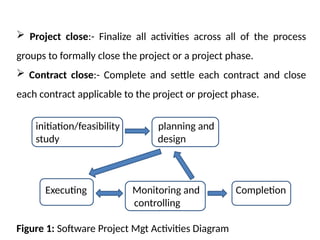
initiation/feasibility planning and
study design
Executing Monitoring and Completion
controlling
Figure 1: Software Project Mgt Activities Diagram
PROJECT SUCCESS CRITERIA
Project planning generally consists of:
 determining how to plan
 developing the scope statement
 selecting the planning team
 identifying deliverables and creating the work breakdown
structure.
 identifying the activities needed to complete those deliverables
and arrange them in a logical sequence
 estimating the resource requirements for the activities
 estimating time and cost for activities
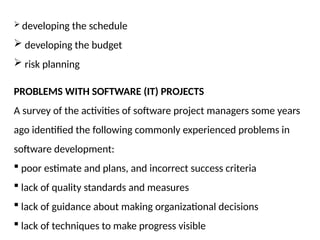
 developing the schedule
 developing the budget
 risk planning
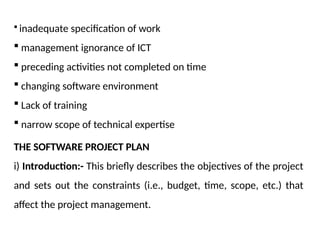
PROBLEMS WITH SOFTWARE (IT) PROJECTS
A survey of the activities of software project managers some years
ago identified the following commonly experienced problems in
software development:
 poor estimate and plans, and incorrect success criteria
 lack of quality standards and measures
 lack of guidance about making organizational decisions
 lack of techniques to make progress visible
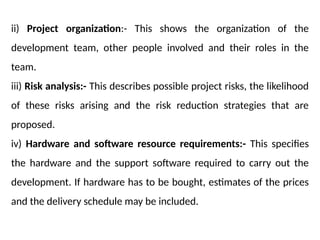
 inadequate specification of work
 management ignorance of ICT
 preceding activities not completed on time
 changing software environment
 Lack of training
 narrow scope of technical expertise
THE SOFTWARE PROJECT PLAN
i) Introduction:- This briefly describes the objectives of the project
and sets out the constraints (i.e., budget, time, scope, etc.) that
affect the project management.
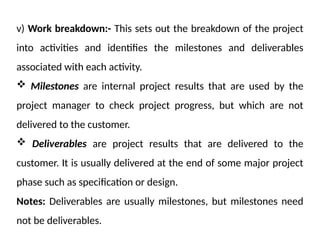
ii) Project organization:- This shows the organization of the
development team, other people involved and their roles in the
team.
iii) Risk analysis:- This describes possible project risks, the likelihood
of these risks arising and the risk reduction strategies that are
proposed.
iv) Hardware and software resource requirements:- This specifies
the hardware and the support software required to carry out the
development. If hardware has to be bought, estimates of the prices
and the delivery schedule may be included.
v) Work breakdown:- This sets out the breakdown of the project
into activities and identifies the milestones and deliverables
associated with each activity.
 Milestones are internal project results that are used by the
project manager to check project progress, but which are not
delivered to the customer.
 Deliverables are project results that are delivered to the
customer. It is usually delivered at the end of some major project
phase such as specification or design.
Notes: Deliverables are usually milestones, but milestones need
not be deliverables.
vi) Project Schedule: This shows the dependencies between
activities, the estimated time required to reach each milestone and
the allocation of people to activities.
vii) Monitoring and reporting mechanisms: This defines the
management reports that should be produced, when these should
be produced and the project monitoring mechanisms used.
PROJECT SCHEDULING
Project scheduling involves separating the total work involved in a
project into separate activities and judging the time required to
complete these activities. Usually, some of these activities are
carried out in parallel.
Network models and network analysis techniques are used to solve
many managerial problems in the following areas:
 Project scheduling and control
 Transportation systems design
 Communication systems design
With project scheduling, two techniques come into play. These are:
i) CPM (Critical Path Method)
ii) PERT (Program Evaluation and Review Technique)
The techniques are tools used in management to plan, schedule
and control projects. They are both time based methods and their
main purpose is to produce a schedule for the project.
Definitions of Project Scheduling Concepts
Event: A Event represents a point in time signifying the completion
of some activities and beginning of new ones. Also, an activity is
any specific engagement involving the use of any resources or skill.
Critical Activity: An activity is said to be critical, if the delay in its
start will cause a delay in the completion date of the entire project.
Non-critical Activity: An activity is said to be non-critical, if the
time between its earliest start and latest completion date as
allowed by the project is longer than its actual duration. In this
case, the non-critical activity is said to have a slack or a float time.
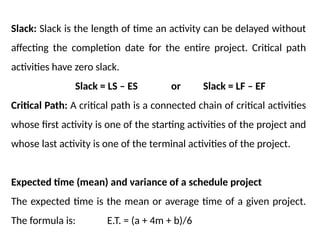
Slack: Slack is the length of time an activity can be delayed without
affecting the completion date for the entire project. Critical path
activities have zero slack.
Slack = LS – ES or Slack = LF – EF
Critical Path: A critical path is a connected chain of critical activities
whose first activity is one of the starting activities of the project and
whose last activity is one of the terminal activities of the project.
Expected time (mean) and variance of a schedule project
The expected time is the mean or average time of a given project.
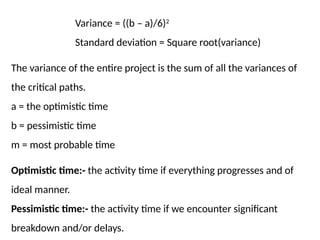
The formula is: E.T. = (a + 4m + b)/6
Variance = ((b – a)/6)2
Standard deviation = Square root(variance)
The variance of the entire project is the sum of all the variances of
the critical paths.
a = the optimistic time
b = pessimistic time
m = most probable time
Optimistic time:- the activity time if everything progresses and of
ideal manner.
Pessimistic time:- the activity time if we encounter significant
breakdown and/or delays.
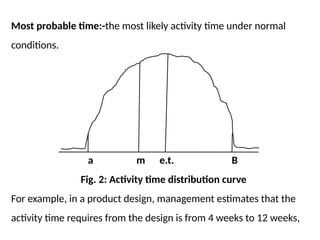
Most probable time:-the most likely activity time under normal
conditions.
a m e.t. B
Fig. 2: Activity time distribution curve
For example, in a product design, management estimates that the
activity time requires from the design is from 4 weeks to 12 weeks,
with the most likely time of 5 weeks. If the activity could be
repeated a large number of times, what would be the average time
for the activity?
Software Projects Evaluation
In evaluating software projects, three major factors will need to be
considered. They are:
(i) Technical feasibility or assessment
(ii) The balance of costs and benefits
(iii) Risk associated with the project.
Cost-benefit evaluation techniques
a) Net profit
b) Payback period
c) Return on investment (ROI) or accounting rate of return (ARR)
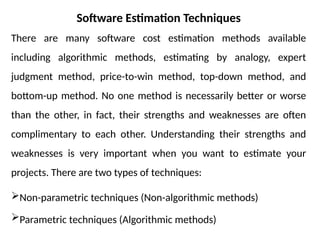
Software Estimation Techniques
There are many software cost estimation methods available
including algorithmic methods, estimating by analogy, expert
judgment method, price-to-win method, top-down method, and
bottom-up method. No one method is necessarily better or worse
than the other, in fact, their strengths and weaknesses are often
complimentary to each other. Understanding their strengths and
weaknesses is very important when you want to estimate your
projects. There are two types of techniques:
Non-parametric techniques (Non-algorithmic methods)
Parametric techniques (Algorithmic methods)
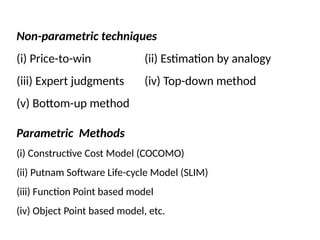
Non-parametric techniques
(i) Price-to-win (ii) Estimation by analogy
(iii) Expert judgments (iv) Top-down method
(v) Bottom-up method
Parametric Methods
(i) Constructive Cost Model (COCOMO)
(ii) Putnam Software Life-cycle Model (SLIM)
(iii) Function Point based model
(iv) Object Point based model, etc.
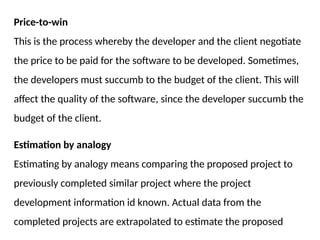
Price-to-win
This is the process whereby the developer and the client negotiate
the price to be paid for the software to be developed. Sometimes,
the developers must succumb to the budget of the client. This will
affect the quality of the software, since the developer succumb the
budget of the client.
Estimation by analogy
Estimating by analogy means comparing the proposed project to
previously completed similar project where the project
development information id known. Actual data from the
completed projects are extrapolated to estimate the proposed
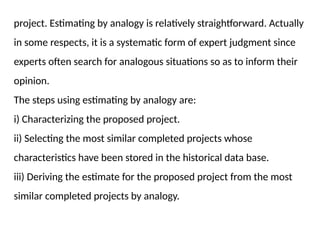
project. Estimating by analogy is relatively straightforward. Actually
in some respects, it is a systematic form of expert judgment since
experts often search for analogous situations so as to inform their
opinion.
The steps using estimating by analogy are:
i) Characterizing the proposed project.
ii) Selecting the most similar completed projects whose
characteristics have been stored in the historical data base.
iii) Deriving the estimate for the proposed project from the most
similar completed projects by analogy.
Expert judgment
Expert judgment techniques involve consulting with software cost
estimation expert or a group of the experts to use their experience
and understanding of the proposed project to arrive at an estimate
of its cost.
Generally speaking, a group consensus technique, Delphi
technique, is the best way to be used. The strengths and
weaknesses are complementary to the strengths and weaknesses
of algorithmic method.
The estimating steps using this method:
(i) Coordinator presents each expert with a specification and an
estimation form.
(ii) Coordinator calls a group meeting in which the experts discuss
estimation issues with the coordinator and each other.
(iii) Experts fill out forms anonymously
(iv) Coordinator prepares and distributes a summary of the
estimation on an iteration form.
(v) Coordinator calls a group meeting, specially focusing on having
the experts discuss points where their estimates varied widely.
(vi) Experts fill out forms, again anonymously, and steps 4
to 6 are iterated for as many rounds as appropriate.
Top-Down Method
Top-down estimating technique is also called Macro
model. This method uses the overall cost estimation for a
project derived from the global properties of the software
project. This method is more applicable to early cost
estimation when only global properties are known.
Bottom-up Estimating Method
Using bottom-up estimating method, the cost of each
software components is estimated and then combine
the results to arrive at an estimated cost of overall
project. It aims at constructing the estimate of a system
from the knowledge accumulated about the small
software components and their interactions.
This method permits the software group to handle an
estimate in an almost traditional fashion. The setbacks
It tends to be more time-consuming and it may be
inaccurate because the necessary information may not be
available in the early phase.
Algorithmic Method
The algorithmic method was designed to provide some
mathematical equations to perform software estimation.
These mathematical equations are based on research and
historical data and use inputs such as Source Lines of
Code (SLOC), number of functions to perform, and other
Cost drivers such as language, design methodology, skill-
levels, risk assessments, etc.
It is able to generate repeatable estimations, it is easy to
modify input data, refine and customize formulas. But
poor sizing inputs and inaccurate cost driver rating will
result in inaccurate estimation.
COCOMO II Effort Equation
The COCOMO II model makes its estimates of required
effort (measured in Person-Months – PM) based primarily
on your estimate of the software project's size (as
measured in thousands of SLOC, KSLOC)):
Effort = a * EAF * (KSLOC)b
Where:
a = 2.94
EAF is the Effort Adjustment Factor derived from the
cost drivers
b is an exponent derived from the five Scale Drivers
As an example, a project with all Nominal Cost Drivers and
Scale Drivers would have an EAF of 1.00 and exponent, b,
of 1.0997.
Assuming that the project is projected to consist of
8,000 source lines of code, COCOMO II estimates that
28.9 Person-Months of effort is required to complete it:
Effort = 2.94 * (1.0) * (8)1.0997
= 28.9 Person-Months
The 5 Scale Drivers are:
• Precedentedness
• Development Flexibility
• Architecture / Risk Resolution
• Team Cohesion
• Process Maturity
Effort Adjustment Factor
The Effort Adjustment Factor in the effort equation is
simply the product of the effort multipliers
corresponding to each of the cost drivers for your
projects.
For example, if your project is rated Very High for
Complexity (effort multiplier of 1.34), and Low for
Language & Tools Experience (effort multiplier of 1.09),
and all of the other cost drivers are rated to be Nominal
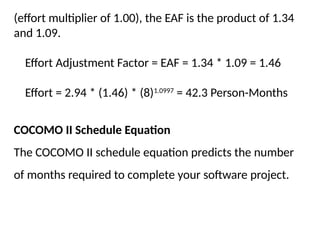
(effort multiplier of 1.00), the EAF is the product of 1.34
and 1.09.
Effort Adjustment Factor = EAF = 1.34 * 1.09 = 1.46
Effort = 2.94 * (1.46) * (8)1.0997
= 42.3 Person-Months
COCOMO II Schedule Equation
The COCOMO II schedule equation predicts the number
of months required to complete your software project.
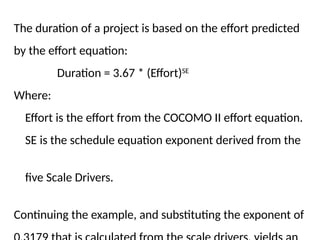
The duration of a project is based on the effort predicted
by the effort equation:
Duration = 3.67 * (Effort)SE
Where:
Effort is the effort from the COCOMO II effort equation.
SE is the schedule equation exponent derived from the
five Scale Drivers.
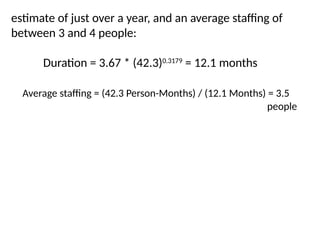
Continuing the example, and substituting the exponent of
estimate of just over a year, and an average staffing of
between 3 and 4 people:
Duration = 3.67 * (42.3)0.3179
= 12.1 months
Average staffing = (42.3 Person-Months) / (12.1 Months) = 3.5
people
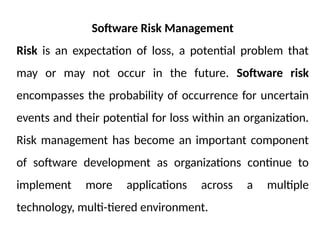
Software Risk Management
Risk is an expectation of loss, a potential problem that
may or may not occur in the future. Software risk
encompasses the probability of occurrence for uncertain
events and their potential for loss within an organization.
Risk management has become an important component
of software development as organizations continue to
implement more applications across a multiple
technology, multi-tiered environment.
Typically, software risk is viewed as a combination of
robustness, performance efficiency, security and
transactional risk propagated throughout the system.
Processes of Risk Management
Risk Management comprises of following processes:
(i) Software Risk Identification
(ii) Software Risk Analysis and prioritization
(iii) Software Risk Planning
(vi) Software Risk Monitoring
(i) Software Risk Identification
The two main approaches to the identification of risks are
the use of checklists and brainstorming. Checklists are
simply lists of the risks that have been found to occur
regularly in software development projects. E.g. personnel
shortfalls, unrealistic delivery time and cost estimates,
developing the wrong software functions, requirements
scrubbing, real-time performance shortfalls (i.e. lack of
simulation and benchmarking), lack of staff training and
development.
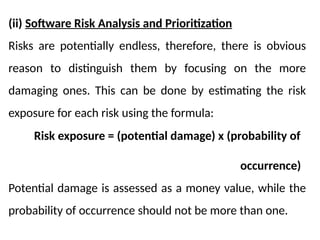
(ii) Software Risk Analysis and Prioritization
Risks are potentially endless, therefore, there is obvious
reason to distinguish them by focusing on the more
damaging ones. This can be done by estimating the risk
exposure for each risk using the formula:
Risk exposure = (potential damage) x (probability of
occurrence)
Potential damage is assessed as a money value, while the
probability of occurrence should not be more than one.
(iii) Software Risk Planning
Having identified the major risks and allocated priorities,
the next task is to decide how to deal with them. The
processes for dealing with risk are:
(a) Risk acceptance
(b) Risk avoidance
(c) Risk reduction and mitigation
(d) Risk transfer
(a) Risk acceptance
This is where you do-nothing option on identified risks.
This plan is acceptable where the identified risks are
minor in order to concentrate on the more likely
damaging ones. That is if the supposed damage that
would be inflicted on the software project at hand would
be less than the costs of action that reduce the
probability of the risks happening.
(b) Risk avoidance
Some activities may be prone to accident that it is best to
avoid them altogether. For example, if you are worried of
the presumed failure of a software project, then don’t
embark on it. Alternatively, is to purchase an off-the-shelf
solution that will perform or solve the identified
problem.
(c) Risk reduction
This is a situation where the developers or the client will
decide to continue with the project despite risks, but
take precautions that reduce the probability of the risk.
Risk mitigation can sometimes be distinguished from risk
reduction. Risk reduction attempts to reduce the likelihood
of the risk occurring, while risk mitigation is action taken to
ensure the impact of the risk is lessened when it occurs.
Mitigation is closely associated with contingency planning.
(d) Risk transfer
In this case, the risk is transferred to another developer or
organization. For example, a software developer that is
finding difficult to actualize some certain objectives or
specifications can outsourced to an outside developer or
organization for a fixed fee. The outside organization or
individual must have a productivity advantages over the
former developer or organization. Though the project
takes longer than the average expected time.
(iv) Software Risk Monitoring
This is where likelihood of a risk is monitored or checked
by the project’s manager in order to provide a
contingency plan to remedy the situation. A contingency
plan is a planned action to be carried out, if the particular
risk materializes. The four factors of planning a risk can be
applied to remedy the situation. For example, if a well
trained staff saddled with the responsibility of
coordinating and developing a software project falls sick,
what do you do as a manager?

Project Management System Architecture for Today

  • 1.
  • 2.
    Introduction The main questionthat we attempt to answer in this introduction is whether the management software projects is really that different from that of other types of project. To answer this, we need to look at some key definitions of some concepts of software project management. What is Software? Software are set of computer programs that instruct the computer to perform a given task as directed by the user(s). The software is either system software or application software.
  • 3.
    What is aProject? A project is a planned activity that determine how a task is going to be carried out before it is started, usually constrained by date, undertaken to meet unique goals and objectives in order to bring about beneficial change or added value. Planning is in essence thinking about something before it is done. The characteristics which distinguish projects from other types of jobs are:  non-routine tasks are involved  planning is required
  • 4.
     specific objectivesare to be met  the project has a predetermined time span  work is carried out in several phases What is Management? Management involves the following activities:  planning - deciding what is to be done  organizing – making arrangement  staffing – selecting the right people for the job  directing – giving instructions  monitoring – checking on progress
  • 5.
     controlling –taking action to remedy hold-ups  innovating – coming up with new solutions  representing – liaising with clients, users, developer, suppliers and other stake-holders. What is Project Management? Project management is the discipline of planning, organizing, controlling, monitoring and managing resources to bring about the successful completion of specific project goals and objectives. The primary challenge of project management is to achieve all of the project goals and objectives, while honouring the preconceived
  • 6.
    project constraints. Theprimary constraints are scope, time and budget, while the secondary challenge is to optimize the allocation and integration of inputs necessary to meet pre-defined objectives. Software projects versus other types of project Fred Brooks pointed out that the products of software projects have certain characteristics which make them different from other types of projects. They are:  Invisibility  Complexity  Conformity  Flexibility
  • 7.
    Invisibility:- The processof building or developing software projects is not immediately seen or visible, like building a bridge, road, etc. The only time that software project is seen is during installation and implementation. Complexity:- Software design and construction contains more complex routine during design than the normal physical artifact. Conformity:- Software developers have to conform to the requirements of human clients. The conformity will lead to the reduction of several errors and running time.
  • 8.
    Flexibility:- Software projectcan be changed at anytime in order to conform to its specifications during design. This is usually seen as one of its strengths. A software can also change to accommodate new components when the need arises. SOFTWARE PROJECT MANAGEMENT ACTIVITIES (i) Initiation/Feasibility Study:-The essence of initiation or feasibility study is to investigate whether a software project is worth doing. This is where the requirements, and also the probable developmental and operational costs, along with the value of the benefits of the new system are determined.
  • 9.
    (ii) Project Planning/Designstage If the feasibility study favours the development of the software, then planning of the project can take place. Design is thinking and making decisions about the precise form of the software that the project is to create. The outline plan and more detailed planning would be done as they approached. The planned activities would then be transformed into system design; considering the input requirements, procedures and the expected output of the software project.
  • 10.
    (iii) Project Execution Theexecution of the software project contains the design and implementation stages. During implementation, the following stages are observed:  Installation/Files conversion  System testing  Staff Training  Change over procedures (iv) Monitoring and Controlling Monitoring and controlling consist of those processes performed to observe project execution so that potential problems can be
  • 11.
    identified in atimely manner and corrective action can be taken, when necessary, to control the execution of the project. Monitoring and controlling include:  Measuring the ongoing project activities, i.e. where we are.  Monitoring the project variables, i.e. cost, effort, scope, etc.  Identify corrective actions to address issues and risks properly, i.e. how can we get on track again. (v) Project Completion Stage Completion includes the formal acceptance of the project and the ending thereof. This phase consists of:
  • 12.
     Project close:-Finalize all activities across all of the process groups to formally close the project or a project phase.  Contract close:- Complete and settle each contract and close each contract applicable to the project or project phase. initiation/feasibility planning and study design Executing Monitoring and Completion controlling Figure 1: Software Project Mgt Activities Diagram
  • 13.
    PROJECT SUCCESS CRITERIA Projectplanning generally consists of:  determining how to plan  developing the scope statement  selecting the planning team  identifying deliverables and creating the work breakdown structure.  identifying the activities needed to complete those deliverables and arrange them in a logical sequence  estimating the resource requirements for the activities  estimating time and cost for activities
  • 14.
     developing theschedule  developing the budget  risk planning PROBLEMS WITH SOFTWARE (IT) PROJECTS A survey of the activities of software project managers some years ago identified the following commonly experienced problems in software development:  poor estimate and plans, and incorrect success criteria  lack of quality standards and measures  lack of guidance about making organizational decisions  lack of techniques to make progress visible
  • 15.
     inadequate specificationof work  management ignorance of ICT  preceding activities not completed on time  changing software environment  Lack of training  narrow scope of technical expertise THE SOFTWARE PROJECT PLAN i) Introduction:- This briefly describes the objectives of the project and sets out the constraints (i.e., budget, time, scope, etc.) that affect the project management.
  • 16.
    ii) Project organization:-This shows the organization of the development team, other people involved and their roles in the team. iii) Risk analysis:- This describes possible project risks, the likelihood of these risks arising and the risk reduction strategies that are proposed. iv) Hardware and software resource requirements:- This specifies the hardware and the support software required to carry out the development. If hardware has to be bought, estimates of the prices and the delivery schedule may be included.
  • 17.
    v) Work breakdown:-This sets out the breakdown of the project into activities and identifies the milestones and deliverables associated with each activity.  Milestones are internal project results that are used by the project manager to check project progress, but which are not delivered to the customer.  Deliverables are project results that are delivered to the customer. It is usually delivered at the end of some major project phase such as specification or design. Notes: Deliverables are usually milestones, but milestones need not be deliverables.
  • 18.
    vi) Project Schedule:This shows the dependencies between activities, the estimated time required to reach each milestone and the allocation of people to activities. vii) Monitoring and reporting mechanisms: This defines the management reports that should be produced, when these should be produced and the project monitoring mechanisms used. PROJECT SCHEDULING Project scheduling involves separating the total work involved in a project into separate activities and judging the time required to complete these activities. Usually, some of these activities are carried out in parallel.
  • 19.
    Network models andnetwork analysis techniques are used to solve many managerial problems in the following areas:  Project scheduling and control  Transportation systems design  Communication systems design With project scheduling, two techniques come into play. These are: i) CPM (Critical Path Method) ii) PERT (Program Evaluation and Review Technique) The techniques are tools used in management to plan, schedule and control projects. They are both time based methods and their
  • 20.
    main purpose isto produce a schedule for the project. Definitions of Project Scheduling Concepts Event: A Event represents a point in time signifying the completion of some activities and beginning of new ones. Also, an activity is any specific engagement involving the use of any resources or skill. Critical Activity: An activity is said to be critical, if the delay in its start will cause a delay in the completion date of the entire project. Non-critical Activity: An activity is said to be non-critical, if the time between its earliest start and latest completion date as allowed by the project is longer than its actual duration. In this case, the non-critical activity is said to have a slack or a float time.
  • 21.
    Slack: Slack isthe length of time an activity can be delayed without affecting the completion date for the entire project. Critical path activities have zero slack. Slack = LS – ES or Slack = LF – EF Critical Path: A critical path is a connected chain of critical activities whose first activity is one of the starting activities of the project and whose last activity is one of the terminal activities of the project. Expected time (mean) and variance of a schedule project The expected time is the mean or average time of a given project. The formula is: E.T. = (a + 4m + b)/6
  • 22.
    Variance = ((b– a)/6)2 Standard deviation = Square root(variance) The variance of the entire project is the sum of all the variances of the critical paths. a = the optimistic time b = pessimistic time m = most probable time Optimistic time:- the activity time if everything progresses and of ideal manner. Pessimistic time:- the activity time if we encounter significant breakdown and/or delays.
  • 23.
    Most probable time:-themost likely activity time under normal conditions. a m e.t. B Fig. 2: Activity time distribution curve For example, in a product design, management estimates that the activity time requires from the design is from 4 weeks to 12 weeks,
  • 24.
    with the mostlikely time of 5 weeks. If the activity could be repeated a large number of times, what would be the average time for the activity?
  • 25.
    Software Projects Evaluation Inevaluating software projects, three major factors will need to be considered. They are: (i) Technical feasibility or assessment (ii) The balance of costs and benefits (iii) Risk associated with the project. Cost-benefit evaluation techniques a) Net profit b) Payback period c) Return on investment (ROI) or accounting rate of return (ARR)
  • 26.
    Software Estimation Techniques Thereare many software cost estimation methods available including algorithmic methods, estimating by analogy, expert judgment method, price-to-win method, top-down method, and bottom-up method. No one method is necessarily better or worse than the other, in fact, their strengths and weaknesses are often complimentary to each other. Understanding their strengths and weaknesses is very important when you want to estimate your projects. There are two types of techniques: Non-parametric techniques (Non-algorithmic methods) Parametric techniques (Algorithmic methods)
  • 27.
    Non-parametric techniques (i) Price-to-win(ii) Estimation by analogy (iii) Expert judgments (iv) Top-down method (v) Bottom-up method Parametric Methods (i) Constructive Cost Model (COCOMO) (ii) Putnam Software Life-cycle Model (SLIM) (iii) Function Point based model (iv) Object Point based model, etc.
  • 28.
    Price-to-win This is theprocess whereby the developer and the client negotiate the price to be paid for the software to be developed. Sometimes, the developers must succumb to the budget of the client. This will affect the quality of the software, since the developer succumb the budget of the client. Estimation by analogy Estimating by analogy means comparing the proposed project to previously completed similar project where the project development information id known. Actual data from the completed projects are extrapolated to estimate the proposed
  • 29.
    project. Estimating byanalogy is relatively straightforward. Actually in some respects, it is a systematic form of expert judgment since experts often search for analogous situations so as to inform their opinion. The steps using estimating by analogy are: i) Characterizing the proposed project. ii) Selecting the most similar completed projects whose characteristics have been stored in the historical data base. iii) Deriving the estimate for the proposed project from the most similar completed projects by analogy.
  • 30.
    Expert judgment Expert judgmenttechniques involve consulting with software cost estimation expert or a group of the experts to use their experience and understanding of the proposed project to arrive at an estimate of its cost. Generally speaking, a group consensus technique, Delphi technique, is the best way to be used. The strengths and weaknesses are complementary to the strengths and weaknesses of algorithmic method.
  • 31.
    The estimating stepsusing this method: (i) Coordinator presents each expert with a specification and an estimation form. (ii) Coordinator calls a group meeting in which the experts discuss estimation issues with the coordinator and each other. (iii) Experts fill out forms anonymously (iv) Coordinator prepares and distributes a summary of the estimation on an iteration form. (v) Coordinator calls a group meeting, specially focusing on having the experts discuss points where their estimates varied widely.
  • 32.
    (vi) Experts fillout forms, again anonymously, and steps 4 to 6 are iterated for as many rounds as appropriate. Top-Down Method Top-down estimating technique is also called Macro model. This method uses the overall cost estimation for a project derived from the global properties of the software project. This method is more applicable to early cost estimation when only global properties are known.
  • 33.
    Bottom-up Estimating Method Usingbottom-up estimating method, the cost of each software components is estimated and then combine the results to arrive at an estimated cost of overall project. It aims at constructing the estimate of a system from the knowledge accumulated about the small software components and their interactions. This method permits the software group to handle an estimate in an almost traditional fashion. The setbacks
  • 34.
    It tends tobe more time-consuming and it may be inaccurate because the necessary information may not be available in the early phase. Algorithmic Method The algorithmic method was designed to provide some mathematical equations to perform software estimation. These mathematical equations are based on research and historical data and use inputs such as Source Lines of Code (SLOC), number of functions to perform, and other
  • 35.
    Cost drivers suchas language, design methodology, skill- levels, risk assessments, etc. It is able to generate repeatable estimations, it is easy to modify input data, refine and customize formulas. But poor sizing inputs and inaccurate cost driver rating will result in inaccurate estimation. COCOMO II Effort Equation The COCOMO II model makes its estimates of required effort (measured in Person-Months – PM) based primarily
  • 36.
    on your estimateof the software project's size (as measured in thousands of SLOC, KSLOC)): Effort = a * EAF * (KSLOC)b Where: a = 2.94 EAF is the Effort Adjustment Factor derived from the cost drivers b is an exponent derived from the five Scale Drivers As an example, a project with all Nominal Cost Drivers and Scale Drivers would have an EAF of 1.00 and exponent, b, of 1.0997.
  • 37.
    Assuming that theproject is projected to consist of 8,000 source lines of code, COCOMO II estimates that 28.9 Person-Months of effort is required to complete it: Effort = 2.94 * (1.0) * (8)1.0997 = 28.9 Person-Months The 5 Scale Drivers are: • Precedentedness • Development Flexibility • Architecture / Risk Resolution • Team Cohesion • Process Maturity
  • 38.
    Effort Adjustment Factor TheEffort Adjustment Factor in the effort equation is simply the product of the effort multipliers corresponding to each of the cost drivers for your projects. For example, if your project is rated Very High for Complexity (effort multiplier of 1.34), and Low for Language & Tools Experience (effort multiplier of 1.09), and all of the other cost drivers are rated to be Nominal
  • 39.
    (effort multiplier of1.00), the EAF is the product of 1.34 and 1.09. Effort Adjustment Factor = EAF = 1.34 * 1.09 = 1.46 Effort = 2.94 * (1.46) * (8)1.0997 = 42.3 Person-Months COCOMO II Schedule Equation The COCOMO II schedule equation predicts the number of months required to complete your software project.
  • 40.
    The duration ofa project is based on the effort predicted by the effort equation: Duration = 3.67 * (Effort)SE Where: Effort is the effort from the COCOMO II effort equation. SE is the schedule equation exponent derived from the five Scale Drivers. Continuing the example, and substituting the exponent of
  • 41.
    estimate of justover a year, and an average staffing of between 3 and 4 people: Duration = 3.67 * (42.3)0.3179 = 12.1 months Average staffing = (42.3 Person-Months) / (12.1 Months) = 3.5 people
  • 42.
    Software Risk Management Riskis an expectation of loss, a potential problem that may or may not occur in the future. Software risk encompasses the probability of occurrence for uncertain events and their potential for loss within an organization. Risk management has become an important component of software development as organizations continue to implement more applications across a multiple technology, multi-tiered environment.
  • 43.
    Typically, software riskis viewed as a combination of robustness, performance efficiency, security and transactional risk propagated throughout the system. Processes of Risk Management Risk Management comprises of following processes: (i) Software Risk Identification (ii) Software Risk Analysis and prioritization (iii) Software Risk Planning (vi) Software Risk Monitoring
  • 44.
    (i) Software RiskIdentification The two main approaches to the identification of risks are the use of checklists and brainstorming. Checklists are simply lists of the risks that have been found to occur regularly in software development projects. E.g. personnel shortfalls, unrealistic delivery time and cost estimates, developing the wrong software functions, requirements scrubbing, real-time performance shortfalls (i.e. lack of simulation and benchmarking), lack of staff training and development.
  • 45.
    (ii) Software RiskAnalysis and Prioritization Risks are potentially endless, therefore, there is obvious reason to distinguish them by focusing on the more damaging ones. This can be done by estimating the risk exposure for each risk using the formula: Risk exposure = (potential damage) x (probability of occurrence) Potential damage is assessed as a money value, while the probability of occurrence should not be more than one.
  • 46.
    (iii) Software RiskPlanning Having identified the major risks and allocated priorities, the next task is to decide how to deal with them. The processes for dealing with risk are: (a) Risk acceptance (b) Risk avoidance (c) Risk reduction and mitigation (d) Risk transfer
  • 47.
    (a) Risk acceptance Thisis where you do-nothing option on identified risks. This plan is acceptable where the identified risks are minor in order to concentrate on the more likely damaging ones. That is if the supposed damage that would be inflicted on the software project at hand would be less than the costs of action that reduce the probability of the risks happening.
  • 48.
    (b) Risk avoidance Someactivities may be prone to accident that it is best to avoid them altogether. For example, if you are worried of the presumed failure of a software project, then don’t embark on it. Alternatively, is to purchase an off-the-shelf solution that will perform or solve the identified problem. (c) Risk reduction This is a situation where the developers or the client will decide to continue with the project despite risks, but
  • 49.
    take precautions thatreduce the probability of the risk. Risk mitigation can sometimes be distinguished from risk reduction. Risk reduction attempts to reduce the likelihood of the risk occurring, while risk mitigation is action taken to ensure the impact of the risk is lessened when it occurs. Mitigation is closely associated with contingency planning. (d) Risk transfer In this case, the risk is transferred to another developer or organization. For example, a software developer that is
  • 50.
    finding difficult toactualize some certain objectives or specifications can outsourced to an outside developer or organization for a fixed fee. The outside organization or individual must have a productivity advantages over the former developer or organization. Though the project takes longer than the average expected time.
  • 51.
    (iv) Software RiskMonitoring This is where likelihood of a risk is monitored or checked by the project’s manager in order to provide a contingency plan to remedy the situation. A contingency plan is a planned action to be carried out, if the particular risk materializes. The four factors of planning a risk can be applied to remedy the situation. For example, if a well trained staff saddled with the responsibility of coordinating and developing a software project falls sick, what do you do as a manager?