Aug 2024
CHAPTER 1- AN INTRODUCTION
SOFTWARE
PROJECT MANAGEMENT
OUTLINE OF TALK
✓ In this introduction the main questions to be addressed will be:
 What is software project management? Is it really different
from ‘ordinary’ project management?
 How do you know when a project has been successful? For
example, do the expectations of the customer/client match
those of the developers?
CH1. INTRODUCTION
2
WHY IS PROJECT MANAGEMENT IMPORTANT?
✓ Large amounts of money are spent on ICT e.g. UK government
in spent £2.3 billions on contracts for ICT and only £1.4 billions
on road building
✓ Project often fail – Standish Group claim only a third of ICT
projects are successful. 82% were late and 43% exceeded
their budget
✓ Poor project management a major factor in these failures
CH1. INTRODUCTION
3
WHAT IS A PROJECT?
“A specific plan or design”
“A planned undertaking”
“A large undertaking e.g. a public works scheme”
Longmans dictionary
Key points above are planning and size of task
CH1. INTRODUCTION
4
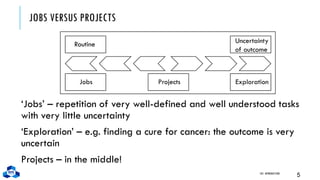
JOBS VERSUS PROJECTS
‘Jobs’ – repetition of very well-defined and well understood tasks
with very little uncertainty
‘Exploration’ – e.g. finding a cure for cancer: the outcome is very
uncertain
Projects – in the middle!
CH1. INTRODUCTION
5
Routine
Jobs Projects Exploration
Uncertainty
of outcome
CHARACTERISTICS OF PROJECTS
✓ A task is more ‘project-like’ if it is:
 Non-routine
 Planned
 Aiming at a specific target
 Carried out for a customer
 Carried out by a temporary work group
 Involving several specialisms
 Made up of several different phases
 Constrained by time and resources
 Large and/or complex
CH1. INTRODUCTION
6
ARE SOFTWARE PROJECTS REALLY DIFFERENT FROM OTHER PROJECTS?
✓ Not really …but
 Invisibility
 Complexity
 Conformity
 Flexibility
 make software more problematic to build than other
engineered artefacts.
CH1. INTRODUCTION
7
CONTRACT MANAGEMENT VERSUS TECHNICAL PROJECT MANAGEMENT
Projects can be:
✓ In-house: clients and developers are employed by the same
organization
✓ Out-sourced: clients and developers employed by different
organizations
✓ ‘Project manager’ could be:
 a ‘contract manager’ in the client organization
 a technical project manager in the supplier/services
organization
CH1. INTRODUCTION
8
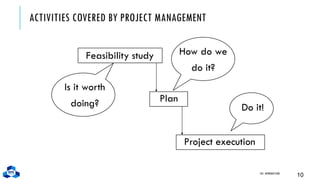
ACTIVITIES COVERED BY PROJECT MANAGEMENT
✓ Feasibility study:
 Is project technically feasible and worthwhile from a business
point of view?
✓ Planning:
 Only done if project is feasible
✓ Execution:
 Implement plan, but plan may be changed as we go along
CH1. INTRODUCTION
9
ACTIVITIES COVERED BY PROJECT MANAGEMENT
Feasibility study
CH1. INTRODUCTION
10
How do we
do it?
Plan
Project execution
Is it worth
doing? Do it!
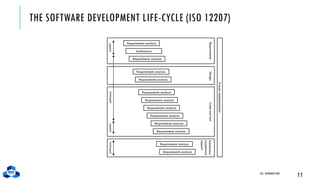
THE SOFTWARE DEVELOPMENT LIFE-CYCLE (ISO 12207)
CH1. INTRODUCTION
11
Requirements analysis
Architecture
Requirements analysis
Process
implementation
Requirements
Design
Code
and
test
Installation/
acceptance
support
system
software
system
software
ISO 12207 LIFE-CYCLE
✓ Requirements analysis:
 Requirements elicitation: what does the client need?
 Analysis: converting ‘customer-facing’ requirements into
equivalents that developers can understand
 Requirements will cover:
•Functions
•Quality
•Resource constraints i.e. costs
CH1. INTRODUCTION
12
ISO 12207 LIFE-CYCLE
✓ Requirements analysis:
 Requirements elicitation: what does the client need?
 Analysis: converting ‘customer-facing’ requirements into
equivalents that developers can understand
 Requirements will cover:
•Functions
•Quality
•Resource constraints i.e. costs
CH1. INTRODUCTION
13
ISO 12207 LIFE-CYCLE
✓ Architecture design
 Based on system requirements
 Defines components of system: hardware, software,
organizational
 Software requirements will come out of this
✓ Code and test
 Of individual components
✓ Integration
 Putting the components together
CH1. INTRODUCTION
14
ISO 12207 LIFE-CYCLE
✓ Qualification testing
 Testing the system (not just the software)
✓ Installation
 The process of making the system operational
 Includes setting up standing data, setting system parameters,
installing on operational hardware platforms, user training etc
✓ Acceptance support
 Including maintenance and enhancement
CH1. INTRODUCTION
15
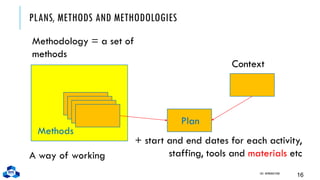
PLANS, METHODS AND METHODOLOGIES
CH1. INTRODUCTION
16
Methods
Plan
Context
Methodology = a set of
methods
A way of working
+ start and end dates for each activity,
staffing, tools and materials etc
SOME WAYS OF CATEGORIZING PROJECTS
✓ Distinguishing different types of project is important as
different types of task need different project approaches e.g
 Voluntary systems (such as computer games) versus compulsory
systems e.g. the order processing system in an organization
 Information systems versus embedded systems
 Objective-based versus product-based
CH1. INTRODUCTION
17
STAKEHOLDERS
✓ These are people who have a stake or interest in the project
✓ In general, they could be users/clients or developers/implementers
✓ They could be:
 Within the project team
 Outside the project team, but within the same organization
 Outside both the project team and the organization
✓ Different stakeholders may have different objectives – need to
define common project objectives
CH1. INTRODUCTION
18
SETTING OBJECTIVES
✓ Answering the question ‘What do we have to do to have a
success?’
✓ Need for a project authority
 Sets the project scope
 Allocates/approves costs
✓ Could be one person - or a group
 Project Board
 Project Management Board
 Steering committee
CH1. INTRODUCTION
19
OBJECTIVES
✓Informally, the objective of a project can be defined by
completing the statement:
The project will be regarded as a success if……….
…………
✓Rather like post-conditions for the project
✓Focus on what will be put in place, rather than how activities
will be carried out
CH1. INTRODUCTION
20
OBJECTIVES SHOULD BE SMART
✓ S – specific, that is, concrete and well-defined
✓ M – measurable, that is, satisfaction of the objective can be
objectively judged
✓ A – achievable, that is, it is within the power of the individual or
group concerned to meet the target
✓ R – relevant, the objective must relevant to the true purpose of
the project
✓ T – time constrained: there is defined point in time by which the
objective should be achieved
CH1. INTRODUCTION
21
GOALS/SUB-OBJECTIVES
✓ These are steps along the way to achieving the objective
✓ Informally, these can be defined by completing the sentence
✓ To reach objective X, the following must be in place
✓ A……………
✓ B……………
✓ C…………… etc
CH1. INTRODUCTION
22
GOALS/SUB-OBJECTIVES CONTINUED
✓ Often a goal can be allocated to an individual
✓ Individual might have the capability of achieving goal on their
own, but not the overall objective e.g.
✓ Overall objective – user satisfaction with software product
✓ Analyst goal – accurate requirements
✓ Developer goal – reliable software
CH1. INTRODUCTION
23
MEASURES OF EFFECTIVENESS
✓ How do we know that the goal or objective has been achieved?
✓ By a practical test, that can be objectively assessed.
✓ e.g. for user satisfaction with software product:
 Repeat business – they buy further products from us
 Number of complaints – if low etc etc
CH1. INTRODUCTION
24
THE BUSINESS CASE
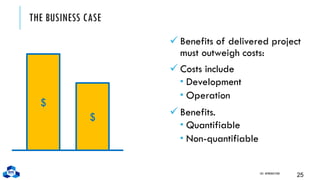
✓ Benefits of delivered project
must outweigh costs:
✓ Costs include
 Development
 Operation
✓ Benefits.
 Quantifiable
 Non-quantifiable
CH1. INTRODUCTION
25
$
$
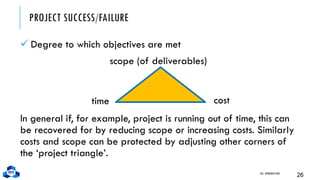
PROJECT SUCCESS/FAILURE
✓ Degree to which objectives are met
CH1. INTRODUCTION
26
In general if, for example, project is running out of time, this can
be recovered for by reducing scope or increasing costs. Similarly
costs and scope can be protected by adjusting other corners of
the ‘project triangle’.
scope (of deliverables)
time cost
OTHER SUCCESS CRITERIA
✓ These can relate to longer term, less directly tangible assets
 Improved skill and knowledge
 Creation of assets that can be used on future projects e.g.
software libraries
 Improved customer relationships that lead to repeat business
CH1. INTRODUCTION
27
WHAT IS MANAGEMENT?
✓ This involves the following activities:
 Planning – deciding what is to be done
 Organizing – making arrangements
 Staffing – selecting the right people for the job
 Directing – giving instructions
 Monitoring – checking on progress
 Controlling – taking action to remedy hold-ups
 Innovating – coming up with solutions when problems emerge
 Representing – liaising with clients, users, developers and
other stakeholders
CH1. INTRODUCTION
28
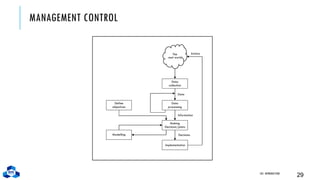
MANAGEMENT CONTROL
CH1. INTRODUCTION
29
Modelling
Data
collection
The
real world
Data
processing
Making
Decisions/plans
Implementation
Define
objectives
Decisions
Information
Data
Actions
MANAGEMENT CONTROL
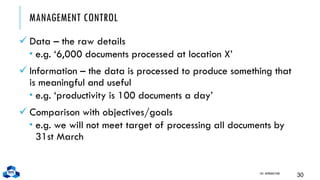
✓ Data – the raw details
 e.g. ‘6,000 documents processed at location X’
✓ Information – the data is processed to produce something that
is meaningful and useful
 e.g. ‘productivity is 100 documents a day’
✓ Comparison with objectives/goals
 e.g. we will not meet target of processing all documents by
31st March
CH1. INTRODUCTION
30
MANAGEMENT CONTROL
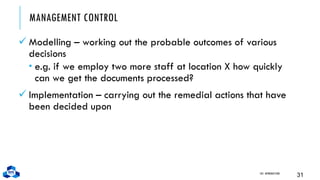
✓ Modelling – working out the probable outcomes of various
decisions
 e.g. if we employ two more staff at location X how quickly
can we get the documents processed?
✓ Implementation – carrying out the remedial actions that have
been decided upon
CH1. INTRODUCTION
31
KEY POINTS IN LECTURE
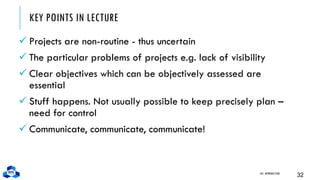
✓ Projects are non-routine - thus uncertain
✓ The particular problems of projects e.g. lack of visibility
✓ Clear objectives which can be objectively assessed are
essential
✓ Stuff happens. Not usually possible to keep precisely plan –
need for control
✓ Communicate, communicate, communicate!
CH1. INTRODUCTION
32

Chapter 1 Introduction how to introduction abou software

  • 1.
    Aug 2024 CHAPTER 1-AN INTRODUCTION SOFTWARE PROJECT MANAGEMENT
  • 2.
    OUTLINE OF TALK ✓In this introduction the main questions to be addressed will be:  What is software project management? Is it really different from ‘ordinary’ project management?  How do you know when a project has been successful? For example, do the expectations of the customer/client match those of the developers? CH1. INTRODUCTION 2
  • 3.
    WHY IS PROJECTMANAGEMENT IMPORTANT? ✓ Large amounts of money are spent on ICT e.g. UK government in spent £2.3 billions on contracts for ICT and only £1.4 billions on road building ✓ Project often fail – Standish Group claim only a third of ICT projects are successful. 82% were late and 43% exceeded their budget ✓ Poor project management a major factor in these failures CH1. INTRODUCTION 3
  • 4.
    WHAT IS APROJECT? “A specific plan or design” “A planned undertaking” “A large undertaking e.g. a public works scheme” Longmans dictionary Key points above are planning and size of task CH1. INTRODUCTION 4
  • 5.
    JOBS VERSUS PROJECTS ‘Jobs’– repetition of very well-defined and well understood tasks with very little uncertainty ‘Exploration’ – e.g. finding a cure for cancer: the outcome is very uncertain Projects – in the middle! CH1. INTRODUCTION 5 Routine Jobs Projects Exploration Uncertainty of outcome
  • 6.
    CHARACTERISTICS OF PROJECTS ✓A task is more ‘project-like’ if it is:  Non-routine  Planned  Aiming at a specific target  Carried out for a customer  Carried out by a temporary work group  Involving several specialisms  Made up of several different phases  Constrained by time and resources  Large and/or complex CH1. INTRODUCTION 6
  • 7.
    ARE SOFTWARE PROJECTSREALLY DIFFERENT FROM OTHER PROJECTS? ✓ Not really …but  Invisibility  Complexity  Conformity  Flexibility  make software more problematic to build than other engineered artefacts. CH1. INTRODUCTION 7
  • 8.
    CONTRACT MANAGEMENT VERSUSTECHNICAL PROJECT MANAGEMENT Projects can be: ✓ In-house: clients and developers are employed by the same organization ✓ Out-sourced: clients and developers employed by different organizations ✓ ‘Project manager’ could be:  a ‘contract manager’ in the client organization  a technical project manager in the supplier/services organization CH1. INTRODUCTION 8
  • 9.
    ACTIVITIES COVERED BYPROJECT MANAGEMENT ✓ Feasibility study:  Is project technically feasible and worthwhile from a business point of view? ✓ Planning:  Only done if project is feasible ✓ Execution:  Implement plan, but plan may be changed as we go along CH1. INTRODUCTION 9
  • 10.
    ACTIVITIES COVERED BYPROJECT MANAGEMENT Feasibility study CH1. INTRODUCTION 10 How do we do it? Plan Project execution Is it worth doing? Do it!
  • 11.
    THE SOFTWARE DEVELOPMENTLIFE-CYCLE (ISO 12207) CH1. INTRODUCTION 11 Requirements analysis Architecture Requirements analysis Requirements analysis Requirements analysis Requirements analysis Requirements analysis Requirements analysis Requirements analysis Requirements analysis Requirements analysis Requirements analysis Requirements analysis Process implementation Requirements Design Code and test Installation/ acceptance support system software system software
  • 12.
    ISO 12207 LIFE-CYCLE ✓Requirements analysis:  Requirements elicitation: what does the client need?  Analysis: converting ‘customer-facing’ requirements into equivalents that developers can understand  Requirements will cover: •Functions •Quality •Resource constraints i.e. costs CH1. INTRODUCTION 12
  • 13.
    ISO 12207 LIFE-CYCLE ✓Requirements analysis:  Requirements elicitation: what does the client need?  Analysis: converting ‘customer-facing’ requirements into equivalents that developers can understand  Requirements will cover: •Functions •Quality •Resource constraints i.e. costs CH1. INTRODUCTION 13
  • 14.
    ISO 12207 LIFE-CYCLE ✓Architecture design  Based on system requirements  Defines components of system: hardware, software, organizational  Software requirements will come out of this ✓ Code and test  Of individual components ✓ Integration  Putting the components together CH1. INTRODUCTION 14
  • 15.
    ISO 12207 LIFE-CYCLE ✓Qualification testing  Testing the system (not just the software) ✓ Installation  The process of making the system operational  Includes setting up standing data, setting system parameters, installing on operational hardware platforms, user training etc ✓ Acceptance support  Including maintenance and enhancement CH1. INTRODUCTION 15
  • 16.
    PLANS, METHODS ANDMETHODOLOGIES CH1. INTRODUCTION 16 Methods Plan Context Methodology = a set of methods A way of working + start and end dates for each activity, staffing, tools and materials etc
  • 17.
    SOME WAYS OFCATEGORIZING PROJECTS ✓ Distinguishing different types of project is important as different types of task need different project approaches e.g  Voluntary systems (such as computer games) versus compulsory systems e.g. the order processing system in an organization  Information systems versus embedded systems  Objective-based versus product-based CH1. INTRODUCTION 17
  • 18.
    STAKEHOLDERS ✓ These arepeople who have a stake or interest in the project ✓ In general, they could be users/clients or developers/implementers ✓ They could be:  Within the project team  Outside the project team, but within the same organization  Outside both the project team and the organization ✓ Different stakeholders may have different objectives – need to define common project objectives CH1. INTRODUCTION 18
  • 19.
    SETTING OBJECTIVES ✓ Answeringthe question ‘What do we have to do to have a success?’ ✓ Need for a project authority  Sets the project scope  Allocates/approves costs ✓ Could be one person - or a group  Project Board  Project Management Board  Steering committee CH1. INTRODUCTION 19
  • 20.
    OBJECTIVES ✓Informally, the objectiveof a project can be defined by completing the statement: The project will be regarded as a success if………. ………… ✓Rather like post-conditions for the project ✓Focus on what will be put in place, rather than how activities will be carried out CH1. INTRODUCTION 20
  • 21.
    OBJECTIVES SHOULD BESMART ✓ S – specific, that is, concrete and well-defined ✓ M – measurable, that is, satisfaction of the objective can be objectively judged ✓ A – achievable, that is, it is within the power of the individual or group concerned to meet the target ✓ R – relevant, the objective must relevant to the true purpose of the project ✓ T – time constrained: there is defined point in time by which the objective should be achieved CH1. INTRODUCTION 21
  • 22.
    GOALS/SUB-OBJECTIVES ✓ These aresteps along the way to achieving the objective ✓ Informally, these can be defined by completing the sentence ✓ To reach objective X, the following must be in place ✓ A…………… ✓ B…………… ✓ C…………… etc CH1. INTRODUCTION 22
  • 23.
    GOALS/SUB-OBJECTIVES CONTINUED ✓ Oftena goal can be allocated to an individual ✓ Individual might have the capability of achieving goal on their own, but not the overall objective e.g. ✓ Overall objective – user satisfaction with software product ✓ Analyst goal – accurate requirements ✓ Developer goal – reliable software CH1. INTRODUCTION 23
  • 24.
    MEASURES OF EFFECTIVENESS ✓How do we know that the goal or objective has been achieved? ✓ By a practical test, that can be objectively assessed. ✓ e.g. for user satisfaction with software product:  Repeat business – they buy further products from us  Number of complaints – if low etc etc CH1. INTRODUCTION 24
  • 25.
    THE BUSINESS CASE ✓Benefits of delivered project must outweigh costs: ✓ Costs include  Development  Operation ✓ Benefits.  Quantifiable  Non-quantifiable CH1. INTRODUCTION 25 $ $
  • 26.
    PROJECT SUCCESS/FAILURE ✓ Degreeto which objectives are met CH1. INTRODUCTION 26 In general if, for example, project is running out of time, this can be recovered for by reducing scope or increasing costs. Similarly costs and scope can be protected by adjusting other corners of the ‘project triangle’. scope (of deliverables) time cost
  • 27.
    OTHER SUCCESS CRITERIA ✓These can relate to longer term, less directly tangible assets  Improved skill and knowledge  Creation of assets that can be used on future projects e.g. software libraries  Improved customer relationships that lead to repeat business CH1. INTRODUCTION 27
  • 28.
    WHAT IS MANAGEMENT? ✓This involves the following activities:  Planning – deciding what is to be done  Organizing – making arrangements  Staffing – selecting the right people for the job  Directing – giving instructions  Monitoring – checking on progress  Controlling – taking action to remedy hold-ups  Innovating – coming up with solutions when problems emerge  Representing – liaising with clients, users, developers and other stakeholders CH1. INTRODUCTION 28
  • 29.
    MANAGEMENT CONTROL CH1. INTRODUCTION 29 Modelling Data collection The realworld Data processing Making Decisions/plans Implementation Define objectives Decisions Information Data Actions
  • 30.
    MANAGEMENT CONTROL ✓ Data– the raw details  e.g. ‘6,000 documents processed at location X’ ✓ Information – the data is processed to produce something that is meaningful and useful  e.g. ‘productivity is 100 documents a day’ ✓ Comparison with objectives/goals  e.g. we will not meet target of processing all documents by 31st March CH1. INTRODUCTION 30
  • 31.
    MANAGEMENT CONTROL ✓ Modelling– working out the probable outcomes of various decisions  e.g. if we employ two more staff at location X how quickly can we get the documents processed? ✓ Implementation – carrying out the remedial actions that have been decided upon CH1. INTRODUCTION 31
  • 32.
    KEY POINTS INLECTURE ✓ Projects are non-routine - thus uncertain ✓ The particular problems of projects e.g. lack of visibility ✓ Clear objectives which can be objectively assessed are essential ✓ Stuff happens. Not usually possible to keep precisely plan – need for control ✓ Communicate, communicate, communicate! CH1. INTRODUCTION 32