9/21/2012
Collin Condray
 17 years experience in web
  development/programming
 Retail data analysis for multi-
  billion dollar companies (3M
  and Tyson)
 Social media and digital
  advertising marketing
    Agency experience with
     Collective Bias and Saatchi X
    Local speaker at University of
     Arkansas, JBU, & Webster
     University
    Director of Technology/Co-
     Owner Blue Zoo Creative
Overview
 How they work


 Strategy/Tactics


 Best practices


 Metrics
Introductions
 Who do you work for?


 What do you do?


 What is your experience
 with digital advertising?

 What do you hope to get
 out of today’s session?

                              4
Volunteer?
Some Ad Terms
 Impression


 Click
Some Ad Terms
 Click Through Rate (CTR)


 Cost Per 1000 Impressions
 (CPM)

 Cost Per Click (CPC)
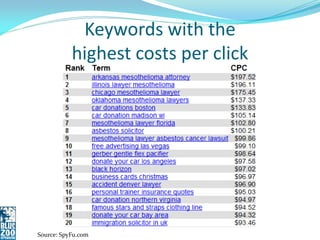
Keywords with the
           highest costs per click


Source: SpyFu.com
Ad Term Importance
 Click Through Rate (CTR)

   Measure of how much
    interactivity there is with the
    ad
   Good for driving traffic


 Pay Per Click (PPC) =
 Cost Per Click (CPC)
Ad Term Importance
 Cost Per 1000 Impressions (CPM)


 Pay Per Impression (PPI)


 Good for spreading the word and raising
 awareness
Other Terms
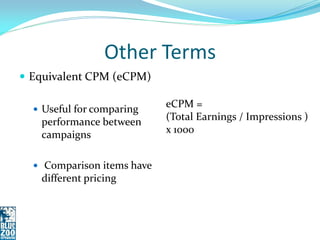
 Equivalent CPM (eCPM)

   Useful for comparing
                            eCPM =
   performance between      (Total Earnings / Impressions )
   campaigns                x 1000


   Comparison items have
   different pricing
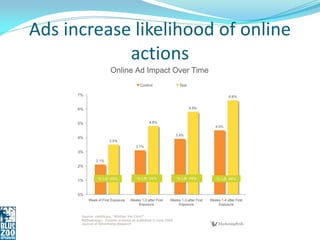
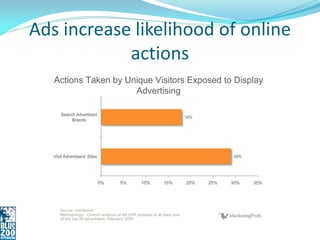
Ads increase likelihood of online
            actions
Ads increase likelihood of online
            actions
Online Ads - Strategy
 Are you trying to:
    Drive sales of a product?
    Generate leads for a
     service?
    Send traffic to your site
     to monetize through ad
     clicks?
    Increase awareness and
     buzz around your brand?
Online Ads - ROI
 Sales, leads, and traffic are
  easier to tie back into profit

 Some integrated tools to
  help estimate ROI

 Buzz is more nebulous but
  still important
Online Ads - Tactical
 Increase brand awareness -
  General ad

 Advertise a specific product -
  Link directly to the page to
  buy this product

 Promote a special event-
  Facebook or Eventbrite event
Online Ads - Tactical
 Target a specific audience-
 send a different message to
 this segment vs. your total
 customer base

 Support current initiative-
 Create a special landing
 page with a this months
 special or coupon
Online Ads - Tactical
 Advertise a seasonal product
 like air conditioning,
 heating, sport seasons, or
 holidays.

 Promote your blog or
 Facebook fan page to gain
 new followers.
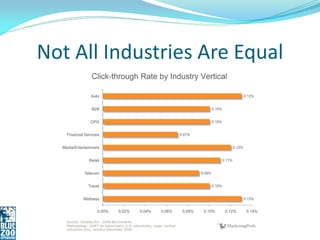
Not All Industries Are Equal
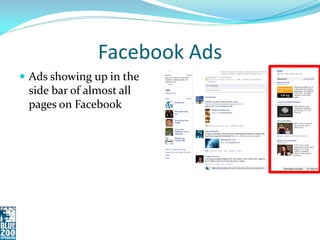
Facebook Ads
 Ads showing up in the
 side bar of almost all
 pages on Facebook
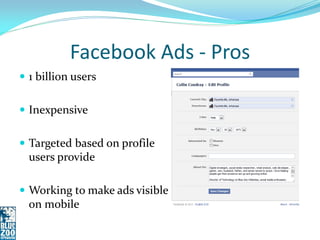
Facebook Ads - Pros
 1 billion users


 Inexpensive


 Targeted based on profile
  users provide

 Working to make ads visible
  on mobile
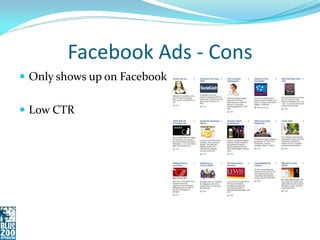
Facebook Ads - Cons
 Only shows up on Facebook


 Low CTR
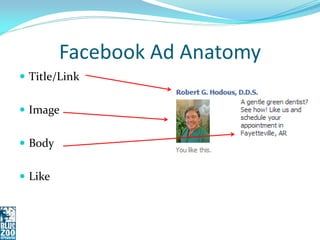
Facebook Ad Anatomy
 Title/Link


 Image


 Body


 Like
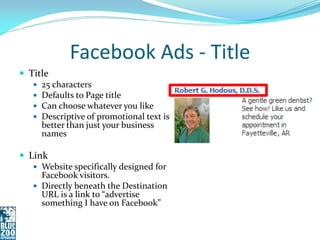
Facebook Ads - Title
 Title
    25 characters
    Defaults to Page title
    Can choose whatever you like
    Descriptive of promotional text is
     better than just your business
     names

 Link
    Website specifically designed for
     Facebook visitors.
    Directly beneath the Destination
     URL is a link to “advertise
     something I have on Facebook”
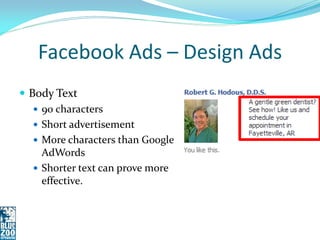
Facebook Ads – Design Ads
 Body Text
    90 characters
    Short advertisement
    More characters than Google
     AdWords
    Shorter text can prove more
     effective.
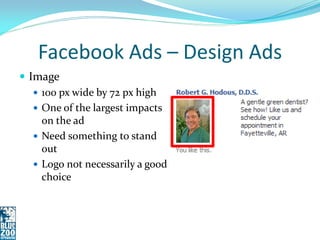
Facebook Ads – Design Ads
 Image
    100 px wide by 72 px high
    One of the largest impacts
     on the ad
    Need something to stand
     out
    Logo not necessarily a good
     choice
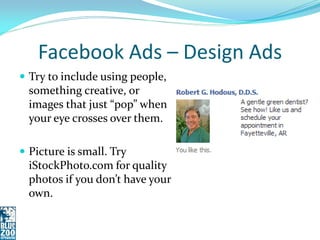
Facebook Ads – Design Ads
 Try to include using people,
  something creative, or
  images that just “pop” when
  your eye crosses over them.

 Picture is small. Try
  iStockPhoto.com for quality
  photos if you don’t have your
  own.
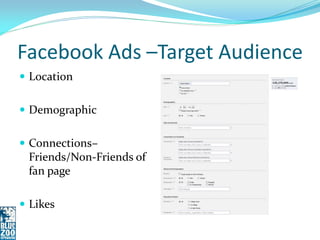
Facebook Ads –Target Audience
 Location


 Demographic


 Connections–
 Friends/Non-Friends of
 fan page

 Likes
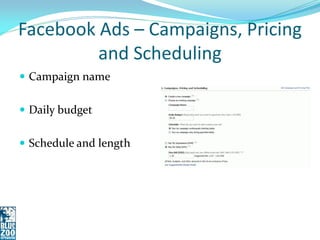
Facebook Ads – Campaigns, Pricing
         and Scheduling
 Campaign name


 Daily budget


 Schedule and length
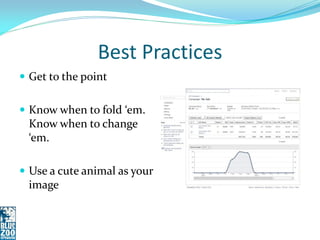
Best Practices
 Get to the point


 Know when to fold ‘em.
 Know when to change
 ‘em.

 Use a cute animal as your
 image
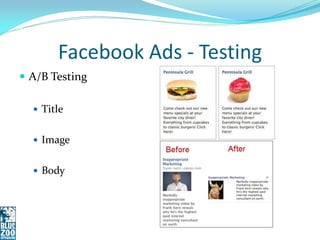
Facebook Ads - Testing
 A/B Testing

   Title


   Image


   Body
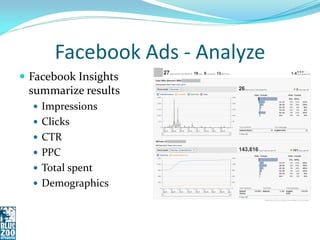
Facebook Ads - Analyze
 Facebook Insights
 summarize results
   Impressions
   Clicks
   CTR
   PPC
   Total spent
   Demographics
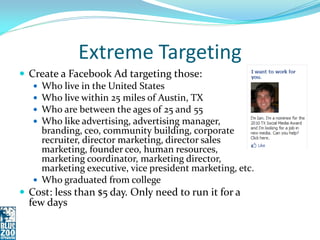
Extreme Targeting
 Create a Facebook Ad targeting those:
    Who live in the United States
    Who live within 25 miles of Austin, TX
    Who are between the ages of 25 and 55
    Who like advertising, advertising manager,
     branding, ceo, community building, corporate
     recruiter, director marketing, director sales
     marketing, founder ceo, human resources,
     marketing coordinator, marketing director,
     marketing executive, vice president marketing, etc.
    Who graduated from college
 Cost: less than $5 day. Only need to run it for a
  few days
Success
 How did the results tie
  back into your strategy
 Did web traffic increase?
 Sales increase?
 Did visitors to take a
  specific action such as
  signing up to your
  newsletter, attending an
  event, or becoming
  fans/followers?
Facebook Ads Walkthrough
 http://facebook.com/ads
Google AdWords - Search
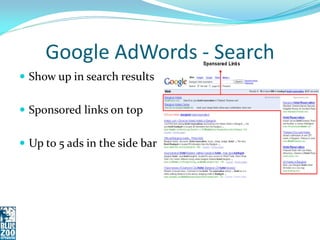
 Show up in search results


 Sponsored links on top


 Up to 5 ads in the side bar
Google AdWords – Content
              Network
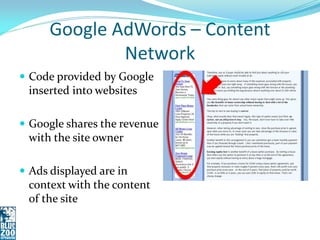
 Code provided by Google
 inserted into websites

 Google shares the revenue
 with the site owner

 Ads displayed are in
 context with the content
 of the site
Google AdWords - Other
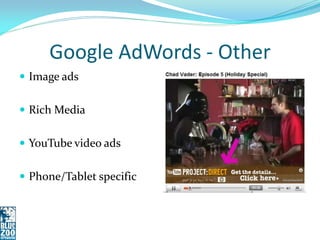
 Image ads


 Rich Media


 YouTube video ads


 Phone/Tablet specific
Google AdWords - Pros
 Pros
    Higher CTR than Facebook
    Shows up anywhere on the
     web where people have
     added AdWords
    Targeted to keywords.
     Contextual to the sites it
     shows up on.
    Can display on YouTube
    Keyword based
Google AdWords - Cons
 Targeting is fuzzier

 Higher complexity to set up
Google AdWords
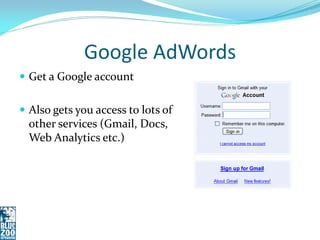
 Get a Google account


 Also gets you access to lots of
  other services (Gmail, Docs,
  Web Analytics etc.)
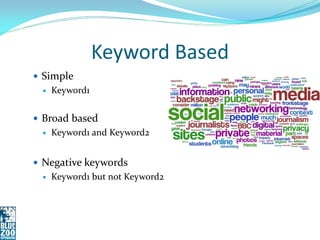
Keyword Based
 Simple
    Keyword1


 Broad based
    Keyword1 and Keyword2


 Negative keywords
    Keyword1 but not Keyword2
Keyword Lists
 List keywords for each
 campaign

 Divide them into ad groups
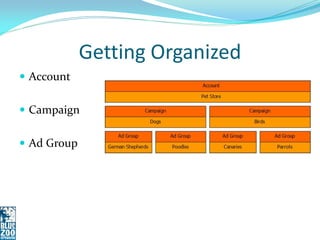
Getting Organized
 Account


 Campaign


 Ad Group
Google AdWords Anatomy
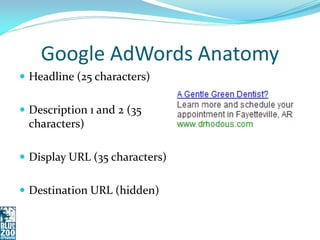
 Headline (25 characters)


 Description 1 and 2 (35
 characters)

 Display URL (35 characters)


 Destination URL (hidden)
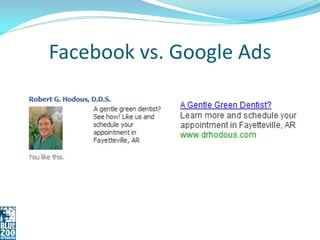
Facebook vs. Google Ads
Other Targeting Factors
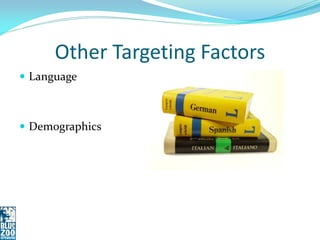
 Language


 Demographics
Ad Extensions
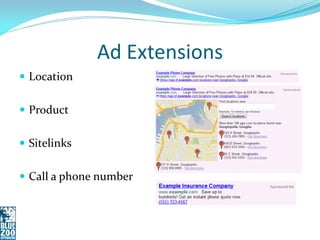
 Location


 Product


 Sitelinks


 Call a phone number
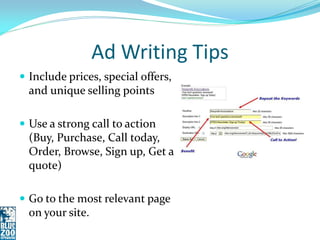
Ad Writing Tips
 Include prices, special offers,
  and unique selling points

 Use a strong call to action
  (Buy, Purchase, Call today,
  Order, Browse, Sign up, Get a
  quote)

 Go to the most relevant page
  on your site.
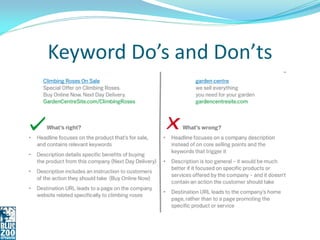
Keyword Do’s and Don’ts
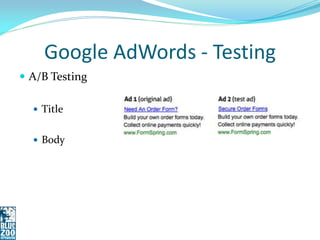
Google AdWords - Testing
 A/B Testing

   Title


   Body
Targeting Ads
 Think like your customers


 Use the Google Keyword tools
  for related keywords

 Include keywords in ad text


 Use negative keywords


 Check your site’s web analytics
Review Performance
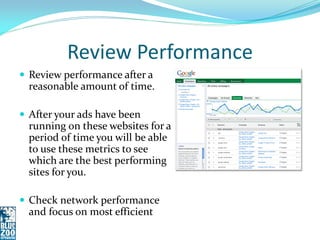
 Review performance after a
  reasonable amount of time.

 After your ads have been
  running on these websites for a
  period of time you will be able
  to use these metrics to see
  which are the best performing
  sites for you.

 Check network performance
  and focus on most efficient
Review Performance
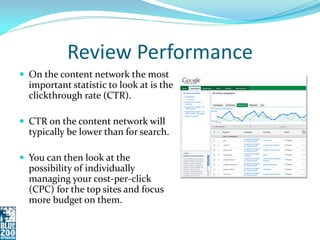
 On the content network the most
  important statistic to look at is the
  clickthrough rate (CTR).

 CTR on the content network will
  typically be lower than for search.

 You can then look at the
  possibility of individually
  managing your cost-per-click
  (CPC) for the top sites and focus
  more budget on them.
Review Performance
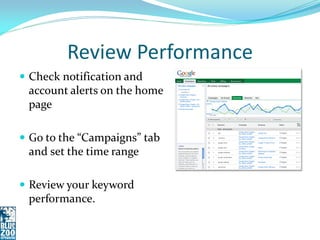
 Check notification and
 account alerts on the home
 page

 Go to the “Campaigns” tab
 and set the time range

 Review your keyword
 performance.
Review Performance
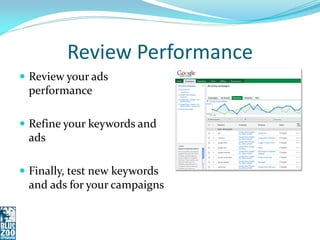
 Review your ads
 performance

 Refine your keywords and
 ads

 Finally, test new keywords
 and ads for your campaigns
Success
 How did the results tie
  back into your strategy
 Did web traffic increase?
 Sales increase?
 Did visitors to take a
  specific action such as
  signing up to your
  newsletter or becoming
  fans/followers?
Google AdWords Specific Metrics
 Average Position out of 11 ads

 First Page Bids-Are you
  spending enough to get your
  ads on the front page

 Quality Score-Google rewards
  relevant, quality advertising
  with a higher position on the
  search page and lower costs, so
  making sure your ads are high
  quality is really important.
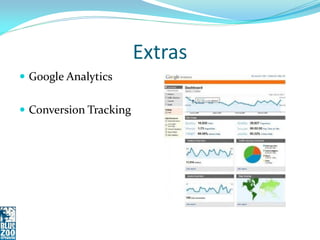
Extras
 Google Analytics


 Conversion Tracking
Google AdWords Walkthrough
 https://adwords.google.com
BlueZooCreative.com
collin@bluezoocreative.com
      Twitter.com/ccondray
                  9/21/2012

Understanding Online Ads and Marketing 9/21/2012

  • 1.
  • 2.
    Collin Condray  17years experience in web development/programming  Retail data analysis for multi- billion dollar companies (3M and Tyson)  Social media and digital advertising marketing  Agency experience with Collective Bias and Saatchi X  Local speaker at University of Arkansas, JBU, & Webster University  Director of Technology/Co- Owner Blue Zoo Creative
  • 3.
    Overview  How theywork  Strategy/Tactics  Best practices  Metrics
  • 4.
    Introductions  Who doyou work for?  What do you do?  What is your experience with digital advertising?  What do you hope to get out of today’s session? 4
  • 5.
  • 6.
    Some Ad Terms Impression  Click
  • 7.
    Some Ad Terms Click Through Rate (CTR)  Cost Per 1000 Impressions (CPM)  Cost Per Click (CPC)
  • 8.
    Keywords with the highest costs per click Source: SpyFu.com
  • 9.
    Ad Term Importance Click Through Rate (CTR)  Measure of how much interactivity there is with the ad  Good for driving traffic  Pay Per Click (PPC) =  Cost Per Click (CPC)
  • 10.
    Ad Term Importance Cost Per 1000 Impressions (CPM)  Pay Per Impression (PPI)  Good for spreading the word and raising awareness
  • 11.
    Other Terms  EquivalentCPM (eCPM)  Useful for comparing eCPM = performance between (Total Earnings / Impressions ) campaigns x 1000  Comparison items have different pricing
  • 12.
    Ads increase likelihoodof online actions
  • 13.
    Ads increase likelihoodof online actions
  • 14.
    Online Ads -Strategy  Are you trying to:  Drive sales of a product?  Generate leads for a service?  Send traffic to your site to monetize through ad clicks?  Increase awareness and buzz around your brand?
  • 15.
    Online Ads -ROI  Sales, leads, and traffic are easier to tie back into profit  Some integrated tools to help estimate ROI  Buzz is more nebulous but still important
  • 16.
    Online Ads -Tactical  Increase brand awareness - General ad  Advertise a specific product - Link directly to the page to buy this product  Promote a special event- Facebook or Eventbrite event
  • 17.
    Online Ads -Tactical  Target a specific audience- send a different message to this segment vs. your total customer base  Support current initiative- Create a special landing page with a this months special or coupon
  • 18.
    Online Ads -Tactical  Advertise a seasonal product like air conditioning, heating, sport seasons, or holidays.  Promote your blog or Facebook fan page to gain new followers.
  • 19.
  • 21.
    Facebook Ads  Adsshowing up in the side bar of almost all pages on Facebook
  • 22.
    Facebook Ads -Pros  1 billion users  Inexpensive  Targeted based on profile users provide  Working to make ads visible on mobile
  • 23.
    Facebook Ads -Cons  Only shows up on Facebook  Low CTR
  • 24.
    Facebook Ad Anatomy Title/Link  Image  Body  Like
  • 25.
    Facebook Ads -Title  Title  25 characters  Defaults to Page title  Can choose whatever you like  Descriptive of promotional text is better than just your business names  Link  Website specifically designed for Facebook visitors.  Directly beneath the Destination URL is a link to “advertise something I have on Facebook”
  • 26.
    Facebook Ads –Design Ads  Body Text  90 characters  Short advertisement  More characters than Google AdWords  Shorter text can prove more effective.
  • 27.
    Facebook Ads –Design Ads  Image  100 px wide by 72 px high  One of the largest impacts on the ad  Need something to stand out  Logo not necessarily a good choice
  • 28.
    Facebook Ads –Design Ads  Try to include using people, something creative, or images that just “pop” when your eye crosses over them.  Picture is small. Try iStockPhoto.com for quality photos if you don’t have your own.
  • 29.
    Facebook Ads –TargetAudience  Location  Demographic  Connections– Friends/Non-Friends of fan page  Likes
  • 30.
    Facebook Ads –Campaigns, Pricing and Scheduling  Campaign name  Daily budget  Schedule and length
  • 31.
    Best Practices  Getto the point  Know when to fold ‘em. Know when to change ‘em.  Use a cute animal as your image
  • 32.
    Facebook Ads -Testing  A/B Testing  Title  Image  Body
  • 33.
    Facebook Ads -Analyze  Facebook Insights summarize results  Impressions  Clicks  CTR  PPC  Total spent  Demographics
  • 34.
    Extreme Targeting  Createa Facebook Ad targeting those:  Who live in the United States  Who live within 25 miles of Austin, TX  Who are between the ages of 25 and 55  Who like advertising, advertising manager, branding, ceo, community building, corporate recruiter, director marketing, director sales marketing, founder ceo, human resources, marketing coordinator, marketing director, marketing executive, vice president marketing, etc.  Who graduated from college  Cost: less than $5 day. Only need to run it for a few days
  • 35.
    Success  How didthe results tie back into your strategy  Did web traffic increase?  Sales increase?  Did visitors to take a specific action such as signing up to your newsletter, attending an event, or becoming fans/followers?
  • 36.
    Facebook Ads Walkthrough http://facebook.com/ads
  • 38.
    Google AdWords -Search  Show up in search results  Sponsored links on top  Up to 5 ads in the side bar
  • 39.
    Google AdWords –Content Network  Code provided by Google inserted into websites  Google shares the revenue with the site owner  Ads displayed are in context with the content of the site
  • 40.
    Google AdWords -Other  Image ads  Rich Media  YouTube video ads  Phone/Tablet specific
  • 41.
    Google AdWords -Pros  Pros  Higher CTR than Facebook  Shows up anywhere on the web where people have added AdWords  Targeted to keywords. Contextual to the sites it shows up on.  Can display on YouTube  Keyword based
  • 42.
    Google AdWords -Cons  Targeting is fuzzier  Higher complexity to set up
  • 43.
    Google AdWords  Geta Google account  Also gets you access to lots of other services (Gmail, Docs, Web Analytics etc.)
  • 44.
    Keyword Based  Simple  Keyword1  Broad based  Keyword1 and Keyword2  Negative keywords  Keyword1 but not Keyword2
  • 45.
    Keyword Lists  Listkeywords for each campaign  Divide them into ad groups
  • 46.
    Getting Organized  Account Campaign  Ad Group
  • 47.
    Google AdWords Anatomy Headline (25 characters)  Description 1 and 2 (35 characters)  Display URL (35 characters)  Destination URL (hidden)
  • 48.
  • 49.
    Other Targeting Factors Language  Demographics
  • 50.
    Ad Extensions  Location Product  Sitelinks  Call a phone number
  • 51.
    Ad Writing Tips Include prices, special offers, and unique selling points  Use a strong call to action (Buy, Purchase, Call today, Order, Browse, Sign up, Get a quote)  Go to the most relevant page on your site.
  • 52.
  • 53.
    Google AdWords -Testing  A/B Testing  Title  Body
  • 54.
    Targeting Ads  Thinklike your customers  Use the Google Keyword tools for related keywords  Include keywords in ad text  Use negative keywords  Check your site’s web analytics
  • 55.
    Review Performance  Reviewperformance after a reasonable amount of time.  After your ads have been running on these websites for a period of time you will be able to use these metrics to see which are the best performing sites for you.  Check network performance and focus on most efficient
  • 56.
    Review Performance  Onthe content network the most important statistic to look at is the clickthrough rate (CTR).  CTR on the content network will typically be lower than for search.  You can then look at the possibility of individually managing your cost-per-click (CPC) for the top sites and focus more budget on them.
  • 57.
    Review Performance  Checknotification and account alerts on the home page  Go to the “Campaigns” tab and set the time range  Review your keyword performance.
  • 58.
    Review Performance  Reviewyour ads performance  Refine your keywords and ads  Finally, test new keywords and ads for your campaigns
  • 59.
    Success  How didthe results tie back into your strategy  Did web traffic increase?  Sales increase?  Did visitors to take a specific action such as signing up to your newsletter or becoming fans/followers?
  • 60.
    Google AdWords SpecificMetrics  Average Position out of 11 ads  First Page Bids-Are you spending enough to get your ads on the front page  Quality Score-Google rewards relevant, quality advertising with a higher position on the search page and lower costs, so making sure your ads are high quality is really important.
  • 61.
  • 62.
    Google AdWords Walkthrough https://adwords.google.com
  • 64.