BlueZooWebsites.com
Twitter.com/ccondray
            1/26/2011
Collin Condray
 15 years experience in web
  development and
  programming
 Retail data analysis for multi-
  billion dollar companies (3M
  and Tyson)
 Social media marketing
    Agency experience with
     Collective Bias and Saatchi X
    Local speaker at University of
     Arkansas, JBU, & Webster
     University
 Currently Director of
  Technology at Blue Zoo
  Websites
Introductions
 Who do you work for?

 What do you do?

 What is your experience
  with social media or
  location based services?

 What do you hope to get
  out of today’s session?

                              3
Please Ask Questions!


                        4
Would you like to…
 Get more word of mouth
  about your organization?

 Reward your best customers
  and secure their loyalty?

 Let your strongest fans
  become public
  ambassadors?

                                5
Would you like to…
 Have someone handing out
  flyers on every corner 1000 ft
  around your location?

 Get more traffic from search
  engines?

 Have another way to
  generate content on social
  networks?
                                   6
Location Based Services (LBS)


                                7
How do LBS work for visitors?
 Users “check in” to a location,
  primarily using their smartphone’s
  GPS.

 Customized messages about what
  they’re doing can be sent to people
  who check in


                                        8
How do LBS work for visitors?
 Location

 Items/Rewards

 Societies/Groups

 User generated content
    Reviews
    Pictures


                                9
How do LBS work for visitors?
 Check in notifies all the
  friends on the service

 Most connect to Twitter and
  Facebook automatically

 Average Facebook user has 140
  friends; they can be notified
  for every check in.

                                  10
How do LBS work for owners?
 Locations claim their
  location and manage
  specials

 Manage local activity
  through the LBS site

 Make sure you claim your
  own organization to
  prevent squatting
                               11
How do LBS work for owners?
 Most LBS have widgets for
  your website to allow cross
  promotion


                                12
Why are LBS important?
                 Users in billions
                                          4.6


                                1.6
                1.4
   1.2


 Landline    Television         PCs   Cell phones
Telephones

                                                    13
Why are LBS important?
 Number of those using
  LBS tripled between 2009
  and 2010.


   Source: eMarketer           14
Why are LBS important?
 Number of mobile social
  network users is expected
  to increase 27% this year.

 iPhone moving to
  Verizon, growth of the
  Android OS, and new
  tablets will create more
  demand.


    Source: eMarketer           15
Why are LBS important?
 Make choices of where to go
  based on other people’s
  feedback.


                                16
Who’s using LBS
 7% of adults who go online
  with their mobile phone use
  LBS
 8% of online adults ages 18-
  29 use location-based
  services
 10% of online Hispanics use
  these services – significantly
  more than online whites (3%)
  or online blacks (5%).
 6% of online men use a LBS
  vs. 3% of online women.

    Source: Pew Internet Research Center   17
Who’s using LBS
 Among online adults,
  62% use a social
  networking site such as
  Facebook. 6% of these
  users use LBS.
 24% of online adults
  make updates using
  Twitter or another
  service. Ten percent of
  these status update site
  users use a location-
  based service, over twice
  the rate of the general
  online population.

    Source: Pew Internet Research Center   18
Mobile phone users say they’d use
              LBS
 Only 13% would not find
  LBS useful in some
  capacity.


   Source: eMarketer            19
What the experts are saying
 “Go back three years ago.
  Twitter was being used by the
  same crowd that is playing
  with Foursquare today…. But
  I think this lame little
  location game is going to be
  bigger than Twitter.”
    Robert Scoble, @Scobleizer,
     January, 2009


                                   20
LBS Concerns
 Privacy


 Which people can see
  updates: everyone or just
  friends?

 Same rules as status
  updates


                               21
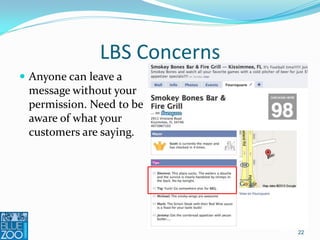
LBS Concerns
 Anyone can leave a
  message without your
  permission. Need to be
  aware of what your
  customers are saying.


                              22
LBS Concerns
 Lack of business adoption


                              23
24
25
Facebook Places
 One of the newer services


 Large user base (500 million)


 Already built into the existing
  Facebook app so visitors are
  more likely to have it


                                    26
How are they social?
 Posted to your wall for
  friends to see

 One of the few that is
  not GPS based

 Friends can check you in
  (even if you’re not there)


                                 27
Check In
 Click the Places option


                               28
Friend activity
 Note nearby friends and
  when they checked in

 Not required to actually
  be there


                                 29
Check In
 Find local places


                                 30
Check In
 You can check in your
  friends, and they can
  check you in as well.

 Option to leave a
  message or photo for your
  wall to let other people
  know what you’re doing


                               31
Why should you use Facebook
             Places?
 Multiple ways to offer deals
 Deals and donations are
  offered by individual
  businesses.
 Friend deals require tagging
  a number of friends to share
  savings.
 Loyalty deals require
  multiple check-ins, similar
  to a traditional punch card.
                                 32
33
Foursquare
 One of the original LBS so it
  is well recognized

 Many more places mapped
  out

 Second biggest user base (4
  million) after Facebook


                                  34
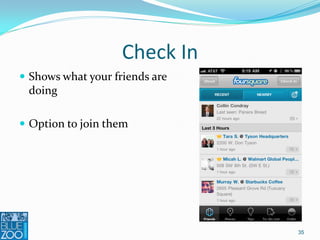
Check In
 Shows what your friends are
  doing

 Option to join them


                                35
Check In
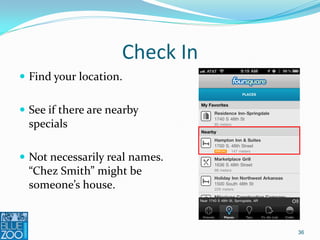
 Find your location.


 See if there are nearby
  specials

 Not necessarily real names.
  “Chez Smith” might be
  someone’s house.


                                36
Check In
 Tap through to nearby
  specials

 Current mayor


 Tips about local places


                                37
Check In
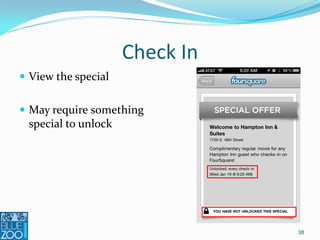
 View the special


 May require something
  special to unlock


                                38
Check In
 Leave your own message or
  photo

 Share with friends within
  Foursquare and on other
  social media networks like
  Facebook and Twitter


                               39
Check In
 Encourages multiple logins
  with social gaming

 Mayor, first stop bonuses


                               40
Earn Badges
 Based on volume of use at
  certain locations


                              41
Leaderboard Competition
 See how your friends are doing


 Competition encourages more
  check ins


                                   42
Why you should use Foursquare
 Size of user base


 Get a window cling or a
  QR bar code to remind
  users to check in

 Free to register your
  location and offer deals


                             43
Location Resources
 Mayor specials


 Frequency based specials after a certain number of
  check ins

 Check-In offers


 Wildcard specials are always unlocked, but there is
  some condition that an employee has to verify.

                                                        44
Location Resources
 Provides analytics with
  traffic, frequency, time of
  day, and comments

 Start tracking user
  activity immediately


                                45
Case Study
 Foursquare is helping
  promote tourism in Chicago.

 Unique badges


 Encourages new people to
  visit certain places


                                46
47
Gowalla
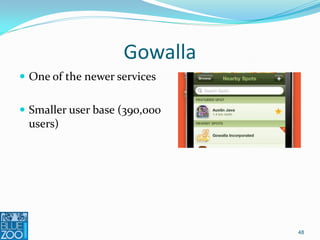
 One of the newer services


 Smaller user base (390,000
  users)


                               48
How are they social?
 Has gifting built into it.
  Virtual souvenirs or icons
  that can be traded with
  friends or hidden for the
  next visitor

 Encourage users to follow
  Trips to visit multiple
  places and stamp their
  Gowalla Passport.

                                49
Check In
 Shows what your friends are
  doing

 Option to join them


                                50
Check In
 Display nearby locations


 Locations are categorized as
  restaurant (e.g. family,
  American, Asian), bar,
  convenience store, etc.


                                 51
Trips
 Multiple location check ins


                                52
Pins
 For completing certain tasks


                                 53
Check In
 Location statistics


                                   54
Check In
 Leave your own message


 Share with friends within
  Gowalla and on other social
  media networks like
  Facebook and Twitter


                                55
Why should you use this service?
 Gowalla now supports
  checking in on both
  Facebook Places and
  Foursquare in addition to
  sharing with both Twitter
  and Tumblr.

 Multiple location feature.
  Good if you have more
  than one physical
  location or partners.

                                    56
Case Study


             57
58
Whrrl
 Relatively small user base
  (350,000 users)

 Based around a story known as
  a footstream.

 Others can contribute to a story
  as well.


                                     59
How are they social?
 User generated societies. Some
  societies are joined
  automatically when a check in
  occurs

 Shared reviews


 User comments within
  Footstreams

                                   60
How are they social?
 Point based system with a
  leaderboard


                                61
Check In
 Check ins also include
  recommendations from other
  users at nearby places


                               62
Check In
 User recommendations
  accepted


                             63
Check In
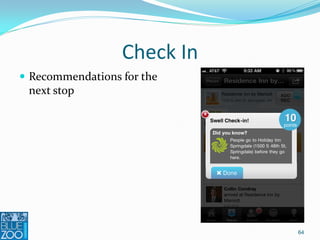
 Recommendations for the
  next stop


                             64
Check In
 Range of notifications


                               65
User Generate Recommendations
 Can be positive or negative


                                66
Check In
 Syndicate back through
  Facebook and Twitter


                              67
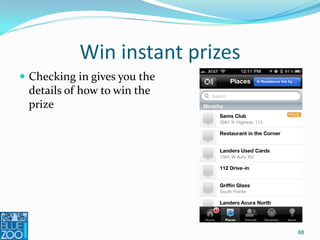
Win instant prizes
 Checking in gives you the
  details of how to win the
  prize


                                 68
User Generated Actions
 Get extra points by completing
  tasks people who have been
  there before have proposed

 You can also make
  recommendations that will get
  you points if other Whrrl users
  complete them


                                    69
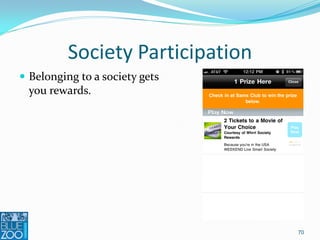
Society Participation
 Belonging to a society gets
  you rewards.


                                  70
Multiple logins are encouraged
 More logins and earning more
  points give you improved win
  options


                                 71
Not every visit is a winner
 Encourage multiple visits.


                                   72
Case Study
 Win a chance for free gas a
  Murphy Oil.


                                73
Why should you use this service?
 Building a community
  around shared
  interests and events.
 Multiple reward
  opportunities
 Good for
  documenting events
  such as concerts after
  checking in.


                                    74
Other Services
 SCVNGR

 Yelp – local search and user
  reviews

 Twitter

 Google Latitude

 Stickybits-Social barcodes

 Urbanspoon
                                 75
Group Buying
 Lets shoppers “gang
  up” on a deal.

 Retailers get
  guaranteed customers.


                           76
77
Listen
 What are your customers
  saying about you on
  location based services?

 Check into your own
  location.

 Is there anyone already
  passionate about you?

                                 78
Engage
 POST
    People

    Objectives

    Strategy

    Technology


                           79
People
 What are you customers
  ready for? Do the
  demographics match?

 Do you see a lot of people
  at your location with
  smartphones?

 How open to sharing are
  they?
                               80
Objectives
 What are your goals?
   Listening
   Get insights
   Talking/broadcasting
   Amplify existing
    marketing initiative
   Supporting
   Embracing – integrate
    your customers


                               81
Strategy
 What change do you
  want your customers to
  make?

   Carry messages to
    others

   Engage more with your
    organization


                               82
Incentives
 What would your users
  consider a “wow” they must
  share with their friends?


                               83
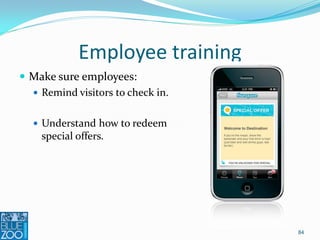
Employee training
 Make sure employees:
   Remind visitors to check in.


   Understand how to redeem
    special offers.


                                   84
Technology
 What LBS should you
  use?
    Reach
    Storytelling
    Incentives


                             85
Measure
 Number of check ins


 Key influencers, who’s
  talking about you


                              86
Measure
 What are they saying?
  (wordcloud)

 Good vs. bad comments?
  Are the number of good
  comments going up?


                             87
What can you do with the
          measurements?
 Customer service
                                    “Geez, one bad employee can
                                     really ruin your day!”
 Correct misinformation


 What is it that the community
  has an interest in that is not
  currently being discussed
  online?


                                                                   88
Reacting to Measurements
• Generate awareness among
  customers and other
  community members about
  your organization

• Increase employee awareness


                                89
Reacting to Measurements
• Keep
  content/interactions
  helpful, fun, and
  inspiring

• Increase impressions
  from multiple sources on
  a variety of platforms


                              90
Blog.BlueZooWebsites.com
     Twitter.com/ccondray
                 1/26/2011

Location Based Services at ASBTDC

  • 1.
  • 2.
    Collin Condray  15years experience in web development and programming  Retail data analysis for multi- billion dollar companies (3M and Tyson)  Social media marketing  Agency experience with Collective Bias and Saatchi X  Local speaker at University of Arkansas, JBU, & Webster University  Currently Director of Technology at Blue Zoo Websites
  • 3.
    Introductions  Who doyou work for?  What do you do?  What is your experience with social media or location based services?  What do you hope to get out of today’s session? 3
  • 4.
  • 5.
    Would you liketo…  Get more word of mouth about your organization?  Reward your best customers and secure their loyalty?  Let your strongest fans become public ambassadors? 5
  • 6.
    Would you liketo…  Have someone handing out flyers on every corner 1000 ft around your location?  Get more traffic from search engines?  Have another way to generate content on social networks? 6
  • 7.
  • 8.
    How do LBSwork for visitors?  Users “check in” to a location, primarily using their smartphone’s GPS.  Customized messages about what they’re doing can be sent to people who check in 8
  • 9.
    How do LBSwork for visitors?  Location  Items/Rewards  Societies/Groups  User generated content  Reviews  Pictures 9
  • 10.
    How do LBSwork for visitors?  Check in notifies all the friends on the service  Most connect to Twitter and Facebook automatically  Average Facebook user has 140 friends; they can be notified for every check in. 10
  • 11.
    How do LBSwork for owners?  Locations claim their location and manage specials  Manage local activity through the LBS site  Make sure you claim your own organization to prevent squatting 11
  • 12.
    How do LBSwork for owners?  Most LBS have widgets for your website to allow cross promotion 12
  • 13.
    Why are LBSimportant? Users in billions 4.6 1.6 1.4 1.2 Landline Television PCs Cell phones Telephones 13
  • 14.
    Why are LBSimportant?  Number of those using LBS tripled between 2009 and 2010. Source: eMarketer 14
  • 15.
    Why are LBSimportant?  Number of mobile social network users is expected to increase 27% this year.  iPhone moving to Verizon, growth of the Android OS, and new tablets will create more demand. Source: eMarketer 15
  • 16.
    Why are LBSimportant?  Make choices of where to go based on other people’s feedback. 16
  • 17.
    Who’s using LBS 7% of adults who go online with their mobile phone use LBS  8% of online adults ages 18- 29 use location-based services  10% of online Hispanics use these services – significantly more than online whites (3%) or online blacks (5%).  6% of online men use a LBS vs. 3% of online women. Source: Pew Internet Research Center 17
  • 18.
    Who’s using LBS Among online adults, 62% use a social networking site such as Facebook. 6% of these users use LBS.  24% of online adults make updates using Twitter or another service. Ten percent of these status update site users use a location- based service, over twice the rate of the general online population. Source: Pew Internet Research Center 18
  • 19.
    Mobile phone userssay they’d use LBS  Only 13% would not find LBS useful in some capacity. Source: eMarketer 19
  • 20.
    What the expertsare saying  “Go back three years ago. Twitter was being used by the same crowd that is playing with Foursquare today…. But I think this lame little location game is going to be bigger than Twitter.”  Robert Scoble, @Scobleizer, January, 2009 20
  • 21.
    LBS Concerns  Privacy Which people can see updates: everyone or just friends?  Same rules as status updates 21
  • 22.
    LBS Concerns  Anyonecan leave a message without your permission. Need to be aware of what your customers are saying. 22
  • 23.
    LBS Concerns  Lackof business adoption 23
  • 24.
  • 25.
  • 26.
    Facebook Places  Oneof the newer services  Large user base (500 million)  Already built into the existing Facebook app so visitors are more likely to have it 26
  • 27.
    How are theysocial?  Posted to your wall for friends to see  One of the few that is not GPS based  Friends can check you in (even if you’re not there) 27
  • 28.
    Check In  Clickthe Places option 28
  • 29.
    Friend activity  Notenearby friends and when they checked in  Not required to actually be there 29
  • 30.
    Check In  Findlocal places 30
  • 31.
    Check In  Youcan check in your friends, and they can check you in as well.  Option to leave a message or photo for your wall to let other people know what you’re doing 31
  • 32.
    Why should youuse Facebook Places?  Multiple ways to offer deals  Deals and donations are offered by individual businesses.  Friend deals require tagging a number of friends to share savings.  Loyalty deals require multiple check-ins, similar to a traditional punch card. 32
  • 33.
  • 34.
    Foursquare  One ofthe original LBS so it is well recognized  Many more places mapped out  Second biggest user base (4 million) after Facebook 34
  • 35.
    Check In  Showswhat your friends are doing  Option to join them 35
  • 36.
    Check In  Findyour location.  See if there are nearby specials  Not necessarily real names. “Chez Smith” might be someone’s house. 36
  • 37.
    Check In  Tapthrough to nearby specials  Current mayor  Tips about local places 37
  • 38.
    Check In  Viewthe special  May require something special to unlock 38
  • 39.
    Check In  Leaveyour own message or photo  Share with friends within Foursquare and on other social media networks like Facebook and Twitter 39
  • 40.
    Check In  Encouragesmultiple logins with social gaming  Mayor, first stop bonuses 40
  • 41.
    Earn Badges  Basedon volume of use at certain locations 41
  • 42.
    Leaderboard Competition  Seehow your friends are doing  Competition encourages more check ins 42
  • 43.
    Why you shoulduse Foursquare  Size of user base  Get a window cling or a QR bar code to remind users to check in  Free to register your location and offer deals 43
  • 44.
    Location Resources  Mayorspecials  Frequency based specials after a certain number of check ins  Check-In offers  Wildcard specials are always unlocked, but there is some condition that an employee has to verify. 44
  • 45.
    Location Resources  Providesanalytics with traffic, frequency, time of day, and comments  Start tracking user activity immediately 45
  • 46.
    Case Study  Foursquareis helping promote tourism in Chicago.  Unique badges  Encourages new people to visit certain places 46
  • 47.
  • 48.
    Gowalla  One ofthe newer services  Smaller user base (390,000 users) 48
  • 49.
    How are theysocial?  Has gifting built into it. Virtual souvenirs or icons that can be traded with friends or hidden for the next visitor  Encourage users to follow Trips to visit multiple places and stamp their Gowalla Passport. 49
  • 50.
    Check In  Showswhat your friends are doing  Option to join them 50
  • 51.
    Check In  Displaynearby locations  Locations are categorized as restaurant (e.g. family, American, Asian), bar, convenience store, etc. 51
  • 52.
  • 53.
    Pins  For completingcertain tasks 53
  • 54.
    Check In  Locationstatistics 54
  • 55.
    Check In  Leaveyour own message  Share with friends within Gowalla and on other social media networks like Facebook and Twitter 55
  • 56.
    Why should youuse this service?  Gowalla now supports checking in on both Facebook Places and Foursquare in addition to sharing with both Twitter and Tumblr.  Multiple location feature. Good if you have more than one physical location or partners. 56
  • 57.
  • 58.
  • 59.
    Whrrl  Relatively smalluser base (350,000 users)  Based around a story known as a footstream.  Others can contribute to a story as well. 59
  • 60.
    How are theysocial?  User generated societies. Some societies are joined automatically when a check in occurs  Shared reviews  User comments within Footstreams 60
  • 61.
    How are theysocial?  Point based system with a leaderboard 61
  • 62.
    Check In  Checkins also include recommendations from other users at nearby places 62
  • 63.
    Check In  Userrecommendations accepted 63
  • 64.
    Check In  Recommendationsfor the next stop 64
  • 65.
    Check In  Rangeof notifications 65
  • 66.
    User Generate Recommendations Can be positive or negative 66
  • 67.
    Check In  Syndicateback through Facebook and Twitter 67
  • 68.
    Win instant prizes Checking in gives you the details of how to win the prize 68
  • 69.
    User Generated Actions Get extra points by completing tasks people who have been there before have proposed  You can also make recommendations that will get you points if other Whrrl users complete them 69
  • 70.
    Society Participation  Belongingto a society gets you rewards. 70
  • 71.
    Multiple logins areencouraged  More logins and earning more points give you improved win options 71
  • 72.
    Not every visitis a winner  Encourage multiple visits. 72
  • 73.
    Case Study  Wina chance for free gas a Murphy Oil. 73
  • 74.
    Why should youuse this service?  Building a community around shared interests and events.  Multiple reward opportunities  Good for documenting events such as concerts after checking in. 74
  • 75.
    Other Services  SCVNGR Yelp – local search and user reviews  Twitter  Google Latitude  Stickybits-Social barcodes  Urbanspoon 75
  • 76.
    Group Buying  Letsshoppers “gang up” on a deal.  Retailers get guaranteed customers. 76
  • 77.
  • 78.
    Listen  What areyour customers saying about you on location based services?  Check into your own location.  Is there anyone already passionate about you? 78
  • 79.
    Engage  POST  People  Objectives  Strategy  Technology 79
  • 80.
    People  What areyou customers ready for? Do the demographics match?  Do you see a lot of people at your location with smartphones?  How open to sharing are they? 80
  • 81.
    Objectives  What areyour goals?  Listening  Get insights  Talking/broadcasting  Amplify existing marketing initiative  Supporting  Embracing – integrate your customers 81
  • 82.
    Strategy  What changedo you want your customers to make?  Carry messages to others  Engage more with your organization 82
  • 83.
    Incentives  What wouldyour users consider a “wow” they must share with their friends? 83
  • 84.
    Employee training  Makesure employees:  Remind visitors to check in.  Understand how to redeem special offers. 84
  • 85.
    Technology  What LBSshould you use?  Reach  Storytelling  Incentives 85
  • 86.
    Measure  Number ofcheck ins  Key influencers, who’s talking about you 86
  • 87.
    Measure  What arethey saying? (wordcloud)  Good vs. bad comments? Are the number of good comments going up? 87
  • 88.
    What can youdo with the measurements?  Customer service  “Geez, one bad employee can really ruin your day!”  Correct misinformation  What is it that the community has an interest in that is not currently being discussed online? 88
  • 89.
    Reacting to Measurements •Generate awareness among customers and other community members about your organization • Increase employee awareness 89
  • 90.
    Reacting to Measurements •Keep content/interactions helpful, fun, and inspiring • Increase impressions from multiple sources on a variety of platforms 90
  • 92.
    Blog.BlueZooWebsites.com Twitter.com/ccondray 1/26/2011