Skills development
The quick selection tool
&
copying a selected area to a new layer
Harvey Johnson
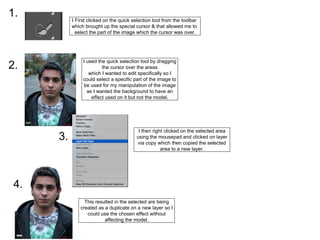
I used the quick selection tool by dragging
the cursor over the areas
which I wanted to edit specifically so I
could select a specific part of the image to
be used for my manipulation of the image
as I wanted the background to have an
effect used on it but not the model.
I First clicked on the quick selection tool from the toolbar
which brought up the special cursor & that allowed me to
select the part of the image which the cursor was over.
1.
2.
3.
I then right clicked on the selected area
using the mousepad and clicked on layer
via copy which then copied the selected
area to a new layer.
4.
This resulted in the selected are being
created as a duplicate on a new layer so I
could use the chosen effect without
affecting the model.

skills development quick selection tool

  • 1.
    Skills development The quickselection tool & copying a selected area to a new layer Harvey Johnson
  • 2.
    I used thequick selection tool by dragging the cursor over the areas which I wanted to edit specifically so I could select a specific part of the image to be used for my manipulation of the image as I wanted the background to have an effect used on it but not the model. I First clicked on the quick selection tool from the toolbar which brought up the special cursor & that allowed me to select the part of the image which the cursor was over. 1. 2. 3. I then right clicked on the selected area using the mousepad and clicked on layer via copy which then copied the selected area to a new layer. 4. This resulted in the selected are being created as a duplicate on a new layer so I could use the chosen effect without affecting the model.