Security Tools
ANAND KUMAR MISHRA
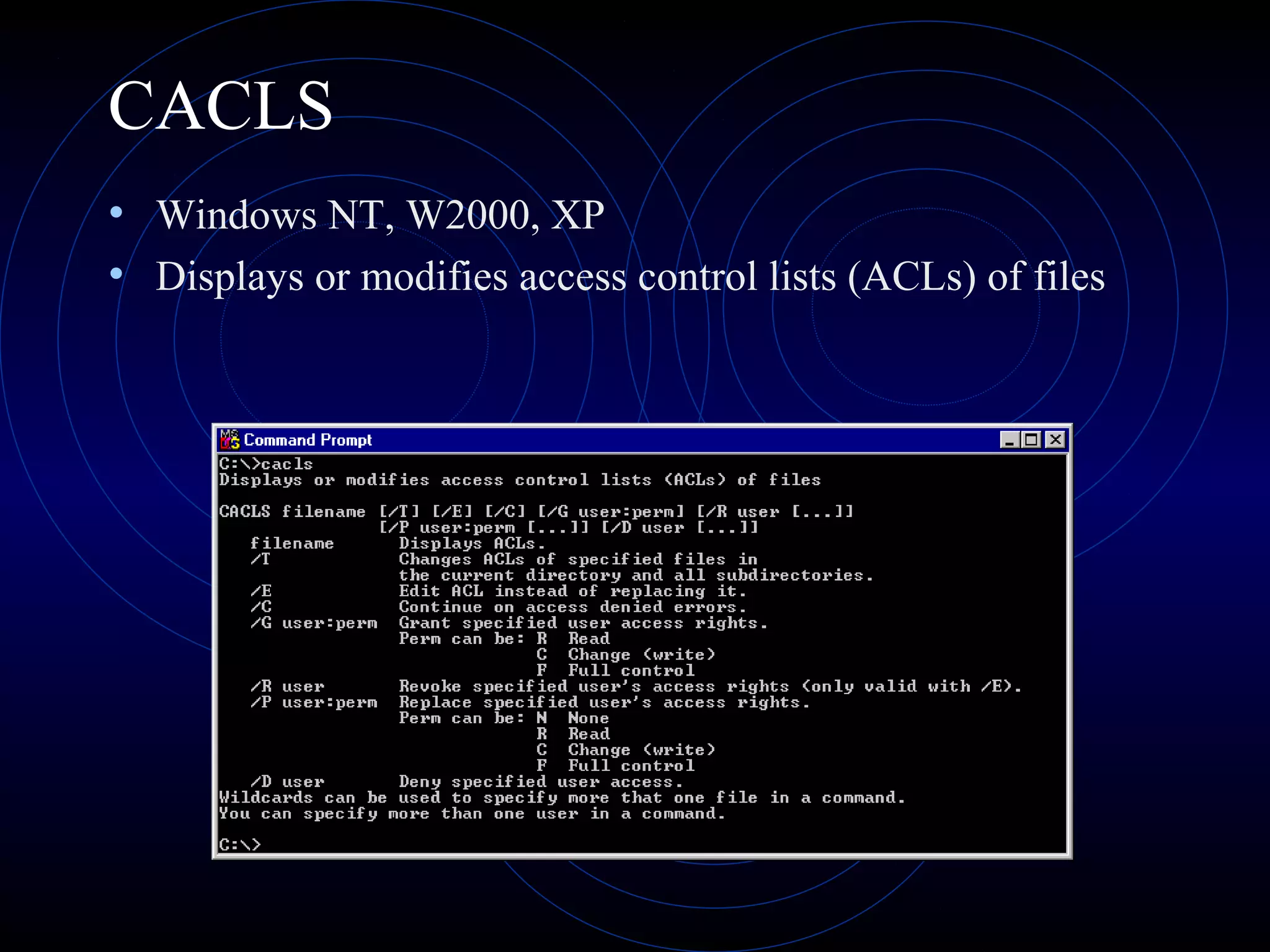
CACLS
• Windows NT, W2000, XP
• Displays or modifies access control lists (ACLs) of files
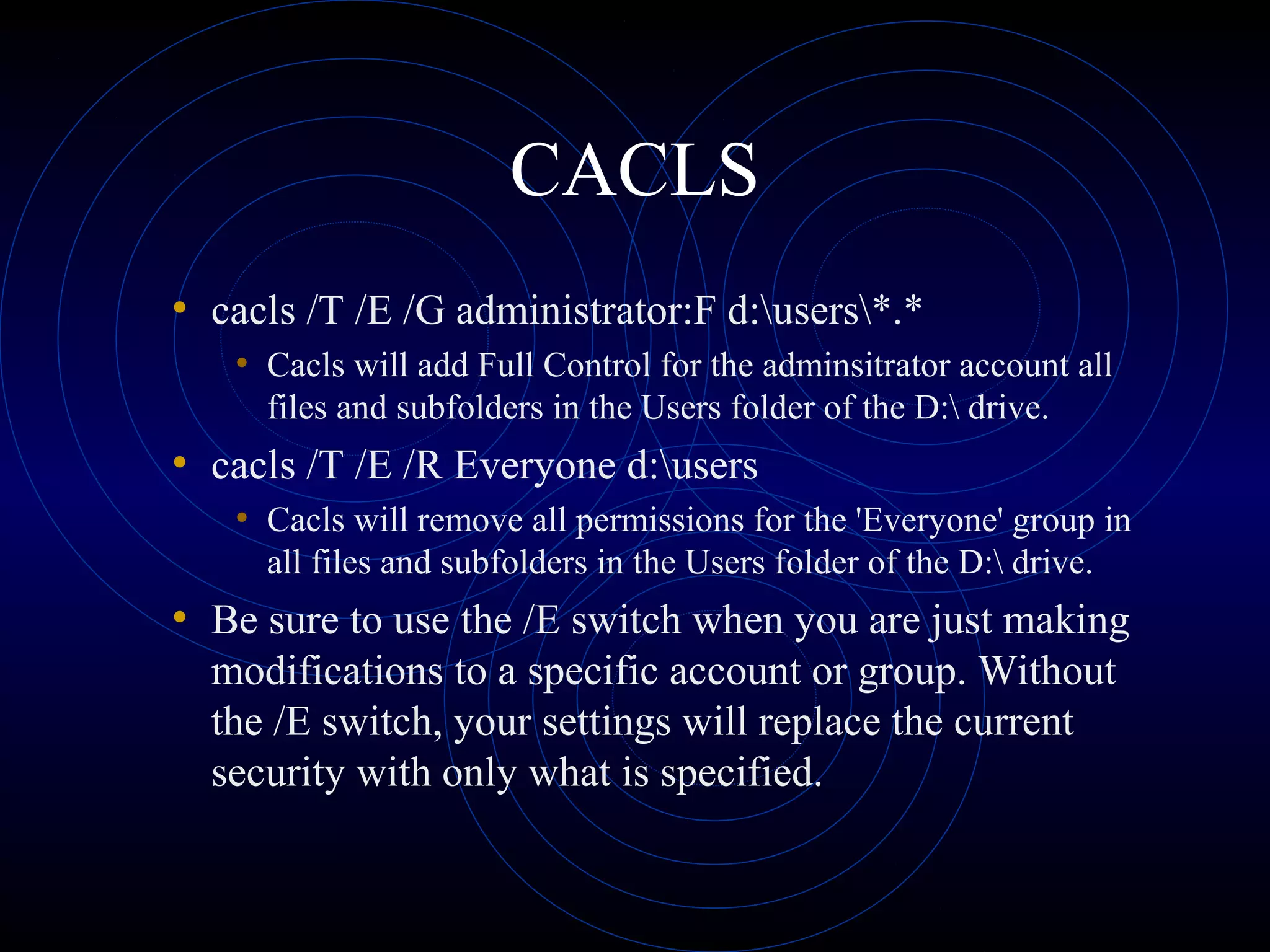
CACLS
• cacls /T /E /G administrator:F d:users*.*
• Cacls will add Full Control for the adminsitrator account all
files and subfolders in the Users folder of the D: drive.
• cacls /T /E /R Everyone d:users
• Cacls will remove all permissions for the 'Everyone' group in
all files and subfolders in the Users folder of the D: drive.
• Be sure to use the /E switch when you are just making
modifications to a specific account or group. Without
the /E switch, your settings will replace the current
security with only what is specified.
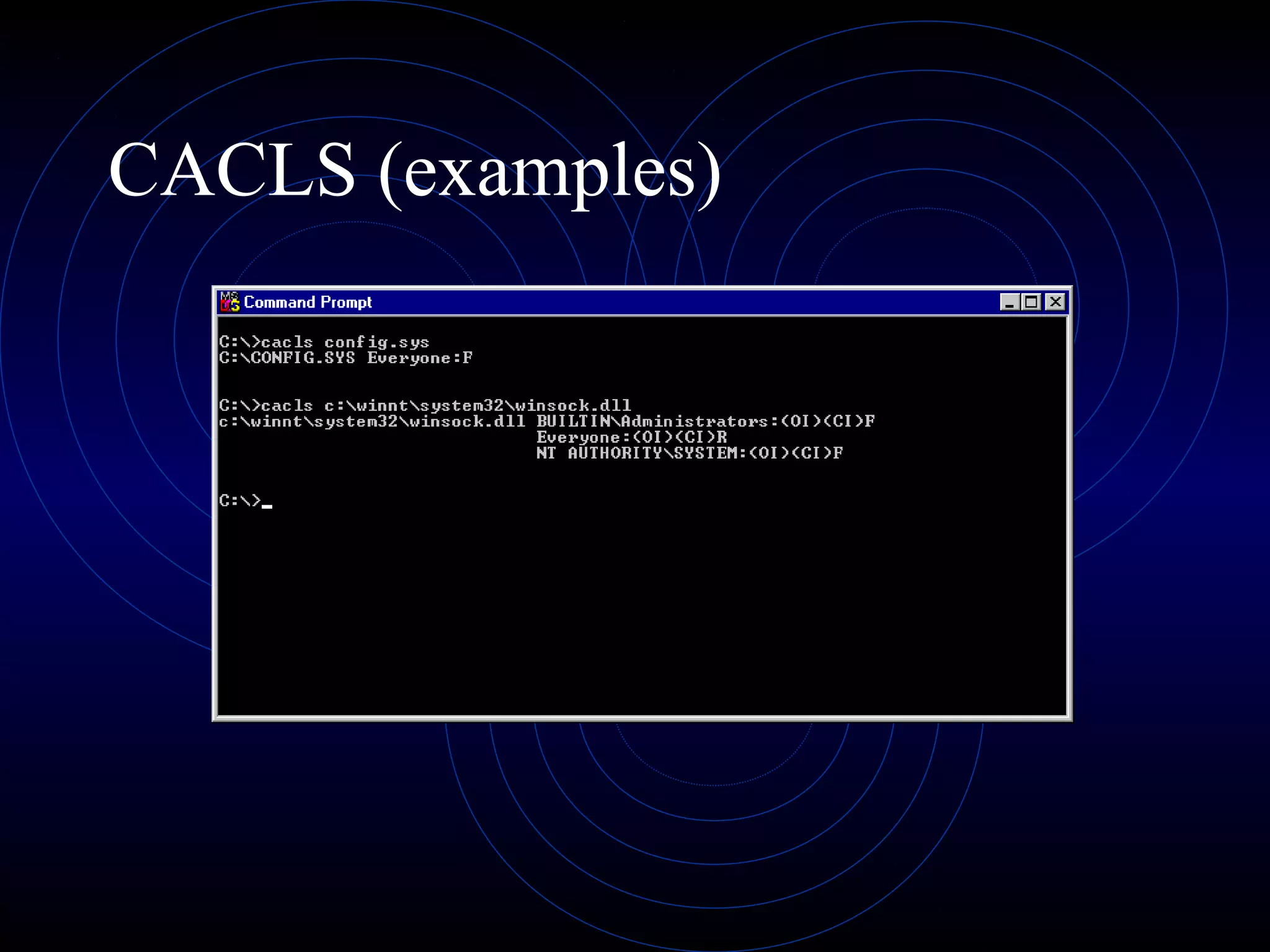
CACLS (examples)
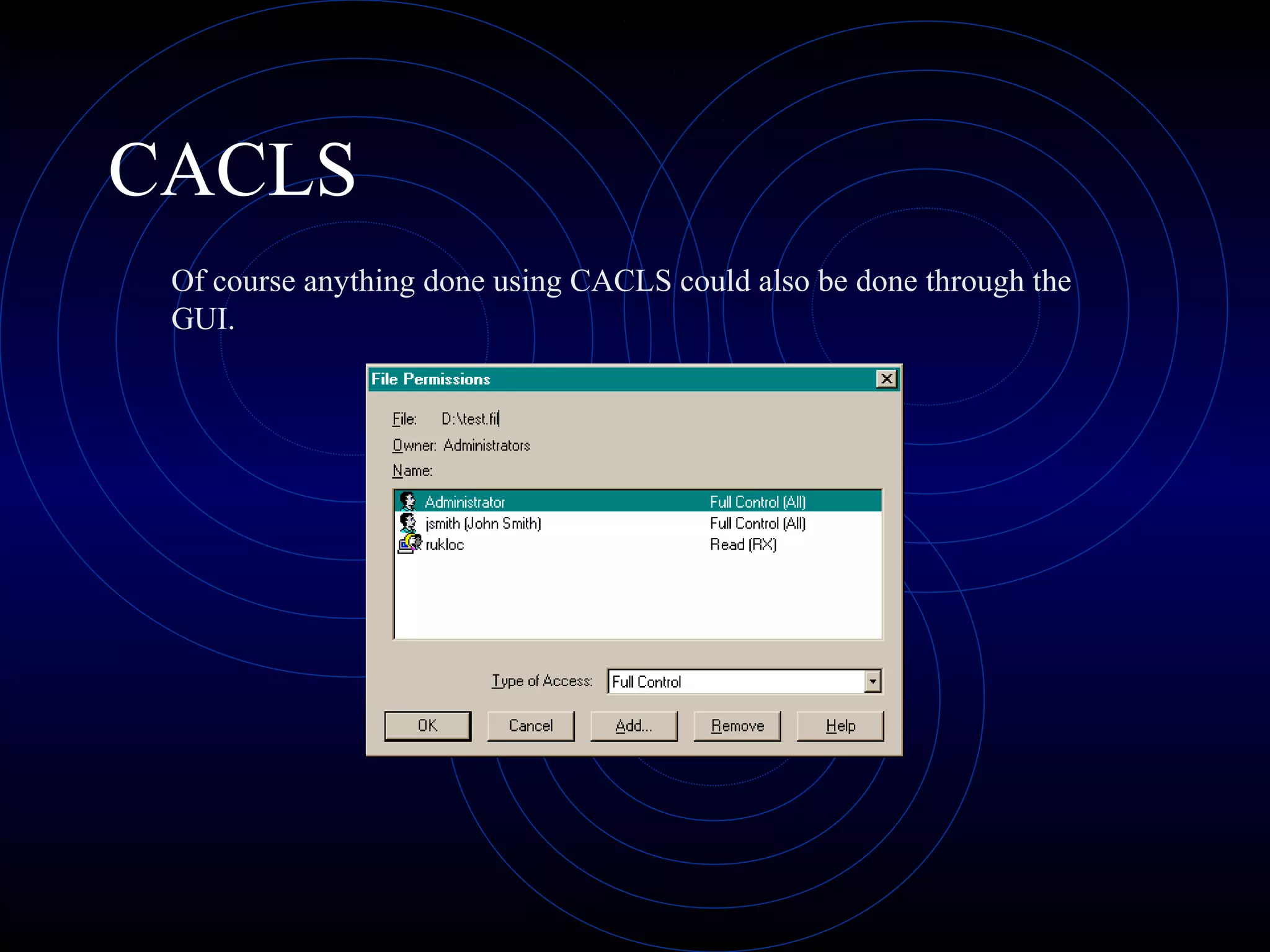
CACLS
Of course anything done using CACLS could also be done through the
GUI.
NSLOOKUP
• Name Server Lookup
• Windows NT, W2000, Linux, UNIX
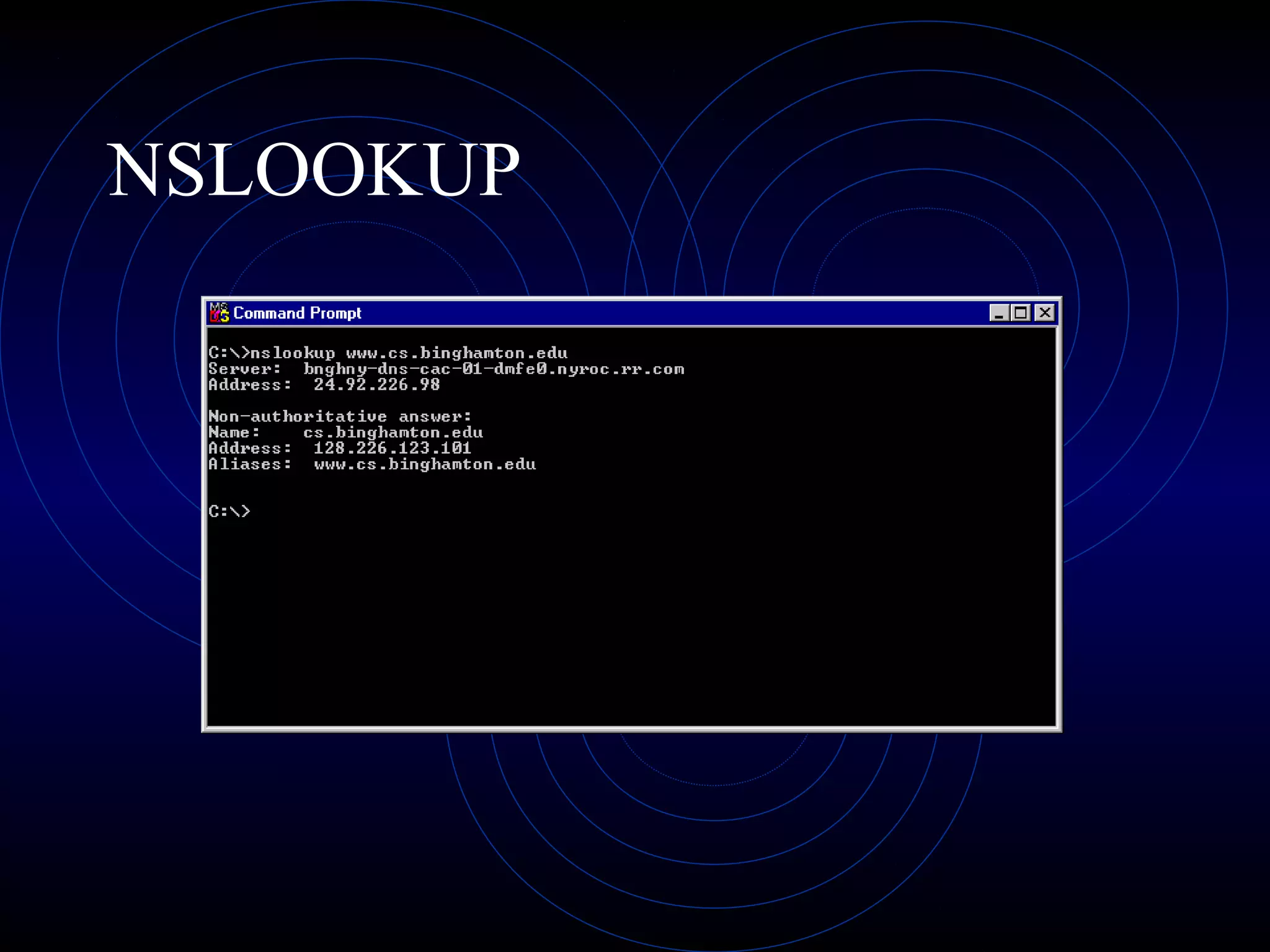
• used to resolve Internet names to IP addresses
• default (no parameter) returns default name server address
(windows) ; on Linux/UNIX enters conversational mode
allowing lookups until you quit
NSLOOKUP
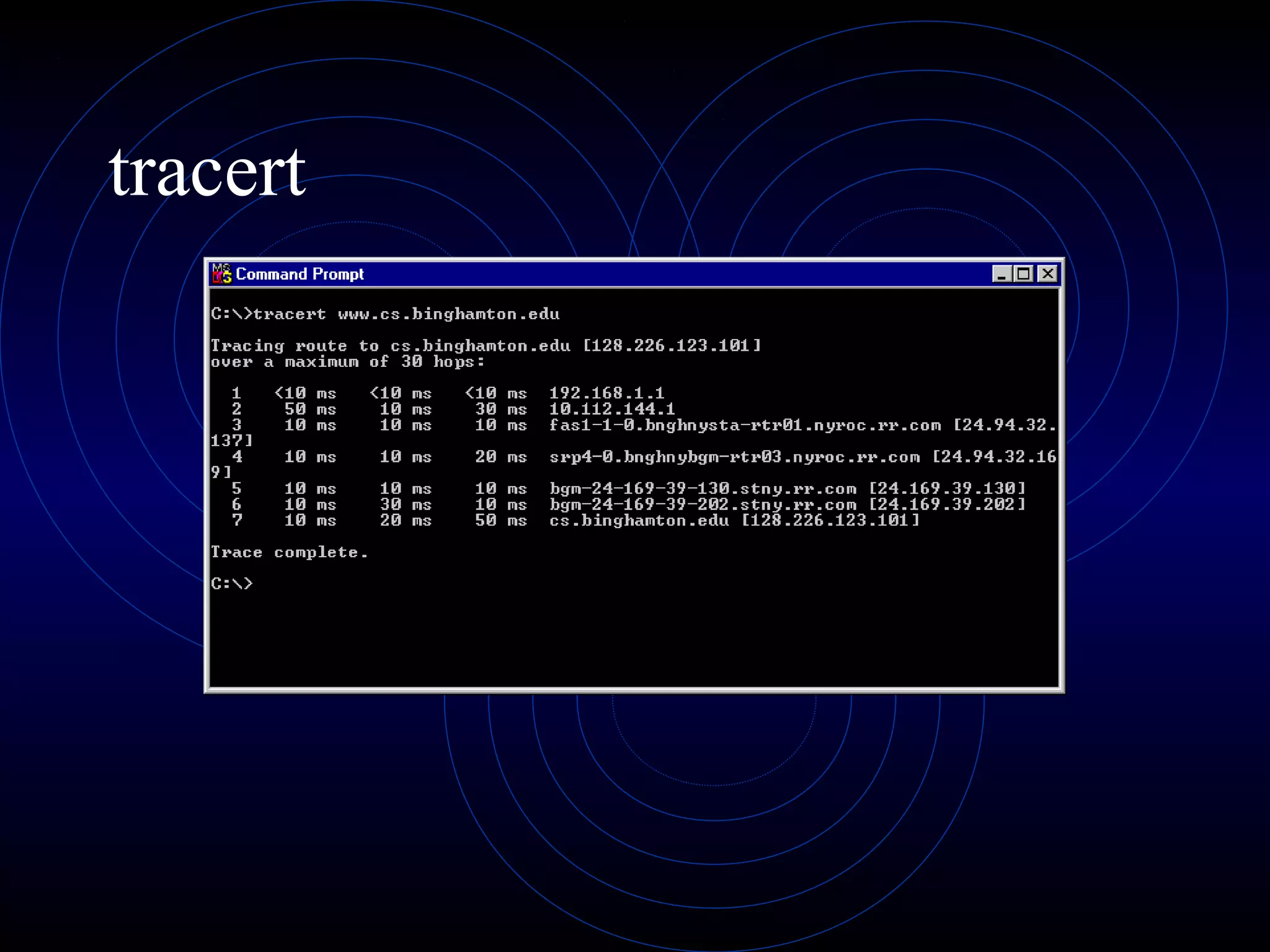
Traceroute
• Tracert (windows) ; traceroute (Linux/Unix)
• used to display all of the routers between two
communicating Internet hosts
• options:
• -d don’t resolve addresses to host names
• -h (m) max number of hops to search for target
• -j (hostlist) loose source route along the host list
• -w (timeout) wait (timeout) msec for each reply
tracert
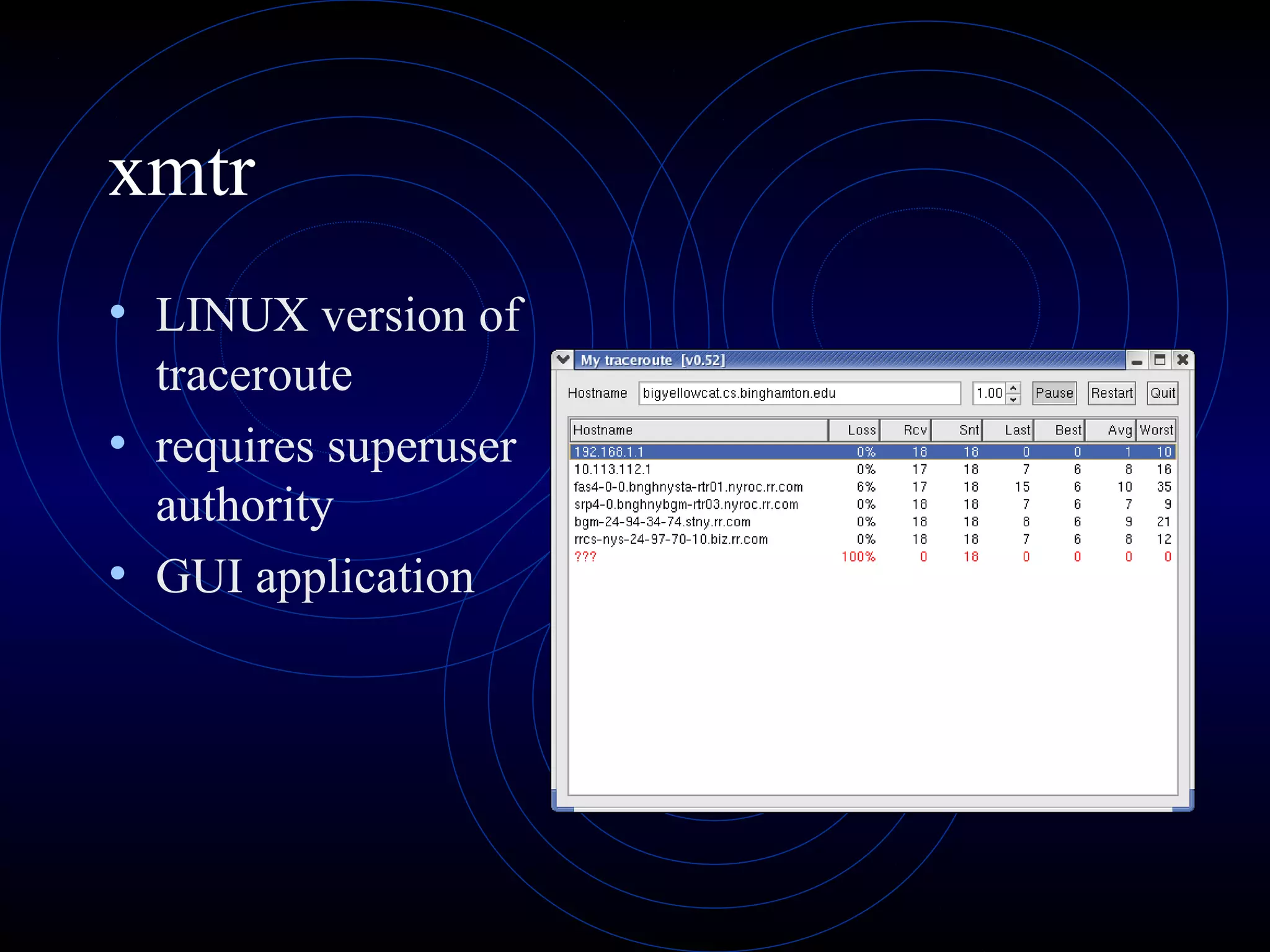
xmtr
• LINUX version of
traceroute
• requires superuser
authority
• GUI application
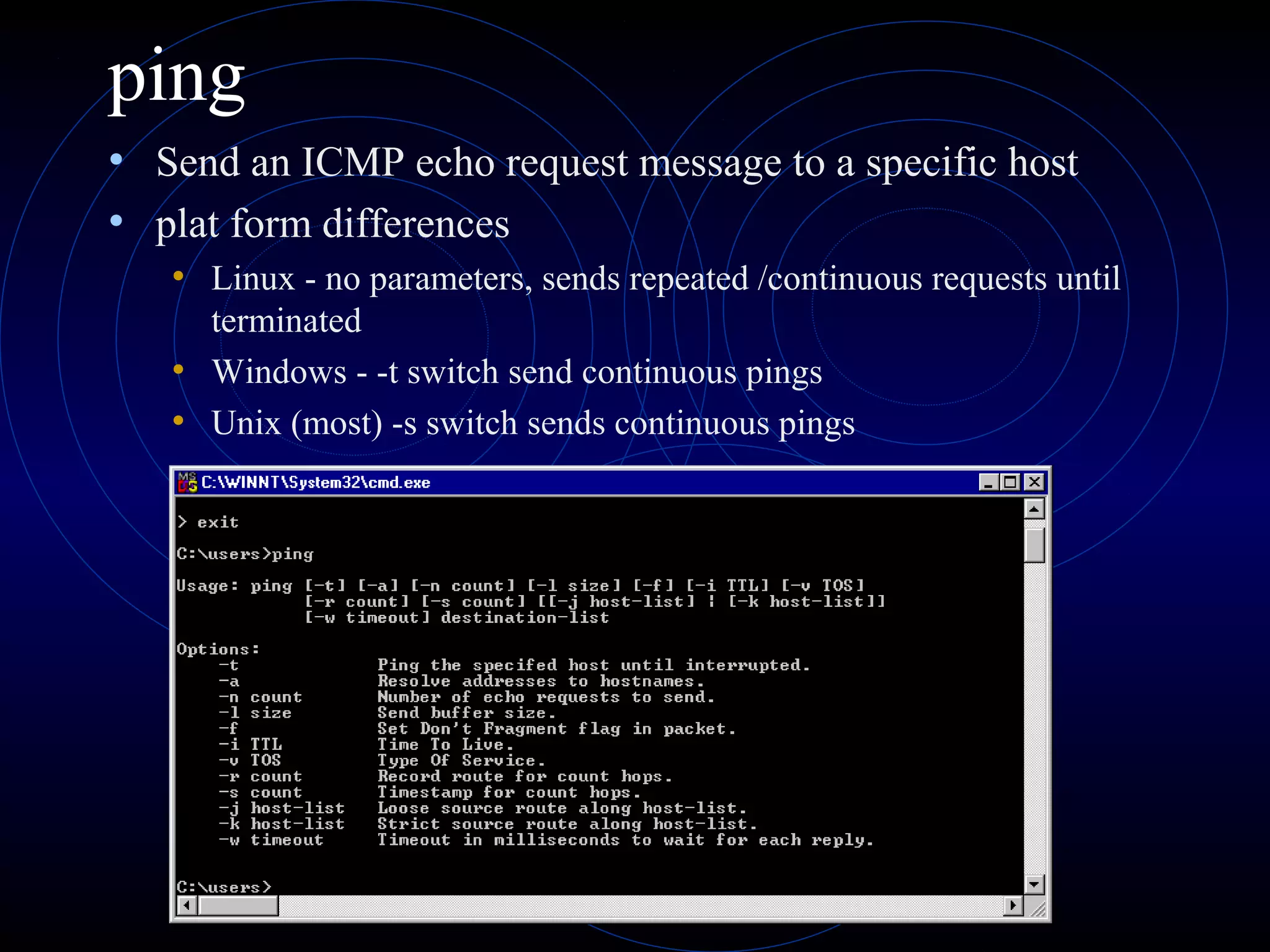
ping
• Send an ICMP echo request message to a specific host
• plat form differences
• Linux - no parameters, sends repeated /continuous requests until
terminated
• Windows - -t switch send continuous pings
• Unix (most) -s switch sends continuous pings
ping
WS-Ping – Security Analysis Tool
• COTS (common Off The Shelf) IPSwitch
• www.ipswitch.com
• Verify connectivity to a particular device on your network
• Quantitatively test data connections between your computer and a remote
system
• Trace the path to a network host or device
• Obtain information on host names and IP addresses
• Scan your network and list devices and network services
• View summary information about a network host or device including the
official hostname, IP address, and contact information (from the Whois
database)
• View Simple Network Management Protocol values as well as Windows
network domains, hosts, and workstations
• Search information (such as user's full names and e-mail addresses) available
through LDAP
WS-Ping
• Features tools for :
• Ping - Click to Enlarge Ping - Use Ping to determine if a network device is reachable.
• Traceroute - Use traceroute to trace the path to a network host or device.
• Throughput - Click to Enlarge Throughput - Use Throughput to test the data speed on a
connection with a remote host.
• Lookup - Use Lookup to obtain information on host names and IP addresses.
• Info - Use the Info tool to view summary information about a network host or device.
• Whois - Use Whois to obtain information on names from the Network Information Center.
• Finger - Use finger to obtain information about a user or host (if supported on the remote host).
• SNMP - Use the SNMP tool to view Simple Network Management Protocol values.
• Scan - Use Scan to scan your network and list devices.
• WinNet - Use the WinNet tool to view your Windows Network domains, hosts, and
workstations.
• LDAP- Use the LDAP tool to search for names and information available through LDAP.
• Time - Use the time tool to query multiple time servers or to synchronize your local system
clock.
• Quote - Use Quote to view quotations from a Quote server.
• HTML - Use the HTML tool to help you efficiently debug your Web site.
SATAN
• Security Administrators Tool for Analyzing Networks
• web based
• Ten years old
• Open Source ( http://www.fish.com/satan
• Rational for SATAN is explained at :
• http://www.fish.com/satan/admin-guide-to-cracking.html
• There are a number of SATAN derivatives:
• SAINT Scan Engine – Saint Corporation
• http://www.saintcorporation.com/products/saint_engine.html
• SANTA
SATAN
• SATAN recognizes several common networking-
related security problems, and reports the
problems without actually exploiting them.
• For each type or problem found, SATAN offers a
tutorial that explains the problem and what its
impact could be.
• The tutorial also explains what can be done about the
problem: correct an error in a configuration file, install
a bugfix from the vendor, use other means to restrict
access, or simply disable service.
Problems Found by SATAN
• NFS file systems exported to arbitrary hosts
• NFS file systems exported to unprivileged programs
• NFS file systems exported via the portmapper
• NIS password file access from arbitrary hosts
• Old (i.e. before 8.6.10) sendmail versions
• REXD access from arbitrary hosts
• X server access control disabled
• arbitrary files accessible via TFTP
• remote shell access from arbitrary hosts
• writable anonymous FTP home directory
Nessus
• Vulnerability Scanner
• Nessus development Team
• plug-in based
• Finger Abuses
• Windows
• Backdoors
• Gain a shell remotely
• CGI abuses
• Remote file access
• RPC
• Firewalls
• FTP
• SMTP
• Gain root remotely
• NIS
• DOS
• Miscellaneous
Nessus
• Client Server architecture
• plug-ins are for the server, client is for
administration and analysis
• creates reports in HTML, LaTeX, ASCII,
and XML
• including graphs

Security tools

  • 1.
  • 2.
    CACLS • Windows NT,W2000, XP • Displays or modifies access control lists (ACLs) of files
  • 3.
    CACLS • cacls /T/E /G administrator:F d:users*.* • Cacls will add Full Control for the adminsitrator account all files and subfolders in the Users folder of the D: drive. • cacls /T /E /R Everyone d:users • Cacls will remove all permissions for the 'Everyone' group in all files and subfolders in the Users folder of the D: drive. • Be sure to use the /E switch when you are just making modifications to a specific account or group. Without the /E switch, your settings will replace the current security with only what is specified.
  • 4.
  • 5.
    CACLS Of course anythingdone using CACLS could also be done through the GUI.
  • 6.
    NSLOOKUP • Name ServerLookup • Windows NT, W2000, Linux, UNIX • used to resolve Internet names to IP addresses • default (no parameter) returns default name server address (windows) ; on Linux/UNIX enters conversational mode allowing lookups until you quit
  • 7.
  • 8.
    Traceroute • Tracert (windows); traceroute (Linux/Unix) • used to display all of the routers between two communicating Internet hosts • options: • -d don’t resolve addresses to host names • -h (m) max number of hops to search for target • -j (hostlist) loose source route along the host list • -w (timeout) wait (timeout) msec for each reply
  • 9.
  • 10.
    xmtr • LINUX versionof traceroute • requires superuser authority • GUI application
  • 11.
    ping • Send anICMP echo request message to a specific host • plat form differences • Linux - no parameters, sends repeated /continuous requests until terminated • Windows - -t switch send continuous pings • Unix (most) -s switch sends continuous pings
  • 12.
  • 13.
    WS-Ping – SecurityAnalysis Tool • COTS (common Off The Shelf) IPSwitch • www.ipswitch.com • Verify connectivity to a particular device on your network • Quantitatively test data connections between your computer and a remote system • Trace the path to a network host or device • Obtain information on host names and IP addresses • Scan your network and list devices and network services • View summary information about a network host or device including the official hostname, IP address, and contact information (from the Whois database) • View Simple Network Management Protocol values as well as Windows network domains, hosts, and workstations • Search information (such as user's full names and e-mail addresses) available through LDAP
  • 14.
    WS-Ping • Features toolsfor : • Ping - Click to Enlarge Ping - Use Ping to determine if a network device is reachable. • Traceroute - Use traceroute to trace the path to a network host or device. • Throughput - Click to Enlarge Throughput - Use Throughput to test the data speed on a connection with a remote host. • Lookup - Use Lookup to obtain information on host names and IP addresses. • Info - Use the Info tool to view summary information about a network host or device. • Whois - Use Whois to obtain information on names from the Network Information Center. • Finger - Use finger to obtain information about a user or host (if supported on the remote host). • SNMP - Use the SNMP tool to view Simple Network Management Protocol values. • Scan - Use Scan to scan your network and list devices. • WinNet - Use the WinNet tool to view your Windows Network domains, hosts, and workstations. • LDAP- Use the LDAP tool to search for names and information available through LDAP. • Time - Use the time tool to query multiple time servers or to synchronize your local system clock. • Quote - Use Quote to view quotations from a Quote server. • HTML - Use the HTML tool to help you efficiently debug your Web site.
  • 15.
    SATAN • Security AdministratorsTool for Analyzing Networks • web based • Ten years old • Open Source ( http://www.fish.com/satan • Rational for SATAN is explained at : • http://www.fish.com/satan/admin-guide-to-cracking.html • There are a number of SATAN derivatives: • SAINT Scan Engine – Saint Corporation • http://www.saintcorporation.com/products/saint_engine.html • SANTA
  • 16.
    SATAN • SATAN recognizesseveral common networking- related security problems, and reports the problems without actually exploiting them. • For each type or problem found, SATAN offers a tutorial that explains the problem and what its impact could be. • The tutorial also explains what can be done about the problem: correct an error in a configuration file, install a bugfix from the vendor, use other means to restrict access, or simply disable service.
  • 17.
    Problems Found bySATAN • NFS file systems exported to arbitrary hosts • NFS file systems exported to unprivileged programs • NFS file systems exported via the portmapper • NIS password file access from arbitrary hosts • Old (i.e. before 8.6.10) sendmail versions • REXD access from arbitrary hosts • X server access control disabled • arbitrary files accessible via TFTP • remote shell access from arbitrary hosts • writable anonymous FTP home directory
  • 18.
    Nessus • Vulnerability Scanner •Nessus development Team • plug-in based • Finger Abuses • Windows • Backdoors • Gain a shell remotely • CGI abuses • Remote file access • RPC • Firewalls • FTP • SMTP • Gain root remotely • NIS • DOS • Miscellaneous
  • 19.
    Nessus • Client Serverarchitecture • plug-ins are for the server, client is for administration and analysis • creates reports in HTML, LaTeX, ASCII, and XML • including graphs