Managing Network
Services
LECTURER: AYESHA ARSHAD
What are Network Services?
Network Service – a capability that facilitates a network operation.
It is typically provided by a server (which can be running one or more services), based on
network protocols running at the application layer in the Open Systems Interconnection (OSI)
model of the network.
Computer systems and computerized systems help human beings to work efficiently and explore
the unthinkable. When these devices are connected together to form a network, the capabilities
are enhanced multiple-times. Some basic services computer network can offer are.
Some examples are domain name system (DNS), dynamic host configuration protocol (DHCP),
voice over internet protocol (VoIP), etc.
Network Services
Some types of network services are:
1. Directory Services
2. File Services
3. Communication Services
4. Application Services
Directory Services
These services are mapping between name and its value, which can be variable value or fixed.
This software system helps to store the information, organize it, and provides various means of
accessing it. Some examples of directory services in computer networking are:
1. Accounting
2. Authentication and Authorization
3. Domain Name Services
Accounting
In an organization, a number of users have their user names and passwords mapped to them.
Directory Services provide means of storing this information in cryptic form and make available
when requested.
Authentication and Authorization
User credentials are checked to authenticate a user at the time of login and/or periodically.
User accounts can be set into hierarchical structure and their access to resources can be
controlled using authorization schemes.
DNS
DNS is widely used and one of the essential services on which internet works.
This system maps IP addresses to domain names, which are easier to remember and recall than
IP addresses.
Because network operates with the help of IP addresses and humans tend to remember website
names, the DNS provides website’s IP address which is mapped to its name from the back-end
on the request of a website name from the user.
File Services
File services include sharing and transferring files over the network.
1. File Sharing
2. File Transfer
File Sharing
One of the reason which gave birth to networking was file sharing.
File sharing enables its users to share their data with other users.
User can upload the file to a specific server, which is accessible by all intended users.
As an alternative, user can make its file shared on its own computer and provides access to
intended users.
File Transfer
This is an activity to copy or move file from one computer to another computer or to multiple
computers, with help of underlying network.
Network enables its user to locate other users in the network and transfers files.
Communication Services
Communication services include:
1. Email
2. Social Networking
3. Internet Chats
4. Discussion Boards
5. Remote Access
Email
Electronic mail is a communication method and something a computer user cannot work
without.
This is the basis of today’s internet features.
Email system has one or more email servers. All its users are provided with unique IDs.
When a user sends email to other user, it is actually transferred between users with help of
email server.
Social Networking
Recent technologies have made technical life social.
The computer savvy peoples, can find other known peoples or friends, can connect with them,
and can share thoughts, pictures, and videos.
Internet Chats
Internet chat provides instant text transfer services between two hosts.
Two or more people can communicate with each other using text based Internet Relay Chat
services.
These days, voice chat and video chat are very common.
Discussion Boards
Discussion boards provide a mechanism to connect multiple peoples with same interests.
It enables the users to put queries, questions, suggestions etc. which can be seen by all other
users. Other may respond as well.
Remote Access
This service enables user to access the data residing on the remote computer.
This feature is known as Remote desktop.
This can be done via some remote device, e.g. mobile phone or home computer.
Application Services
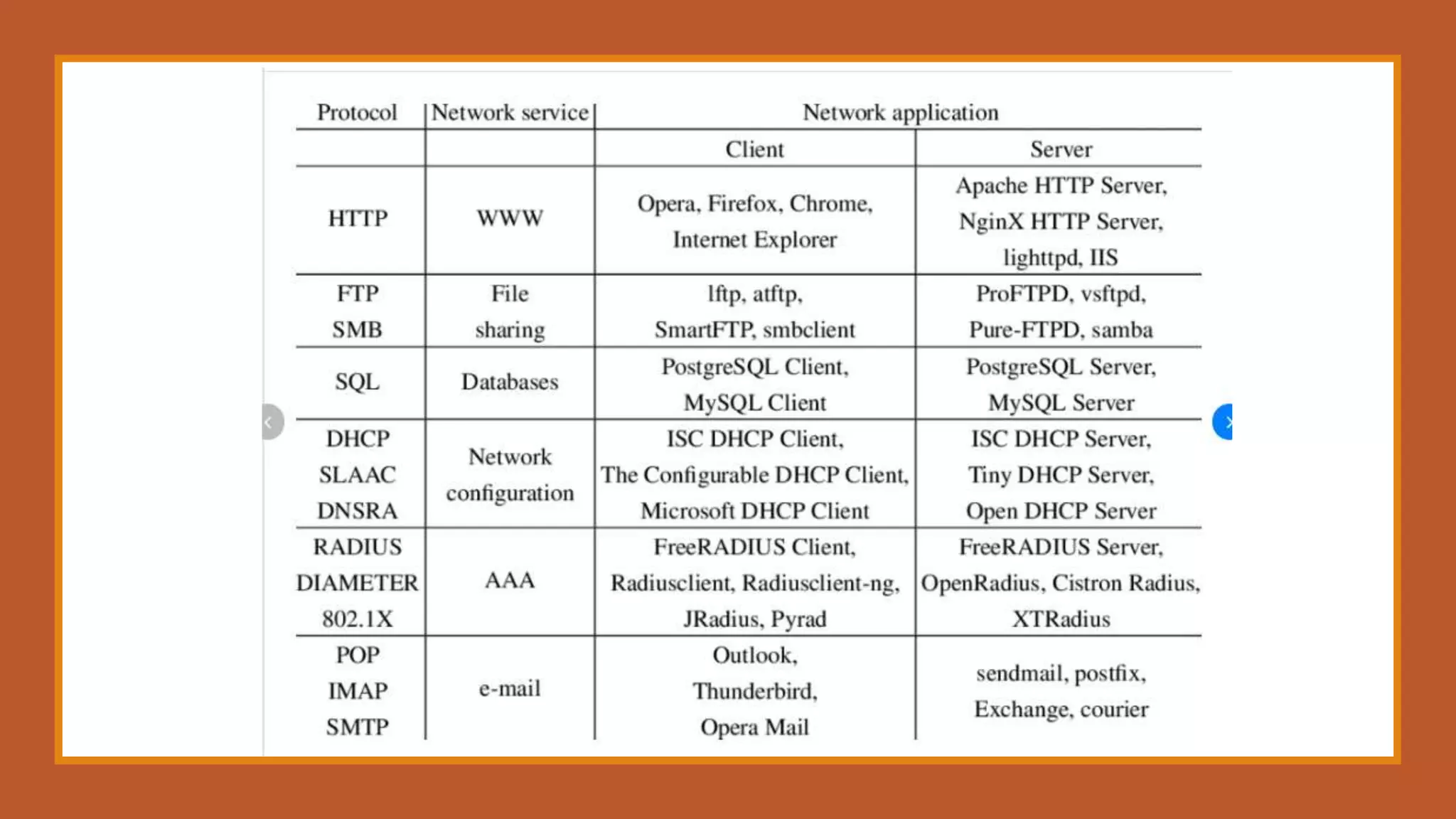
These are nothing but providing network based services to the users such as web services,
database managing, and resource sharing.
1. Resource Sharing
2. Database
3. Web Services
Resource Sharing
To use resources efficiently and economically, network provides a mean to share them.
This may include Servers, Printers, and Storage Media etc.
Database Services
This application service is one of the most important services.
It stores data and information, processes it, and enables the users to retrieve it efficiently by
using queries.
Databases help organizations to make decisions based on statistics.
Web Services
World Wide Web has become the synonym for internet.
It is used to connect to the internet, and access files and information services provided by the
internet servers.
How network services are managed?
Network services management comes under network administration. There are plenty of tools
available that allow us to do all types of network administration work.
Here are some handy and the most useful tools that let network administrator to debug,
understand and configure networks a bit easily.
The goal is to make inventory of essentials to have in toolbox when there is need of debugging
or network configuration.
1) Go Deep with WireShark
A great open source as well as cross-platform tool, it is basically a network protocol analyzer also
called as Sniffer. It allows examining data from a live network or from a capture file stored.
We can interactively browse the capture data, explore all the layers of packages and able to see
all of their content. It is a very useful tool when we are protecting network from malicious
attack.
It also has several interesting features such as the ability to apply filters to quantities of captured
packets. For example, to display only connections or exchanges between IPs indicated that in a
specified language.
Wireshark also has a function “Follow TCP Stream” that tracks live interaction and TCP
connections between two machines in a single window, then contents of packets being
translated and formatted dynamically.
There are many tools like Wireshark, but Wireshark offer numerous options and each has many
features such as graphical command line, including features such as tcpdump CLI, or tshark.
2) PUTTY
There is no need to mention popularity of this tool among administrators separately. This is very
simple tool to use and also essential for network administration.
It’s a basic tool for remote configuration of different elements. It initializes SSH connections,
telnet, or series
In addition, it is a tool with a simple executable exe file that does not even need any installation,
also very light weight.
It provides several configuration tabs with other options that are kind accessories. Some of
these parameters still greatly increase its functionality and capabilities.
Note: one of the missing features of Putty is the ability to manage multiple views within the
same window. However, there is a small application that performs this function and enables us
to manage, resize and split terminals of Putty.
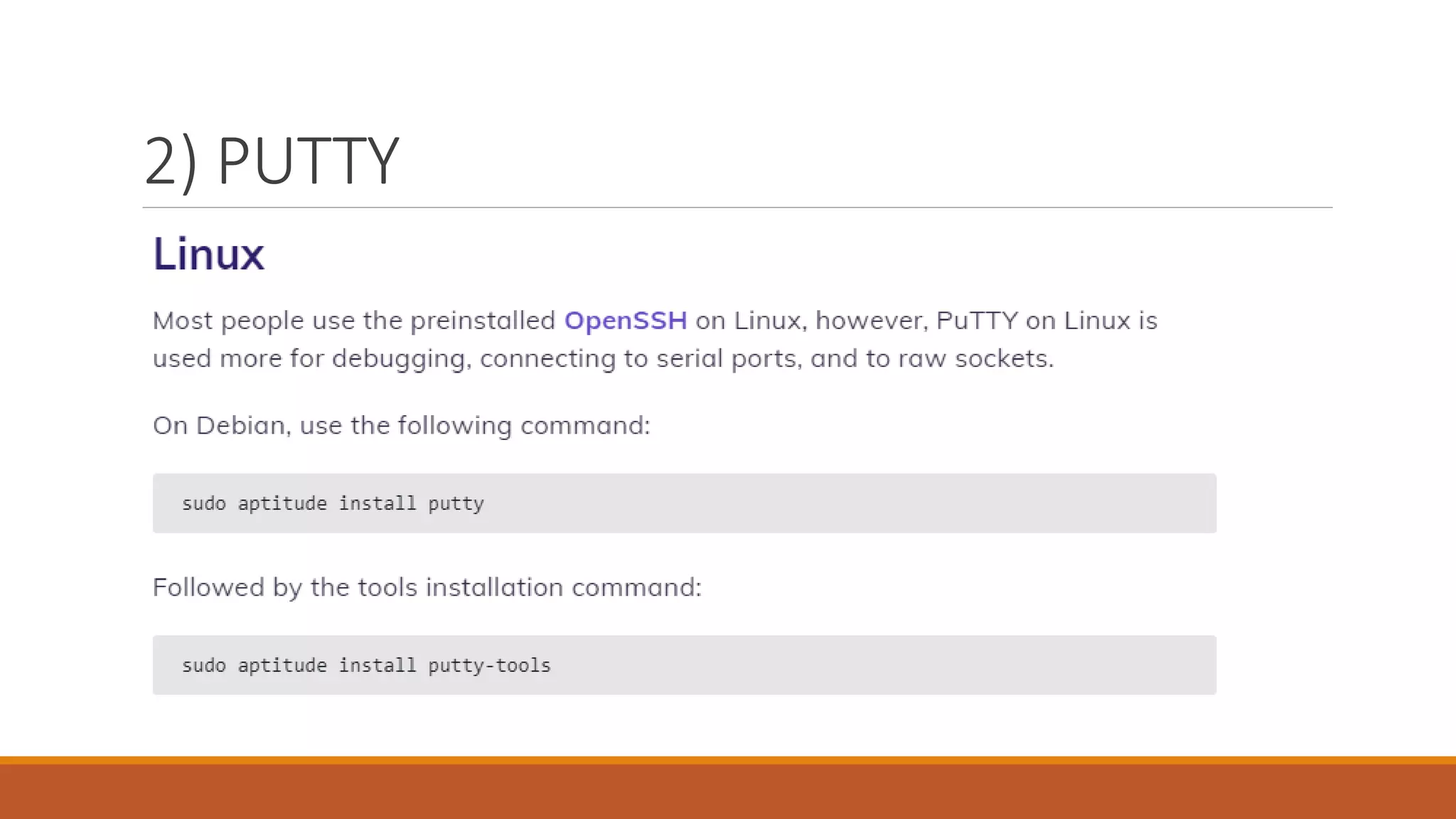
2) PUTTY
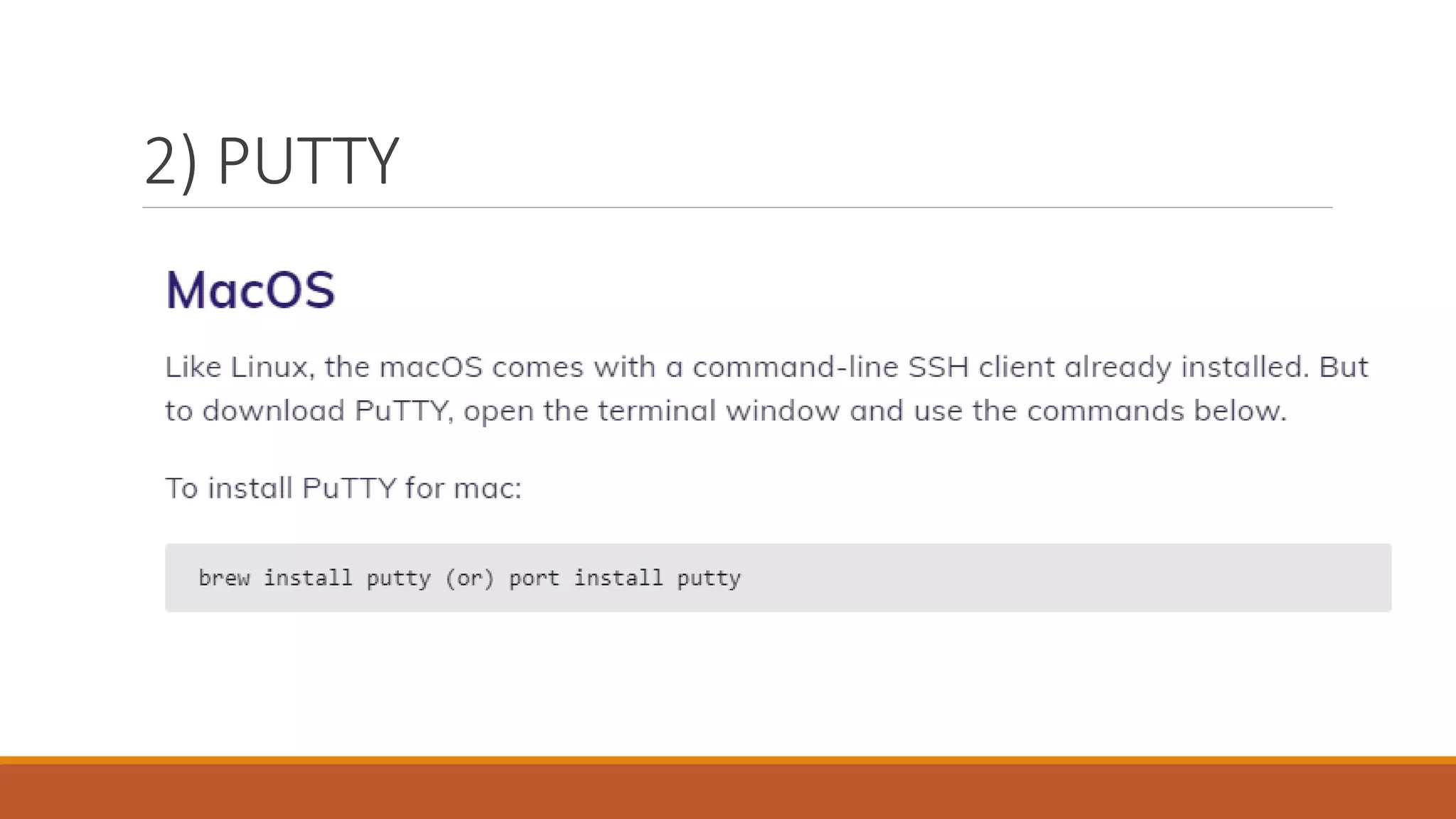
2) PUTTY
2) PUTTY
2) PUTTY
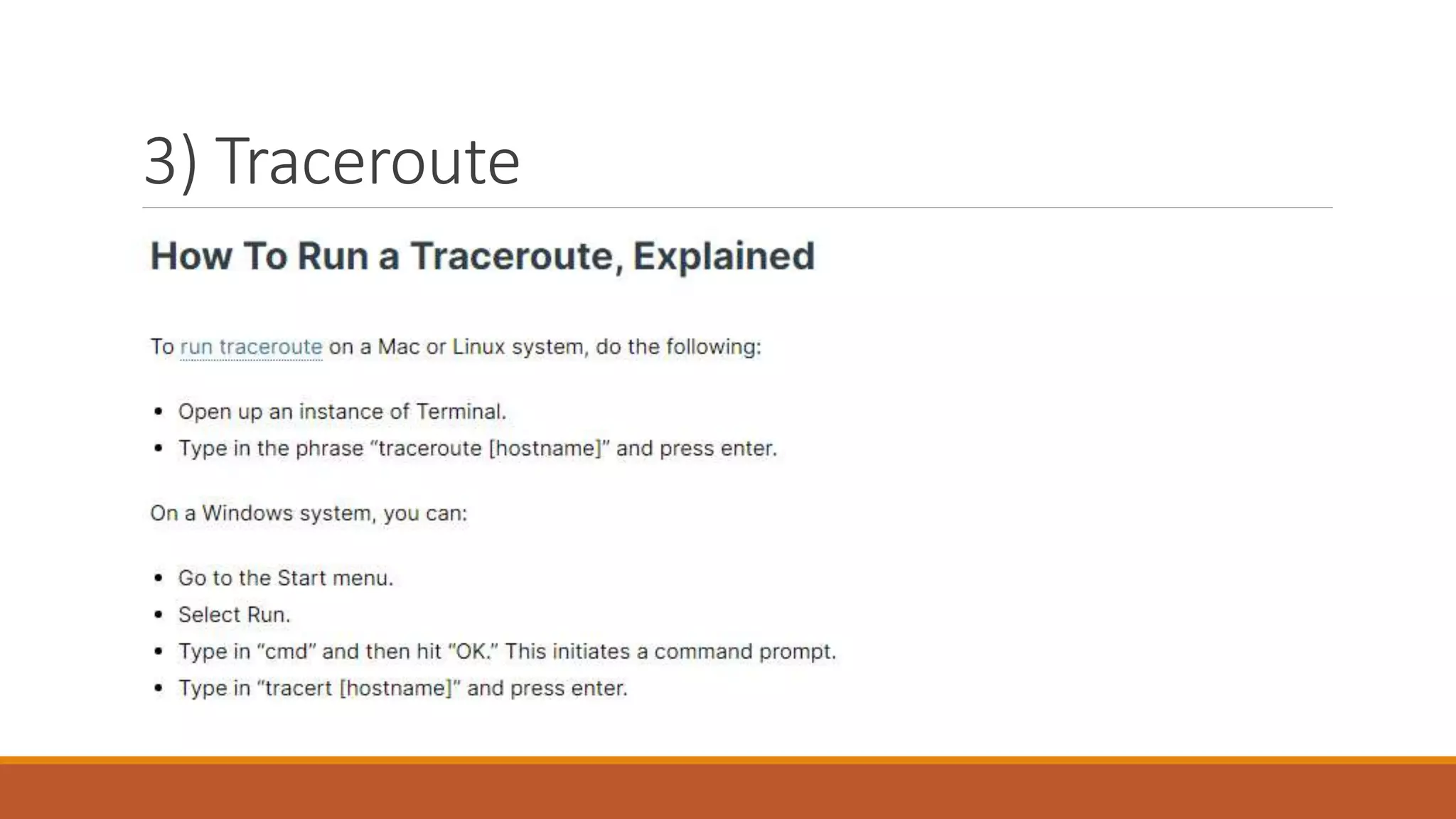
3) Traceroute
Available of Windows, Linux, Mac OS and IOS Cisco, is a tool that allows following the path of
whole package throughout its adventure in a network.
This is a handy debugging tool in case of malfunctions and network configuration to see if
routing configurations are correctly applied.
The operation of Traceroute is quite simple and interesting.
An Internet Protocol (IP) tracer is helpful for figuring out the routing hops data has to go
through, as well as response delays as it travels across nodes, which are what send the data
toward its destination.
Traceroute also enables you to locate where the data was unable to be sent along, known as
points of failure. You can also perform a visual traceroute to get a visual representation of each
hop.
3) Traceroute
3) Traceroute
4) Supervision
Supervision is a suite of tools that is a tool in itself, but it’s a process that is widely used in
network administrations because it allow to be informed of the status of machine and active
elements of the network in real time and also send alerts.
It is a tool that quickly becomes indispensible for medium and large networks. Among the most
used tools, note: Nagios and Shinken. There mode owner PRTG, which is also talk about it.
5) Metrology
Some people get confuse between Metrology and Supervision so here we will see what
differentiate them from each other.
Unlike, Supervision, Metrology will not perform to send an alert or establishment of the state of
a host or service at time T, but will have to lead the graph plotting describing metrics (values) of
a flow, the use of a resource, etc…
Metrology enables the establishment of a base-line, which is a reference line of network status
at a time T or during a so-called reference period.
This usually allows detecting unusual behavior of the network during peak load, performance
losses, etc…
Among the Metrology tools one might note Cacti and Munin specifically, which probably the
best known in free mode.
6) Nmap
This is a free tool widely used in defense of network attack.
As its name suggests, it has the function nmap discovery and mapping of networks through
more or less extensive requests to a network or to a specific host.
For example, it’s very useful to know, which ports are open on a host and therefore how it seen
from the outside, but also know by what protocol we can go on such manager such as SSH,
Telnet, etc…
Nmap mostly used from the command line, but there is also a GUI version available on both
Windows and Linux.
7) Ping
Ping is one of the first orders to which one learns to use when starting machine and its use is still
common during all these of years of practice.
This is one the first tests we do when we try to verify that a network link is operational between
two hosts. Its use is very similar on all OS.

Topic # 16 of outline Managing Network Services.pptx

  • 1.
  • 2.
    What are NetworkServices? Network Service – a capability that facilitates a network operation. It is typically provided by a server (which can be running one or more services), based on network protocols running at the application layer in the Open Systems Interconnection (OSI) model of the network. Computer systems and computerized systems help human beings to work efficiently and explore the unthinkable. When these devices are connected together to form a network, the capabilities are enhanced multiple-times. Some basic services computer network can offer are. Some examples are domain name system (DNS), dynamic host configuration protocol (DHCP), voice over internet protocol (VoIP), etc.
  • 3.
    Network Services Some typesof network services are: 1. Directory Services 2. File Services 3. Communication Services 4. Application Services
  • 4.
    Directory Services These servicesare mapping between name and its value, which can be variable value or fixed. This software system helps to store the information, organize it, and provides various means of accessing it. Some examples of directory services in computer networking are: 1. Accounting 2. Authentication and Authorization 3. Domain Name Services
  • 5.
    Accounting In an organization,a number of users have their user names and passwords mapped to them. Directory Services provide means of storing this information in cryptic form and make available when requested.
  • 6.
    Authentication and Authorization Usercredentials are checked to authenticate a user at the time of login and/or periodically. User accounts can be set into hierarchical structure and their access to resources can be controlled using authorization schemes.
  • 7.
    DNS DNS is widelyused and one of the essential services on which internet works. This system maps IP addresses to domain names, which are easier to remember and recall than IP addresses. Because network operates with the help of IP addresses and humans tend to remember website names, the DNS provides website’s IP address which is mapped to its name from the back-end on the request of a website name from the user.
  • 8.
    File Services File servicesinclude sharing and transferring files over the network. 1. File Sharing 2. File Transfer
  • 9.
    File Sharing One ofthe reason which gave birth to networking was file sharing. File sharing enables its users to share their data with other users. User can upload the file to a specific server, which is accessible by all intended users. As an alternative, user can make its file shared on its own computer and provides access to intended users.
  • 10.
    File Transfer This isan activity to copy or move file from one computer to another computer or to multiple computers, with help of underlying network. Network enables its user to locate other users in the network and transfers files.
  • 11.
    Communication Services Communication servicesinclude: 1. Email 2. Social Networking 3. Internet Chats 4. Discussion Boards 5. Remote Access
  • 12.
    Email Electronic mail isa communication method and something a computer user cannot work without. This is the basis of today’s internet features. Email system has one or more email servers. All its users are provided with unique IDs. When a user sends email to other user, it is actually transferred between users with help of email server.
  • 13.
    Social Networking Recent technologieshave made technical life social. The computer savvy peoples, can find other known peoples or friends, can connect with them, and can share thoughts, pictures, and videos.
  • 14.
    Internet Chats Internet chatprovides instant text transfer services between two hosts. Two or more people can communicate with each other using text based Internet Relay Chat services. These days, voice chat and video chat are very common.
  • 15.
    Discussion Boards Discussion boardsprovide a mechanism to connect multiple peoples with same interests. It enables the users to put queries, questions, suggestions etc. which can be seen by all other users. Other may respond as well.
  • 16.
    Remote Access This serviceenables user to access the data residing on the remote computer. This feature is known as Remote desktop. This can be done via some remote device, e.g. mobile phone or home computer.
  • 17.
    Application Services These arenothing but providing network based services to the users such as web services, database managing, and resource sharing. 1. Resource Sharing 2. Database 3. Web Services
  • 18.
    Resource Sharing To useresources efficiently and economically, network provides a mean to share them. This may include Servers, Printers, and Storage Media etc.
  • 19.
    Database Services This applicationservice is one of the most important services. It stores data and information, processes it, and enables the users to retrieve it efficiently by using queries. Databases help organizations to make decisions based on statistics.
  • 20.
    Web Services World WideWeb has become the synonym for internet. It is used to connect to the internet, and access files and information services provided by the internet servers.
  • 22.
    How network servicesare managed? Network services management comes under network administration. There are plenty of tools available that allow us to do all types of network administration work. Here are some handy and the most useful tools that let network administrator to debug, understand and configure networks a bit easily. The goal is to make inventory of essentials to have in toolbox when there is need of debugging or network configuration.
  • 23.
    1) Go Deepwith WireShark A great open source as well as cross-platform tool, it is basically a network protocol analyzer also called as Sniffer. It allows examining data from a live network or from a capture file stored. We can interactively browse the capture data, explore all the layers of packages and able to see all of their content. It is a very useful tool when we are protecting network from malicious attack. It also has several interesting features such as the ability to apply filters to quantities of captured packets. For example, to display only connections or exchanges between IPs indicated that in a specified language. Wireshark also has a function “Follow TCP Stream” that tracks live interaction and TCP connections between two machines in a single window, then contents of packets being translated and formatted dynamically. There are many tools like Wireshark, but Wireshark offer numerous options and each has many features such as graphical command line, including features such as tcpdump CLI, or tshark.
  • 24.
    2) PUTTY There isno need to mention popularity of this tool among administrators separately. This is very simple tool to use and also essential for network administration. It’s a basic tool for remote configuration of different elements. It initializes SSH connections, telnet, or series In addition, it is a tool with a simple executable exe file that does not even need any installation, also very light weight. It provides several configuration tabs with other options that are kind accessories. Some of these parameters still greatly increase its functionality and capabilities. Note: one of the missing features of Putty is the ability to manage multiple views within the same window. However, there is a small application that performs this function and enables us to manage, resize and split terminals of Putty.
  • 25.
  • 26.
  • 27.
  • 28.
  • 29.
    3) Traceroute Available ofWindows, Linux, Mac OS and IOS Cisco, is a tool that allows following the path of whole package throughout its adventure in a network. This is a handy debugging tool in case of malfunctions and network configuration to see if routing configurations are correctly applied. The operation of Traceroute is quite simple and interesting. An Internet Protocol (IP) tracer is helpful for figuring out the routing hops data has to go through, as well as response delays as it travels across nodes, which are what send the data toward its destination. Traceroute also enables you to locate where the data was unable to be sent along, known as points of failure. You can also perform a visual traceroute to get a visual representation of each hop.
  • 30.
  • 31.
  • 32.
    4) Supervision Supervision isa suite of tools that is a tool in itself, but it’s a process that is widely used in network administrations because it allow to be informed of the status of machine and active elements of the network in real time and also send alerts. It is a tool that quickly becomes indispensible for medium and large networks. Among the most used tools, note: Nagios and Shinken. There mode owner PRTG, which is also talk about it.
  • 33.
    5) Metrology Some peopleget confuse between Metrology and Supervision so here we will see what differentiate them from each other. Unlike, Supervision, Metrology will not perform to send an alert or establishment of the state of a host or service at time T, but will have to lead the graph plotting describing metrics (values) of a flow, the use of a resource, etc… Metrology enables the establishment of a base-line, which is a reference line of network status at a time T or during a so-called reference period. This usually allows detecting unusual behavior of the network during peak load, performance losses, etc… Among the Metrology tools one might note Cacti and Munin specifically, which probably the best known in free mode.
  • 34.
    6) Nmap This isa free tool widely used in defense of network attack. As its name suggests, it has the function nmap discovery and mapping of networks through more or less extensive requests to a network or to a specific host. For example, it’s very useful to know, which ports are open on a host and therefore how it seen from the outside, but also know by what protocol we can go on such manager such as SSH, Telnet, etc… Nmap mostly used from the command line, but there is also a GUI version available on both Windows and Linux.
  • 35.
    7) Ping Ping isone of the first orders to which one learns to use when starting machine and its use is still common during all these of years of practice. This is one the first tests we do when we try to verify that a network link is operational between two hosts. Its use is very similar on all OS.