WEB SECURITY
M.Usman Manzoor
Web Application Security 1
Need Of Web Security….
Security is required because the widespread use of data
processing equipment, the security of information felt to be
valuable to an organization was provided primarily by
physical and administrative means.
WEB SECURITY :
•Measures to protect data during their transmission over a
collection of interconnected networks.
•The World Wide Web is fundamentally a client/server
application running over the internet and TCP/IP intranets.
Web Application Security 2
E-Commerce Security
• Companies are doing more and more business on the Web.
• The basic needs of Web and regular security are given
below.
• Authentication
• Authorization
• Data integrity and Encryption
• Accountability
Web Application Security 3
Authentication
• Authentication comes in two major levels.
• standard
• strong
(username & pasword)
• Solutions for authentication usually vary in a large
organization; senior accountants.
Web Application Security 4
Authorization
• Having permission to do what they want.
• The process that ensures that a person has the right to
access certain resources
• Access controls
• E.g; you invited someone at home so you don’t allow him
to read your private data/letters.
Web Application Security 5
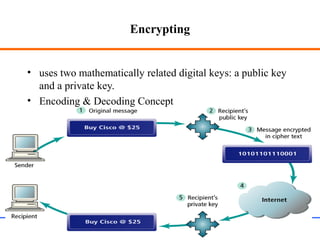
Encrypting
• uses two mathematically related digital keys: a public key
and a private key.
• Encoding & Decoding Concept
Web Application Security 6
Major security issues
• Prevent unauthorized users from accessing sensitive data
– Authentication: identifying users to determine if they are one of the
authorized ones
– Access control: identifying which resources need protection and who
should have access to them
• Prevent attackers from stealing data from network during
transmission
– Encryption (usually by Secure Sockets Layer)
Web Application Security 7
Authentication
• Collect user ID information from end users (“logging in”)
– usually by means of browser dialog / interface
– user ID information normally refers to username and password
• Transport collected user ID information to the web server
– unsecurely (HTTP) or securely (HTTPS = HTTP over SSL)
• Verify ID and passwd with backend Realms (“security database”)
– Realms maintain username, password, roles, etc
– Validation: the web server checks if the collected user ID & password
match with these in the realms.
Web Application Security 8
Techniques
• User level securtiy.
• SSL(secure socket layer).
• Any physical device (firewalls).
• VPN(virtual private network).
Web Application Security 9
Firewall
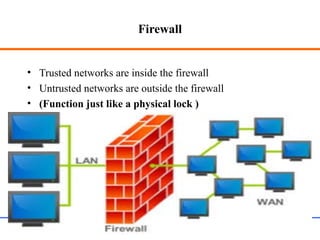
• Trusted networks are inside the firewall
• Untrusted networks are outside the firewall
• (Function just like a physical lock )
Web Application Security 10
Firewall
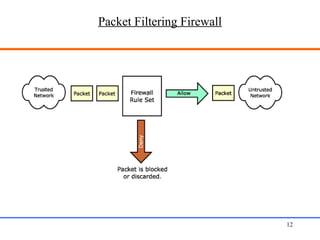
Types of firewall.
• Packet-filtering routers
– Applies a set of rules to individual IP packets as they arrive
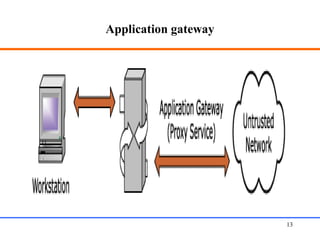
• Application gateways / proxy servers
– Acts as a buffer for services between the internal and external
network
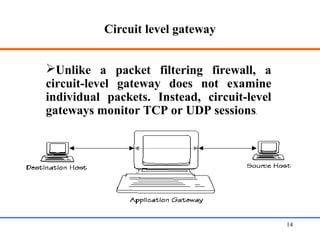
• Circuit level gateways
– Works by never allowing end-to-end TCP connections
Web Application Security 11
Packet Filtering Firewall
Web Application Security 12
Application gateway
Web Application Security 13
Circuit level gateway
Web Application Security 14
Unlike a packet filtering firewall, a
circuit-level gateway does not examine
individual packets. Instead, circuit-level
gateways monitor TCP or UDP sessions.
What is Secure Sockets Layer (SSL)?
• A protocol developed in 1996 by Netscape for securely
transmitting private web documents over the Internet.
• It employs private and public key to encrypt data that’s
transmitted over the SSL connection.
• By convention, URLs that require SSL connection start with
https: (port 443) instead of http: (port 80).
• The webpage that uses https is the SAME as that uses http,
only the transmission protocol is different!
Web Application Security 15
Why use SSL?
• SSL is necessary if …
– There is a login or sign in (to protect user name and
passwd)
– It transmits sensitive data online, such as credit card
information, etc.
– You need to comply with privacy and security
requirements
– make the information transmitted on the network secure
Web Application Security 16
Secure Socket Layer
• SSL Characteristics
– When SSL connection established browser-to-server and server-to-
browser communications are encrypted. This includes:
• URL of requested document
• Contents of the document
• Contents of browser forms
• Cookies sent from browser to server
• Cookies sent from server to browser
• Contents of HTTP header
Web Application Security 17
SSL Connection
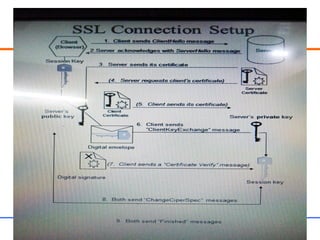
• Establishing an SSL Connection
– The client (browser) opens a connection to server port
– Browser sends “client hello” message. Client hello message
contains:
• version of SSL browser uses
– The Server responds with a “server hello” message. Server hello
message contains
• session id
Web Application Security 18
SSL Connection
Establishing an SSL Connection (con’t.)
– The server sends its certificate
• used to authenticate server to client
– Optionally the server may request client’s certificate
– If requested, client will send its certificate of authentication
• if client has no certificate then connection failure
– Client sends a “ClientKeyExchange” message
• symmetric session key chosen
Web Application Security 19
SSL Connection
• Establishing an SSL Connection (con’t.)
– Optionally, if client authentication is used the client will send a
certificate verify message.
– Server and client send “ChangeCipherSpec” message indicating
they are ready to begin encrypted transmission.
– Client and server send “Finished” messages to each other
• These are a message digest of their entire conversation up to
this point.
• If the digests match then messages were received without
interference.
Web Application Security 20
Web Application Security 21
Use of an SSL Certificate
• To enable secured SSL connections, the server needs an SSL
certificate signed by a Certificate Authority (CA).
– CA verifies the ID of the certificate owner
• Each SSL Certificate contains unique and authenticated
information about the certificate owner, such as ID (in X.500
format), location, public key, and the signature of the CA.
– It confirms that you are who you say you are in the Internet.
Web Application Security 22
A Sample Certificate
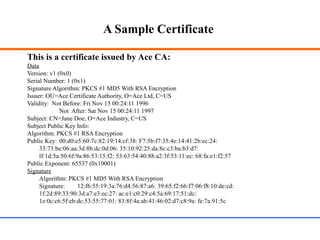
This is a certificate issued by Ace CA:
Data
Version: v1 (0x0)
Serial Number: 1 (0x1)
Signature Algorithm: PKCS #1 MD5 With RSA Encryption
Issuer: OU=Ace Certificate Authority, O=Ace Ltd, C=US
Validity: Not Before: Fri Nov 15 00:24:11 1996
Not After: Sat Nov 15 00:24:11 1997
Subject: CN=Jane Doe, O=Ace Industry, C=US
Subject Public Key Info:
Algorithm: PKCS #1 RSA Encryption
Public Key: 00:d0:e5:60:7c:82:19:14:cf:38: F7:5b:f7:35:4e:14:41:2b:ec:24:
33:73:be:06:aa:3d:8b:dc:0d:06: 35:10:92:25:da:8c:c3:ba:b3:d7:
lf:1d:5a:50:6f:9a:86:53:15:f2: 53:63:54:40:88:a2:3f:53:11:ec: 68:fa:e1:f2:57
Public Exponent: 65537 (0x10001)
Signature
Algorithm: PKCS #1 MD5 With RSA Encryption
Signature: 12:f6:55:19:3a:76:d4:56:87:a6: 39:65:f2:66:f7:06:f8:10:de:cd:
1f:2d:89:33:90:3d:a7:e3:ec:27: ac:e1:c0:29:c4:5a:69:17:51:dc:
1e:0c:c6:5f:eb:dc:53:55:77:01: 83:8f:4a:ab:41:46:02:d7:c8:9a: fe:7a:91:5c
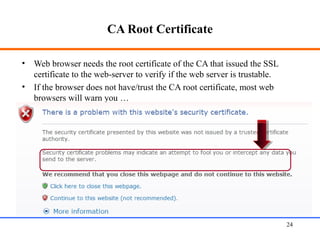
CA Root Certificate
• Web browser needs the root certificate of the CA that issued the SSL
certificate to the web-server to verify if the web server is trustable.
• If the browser does not have/trust the CA root certificate, most web
browsers will warn you …
Web Application Security 24
Security Approaches
There are two general approaches to the security for the Web
application framework:
• BASIC Authentication
• Form-based Authentication
Web Application Security 25
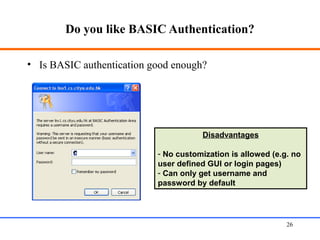
Do you like BASIC Authentication?
• Is BASIC authentication good enough?
Web Application Security 26
Disadvantages
- No customization is allowed (e.g. no
user defined GUI or login pages)
- Can only get username and
password by default
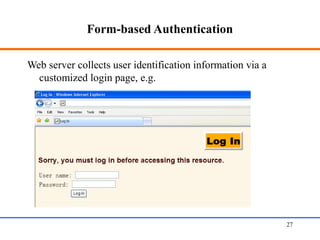
Form-based Authentication
Web server collects user identification information via a
customized login page, e.g.
Web Application Security 27
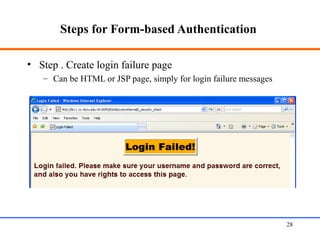
Steps for Form-based Authentication
• Step . Create login failure page
– Can be HTML or JSP page, simply for login failure messages
Web Application Security 28
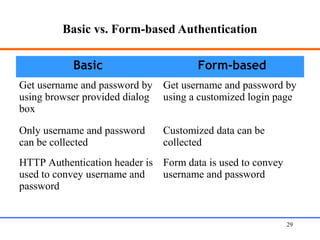
Basic vs. Form-based Authentication
Basic Form-based
Get username and password by
using browser provided dialog
box
Get username and password by
using a customized login page
Only username and password
can be collected
Customized data can be
collected
HTTP Authentication header is
used to convey username and
password
Form data is used to convey
username and password
Web Application Security 29
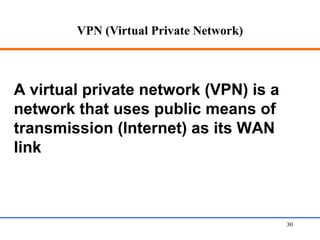
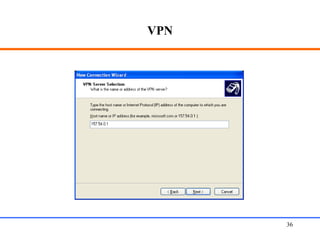
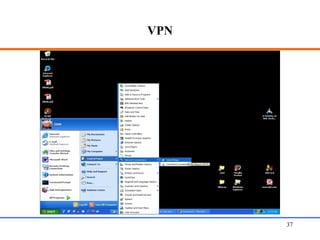
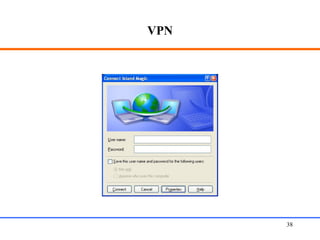
VPN (Virtual Private Network)
Web Application Security 30
A virtual private network (VPN) is a
network that uses public means of
transmission (Internet) as its WAN
link
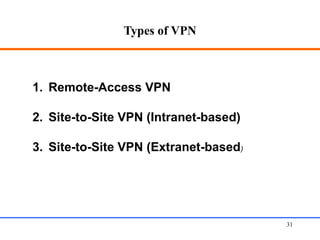
Types of VPN
Web Application Security 31
1. Remote-Access VPN
2. Site-to-Site VPN (Intranet-based)
3. Site-to-Site VPN (Extranet-based)
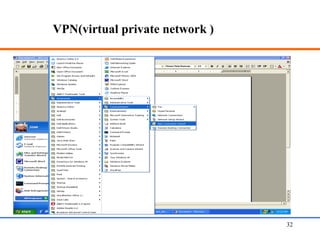
VPN(virtual private network )
Web Application Security 32
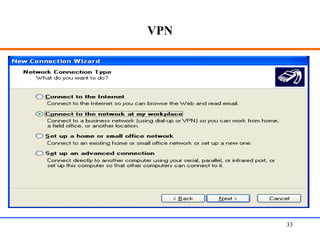
VPN
Web Application Security 33
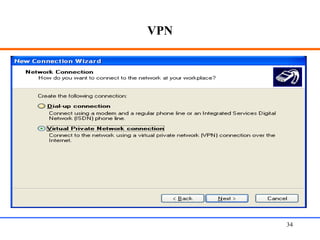
VPN
Web Application Security 34
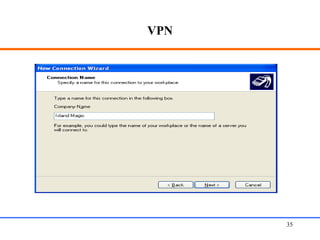
VPN
Web Application Security 35
VPN
Web Application Security 36
VPN
Web Application Security 37
VPN
Web Application Security 38
•Thanks
Web Application Security 39

Web security

  • 1.
    WEB SECURITY M.Usman Manzoor WebApplication Security 1
  • 2.
    Need Of WebSecurity…. Security is required because the widespread use of data processing equipment, the security of information felt to be valuable to an organization was provided primarily by physical and administrative means. WEB SECURITY : •Measures to protect data during their transmission over a collection of interconnected networks. •The World Wide Web is fundamentally a client/server application running over the internet and TCP/IP intranets. Web Application Security 2
  • 3.
    E-Commerce Security • Companiesare doing more and more business on the Web. • The basic needs of Web and regular security are given below. • Authentication • Authorization • Data integrity and Encryption • Accountability Web Application Security 3
  • 4.
    Authentication • Authentication comesin two major levels. • standard • strong (username & pasword) • Solutions for authentication usually vary in a large organization; senior accountants. Web Application Security 4
  • 5.
    Authorization • Having permissionto do what they want. • The process that ensures that a person has the right to access certain resources • Access controls • E.g; you invited someone at home so you don’t allow him to read your private data/letters. Web Application Security 5
  • 6.
    Encrypting • uses twomathematically related digital keys: a public key and a private key. • Encoding & Decoding Concept Web Application Security 6
  • 7.
    Major security issues •Prevent unauthorized users from accessing sensitive data – Authentication: identifying users to determine if they are one of the authorized ones – Access control: identifying which resources need protection and who should have access to them • Prevent attackers from stealing data from network during transmission – Encryption (usually by Secure Sockets Layer) Web Application Security 7
  • 8.
    Authentication • Collect userID information from end users (“logging in”) – usually by means of browser dialog / interface – user ID information normally refers to username and password • Transport collected user ID information to the web server – unsecurely (HTTP) or securely (HTTPS = HTTP over SSL) • Verify ID and passwd with backend Realms (“security database”) – Realms maintain username, password, roles, etc – Validation: the web server checks if the collected user ID & password match with these in the realms. Web Application Security 8
  • 9.
    Techniques • User levelsecurtiy. • SSL(secure socket layer). • Any physical device (firewalls). • VPN(virtual private network). Web Application Security 9
  • 10.
    Firewall • Trusted networksare inside the firewall • Untrusted networks are outside the firewall • (Function just like a physical lock ) Web Application Security 10
  • 11.
    Firewall Types of firewall. •Packet-filtering routers – Applies a set of rules to individual IP packets as they arrive • Application gateways / proxy servers – Acts as a buffer for services between the internal and external network • Circuit level gateways – Works by never allowing end-to-end TCP connections Web Application Security 11
  • 12.
    Packet Filtering Firewall WebApplication Security 12
  • 13.
  • 14.
    Circuit level gateway WebApplication Security 14 Unlike a packet filtering firewall, a circuit-level gateway does not examine individual packets. Instead, circuit-level gateways monitor TCP or UDP sessions.
  • 15.
    What is SecureSockets Layer (SSL)? • A protocol developed in 1996 by Netscape for securely transmitting private web documents over the Internet. • It employs private and public key to encrypt data that’s transmitted over the SSL connection. • By convention, URLs that require SSL connection start with https: (port 443) instead of http: (port 80). • The webpage that uses https is the SAME as that uses http, only the transmission protocol is different! Web Application Security 15
  • 16.
    Why use SSL? •SSL is necessary if … – There is a login or sign in (to protect user name and passwd) – It transmits sensitive data online, such as credit card information, etc. – You need to comply with privacy and security requirements – make the information transmitted on the network secure Web Application Security 16
  • 17.
    Secure Socket Layer •SSL Characteristics – When SSL connection established browser-to-server and server-to- browser communications are encrypted. This includes: • URL of requested document • Contents of the document • Contents of browser forms • Cookies sent from browser to server • Cookies sent from server to browser • Contents of HTTP header Web Application Security 17
  • 18.
    SSL Connection • Establishingan SSL Connection – The client (browser) opens a connection to server port – Browser sends “client hello” message. Client hello message contains: • version of SSL browser uses – The Server responds with a “server hello” message. Server hello message contains • session id Web Application Security 18
  • 19.
    SSL Connection Establishing anSSL Connection (con’t.) – The server sends its certificate • used to authenticate server to client – Optionally the server may request client’s certificate – If requested, client will send its certificate of authentication • if client has no certificate then connection failure – Client sends a “ClientKeyExchange” message • symmetric session key chosen Web Application Security 19
  • 20.
    SSL Connection • Establishingan SSL Connection (con’t.) – Optionally, if client authentication is used the client will send a certificate verify message. – Server and client send “ChangeCipherSpec” message indicating they are ready to begin encrypted transmission. – Client and server send “Finished” messages to each other • These are a message digest of their entire conversation up to this point. • If the digests match then messages were received without interference. Web Application Security 20
  • 21.
  • 22.
    Use of anSSL Certificate • To enable secured SSL connections, the server needs an SSL certificate signed by a Certificate Authority (CA). – CA verifies the ID of the certificate owner • Each SSL Certificate contains unique and authenticated information about the certificate owner, such as ID (in X.500 format), location, public key, and the signature of the CA. – It confirms that you are who you say you are in the Internet. Web Application Security 22
  • 23.
    A Sample Certificate Thisis a certificate issued by Ace CA: Data Version: v1 (0x0) Serial Number: 1 (0x1) Signature Algorithm: PKCS #1 MD5 With RSA Encryption Issuer: OU=Ace Certificate Authority, O=Ace Ltd, C=US Validity: Not Before: Fri Nov 15 00:24:11 1996 Not After: Sat Nov 15 00:24:11 1997 Subject: CN=Jane Doe, O=Ace Industry, C=US Subject Public Key Info: Algorithm: PKCS #1 RSA Encryption Public Key: 00:d0:e5:60:7c:82:19:14:cf:38: F7:5b:f7:35:4e:14:41:2b:ec:24: 33:73:be:06:aa:3d:8b:dc:0d:06: 35:10:92:25:da:8c:c3:ba:b3:d7: lf:1d:5a:50:6f:9a:86:53:15:f2: 53:63:54:40:88:a2:3f:53:11:ec: 68:fa:e1:f2:57 Public Exponent: 65537 (0x10001) Signature Algorithm: PKCS #1 MD5 With RSA Encryption Signature: 12:f6:55:19:3a:76:d4:56:87:a6: 39:65:f2:66:f7:06:f8:10:de:cd: 1f:2d:89:33:90:3d:a7:e3:ec:27: ac:e1:c0:29:c4:5a:69:17:51:dc: 1e:0c:c6:5f:eb:dc:53:55:77:01: 83:8f:4a:ab:41:46:02:d7:c8:9a: fe:7a:91:5c
  • 24.
    CA Root Certificate •Web browser needs the root certificate of the CA that issued the SSL certificate to the web-server to verify if the web server is trustable. • If the browser does not have/trust the CA root certificate, most web browsers will warn you … Web Application Security 24
  • 25.
    Security Approaches There aretwo general approaches to the security for the Web application framework: • BASIC Authentication • Form-based Authentication Web Application Security 25
  • 26.
    Do you likeBASIC Authentication? • Is BASIC authentication good enough? Web Application Security 26 Disadvantages - No customization is allowed (e.g. no user defined GUI or login pages) - Can only get username and password by default
  • 27.
    Form-based Authentication Web servercollects user identification information via a customized login page, e.g. Web Application Security 27
  • 28.
    Steps for Form-basedAuthentication • Step . Create login failure page – Can be HTML or JSP page, simply for login failure messages Web Application Security 28
  • 29.
    Basic vs. Form-basedAuthentication Basic Form-based Get username and password by using browser provided dialog box Get username and password by using a customized login page Only username and password can be collected Customized data can be collected HTTP Authentication header is used to convey username and password Form data is used to convey username and password Web Application Security 29
  • 30.
    VPN (Virtual PrivateNetwork) Web Application Security 30 A virtual private network (VPN) is a network that uses public means of transmission (Internet) as its WAN link
  • 31.
    Types of VPN WebApplication Security 31 1. Remote-Access VPN 2. Site-to-Site VPN (Intranet-based) 3. Site-to-Site VPN (Extranet-based)
  • 32.
    VPN(virtual private network) Web Application Security 32
  • 33.
  • 34.
  • 35.
  • 36.
  • 37.
  • 38.
  • 39.

Editor's Notes

  • #8 1) Protect data on storage; 2) protect data on network.
  • #24 This certificate in SSL is for web-server, to identify if the server is trustable: Data & signature parts; Data part in details; Signature part in details.