Contents
• What is Cyber Extortion
• Definition of Ransomware
• History
• Types of Ransomware
• Famous Ransomwares
• How it works?
• How to avoid Ransomware
• Removal of malwares from PC
• TOX
• Conclusion
• References
CYBER EXTORTION
• Cyber extortion is an online crime involving an
attack or threat of attack against an
enterprise, coupled with a demand for money
to stop the attack.
• Cyber extortions have taken on multiple forms
- encrypting data and holding it hostage,
stealing data and threatening exposure, and
denying access to data.
Continue…
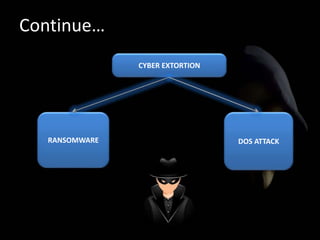
CYBER EXTORTION
RANSOMWARE DOS ATTACK
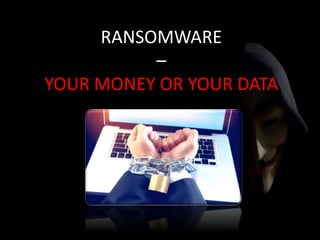
RANSOMWARE
–
YOUR MONEY OR YOUR DATA
RANSOMWARE DEFINED…
 Malware locks out the user’s system and demands
ransom.
 Creates “Zombie Computer” operated remotely.
 Individuals and business targeted.
 This form of extortion works on the assumption that
the data is important enough to the user that they are
willing to pay for recovery.
 There is however no guarantee of actual recovery, even
after payment is made.
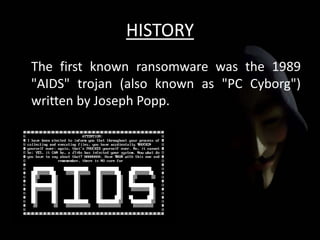
HISTORY
The first known ransomware was the 1989
"AIDS" trojan (also known as "PC Cyborg")
written by Joseph Popp.
TYPES OF RANSOMWARE
 Encryption Ransomware - Locker Virus and
Onion Ransomware
 Locker Ransomware - Reveton
FAMOUS RANSOMWARE
 Reveton
 CryptoLocker
Reveton
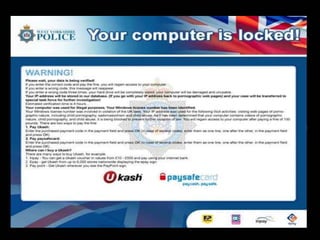
 In 2012, a major ransomware worm known as Reveton
began to spread.
 It is also known as "police trojan".
 Its payload displays a warning from a law enforcement
agency.
 Claiming that the computer had been used for illegal
activities, such as downloading pirated software, promoting
terrorism, copyright etc.
 The warning informs the user that to unlock their system
they would have to pay a fine.
 To increase the illusion that the computer is being tracked
by law enforcement, the screen also displays the
computer's IP address and footage from a computer's
webcam.
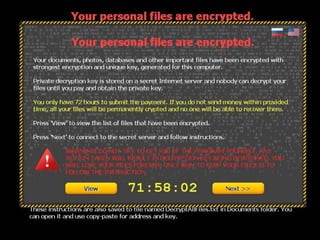
CryptoLocker
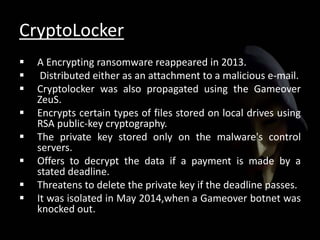
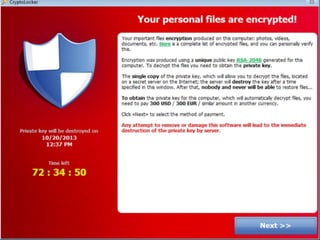
 A Encrypting ransomware reappeared in 2013.
 Distributed either as an attachment to a malicious e-mail.
 Cryptolocker was also propagated using the Gameover
ZeuS.
 Encrypts certain types of files stored on local drives using
RSA public-key cryptography.
 The private key stored only on the malware's control
servers.
 Offers to decrypt the data if a payment is made by a
stated deadline.
 Threatens to delete the private key if the deadline passes.
 It was isolated in May 2014,when a Gameover botnet was
knocked out.
Companies affected by Ransomware
And many more….
HOW RANSOMWARE WORKS
HOW TO PREVENT BEING A VICTIM
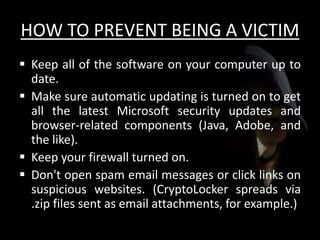
 Keep all of the software on your computer up to
date.
 Make sure automatic updating is turned on to get
all the latest Microsoft security updates and
browser-related components (Java, Adobe, and
the like).
 Keep your firewall turned on.
 Don't open spam email messages or click links on
suspicious websites. (CryptoLocker spreads via
.zip files sent as email attachments, for example.)
Experts advise taking these steps to avoid attacks or
protect yourself after an attack:
Use reputable antivirus software and a firewall.
Back up often.
Exercise caution.
Disconnect from the Internet.
Alert authorities.
Update your security software.
REMOVAL OF MALWARES FROM
WINDOWS PC
Step 1: Enter Safe Mode
Step 2: Delete Temporary Files
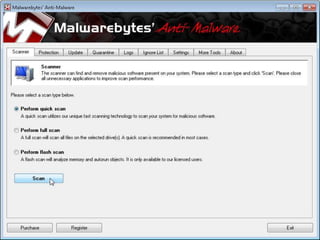
Step 3: Download Malware Scanners
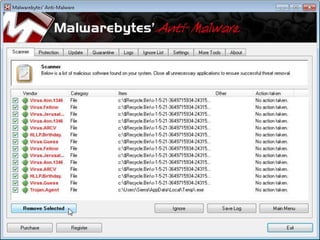
Step 4: Run a Scan With Malwarebytes
Step 5: Fix Your Web Browser
Step 6: Recover Your Files If Windows Is Corrupt
FEW BEST MALWARE REMOVAL TOOLS
 Spybot Search & Destroy (Windows, Freeware)
 SUPERAntiSpyware (Windows, $30)
 ComboFix (Windows, Freeware)
 Malwarebytes' Anti-Malware (Windows, $25)
 HijackThis (Windows, Freeware)
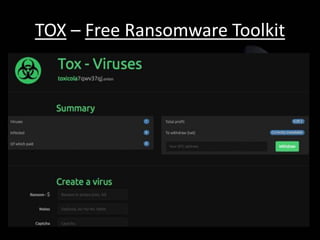
TOX – Free Ransomware Toolkit
Continue….
 'Tox' Offers Free build-your-own Ransomware
Malware Toolkit.
 Tox is completely free to use.
 One dark web hacker has released this for anyone
to download and set up their own ransomware
for free.
 Tox, which runs on TOR, requires not much
technical skills to use.
 It is designed in such a way that almost anyone
can easily deploy ransomware in three simple
steps.
Make your own Ransomware
Once a user register with the site, follow these
three simple steps to creating your own
malware:
Type a desired ransom amount you want to ask
victims for.
Provide an additional note in the "Cause", the
message that will alert victims that they are
being held hostage to a piece of malware.
Finally, you are prompted to fill out a captcha,
and click "Create".
"This process creates an executable of about 2MB that
is disguised as a .scr file.
Then the Tox [users] distribute and install as they see
fit. The Tox site (runs on the TOR network) will track the
installs and profit. To withdraw funds, you need only
supply a receiving Bitcoin address.“
- McAfee explains..
CONCLUSION
When it comes to malware attacks, knowledge is
the best possible weapon to prevent them.
Be careful what you click!!
Preventive measures should be taken before
Ransomwares establish strong hold.
Keeping all the software updated and getting
latest security updates might help to prevent the
attacks.
REFRENCES
 http://thehackernews.com/2015/05/ransomware-
creator.html
 http://www.spamlaws.com/how-ransomware-
works.html
 http://www.trendmicro.com/vinfo/us/security/definition
/Ransomware
 https://www.microsoft.com/security/portal/mmpc/share
d/ransomware.aspx
 http://www.trendmicro.com/vinfo/us/security/news/cyb
ercrime-and-digital-threats/crypto-ransomware-when-
encryption-breaks-bad
THANK YOU
QUERIES ??

Ransomware

  • 2.
    Contents • What isCyber Extortion • Definition of Ransomware • History • Types of Ransomware • Famous Ransomwares • How it works? • How to avoid Ransomware • Removal of malwares from PC • TOX • Conclusion • References
  • 3.
    CYBER EXTORTION • Cyberextortion is an online crime involving an attack or threat of attack against an enterprise, coupled with a demand for money to stop the attack. • Cyber extortions have taken on multiple forms - encrypting data and holding it hostage, stealing data and threatening exposure, and denying access to data.
  • 4.
  • 5.
  • 6.
    RANSOMWARE DEFINED…  Malwarelocks out the user’s system and demands ransom.  Creates “Zombie Computer” operated remotely.  Individuals and business targeted.  This form of extortion works on the assumption that the data is important enough to the user that they are willing to pay for recovery.  There is however no guarantee of actual recovery, even after payment is made.
  • 7.
    HISTORY The first knownransomware was the 1989 "AIDS" trojan (also known as "PC Cyborg") written by Joseph Popp.
  • 8.
    TYPES OF RANSOMWARE Encryption Ransomware - Locker Virus and Onion Ransomware  Locker Ransomware - Reveton
  • 11.
  • 12.
    Reveton  In 2012,a major ransomware worm known as Reveton began to spread.  It is also known as "police trojan".  Its payload displays a warning from a law enforcement agency.  Claiming that the computer had been used for illegal activities, such as downloading pirated software, promoting terrorism, copyright etc.  The warning informs the user that to unlock their system they would have to pay a fine.  To increase the illusion that the computer is being tracked by law enforcement, the screen also displays the computer's IP address and footage from a computer's webcam.
  • 13.
    CryptoLocker  A Encryptingransomware reappeared in 2013.  Distributed either as an attachment to a malicious e-mail.  Cryptolocker was also propagated using the Gameover ZeuS.  Encrypts certain types of files stored on local drives using RSA public-key cryptography.  The private key stored only on the malware's control servers.  Offers to decrypt the data if a payment is made by a stated deadline.  Threatens to delete the private key if the deadline passes.  It was isolated in May 2014,when a Gameover botnet was knocked out.
  • 15.
    Companies affected byRansomware And many more….
  • 16.
  • 17.
    HOW TO PREVENTBEING A VICTIM  Keep all of the software on your computer up to date.  Make sure automatic updating is turned on to get all the latest Microsoft security updates and browser-related components (Java, Adobe, and the like).  Keep your firewall turned on.  Don't open spam email messages or click links on suspicious websites. (CryptoLocker spreads via .zip files sent as email attachments, for example.)
  • 18.
    Experts advise takingthese steps to avoid attacks or protect yourself after an attack: Use reputable antivirus software and a firewall. Back up often. Exercise caution. Disconnect from the Internet. Alert authorities. Update your security software.
  • 19.
    REMOVAL OF MALWARESFROM WINDOWS PC Step 1: Enter Safe Mode Step 2: Delete Temporary Files Step 3: Download Malware Scanners Step 4: Run a Scan With Malwarebytes Step 5: Fix Your Web Browser Step 6: Recover Your Files If Windows Is Corrupt
  • 22.
    FEW BEST MALWAREREMOVAL TOOLS  Spybot Search & Destroy (Windows, Freeware)  SUPERAntiSpyware (Windows, $30)  ComboFix (Windows, Freeware)  Malwarebytes' Anti-Malware (Windows, $25)  HijackThis (Windows, Freeware)
  • 23.
    TOX – FreeRansomware Toolkit
  • 24.
    Continue….  'Tox' OffersFree build-your-own Ransomware Malware Toolkit.  Tox is completely free to use.  One dark web hacker has released this for anyone to download and set up their own ransomware for free.  Tox, which runs on TOR, requires not much technical skills to use.  It is designed in such a way that almost anyone can easily deploy ransomware in three simple steps.
  • 25.
    Make your ownRansomware Once a user register with the site, follow these three simple steps to creating your own malware: Type a desired ransom amount you want to ask victims for. Provide an additional note in the "Cause", the message that will alert victims that they are being held hostage to a piece of malware. Finally, you are prompted to fill out a captcha, and click "Create".
  • 26.
    "This process createsan executable of about 2MB that is disguised as a .scr file. Then the Tox [users] distribute and install as they see fit. The Tox site (runs on the TOR network) will track the installs and profit. To withdraw funds, you need only supply a receiving Bitcoin address.“ - McAfee explains..
  • 27.
    CONCLUSION When it comesto malware attacks, knowledge is the best possible weapon to prevent them. Be careful what you click!! Preventive measures should be taken before Ransomwares establish strong hold. Keeping all the software updated and getting latest security updates might help to prevent the attacks.
  • 28.
    REFRENCES  http://thehackernews.com/2015/05/ransomware- creator.html  http://www.spamlaws.com/how-ransomware- works.html http://www.trendmicro.com/vinfo/us/security/definition /Ransomware  https://www.microsoft.com/security/portal/mmpc/share d/ransomware.aspx  http://www.trendmicro.com/vinfo/us/security/news/cyb ercrime-and-digital-threats/crypto-ransomware-when- encryption-breaks-bad
  • 29.