Scatter Plot
BY IRFAN YAQOOB
Content To discuss
Scatter Plot
Learning Objectives
At the End of this presentation We will get brief ideas about
Scatter Plot
create a scatterplot to graphically depict the relationship between 2 quantitative variables
describe the information that a scatterplot conveys about the relationship between 2
quantitative variables: form, direction, strength etc.
Continue..
calculate the correlation coefficient between 2 quantitative variables using technology.
interpret the value of the correlation coefficient
How to draw in Excel 2013
Scatter Plot
Background…
On numerous occasions, our interest lies not in just one single variable but in two, three, four or
more variables. For example, if we talk about the yield of a crop, we realize that the yield of any
crop depends on a variety of factors --- the fertility of the soil, the type of fertilizer used, the
amount of rainfall, and so on. Now we discuss about bivariate variable.
Scatter Plot
A scatter plot is a graph of a collection of ordered pairs (x,y).
The graph looks like a bunch of dots, but some of the graphs are a general shape or move in a
general direction.
Example
An important concern for any pharmaceutical company producing drugs is to determine how a
particular drug will
affect one’s perception or general awareness. Suppose one such company wants to establish a
relationship between the
PERCENTAGE of a drug in the blood-stream and the LENGTH OF TIME it takes to respond to a
stimulus.
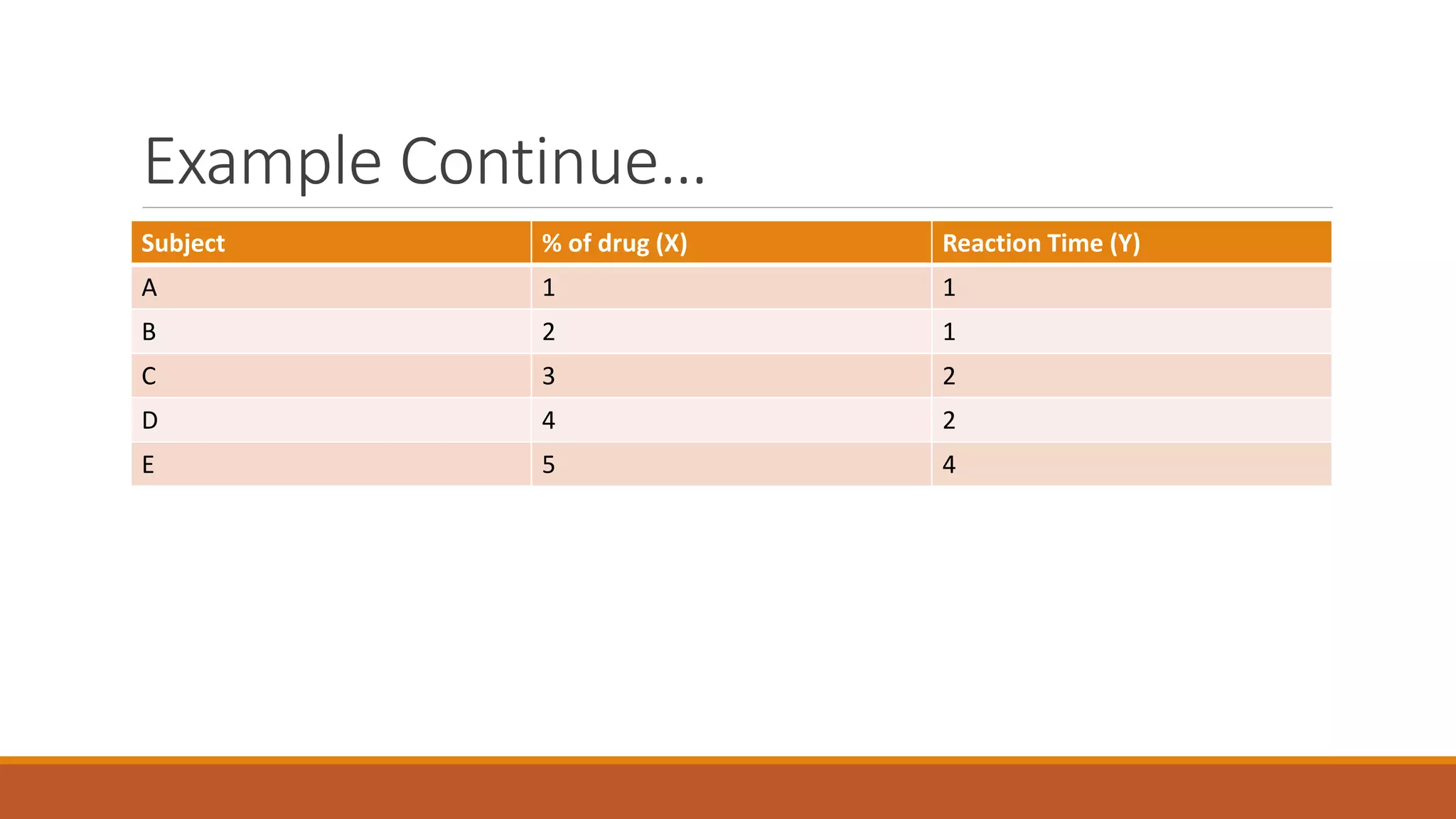
Suppose the company administers this drug on 5 subjects and obtains the following information:
Example Continue…
Subject % of drug (X) Reaction Time (Y)
A 1 1
B 2 1
C 3 2
D 4 2
E 5 4
Example Continue…
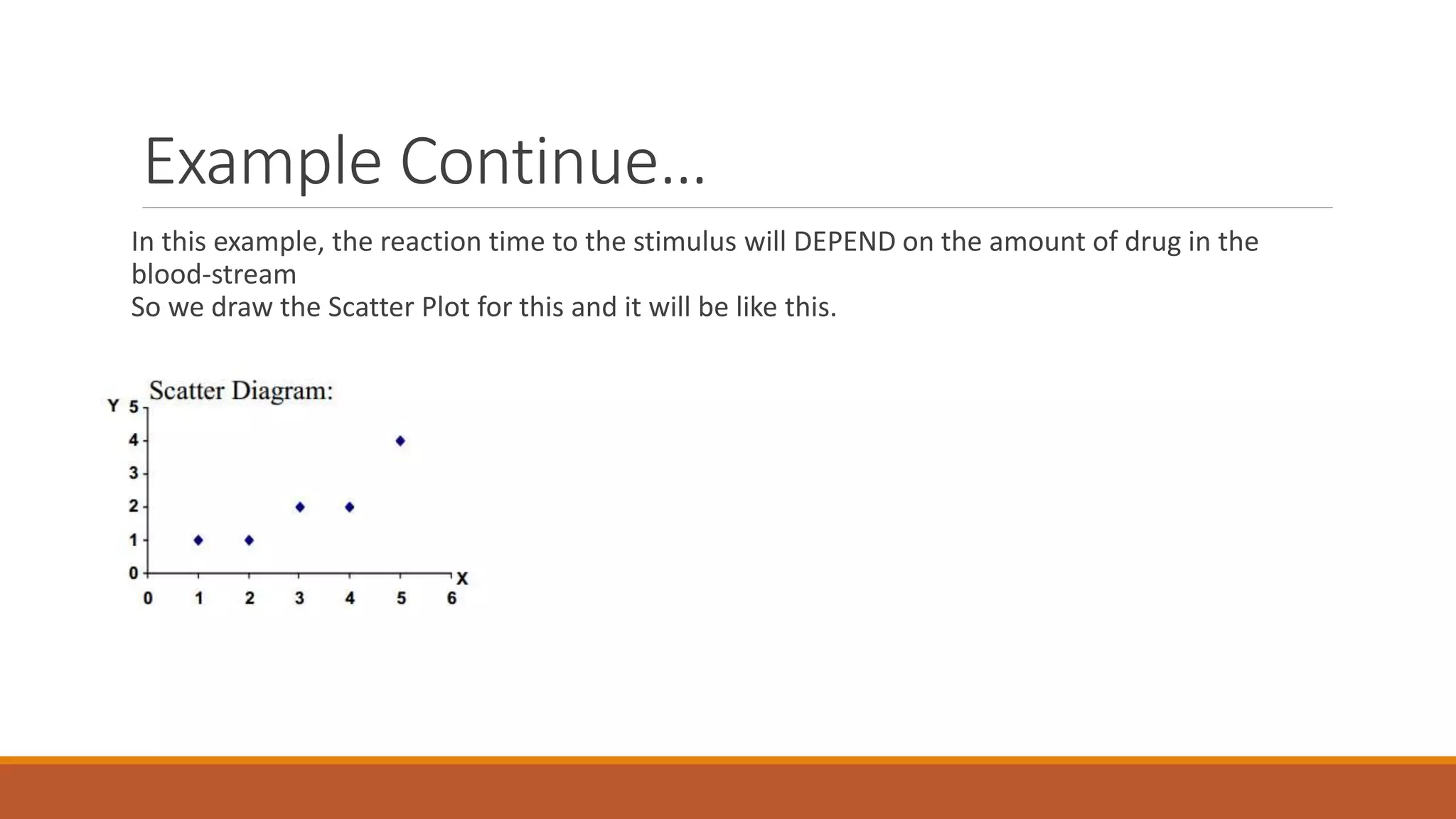
In this example, the reaction time to the stimulus will DEPEND on the amount of drug in the
blood-stream
So we draw the Scatter Plot for this and it will be like this.
Why we Use Scatter Plot
TO find outlier
When we have a pair of numeric data
Correlation
Identify the type of relationship between two quantities.
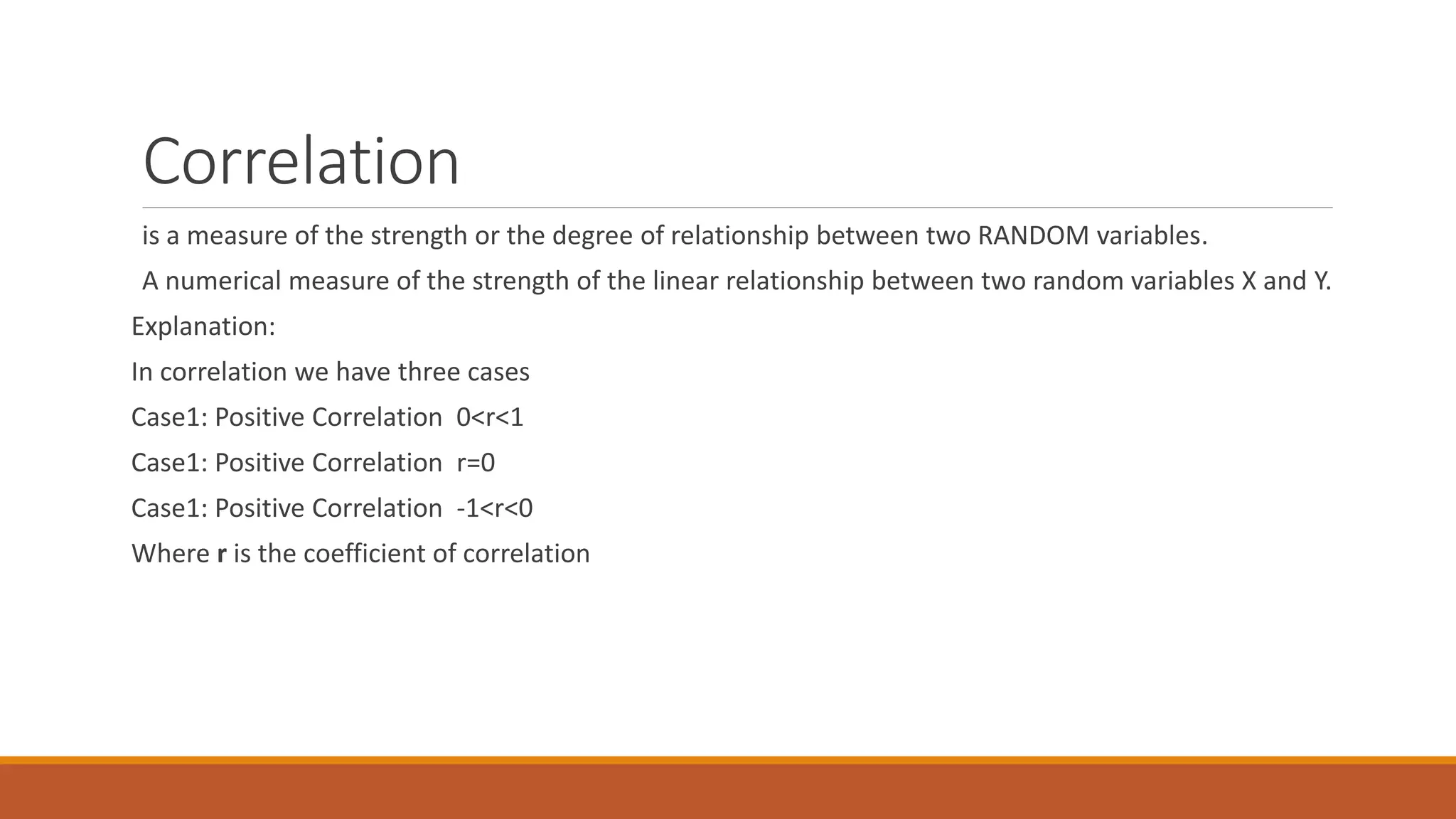
Correlation
is a measure of the strength or the degree of relationship between two RANDOM variables.
A numerical measure of the strength of the linear relationship between two random variables X and Y.
Explanation:
In correlation we have three cases
Case1: Positive Correlation 0<r<1
Case1: Positive Correlation r=0
Case1: Positive Correlation -1<r<0
Where r is the coefficient of correlation
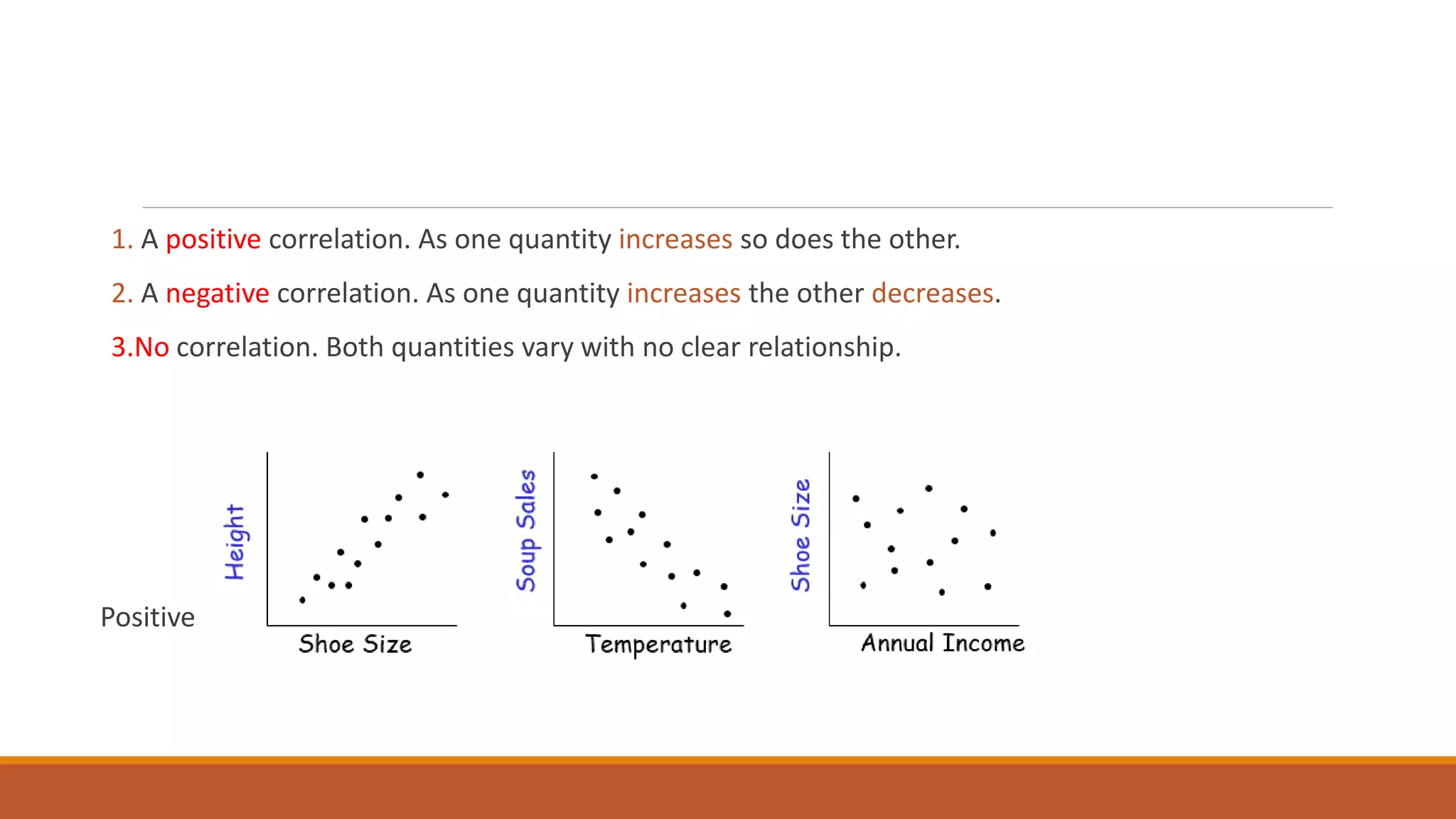
1. A positive correlation. As one quantity increases so does the other.
2. A negative correlation. As one quantity increases the other decreases.
3.No correlation. Both quantities vary with no clear relationship.
Positive Correlation Negative Correlation No Correlation
Example
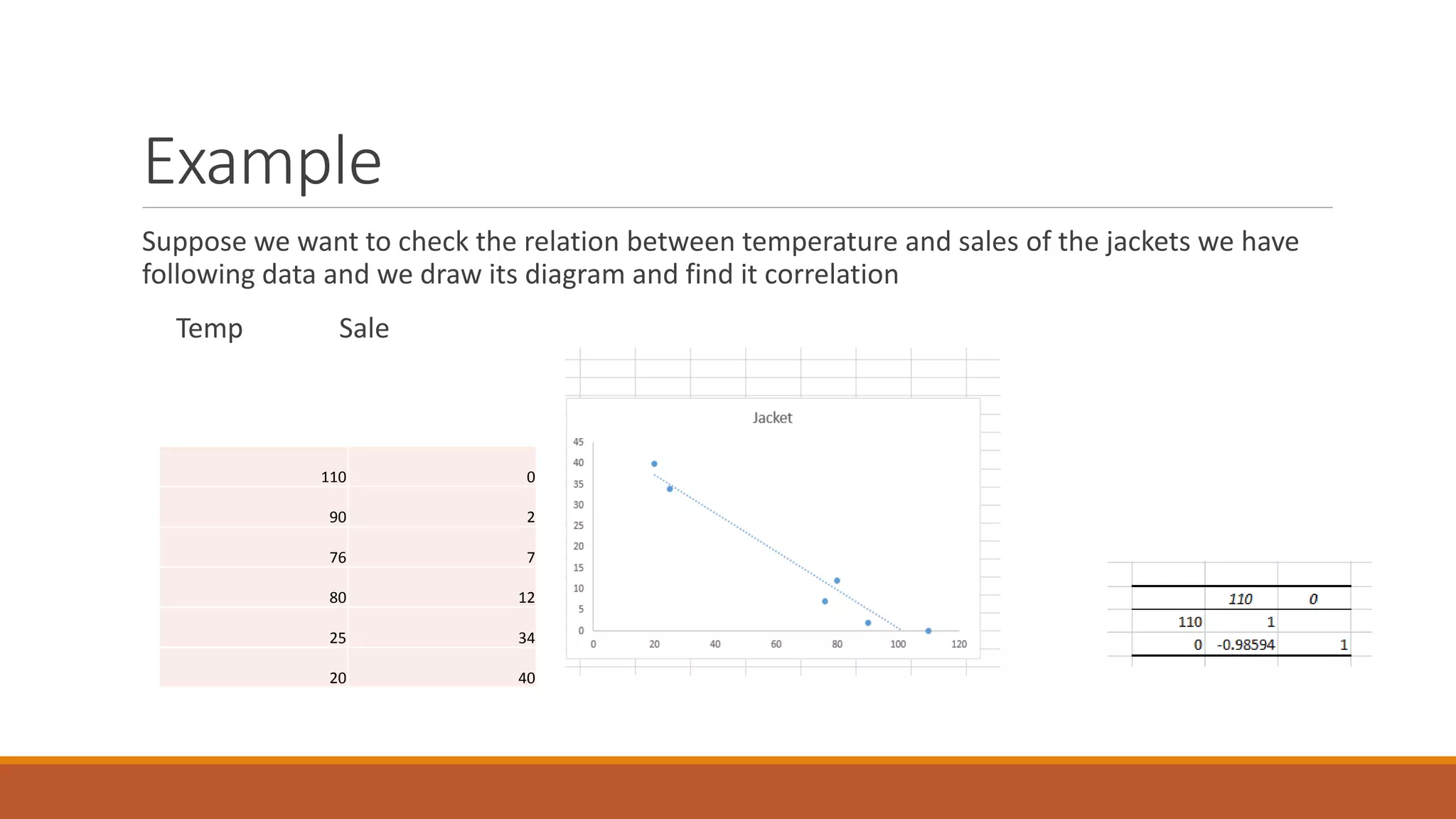
Suppose we want to check the relation between temperature and sales of the jackets we have
following data and we draw its diagram and find it correlation
Temp Sale
Correlation
110 0
90 2
76 7
80 12
25 34
20 40
Example in detail
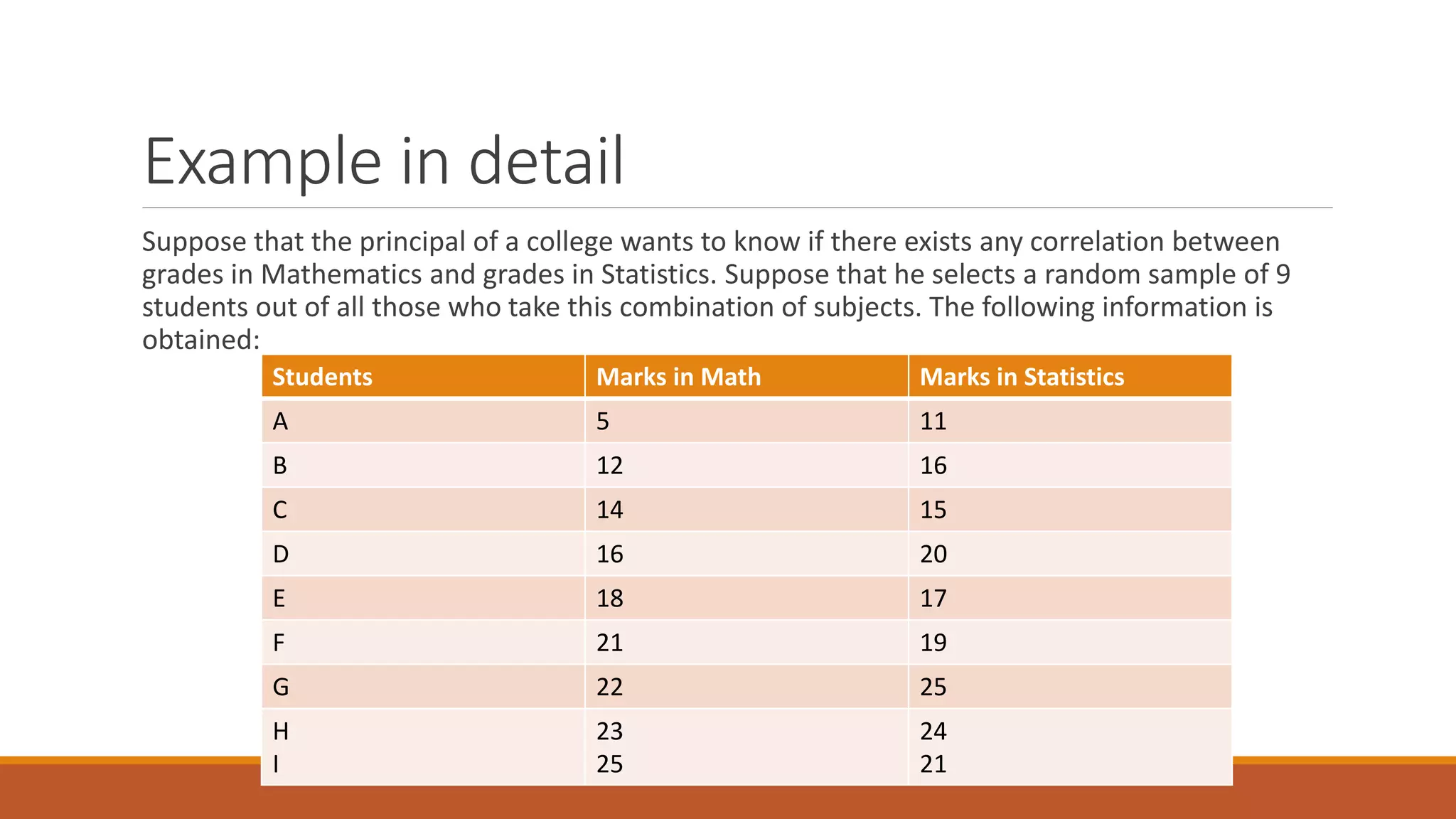
Suppose that the principal of a college wants to know if there exists any correlation between
grades in Mathematics and grades in Statistics. Suppose that he selects a random sample of 9
students out of all those who take this combination of subjects. The following information is
obtained:
Students Marks in Math Marks in Statistics
A 5 11
B 12 16
C 14 15
D 16 20
E 18 17
F 21 19
G 22 25
H
I
23
25
24
21
Continue…
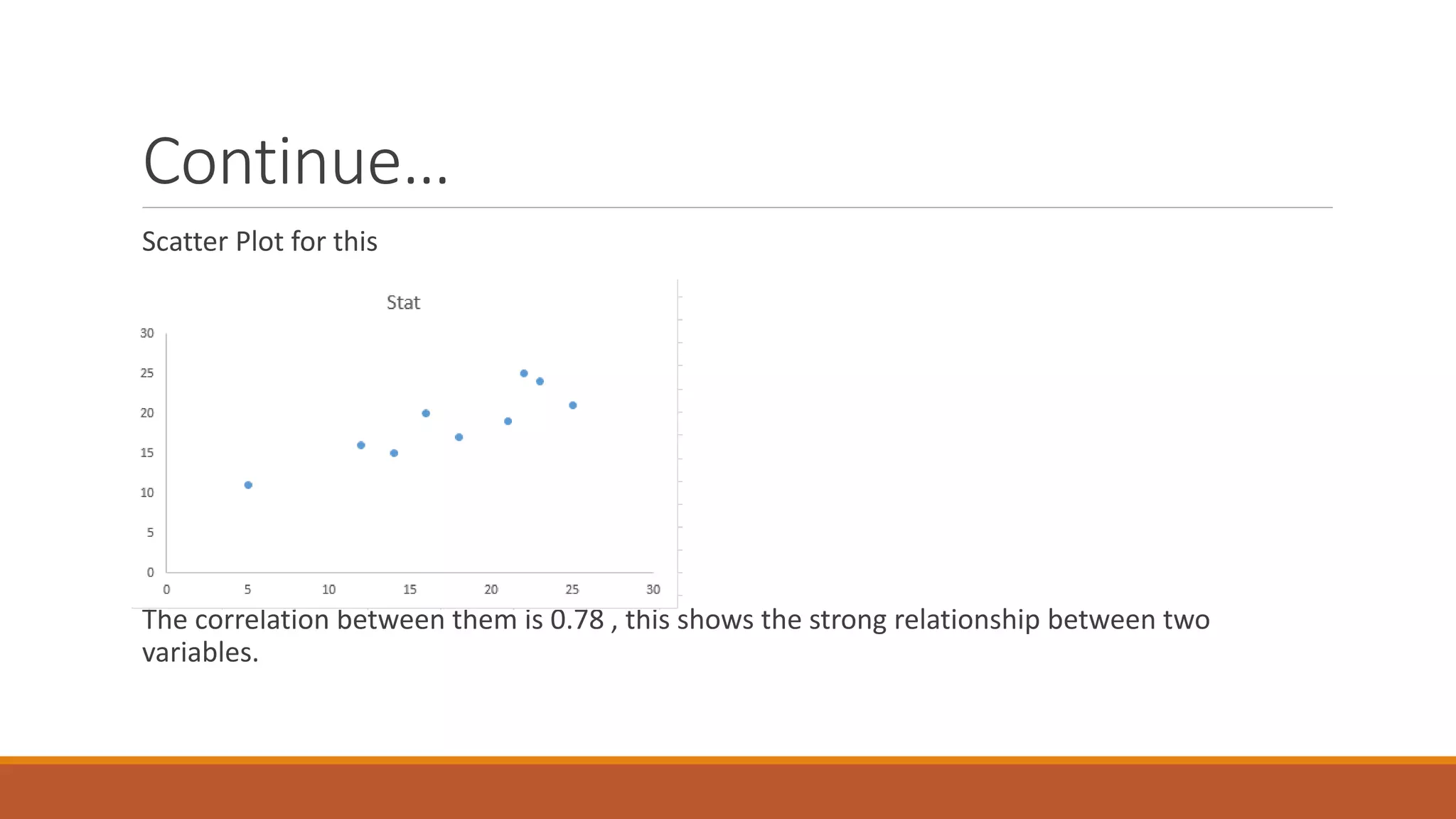
Scatter Plot for this
The correlation between them is 0.78 , this shows the strong relationship between two
variables.
INTERPRETATION
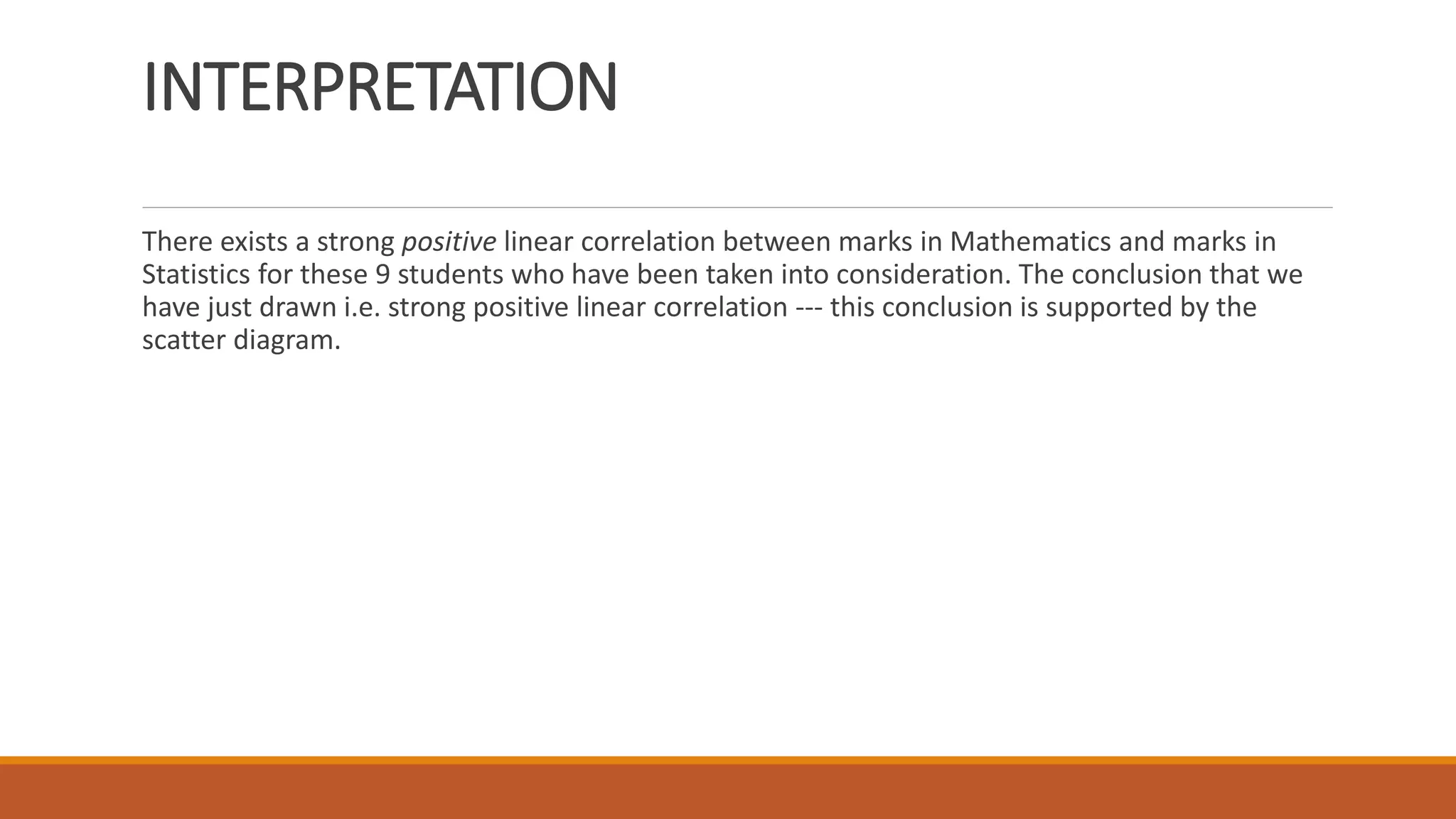
There exists a strong positive linear correlation between marks in Mathematics and marks in
Statistics for these 9 students who have been taken into consideration. The conclusion that we
have just drawn i.e. strong positive linear correlation --- this conclusion is supported by the
scatter diagram.
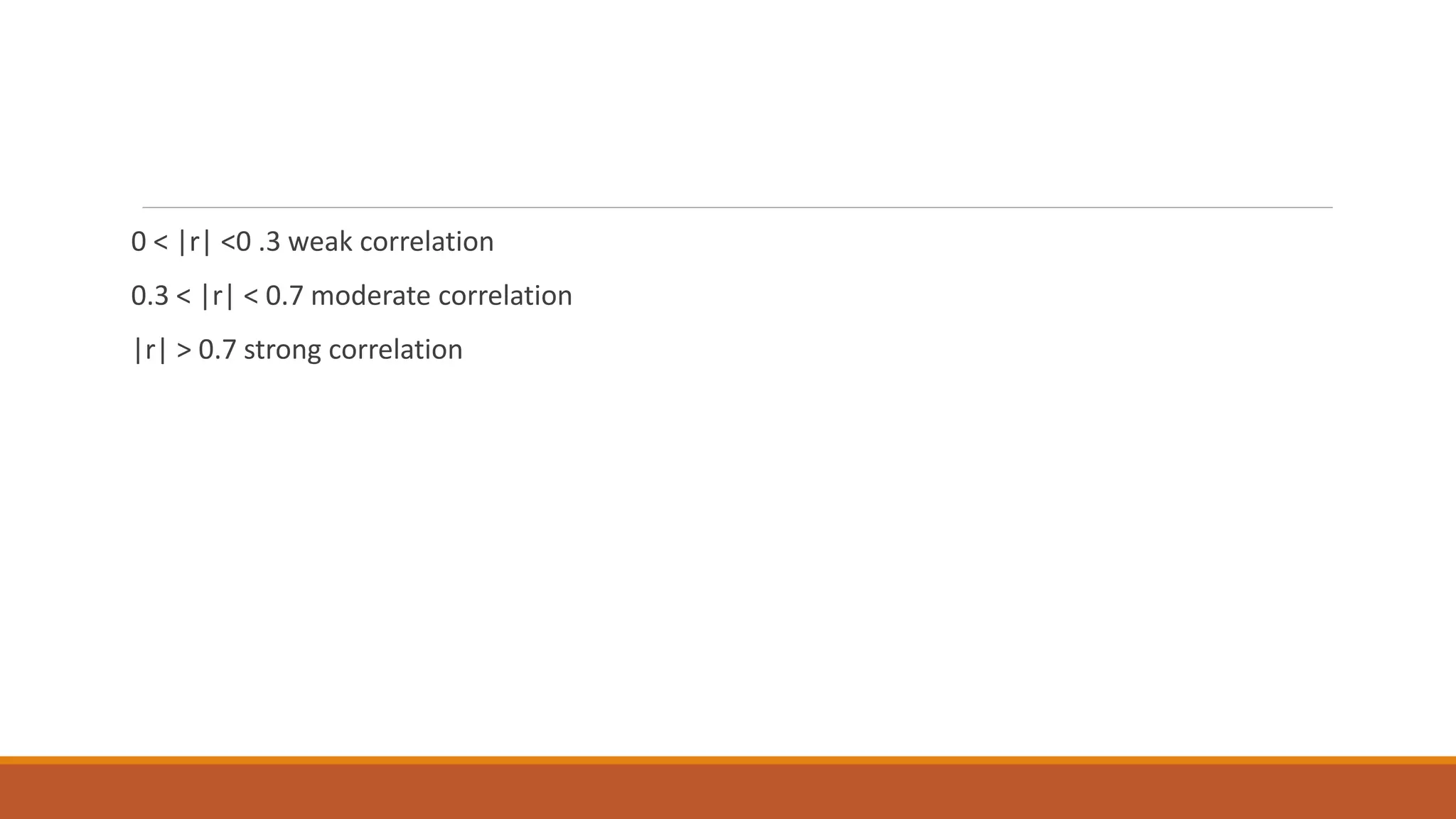
0 < |r| <0 .3 weak correlation
0.3 < |r| < 0.7 moderate correlation
|r| > 0.7 strong correlation
Tool Used
We have number of tools to draw scatter plot , but in this case we use a very simple tool
Microsoft Excel, because this tool is approachable to every one and easy to use as well.
You can use SPSS scatter plot as well.
How to draw Scatter plot on Excel 2013
Open excel 2013 from window explorer
Click on empty workbook
Add your data on the workbook
After adding select your data
Go to INSERT tab in the bar menu
There is an image for Scatter plot
Click on it and it will create a scatter plot
Continue…
You can set the trend line by right click on the diagram , it will show you the format plot area and
you can easily draw a trend line on the relationship.
Now to find the correlation click on the Data on the Menu Bar.
You can see the an option of Data analysis on the top right.
Click on data analysis and find correlation option draw your input and output range and
correlation will be calculated.
Scatter plot- Complete

Scatter plot- Complete

  • 1.
  • 2.
  • 3.
    Learning Objectives At theEnd of this presentation We will get brief ideas about Scatter Plot create a scatterplot to graphically depict the relationship between 2 quantitative variables describe the information that a scatterplot conveys about the relationship between 2 quantitative variables: form, direction, strength etc.
  • 4.
    Continue.. calculate the correlationcoefficient between 2 quantitative variables using technology. interpret the value of the correlation coefficient How to draw in Excel 2013
  • 5.
    Scatter Plot Background… On numerousoccasions, our interest lies not in just one single variable but in two, three, four or more variables. For example, if we talk about the yield of a crop, we realize that the yield of any crop depends on a variety of factors --- the fertility of the soil, the type of fertilizer used, the amount of rainfall, and so on. Now we discuss about bivariate variable.
  • 6.
    Scatter Plot A scatterplot is a graph of a collection of ordered pairs (x,y). The graph looks like a bunch of dots, but some of the graphs are a general shape or move in a general direction.
  • 7.
    Example An important concernfor any pharmaceutical company producing drugs is to determine how a particular drug will affect one’s perception or general awareness. Suppose one such company wants to establish a relationship between the PERCENTAGE of a drug in the blood-stream and the LENGTH OF TIME it takes to respond to a stimulus. Suppose the company administers this drug on 5 subjects and obtains the following information:
  • 8.
    Example Continue… Subject %of drug (X) Reaction Time (Y) A 1 1 B 2 1 C 3 2 D 4 2 E 5 4
  • 9.
    Example Continue… In thisexample, the reaction time to the stimulus will DEPEND on the amount of drug in the blood-stream So we draw the Scatter Plot for this and it will be like this.
  • 10.
    Why we UseScatter Plot TO find outlier When we have a pair of numeric data Correlation Identify the type of relationship between two quantities.
  • 11.
    Correlation is a measureof the strength or the degree of relationship between two RANDOM variables. A numerical measure of the strength of the linear relationship between two random variables X and Y. Explanation: In correlation we have three cases Case1: Positive Correlation 0<r<1 Case1: Positive Correlation r=0 Case1: Positive Correlation -1<r<0 Where r is the coefficient of correlation
  • 12.
    1. A positivecorrelation. As one quantity increases so does the other. 2. A negative correlation. As one quantity increases the other decreases. 3.No correlation. Both quantities vary with no clear relationship. Positive Correlation Negative Correlation No Correlation
  • 13.
    Example Suppose we wantto check the relation between temperature and sales of the jackets we have following data and we draw its diagram and find it correlation Temp Sale Correlation 110 0 90 2 76 7 80 12 25 34 20 40
  • 14.
    Example in detail Supposethat the principal of a college wants to know if there exists any correlation between grades in Mathematics and grades in Statistics. Suppose that he selects a random sample of 9 students out of all those who take this combination of subjects. The following information is obtained: Students Marks in Math Marks in Statistics A 5 11 B 12 16 C 14 15 D 16 20 E 18 17 F 21 19 G 22 25 H I 23 25 24 21
  • 15.
    Continue… Scatter Plot forthis The correlation between them is 0.78 , this shows the strong relationship between two variables.
  • 16.
    INTERPRETATION There exists astrong positive linear correlation between marks in Mathematics and marks in Statistics for these 9 students who have been taken into consideration. The conclusion that we have just drawn i.e. strong positive linear correlation --- this conclusion is supported by the scatter diagram.
  • 17.
    0 < |r|<0 .3 weak correlation 0.3 < |r| < 0.7 moderate correlation |r| > 0.7 strong correlation
  • 18.
    Tool Used We havenumber of tools to draw scatter plot , but in this case we use a very simple tool Microsoft Excel, because this tool is approachable to every one and easy to use as well. You can use SPSS scatter plot as well.
  • 19.
    How to drawScatter plot on Excel 2013 Open excel 2013 from window explorer Click on empty workbook Add your data on the workbook After adding select your data Go to INSERT tab in the bar menu There is an image for Scatter plot Click on it and it will create a scatter plot
  • 20.
    Continue… You can setthe trend line by right click on the diagram , it will show you the format plot area and you can easily draw a trend line on the relationship. Now to find the correlation click on the Data on the Menu Bar. You can see the an option of Data analysis on the top right. Click on data analysis and find correlation option draw your input and output range and correlation will be calculated.