
General Ledger Accounting SAP End-User Training
Prerequisites Prior to attending this course, you should have attended or completed the following: SAP Basic Navigation
Course Agenda Introduction Learning Objectives Overview General Ledger Overview General Ledger Accounts Profit Center Park/Post Journal Entries Accruals Recurring Journal Entry Reports Month End Process  Approximate course time: 1 day
Introduction Training Instructors Housekeeping Breaks Restrooms Introduce Yourself Name Department History with AOI Class Expectations
Be mentally engaged Assume best intentions when dealing with conflict Remain open minded Respect each others time – including punctuality,  scheduling and communication Be respectful in our use of electronics One person speaks at a time – with the attention of all Offer input; everyone has value to add Understand what is being said, or ask for clarification No side conversations; it’s distracting and excluding Leave mental baggage at the door Enforce all ground rules Share all relevant information within the allotted time  and “park” other ideas for later Be Positive! Ground Rules
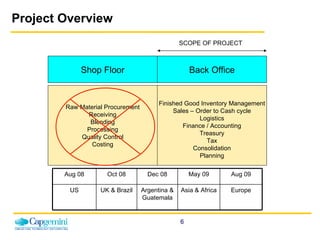
Project Overview Back Office Shop Floor SCOPE OF PROJECT Finished Good Inventory Management Sales – Order to Cash cycle Logistics Finance / Accounting Treasury Tax Consolidation Planning Raw Material Procurement Receiving Blending Processing Quality Control Costing Aug 08 Oct 08 Dec 08 May 09 Aug 09 US UK & Brazil Argentina & Guatemala Asia & Africa Europe
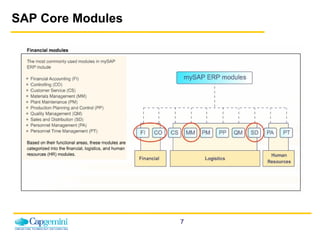
SAP Core Modules
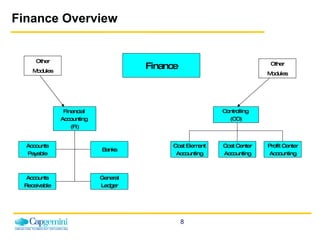
Finance Overview Finance Financial  Accounting  (FI) Controlling  (CO) Accounts Payable Banks Accounts Receivable General Ledger Cost Center Accounting Cost Element Accounting Profit Center Accounting Other Modules Other Modules
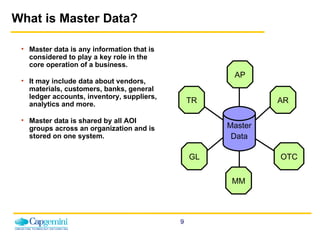
What is Master Data? Master data is any information that is considered to play a key role in the core operation of a business.  It may include data about vendors, materials, customers, banks, general ledger accounts, inventory, suppliers, analytics and more.  Master data is shared by all AOI groups across an organization and is stored on one system. Master Data AP TR GL MM AR OTC
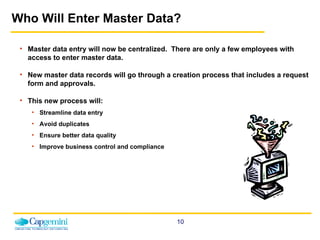
Who Will Enter Master Data? Master data entry will now be centralized.  There are only a few employees with access to enter master data. New master data records will go through a creation process that includes a request form and approvals. This new process will: Streamline data entry Avoid duplicates Ensure better data quality Improve business control and compliance
Course Learning Objectives Upon completion of this course, you will be able to: Understand the following areas/elements in SAP: General Ledger Accounting Profit Centers Journal Entries Recurring Journal Entries Accruals Perform SAP Transactions related to G/L Accounting Run Reports related to G/L Accounting
Course Components Concepts Demonstrations Exercises Task support Work instructions Context sensitive help Participant guides Evaluation
Finance Overview & Master Data
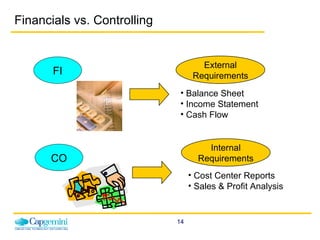
Balance Sheet Income Statement Cash Flow Cost Center Reports Sales & Profit Analysis CO FI External Requirements Internal Requirements Financials vs. Controlling
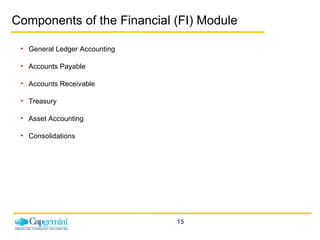
Components of the Financial (FI) Module General Ledger Accounting Accounts Payable Accounts Receivable Treasury Asset Accounting Consolidations
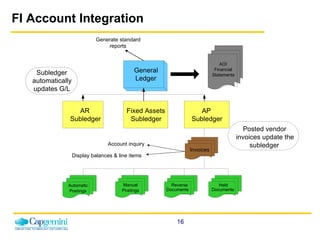
FI Account Integration Subledger automatically updates G/L Generate standard reports General Ledger AR Subledger Fixed Assets Subledger AP Subledger Invoices Manual Postings Reverse Documents Held Documents Automatic Postings AOI Financial Statements Account inquiry Display balances & line items Posted vendor invoices update the subledger
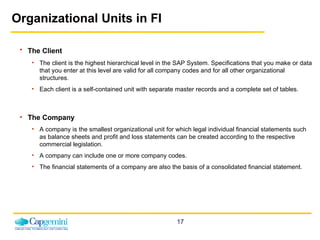
Organizational Units in FI The Client   The client is the highest hierarchical level in the SAP System. Specifications that you make or data that you enter at this level are valid for all company codes and for all other organizational structures.  Each client is a self-contained unit with separate master records and a complete set of tables. The Company A company is the smallest organizational unit for which legal individual financial statements such as balance sheets and profit and loss statements can be created according to the respective commercial legislation. A company can include one or more company codes. The financial statements of a company are also the basis of a consolidated financial statement.
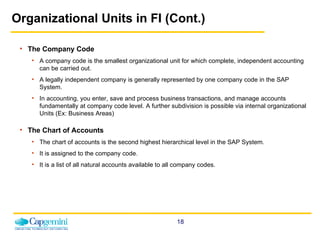
Organizational Units in FI (Cont.) The Company Code A company code is the smallest organizational unit for which complete, independent accounting can be carried out.  A legally independent company is generally represented by one company code in the SAP System.  In accounting, you enter, save and process business transactions, and manage accounts fundamentally at company code level. A further subdivision is possible via internal organizational Units (Ex: Business Areas) The Chart of Accounts The chart of accounts is the second highest hierarchical level in the SAP System.  It is assigned to the company code. It is a list of all natural accounts available to all company codes.
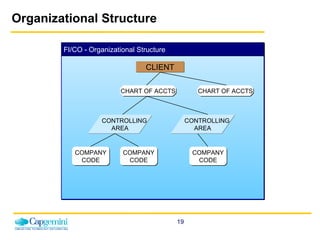
Organizational Structure FI/CO - Organizational Structure CLIENT CHART OF ACCTS CHART OF ACCTS COMPANY CODE COMPANY CODE COMPANY CODE CONTROLLING AREA CONTROLLING AREA
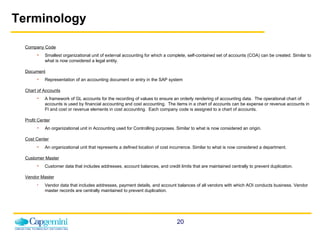
Terminology Company Code Smallest organizational unit of external accounting for which a complete, self-contained set of accounts (COA) can be created. Similar to what is now considered a legal entity. Document Representation of an accounting document or entry in the SAP system Chart of Accounts A framework of GL accounts for the recording of values to ensure an orderly rendering of accounting data.  The operational chart of accounts is used by financial accounting and cost accounting.  The items in a chart of accounts can be expense or revenue accounts in FI and cost or revenue elements in cost accounting.  Each company code is assigned to a chart of accounts. Profit Center An organizational unit in Accounting used for Controlling purposes. Similar to what is now considered an origin. Cost Center An organizational unit that represents a defined location of cost incurrence.   Similar to what is now considered a department. Customer Master   Customer data that includes addresses, account balances, and credit limits that are maintained centrally to prevent duplication. Vendor Master Vendor data that includes addresses, payment details, and account balances of all vendors with which AOI conducts business. Vendor master records are centrally maintained to prevent duplication.
Terminology (Cont.) Posting Key A two-digit numerical key that determines the way line items are posted. This key determines several factors including the account type, type of posting (debit or credit) and layout of entry screens. Account Group Used to categorize accounts that have similar master data requirements. It determines the required master data needed for creating G/L accounts. It also determines the number range in which the customer account should be placed, and whether that number is to be assigned by the user or by the system. Ledger In G/L Accounting, you can use several ledgers in parallel. This allows you to produce financial statements according to different accounting principles, for example.  Fiscal Year Variant A period as defined by the financial calendar.  The fiscal year variant contains the number of posting periods in the fiscal year and the number of special periods.   You can define a maximum of 16 posting periods for each fiscal year in the Controlling component (CO).  Posting Period Variant You can specify which company codes are open for posting in a posting period variant. Posting period variants are cross-company code and you have to assign them to your company codes. The posting periods are then opened and closed simultaneously for all company codes via the posting period variants. Reconciliation Account Summary account for subledgers such as Accounts Receivable, Accounts Payable, and Asset Accounting. No direct postings to reconciliation accounts are allowed.
Terminology (Cont.) Cost Element A cost element classifies the organization's valuated consumption of production factors within a controlling area. A cost element corresponds to a cost-relevant item in the chart of accounts. Primary Cost Element  A cost element whose costs originate outside of CO and accrual costs that are used only for controlling purposes. Open Item Management A stipulation that the items in an account must be used to clear other line items in the same account.  Items must balance out to zero before they can be cleared. The account balance is therefore always equal to the sum of the open items.
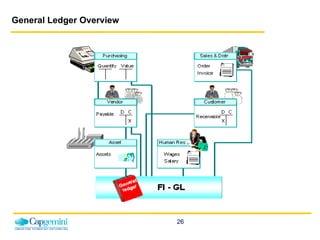
General Ledger Overview General Ledger (FI-GL) is defined  as the sub-module in which all of the financial accounting data for the legal entity is recorded either manually or automatically through integrated processes. Integrated with other application modules and FI sub-modules Financial Data Entry User-defined Balance Sheet / Profit and Loss Statement versions Multiple Currencies External Reporting Includes General Ledger and Profit Center Accounting
General Ledger Functionality FI-GL General Ledger Master records management: GL accounts Document entry:  direct posting, recurring posting, reverse posting, automatic posting,  drill-down capability Periodic processing:  closing, interest calculation, automatic clearing, foreign currency valuation, Tax management, archiving Reporting
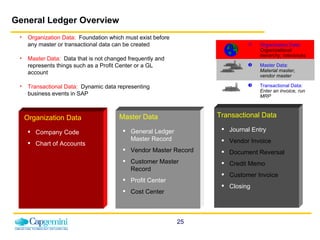
General Ledger Overview Company Code Chart of Accounts Organization Data:   Organizational hierarchy, tolerances Master Data:  Material master, vendor master Transactional Data:  Enter an invoice, run MRP General Ledger Master Record Vendor Master Record Customer Master Record Profit Center Cost Center Organization Data Transactional Data Master Data Journal Entry Vendor Invoice Document Reversal Credit Memo Customer Invoice Closing Organization Data:   Foundation which must exist before any master or transactional data can be created Master Data:   Data that is not changed frequently and represents things such as a Profit Center or a GL account Transactional Data:   Dynamic data representing business events in SAP
General Ledger Overview
Benefits of SAP General Ledger Accounting Provides a comprehensive picture for external accounting and accounts Automatic and simultaneous posting of all sub-ledger items in the appropriate general ledger accounts (reconciliation accounts) Simultaneous updating of general ledger and cost accounting areas Real-time evaluation of and reporting on current accounting data  Integrated with all the other operational areas of a company and ensures that the accounting data is always complete and accurate Actual individual transactions can be checked at any time in real-time processing by displaying the original documents, line items, and transaction figures at various levels like Account Information, Journals, Totals/Transactional figures and Balance Sheet Evaluations, etc.
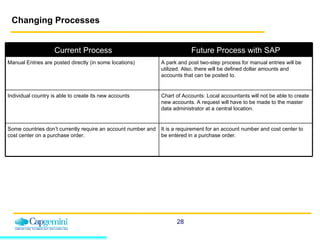
Changing Processes Current Process Future Process with SAP Manual Entries are posted directly (in some locations) A park and post two-step process for manual entries will be utilized. Also, there will be defined dollar amounts and accounts that can be posted to. Individual country is able to create its new accounts Chart of Accounts: Local accountants will not be able to create new accounts. A request will have to be made to the master data administrator at a central location.  Some countries don’t currently require an account number and cost center on a purchase order. It is a requirement for an account number and cost center to be entered in a purchase order.
General Ledger Account Master Records A General Ledger Account master record contains information about the account that controls how business transactions are posted to it and how it is managed. Once Components of the Chart of Accounts and Company Code segments have been defined, a G/L Account master record is created. A master record can be created in one step for both the Chart of Accounts and the Company Code.  This is known as creating the master record centrally.
Types of General Ledger Master Data Accounts  Track the effect of transactions on a balance sheet or income statement Type of GL account (balance sheet, profit and loss) Used to manage debit and credit entries resulting from business transactions affecting assets, liabilities, owners’ equity, revenues and expenses Account groups Used to categorize accounts that have similar master data requirements Determine the required master data needed for creating GL accounts Determine the number range in which the customer account should be placed, and whether that number is to be assigned by the user or by the system
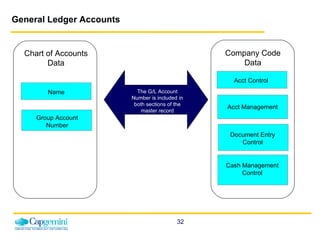
Organization of G/L Master Data Every G/L account created is assigned to a Chart of Accounts (CoA) One or more company codes can be assigned to a single Chart of Accounts    known as the Operational CoA at the Company level G/L accounts contain both CoA-specific and company code-specific data CoA-specific data include the: G/L account name and number Profit and loss or balance sheet account indicator Account group The account group specifies the account number range and determines the account field layout (Required, Optional or Suppressed) Company code-specific data include the: Currency type and indicator  Tax information  Reconciliation account type
General Ledger Accounts   Chart of Accounts Data Name Company Code Data Acct Management Document Entry Control Acct Control Group Account Number The G/L Account Number is included in both sections of the master record Cash Management Control
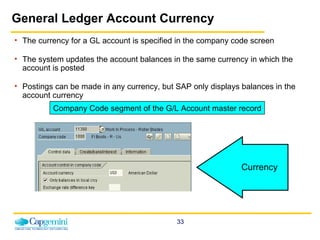
General Ledger Account Currency The currency for a GL account is specified in the company code screen The system updates the account balances in the same currency in which the account is posted Postings can be made in any currency, but SAP only displays balances in the account currency Currency Company Code segment of the G/L Account master record
General Ledger Accounts G/L accounts have transaction figures that record changes to the account during a posting period G/L accounts are oriented towards external reporting G/L accounts are classified as either balance sheet or income statement accounts Budgeting will be performed at a G/L Account level, by profit center Postings to Expense/Revenue G/L Accounts require a cost object (Cost Center/WBS Element/Profit Center), which provides additional information for internal reporting G/L Accounts can be Blocked for posting G/L Accounts can be Marked for Deletion but not Deleted
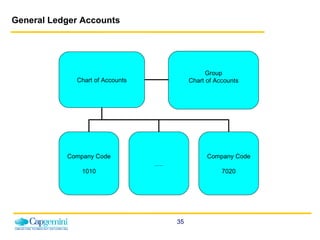
General Ledger Accounts Chart of Accounts Company Code 1010 … . Company Code 7020 Group Chart of Accounts
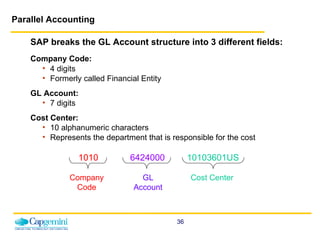
SAP breaks the GL Account structure into 3 different fields: Company Code:   4 digits  Formerly called Financial Entity GL Account:   7 digits Cost Center:  10 alphanumeric characters Represents the department that is responsible for the cost 1010  6424000   10103601US Parallel Accounting Company Code GL Account Cost Center
Parallel Accounting In SAP, each GAAP (Generally Accepted Accounting Principle) is represented by a ledger.  Except for the Brazil, all the countries (company codes) will have two ledgers for accounting transactions. (Brazil will have three ledgers). Leading ledger i.e. local  GAAP, general  local (financial) year Non leading ledger i.e. US  GAAP and  fiscal(financial) year All the transactions will be made to leading ledger and will automatically be flowed to non-leading ledgers.  However, for any adjustment for local requirements all countries will post to only non-leading ledgers through specific transactions. All the ledgers are also capable of providing reports in Group currency or any other additional currency.
Profit Center Accounting In SAP, a Profit Center is a “bucket” where revenues can be posted and costs can be assigned, planned and reported on. Each revenue-producing location will be represented by a profit center. For AOI purposes, a profit center is an origin of tobacco and a profit center group is a group of profit centers/origins, such as a region. All revenue postings require a profit center. All cost centers are associated to a profit center to allow for reporting such as a profit and loss statement for a specific location. Profit centers are not company code-specific. Profit centers are assigned to the AOI Inc. Controlling Area (CAOI), which is the main Controlling organizational unit and the only Controlling area AOI will have.
Profit Center Accounting Profit Center Accounting enables internal profit to be calculated for profit centers. It generates a balanced and complete Balance Sheet and Profit and Loss Statement for each Profit Center. It also compares the overall period costs of the company or profit center with the revenues and internal activities for the same period. It allows real-time evaluations, reporting and analysis on posted plan and actual data.
Profit Center Accounting (cont’d) AOI manages its business on an operational basis as well as a financial basis.  Profit center accounting is how management can monitor its business operationally.    Profit centers can be assigned to alternative hierarchical structures which are completely independent of the standard hierarchy.  These structures are called profit center groups. Profit center groups represent a flexible view of the standard hierarchy and are used for reporting, planning and allocations. The standard hierarchy is a special type of profit center group. It is a tree structure which contains all profit centers in a controlling area and reflects the organizational structure used in Profit Center Accounting. The Standard Hierarchy AOI accounts for all profit centers and is an entity to which all profit centers must be attached upon creation. The master data of a profit center includes the name of the PC, the controlling area it is assigned to, and the profit center’s period of validity, as well as information about the person responsible for the profit center, the profit center’s assignment to a node of the standard hierarchy, and data required for communication (address, telephone number and so on). Profit Center Standard Hierarchy (KCH6N) is covered in FICO master data course.
Cost Center Accounting Cost Center Accounting  is utilized to collect and report operating activity within an organizational unit. A cost center is essentially a department within the company Cost centers represent a distinct and separate accounting unit and may be organized by area of responsibility, location, or activity-related aspects Each cost center is assigned to the Controlling Area CAOI Cost centers can be structured into multiple alternate hierarchies, according to organizational/functional aspects The cost center is the lowest level of the hierarchy – expenses are rolled up to superior levels Cost Center Accounting covered in detail in the AOI Cost Center training course
Cost and Revenue Element Accounting Cost and Revenue Element Accounting  provides you with an overview of the costs and revenues that occur in an organization.  Cost elements describe the origin of costs.  Cost Elements are at the center of all the transactional activity in Controlling. Each posting in Controlling is linked to a Cost Element and at least one controlling object , such as a cost center or an internal order or a WBS (work breakdown structure) element. Cost element are also links to the General Ledger in FI module as no primary cost element can exist without its General Ledger account first being created in FI.
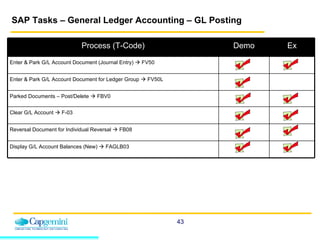
SAP Tasks – General Ledger Accounting – GL Posting Process (T-Code) Demo Ex Enter & Park G/L Account Document (Journal Entry)    FV50 Enter & Park G/L Account Document for Ledger Group    FV50L Parked Documents – Post/Delete    FBV0 Clear G/L Account    F-03 Reversal Document for Individual Reversal    FB08 Display G/L Account Balances (New)    FAGLB03
Document Entry and Change Document When you enter documents (such as a journal entry) the system checks whether the minimum account assignments have been made, for example, document date, posting date, document type, posting key, account number, and amount. If you enter a key that is not defined in the system, the system issues an error message. You have to correct your entry before you can enter any more documents. These checks prevent incorrect, inconsistent, or incomplete entries from being made. To be able to post the document, the debits and credits must balance to zero. This updates the account balances. If the debits do not equal the credits, you can hold the document, or park it until it is complete, without updating G/L account balances. You can change documents that have already been posted. However, the system protects certain fields of a posted document from changes. This includes fields such as:  Amount Posted ,  Account ,  Posting Key ,  Fiscal Year , and  Tax Amount . Data in these fields cannot be changed since it has already led to an update of account balances.
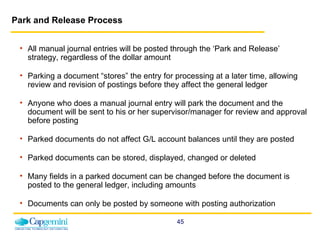
Park and Release Process All manual journal entries will be posted through the ‘Park and Release’ strategy, regardless of the dollar amount Parking a document “stores” the entry for processing at a later time,  allowing review and revision of postings before they affect the general ledger Anyone who does a manual journal entry will park the document and the document will be sent to his or her supervisor/manager for review and approval before posting Parked documents do not affect G/L account balances until they are posted Parked documents can be stored, displayed, changed or deleted Many fields in a parked document can be changed before the document is posted to the general ledger, including amounts Documents can only be posted by someone with posting authorization
General Ledger Account Posting (Journal Entry) For manual journal entries, you enter your document header data (document date, document type, company code, posting date, and currency) and data for the individual line items.  The following two functions are available: Enter & Park G/L Account Document  Enter & Park G/L Account Document   for Ledger Group  These are both single-screen transactions, meaning that you can enter, hold and park documents on one screen with a minimum amount of entries. Manual journal entries (G/L Account Postings) will be done using the ‘Park and Release’ Process
Enter and Park G/L Account Document - Journal Entry (FV50)   AOI will use this transaction to create and and park G/L account documents For G/L Account Postings, you enter your: Document header data, which includes document date, document type, company code, posting date, and currency Data for the individual line items Demonstration and Exercise Use the work instruction “Enter and Park G/L Account Document” to complete the exercise scenario on the system  Refer to your data sheets for appropriate data Demonstration Task Exercise
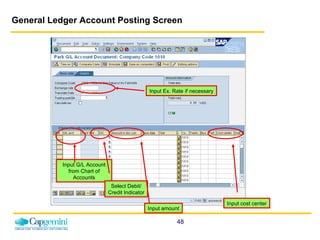
General Ledger Account Posting Screen Input G/L Account from Chart of Accounts Input Ex. Rate if necessary Select Debit/ Credit Indicator Input amount Input cost center
G/L Account Postings for Ledger Group A ledger group is a collection of ledgers assigned to a group. With this function, you can post to a specific ledger group. The document data is posted to all ledgers that are assigned to the ledger group.  If your ledger group only contains one ledger, the data is only posted to that individual ledger. The following conditions apply for the entry of G/L account documents for ledger groups: The system only offers currencies that are assigned to the ledger or to the ledger group. You cannot make postings to accounts that are managed on an open item basis. You cannot make tax-relevant postings. You cannot post to tax accounts directly.
Enter and Park G/L Account Document for Ledger Group (FV50L)   AOI will use this transaction to enter and park G/L account documents for a ledger group.  Demonstration and Exercise Use the work instruction “Enter and Park G/L Account Document for Ledger Group” to complete the exercise scenario on the system  Demonstration
Post/Delete Parked Documents (FBV0)   You can also post or delete parked documents in this transaction. If you know the document number, enter the company code, document number, and FY. If you do not know the document number, click the  Document   List box .   On the selection screen that follows, enter the appropriate selection criteria and choose  Execute .  The system then generates a list containing the documents that match these criteria. From there you can select the required document(s) and Delete. Make sure to Save! Demonstration Task Exercise
Clearing General Ledger Accounts   The SAP System offers the following procedures for accounts with open item management: Posting with clearing Manual account clearing The following prerequisites must be fulfilled in order for open items to be cleared: The accounts must be managed on an open item basis.  The items to be cleared cannot trigger a posting, for example, cash discounts or exchange rate differences. The items cannot be special G/L transactions. You use special functions to clear these items.
Clear G/L Account (F-03)   In this transaction, you can only clear open items from one account. You can use this function to clear debits and credits that balance to zero (for example, invoices and payments that you have already entered).   Result:  The system assigns the clearing date and clearing document number to each open item cleared. Demonstration and Exercise Use the work instruction “F-03 Clear G/L Account” to complete the exercise scenario on the system  Refer to your data sheets for appropriate data Demonstration Task Exercise
Reversing a Document There are times when a manual journal entry that has been previously posted needs to be reversed.  This can occur for a variety of reasons such as to correct data entry errors, accruals, etc.   The main reason for doing a reversal is that some data field (such as G/L account, cost center, vendor, customer) was entered incorrectly.  If you have entered an incorrect document, you can reverse it, thereby also clearing the open items. However, AP invoices can't be reversed once they've been paid. Instead of User A creating another manual journal entry to reverse the posted entry (which must then be parked, until approved and posted by User B), the previously posted entry can just be reversed.  Only a user that is authorized to post a journal entry can reverse a journal entry. 
Reversing a Document (cont’d) In addition, the posting date and posting period of the reversal can be manually entered if it should be other than the date and time period of the physical reversal of the entry.  If the reverse document cannot be posted to the same period as the original document, enter the posting date and the posting period of the reversing document. In SAP, instead of entering a description, codes are used to indicate the reason an entry needs to be reversed. These reason codes are predefined in SAP.  If the document to be reversed is a check payment, you will also have to specify a void reason code. You can display permitted void reason codes with the possible entries button. Reasons 1-3 can only be used by the system. When reversing a document, the document and the reverse document increase the account transaction debit and credit figures by the same amount.
Reversal Document for Individual Reversal (FB08)   If necessary, a journal entry can be reversed. This transaction will also be used to reverse an AP vendor invoice, payment document or AR customer invoice, for example. Demonstration and Exercise Use the work instruction “FB08 Reversal Document for Individual Reversal” to complete the exercise scenario on the system  Refer to your data sheets for appropriate data Demonstration Task Exercise
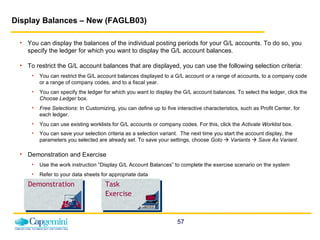
Display Balances – New (FAGLB03)   You can display the balances of the individual posting periods for your G/L accounts. To do so, you specify the ledger for which you want to display the G/L account balances.   To restrict the G/L account balances that are displayed, you can use the following selection criteria: You can restrict the G/L account balances displayed to a G/L account or a range of accounts, to a company code or a range of company codes, and to a fiscal year. You can specify the ledger for which you want to display the G/L account balances. To select the ledger, click the  Choose Ledger  box. Free Selections : In Customizing, you can define up to five interactive characteristics, such as Profit Center, for each ledger.  You can use existing worklists for G/L accounts or company codes. For this, click the  Activate Worklist  box. You can save your selection criteria as a selection variant.  The next time you start the account display, the parameters you selected are already set. To save your settings, choose  Goto      Variants      Save As Variant .   Demonstration and Exercise Use the work instruction “Display G/L Account Balances” to complete the exercise scenario on the system  Refer to your data sheets for appropriate data Demonstration Task Exercise
Accruals An accrual entry is created to record expenses incurred in the current period, which will not be paid until the next period Accruals are performed for reporting purposes so that period profits can be accurately calculated After an accrual is created in SAP, the Reverse Accrual Documents transaction is performed, at the beginning of the next period, to reverse the accrual which was posted when the expense was incurred Accruals do not automatically reverse in the following period  The accruals are reversed with a batch job running the first day of every month as part of the month end process The reversal date of the accruals should always be the first day of each month The document type xx has been created for accrual postings
Freight Accruals Freight accrual will be made from the shipment cost document Different scenarios where AOI will pay the freight for a sales order Customer may ask AOI to pay the freight on their behalf and bill them on the invoice for the sale  Freight cost is an AOI expense and will be paid by AOI The freight cost is not known at the time of shipping and it’s a customer cost  The decision as to whether or not to accrue freight will be made on the terms of sale.  The accrual for freight will be based on a shipment cost condition type which identifies the account numbers. The amounts to accrue will be based on freight rates and shipping points, which will maintained by OTC.
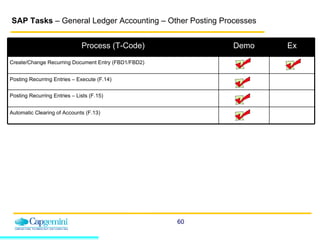
SAP Tasks  – General Ledger Accounting – Other Posting Processes Process (T-Code) Demo Ex Create/Change Recurring Document Entry (FBD1/FBD2) Posting Recurring Entries – Execute (F.14) Posting Recurring Entries – Lists (F.15) Automatic Clearing of Accounts (F.13)
Recurring Journal Entry Recurring Journal Entries should/will be used for business transactions that are repeated regularly, such as payment of rent or insurance.  They impact the same accounts for the same amounts and posting keys every month.  The following data never changes in recurring entries:  Posting key   Account   Amounts Recurring Journal Entries will be exactly the same each time Recurring Journal Entries are not posted to the system on creation, but stored as a transaction to be posted at specific intervals Recurring Journal Entries can be posted during the month-end closing process or during periodic processing Recurring Journal Entries cannot be used for cross-company transactions If necessary, a recurring document entry can be reversed using transaction FB08.
Recurring Journal Entry (Cont.) Change recurring documents Similar to changing any other document, except that you can also change the amounts in the individual line items and the recurring posting data Delete recurring documents You must set the deletion flag in the header You can display recurring documents: To be carried out in a particular period Not to be carried out in a particular period To be carried out during the next run of the recurring entry program
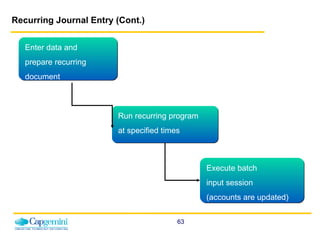
Recurring Journal Entry (Cont.) Enter data and  prepare recurring document Run recurring program at specified times Execute batch  input session (accounts are updated)
Recurring Journal Entry (Cont.) You enter a recurring entry original document once. In this document, you enter the data necessary for posting accounting documents, such as the amount, account number, and posting key. You also enter control information: Day of the first run, day of the last run, and scheduling dates.  Recurring entries are posted through a separate process than other journal entries. The recurring entry program at will be run at required intervals. The program selects any recurring entry document whose next run data is the same as the date of the settlement period and creates a batch input session. The posting of recurring entries should be based upon review of the recurring entry list to review for any changes needed and timeliness of posting.   To enter a Recurring Journal Entry, the following information must be provided: GL Account numbers Posting frequency Amounts  Posting keys (debit/credit) First run and last run Posting frequency Document type
Recurring Journal Entry – Periodic Processing Once the necessary information has been entered, the next step is to use transaction F.14 to manually create posting documents from recurring documents.   Document and posting dates are the same as the settlement period It is not possible to execute the same settlement run twice The settlement period has to agree with the frequency defined at the time the recurring document entry is entered The third step is to use transaction F.14 to post the recurring Journal Entry into the SAP system Only at this point the document is posted in SAP
Create Recurring Document Entry (FBD1)   There will be a batch job which will post these documents periodically. Demonstration and Exercise Use the work instruction “FBD1 Create Recurring Document Entry” to complete the exercise scenario on the system  Refer to your data sheets for appropriate data Demonstration Task Exercise
Change Recurring Document Entry (FBD2)   Enter the number of a recurring entry document. If you do not know the document number, you can search for it by choosing  Document List . To edit one or more line items, choose each line item and change the data contained in it.  You can edit the document header to   make changes in the document header fields  Reference  and  Doc. header text . You can edit the recurring entries data and make changes in the following fields: Next run on, Last run on, Interval in months, Run date, Run schedule, Number of runs and Deletion indicator. Make sure to Save! Demonstration
Posting Recurring Entries - Execute (F.14)   Create Posting Documents from Recurring Documents This transaction is used to post recurring documents. The program selects any recurring entry document whose next run data is the same as the date of the settlement period and creates a batch input session.  To post the accounting documents and update the recurring entry documents, you have to process the batch input session created by the program.   Demonstration
Posting Recurring Entries - Lists (F.15)  Use this transaction to view recurring entry original documents, when there is a requirement to view recurring entries for a Company Code.  Recurring entries are set up to be posted in regular intervals in the future.  This process provides the ability to generate a list of all such entries that have been set up.   This list can be used to identify changes to amounts or accounts needed as well as a checklist to make sure all such entries are posted at the right time.  Demonstration
Automatic Clearing (F.13)   Automatic Clearing is used clear open items from customer, vendor and G/L accounts automatically. This applies to GR/IR clearing accounts in particular.  It selects all accounts specified in the value sets that have debit and credit postings.  Only documents with a matching debit and credit will be cleared. Demonstration
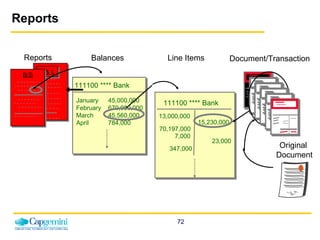
Reporting There are a variety of standard SAP reports which can be run on-line or printed  To run a report it is necessary to set the report parameters on the initial screen and then execute it to run it on-line With most reports, it is possible to ‘drill-down’ on the individual line items and access the document entry screens which generated the postings
Reports Document/Transaction Line Items Balances Reports P & L 111100 **** Bank January 45,000,000 February  670,000,000 March 45,560,000 April 784,000 111100 **** Bank 13,000,000 15,230,000 70,197,000 7,000 23,000 347,000 B/S Original  Document
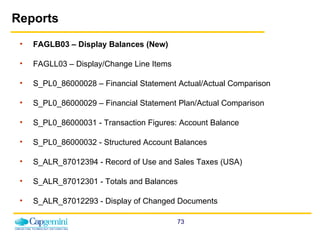
Reports FAGLB03 – Display Balances (New) FAGLL03 – Display/Change Line Items S_PL0_86000028 – Financial Statement Actual/Actual Comparison S_PL0_86000029 – Financial Statement Plan/Actual Comparison S_PL0_86000031 - Transaction Figures: Account Balance  S_PL0_86000032 - Structured Account Balances  S_ALR_87012394 - Record of Use and Sales Taxes (USA)  S_ALR_87012301 - Totals and Balances  S_ALR_87012293 - Display of Changed Documents
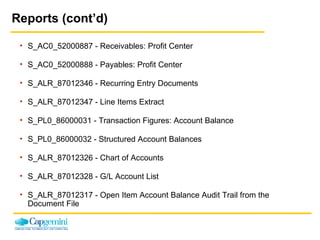
Reports (cont’d) S_AC0_52000887 - Receivables: Profit Center  S_AC0_52000888 - Payables: Profit Center  S_ALR_87012346 - Recurring Entry Documents  S_ALR_87012347 - Line Items Extract  S_PL0_86000031 - Transaction Figures: Account Balance  S_PL0_86000032 - Structured Account Balances  S_ALR_87012326 - Chart of Accounts  S_ALR_87012328 - G/L Account List  S_ALR_87012317 - Open Item Account Balance Audit Trail from the  Document File
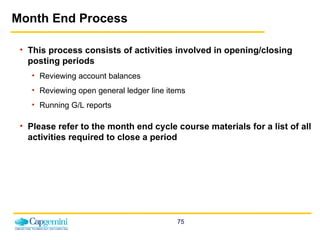
Month End Process This process consists of activities involved in opening/closing posting periods Reviewing account balances  Reviewing open general ledger line items Running G/L reports Please refer to the month end cycle course materials for a list of all activities required to close a period
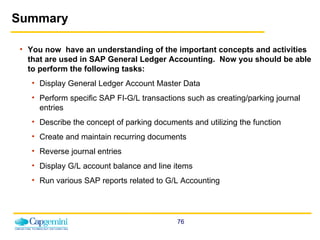
Summary You now  have an understanding of the important concepts and activities that are used in SAP General Ledger Accounting.  Now you should be able to perform the following tasks: Display General Ledger Account Master Data Perform specific SAP FI-G/L transactions such as creating/parking journal entries Describe the concept of parking documents and utilizing the function Create and maintain recurring documents Reverse journal entries Display G/L account balance and line items Run various SAP reports related to G/L Accounting
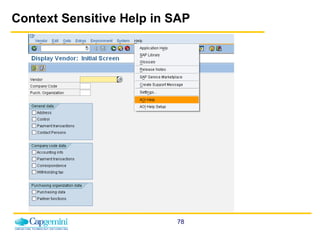
Where can I find Help? 3 Steps to Follow: Context Sensitive Help in SAP AOI Help in SAP will take you directly to the work instruction for the  t-code that you need help with.  See next slide. Super-users Super-users will be identified from each department or location to help you with your daily tasks after go-live. Help Desk Submit Help Desk Ticket to local IS Help Desk via phone or e-mail
Context Sensitive Help in SAP
Questions and Answers
Thank You! Thank you for making this class a success!

SAP FICO General Ledger EndUser Training | www.sapdocs.info

  • 1.
    General Ledger AccountingSAP End-User Training
  • 2.
    Prerequisites Prior toattending this course, you should have attended or completed the following: SAP Basic Navigation
  • 3.
    Course Agenda IntroductionLearning Objectives Overview General Ledger Overview General Ledger Accounts Profit Center Park/Post Journal Entries Accruals Recurring Journal Entry Reports Month End Process Approximate course time: 1 day
  • 4.
    Introduction Training InstructorsHousekeeping Breaks Restrooms Introduce Yourself Name Department History with AOI Class Expectations
  • 5.
    Be mentally engagedAssume best intentions when dealing with conflict Remain open minded Respect each others time – including punctuality, scheduling and communication Be respectful in our use of electronics One person speaks at a time – with the attention of all Offer input; everyone has value to add Understand what is being said, or ask for clarification No side conversations; it’s distracting and excluding Leave mental baggage at the door Enforce all ground rules Share all relevant information within the allotted time and “park” other ideas for later Be Positive! Ground Rules
  • 6.
    Project Overview BackOffice Shop Floor SCOPE OF PROJECT Finished Good Inventory Management Sales – Order to Cash cycle Logistics Finance / Accounting Treasury Tax Consolidation Planning Raw Material Procurement Receiving Blending Processing Quality Control Costing Aug 08 Oct 08 Dec 08 May 09 Aug 09 US UK & Brazil Argentina & Guatemala Asia & Africa Europe
  • 7.
  • 8.
    Finance Overview FinanceFinancial Accounting (FI) Controlling (CO) Accounts Payable Banks Accounts Receivable General Ledger Cost Center Accounting Cost Element Accounting Profit Center Accounting Other Modules Other Modules
  • 9.
    What is MasterData? Master data is any information that is considered to play a key role in the core operation of a business. It may include data about vendors, materials, customers, banks, general ledger accounts, inventory, suppliers, analytics and more. Master data is shared by all AOI groups across an organization and is stored on one system. Master Data AP TR GL MM AR OTC
  • 10.
    Who Will EnterMaster Data? Master data entry will now be centralized. There are only a few employees with access to enter master data. New master data records will go through a creation process that includes a request form and approvals. This new process will: Streamline data entry Avoid duplicates Ensure better data quality Improve business control and compliance
  • 11.
    Course Learning ObjectivesUpon completion of this course, you will be able to: Understand the following areas/elements in SAP: General Ledger Accounting Profit Centers Journal Entries Recurring Journal Entries Accruals Perform SAP Transactions related to G/L Accounting Run Reports related to G/L Accounting
  • 12.
    Course Components ConceptsDemonstrations Exercises Task support Work instructions Context sensitive help Participant guides Evaluation
  • 13.
    Finance Overview &Master Data
  • 14.
    Balance Sheet IncomeStatement Cash Flow Cost Center Reports Sales & Profit Analysis CO FI External Requirements Internal Requirements Financials vs. Controlling
  • 15.
    Components of theFinancial (FI) Module General Ledger Accounting Accounts Payable Accounts Receivable Treasury Asset Accounting Consolidations
  • 16.
    FI Account IntegrationSubledger automatically updates G/L Generate standard reports General Ledger AR Subledger Fixed Assets Subledger AP Subledger Invoices Manual Postings Reverse Documents Held Documents Automatic Postings AOI Financial Statements Account inquiry Display balances & line items Posted vendor invoices update the subledger
  • 17.
    Organizational Units inFI The Client The client is the highest hierarchical level in the SAP System. Specifications that you make or data that you enter at this level are valid for all company codes and for all other organizational structures. Each client is a self-contained unit with separate master records and a complete set of tables. The Company A company is the smallest organizational unit for which legal individual financial statements such as balance sheets and profit and loss statements can be created according to the respective commercial legislation. A company can include one or more company codes. The financial statements of a company are also the basis of a consolidated financial statement.
  • 18.
    Organizational Units inFI (Cont.) The Company Code A company code is the smallest organizational unit for which complete, independent accounting can be carried out. A legally independent company is generally represented by one company code in the SAP System. In accounting, you enter, save and process business transactions, and manage accounts fundamentally at company code level. A further subdivision is possible via internal organizational Units (Ex: Business Areas) The Chart of Accounts The chart of accounts is the second highest hierarchical level in the SAP System. It is assigned to the company code. It is a list of all natural accounts available to all company codes.
  • 19.
    Organizational Structure FI/CO- Organizational Structure CLIENT CHART OF ACCTS CHART OF ACCTS COMPANY CODE COMPANY CODE COMPANY CODE CONTROLLING AREA CONTROLLING AREA
  • 20.
    Terminology Company CodeSmallest organizational unit of external accounting for which a complete, self-contained set of accounts (COA) can be created. Similar to what is now considered a legal entity. Document Representation of an accounting document or entry in the SAP system Chart of Accounts A framework of GL accounts for the recording of values to ensure an orderly rendering of accounting data. The operational chart of accounts is used by financial accounting and cost accounting. The items in a chart of accounts can be expense or revenue accounts in FI and cost or revenue elements in cost accounting. Each company code is assigned to a chart of accounts. Profit Center An organizational unit in Accounting used for Controlling purposes. Similar to what is now considered an origin. Cost Center An organizational unit that represents a defined location of cost incurrence. Similar to what is now considered a department. Customer Master Customer data that includes addresses, account balances, and credit limits that are maintained centrally to prevent duplication. Vendor Master Vendor data that includes addresses, payment details, and account balances of all vendors with which AOI conducts business. Vendor master records are centrally maintained to prevent duplication.
  • 21.
    Terminology (Cont.) PostingKey A two-digit numerical key that determines the way line items are posted. This key determines several factors including the account type, type of posting (debit or credit) and layout of entry screens. Account Group Used to categorize accounts that have similar master data requirements. It determines the required master data needed for creating G/L accounts. It also determines the number range in which the customer account should be placed, and whether that number is to be assigned by the user or by the system. Ledger In G/L Accounting, you can use several ledgers in parallel. This allows you to produce financial statements according to different accounting principles, for example. Fiscal Year Variant A period as defined by the financial calendar. The fiscal year variant contains the number of posting periods in the fiscal year and the number of special periods. You can define a maximum of 16 posting periods for each fiscal year in the Controlling component (CO). Posting Period Variant You can specify which company codes are open for posting in a posting period variant. Posting period variants are cross-company code and you have to assign them to your company codes. The posting periods are then opened and closed simultaneously for all company codes via the posting period variants. Reconciliation Account Summary account for subledgers such as Accounts Receivable, Accounts Payable, and Asset Accounting. No direct postings to reconciliation accounts are allowed.
  • 22.
    Terminology (Cont.) CostElement A cost element classifies the organization's valuated consumption of production factors within a controlling area. A cost element corresponds to a cost-relevant item in the chart of accounts. Primary Cost Element A cost element whose costs originate outside of CO and accrual costs that are used only for controlling purposes. Open Item Management A stipulation that the items in an account must be used to clear other line items in the same account. Items must balance out to zero before they can be cleared. The account balance is therefore always equal to the sum of the open items.
  • 23.
    General Ledger OverviewGeneral Ledger (FI-GL) is defined as the sub-module in which all of the financial accounting data for the legal entity is recorded either manually or automatically through integrated processes. Integrated with other application modules and FI sub-modules Financial Data Entry User-defined Balance Sheet / Profit and Loss Statement versions Multiple Currencies External Reporting Includes General Ledger and Profit Center Accounting
  • 24.
    General Ledger FunctionalityFI-GL General Ledger Master records management: GL accounts Document entry: direct posting, recurring posting, reverse posting, automatic posting, drill-down capability Periodic processing: closing, interest calculation, automatic clearing, foreign currency valuation, Tax management, archiving Reporting
  • 25.
    General Ledger OverviewCompany Code Chart of Accounts Organization Data: Organizational hierarchy, tolerances Master Data: Material master, vendor master Transactional Data: Enter an invoice, run MRP General Ledger Master Record Vendor Master Record Customer Master Record Profit Center Cost Center Organization Data Transactional Data Master Data Journal Entry Vendor Invoice Document Reversal Credit Memo Customer Invoice Closing Organization Data: Foundation which must exist before any master or transactional data can be created Master Data: Data that is not changed frequently and represents things such as a Profit Center or a GL account Transactional Data: Dynamic data representing business events in SAP
  • 26.
  • 27.
    Benefits of SAPGeneral Ledger Accounting Provides a comprehensive picture for external accounting and accounts Automatic and simultaneous posting of all sub-ledger items in the appropriate general ledger accounts (reconciliation accounts) Simultaneous updating of general ledger and cost accounting areas Real-time evaluation of and reporting on current accounting data Integrated with all the other operational areas of a company and ensures that the accounting data is always complete and accurate Actual individual transactions can be checked at any time in real-time processing by displaying the original documents, line items, and transaction figures at various levels like Account Information, Journals, Totals/Transactional figures and Balance Sheet Evaluations, etc.
  • 28.
    Changing Processes CurrentProcess Future Process with SAP Manual Entries are posted directly (in some locations) A park and post two-step process for manual entries will be utilized. Also, there will be defined dollar amounts and accounts that can be posted to. Individual country is able to create its new accounts Chart of Accounts: Local accountants will not be able to create new accounts. A request will have to be made to the master data administrator at a central location. Some countries don’t currently require an account number and cost center on a purchase order. It is a requirement for an account number and cost center to be entered in a purchase order.
  • 29.
    General Ledger AccountMaster Records A General Ledger Account master record contains information about the account that controls how business transactions are posted to it and how it is managed. Once Components of the Chart of Accounts and Company Code segments have been defined, a G/L Account master record is created. A master record can be created in one step for both the Chart of Accounts and the Company Code. This is known as creating the master record centrally.
  • 30.
    Types of GeneralLedger Master Data Accounts Track the effect of transactions on a balance sheet or income statement Type of GL account (balance sheet, profit and loss) Used to manage debit and credit entries resulting from business transactions affecting assets, liabilities, owners’ equity, revenues and expenses Account groups Used to categorize accounts that have similar master data requirements Determine the required master data needed for creating GL accounts Determine the number range in which the customer account should be placed, and whether that number is to be assigned by the user or by the system
  • 31.
    Organization of G/LMaster Data Every G/L account created is assigned to a Chart of Accounts (CoA) One or more company codes can be assigned to a single Chart of Accounts  known as the Operational CoA at the Company level G/L accounts contain both CoA-specific and company code-specific data CoA-specific data include the: G/L account name and number Profit and loss or balance sheet account indicator Account group The account group specifies the account number range and determines the account field layout (Required, Optional or Suppressed) Company code-specific data include the: Currency type and indicator Tax information Reconciliation account type
  • 32.
    General Ledger Accounts Chart of Accounts Data Name Company Code Data Acct Management Document Entry Control Acct Control Group Account Number The G/L Account Number is included in both sections of the master record Cash Management Control
  • 33.
    General Ledger AccountCurrency The currency for a GL account is specified in the company code screen The system updates the account balances in the same currency in which the account is posted Postings can be made in any currency, but SAP only displays balances in the account currency Currency Company Code segment of the G/L Account master record
  • 34.
    General Ledger AccountsG/L accounts have transaction figures that record changes to the account during a posting period G/L accounts are oriented towards external reporting G/L accounts are classified as either balance sheet or income statement accounts Budgeting will be performed at a G/L Account level, by profit center Postings to Expense/Revenue G/L Accounts require a cost object (Cost Center/WBS Element/Profit Center), which provides additional information for internal reporting G/L Accounts can be Blocked for posting G/L Accounts can be Marked for Deletion but not Deleted
  • 35.
    General Ledger AccountsChart of Accounts Company Code 1010 … . Company Code 7020 Group Chart of Accounts
  • 36.
    SAP breaks theGL Account structure into 3 different fields: Company Code: 4 digits Formerly called Financial Entity GL Account: 7 digits Cost Center: 10 alphanumeric characters Represents the department that is responsible for the cost 1010 6424000 10103601US Parallel Accounting Company Code GL Account Cost Center
  • 37.
    Parallel Accounting InSAP, each GAAP (Generally Accepted Accounting Principle) is represented by a ledger. Except for the Brazil, all the countries (company codes) will have two ledgers for accounting transactions. (Brazil will have three ledgers). Leading ledger i.e. local GAAP, general local (financial) year Non leading ledger i.e. US GAAP and fiscal(financial) year All the transactions will be made to leading ledger and will automatically be flowed to non-leading ledgers. However, for any adjustment for local requirements all countries will post to only non-leading ledgers through specific transactions. All the ledgers are also capable of providing reports in Group currency or any other additional currency.
  • 38.
    Profit Center AccountingIn SAP, a Profit Center is a “bucket” where revenues can be posted and costs can be assigned, planned and reported on. Each revenue-producing location will be represented by a profit center. For AOI purposes, a profit center is an origin of tobacco and a profit center group is a group of profit centers/origins, such as a region. All revenue postings require a profit center. All cost centers are associated to a profit center to allow for reporting such as a profit and loss statement for a specific location. Profit centers are not company code-specific. Profit centers are assigned to the AOI Inc. Controlling Area (CAOI), which is the main Controlling organizational unit and the only Controlling area AOI will have.
  • 39.
    Profit Center AccountingProfit Center Accounting enables internal profit to be calculated for profit centers. It generates a balanced and complete Balance Sheet and Profit and Loss Statement for each Profit Center. It also compares the overall period costs of the company or profit center with the revenues and internal activities for the same period. It allows real-time evaluations, reporting and analysis on posted plan and actual data.
  • 40.
    Profit Center Accounting(cont’d) AOI manages its business on an operational basis as well as a financial basis.  Profit center accounting is how management can monitor its business operationally.    Profit centers can be assigned to alternative hierarchical structures which are completely independent of the standard hierarchy. These structures are called profit center groups. Profit center groups represent a flexible view of the standard hierarchy and are used for reporting, planning and allocations. The standard hierarchy is a special type of profit center group. It is a tree structure which contains all profit centers in a controlling area and reflects the organizational structure used in Profit Center Accounting. The Standard Hierarchy AOI accounts for all profit centers and is an entity to which all profit centers must be attached upon creation. The master data of a profit center includes the name of the PC, the controlling area it is assigned to, and the profit center’s period of validity, as well as information about the person responsible for the profit center, the profit center’s assignment to a node of the standard hierarchy, and data required for communication (address, telephone number and so on). Profit Center Standard Hierarchy (KCH6N) is covered in FICO master data course.
  • 41.
    Cost Center AccountingCost Center Accounting is utilized to collect and report operating activity within an organizational unit. A cost center is essentially a department within the company Cost centers represent a distinct and separate accounting unit and may be organized by area of responsibility, location, or activity-related aspects Each cost center is assigned to the Controlling Area CAOI Cost centers can be structured into multiple alternate hierarchies, according to organizational/functional aspects The cost center is the lowest level of the hierarchy – expenses are rolled up to superior levels Cost Center Accounting covered in detail in the AOI Cost Center training course
  • 42.
    Cost and RevenueElement Accounting Cost and Revenue Element Accounting provides you with an overview of the costs and revenues that occur in an organization. Cost elements describe the origin of costs. Cost Elements are at the center of all the transactional activity in Controlling. Each posting in Controlling is linked to a Cost Element and at least one controlling object , such as a cost center or an internal order or a WBS (work breakdown structure) element. Cost element are also links to the General Ledger in FI module as no primary cost element can exist without its General Ledger account first being created in FI.
  • 43.
    SAP Tasks –General Ledger Accounting – GL Posting Process (T-Code) Demo Ex Enter & Park G/L Account Document (Journal Entry)  FV50 Enter & Park G/L Account Document for Ledger Group  FV50L Parked Documents – Post/Delete  FBV0 Clear G/L Account  F-03 Reversal Document for Individual Reversal  FB08 Display G/L Account Balances (New)  FAGLB03
  • 44.
    Document Entry andChange Document When you enter documents (such as a journal entry) the system checks whether the minimum account assignments have been made, for example, document date, posting date, document type, posting key, account number, and amount. If you enter a key that is not defined in the system, the system issues an error message. You have to correct your entry before you can enter any more documents. These checks prevent incorrect, inconsistent, or incomplete entries from being made. To be able to post the document, the debits and credits must balance to zero. This updates the account balances. If the debits do not equal the credits, you can hold the document, or park it until it is complete, without updating G/L account balances. You can change documents that have already been posted. However, the system protects certain fields of a posted document from changes. This includes fields such as: Amount Posted , Account , Posting Key , Fiscal Year , and Tax Amount . Data in these fields cannot be changed since it has already led to an update of account balances.
  • 45.
    Park and ReleaseProcess All manual journal entries will be posted through the ‘Park and Release’ strategy, regardless of the dollar amount Parking a document “stores” the entry for processing at a later time, allowing review and revision of postings before they affect the general ledger Anyone who does a manual journal entry will park the document and the document will be sent to his or her supervisor/manager for review and approval before posting Parked documents do not affect G/L account balances until they are posted Parked documents can be stored, displayed, changed or deleted Many fields in a parked document can be changed before the document is posted to the general ledger, including amounts Documents can only be posted by someone with posting authorization
  • 46.
    General Ledger AccountPosting (Journal Entry) For manual journal entries, you enter your document header data (document date, document type, company code, posting date, and currency) and data for the individual line items. The following two functions are available: Enter & Park G/L Account Document Enter & Park G/L Account Document for Ledger Group These are both single-screen transactions, meaning that you can enter, hold and park documents on one screen with a minimum amount of entries. Manual journal entries (G/L Account Postings) will be done using the ‘Park and Release’ Process
  • 47.
    Enter and ParkG/L Account Document - Journal Entry (FV50) AOI will use this transaction to create and and park G/L account documents For G/L Account Postings, you enter your: Document header data, which includes document date, document type, company code, posting date, and currency Data for the individual line items Demonstration and Exercise Use the work instruction “Enter and Park G/L Account Document” to complete the exercise scenario on the system Refer to your data sheets for appropriate data Demonstration Task Exercise
  • 48.
    General Ledger AccountPosting Screen Input G/L Account from Chart of Accounts Input Ex. Rate if necessary Select Debit/ Credit Indicator Input amount Input cost center
  • 49.
    G/L Account Postingsfor Ledger Group A ledger group is a collection of ledgers assigned to a group. With this function, you can post to a specific ledger group. The document data is posted to all ledgers that are assigned to the ledger group. If your ledger group only contains one ledger, the data is only posted to that individual ledger. The following conditions apply for the entry of G/L account documents for ledger groups: The system only offers currencies that are assigned to the ledger or to the ledger group. You cannot make postings to accounts that are managed on an open item basis. You cannot make tax-relevant postings. You cannot post to tax accounts directly.
  • 50.
    Enter and ParkG/L Account Document for Ledger Group (FV50L) AOI will use this transaction to enter and park G/L account documents for a ledger group. Demonstration and Exercise Use the work instruction “Enter and Park G/L Account Document for Ledger Group” to complete the exercise scenario on the system Demonstration
  • 51.
    Post/Delete Parked Documents(FBV0) You can also post or delete parked documents in this transaction. If you know the document number, enter the company code, document number, and FY. If you do not know the document number, click the Document List box . On the selection screen that follows, enter the appropriate selection criteria and choose Execute . The system then generates a list containing the documents that match these criteria. From there you can select the required document(s) and Delete. Make sure to Save! Demonstration Task Exercise
  • 52.
    Clearing General LedgerAccounts The SAP System offers the following procedures for accounts with open item management: Posting with clearing Manual account clearing The following prerequisites must be fulfilled in order for open items to be cleared: The accounts must be managed on an open item basis. The items to be cleared cannot trigger a posting, for example, cash discounts or exchange rate differences. The items cannot be special G/L transactions. You use special functions to clear these items.
  • 53.
    Clear G/L Account(F-03) In this transaction, you can only clear open items from one account. You can use this function to clear debits and credits that balance to zero (for example, invoices and payments that you have already entered). Result: The system assigns the clearing date and clearing document number to each open item cleared. Demonstration and Exercise Use the work instruction “F-03 Clear G/L Account” to complete the exercise scenario on the system Refer to your data sheets for appropriate data Demonstration Task Exercise
  • 54.
    Reversing a DocumentThere are times when a manual journal entry that has been previously posted needs to be reversed.  This can occur for a variety of reasons such as to correct data entry errors, accruals, etc.  The main reason for doing a reversal is that some data field (such as G/L account, cost center, vendor, customer) was entered incorrectly.  If you have entered an incorrect document, you can reverse it, thereby also clearing the open items. However, AP invoices can't be reversed once they've been paid. Instead of User A creating another manual journal entry to reverse the posted entry (which must then be parked, until approved and posted by User B), the previously posted entry can just be reversed.  Only a user that is authorized to post a journal entry can reverse a journal entry. 
  • 55.
    Reversing a Document(cont’d) In addition, the posting date and posting period of the reversal can be manually entered if it should be other than the date and time period of the physical reversal of the entry.  If the reverse document cannot be posted to the same period as the original document, enter the posting date and the posting period of the reversing document. In SAP, instead of entering a description, codes are used to indicate the reason an entry needs to be reversed. These reason codes are predefined in SAP.  If the document to be reversed is a check payment, you will also have to specify a void reason code. You can display permitted void reason codes with the possible entries button. Reasons 1-3 can only be used by the system. When reversing a document, the document and the reverse document increase the account transaction debit and credit figures by the same amount.
  • 56.
    Reversal Document forIndividual Reversal (FB08) If necessary, a journal entry can be reversed. This transaction will also be used to reverse an AP vendor invoice, payment document or AR customer invoice, for example. Demonstration and Exercise Use the work instruction “FB08 Reversal Document for Individual Reversal” to complete the exercise scenario on the system Refer to your data sheets for appropriate data Demonstration Task Exercise
  • 57.
    Display Balances –New (FAGLB03) You can display the balances of the individual posting periods for your G/L accounts. To do so, you specify the ledger for which you want to display the G/L account balances. To restrict the G/L account balances that are displayed, you can use the following selection criteria: You can restrict the G/L account balances displayed to a G/L account or a range of accounts, to a company code or a range of company codes, and to a fiscal year. You can specify the ledger for which you want to display the G/L account balances. To select the ledger, click the Choose Ledger box. Free Selections : In Customizing, you can define up to five interactive characteristics, such as Profit Center, for each ledger. You can use existing worklists for G/L accounts or company codes. For this, click the Activate Worklist box. You can save your selection criteria as a selection variant. The next time you start the account display, the parameters you selected are already set. To save your settings, choose Goto  Variants  Save As Variant . Demonstration and Exercise Use the work instruction “Display G/L Account Balances” to complete the exercise scenario on the system Refer to your data sheets for appropriate data Demonstration Task Exercise
  • 58.
    Accruals An accrualentry is created to record expenses incurred in the current period, which will not be paid until the next period Accruals are performed for reporting purposes so that period profits can be accurately calculated After an accrual is created in SAP, the Reverse Accrual Documents transaction is performed, at the beginning of the next period, to reverse the accrual which was posted when the expense was incurred Accruals do not automatically reverse in the following period The accruals are reversed with a batch job running the first day of every month as part of the month end process The reversal date of the accruals should always be the first day of each month The document type xx has been created for accrual postings
  • 59.
    Freight Accruals Freightaccrual will be made from the shipment cost document Different scenarios where AOI will pay the freight for a sales order Customer may ask AOI to pay the freight on their behalf and bill them on the invoice for the sale Freight cost is an AOI expense and will be paid by AOI The freight cost is not known at the time of shipping and it’s a customer cost The decision as to whether or not to accrue freight will be made on the terms of sale. The accrual for freight will be based on a shipment cost condition type which identifies the account numbers. The amounts to accrue will be based on freight rates and shipping points, which will maintained by OTC.
  • 60.
    SAP Tasks – General Ledger Accounting – Other Posting Processes Process (T-Code) Demo Ex Create/Change Recurring Document Entry (FBD1/FBD2) Posting Recurring Entries – Execute (F.14) Posting Recurring Entries – Lists (F.15) Automatic Clearing of Accounts (F.13)
  • 61.
    Recurring Journal EntryRecurring Journal Entries should/will be used for business transactions that are repeated regularly, such as payment of rent or insurance. They impact the same accounts for the same amounts and posting keys every month. The following data never changes in recurring entries: Posting key Account Amounts Recurring Journal Entries will be exactly the same each time Recurring Journal Entries are not posted to the system on creation, but stored as a transaction to be posted at specific intervals Recurring Journal Entries can be posted during the month-end closing process or during periodic processing Recurring Journal Entries cannot be used for cross-company transactions If necessary, a recurring document entry can be reversed using transaction FB08.
  • 62.
    Recurring Journal Entry(Cont.) Change recurring documents Similar to changing any other document, except that you can also change the amounts in the individual line items and the recurring posting data Delete recurring documents You must set the deletion flag in the header You can display recurring documents: To be carried out in a particular period Not to be carried out in a particular period To be carried out during the next run of the recurring entry program
  • 63.
    Recurring Journal Entry(Cont.) Enter data and prepare recurring document Run recurring program at specified times Execute batch input session (accounts are updated)
  • 64.
    Recurring Journal Entry(Cont.) You enter a recurring entry original document once. In this document, you enter the data necessary for posting accounting documents, such as the amount, account number, and posting key. You also enter control information: Day of the first run, day of the last run, and scheduling dates. Recurring entries are posted through a separate process than other journal entries. The recurring entry program at will be run at required intervals. The program selects any recurring entry document whose next run data is the same as the date of the settlement period and creates a batch input session. The posting of recurring entries should be based upon review of the recurring entry list to review for any changes needed and timeliness of posting.  To enter a Recurring Journal Entry, the following information must be provided: GL Account numbers Posting frequency Amounts Posting keys (debit/credit) First run and last run Posting frequency Document type
  • 65.
    Recurring Journal Entry– Periodic Processing Once the necessary information has been entered, the next step is to use transaction F.14 to manually create posting documents from recurring documents. Document and posting dates are the same as the settlement period It is not possible to execute the same settlement run twice The settlement period has to agree with the frequency defined at the time the recurring document entry is entered The third step is to use transaction F.14 to post the recurring Journal Entry into the SAP system Only at this point the document is posted in SAP
  • 66.
    Create Recurring DocumentEntry (FBD1) There will be a batch job which will post these documents periodically. Demonstration and Exercise Use the work instruction “FBD1 Create Recurring Document Entry” to complete the exercise scenario on the system Refer to your data sheets for appropriate data Demonstration Task Exercise
  • 67.
    Change Recurring DocumentEntry (FBD2) Enter the number of a recurring entry document. If you do not know the document number, you can search for it by choosing Document List . To edit one or more line items, choose each line item and change the data contained in it. You can edit the document header to make changes in the document header fields Reference and Doc. header text . You can edit the recurring entries data and make changes in the following fields: Next run on, Last run on, Interval in months, Run date, Run schedule, Number of runs and Deletion indicator. Make sure to Save! Demonstration
  • 68.
    Posting Recurring Entries- Execute (F.14) Create Posting Documents from Recurring Documents This transaction is used to post recurring documents. The program selects any recurring entry document whose next run data is the same as the date of the settlement period and creates a batch input session. To post the accounting documents and update the recurring entry documents, you have to process the batch input session created by the program. Demonstration
  • 69.
    Posting Recurring Entries- Lists (F.15) Use this transaction to view recurring entry original documents, when there is a requirement to view recurring entries for a Company Code. Recurring entries are set up to be posted in regular intervals in the future.  This process provides the ability to generate a list of all such entries that have been set up.  This list can be used to identify changes to amounts or accounts needed as well as a checklist to make sure all such entries are posted at the right time. Demonstration
  • 70.
    Automatic Clearing (F.13) Automatic Clearing is used clear open items from customer, vendor and G/L accounts automatically. This applies to GR/IR clearing accounts in particular. It selects all accounts specified in the value sets that have debit and credit postings. Only documents with a matching debit and credit will be cleared. Demonstration
  • 71.
    Reporting There area variety of standard SAP reports which can be run on-line or printed To run a report it is necessary to set the report parameters on the initial screen and then execute it to run it on-line With most reports, it is possible to ‘drill-down’ on the individual line items and access the document entry screens which generated the postings
  • 72.
    Reports Document/Transaction LineItems Balances Reports P & L 111100 **** Bank January 45,000,000 February 670,000,000 March 45,560,000 April 784,000 111100 **** Bank 13,000,000 15,230,000 70,197,000 7,000 23,000 347,000 B/S Original Document
  • 73.
    Reports FAGLB03 –Display Balances (New) FAGLL03 – Display/Change Line Items S_PL0_86000028 – Financial Statement Actual/Actual Comparison S_PL0_86000029 – Financial Statement Plan/Actual Comparison S_PL0_86000031 - Transaction Figures: Account Balance S_PL0_86000032 - Structured Account Balances S_ALR_87012394 - Record of Use and Sales Taxes (USA) S_ALR_87012301 - Totals and Balances S_ALR_87012293 - Display of Changed Documents
  • 74.
    Reports (cont’d) S_AC0_52000887- Receivables: Profit Center S_AC0_52000888 - Payables: Profit Center S_ALR_87012346 - Recurring Entry Documents S_ALR_87012347 - Line Items Extract S_PL0_86000031 - Transaction Figures: Account Balance S_PL0_86000032 - Structured Account Balances S_ALR_87012326 - Chart of Accounts S_ALR_87012328 - G/L Account List S_ALR_87012317 - Open Item Account Balance Audit Trail from the Document File
  • 75.
    Month End ProcessThis process consists of activities involved in opening/closing posting periods Reviewing account balances Reviewing open general ledger line items Running G/L reports Please refer to the month end cycle course materials for a list of all activities required to close a period
  • 76.
    Summary You now have an understanding of the important concepts and activities that are used in SAP General Ledger Accounting. Now you should be able to perform the following tasks: Display General Ledger Account Master Data Perform specific SAP FI-G/L transactions such as creating/parking journal entries Describe the concept of parking documents and utilizing the function Create and maintain recurring documents Reverse journal entries Display G/L account balance and line items Run various SAP reports related to G/L Accounting
  • 77.
    Where can Ifind Help? 3 Steps to Follow: Context Sensitive Help in SAP AOI Help in SAP will take you directly to the work instruction for the t-code that you need help with. See next slide. Super-users Super-users will be identified from each department or location to help you with your daily tasks after go-live. Help Desk Submit Help Desk Ticket to local IS Help Desk via phone or e-mail
  • 78.
  • 79.
  • 80.
    Thank You! Thankyou for making this class a success!

Editor's Notes

  • #2 Introduce the course.
  • #3 Walk through the prerequisites for the course. Identify anyone who has not completed these prerequisites.
  • #4 Walk through the course agenda.
  • #5 Introduce yourself and have each student introduce themselves. Walk through housekeeping items, such as scheduled breaks, restroom location, and lunch options. Walk through classroom rules, such as turning cell phones off and not accessing email.
  • #12 Walk through the course objectives.
  • #13 List and explain the components of the course. Concepts provide an overview and key elements of the business process Demonstrations will show you how to actually perform a task Exercises let you practice on the SAP system to test your knowledge Task support is available to you to help you perform the tasks in SAP: Work instructions Context sensitive help Participant guides Evaluation explanation (tbd)
  • #21 SAP adheres to the “document principle,” which means that each posting is stored in the form of a document. Each document is composed of a document header and line items. The document number is displayed at the bottom of the screen.
  • #22 SAP adheres to the “document principle,” which means that each posting is stored in the form of a document. Each document is composed of a document header and line items. The document number is displayed at the bottom of the screen.
  • #23 SAP adheres to the “document principle,” which means that each posting is stored in the form of a document. Each document is composed of a document header and line items. The document number is displayed at the bottom of the screen.
  • #29 Walk through the table and describe the differences between the current and future processes.
  • #34 An account currency must be specified in the Company Code segment of a G/L Account master record. If the currency specified is the local currency (i.e., the Company Code currency) then transactions posted to the account are managed in the Local Currency. If the currency specified is not the same as the Local Currency, then transactions posted to the account are posted in the specified foreign currency and the local currency. Note: The above statement assumes the “Only balances in local crcy” checkbox is not selected. If “Only balances in local crcy” is selected then the system will only allow postings using the currency specified in the Account Currency field to be made to the G/L account . When creating a G/L Account master record at the Company Code level, the system defaults the local currency as the Account Currency. The default may be overridden with a different Account Currency.
  • #44 Walk through the processes that will be demonstrated, followed by an exercise to be completed by each participant.
  • #48 Demonstrate this transaction to the participants. Ensure the participants follow along using either the AOI online help or the work instruction.
  • #51 Demonstrate this transaction to the participants. Ensure the participants follow along using either the AOI online help or the work instruction.
  • #52 Demonstrate this transaction to the participants. Ensure the participants follow along using either the AOI online help or the work instruction.
  • #54 Demonstrate this transaction to the participants. Ensure the participants follow along using either the AOI online help or the work instruction.
  • #55 Demonstrate this transaction to the participants. Ensure the participants follow along using either the AOI online help or the work instruction.
  • #57 Demonstrate this transaction to the participants. Ensure the participants follow along using either the AOI online help or the work instruction.
  • #58 Demonstrate this transaction to the participants. Ensure the participants follow along using either the AOI online help or the work instruction.
  • #61 Walk through the processes that will be demonstrated, followed by an exercise to be completed by each participant.
  • #67 Demonstrate this transaction to the participants. Ensure the participants follow along using either the AOI online help or the work instruction.
  • #68 Demonstrate this transaction to the participants. Ensure the participants follow along using either the AOI online help or the work instruction.
  • #69 Demonstrate this transaction to the participants. Ensure the participants follow along using either the AOI online help or the work instruction.
  • #70 Demonstrate this transaction to the participants. Ensure the participants follow along using either the AOI online help or the work instruction.
  • #71 Demonstrate this transaction to the participants. Ensure the participants follow along using either the AOI online help or the work instruction.
  • #78 Inform the students on who to contact for site support, super user support, and help desk support.
  • #79 Tell the participants how to access online help, show them both AOI Help Website and the context sensitive help options. Point out that the AOI Help Website is where all the detailed work instructions and the participant guides are located. Demonstrate how to access context sensitive online help, the AOI Help Website and the participate guides. Tell participants that information on the Training Sandbox will be available following training.
  • #80 Ask the participants if they have any questions.