Management
Information Systems
Tuesday 2/11/20
L&L Chapter 6
Today’s Agenda
• Review important concepts from L&L Chapters 3 & 5
• L&L Chapter 6
• ERD Exercise [In-Class Assignment #4]
• 1st Exam [L&L Chapters 1,2,3,5,and 6] Review
Database Approach to Data Management
• Database
• A collection of related files (entities) containing records on people, places, or
things
• Entity
• A person, place, thing, or event about which information must be kept.
• Has relationships to other entities (i.e. the entity Student has a relationship to
the entity Grades in a University Student database )
• Also called a table or file
• Attribute
• Pieces of information describing a particular entity (i.e. Student ID, Name, etc.
for the entity Student)
• Also called a field or column
Database Approach to Data Management
• Relational Database
• Organizes data into two-dimensional tables with rows and
columns.
• A column is also called an attribute or field. A row is a group
of attributes that describe a single instance of an entity. A row
is also called a record or tuple.
• Can relate data stored in one table to data stored in another as
long as the two tables share a common data element
(attribute).
Database Approach to Data Management
• Primary Key
• A unique attribute type used to identify a single instance (row)
of an entity.
• Allows each record to be retrieved, updated, or sorted.
• Foreign Key
• An attribute that appears as a primary key in one entity (table)
and as a non-primary key attribute in another entity (table).
Used to link two tables together.
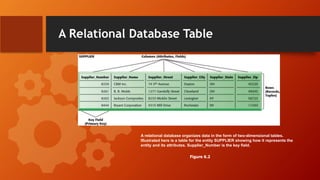
A Relational Database Table
A relational database organizes data in the form of two-dimensional tables.
Illustrated here is a table for the entity SUPPLIER showing how it represents the
entity and its attributes. Supplier_Number is the key field.
Figure 6.2
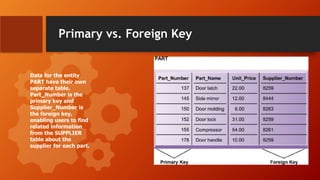
Primary vs. Foreign Key
Data for the entity
PART have their own
separate table.
Part_Number is the
primary key and
Supplier_Number is
the foreign key,
enabling users to find
related information
from the SUPPLIER
table about the
supplier for each part.
Database Approach to Data Management
• Entity-relationship diagram (ERD)
• Diagramming tool used to express entity relationships
• Very useful in developing complex databases
• Associations
• Define the relationships one entity has to another
• Determine necessary key structures to access data
• Come in three relationship types:
• One-to-One
• One-to-Many
• Many-to-Many
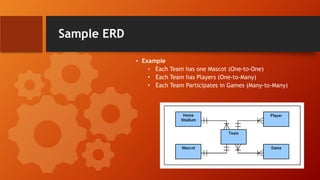
Sample ERD
• Example
• Each Team has one Mascot (One-to-One)
• Each Team has Players (One-to-Many)
• Each Team Participates in Games (Many-to-Many)
Database Approach to Data Management
• Normalization
• A technique to make complex databases more efficient by eliminating as much
redundant data as possible
• Referential Integrity
• Used by relational databases to ensure that relationships between coupled tables
remain consistent.
• For example: when one table has a foreign key that points to another table, you
may not add a record to the table with foreign key unless there is a corresponding
record in the linked table.
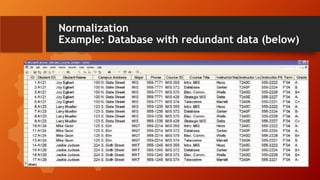
Normalization
Example: Database with redundant data (below)
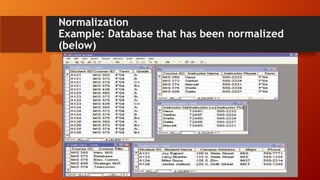
Normalization
Example: Database that has been normalized
(below)
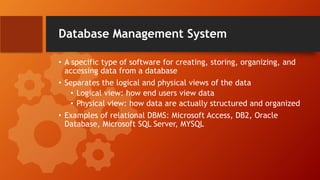
Database Management System
• A specific type of software for creating, storing, organizing, and
accessing data from a database
• Separates the logical and physical views of the data
• Logical view: how end users view data
• Physical view: how data are actually structured and organized
• Examples of relational DBMS: Microsoft Access, DB2, Oracle
Database, Microsoft SQL Server, MYSQL
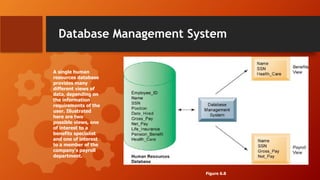
Database Management System
A single human
resources database
provides many
different views of
data, depending on
the information
requirements of the
user. Illustrated
here are two
possible views, one
of interest to a
benefits specialist
and one of interest
to a member of the
company’s payroll
department.
Figure 6.8
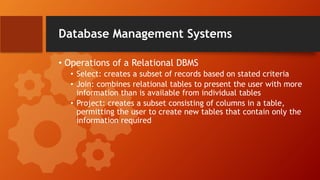
Database Management Systems
• Operations of a Relational DBMS
• Select: creates a subset of records based on stated criteria
• Join: combines relational tables to present the user with more
information than is available from individual tables
• Project: creates a subset consisting of columns in a table,
permitting the user to create new tables that contain only the
information required
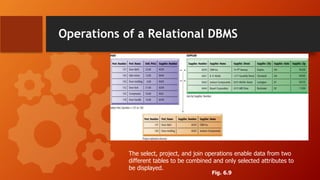
Operations of a Relational DBMS
The select, project, and join operations enable data from two
different tables to be combined and only selected attributes to
be displayed.
Fig. 6.9
Database Management Systems
• Capabilities of a DBMS
• Data Definition: information about the structure of the content of the
database
• data elements (entities) and their characteristics (fields, etc.)
• ownership (who maintains db)
• authorization (who can access db)
• Data Dictionary: an automated or manual file that stores data definitions.
Database Management Systems
• Querying a database
• A query is a request for information from a database given certain selection
parameters.
• Data Manipulation Language
• A specialized language that is used to add, change, delete, and retrieve
data in the database.
• Structured Query Language (SQL) is the most prominent data
manipulation language used today. It is the industry standard language
for relational databases.
Database Management Systems
• Non-relational DBMS
• A more flexible data model used as an alternative to the traditional
relational model of organizing data
• Used for data that is not easily organized into rows and columns
(e.g., social media, graphics, emails)
• Useful for querying large volumes of data (i.e., big data) that may be
distributed across many machines
Big Data
• A term used to describe datasets with volumes so huge that they are beyond
the ability of typical DBMS to capture, store, and analyze.
• Characterized by the “3Vs” – volume of data, variety of data, and the
velocity at which the data must be processed
• Big data sets provide more patterns and insights than smaller datasets
• Requires new technologies and tools
Business Intelligence
• Applications and technologies to help users obtain useful information from all
different types of data in order to make better business decisions. Consists of:
Tools for capturing and organizing data:
• Data warehouses
• Data marts
• Hadoop
• In-memory computing
• Analytical platforms
Tools for analyzing data
• OLAP
• Data mining
• Text mining and web mining
Tools for Capturing &
Organizing Data
• Data Warehouse
• A database that stores current and historical data that may be of interest to
decision makers
• Integrates multiple large databases and other information sources into a
single repository
• Data Mart
• Subsets of data warehouses that are highly focused (customized) and
isolated for a specific population of users
Tools for Capturing &
Organizing Data
• Hadoop
• Open-source software framework from Apache
• Designed for big data
• Breaks data task into sub-problems and distributes the processing to many
inexpensive computer processing nodes
• Combines result into smaller data set that is easier to analyze
• Key services
• Hadoop Distributed File System (HDFS)
• MapReduce
Tools for Capturing &
Organizing Data
• In-Memory Computing
• Relies on computer’s main memory (RAM) for data storage
• Eliminates bottlenecks in retrieving and reading data from hard-disk based
databases
• Dramatically shortens query response times
• Enabled by
• High-speed processors
• Multicore processing
• Falling computer memory prices
Tools for Capturing &
Organizing Data
• Analytic Platforms
• Preconfigured hardware-software systems
• Designed for query processing and analytics
• Can use both relational and non-relational technology to analyze large data
sets
• Include in-memory systems, NoSQL DBMS
• Example: IBM PureData Systems for Analytics
• Integrated database, server, storage components
Tools for Analyzing Data
• Online Analytical Processing (OLAP)
• Supports multidimensional data analysis, enabling users to view
the same data in different ways using multiple dimensions
(e.g., product, pricing, cost, region, time period).
• Each aspect of information—product, pricing, cost, region, or time period—represents a
different dimension
• E.g., how many bolts did we sell in each sales region in the month of June and how does
it compare with projected sales
• Need to have a good idea about what information you are
looking for
Tools for Analyzing Data
• Data Mining
• Provides insights into corporate data by finding hidden patterns
and relationships in large databases and inferring rules from
them to predict future behavior
• Patterns and rules are used to guide decision making and
forecast the effect of those decisions
• Popular use of data mining is to provide detailed analyses of
patterns in customer data for one-to-one marketing campaigns
or for identifying profitable customers
Tools for Analyzing Data
• Text Mining (aka: Text Analytics)
• Unstructured data (mostly text files) that accounts for more than
80% of an organization’s useful information.
• Text mining allows businesses to extract key elements from, discover
patterns in, and summarize large unstructured data sets.
• Web Mining
• Discovery and analysis of useful patterns and information from the
Web
• Includes content mining, structure mining, and usage mining
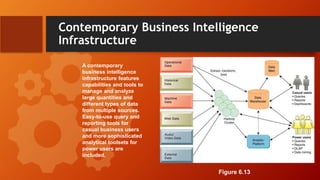
Contemporary Business Intelligence
Infrastructure
A contemporary
business intelligence
infrastructure features
capabilities and tools to
manage and analyze
large quantities and
different types of data
from multiple sources.
Easy-to-use query and
reporting tools for
casual business users
and more sophisticated
analytical toolsets for
power users are
included.
Figure 6.13
Managing Data Resources
• Need to have policies and procedures in place to ensure that
data is accurate, reliable, and available. This includes:
• Establishing an Information Policy
• Identifies which users and organizational units can share information, where
information can be distributed, and who is responsible for updating and
maintaining information
• Ensuring Data Quality
• Data quality problems can be caused by redundant and inconsistent data
produced by multiple systems
• Data input errors are the cause of many data quality problems
Managing Data Resources
• How to Ensure Data Quality
• Data Quality Audit
• A structured survey of the accuracy and level of completeness of the
data in a database
• Can survey entire data files, samples from data files, or perceptions of
end users
• Data Cleansing (AKA: Data Scrubbing)
• Activities for detecting and correcting data in a database that are
incorrect, incomplete, improperly formatted, or redundant.
• Can use specialized data-cleansing software to perform data cleansing
activities
ERD Exercise – Open on Blackboard
• The project manager at ABC Consulting would like a database so that he can
keep track of employees, their skills, which project(s) they are working on and
the client associated with each project. Here is the information he has
provided you regarding the relationships between these entities:
• An employee has many different skills, and there may be multiple employees
with the same skill. An employee may work on more than one project at a
time, and a project may have more than one employee working on it. A project
belongs to only one client; however, a client may have multiple projects being
worked on at any given time.
• Create an entity-relationship diagram illustrating the associations between
these entities.
1st Exam Review
Homework
•Study for 1st Exam
• L&L Chapters 1, 2, 3, 5, and 6
•Have MyITLab Access Code purchased for
next class [will intro Access Lab before
Exam]

RowanDay4.pptx

  • 1.
  • 2.
    Today’s Agenda • Reviewimportant concepts from L&L Chapters 3 & 5 • L&L Chapter 6 • ERD Exercise [In-Class Assignment #4] • 1st Exam [L&L Chapters 1,2,3,5,and 6] Review
  • 3.
    Database Approach toData Management • Database • A collection of related files (entities) containing records on people, places, or things • Entity • A person, place, thing, or event about which information must be kept. • Has relationships to other entities (i.e. the entity Student has a relationship to the entity Grades in a University Student database ) • Also called a table or file • Attribute • Pieces of information describing a particular entity (i.e. Student ID, Name, etc. for the entity Student) • Also called a field or column
  • 4.
    Database Approach toData Management • Relational Database • Organizes data into two-dimensional tables with rows and columns. • A column is also called an attribute or field. A row is a group of attributes that describe a single instance of an entity. A row is also called a record or tuple. • Can relate data stored in one table to data stored in another as long as the two tables share a common data element (attribute).
  • 5.
    Database Approach toData Management • Primary Key • A unique attribute type used to identify a single instance (row) of an entity. • Allows each record to be retrieved, updated, or sorted. • Foreign Key • An attribute that appears as a primary key in one entity (table) and as a non-primary key attribute in another entity (table). Used to link two tables together.
  • 6.
    A Relational DatabaseTable A relational database organizes data in the form of two-dimensional tables. Illustrated here is a table for the entity SUPPLIER showing how it represents the entity and its attributes. Supplier_Number is the key field. Figure 6.2
  • 7.
    Primary vs. ForeignKey Data for the entity PART have their own separate table. Part_Number is the primary key and Supplier_Number is the foreign key, enabling users to find related information from the SUPPLIER table about the supplier for each part.
  • 8.
    Database Approach toData Management • Entity-relationship diagram (ERD) • Diagramming tool used to express entity relationships • Very useful in developing complex databases • Associations • Define the relationships one entity has to another • Determine necessary key structures to access data • Come in three relationship types: • One-to-One • One-to-Many • Many-to-Many
  • 9.
    Sample ERD • Example •Each Team has one Mascot (One-to-One) • Each Team has Players (One-to-Many) • Each Team Participates in Games (Many-to-Many)
  • 10.
    Database Approach toData Management • Normalization • A technique to make complex databases more efficient by eliminating as much redundant data as possible • Referential Integrity • Used by relational databases to ensure that relationships between coupled tables remain consistent. • For example: when one table has a foreign key that points to another table, you may not add a record to the table with foreign key unless there is a corresponding record in the linked table.
  • 11.
  • 12.
    Normalization Example: Database thathas been normalized (below)
  • 13.
    Database Management System •A specific type of software for creating, storing, organizing, and accessing data from a database • Separates the logical and physical views of the data • Logical view: how end users view data • Physical view: how data are actually structured and organized • Examples of relational DBMS: Microsoft Access, DB2, Oracle Database, Microsoft SQL Server, MYSQL
  • 14.
    Database Management System Asingle human resources database provides many different views of data, depending on the information requirements of the user. Illustrated here are two possible views, one of interest to a benefits specialist and one of interest to a member of the company’s payroll department. Figure 6.8
  • 15.
    Database Management Systems •Operations of a Relational DBMS • Select: creates a subset of records based on stated criteria • Join: combines relational tables to present the user with more information than is available from individual tables • Project: creates a subset consisting of columns in a table, permitting the user to create new tables that contain only the information required
  • 16.
    Operations of aRelational DBMS The select, project, and join operations enable data from two different tables to be combined and only selected attributes to be displayed. Fig. 6.9
  • 17.
    Database Management Systems •Capabilities of a DBMS • Data Definition: information about the structure of the content of the database • data elements (entities) and their characteristics (fields, etc.) • ownership (who maintains db) • authorization (who can access db) • Data Dictionary: an automated or manual file that stores data definitions.
  • 18.
    Database Management Systems •Querying a database • A query is a request for information from a database given certain selection parameters. • Data Manipulation Language • A specialized language that is used to add, change, delete, and retrieve data in the database. • Structured Query Language (SQL) is the most prominent data manipulation language used today. It is the industry standard language for relational databases.
  • 19.
    Database Management Systems •Non-relational DBMS • A more flexible data model used as an alternative to the traditional relational model of organizing data • Used for data that is not easily organized into rows and columns (e.g., social media, graphics, emails) • Useful for querying large volumes of data (i.e., big data) that may be distributed across many machines
  • 20.
    Big Data • Aterm used to describe datasets with volumes so huge that they are beyond the ability of typical DBMS to capture, store, and analyze. • Characterized by the “3Vs” – volume of data, variety of data, and the velocity at which the data must be processed • Big data sets provide more patterns and insights than smaller datasets • Requires new technologies and tools
  • 21.
    Business Intelligence • Applicationsand technologies to help users obtain useful information from all different types of data in order to make better business decisions. Consists of: Tools for capturing and organizing data: • Data warehouses • Data marts • Hadoop • In-memory computing • Analytical platforms Tools for analyzing data • OLAP • Data mining • Text mining and web mining
  • 22.
    Tools for Capturing& Organizing Data • Data Warehouse • A database that stores current and historical data that may be of interest to decision makers • Integrates multiple large databases and other information sources into a single repository • Data Mart • Subsets of data warehouses that are highly focused (customized) and isolated for a specific population of users
  • 23.
    Tools for Capturing& Organizing Data • Hadoop • Open-source software framework from Apache • Designed for big data • Breaks data task into sub-problems and distributes the processing to many inexpensive computer processing nodes • Combines result into smaller data set that is easier to analyze • Key services • Hadoop Distributed File System (HDFS) • MapReduce
  • 24.
    Tools for Capturing& Organizing Data • In-Memory Computing • Relies on computer’s main memory (RAM) for data storage • Eliminates bottlenecks in retrieving and reading data from hard-disk based databases • Dramatically shortens query response times • Enabled by • High-speed processors • Multicore processing • Falling computer memory prices
  • 25.
    Tools for Capturing& Organizing Data • Analytic Platforms • Preconfigured hardware-software systems • Designed for query processing and analytics • Can use both relational and non-relational technology to analyze large data sets • Include in-memory systems, NoSQL DBMS • Example: IBM PureData Systems for Analytics • Integrated database, server, storage components
  • 26.
    Tools for AnalyzingData • Online Analytical Processing (OLAP) • Supports multidimensional data analysis, enabling users to view the same data in different ways using multiple dimensions (e.g., product, pricing, cost, region, time period). • Each aspect of information—product, pricing, cost, region, or time period—represents a different dimension • E.g., how many bolts did we sell in each sales region in the month of June and how does it compare with projected sales • Need to have a good idea about what information you are looking for
  • 27.
    Tools for AnalyzingData • Data Mining • Provides insights into corporate data by finding hidden patterns and relationships in large databases and inferring rules from them to predict future behavior • Patterns and rules are used to guide decision making and forecast the effect of those decisions • Popular use of data mining is to provide detailed analyses of patterns in customer data for one-to-one marketing campaigns or for identifying profitable customers
  • 28.
    Tools for AnalyzingData • Text Mining (aka: Text Analytics) • Unstructured data (mostly text files) that accounts for more than 80% of an organization’s useful information. • Text mining allows businesses to extract key elements from, discover patterns in, and summarize large unstructured data sets. • Web Mining • Discovery and analysis of useful patterns and information from the Web • Includes content mining, structure mining, and usage mining
  • 29.
    Contemporary Business Intelligence Infrastructure Acontemporary business intelligence infrastructure features capabilities and tools to manage and analyze large quantities and different types of data from multiple sources. Easy-to-use query and reporting tools for casual business users and more sophisticated analytical toolsets for power users are included. Figure 6.13
  • 30.
    Managing Data Resources •Need to have policies and procedures in place to ensure that data is accurate, reliable, and available. This includes: • Establishing an Information Policy • Identifies which users and organizational units can share information, where information can be distributed, and who is responsible for updating and maintaining information • Ensuring Data Quality • Data quality problems can be caused by redundant and inconsistent data produced by multiple systems • Data input errors are the cause of many data quality problems
  • 31.
    Managing Data Resources •How to Ensure Data Quality • Data Quality Audit • A structured survey of the accuracy and level of completeness of the data in a database • Can survey entire data files, samples from data files, or perceptions of end users • Data Cleansing (AKA: Data Scrubbing) • Activities for detecting and correcting data in a database that are incorrect, incomplete, improperly formatted, or redundant. • Can use specialized data-cleansing software to perform data cleansing activities
  • 32.
    ERD Exercise –Open on Blackboard • The project manager at ABC Consulting would like a database so that he can keep track of employees, their skills, which project(s) they are working on and the client associated with each project. Here is the information he has provided you regarding the relationships between these entities: • An employee has many different skills, and there may be multiple employees with the same skill. An employee may work on more than one project at a time, and a project may have more than one employee working on it. A project belongs to only one client; however, a client may have multiple projects being worked on at any given time. • Create an entity-relationship diagram illustrating the associations between these entities.
  • 33.
  • 34.
    Homework •Study for 1stExam • L&L Chapters 1, 2, 3, 5, and 6 •Have MyITLab Access Code purchased for next class [will intro Access Lab before Exam]

Editor's Notes

  • #3 Notes to presenter: What is your purpose for sharing this reflection? Is it at the end of a unit or project? Are you sharing this reflection, at the attainment of a learning goal you set for yourself? Is it at the end of a course? State your purpose for the reflection or even the purpose of the learning experience or learning goal. Be clear and be specific in stating your purpose.